

Cara Membangun Aplikasi Web untuk Permintaan Akses Data & Privasi
Pelajari cara merancang dan membangun aplikasi web untuk menerima, memverifikasi, memenuhi, dan melacak permintaan akses data dengan log audit, redaksi, ekspor, dan pelaporan siap kepatuhan.
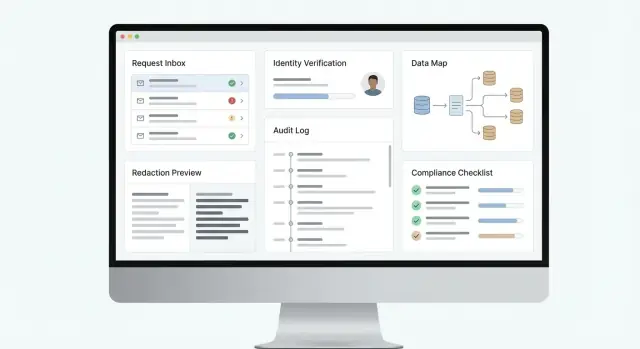
What the App Must Handle (and Why)
A data access request—often called a DSAR (Data Subject Access Request) or SAR (Subject Access Request)—is when an individual asks your organization what personal data you have about them, how you use it, and to receive a copy. If your business collects customer, user, employee, or prospect data, you should assume these requests will happen.
Handling them well is not just about avoiding fines. It’s about trust: a clear, consistent response shows you understand your data and respect people’s rights.
Regulations and request types you need to support
Most teams design around GDPR and CCPA/CPRA first, but the app should be flexible enough to handle multiple jurisdictions and internal policies.
Common request types include:
- Access: provide a copy of the data and required context (sources, purposes, recipients, retention where applicable).
- Delete: erase data where you’re allowed to, and document exceptions (e.g., fraud prevention, legal obligations).
- Correct: fix inaccurate personal information across systems.
- Portability: deliver data in a reusable format for transfer.
Even within “access,” the scope can vary: a customer may ask for “everything you have,” or for data tied to a specific account, timeframe, or product.
Who will touch the workflow
A DSAR app sits at the intersection of multiple stakeholders:
- Privacy/legal defines policy, approvals, and response content.
- Support receives requests and communicates with the requester.
- Security ensures identity checks, logging, and safe delivery.
- Engineering/IT maintains connectors, data sources, and reliability.
What “done well” looks like
A strong DSAR web app makes every request timely, traceable, and consistent. That means clear intake, reliable identity verification, predictable data collection across systems, documented decisions (including denials or partial fulfillment), and an auditable record of who did what and when.
The goal is a repeatable process you can defend—internally and to regulators—without turning each request into a fire drill.
Define Your Core Requirements and Success Metrics
Before you design screens or pick tools, get clear on what “done” means for your organization. A data access request web app succeeds when it reliably moves every request from intake to delivery, meets legal timelines (GDPR, CCPA processes, etc.), and leaves a defensible trail.
Start with the minimum end-to-end workflow
Document the core DSAR workflow your app must support from day one:
- Request intake and tracking from start to finish: capture request type (access, deletion, correction, portability), jurisdiction, due date rules, and status changes from “received” to “fulfilled/denied.”
- Identity verification and authorization checks: confirm the requester is who they claim to be, and validate they have the right to act (e.g., parent/guardian, authorized agent).
- Data discovery across systems and structured response packaging: find personal data in priority systems, reconcile duplicates, and produce an export that’s readable and consistent.
- Auditability: who did what, when, and why: record every action (verification results, searches run, approvals, redactions, communications) so you can justify decisions.
Keep it practical: define which request channels you’ll accept (web form only vs. email/manual entry), which languages/locales matter, and what “edge cases” you’ll handle early (shared accounts, former employees, minors).
Define measurable success metrics (so you can improve)
Turn requirements into KPIs your team can track weekly:
- Time to acknowledge (e.g., median time from submission to confirmation)
- Time to complete and SLA compliance rate (percent closed within statutory deadlines)
- Verification outcomes (pass rate, average time to verify, percent requiring manual review)
- Automation coverage (percent of requests where key systems were searched via connectors vs. manual work)
- Quality metrics (reopen rate due to missing data, redaction error rate, customer satisfaction on closure)
- Audit completeness (percent of cases with required evidence attached and approvals logged)
Clarify scope and ownership
Write down who owns each step: privacy team, support, security, legal. Define roles and permissions at a high level now—you’ll translate that into access controls and audit logs later.
If you’re standardizing how you report progress to stakeholders, decide what the “single source of truth” is (the app) and what must be exported to internal reporting tools.
Choose an Architecture That Scales with Compliance Needs
A data access request web app is more than a form and an export button. Your architecture has to support strict timelines, evidence for auditors, and frequent policy changes—without turning every request into a custom project.
Separate experiences: requester, privacy team, and systems
Most teams end up with three “faces” of the product:
- User portal (requester): submit a request, upload documents if needed, track status, and receive the final package.
- Admin portal (privacy team): triage, validate identity, search, review/redact, approve, and publish responses.
- Internal APIs: let systems (CRM, support desk, data warehouse) exchange status updates and evidence automatically.
Keeping these separate (even if they share a codebase) makes permissions, auditing, and future changes far easier.
Core services that stay stable as you add connectors
A scalable DSAR workflow usually breaks into a few key services:
- Ingestion: captures requests from web forms, email, or tickets.
- Identity: verification, authority checks (e.g., agent requests), and risk-based escalation.
- Connectors: pull data from internal systems and processors.
- Fulfillment: collects results, runs matching, and builds the response bundle.
- Notifications: deadline reminders, requester updates, and internal SLAs.
Pick data stores that match compliance realities
Use:
- An operational database for request state and tasks.
- Object storage for generated exports and attachments (with strict access controls and expiry).
- An immutable audit log (append-only) for who did what, when, and why.
Single app vs modular services
Start with a single deployable app if your volume is low and your team is small—fewer moving parts, faster iteration. Move toward modular services when connector count, traffic, or audit requirements grow, so you can update integrations without risking the admin workflow.
Where Koder.ai can help (without changing the compliance requirements)
If you’re building this in-house, tools like Koder.ai can speed up the initial implementation by generating a working React-based admin portal and a Go + PostgreSQL backend from a structured conversation.
Two platform features are particularly relevant to compliance-heavy workflows:
- Planning mode to map roles, case states, and evidence requirements before generating screens and APIs.
- Snapshots and rollback so connector changes and policy tweaks can be reverted quickly if they affect fulfillment accuracy.
You still need privacy/legal sign-off and security review, but accelerating the “first usable end-to-end flow” helps teams validate requirements early.
Design the Intake Flow and Case Lifecycle
The intake experience is where most DSAR and privacy cases succeed or fail. If people can’t submit a request easily—or if your team can’t triage it quickly—you’ll miss deadlines, over-collect data, or lose track of what was promised.
Offer three intake channels (that end in one queue)
A practical web app supports multiple entry points, but normalizes everything into a single case record:
- Public request form for anyone who doesn’t have an account.
- Authenticated portal for logged-in customers, where you can prefill known details and let them track status.
- Email-to-ticket ingestion so requests sent to privacy@… or support@… become cases automatically (with attachments preserved).
The key is consistency: whichever channel is used, the result should be the same case fields, the same timers, and the same audit trail.
Collect only what you need (and nothing extra)
Your intake form should be short and purpose-driven:
- Identity information (just enough to verify later): name, contact method, and any account identifiers you already use.
- Request scope: access, deletion, correction, portability, “do not sell/share,” etc., plus optional free-text details.
- Jurisdiction and deadlines: country/state selection (or inferred from address) so the app can apply the right statutory clock.
Avoid asking for sensitive details “just in case.” If you need more information, request it later as part of the verification step.
Define a simple case lifecycle your team can follow
Make case states explicit and visible to both staff and requesters:
received → verifying → in progress → ready → delivered → closed
Each transition should have clear rules: who can move it, what evidence is required (e.g., verification complete), and what gets logged.
Automate SLAs, reminders, and escalation
From the moment a case is created, start SLA timers tied to the applicable regulation. Send reminders as deadlines approach, pause clocks when policy allows (for example, when awaiting clarification), and add escalation rules (e.g., alert a manager if the case sits in “verifying” for 5 days).
Done well, intake and lifecycle design turns compliance from an inbox problem into a predictable workflow.
Implement Identity Verification and Authority Checks
Identity verification is where privacy compliance becomes real: you’re about to disclose personal data, so you must be confident the requester is the data subject (or legally allowed to act for them). Build this into your workflow as a first-class step, not an afterthought.
Pick verification methods that match your user base
Offer multiple options so legitimate users aren’t blocked, while still keeping the process defensible:
- Email magic link (good baseline for low-risk requests)
- SMS one-time code (useful when you have a verified number)
- Account login (strong when the user already has an authenticated profile)
- Document check (ID scan + selfie or manual review, used sparingly)
Make the UI clear about what will happen next and why. If you can, pre-fill known data for logged-in users, and avoid asking for extra information you don’t need.
Support representatives, agents, and minors
Your app should handle cases where the requester isn’t the data subject:
- Authorized agents/representatives: collect an authorization letter or power of attorney, and verify both identities (agent and data subject).
- Parents/guardians for minors: request proof of guardianship where required, and ensure responses go to the right party.
Model this explicitly in your data schema (e.g., “requester” vs “data subject”), and log how authority was established.
Use risk-based verification (and explain it)
Not every request carries the same risk. Set rules that automatically raise the verification bar when:
- The request involves sensitive data (health, financial, precise location)
- The response will include documents or free-text notes
- The request is made from a new device, unusual region, or suspicious email domain
When you escalate verification, show a short, plain-language reason so it doesn’t feel arbitrary.
Store verification evidence securely—then delete it on schedule
Verification artifacts (IDs, authorization documents, audit events) should be encrypted, access-controlled, and visible only to a limited role. Store only what you need, keep a clear retention limit, and automate deletion.
Treat verification evidence as sensitive data of its own, with entries reflected in your audit trail for later proof of compliance.
Map Your Data and Build System Connectors
A data access request app is only as good as its visibility into where personal data actually lives. Before you write a single connector, build a practical system inventory that you can maintain over time.
Create a living system inventory
Start with the systems most likely to contain user-identifiable information:
- Core databases (production, analytics, data warehouse)
- SaaS tools (CRM, email marketing, billing, product analytics)
- Support systems (ticketing, chat transcripts, call recordings)
- Logs and event streams (application logs, CDN/WAF logs, auth logs)
For each system, record: owner, purpose, data categories stored, identifiers available (email, user ID, device ID), how to access (API/SQL/export), and any constraints (rate limits, retention, vendor turnaround time). This inventory becomes your “source of truth” when requests arrive.
Build connectors that match the source
Connectors don’t need to be fancy; they need to be reliable:
- API pulls for SaaS tools (incremental sync when possible)
- Database queries for first-party systems (parameterized queries keyed by known identifiers)
- Vendor exports for tools without APIs (document format, cadence, and who triggers them)
Keep connectors isolated from the rest of the app so you can update them without breaking the workflow.
Normalize data for review
Different systems describe the same person in different ways. Normalize retrieved records into a consistent schema so reviewers aren’t comparing apples to oranges. A simple, workable model is:
person_identifier(what you matched on)data_category(profile, communications, transactions, telemetry)field_nameandfield_valuerecord_timestamp
Track provenance for every field
Provenance is what makes results defensible. Store metadata alongside each value:
- Source system and object/table
- Retrieval time and original timestamp
- Match method (exact, fuzzy) and confidence score
When someone asks “Where did this come from?”, you’ll have a precise answer—and a clear path to correct or delete it when required.
Build the Data Retrieval and Matching Engine
This is the “find everything about this person” part of your app—and the part most likely to create privacy risk if it’s sloppy. A good retrieval and matching engine is deliberate: it searches widely enough to be complete, but narrowly enough to avoid pulling unrelated data.
Start with a clear search strategy
Design your engine around the identifiers you can reliably collect during intake. Common starting points include email, phone number, customer ID, order number, and mailing address.
Then expand to identifiers that often live in product and analytics systems:
- Linked accounts (parent/child accounts, household profiles, workplace admins)
- Device IDs and advertising identifiers (when applicable and legally supportable)
- Session IDs and cookie identifiers (typically lower confidence)
For systems that don’t share a stable key, add fuzzy matching (e.g., normalized names + address) and treat the results as “candidates” that require review.
Minimize over-collection by default
Avoid the temptation to “export the whole user table.” Build connectors that can query by identifier and return only relevant fields when possible—especially for logs and event streams. Fetching less reduces review time and lowers the chance you disclose someone else’s data.
A practical pattern is a two-step flow: (1) run lightweight “does this identifier exist?” checks, then (2) pull full records only for confirmed matches.
Enforce multi-tenant isolation
If your app serves multiple brands, regions, or business units, every query must carry a tenant scope. Apply tenant filters in the connector layer (not just in the UI), and validate them in tests to prevent cross-tenant leakage.
Handle messy real-world edge cases
Plan for duplicates and ambiguity:
- Duplicate profiles across systems and time
- Shared emails (family inboxes, role-based addresses like billing@)
- Merged accounts and historical identifiers
Store match confidence, evidence (which identifier matched), and timestamps so reviewers can explain—and defend—why records were included or excluded.
Add Review, Redaction, and Response Packaging
Once your retrieval engine assembles the relevant records, you still shouldn’t send them straight to the requester. Most organizations need a human review step to prevent accidental disclosure of third-party personal data, confidential business information, or content restricted by law or contract.
Build a review queue that people can actually use
Create a structured “case review” workspace that lets reviewers:
- See the compiled dataset grouped by source system (CRM, support, billing, product logs)
- Filter by data category (identifiers, communications, transactions, device data)
- Open the underlying evidence (record IDs, timestamps, system of origin)
- Add internal notes and request re-fetching if something looks incomplete
This is also where you standardize decisions. A small set of decision types (include, redact, withhold, needs legal review) keeps responses consistent and easier to audit.
Redaction and withholding: treat them as first-class features
Your app should support both removing sensitive parts of a record and excluding whole records when disclosure isn’t permitted.
Redaction should cover:
- Third-party data (names, email addresses, phone numbers in message threads)
- Confidential business info (internal tooling details, security-sensitive identifiers)
- “Free text” fields where sensitive content often hides (notes, transcripts, attachments)
Exclusions should be possible when data can’t be disclosed, with documented reasons (for example: legally privileged material, trade secrets, or content that would adversely affect others).
Don’t just hide the data—capture the rationale in a structured way so you can defend the decision later.
Package deliverables for both humans and machines
Most DSAR workflows work best when you generate two deliverables:
- A human-readable report (HTML/PDF) summarizing what you found and what you withheld or redacted
- A machine-readable export (JSON/CSV) containing the disclosed data in a predictable schema
Include helpful metadata throughout: sources, relevant dates, explanations of redactions/exclusions, and clear next steps (how to ask questions, how to appeal, how to correct data). This turns the response from a data dump into an understandable outcome.
If you want a consistent feel across cases, use a response template and keep it versioned so you can show which template was used at the time of fulfillment. Pair this with your audit logs so every change to the package is traceable.
Security Controls, Permissions, and Audit Logs
Security isn’t a feature you “add later” in a data access request web app—it’s the foundation that keeps sensitive personal data from leaking while proving you handled each request correctly. The goal is simple: only the right people can see the right data, every action is traceable, and exported files can’t be abused.
Role-based permissions (RBAC)
Start with clear, role-based access control so responsibilities don’t blur. Typical roles include:
- Privacy admin: configures policies, connectors, templates, and escalations.
- Reviewer: inspects retrieved records, flags edge cases, suggests redactions.
- Approver: final sign-off before any data is released.
- Auditor: read-only access to case history, evidence, and reports.
Keep permissions granular. For example, a reviewer might access retrieved data but not change deadlines, while an approver can release a response but cannot edit connector credentials.
Immutable audit trail (prove what happened)
Your DSAR workflow should generate an append-only audit log covering:
- Who viewed, changed, exported, or deleted anything
- What records were accessed (at least identifiers and source system)
- When actions happened (timestamps with timezone)
- Why actions happened (case notes, decision codes)
Make audit entries hard to tamper with: restrict write access to the application service, prevent edits, and consider write-once storage or hashing/signing log batches.
Audit logs are also where you defend decisions like partial disclosure or denial.
Encryption, keys, and secrets handling
Encrypt in transit (TLS) and at rest (databases, object storage, backups). Store secrets (API tokens, database credentials) in a dedicated secret manager—not in code, config files, or support tickets.
For exports, use short-lived, signed download links and encrypted files where appropriate. Limit who can generate exports and set automatic expiration.
Abuse prevention and safe downloads
Privacy apps attract scraping and social engineering attempts. Add:
- Rate limits and request throttling on portals and download endpoints
- Anomaly detection (sudden spikes in cases, repeated failed verification, unusual admin activity)
- Secure downloads (virus scanning, watermarking, and “view-only” options for internal review)
These controls reduce risk while keeping the system usable for real customers and internal teams.
Notifications, Deadlines, and Customer Communication
A DSAR workflow succeeds or fails on two things customers notice immediately: whether you respond on time, and whether your updates feel clear and trustworthy. Treat communication as a first-class feature—not a few emails bolted on at the end.
Template-based messages that stay consistent
Start with a small set of approved templates your team can reuse and localize. Keep them short, specific, and free of legal overload.
Common templates to build in:
- “Verification required”: what you need, how to provide it, and what happens next
- “Extension notice”: the reason, the new due date, and what work is in progress
- “Completion”: what was provided, how to access it securely, and how to ask follow-up questions
Add variables (request ID, dates, portal link, delivery method) so the app can fill details automatically, while preserving wording that your legal/privacy team approved.
Deadline tracking by jurisdiction and request type
Deadlines can vary by law (e.g., GDPR vs. CCPA/CPRA), request type (access, deletion, correction), and whether identity verification is still pending. Your app should calculate and display:
- the current due date and the reason it’s set (rule + state)
- pause conditions (for example, waiting for verification) and how they affect timers
- extension eligibility and a “send extension notice” action that stamps the audit trail
Make deadlines visible everywhere: case list, case detail, and staff reminders.
Integrations: email, ticketing, and messaging
Not every organization wants another inbox. Provide webhook and email integrations so updates can flow to existing tools (e.g., a helpdesk ticketing system or internal chat).
Use event-driven hooks such as case.created, verification.requested, deadline.updated, and response.delivered.
Customer portal updates and secure delivery links
A simple portal reduces back-and-forth: customers can see status (“received,” “verifying,” “in progress,” “ready”), upload documents, and retrieve results.
When delivering data, avoid attachments. Provide time-limited, authenticated download links and clear guidance on how long the link remains active and what to do if it expires.
Retention, Reporting, and Policy Alignment
Retention and reporting are where a DSAR tool stops being “a workflow app” and starts acting like a compliance system. The goal is simple: keep what you must, delete what you don’t need, and prove it with evidence.
Set clear retention rules (per artifact)
Define retention by object type, not just by “case closed.” A typical policy separates:
- Case record (request details, deadlines, actions taken)
- Identity verification evidence (documents, liveness checks, verification tokens)
- Exports and response packages (ZIP/PDF/JSON files you deliver)
- Audit logs (immutable event history)
Keep retention periods configurable by jurisdiction and request type. For example, you may retain audit logs longer than identity evidence, and you may delete exports quickly after delivery while keeping a hash and metadata to prove what was sent.
Legal holds and exceptions (pause or limit processing)
Add an explicit legal hold status that can pause deletion timers and restrict what staff can do next. This should support:
- A reason code (litigation, investigation, contractual dispute)
- Scope (entire case vs. specific data sources)
- Approval and review dates (so holds don’t become permanent by accident)
Also model exemptions and limitations (e.g., third-party data, privileged communications). Treat them as structured outcomes, not free-text notes, so they can be reported consistently.
Reporting that stands up to scrutiny
Regulators and internal auditors typically ask for trends, not anecdotes. Build reports that cover:
- Volumes by request type (access, deletion, correction)
- Response times vs. statutory deadlines
- Outcomes (fulfilled, partially fulfilled, denied)
- Exemptions used and how often
Export reports in common formats and keep report definitions versioned so numbers remain explainable.
Align with policies (and link them in-product)
Your app should reference the same rules your organization publishes. Link directly to internal resources like /privacy and /security from admin settings and case views, so operators can verify the “why” behind each retention choice.
Testing, Monitoring, and Ongoing Operations
A DSAR app isn’t “done” when the UI works. The riskiest failures happen at the edges: mismatched identities, connector timeouts, and exports that silently omit data. Plan for testing and operations as first-class features.
Test the cases that break trust
Build a repeatable test suite around real DSAR pitfalls:
- Wrong-person requests: Same name, shared email aliases, recycled phone numbers, or family accounts. Verify the system rejects or escalates when confidence is low.
- Partial matches: One system has “Liz,” another “Elizabeth,” one has old addresses. Confirm your matching logic shows evidence and supports manual review.
- Large accounts: High-volume transaction histories and long message threads. Ensure paging, timeouts, and export size limits are handled gracefully.
- Attachments: Uploaded IDs, authorizations, and supporting documents. Test malware scanning, file type restrictions, storage encryption, and how attachments appear in the audit trail.
Include “golden” fixtures for each connector (sample records + expected output), so schema changes are detected early.
Monitor what actually fails in production
Operational monitoring should cover both app health and compliance outcomes:
- Connector latency and error rates: Track per system. A single slow HR or CRM connector can stall the entire case.
- Queue backlog: If retrieval or redaction jobs pile up, deadlines will slip. Alert on age of oldest job, not just queue length.
- Failed exports and packaging: Monitor generation failures, corrupted archives, and missing sections.
- Download errors: Watch for expired links, permission issues, and repeated retries that indicate a broken delivery flow.
Pair metrics with structured logs so you can answer: “Which system failed, for which case, and what did the user see?”
Change management and a safe rollout
Expect churn: new tools get added, field names change, and vendors go down. Create a connector playbook (owner, auth method, rate limits, known PII fields) and a process for schema-change approvals.
A practical phased rollout plan:
- Pilot with one region and 2–3 core systems.
- Expand to remaining systems with shadow runs (generate responses internally before sending).
- Harden with load tests, escalation paths, and documented on-call ownership.
Continuous improvement checklist: review monthly failure reports, tune matching thresholds, update templates, re-train reviewers, and retire unused connectors to reduce risk.
If you’re iterating quickly, consider using an environment strategy that supports frequent, low-risk releases (for example, staged deployments plus the ability to revert). Platforms like Koder.ai support rapid iteration with deployment/hosting and source code export, which can be useful when privacy workflows change often and you need to keep implementation and auditability aligned.
Pertanyaan umum
What is a DSAR/SAR, and what should a DSAR web app do?
DSAR (sering disebut juga SAR) adalah permintaan dari individu untuk mengetahui data pribadi apa yang Anda miliki tentang mereka, bagaimana Anda menggunakan data tersebut, dan untuk menerima salinannya.
Sebuah aplikasi web DSAR membantu Anda menerima, memverifikasi, mencari, meninjau, dan mengirimkan respons secara konsisten dan tepat waktu—dengan jejak audit yang bisa Anda pertahankan.
Which request types should the app support from day one?
Rencanakan untuk mendukung setidaknya:
- Akses (salinan data + konteks yang diperlukan)
- Penghapusan (hapus jika diizinkan; dokumentasikan pengecualian)
- Koreksi (perbaiki data yang tidak akurat di berbagai sistem)
- Portabilitas (serahkan dalam format yang dapat digunakan kembali seperti JSON/CSV)
Bahkan permintaan “akses” bisa bersifat sempit (rentang waktu/produk tertentu) atau luas (“semua yang kalian miliki”).
What’s the minimum end-to-end DSAR workflow to implement first?
Alur kerja minimum yang praktis adalah:
- Intake ke satu catatan kasus (semua saluran)
- Verifikasi identitas + pemeriksaan kewenangan
- Penemuan data melalui sistem/konektor prioritas
- Peninjauan/redaksi + persetujuan
- Pengiriman aman + penutupan
- Jejak audit append-only sepanjang proses
Jika Anda tidak bisa menyelesaikan langkah-langkah ini end-to-end, Anda akan kesulitan memenuhi tenggat waktu secara andal.
What success metrics (KPIs) should we track for DSAR handling?
Gunakan KPI terukur yang mencerminkan kepatuhan dan kesehatan operasional, seperti:
- Median waktu untuk mengakui
- Waktu penyelesaian dan tingkat kepatuhan SLA
- Tingkat keberhasilan verifikasi dan tingkat pemeriksaan manual
- Cakupan otomatisasi konektor vs pekerjaan manual
- Tingkat pembukaan kembali (data hilang), tingkat kesalahan redaksi
- Kelengkapan audit (bukti/persetujuan yang dilampirkan)
Lacak secara mingguan supaya Anda benar-benar bisa memperbaiki proses.
How should we structure the app: requester portal vs. admin portal vs. APIs?
Kebanyakan tim memisahkan:
- Portal pemohon: ajukan, unggah dokumen, lacak status, unduh hasil
- Portal admin: triase, verifikasi, cari, tinjau/redaksi, setujui, publikasikan
- API internal/webhook: sinkronkan status dan bukti dengan CRM/helpdesk/warehouse
Memisahkan pengalaman ini memudahkan RBAC, audit, dan perubahan kebijakan di masa depan.
How should identity verification and authority checks work?
Tawarkan beberapa metode dan tingkatkan sesuai risiko:
- Magic link lewat email, SMS OTP, atau login akun untuk kasus berisiko rendah
- Pemeriksaan dokumen (dipakai hemat) untuk respons berisiko tinggi atau sensitif
- Dukungan perwakilan berwenang dan kasus anak dengan memodelkan pemohon vs. subjek data
Catat apa yang Anda periksa dan mengapa, simpan bukti secara aman, dan hapus sesuai jadwal yang ditentukan.
How do we map where personal data lives before building connectors?
Buat inventaris “hidup” dari sistem yang kemungkinan menyimpan data pribadi (DB produksi, warehouse, CRM, penagihan, transkrip dukungan, log).
Untuk setiap sistem, catat: pemilik, tujuan, pengenal yang tersedia, metode akses (API/SQL/ekspor), batas laju, dan batasan retensi. Inventaris ini menjadi sumber kebenaran operasional saat permintaan datang.
What makes a good connector design for DSAR data retrieval?
Prioritaskan reliabilitas dan query yang terfokus:
- Tarik API untuk tools SaaS
- Query SQL terparameter untuk database internal
- Ekspor vendor bila tidak ada API
Jaga konektor terisolasi, normalisasikan hasil ke skema konsisten, dan simpan provenance (sumber, timestamp, metode/kepastian pencocokan) sehingga hasil bisa dipertahankan.
How do we avoid over-collecting data or disclosing the wrong person’s data?
Gunakan strategi pencocokan yang disengaja:
- Mulai dari pengenal berkepercayaan tinggi (email, telepon, ID pelanggan, nomor pesanan)
- Tambah pengenal berkepercayaan lebih rendah (cookies/session ID) hati-hati
- Gunakan pencocokan fuzzy hanya sebagai kandidat yang memerlukan peninjauan
Untuk mencegah over-collection, jalankan cek “ada/tidak” ringan terlebih dulu, lalu tarik rekaman penuh hanya untuk kecocokan yang terkonfirmasi—dengan penerapan ruang lingkup tenant di lapisan konektor.
How should review, redaction, and response packaging work?
Perlakukan peninjauan sebagai wajib bagi banyak organisasi:
- Sediakan workspace reviewer yang terstruktur menurut sumber dan kategori data
- Dukung keputusan terstruktur (include, redact, withhold, needs legal)
- Tangkap alasan terdokumentasi untuk pengecualian (mis. data pihak ketiga, privileged)
Sediakan kedua hasil: laporan yang bisa dibaca manusia (HTML/PDF) dan ekspor mesin (JSON/CSV), gunakan tautan unduhan aman dengan batas waktu daripada lampiran email.