

27 ਮਾਰਚ 2025·8 ਮਿੰਟ
ਆਨਲਾਈਨ ਕੋਰਸ ਵੈਬ ਐਪ ਬਣਾਓ: ਪਾਠ, ਪ੍ਰਗਤੀ, ਸਰਟੀਫਿਕੇਟ
ਰੋਲਾਂ, ਪਾਠ, ਪ੍ਰਗਤੀ, ਸਰਟੀਫਿਕੇਟ ਅਤੇ ਐਡਮਿਨ ਪੈਨਲ ਨਾਲ ਇੱਕ ਆਨਲਾਈਨ ਕੋਰਸ ਵੈਬ ਐਪ ਯੋਜਨਾ ਅਤੇ ਬਣਾਓ—ਡੇਟਾ ਮਾਡਲ, UX, ਸੁਰੱਖਿਆ ਅਤੇ ਲਾਂਚ ਟਿਪਸ ਸਮੇਤ।
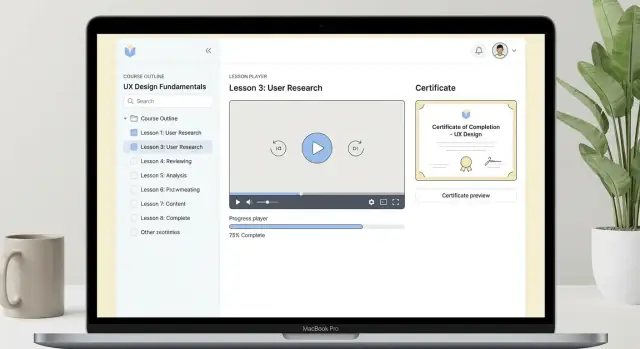
ਰੋਲਾਂ, ਪਾਠ, ਪ੍ਰਗਤੀ, ਸਰਟੀਫਿਕੇਟ ਅਤੇ ਐਡਮਿਨ ਪੈਨਲ ਨਾਲ ਇੱਕ ਆਨਲਾਈਨ ਕੋਰਸ ਵੈਬ ਐਪ ਯੋਜਨਾ ਅਤੇ ਬਣਾਓ—ਡੇਟਾ ਮਾਡਲ, UX, ਸੁਰੱਖਿਆ ਅਤੇ ਲਾਂਚ ਟਿਪਸ ਸਮੇਤ।
Before you pick a tech stack or sketch UI screens, get specific about what “done” looks like. An online course platform can mean anything from a simple lesson library to a full LMS with cohorts, grading, and integrations. Your first job is to narrow it.
Start by naming your primary users and what each must be able to do:
A practical test: if you removed one role entirely, would the product still work? If yes, that role’s features likely belong after launch.
For a first version, focus on outcomes learners actually feel:
Everything else—quizzes, discussions, downloads, cohorts—can wait unless it’s essential to your teaching model.
A clean MVP usually includes:
Save for later: advanced assessments, automation workflows, integrations, multi-instructor revenue splits.
Pick 3–5 metrics that match your goals:
These metrics keep scope decisions honest when feature requests start piling up.
Clear user roles make an online course platform easier to build and much easier to maintain. If you decide who can do what early, you’ll avoid painful rewrites when you add payments, certificates, or new content types later.
Most course web apps can start with three roles: Student, Instructor, and Admin. You can always split roles later (e.g., “Teaching Assistant” or “Support”), but these three cover the essential workflows.
A student’s path should feel effortless:
The key design detail: “resume” requires the product to remember a student’s last activity per course (last lesson opened, completion state, timestamps). Even if you postpone advanced progress tracking, plan for this state from day one.
Instructors need two big capabilities:
A practical rule: instructors usually shouldn’t be able to edit payments, user accounts, or platform-wide settings. Keep them focused on course content and course-level insights.
Admins handle operational tasks:
Write down permissions as a simple matrix before you code. For example: “Only admins can delete a course,” “Instructors can edit lessons in their own courses,” and “Students can only access lessons in courses they’re enrolled in.” This single exercise prevents security gaps and reduces future migration work.
Learners don’t judge your platform by the admin settings—they judge it by how quickly they can find a course, understand what they’ll get, and move through lessons without friction. Your MVP should focus on clear structure, a reliable lesson experience, and simple, predictable completion rules.
Start with a hierarchy that’s easy to scan:
Keep authoring simple: reorder modules/lessons, set visibility (draft/published), and preview as a learner.
Your catalog needs three basics: search, filters, and fast browsing.
Common filters: topic/category, level, duration, language, free/paid, and “in progress.” Each course should have a landing page with outcomes, syllabus, prerequisites, instructor info, and what’s included (downloads, certificate, quizzes).
For video lessons, prioritize:
Optional but valuable:
Text lessons should support headings, code blocks, and a clean reading layout.
Decide completion rules per lesson type:
Then define course completion: all required lessons complete, or allow optional lessons. These choices affect progress bars, certificates, and support tickets later—so make them explicit early.
Progress tracking is where learners feel momentum—and where support tickets often start. Before you build UI, write down the rules for what “progress” means at each level: lesson, module, and course.
At the lesson level, choose a clear completion rule: a “mark complete” button, reaching the end of a video, passing a quiz, or a combination. Then roll up progress:
Be explicit about whether optional lessons count. If certificates depend on progress, you don’t want ambiguity later.
Use a small set of events you can trust and analyze:
Keep events separate from computed percentages. Events are facts; percentages can be recalculated if rules change.
Revisiting lessons: don’t reset completion when a learner reopens content—just update last_viewed. Partial watch: for video, consider thresholds (e.g., 90%) and store watch position so they can resume. If you offer offline notes, treat notes as independent (sync later), not as a completion signal.
A good student dashboard shows: current course, next lesson, last viewed, and a simple completion percent. Add a “Continue” button that deep-links to the next unfinished item (e.g., /courses/{id}/lessons/{id}). This reduces drop-off more than any fancy chart.
Certificates feel simple (“download a PDF”), but they touch rules, security, and support. If you design them early, you avoid angry emails like “I finished everything—why can’t I get my certificate?”
Start by choosing certificate criteria that your system can evaluate consistently:
Store the final decision as a snapshot (eligible yes/no, reason, timestamp, approver) so the result doesn’t change if lessons are edited later.
At minimum, put these fields into every certificate record and render them on the PDF:
That unique ID becomes the anchor for support, auditing, and verification.
A practical approach is PDF download plus a shareable verification page like /certificates/verify/<certificateId>.
Generate the PDF server-side from a template so it’s consistent across browsers. When users click “Download,” return either the file or a temporary link.
Avoid client-generated PDFs and editable HTML downloads. Instead:
Finally, support revocation: if fraud or refunds matter, you need a way to invalidate a certificate and have the verification page clearly show the current status.
A clean data model keeps your course app easy to extend (new lesson types, certificates, cohorts) without turning every change into a migration nightmare. Start with a small set of tables/collections and be intentional about what you store as state versus what you can derive.
At a minimum, you’ll want:
Keep course structure (lessons, ordering, requirements) separate from user activity (progress). That separation makes reporting and updates much simpler.
Assume you’ll need reporting like “completion by course” and “progress by cohort.” Even if you don’t launch cohorts on day one, add optional fields such as enrollments.cohort_id (nullable) so you can group later.
For dashboards, avoid counting completions by scanning every progress row on each page load. Consider a lightweight enrollments.progress_percent field that you update when a lesson is completed, or generate a nightly summary table for analytics.
Store large files (videos, PDFs, downloads) in object storage (e.g., S3-compatible) and deliver them via a CDN. In your database, store only metadata: file URL/path, size, content type, and access rules. This keeps the database fast and backups manageable.
Add indexes for the queries you’ll run constantly:
/certificate/verify)A maintainable architecture is less about chasing the newest framework and more about choosing a stack your team can confidently ship and support for years. For an online course platform, the “boring” choices often win: predictable deployment, clear separation of concerns, and a database model that matches your product.
A practical baseline looks like this:
If your team is small, a “monolith with clean boundaries” is usually easier than microservices. You can still keep modules separated (Courses, Progress, Certificates) and evolve later.
If you want to speed up early iterations without locking yourself into a no-code ceiling, a vibe-coding platform like Koder.ai can help you prototype and ship the first version quickly: you describe the course workflows in chat, refine in a planning step, and generate a React + Go + PostgreSQL app you can deploy, host, or export as source code for a traditional pipeline.
Both can work well. Choose based on your product and team habits:
GET /courses, GET /courses/:idGET /lessons/:idPOST /progress/events (track completion, quiz submission, video watched)POST /certificates/:courseId/generateGET /certificates/:id/verifyA good compromise is REST for core workflows plus a GraphQL layer later if dashboards become difficult to optimize.
Course platforms have tasks that shouldn’t block a web request. Use a queue/worker setup from the start:
Common patterns: Redis + BullMQ (Node), Celery + Redis/RabbitMQ (Python), or a managed queue service. Keep job payloads small (IDs, not entire objects), and make jobs idempotent so retries are safe.
Set up basic observability before launch, not after an incident:
Even lightweight dashboards that alert you to “certificate job failures” or “progress events spiking” will save hours during launch week.
Monetization isn’t just “add Stripe.” The moment you charge money, you need a clean way to answer two questions reliably: who is enrolled and what are they entitled to access.
Most course apps start with one or two models and expand later:
Design your enrollment record so it can represent each model without hacks (e.g., include price paid, currency, purchase type, start/end dates).
Use a payment provider (Stripe, Paddle, etc.) and store only necessary payment metadata:
Avoid storing raw card data—let the provider handle PCI compliance.
Access should be granted based on entitlements tied to enrollment, not on “payment succeeded” flags sprinkled across the app.
A practical pattern:
If you’re presenting pricing tiers, keep it consistent with your product page (/pricing). For implementation details and webhook gotchas, link readers to /blog/payment-integration-basics.
Security isn’t a feature you “add later” on an online course platform. It affects payments, certificates, private student data, and your instructors’ intellectual property. The good news: a small set of consistent rules will cover most real-world risks.
Start with one login method and make it reliable.
Use session management you can explain: short-lived sessions, refresh logic if needed, and a “log out of all devices” option.
Treat authorization as a rule you enforce everywhere—UI, API, and database access patterns.
Typical roles:
Every sensitive endpoint should answer: Who is this? What are they allowed to do? On which resource? For example, “Instructor can edit lesson only if they own the course.”
If you host videos/files, don’t ship them as public URLs.
Minimize stored personal data: name, email, and progress are usually enough.
Define clear retention rules (e.g., delete inactive accounts after X months if legally allowed) and let users request export/deletion. Keep audit logs for admin actions, but avoid logging full lesson content, tokens, or passwords.
If you handle payments, isolate that data and prefer a payment provider so you don’t store card details at all.
A course app succeeds when learners can start quickly, keep their place, and feel steady momentum. The UX should reduce friction (finding the next lesson, understanding what counts as “done”) while staying inclusive for different devices and abilities.
Design lessons for small screens first: clear typography, generous line-height, and a layout that doesn’t require pinching or horizontal scrolling.
Make lessons feel fast. Optimize media so the first content renders quickly, and defer heavy extras (downloads, transcripts, related links) until after the core lesson loads.
Resume is non-negotiable: show “Continue where you left off” on the course page and in the lesson player. Persist last position for video/audio and last read location for text lessons, so learners can return in a few seconds.
Learners stay motivated when progress is obvious:
Avoid confusing states. If completion depends on multiple actions (watch time + quiz + assignment), show a small checklist within the lesson so learners know exactly what’s missing.
Use lightweight celebrations: a short confirmation message, unlocking the next module, or a “You’re X lessons from finishing” nudge—helpful, not noisy.
Treat accessibility as core UX, not polish:
Learners will get stuck. Provide a predictable path:
/help or /faq page linked from course and lesson screensShipping an online course platform without testing and feedback loops is how you end up with “my lesson says complete but the course isn’t” support tickets. Treat progress, certificates, and enrollment as business logic that deserves real test coverage.
Start with unit tests around progress rules, because they’re easy to break when you add new lesson types or change completion criteria. Cover edge cases like:
Then add integration tests for enrollment flows: sign up → enroll → access lessons → finish course → generate certificate. If you support payments, include a “happy path” and at least one failure/retry scenario.
Create seed data for realistic courses to validate dashboards and reporting. One tiny course and one “real” course with sections, quizzes, optional lessons, and multiple instructors will quickly reveal UI gaps in the student dashboard and admin panel.
Track analytics events carefully and name them consistently. A practical starter set:
lesson_startedlesson_completedcourse_completedcertificate_issuedcertificate_verifiedAlso capture context (course_id, lesson_id, user_role, device) so you can diagnose drop-off and measure the impact of changes.
Run a small beta before full launch, with a handful of course creators and learners. Give creators a checklist (build course, publish, edit, view learner progress) and ask them to narrate what feels confusing. Prioritize fixes that reduce setup time and prevent content mistakes—those are the pain points that block adoption.
If you want, publish a lightweight “Known issues” page at /status during beta to reduce support load.
If you’re iterating quickly, make safe rollbacks part of your process. For example, Koder.ai supports snapshots and rollback, which is useful when you’re changing progress rules or certificate generation and want a fast escape hatch during beta.
Launching your MVP is when real product work begins: you’ll learn which courses get traffic, where learners drop off, and what admins spend time fixing. Plan for incremental scaling so you don’t “rebuild” under pressure.
Start with simple wins before big infrastructure changes.
Video and large files are usually your first scaling bottleneck.
Use a CDN for static assets and downloadable resources. For video, aim for adaptive streaming (so learners on mobile or slower connections still get smooth playback). Even if you start with basic file hosting, choose a path that lets you upgrade media delivery without changing your whole app.
As usage grows, operational tools matter as much as learner features.
Prioritize:
Good next bets after you’ve stabilized core lessons and progress tracking:
Treat each as its own mini-MVP with clear success metrics, so growth stays controlled and maintainable.
Start by defining the minimum learner outcomes:
If a feature doesn’t directly support those outcomes (e.g., discussions, complex quizzes, deep integrations), push it to the post-launch roadmap unless it’s central to your teaching model.
A practical starting set is:
If removing a role wouldn’t break the product, its features likely belong after launch.
Write a simple permissions matrix before coding and enforce it in the API (not only the UI). Common rules:
Treat authorization as a required check on every sensitive endpoint.
Use a hierarchy learners can scan quickly:
Keep authoring actions simple:
Attach downloads to a course or a specific lesson, and add quizzes/assignments only when they meaningfully reinforce learning.
Implement “resume” as a first-class workflow:
Then provide a single “Continue” button that deep-links to the next unfinished item (for example, /courses/{id}/lessons/{id}) to reduce drop-off.
Define completion rules per lesson type and make them explicit:
Then define course completion (all required lessons vs optional lessons excluded) so progress bars and certificates don’t feel arbitrary.
Track a small set of reliable events as facts:
startedlast_viewedcompletedquiz_passed (with attempt count and pass/fail)Keep events separate from computed percentages. If you later change completion rules, you can recompute progress without losing historical truth.
Design for common edge cases upfront:
last_viewed.Add tests for out-of-order completion, retakes/resets, and certificate-triggering flows to prevent “I finished everything” support tickets.
Use explicit eligibility rules your system can evaluate:
Store the outcome as a snapshot (eligible yes/no, reason, timestamp, approver) so it won’t change unexpectedly if course content is edited later.
Do both:
/certificates/verify/<certificateId>.To reduce tampering:
Always support revocation so verification reflects the current status.