

27 ਜੂਨ 2025·8 ਮਿੰਟ
ਲੋਕਲਾਈਜ਼ੇਸ਼ਨ ਅਤੇ ਅਨੁਵਾਦ ਪ੍ਰਬੰਧਨ ਲਈ ਵੈਬ ਐਪ ਕਿਵੇਂ ਬਣਾਈਏ
ਇੱਕ ਵੈਬ ਐਪ ਦੀ ਯੋਜਨਾ ਬਣਾਓ ਜੋ ਅਨੁਵਾਦ ਵਰਕਫਲੋ, ਲੋਕੇਲ ਡੇਟਾ, ਸਮੀਖਿਆ, QA ਚੈੱਕ ਅਤੇ ਰਿਲੀਜ਼ਾਂ ਨੂੰ ਪ੍ਰਬੰਧਿਤ ਕਰੇ। ਡੇਟਾ ਮਾਡਲ, UX ਅਤੇ ਇੰਟੀਗਰੇਸ਼ਨ ਸ਼ਾਮਲ ਹਨ।
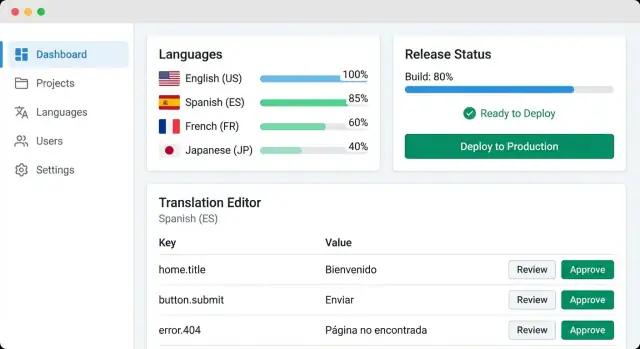
ਇੱਕ ਵੈਬ ਐਪ ਦੀ ਯੋਜਨਾ ਬਣਾਓ ਜੋ ਅਨੁਵਾਦ ਵਰਕਫਲੋ, ਲੋਕੇਲ ਡੇਟਾ, ਸਮੀਖਿਆ, QA ਚੈੱਕ ਅਤੇ ਰਿਲੀਜ਼ਾਂ ਨੂੰ ਪ੍ਰਬੰਧਿਤ ਕਰੇ। ਡੇਟਾ ਮਾਡਲ, UX ਅਤੇ ਇੰਟੀਗਰੇਸ਼ਨ ਸ਼ਾਮਲ ਹਨ।
Localization management is the day-to-day work of getting your product’s text (and sometimes images, dates, currencies, and formatting rules) translated, reviewed, approved, and shipped—without breaking the build or confusing users.
For a product team, the goal isn’t “translate everything.” It’s to keep every language version accurate, consistent, and up to date as the product changes.
Most teams start with good intentions and end up with a mess:
A useful localization management web app supports multiple roles:
You’ll build an MVP that centralizes strings, tracks status per locale, and supports basic review and export. A fuller system adds automation (sync, QA checks), richer context, and tools like glossary and translation memory.
Before you design tables or screens, decide what your localization management web app is actually responsible for. A tight scope makes the first version usable—and keeps you from rebuilding everything later.
Translations rarely live in one place. Write down what you need to support from day one:
This list helps you avoid a “one workflow fits all” approach. For example, marketing copy may need approvals, while UI strings may need fast iteration.
Pick 1–2 formats for the MVP, then expand. Common options include JSON, YAML, PO, and CSV. A practical MVP choice is JSON or YAML (for app strings), plus CSV only if you already rely on spreadsheet imports.
Be explicit about requirements like plural forms, nested keys, and comments. These details affect your locale file management and your future import/export reliability.
Define a source language (often en) and set fallback behavior:
Also decide what “done” means per locale: 100% translated, reviewed, or shipped.
For the MVP, focus on the translation review process and basic i18n workflow: create/edit strings, assign work, review, and export.
Plan later add-ons—screenshots/context, glossary, translation memory basics, and integrating machine translation—but don’t build them until you’ve validated your core workflow with real content.
A translation app succeeds or fails on its data model. If the underlying entities and fields are clear, everything else—UI, workflow, integrations—becomes simpler.
Most teams can cover 80% of their needs with a small set of tables/collections:
en, en-GB, pt-BR).checkout.pay_button).Model the relationships explicitly: a Project has many Locales; a Key belongs to a Project; a Translation belongs to a Key and a Locale.
Add a status to each translation so the system can guide humans:
draft → in_review → approvedblocked for strings that shouldn’t ship yet (legal review, missing context, etc.)Keep status changes as events (or a history table) so you can answer “who approved this and when?” later.
Translations need more than plain text. Capture:
{name}, %d) and whether they must match the sourceAt minimum, persist: created_by, updated_by, timestamps, and a short change_reason. This makes reviews faster and builds trust when teams compare what’s in the app vs. what shipped.
Storage decisions will shape everything: editing UX, import/export speed, diffing, and how confidently you can ship.
Row-per-key (one DB row per string key per locale) is great for dashboards and workflows. You can easily filter “missing French” or “needs review,” assign owners, and compute progress. The downside: reconstructing a locale file for export requires grouping and ordering, and you’ll need extra fields for file paths and namespaces.
Document-per-file (store each locale file as a JSON/YAML document) maps cleanly to how repositories work. It’s faster to export and easier to keep formatting identical. But searching and filtering becomes harder unless you also maintain an index of keys, statuses, and metadata.
Many teams use a hybrid: store row-per-key as the source of truth, plus generated file snapshots for export.
Keep revision history at the translation unit level (key + locale). Every change should record: previous value, new value, author, timestamp, and comment. This makes reviews and rollbacks simple.
Separately, track release snapshots: “what exactly shipped in v1.8.” A snapshot can be a tag that points to a consistent set of approved revisions across locales. This prevents late edits from silently altering a released build.
Don’t treat “plural” as a single boolean. Use ICU MessageFormat or CLDR categories (e.g., one, few, many, other) so languages like Polish or Arabic aren’t forced into English rules.
For gender and other variations, model them as variants of the same key (or message) rather than separate ad-hoc keys, so translators see the full context.
Implement full-text search over key, source text, translation, and developer notes. Pair it with filters that match real work: status (new/translated/reviewed), tags, file/namespace, and missing/empty.
Index these fields early—search is the feature people use hundreds of times a day.
A localization management web app usually starts simple—upload a file, edit strings, download it again. It gets complicated when you add multiple products, many locales, frequent releases, and a steady stream of automation (sync, QA, machine translation, reviews).
The easiest way to stay flexible is to separate concerns early.
A common, scalable setup is API + web UI + background jobs + database:
This split helps you add more workers for heavy tasks without rewriting the whole app.
If you want to move faster on the first working version, a vibe-coding platform like Koder.ai can help you scaffold the web UI (React), API (Go), and PostgreSQL schema from a structured spec and a few iterations in chat—then export the source code when you’re ready to own the repo and deployment.
Keep your API centered on a few core resources:
checkout.button.pay).Design endpoints so they support both human editing and automation. For example, listing keys should accept filters like “missing in locale”, “changed since”, or “needs review”.
Treat automation as asynchronous work. A queue typically handles:
Make jobs idempotent (safe to retry) and record job logs per project so teams can self-diagnose failures.
Even small teams can create big datasets. Add pagination for lists (keys, history, jobs), cache common reads (project locale stats), and apply rate limits to protect import/export endpoints and public tokens.
These are boring details that prevent your translation management system from slowing down right when adoption grows.
If your app stores source strings and translation history, access control isn’t optional—it’s how you prevent accidental edits and keep decisions traceable.
A simple set of roles covers most teams:
Treat each action as a permission so you can evolve later. Common rules:
This maps cleanly to a translation management system while staying flexible for contractors.
If your company already uses Google Workspace, Azure AD, or Okta, single sign-on (SSO) reduces password risk and makes offboarding instant. Email/password can work for small teams—just require strong passwords and reset flows.
Use secure, short-lived sessions (HTTP-only cookies), CSRF protection, rate limiting, and 2FA where possible.
Record who changed what and when: edits, approvals, locale changes, exports, and permission updates. Pair the log with “undo” via version history so rollbacks are safe and fast (see /blog/plan-storage-and-versioning).
Your UI is where localization work actually happens, so prioritize the screens that reduce back-and-forth and make status obvious at a glance.
Start with a dashboard that answers three questions quickly: what’s done, what’s missing, and what’s blocked.
Show progress by locale (percent translated, percent reviewed), plus a clear “missing strings” count. Add a review queue widget that highlights items waiting on approval, and a “recently changed” feed so reviewers can spot risky edits.
Filters matter more than charts: locale, product area, status, assignee, and “changed since last release.”
A good editor is side-by-side: source on the left, target on the right, with context always visible.
Context can include the key, screenshot text (if you have it), character limits, and placeholders (e.g., {name}, %d). Include history and comments in the same view so translators don’t need a separate “discussion” screen.
Make the status workflow one click: Draft → In review → Approved.
Localization work is often “many small changes.” Add bulk select with actions like assign to user/team, change status, and export/import for a locale or module.
Keep bulk actions gated by roles (see /blog/roles-permissions-for-translators if you cover it elsewhere).
Heavy translators live in the editor for hours. Support full keyboard navigation, visible focus states, and shortcuts like:
Also support screen readers and high-contrast mode—accessibility improves speed for everyone.
A localization management web app succeeds or fails on workflow. If people can’t tell what to translate next, who owns a decision, or why a string is blocked, you’ll get delays and inconsistent quality.
Start with a clear unit of work: a set of keys for a locale in a specific version. Let project managers (or leads) assign work by locale, file/module, and priority, with an optional due date.
Make assignments visible in a “My Work” inbox that answers three questions: what’s assigned, what’s overdue, and what’s waiting on others. For larger teams, add workload signals (items count, word count estimate, last activity) so assignments are fair and predictable.
Build a simple status pipeline, for example: Untranslated → In progress → Ready for review → Approved.
Review should be more than a binary check. Support inline comments, suggested edits, and approve/reject with reason. When reviewers reject, keep the history—don’t overwrite.
This makes your translation review process auditable and reduces repeated mistakes.
Source text will change. When it does, mark existing translations as Needs update and show a diff or “what changed” summary. Keep the older translation as a reference, but prevent it from being re-approved without an explicit decision.
Notify on events that block progress: new assignment, review requested, rejection, due date approaching, and source change affecting approved strings.
Keep notifications actionable with deep links like /projects/{id}/locales/{locale}/tasks so people can resolve issues in one click.
Manual file juggling is where localization projects start to drift: translators work on stale strings, developers forget to pull updates, and releases ship with half-finished locales.
A good localization management web app should treat import/export as a repeatable pipeline, not a one-off task.
Support the common paths teams actually use:
When exporting, allow filtering by project, branch, locale, and status (e.g., “approved only”). That keeps partially reviewed strings from leaking into production.
Sync only works if keys stay consistent. Decide early how strings are generated:
checkout.button.pay_now), protect them from accidental renames.Your app should detect when a source string changed but the key didn’t, and mark translations as needs review rather than overwriting them.
Add webhooks so sync happens automatically:
main → import updated source strings.Webhooks should be idempotent (safe to retry) and produce clear logs: what changed, what was skipped, and why.
If you’re implementing this, document the simplest end-to-end setup (repo access + webhook + PR export) and link it from the UI, for example: /docs/integrations.
Localization QA is where a translation management web app stops being a simple editor and starts preventing production bugs.
The goal is to catch issues before strings ship—especially the ones that only appear in a specific locale file.
Start with checks that can break the UI or crash formatting:
{count} present in English but missing in French, or plural forms inconsistent).% in printf-style strings, malformed ICU messages).Treat these as “block release” by default, with a clear error message and a pointer to the exact key and locale.
These don’t always break the app, but they hurt quality and brand consistency:
Text can be correct and still look wrong. Add a way to request screenshot context per key (or attach a screenshot to a key), so reviewers can validate truncation, line breaks, and tone in real UI.
Before each release, generate a QA summary per locale: errors, warnings, untranslated strings, and top offenders.
Make it easy to export or link internally (e.g., /releases/123/qa) so the team has a single “go/no-go” view.
Adding a glossary, translation memory (TM), and machine translation (MT) can dramatically speed up localization—but only if your app treats them as guidance and automation, not as “publish-ready” content.
A glossary is a curated list of terms with approved translations per locale (product names, UI concepts, legal phrases).
Store entries as term + locale + approved translation + notes + status.
To enforce it, add checks where translators work:
TM reuses previously approved translations. Keep it simple:
Treat TM as a suggestion system: users can accept, edit, or reject matches, and only accepted translations should feed back into TM.
MT is useful for drafts and backlogs, but it shouldn’t be the default final output.
Make MT opt-in per project and per job, and route MT-filled strings through the normal review process.
Different teams have different constraints. Allow admins to select providers (or disable MT entirely), set usage limits, and choose what data is sent (e.g., exclude sensitive keys).
Log requests for cost visibility and auditing, and document options in /settings/integrations.
A localization app shouldn’t just “store translations”—it should help you ship them safely.
The key idea is a release: a frozen snapshot of approved strings for a specific build, so what gets deployed is predictable and reproducible.
Treat a release as an immutable bundle:
This lets you answer: “What did we ship in v2.8.1 for fr-FR?” without guessing.
Most teams want to validate translations before users see them. Model exports by environment:
Make the export endpoint explicit (for example: /api/exports/production?release=123) to prevent accidental leaks of unreviewed text.
Rollback is easiest when releases are immutable. If a release introduces issues (broken placeholders, wrong terminology), you should be able to:
Avoid “editing production in place”—it breaks audit trails and makes incidents harder to analyze.
Notably, this “snapshot + rollback” mindset maps well to how modern build platforms operate. For example, Koder.ai includes snapshots and rollback as a first-class workflow for applications you generate and host, which is a useful mental model when you design immutable localization releases.
After deployment, run a small operational checklist:
If you show release history in the UI, include a simple “diff vs. previous release” view so teams can spot risky changes quickly.
Security and visibility are the difference between a useful localization tool and one teams can trust. Once your workflow is running, lock it down and start measuring it.
Follow least privilege by default: translators shouldn’t be able to change project settings, and reviewers shouldn’t have access to billing or admin-only exports. Make roles explicit and auditable.
Store secrets safely. Keep database credentials, webhook signing keys, and third-party tokens in a secrets manager or encrypted environment variables—never in the repo. Rotate keys on a schedule and when someone leaves.
Backups aren’t optional. Take automated backups of your database and object storage (locale files, attachments), test restores, and define retention. A “backup that can’t be restored” is just extra storage.
If strings might include user content (support tickets, names, addresses), avoid storing it in the translation system. Prefer placeholders or references, and strip logs of sensitive values.
If you must process such text, define retention rules and access restrictions.
Track a few metrics that reflect workflow health:
A simple dashboard plus CSV export is enough to start.
Once the foundation is steady, consider:
If you’re planning to offer this as a product, add a clear upgrade path and call-to-action (see /pricing).
If your immediate goal is to validate the workflow quickly with real users, you can also prototype the MVP on Koder.ai: describe the roles, status flow, and import/export formats in planning mode, iterate on the React UI and Go API via chat, and then export the codebase when you’re ready to harden it for production.
ਇੱਕ ਲੋਕਲਾਈਜ਼ੇਸ਼ਨ ਪ੍ਰਬੰਧਨ ਵੈਬ ਐਪ ਤੁਹਾਡੇ ਸਟਰਿੰਗਜ਼ ਨੂੰ ਕੇਂਦ੍ਰਿਤ ਕਰਦਾ ਹੈ ਅਤੇ ਉਹਨਾਂ ਦੇ ਆਲੇ-ਦੁਆਲੇ ਦੇ ਵਰਕਫਲੋ—ਅਨੁਵਾਦ, ਸਮੀਖਿਆ, ਮਨਜ਼ੂਰੀਆਂ, ਅਤੇ ਐਕਸਪੋਰਟ—ਨੂੰ ਸੰਭਾਲਦਾ ਹੈ, ਤਾਂ ਜੋ ਟੀਮਾਂ ਅਣਜਾਣ ਚਾਵਾਂ, ਗੁੰਮ ਪਲੇਸਹੋਲਡਰ, ਜਾਂ ਅਸਪਸ਼ਟ ਸਥਿਤੀ ਤੋਂ ਬਿਨਾਂ ਅੱਪਡੇਟ ਸ਼ਿਪ ਕਰ ਸਕਣ।
ਸ਼ੁਰੂ ਕਰੋ ਨਾਲ:
pt-BR → pt → en)ਇੱਕ ਸਖਤ ਸਕੋਪ "ਇੱਕ ਵਰਕਫਲੋ ਸਭ ਲਈ" ਵਾਲੀ ਗਲਤੀ ਤੋ ਬਚਾਉਂਦਾ ਹੈ ਅਤੇ MVP ਨੂੰ ਉਪਯੋਗੀ ਰੱਖਦਾ ਹੈ।
ਅਕਸਰ ਟੀਮਾਂ ਮੁੱਖ ਵਰਕਫਲੋ ਕਵਰ ਕਰਨ ਲਈ ਇਹ ਏਟਿਟੀਜ਼ ਵਰਤ ਸਕਦੀਆਂ ਹਨ:
draft → in_review → approved)ਇਹ ਮੈਟਾਡੇਟਾ ਰੱਖੋ ਤਾਂ ਜੋ ਉਤਪਾਦਕ ਗਲਤੀਆਂ ਅਤੇ ਸਮੀਖਿਆ ਦੀ ਘੁੰਮਾਗਿਰਿ ਘਟੇ:
ਇਹ ਤੁਸੀਂ ਕਿਸ ਲਈ optimize ਕਰ ਰਹੇ ਹੋ 'ਤੇ ਨਿਰਭਰ ਕਰਦਾ ਹੈ:
ਅਕਸਰ ਇੱਕ ਹਾਈਬ੍ਰਿਡ ਪਹੁੰਚ ਵਰਤੀ ਜਾਂਦੀ ਹੈ: row-per-key ਸਰੋਤ ਸੱਚਾਈ ਵਜੋਂ, ਨਾਲ ਹੀ ਐਕਸਪੋਰਟ ਲਈ ਬਣਾਈਆਂ ਗਈਆਂ ਸਨੇਪਸ਼ਾਟ ਫਾਇਲਾਂ।
ਦੋ ਪੱਧਰ ਵਰਤੋਂ:
ਇਹ "ਚੁਪਚਾਪ ਸੋਧ" ਨੂੰ ਰੋਕਦਾ ਹੈ ਜੋ ਪਹਿਲਾਂ ਹੀ ਸ਼ਿਪ ਹੋ ਚੁੱਕੇ ਕੰਟੈਂਟ ਨੂੰ ਬਦਲ ਸਕਦਾ ਹੈ।
ਮੁੱਢਲੀ ਭੂਮਿਕਾਵਾਂ ਜੋ ਅਕਸਰ ਵਰਤੋਂ ਵਿੱਚ ਆਉਂਦੀਆਂ ਹਨ:
API ਨੂੰ ਕੁਝ ਮੁੱਖ ਸਰੋਤਾਂ 'ਤੇ ਕੇਂਦ੍ਰਿਤ ਰੱਖੋ:
Projects, Locales, Keys, Translationsਫਿਰ ਸੂਚੀ ਐਂਡਪੋਇੰਟਸ ਨੂੰ ਅਜਿਹੇ ਫਿਲਟਰ ਦੇਣ ਜੋ ਅਸਲੀ ਕੰਮ ਲਈ ਜਰੂਰੀ ਹਨ, ਜਿਵੇਂ:
ਲੰਮੇ ਕੰਮ ਨੂੰ asynchronous ਰੱਖੋ:
ਜੌਬਾਂ ਨੂੰ idempotent ਬਣਾਓ (ਫੇਰ ਤੋਂ ਚਲਾਉਣਾ ਸੁਰੱਖਿਅਤ) ਅਤੇ ਪਰੋਜੈਕਟ ਪ੍ਰਤੀ ਲੋਗ ਰੱਖੋ ਤਾਂ ਟੀਮਾਂ ਖੁਦ ਹੀ ਫੇਲਿਯਰਾਂ ਦੀ ਜਾਂਚ ਕਰ ਸਕਣ।
ਵਹੀ ਚੈਕ ਜੋ ਟੁੱਟੀ UI ਰੋਕ ਸਕਦੇ ਹਨ ਇਹਨਾਂ ਨੂੰ ਪ੍ਰਾਥਮਿਕਤਾ ਦਿਓ:
{count}, %d) ਅਤੇ plural-ਫਾਰਮ ਕਵਰੇਜਇਨ੍ਹਾਂ ਨੂੰ ਡਿਫੌਲਟ ਤੌਰ 'ਤੇ ਰਿਲੀਜ਼-ਬਲਾਕਿੰਗ ਮੰਨੋ; ਹੌਲੀ ਚੇਤਾਵਨੀਆਂ ਲਈ glossary consistency ਅਤੇ whitespace/casing ਵਰਗੇ ਚੈਕ ਰੱਖੋ।
ਜੇ ਇਹ ਸੰਰਚਨਾ ਸਾਫ਼ ਹੈ ਤਾਂ UI ਸਕ੍ਰੀਨਾਂ, ਪਰਵਾਨਗੀਆਂ, ਅਤੇ ਇੰਟੀਗ੍ਰੇਸ਼ਨ ਬਣਾਉਣਾ ਆਸਾਨ ਹੁੰਦਾ ਹੈ।
created_by, updated_by, timestamps, change reason)ਇਹ ਇੱਕ ਸਧਾਰਨ ਟੈਕਸਟ ਏਡੀਟਰ ਅਤੇ ਇੱਕ ਭਰੋਸੇਯੋਗ ਪ੍ਰਣਾਲੀ ਵਿੱਚ ਫਰਕ ਲਿਆਉਂਦਾ ਹੈ।
ਕਿਰਿਆਵਾਂ ਮੁਤਾਬਕ ਅਨੁਮਤੀਆਂ ਪਰਿਭਾਸ਼ਤ ਕਰੋ (ਜਿਵੇਂ edit source, approve, export) ਤਾਂ ਜੋ ਤਰਤੀਬ ਬਦਲਣ 'ਤੇ ਵੀ ਵਰਕਫਲੋ ਟੁੱਟੇ ਨਾ।
ਇਸ ਨਾਲ UI ਵਿੱਚ ਮਨੁੱਖੀ ਸੋਧ ਅਤੇ CLI/CI ਰਾਹੀਂ automation ਦੋਹਾਂ ਸਮਰਥਨ ਮਿਲਦਾ ਹੈ।