What a Deprecation Management App Solves
A feature deprecation is any planned change where something users rely on is reduced, replaced, or removed. That can mean:
- A UI feature disappearing or moving (buttons, dashboards, settings)
- An API endpoint being sunset, versioned, or changing behavior
- A plan or entitlement change (limits lowered, add-on merged, pricing tier removed)
Even when the product direction is correct, deprecations fail when they’re treated like a one-off announcement instead of a managed deprecation workflow.
Common failure modes
Surprise removals are the obvious one, but the real damage usually shows up elsewhere: broken integrations, incomplete migration docs, inconsistent messaging across channels, and support spikes right after a release.
Teams also lose track of “who is affected” and “who approved what.” Without an audit trail, it’s hard to answer basic questions like: Which accounts still use the old feature flag? Which customers were notified? What was the promised date?
Why a dedicated app helps
A deprecation management app centralizes sunset planning so every deprecation has a clear owner, timeline, and status. It enforces consistent communications (email, in-app notifications, release notes automation), tracks user migration progress, and creates accountability through approvals and an audit trail.
Instead of scattered docs and spreadsheets, you get a single source of truth for impact detection, messaging templates, and adoption analytics.
Who uses it
Product managers coordinate scope and dates. Engineering ties changes to feature flags and releases. Support and Success rely on accurate customer lists and scripts. Compliance and Security may require approvals, retention of notices, and proof that customers were informed.
Goals, Scope, and Non-Goals
A deprecation management app should exist to reduce chaos, not to add another place to “check.” Before you design screens or data models, agree on what success looks like and what’s explicitly out of scope.
Goals (what you’re optimizing for)
Start with outcomes that matter across Product, Support, and Engineering:
- Fewer support tickets and escalations tied to breaking changes (measure: ticket volume tagged to the deprecation).
- Higher migration completion before the deadline (measure: % migrated by cohort/plan).
- Fewer last-minute reversals because risks were discovered late (measure: number of deadline extensions or rollbacks).
Convert these into clear success metrics and service levels:
- Time from announcement → first customer action
- Time from announcement → 80% migrated
- % migrated by deadline (overall and by priority accounts)
- SLA for comms: e.g., “Customers get at least 30 days notice for major removals.”
Scope (what the app manages)
Be specific about the object of deprecation. You can start narrow and expand:
- Product features (UI behavior, settings)
- API endpoints/fields
- Integrations (webhooks, third-party connectors)
- Plans/tiers (entitlements, limits)
- Or a unified “change” model that can represent all of the above
Also define what “migration” means in your context: enabling a new feature, switching endpoints, installing a new integration, or completing a checklist.
Constraints (rules you can’t ignore)
Common constraints that shape the design:
- Privacy & compliance: what user/account data can be stored and surfaced
- Data retention: audit trail duration, export needs, deletion policies
- Multi-tenant requirements: segmentation by workspace/org, regional hosting
- Approvals: who can publish timelines, send customer messaging, or change deadlines
Non-Goals (what not to build)
To avoid scope creep, decide early what the app won’t do—at least for v1:
- Replacing your full support desk, docs site, or CRM
- Acting as a general project management tool
- Auto-migrating customers without explicit safeguards and ownership
Clear goals and boundaries make every later decision—workflow, permissions, notifications—much easier to align.
Deprecation Lifecycle and Workflow Stages
A deprecation management app should make the lifecycle explicit so everyone knows what “good” looks like and what must happen before moving forward. Start by mapping your current process end-to-end: initial announcement, scheduled reminders, support playbooks, and final removal. The app’s workflow should mirror reality first, then gradually standardize it.
A simple, enforceable stage model
A practical default is:
Proposed → Approved → Announced → Migration → Sunset → Done
Each stage should have a clear definition, exit criteria, and an owner. For example, “Announced” shouldn’t mean “someone posted a message once”; it should mean the announcement has been delivered through agreed channels and follow-ups are scheduled.
Checkpoints that prevent last-minute chaos
Add required checkpoints that must be completed (and recorded) before a stage can be marked complete:
- Legal/comms review for wording, dates, and any contractual implications
- Documentation updated (docs, FAQs, release notes, internal runbooks)
- Rollback or mitigation plan ready, including who decides and how to execute
- Support readiness, including macros/scripts and escalation paths
Treat these as first-class items: checklists with assignees, due dates, and evidence (links to tickets or docs).
Ownership and sign-offs
Deprecations fail when responsibility is vague. Define who owns each stage (Product, Engineering, Support, Docs) and require sign-offs when risk is high—especially the transition from Approved → Announced and Migration → Sunset.
The goal is a workflow that’s lightweight day-to-day, but strict at the points where mistakes are expensive.
Data Model: Entities and Relationships
A clear data model prevents deprecations from turning into scattered docs, ad-hoc messages, and unclear ownership. Start with a small set of core objects, then add fields only when they drive decisions.
Core entities
Feature is the thing users experience (a setting, API endpoint, report, workflow).
Deprecation is a time-bound change event for a feature: when it’s announced, restricted, and finally turned off.
Migration Plan explains how users should move to a replacement and how you’ll measure progress.
Audience Segment defines who is affected (e.g., “Accounts on Plan X using Feature Y in the last 30 days”).
Message captures what you’ll send, where, and when (email, in-app, banner, support macro).
Required fields (what you’ll wish you had later)
For Deprecation and Migration Plan, treat these as mandatory:
- Timelines: announce date, soft-end date (warnings/restrictions), hard end date (sunset), plus timezone.
- Impacted surfaces: UI areas, API routes, docs pages, integrations, billing/entitlements.
- Replacement path: link to the new feature, step-by-step migration notes, and known limitations.
- Risk level: low/medium/high with a short rationale (e.g., “breaks automation for power users”).
Relationships (how it all connects)
Model the real-world hierarchy:
- One Feature → many Deprecations (multiple sunsets over time, regional rollouts, or policy-driven changes).
- One Deprecation → one Migration Plan (usually), and many Audience Segments (different messaging and deadlines).
- One Deprecation → many Messages (channels and stages), each optionally scoped to a specific Audience Segment.
Audit and governance fields
Add audit fields everywhere: created_by, approved_by, created_at, updated_at, approved_at, plus a change history log (who changed what, and why). This enables an accurate audit trail when support, legal, or leadership asks, “When did we decide this?”
Roles, Permissions, and Approvals
Clear roles and lightweight approvals prevent two common failures during deprecations: “everyone can change everything” and “nothing ships because nobody knows who decides.” Design your app so responsibility is explicit, and every externally visible action has an owner.
Core roles
- Admin: manages workspace settings, roles, global templates, and compliance rules.
- Product Manager (PM): owns the deprecation plan, timelines, target audiences, and messaging intent.
- Engineer: implements technical steps, validates readiness, and updates migration status.
- Support: monitors customer impact, contributes FAQs/macros, and escalates blockers.
- Read-only: can view status, timelines, and reports without making changes.
Permissions by action
Model permissions around key actions rather than screens:
- Create/Edit deprecation items (PM, Admin), with limited fields editable after approval.
- Approve plan, dates, and high-impact changes (Admin, designated approvers).
- Send messages (PM/Support with approval) and edit templates (Admin).
- Edit timelines (PM) with approval required for major date shifts.
- Close out (PM + Engineer sign-off) once migration thresholds are met.
Approval flows for high-risk changes
Require approvals when a change affects many users, regulated customers, or critical workflows. Typical checkpoints: initial plan approval, “ready to announce,” and final “sunset/disable” confirmation. External communications (email, in-app banners, help center updates) should be approval-gated.
Audit log requirements
Maintain an immutable audit trail: who changed what, when, and why (including message content, audience definition, and timeline edits). Add links to related tickets and incidents so postmortems and compliance reviews are fast and factual.
Start small, scale later
Try Koder.ai on the free tier and expand when your app needs more capacity.
A deprecation management app succeeds or fails on clarity. People should be able to answer three questions quickly: What’s changing? Who is affected? What do we do next? The information architecture should reflect that flow, using plain language and consistent patterns.
Dashboard: the “control room”
The dashboard should be scannable in under a minute. Focus on active work and risk, not a long inventory.
Show:
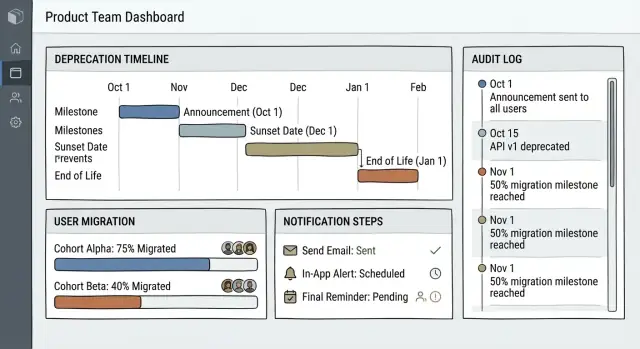
- Active deprecations with current stage (Announced → Migration → Removal)
- Upcoming deadlines (next 7/14/30 days) with a clear “days left” label
- High-risk items: large impacted audience, low migration rate, or missing approvals
Keep filters simple: Status, Owner, Product area, Deadline window. Avoid jargon like “sunset state”; prefer “Removal scheduled.”
Deprecation detail page: the single source of truth
Each deprecation needs one canonical page that teams trust during execution.
Structure it as a timeline with the most important decisions and next steps upfront:
- Header summary: name, owner, current stage, removal date, links to replacement
- Timeline: announcement date, migration start, cutoff, removal (with editable milestones)
- Impacted users: top segments, counts, and how the audience is detected
- Messages & docs: in-app notifications, email templates, release notes snippet, and documentation links
Use short, direct labels: “Replacement feature”, “Who is affected”, “What users need to do.”
Consistency through templates
Reduce errors by providing templates for:
- Standard timelines (e.g., 30/60/90-day plans)
- Checklists (approvals, comms sent, support briefed, docs updated)
- Migration steps (what changes for users, FAQ prompts)
Templates should be selectable at creation time and remain visible as a checklist on the detail page.
Accessibility and clarity by default
Aim for minimal cognitive load:
- Write in plain language; avoid internal acronyms
- Use high-contrast status pills and readable date formats
- Ensure keyboard navigation and meaningful headings for screen readers
A good UX makes the workflow feel inevitable: the next action is always obvious, and the page tells the same story to product, engineering, support, and customers.
Audience Segmentation and Impact Detection
Deprecations fail when you notify everyone the same way. A deprecation management app should first answer two questions: who is affected and how much. Segmentation and impact detection make messaging precise, reduce support noise, and help teams prioritize migrations.
Segmentation sources (where the “audience” comes from)
Start with segments that map to how customers buy, use, and operate:
- Plan / contract tier (Free, Pro, Enterprise)
- Usage level (power users vs occasional users)
- Integration type (API-only, UI-only, specific connector)
- Region / data residency (important for timing and legal constraints)
- Account age (new customers may never have touched the old feature)
Treat segments as filters you can combine (e.g., “Enterprise + EU + uses API”). Store the segment definition so it’s auditable later.
Computing “impacted” (what evidence you use)
Impact should be computed from concrete signals, typically:
- Feature usage logs (feature toggles, page visits, button clicks)
- API calls (endpoints tied to the deprecated capability)
- UI events (specific workflows that imply reliance)
Use a time window (“used in last 30/90 days”) and a threshold (“≥10 events”) so you can separate active dependence from historical noise.
Edge cases to handle
Shared environments create false positives unless you model them:
- Shared accounts / service users: attribute API usage to the workspace or integration key, not a person.
- Multiple workspaces: a user may be impacted in one workspace and not another.
- Admins vs end users: admins need early, detailed notices; end users need task-focused guidance.
Preview before you send
Before any email or in-app notice, provide a preview step that shows a sample list of impacted accounts/users, why they were flagged (top signals), and the projected reach by segment. This “dry run” prevents embarrassing blasts and builds trust in the workflow.
Notifications, Messaging, and Templates
Deprecations fail most often when users don’t hear about them (or hear too late). Treat messaging as a workflow asset: scheduled, auditable, and tailored to the impacted audience segment.
Channels to cover real-world delivery
Support multiple outbound paths so teams can meet users where they already pay attention:
- In-app banner for active users at the moment of need
- Email for broader reach and longer-form guidance
- Webhooks to push events into internal systems
- Slack (or similar) for internal stakeholder alerts
- Status page link (optional) when a change affects availability or reliability
Each notification should reference the specific deprecation record, so recipients and teams can trace “what was sent, to whom, and why.”
Cadence: from heads-up to deadline
Bake in a default schedule that teams can tweak per deprecation:
- Announcement: what’s changing and why, plus the replacement path
- Reminders: based on days remaining and user activity (e.g., still using the old feature)
- Deadline warning: explicit date/time, impact, and support options
- Final notice: confirmation of cutover and where to go next
Templates with variables
Provide templates with required fields and preview:
- Feature:
{{feature_name}}
- Deadline:
{{deadline}}
- Replacement:
{{replacement_link}} (e.g., /docs/migrate/new-api)
- CTA:
{{cta_text}} and {{cta_url}}
Safety controls
Add guardrails to prevent accidental blasts:
- Test sends to internal accounts and seeded segments
- Rate limits and per-tenant caps
- Quiet hours by timezone
- Unsubscribe handling where applicable (and channel fallbacks when users opt out)
Migration Tracking and User Guidance
Draft comms inside the app
Model templates and scheduled notices as part of the workflow, not a last step.
A deprecation plan succeeds when users can see exactly what to do next—and when your team can confirm who’s actually moved. Treat migration as a set of concrete, trackable steps, not a vague “please upgrade” message.
Checklist-style migration steps
Model each migration as a small checklist with clear outcomes (not just instructions). For example: “Create new API key,” “Switch SDK initialization,” “Remove legacy endpoint calls,” “Verify webhook signature.” Each step should include:
- A short description and “done” criteria
- Links to the right place to complete it (settings page, wizard, or docs)
- Optional validation (e.g., detected new endpoint usage)
Keep the checklist visible on the deprecation page and in any in-app banner so users can always resume where they left off.
Guided migration (help, not homework)
Add a “guided migration” panel that bundles everything users typically search for:
- Relevant docs pages (e.g.,
/docs/migrations/legacy-to-v2)
- Wizard entry points (e.g.,
/settings/integrations/new-setup)
- Sample configs and copy-paste snippets
- A short FAQ covering common failure modes and how to roll back safely
This isn’t only content; it’s navigation. The fastest migrations happen when the app routes people to the exact screen they need.
Completion tracking at the right granularity
Track completion per account, workspace, and integration (when applicable). Many teams migrate one workspace first, then roll changes out gradually.
Store progress as events and state: step status, timestamps, actor, and detected signals (e.g., “v2 endpoints seen in last 24h”). Provide an at-a-glance “% complete” plus a drill-down into what’s blocked.
Support handoff with automatic context
When users get stuck, make escalation seamless: a “Contact support” button should create a ticket, assign a CSM (or queue), and attach context automatically—account identifiers, current step, error messages, integration type, and recent migration activity. This avoids back-and-forth and shortens time to resolution.
Analytics and Reporting for Adoption
Deprecation projects fail quietly when you can’t see who’s affected, who’s moving, and who might churn. Analytics should answer those questions at a glance, and make the numbers trustworthy enough to share with leadership, Support, and Customer Success.
The core adoption metrics
Start with a small set of metrics that are hard to misinterpret:
- Exposed users: accounts/users still using the deprecated feature (or hitting the old endpoint) within a defined window.
- Started migration: users who began the upgrade flow (e.g., enabled the replacement feature, created required settings, installed a new integration).
- Completed migration: users meeting your “done” criteria (replacement usage above a threshold, deprecated usage at zero, required checklist completed).
- Churn-risk signals: rising ticket volume on the feature, repeated error events, sharp usage drops, failed migration attempts, or negative NPS tags tied to the change.
Define each metric in the UI with a short tooltip and link to a “How we calculate this” note. If definitions shift mid-project, record the change in the audit trail.
Timelines that match the lifecycle
A good report reads like the deprecation plan:
- Progress lines over time for exposed/started/completed.
- Vertical markers for key dates: announce, remind, final notice, sunset.
- A “pace to target” indicator (e.g., completion trend vs required rate to finish before sunset).
This makes it obvious whether additional reminders, tooling improvements, or deadline adjustments are needed.
Breakdowns that drive action
Rollups are useful, but decisions happen in segments. Provide drill-downs by:
- Audience segment (persona or use case)
- Plan tier (free vs paid tiers)
- Region (time zones and local holidays affect response rates)
- Integration type (API clients, partner connectors, self-built vs marketplace)
Each breakdown should link directly to the affected accounts list, so teams can act without exporting first.
Exports and scheduled reporting
Support lightweight sharing:
- CSV export for account lists and rollups
- Scheduled email/Slack summaries to stakeholders
- A weekly “at risk before sunset” report that highlights the top segments and accounts to contact
For automation and deeper BI work, expose the same data via an API endpoint (and keep it stable across deprecation projects).
Change specs without fear
Experiment safely with snapshots and rollback while you refine workflow stages.
A deprecation app is most useful when it becomes the “source of truth” that other systems can trust. Integrations let you move from manual status updates to automated gating, measurement, and customer support workflows.
Feature flags: control and verify behavior
Connect to your feature flag provider so each deprecation can reference one or more flags (old experience, new experience, rollback). This enables:
- Gating by environment (dev/stage/prod) and by audience segment
- Automated checks (e.g., “new flow enabled for 90% of eligible accounts”)
- Safer rollbacks tied to the deprecation record, not a separate spreadsheet
Store flag keys and flag “expected state” per stage, plus a lightweight sync job to read current status.
Analytics + warehouse: measure adoption, not opinions
Wire the app to product analytics so each deprecation has a clear success metric: events for “used old feature,” “used new feature,” and “completed migration.” Pull aggregated counts to show progress by segment.
Optionally, stream the same metrics into a data warehouse for deeper slicing (plan, region, account age). Keep it optional to avoid blocking smaller teams.
Docs and release notes: one click from the record
Every deprecation should link to the canonical help content and announcements, using internal routes such as:
- /docs/migrations/new-checkout
- /release-notes/2026-01
This reduces inconsistency: support and PMs always reference the same pages.
Webhooks and APIs: automate downstream work
Expose webhooks (and a small REST API) for lifecycle events like “scheduled,” “email sent,” “flag flipped,” and “sunset completed.” Common consumers include CRMs, support desks, and messaging providers—so customers get consistent, timely guidance without copying updates across tools.
Architecture and Implementation Plan
Treat the first version as a focused CRUD app: create deprecations, define dates, assign owners, list impacted audiences, and track status. Start with what your team can ship quickly, then add automation (event ingestion, messaging, integrations) once the workflow is trusted.
Stack: pick what your team already runs
A typical, low-risk stack is a server-rendered web app or a simple SPA with an API (Rails/Django/Laravel/Node). The key is boring reliability: strong migrations, easy admin screens, and good background jobs. If you already have SSO (Okta/Auth0), use it; otherwise add passwordless magic links for internal users only.
If you want to accelerate the first working version (especially for internal tooling), consider building a prototype in Koder.ai. It’s a vibe-coding platform where you can describe the workflow in chat, iterate in a “planning mode,” and generate a React web app with a Go backend and PostgreSQL—then export the source code if you decide to take it in-house. Snapshots and rollback are particularly useful while you’re still refining stages, permissions, and notification rules.
Core building blocks
You’ll need:
- Auth + authorization for owners, reviewers, and read-only stakeholders.
- Relational database (Postgres/MySQL) for deprecation records, tasks, approvals, and the audit trail.
- Background jobs for scheduled notifications, reminders, and report generation.
- Email sender + webhook-based messaging (e.g., Slack/Teams) behind a single “message service.”
- Event ingestion endpoint to receive product usage events that power impact and adoption dashboards.
Data storage: workflows vs usage
Keep the workflow system-of-record in a relational DB. For usage, start by storing daily aggregates in Postgres; if volume grows, push raw events to an event store or warehouse and query summarized tables for the app.
Operational essentials
Make jobs idempotent (safe to retry), use deduplication keys for outbound messages, and add retry policies with backoff. Log every delivery attempt and alert on failures. Basic monitoring (job queue depth, error rate, webhook failures) prevents silent missed communications.
Testing, Launch, and Ongoing Operations
A deprecation management app touches messaging, permissions, and customer experience—so testing needs to focus on failure modes as much as happy paths.
Test the workflows that matter
Start with end-to-end scenarios that mirror real deprecations: drafting, approvals, timeline edits, message sending, and rollbacks. Include edge cases like “extend the end date after messages were sent” or “swap the replacement feature mid-stream,” and confirm the UI clearly reflects what changed.
Also test approvals under pressure: parallel reviewers, rejected approvals, re-approval after edits, and what happens when an approver’s role changes.
Validate segmentation and impact detection
Segmentation mistakes are costly. Use a set of sample accounts (and known “golden” users) to validate that the right audiences are selected. Pair automated checks with manual spot checks: pick random accounts and verify the app’s calculated impact aligns with product reality.
If you have rules that depend on analytics or feature flags, test with delayed or missing events so you know how the system behaves when data is incomplete.
Security checks and audit readiness
Run permission tests for each role: who can view sensitive segments, who can edit timelines, and who can send messages. Confirm audit logs capture the “who/what/when” for edits and sends, and minimize stored PII—prefer stable IDs over emails when possible.
Rollout plan and operations
Launch gradually: an internal pilot, a small set of low-risk deprecations, then wider use across teams. During rollout, define an on-call or “owner of the week” for urgent edits, bounces, or mistaken segmentation.
Finally, set a lightweight operating cadence: monthly reviews of completed deprecations, template quality, and adoption metrics. This keeps the app trustworthy and prevents it from becoming a one-off tool people avoid.