

18 ਜੁਲਾ 2025·8 ਮਿੰਟ
ਰੀਮੋਟ ਡਿਵਾਈਸ ਨਿਗਰਾਨੀ ਲਈ ਮੋਬਾਈਲ ਐਪ ਕਿਵੇਂ ਬਣਾਈਏ
ਰੀਮੋਟ ਡਿਵਾਈਸ ਨਿਗਰਾਨੀ ਲਈ ਮੋਬਾਈਲ ਐਪ ਦੀ ਯੋਜਨਾ ਬਣਾਉਣ, ਬਣਾਉਣ ਅਤੇ ਲਾਂਚ ਕਰਨ ਦੀ ਰਾਹਦਾਰੀ: ਆਰਕੀਟੈਕਚਰ, ਡੇਟਾ ਫਲੋ, ਰੀਅਲ-ਟਾਈਮ ਅੱਪਡੇਟ, ਅਲਰਟ, ਸੁਰੱਖਿਆ ਅਤੇ ਟੈਸਟਿੰਗ।
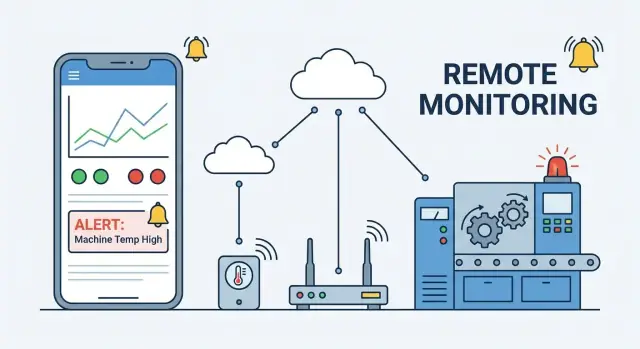
ਰੀਮੋਟ ਡਿਵਾਈਸ ਨਿਗਰਾਨੀ ਲਈ ਮੋਬਾਈਲ ਐਪ ਦੀ ਯੋਜਨਾ ਬਣਾਉਣ, ਬਣਾਉਣ ਅਤੇ ਲਾਂਚ ਕਰਨ ਦੀ ਰਾਹਦਾਰੀ: ਆਰਕੀਟੈਕਚਰ, ਡੇਟਾ ਫਲੋ, ਰੀਅਲ-ਟਾਈਮ ਅੱਪਡੇਟ, ਅਲਰਟ, ਸੁਰੱਖਿਆ ਅਤੇ ਟੈਸਟਿੰਗ।
Remote device monitoring means you can see what a device is doing—and whether it’s healthy—without being physically next to it. A mobile monitoring app is the “window” into a fleet of devices: it pulls in signals from each device, turns them into understandable status, and lets the right people act quickly.
Remote monitoring shows up anywhere equipment is distributed or hard to reach. Typical examples include:
ਹਰ ਮਾਮਲੇ ਵਿੱਚ, ਐਪ ਦਾ ਕੰਮ ਅਨਿਸ਼ਚਿਤਤਾ ਘਟਾ ਕੇ ਸਪਸ਼ਟ, ਤਾਜ਼ਾ ਜਾਣਕਾਰੀ ਦਿੰਦਾਂ ਹੈ।
A good remote device monitoring app usually delivers four basics:
The best apps also make it easy to search and filter by site, model, severity, or owner—because fleet monitoring is less about one device and more about priorities.
Before you build features, define what “better monitoring” means for your team. Common success metrics include:
When these metrics improve, the monitoring app isn’t just reporting data—it’s actively preventing downtime and reducing operational cost.
Before you pick protocols or design charts, decide who the app is for and what “success” looks like on day one. Remote monitoring apps often fail when they try to satisfy everyone with the same workflow.
Write 5–10 concrete scenarios your app must support, such as:
These scenarios help you avoid building features that look useful but don’t reduce response time.
At minimum, plan for:
Must-have: authentication + roles, device inventory, real-time(ish) status, basic charts, alerts + push notifications, and a minimal incident workflow (acknowledge/resolve).
Nice-to-have: map view, advanced analytics, automation rules, QR onboarding, in-app chat, and custom dashboards.
Choose based on who carries the phone in the real world. If field techs are standardized on one OS, start there. If you need both quickly, a cross-platform approach can work—but keep the MVP scope tight so performance and notification behavior stay predictable.
If you’re trying to validate the MVP quickly, platforms like Koder.ai can help you prototype a monitoring UI and backend workflows from a chat-driven spec (for example: device list + device detail + alerts + roles), then iterate toward production once the core workflows are proven.
Before you pick protocols or design dashboards, get specific about what data exists, where it originates, and how it should travel. A clear “data map” prevents two common failures: collecting everything (and paying for it forever), or collecting too little (and being blind during incidents).
Start by listing the signals each device can produce and how trustworthy they are:
For each item, note units, expected ranges, and what “bad” looks like. This becomes the backbone for later alert rules and UI thresholds.
Not all data deserves real-time delivery. Decide what must update in seconds (e.g., safety alarms, critical machine state), what can be minutes (battery, signal strength), and what can be hourly/daily (usage summaries). Frequency drives device battery impact, data costs, and how “live” your app feels.
A practical approach is to define tiers:
Retention is a product decision, not just a storage setting. Keep raw data long enough to investigate incidents and validate fixes, then downsample into summaries (min/max/avg, percentiles) for trend charts. Example: raw for 7–30 days, hourly aggregates for 12 months.
Devices and phones will go offline. Define what gets buffered on-device, what can be dropped, and how to label delayed data in the app (e.g., “last updated 18 min ago”). Make sure timestamps come from the device (or are corrected server-side) so history remains accurate after reconnects.
A remote device monitoring app is only as reliable as the system behind it. Before screens and dashboards, pick an architecture that matches your device capabilities, network reality, and how “real-time” you truly need to be.
Most setups look like this chain:
Device → (optional) Gateway → Cloud backend → Mobile app
Direct-to-cloud devices work best when devices have reliable IP connectivity (Wi‑Fi/LTE) and enough power/CPU.
Gateway-based architectures fit constrained devices or industrial setups.
A common split is MQTT for device→cloud, and WebSockets + REST for cloud→mobile.
[Device Sensors]
     |
     | telemetry (MQTT/HTTP)
     v
[Gateway - optional] ---- local protocols (BLE/Zigbee/Serial)
     |
     | secure uplink (MQTT/HTTP)
     v
[Cloud Ingest] -\u003e [Rules/Alerts] -\u003e [Time-Series Storage]
     |
     | REST (queries/commands) + WebSocket (live updates)
     v
[Mobile App Dashboard]
Pick the simplest architecture that still works under your worst network conditions—then design everything else (data model, alerts, UI) around that choice.
A monitoring app is only as reliable as the way it identifies devices, tracks their state, and manages their “life” from onboarding to retirement. Good lifecycle management prevents mystery devices, duplicate records, and stale status screens.
Start with a clear identity strategy: every device must have a unique ID that never changes. This could be a factory serial number, a secure hardware identifier, or a generated UUID stored on the device.
During provisioning, capture minimal but useful metadata: model, owner/site, install date, and capabilities (e.g., has GPS, supports OTA updates). Keep provisioning flows simple—scan a QR code, claim the device, and confirm it shows up in the fleet.
Define a consistent state model so the mobile app can display real-time device status without guessing:
Make the rules explicit (e.g., “offline if no heartbeat for 5 minutes”) so support and users interpret the dashboard the same way.
Commands should be treated as tracked tasks:
This structure helps you show progress in the app and prevents “did it work?” confusion.
Devices will disconnect, roam, or sleep. Design for it:
When you manage identity, state, and commands this way, the rest of your remote device monitoring app becomes far easier to trust and operate.
Your backend is the “control room” for a remote device monitoring app: it receives telemetry, stores it efficiently, and serves fast, predictable APIs to the mobile app.
Most teams end up with a small set of services (separate codebases or well-separated modules):
Many systems use both: relational for control data, time-series for telemetry.
Mobile dashboards need charts that load quickly. Store raw data, but also precompute:
Keep APIs simple and cache-friendly:
GET /devices (list + filters like site, status)GET /devices/{id}/status (last-known state, battery, connectivity)GET /devices/{id}/telemetry?from=\u0026to=\u0026metric= (history queries)GET /alerts and POST /alerts/rules (view and manage alerting)Design responses around the mobile UI: prioritize “what’s the current status?” first, then allow deeper history when users drill in.
“Real-time” in a remote device monitoring app rarely means “every millisecond.” It usually means “fresh enough to act,” without keeping the radio awake or hammering your backend.
Polling (the app periodically asks the server for the latest status) is simple and battery-friendly when updates are infrequent. It’s often enough for dashboards viewed a few times per day, or when devices report every few minutes.
Streaming updates (the server pushes changes to the app) feel instant, but they keep a connection open and can increase power use—especially on unreliable networks.
A practical approach is hybrid: poll in the background at a low rate, then switch to streaming only when the user is actively watching a screen.
Use WebSockets (or similar push channels) when:
Stick with polling when:
Battery and scale problems often share the same root: too many requests.
Batch updates (fetch multiple devices in one call), paginate long histories, and apply rate limits so a single screen can’t accidentally request hundreds of devices every second. If you have high-frequency telemetry, downsample for mobile (e.g., 1 point per 10–30 seconds) and let the backend aggregate.
Always show:
This builds trust and prevents users from acting on stale “real-time device status.”
Alerts are where a remote device monitoring app earns trust—or loses it. The goal isn’t “more notifications”; it’s getting the right person to take the right action with enough context to fix the issue quickly.
Start with a small set of alert categories that map to real operational problems:
Use in-app notifications as the complete record (searchable, filterable). Add push notifications for time-sensitive issues, and consider email/SMS only for high-severity or after-hours escalation. Push should be brief: device name, severity, and one clear action.
Noise kills response rates. Build in:
Treat alerts as incidents with states: Triggered → Acknowledged → Investigating → Resolved. Every step should be recorded: who acknowledged, when, what changed, and optional notes. This audit trail helps with compliance, postmortems, and tuning thresholds so your /blog/monitoring-best-practices section can be based on real data later.
A monitoring app succeeds or fails on one question: can someone understand what’s wrong in a few seconds? Aim for glanceable screens that highlight exceptions first, with details one tap away.
Your home screen is usually a device list. Make it fast to narrow down a fleet:
Use clear status chips (Online, Degraded, Offline) and show a single most important secondary line such as last heartbeat (“Seen 2m ago”).
On the device detail screen, avoid long tables. Use status cards for the essentials:
Add a Recent events panel with human-readable messages (“Door opened”, “Firmware update failed”) and timestamps. If commands are available, keep them behind an explicit action (e.g., “Restart device”) with confirmation.
Charts should answer “what changed?” not show off data volume.
Include a time range picker (1h / 24h / 7d / Custom), display units everywhere, and use readable labels (avoid cryptic abbreviations). When possible, annotate anomalies with markers that match your event log.
Don’t rely on color alone. Pair color contrast with status icons and text (“Offline”). Increase tap targets, support Dynamic Type, and keep critical status visible even in bright light or low battery mode.
Security isn’t a “later” feature for a remote device monitoring app. The moment you show real-time device status or allow remote commands, you’re handling sensitive operational data—and potentially controlling physical equipment.
For most teams, magic link sign-in is a solid default: users enter an email, receive a time-limited link, and you avoid password reset headaches.
Keep the magic link short-lived (minutes), single-use, and tied to device/browser context when possible. If you support multiple orgs, make the org selection explicit so people don’t accidentally access the wrong fleet monitoring workspace.
Authentication proves who someone is; authorization defines what they can do. Use role-based access control (RBAC) with at least two roles:
In practice, the riskiest action is “control.” Treat command endpoints as a separate permission set, even if the UI is a single button.
Use TLS everywhere—between mobile app and backend APIs, and between devices and ingestion services (MQTT vs HTTP doesn’t matter if it’s not encrypted).
On the phone, store tokens in the OS keychain/keystore, not in plain preferences. On the backend, design least-privilege APIs: a dashboard request shouldn’t return secret keys, and a device-control endpoint shouldn’t accept broad “do anything” payloads.
Log security-relevant events (sign-ins, role changes, device command attempts) as audit events you can review later. For dangerous actions—like disabling a device, changing ownership, or muting push notifications for monitoring—add confirmation steps and visible attribution (“who did what, when”).
A remote device monitoring app can look perfect in the lab and still fail in the field. The difference is usually “real life”: flaky networks, noisy telemetry, and devices that do unexpected things. Testing should mirror those conditions as closely as possible.
Start with unit tests for parsing, validation, and state transitions (for example, how a device moves from online to stale to offline). Add API tests that verify authentication, pagination, and filtering for device history.
Then run end-to-end tests for the most important user flows: opening a fleet dashboard, drilling into a device, viewing recent telemetry, sending a command, and confirming the result. These are the tests that catch broken assumptions between the mobile UI, backend, and device protocol.
Don’t rely only on a few physical devices. Build a fake telemetry generator that can:
Pair this with network simulation on mobile: airplane-mode flips, packet loss, and switching between Wi‑Fi and cellular. The goal is to confirm your app stays understandable when data is late, partial, or missing.
Remote monitoring systems regularly encounter:
Write focused tests that prove your history views, “last seen” labels, and alert triggers behave correctly under these conditions.
Finally, test with large fleets and long date ranges. Verify the app remains responsive on slow networks and older phones, and that the backend can serve time-series history efficiently without forcing the mobile app to download more than it needs.
Shipping a remote device monitoring app isn’t a finish line—it’s the start of running a service that people will rely on when something goes wrong. Plan for safe releases, measurable operations, and predictable change.
Start with a staged rollout: internal testers → a small pilot fleet → a larger percentage of users/devices → full release. Pair this with feature flags so you can enable new dashboards, alert rules, or connectivity modes per customer, per device model, or per app version.
Have a rollback strategy that covers more than the mobile app store:
If your app reports device uptime but your ingestion pipeline is delayed, users will see “offline” devices that are actually fine. Track the health of the whole chain:
Expect ongoing updates: firmware changes can alter telemetry fields, command capabilities, and timing. Treat telemetry as a versioned contract—add fields without breaking old ones, document deprecations, and keep parsers tolerant of unknown values. For command APIs, version endpoints and validate payloads by device model and firmware version.
If you’re planning budget and timelines, see pricing. For deeper dives, explore topics like MQTT vs HTTP and time-series storage in blog, then turn your learnings into a quarterly roadmap that prioritizes fewer, higher-confidence improvements.
If you want to accelerate early delivery, Koder.ai can be useful for turning the MVP requirements above (roles, device registry, alert workflow, dashboards) into a working web backend + UI and even a cross-platform mobile experience, with source code export and iterative changes driven by planning-mode specs—so your team can spend more time validating device workflows and less time on scaffolding.
Start by defining what “better monitoring” means for your team:
Use these as acceptance criteria for the MVP so features are tied to operational outcomes, not nice-looking dashboards.
Typical roles map to different workflows:
Design screens and permissions per role so you don’t force everyone into one workflow.
Include the core flow for seeing problems, understanding them, and acting:
Make a data map per device model:
This prevents over-collecting (cost) or under-collecting (blind spots during incidents).
Use a tiered approach:
This keeps the app responsive while still supporting post-incident analysis.
Choose based on device constraints and network reality:
Pick the simplest option that still works in your worst connectivity conditions.
A common, practical split is:
Avoid “always streaming” if users mostly need last-known status; hybrid (poll in background, stream in foreground) often works best.
Treat commands as tracked tasks so users can trust outcomes:
Add retries/timeouts and (same command ID won’t execute twice), and show states like vs vs in the UI.
Design for unreliable connectivity on both device and phone:
The goal is clarity: users should immediately know when data is stale.
Use RBAC and separate “view” from “control” capabilities:
Secure the full chain with TLS, store tokens in OS keychain/keystore, and keep an audit trail for sign-ins, role changes, and command attempts. Treat device-control endpoints as higher risk than status reads.
Defer maps, advanced analytics, and custom dashboards until you’ve proven response time improves.