

10 ਨਵੰ 2025·8 ਮਿੰਟ
How to Build a Website for Your Product Experiment Log
ਸਿੱਖੋ ਕਿ ਕਿਵੇਂ ਇੱਕ ਵੈੱਬਸਾਈਟ ਯੋਜਨਾ, ਡਿਜ਼ਾਈਨ ਅਤੇ ਲਾਂਚ ਕਰਨੀ ਹੈ ਜੋ ਪ੍ਰਯੋਗਾਂ ਦਾ ਦਸਤਾਵੇਜ਼ ਰੱਖੇ—ਇੱਕਸਾਰ ਐਂਟ੍ਰੀਆਂ, ਟੈਗਿੰਗ, ਸਰਚ ਅਤੇ ਸਪਸ਼ਟ ਨਤੀਜੇ ਸਮੇਤ।
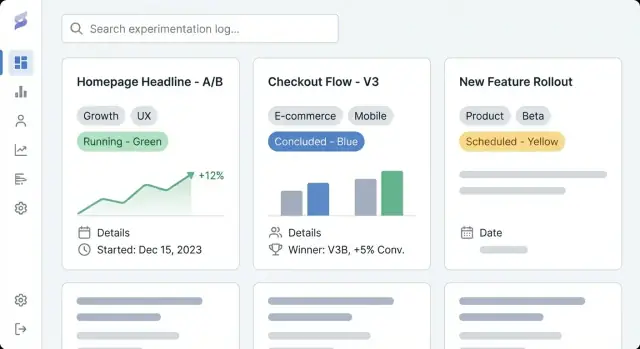
ਸਿੱਖੋ ਕਿ ਕਿਵੇਂ ਇੱਕ ਵੈੱਬਸਾਈਟ ਯੋਜਨਾ, ਡਿਜ਼ਾਈਨ ਅਤੇ ਲਾਂਚ ਕਰਨੀ ਹੈ ਜੋ ਪ੍ਰਯੋਗਾਂ ਦਾ ਦਸਤਾਵੇਜ਼ ਰੱਖੇ—ਇੱਕਸਾਰ ਐਂਟ੍ਰੀਆਂ, ਟੈਗਿੰਗ, ਸਰਚ ਅਤੇ ਸਪਸ਼ਟ ਨਤੀਜੇ ਸਮੇਤ।
A product experimentation log website is a shared place to document every experiment your team runs—A/B tests, pricing trials, onboarding tweaks, feature flags, email experiments, and even “failed” ideas that still taught you something. Think of it as an experiment repository and product learning log combined: a record of what you tried, why you tried it, what happened, and what you decided next.
Most teams already have fragments of experiment tracking spread across docs, dashboards, and chat threads. A dedicated experiment tracking website pulls those artifacts into a single, navigable history.
The practical outcomes are:
This guide focuses on how to build a website that makes experiment documentation easy to create and easy to use. We’ll cover how to plan structure and navigation, define an experiment entry data model (so entries stay consistent), create readable page templates, set up tagging and search for fast discovery, and choose the right implementation approach (CMS vs. custom app).
By the end, you’ll have a clear plan for an A/B test documentation site that supports day-to-day product work—capturing hypotheses, metrics and results reporting, and decisions in a way that’s searchable, trustworthy, and useful over time.
Before you pick tools or design experiment templates, get clear on why this experiment tracking website exists and who it serves. A product experimentation log is only useful if it matches how your teams actually make decisions.
Write down 2–4 measurable outcomes for the experiment repository. Common definitions of success include:
These goals should influence everything later: what fields you require in each entry, how strict your workflow is, and how advanced your tagging and search needs to be.
List your primary audiences and what they need to do in the product learning log:
A simple way to validate this: ask each group, “What question do you want answered in 30 seconds?” Then make sure your experiment templates and page layout support that.
Decide early whether your CMS for experiment logs should be:
If you choose mixed access, define what’s allowed in public entries (e.g., no raw metrics, anonymized segments, no unreleased feature names) and who approves publication. This prevents rework later when your team wants to share learnings externally.
A product experimentation log only works if people can find the right experiment in under a minute. Before you pick tools or design screens, decide how someone will browse your experiment tracking website when they don’t know what they’re looking for.
Keep the main navigation limited and predictable. A practical starting point is:
If “Metrics” feels heavy, you can link to it from Experiments at first and expand later.
Decide the main “shape” of browsing. Most product learning logs work best with one primary view and the rest handled by filters:
Choose the one your stakeholders already use in conversations. Everything else can be tags (e.g., platform, hypothesis theme, segment, experiment type).
Make URLs readable and stable so people can share them in Slack and tickets:
/experiments/2025-12-checkout-free-shipping-thresholdAdd breadcrumbs like Experiments → Checkout → Free shipping threshold to prevent dead ends and keep scanning intuitive.
List what you’ll publish on day one versus later: recent experiments, top playbooks, a core metrics glossary, and team pages. Prioritize entries that will be referenced often (high-impact tests, canonical experiment templates, and metric definitions used in results reporting).
A useful product experimentation log isn’t just a list of links—it’s a database of learnings. The data model is the “shape” of that database: what you store, how entries relate, and which fields must be present so experiments stay comparable over time.
Start with a small set of content types that match how teams actually work:
Keeping these separate prevents every experiment from inventing new metric names or burying decisions in free-text notes.
Make the “minimum viable entry” easy to complete. At a minimum, require:
Optional—but often valuable—fields include target audience, traffic allocation, test type (A/B, multivariate), and links to tickets or designs.
Results are where logs usually fall apart, so standardize them:
If you allow attachments, keep a consistent slot for screenshots so readers know where to look.
Model relationships explicitly so discovery and reporting work later:
Standardize statuses so sorting and dashboards stay meaningful: proposed, running, concluded, shipped, archived. This prevents “done,” “complete,” and “finished” from turning into three different states.
Good templates turn “someone’s notes” into a shared record the whole company can scan, trust, and reuse. The goal is consistency without making authors feel like they’re filling out paperwork.
Start with the information a reader needs to decide whether to keep reading.
/docs/...), and primary metric.Your index page should behave like a dashboard. Include filters for status, team, tag, date range, and platform; sorting by recently updated, start date, and (if you can quantify it) impact; and quick-scan fields like status, owner, start/end dates, and a one-line result.
Create one default template plus optional variants (e.g., “A/B test,” “Pricing test,” “Onboarding experiment”). Prefill headings, example text, and required fields so authors don’t start from a blank page.
Use a single-column layout, generous line spacing, and clear typography. Keep key facts in a sticky summary block (where it makes sense), and make tables horizontally scrollable so results stay readable on phones.
A product experimentation log is only useful if people can quickly find relevant learnings. Tagging and taxonomy turn a pile of experiment pages into something you can browse, filter, and reuse.
Define a handful of tag groups that match how your team naturally searches. A practical baseline is:
Keep the number of groups limited. Too many dimensions makes filtering confusing and encourages inconsistent tagging.
Uncontrolled tags quickly become “signup,” “sign-up,” and “registration” all at once. Create a controlled vocabulary:
A simple approach is a “tag registry” page the team maintains (e.g., /experiment-tags) plus lightweight review during experiment write-ups.
Tags are great for discovery, but some attributes should be structured fields to stay consistent:
Structured fields power reliable filters and dashboards, while tags capture nuance.
Help readers jump between connected work. Add sections like Related experiments (same feature or metric) and Similar hypotheses (same assumption tested elsewhere). This can be manual links at first, then later automated with “shared tags” rules to suggest neighbors.
This decision sets the ceiling for what your product experimentation log can become. A CMS can get you publishing quickly, while a custom application can turn the log into a tightly integrated system for decision-making.
A CMS is a good fit when your main need is consistent, readable A/B test documentation with light structure.
Use a CMS if you want:
Typical pattern: a headless CMS (content stored in the CMS, presented by your site) paired with a static site generator. This keeps the experiment repository fast, easy to host, and friendly for non-technical contributors.
A custom experiment tracking website makes sense when the log must connect directly to your product data and internal tools.
Consider a custom app if you need:
If you want to prototype this quickly, a vibe-coding platform like Koder.ai can be a practical shortcut: you can describe the data model (experiments, metrics, decisions), page templates, and workflows in chat, then iterate on a working React + Go + PostgreSQL app, with deployment/hosting, source export, and snapshots/rollback for safe changes.
Be explicit about where experiment data lives.
Write this down early—otherwise teams end up with duplicate entries across docs, spreadsheets, and tools, and the product learning log stops being trusted.
Your experimentation log doesn’t need exotic technology. The best stack is the one your team can operate confidently, keep secure, and evolve without friction.
A static site (pre-built pages) is often the simplest choice: fast, inexpensive to host, and low maintenance. It works well if experiments are mostly read-only and updates happen through a CMS or pull requests.
A server-rendered app (pages generated on request) is a good fit when you need stronger access control, dynamic filters, or per-team views without complex client logic. It’s also easier to enforce permissions at the server level.
A single-page app (SPA) can feel very responsive for filtering and dashboards, but it adds complexity around SEO, auth, and initial load performance. Choose it only if you truly need app-like interactions.
If you’re building a custom app, also decide whether you want a conventional build pipeline or an accelerated approach. For example, Koder.ai can generate the core scaffolding (React UI, Go API, PostgreSQL schema) from a written spec, which is useful when you’re iterating on templates and workflows with multiple stakeholders.
Prioritize reliability (uptime, monitoring, alerting) and backups (automated, tested restores). Keep environment separation: at minimum, a staging environment for trying taxonomy changes, template updates, and permission rules before production.
Most teams eventually need SSO (Okta, Google Workspace, Azure AD), plus roles (viewer, editor, admin) and private areas for sensitive learnings (revenue, user data, legal notes). Plan this early so you don’t re-architect later.
Use caching (CDN and browser caching), keep pages lightweight, and optimize media (compressed images, lazy loading where appropriate). Fast page speed matters because people won’t use a log that feels slow—especially when they’re trying to find a past test during a meeting.
A product experimentation log becomes truly useful when people can find “that one test” in seconds—without knowing the exact title.
On-site search (built into your CMS or app database) is usually enough when you have a few hundred experiments, a small team, and simple needs like searching titles, summaries, and tags. It’s easier to maintain and avoids extra vendor setup.
An external search service (like Algolia/Elastic/OpenSearch) is worth it when you have thousands of entries, need lightning-fast results, want typo-tolerance and synonyms (e.g., “checkout” = “purchase”), or need advanced ranking so the most relevant experiments show up first. External search is also helpful if your content spans multiple sources (docs + log + wiki).
Search alone isn’t enough. Add filters that reflect real decision-making:
Make filters combinable (e.g., “Concluded + Last 90 days + Growth team + Activation metric”).
Saved views turn recurring questions into one-click answers:
Allow teams to pin shared views to navigation, and let individuals save personal views.
In search results, show a short results snippet: hypothesis, variant, audience, and the headline outcome. Highlight matched keywords in the title and summary, and surface a few key fields (status, owner, primary metric) so users can decide what to open without clicking into five pages.
A great experiment tracking website isn’t just pages and tags—it’s a shared process. Clear ownership and a lightweight workflow prevent half-finished entries, missing results, and “mystery decisions” months later.
Start by deciding who can create, edit, approve, and publish experiment entries. A simple model works for most teams:
Keep permissions consistent with your access level decisions (public vs. internal vs. restricted). If you support private experiments, require an explicit owner for each entry.
Define a short checklist that every experiment must satisfy before publishing:
This checklist can be a required form section inside your experiment templates.
Treat entries like living documents. Enable version history and require brief change notes for material updates (metric fix, analysis correction, decision reversal). This keeps trust high and makes audits painless.
Decide upfront how you’ll store sensitive info:
Governance doesn’t need to be heavy. It just needs to be explicit.
An experiment tracking website is only useful if people can find, trust, and reuse what’s inside it. Lightweight analytics helps you spot where the log is working—and where it’s quietly failing—without turning the site into a surveillance tool.
Start with a few practical signals:
If your analytics tool supports it, disable IP logging and avoid user-level identifiers. Prefer aggregated, page-level reporting.
Usage metrics won’t tell you if entries are complete. Add “content health” checks that report on the repository itself:
This can be as simple as a weekly report from your CMS/database or a small script that flags entries. The goal is to make gaps visible so owners can fix them.
Experiment write-ups should almost never contain personal user data. Keep entries free of:
Link to aggregated dashboards instead of embedding raw datasets, and store sensitive analysis in approved systems.
A/B test results are easy to misread out of context. Add a short disclaimer in your experiment template (and/or footer) noting that:
This keeps the log honest and reduces “cargo-cult” reuse of past outcomes.
A great experiment log isn’t “done” when the site is live. The real value shows up when teams trust it, keep it current, and can still find learnings six months later.
Most teams start with spreadsheets, slide decks, or scattered docs. Pick a small pilot batch (e.g., last quarter’s experiments) and map each source field to your new template.
If you can, import in bulk: export spreadsheets to CSV, then script or use a CMS importer to create entries in the new format. For documents, migrate the key summary fields first (goal, change, results, decision) and link to the original file for supporting detail.
Run one pass focused on consistency, not perfection. Common issues to catch:
This is also a good moment to agree on required fields for anything marked as completed.
Before announcing it, verify:
Set a light routine: monthly cleanup (stale drafts, missing results) and a quarterly taxonomy review (merge tags, add new categories thoughtfully).
Once the basics are stable, consider integrations: auto-link experiments to issue trackers, or pull in analytics context so each entry points to the exact dashboard used for results reporting.
If you’re evolving toward a custom application, you can also iterate in “planning mode” first—writing down workflows, required fields, and approval rules—then implement them. Platforms like Koder.ai support this kind of iterative build-and-refine cycle (with deploys, snapshots, and rollback) so your log can mature without a heavyweight rebuild.
ਇੱਕ product experimentation log website ਉਹ ਸਾਂਝਾ, ਖੋਜਯੋਗ ਰਿਪੋਜ਼ਿਟਰੀ ਹੈ ਜਿੱਥੇ ਪ੍ਰਯੋਗਾਂ (A/B ਟੈਸਟ, ਪ੍ਰਾਈਸਿੰਗ ਟ੍ਰਾਇਲ, onboarding ਬਦਲਾਵ, feature-flag ਰੋਲਆਊਟ, ਈਮੇਲ ਟੈਸਟ) ਨੂੰ ਦਰਜ ਕੀਤਾ ਜਾਂਦਾ ਹੈ। ਹਰ ਐਂਟ੍ਰੀ ਦਰਸਾਂਦੀ ਹੈ ਕਿ ਤੁਸੀਂ ਕੀ ਕੀਤਾ, ਕਿਉਂ ਕੀਤਾ, ਕੀ ਹੋਇਆ, ਅਤੇ ਅਗਲਾ ਫੈਸਲਾ ਕੀ ਸੀ—ਤਾਂ ਜੋ ਸਿੱਖਿਆ ਡੌਕਸ, ਡੈਸ਼ਬੋਰਡ ਜਾਂ ਚੈਟ ਵਿੱਚ ਖੋ ਨਾ ਜਾਵੇ।
2–4 ਮਾਪਯੋਗ ਨਤੀਜੇ ਪਰਿਭਾਸ਼ਿਤ ਕਰਕੇ ਸ਼ੁਰੂ ਕਰੋ, ਉਦਾਹਰਨ ਲਈ:
ਇਹ ਲਕੜੀ ਤੁਹਾਡੇ ਲੋੜੀਂਦੇ ਫੀਲਡ, ਵਰਕਫਲੋ ਦੀ ਕੜਕਾਈ ਅਤੇ ਟੈਕਸੋਨੋਮੀ/ਸਰਚ ਦੀ ਜਰੂਰਤ ਨੂੰ ਪ੍ਰਭਾਵਿਤ ਕਰਨੀਆਂ ਚਾਹੀਦੀਆਂ ਹਨ।
ਆਪਣੇ ਮੁੱਖ ਦਰਸ਼ਕ ਅਤੇ ਹਰ ਇੱਕ ਲਈ “30-ਸਕਿੰਟ ਦਾ ਸਵਾਲ” ਲਿਸਟ ਕਰੋ। ਆਮ ਲੋੜਾਂ ਵਿੱਚ ਸ਼ਾਮਲ ਹਨ:
ਫਿਰ ਟੈEMPLATE ਅਤੇ ਪੇਜ਼ ਲੇਆਉਟ ਐਸੇ ਬਣਾਓ ਕਿ ਉਹ ਤੁਰੰਤ ਉਨ੍ਹਾਂ ਦੇ ਸਵਾਲਾਂ ਦੇ ਜਵਾਬ ਦਿਖਾਉਣ।
ਤਿੰਨ ਮਾਡਲ ਵਿਚੋਂ ਚੁਣੋ:
ਜੇ ਤੁਸੀਂ mixed ਚੁਣਦੇ ਹੋ, ਤਾਂ ਸਰਜਨਾਤਮਕ ਐਂਟ੍ਰੀਆਂ ਲਈ ਚੀਜ਼ਾਂ ਪਰਿਭਾਸ਼ਿਤ ਕਰੋ (ਉਦਾਹਰਣ: ਰਾ ਮੈਟ੍ਰਿਕਸ ਨਹੀਂ, ਗੁਪਤ ਸੈਗਮੈਂਟ, unreleased ਫੀਚਰ ਨਾਮ ਨਹੀਂ) ਅਤੇ ਪ੍ਰਕਾਸ਼ਨ ਦੀ ਮਨਜ਼ੂਰੀ ਵਾਲੇ ਲੋਕ ਨਿਰਧਾਰਤ ਕਰੋ। ਇਹ ਬਾਅਦ ਵਿੱਚ ਦੁਬਾਰਤਾ ਕੰਮ ਤੋਂ ਬਚਾਏਗਾ।
ਉਪਰਲੈਵਲ ਨੈਵੀਗੇਸ਼ਨ ਨੂੰ ਸੀਮਤ ਅਤੇ ਭਵਿੱਖਬਾਣੀ ਰੱਖੋ, ਉਦਾਹਰਨ ਲਈ:
ਇੱਕ ਪ੍ਰਮੁੱਖ ਬ੍ਰਾਊਜ਼ਿੰਗ ਡਾਇਮੈਸ਼ਨ ਚੁਣੋ (ਉਤਪਾਦ ਖੇਤਰ, ਫਨਲ ਸਟੇਜ, ਜਾਂ ਟੀਮ), ਫਿਰ ਬਾਕੀ ਚੀਜ਼ਾਂ ਲਈ ਟੈਗ/ਫਿਲਟਰ ਵਰਤੋ।
ਹਰ ਐਂਟ੍ਰੀ ਲਈ ਇੱਕ ਘੱਟੋ-ਘੱਟ ਲਾਜ਼ਮੀ ਸੈੱਟ ਰੱਖੋ:
ਨਤੀਜਿਆਂ ਲਈ ਇੱਕਸਾਰ ਬਣਾਓ:
ਇੱਕ ਪੈਕਟਿਕਲ ਡਿਫਾਲਟ ਆਰਡਰ:
ਛੋਟੀ, ਪਛਾਣਯੋਗ ਟੈਗ ਰਣਨੀਤੀ ਨਾਲ ਸ਼ੁਰੂ ਕਰੋ ਜੋ ਲੋਕ ਕਿਵੇਂ ਖੋਜਦੇ ਹਨ ਉਸਨੂੰ ਮੈਚ ਕਰਦੀ ਹੋਵੇ; ਬੇਸਲਾਈਨ ਲਈ ਉਦਾਹਰਨ:
ਟੈਗ-ਸਪ੍ਰੌਲ ਨੂੰ ਰੋਕਣ ਲਈ ਨਾਮਕਰਨ ਨਿਯਮ ਬਣਾਓ (ਫਾਰਮੈਟ, ਕੇਸ, ਅਕਰੋਨਿਮ), ਨਵੇਂ ਟੈਗ ਕੌਣ ਬਣਾ ਸਕਦਾ ਹੈ, ਅਤੇ ਸੰਦੇਸ਼ਜਨਕ ਟੈਗਾਂ ਲਈ ਛੋਟੀ ਵਿਆਖਿਆ ਸ਼ਾਮਲ ਕਰੋ। ਮੂਲ ਗੁਣਾਂ (status, team/owner, experiment type) ਨੂੰ ਸਟ੍ਰਕਚਰਡ ਫੀਲਡ ਰੱਖੋ—ਟੈਗਾਂ ਨੂੰ ਨੁਆਨਸ ਕੈਪਚਰ ਕਰਨ ਲਈ ਛੱਡੋ।
ਇੱਕ CMS ਵਰਤੋਂ ਜੇ ਤੁਹਾਡੀ ਮੁੱਖ ਲੋੜ ਪਾਠਯੋਗ ਡੌਕਸ, ਮਨਜ਼ੂਰੀ ਅਤੇ ਮੁੱਢਲੀ ਟੈਗਿੰਗ ਹੈ ਅਤੇ non-technical ਯੂਜ਼ਰਾਂ ਲਈ ਅਨੁਕੂਲ ਐਡੀਟਰ ਚਾਹੀਦਾ ਹੈ।
ਕਸਟਮ ਐਪ ਲੋੜੀਂਦਾ ਹੈ ਜੇ ਤੁਸੀਂ ਚਾਹੁੰਦੇ ਹੋ:
ਜਿਹੜਾ ਵੀ ਰਸਤਾ ਚੁਣੋ, “source of truth” (CMS vs database/app) ਨੂੰ ਲਿਖੋ ਤਾਂ ਜੋ duplicate ਐਂਟ੍ਰੀਆਂ ਨਾ ਬਣਨ।
ਅਤੇ-ਸਰਚ ਅਤੇ filters ਸਹੀ ਤਰੀਕੇ ਨਾਲ ਹੋਣਗੇ ਤਾਂ ਲੌਗ ਰੋਜ਼ਾਨਾ ਵਰਤੋਂ ਯੋਗ ਬਣ ਜਾਵੇਗਾ:
ਲਿਸਟ ਰਿਜ਼ਲਟ ਵਿੱਚ ਇੱਕ ਛੋਟੀ outcome ਸਨਿੱਪੇਟ ਦਿਖਾਓ ਅਤੇ ਕੁਝ ਮੁੱਖ ਫੀਲਡ (status, owner, primary metric) ਵਿਖਾਓ ਤਾਂ ਕਿ ਯੂਜ਼ਰਾਂ ਨੂੰ ਘੱਟ-ਕਲਿਕ ਵਿੱਚ ਸਹੀ ਪ੍ਰਯੋਗ ਮਿਲ ਜਾਵੇ।
ਇਹ “ਨੋਟਸ” ਨੂੰ ਸਮੇਂ-ਸਮੇਂ ਤੇ ਤੁਲਨਯੋਗ ਰਿਕਾਰਡ ਬਣਾਉਂਦਾ ਹੈ।
ਇਸ ਤਰ੍ਹਾਂ ਪੇਜ਼ ਸਕੈਨ ਕਰਨ ਯੋਗ ਰਹਿੰਦੇ ਹਨ ਪਰ ਡੀਪਥ ਵੀ ਉਪਲਬਧ ਰਹਿੰਦੀ ਹੈ।