

Cách Meta-Framework Xây Dựng Trên Các Công Cụ Hiện Có (Giải Thích)
Tìm hiểu cách meta-framework đặt lên trên các thư viện và công cụ hiện có, thêm định tuyến, SSR/SSG, tải dữ liệu và pipeline build với những đánh đổi rõ ràng.
What a Meta-Framework Is (and Isn’t)
A meta-framework is a toolkit that sits on top of an existing framework (like React, Vue, or Svelte) and gives you a more complete “application starter kit.” You still write components the same way, but the meta-framework adds conventions, defaults, and extra capabilities that you’d otherwise have to assemble yourself.
The “on top of” idea: reuse + conventions
Meta-frameworks reuse the underlying framework for UI rendering, then standardize everything around it:
- Reuse: You’re not replacing React/Vue/Svelte—you’re building with them.
- Conventions: The meta-framework defines “the normal way” to do common tasks (folder structure, routing rules, data loading patterns), so teams spend less time debating or wiring things together.
That’s why tools like Next.js (React), Nuxt (Vue), and SvelteKit (Svelte) feel familiar, yet opinionated.
What you typically get out of the box
Most meta-frameworks bundle a set of features that commonly show up in real apps:
- Routing and app structure (often file-based routing)
- Multiple rendering options (client-side, server-side, or pre-rendered pages)
- Bundling and build configuration with sensible defaults
- Production concerns like caching knobs, environment handling, and integrations for deployment
The key point: meta-frameworks aim to turn “a UI library + a pile of decisions” into “an app you can ship.”
What it is not
A meta-framework is not automatically “better” or “faster,” and it’s more than a prettier project template. It introduces its own rules and abstractions, so you’ll need to learn its mental model.
Used well, it speeds up common work and reduces decision fatigue. Used blindly, it can add complexity—especially when you fight conventions or need something outside the happy path.
The Layer Cake: How the Pieces Stack Together
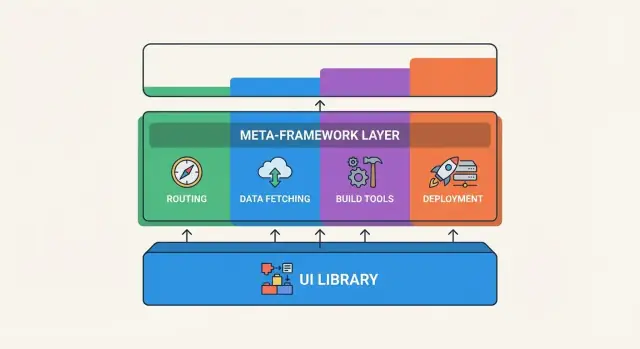
A meta-framework is easiest to understand as “a framework on top of a framework.” You still write the same UI components, but you’re also opting into conventions and runtime/build features that sit above your base tools.
A simple layer diagram
Think of it like a three-layer stack:
- Library (or base framework): React, Vue, Svelte, etc. This is where components, props, events, and state live.
- Meta-framework: Next.js, Nuxt, SvelteKit, etc. This adds routing, rendering options (SSR/SSG), data-loading patterns, build defaults, and deployment expectations.
- Your app: Your pages, features, UI, business rules, and integrations.
In other words: the meta-framework isn’t replacing the base framework—it’s organizing how you use it.
What stays the same
Most of what you already know from the underlying framework carries over.
You still build UI out of components. You can still use your preferred state patterns (local state, global stores, context, composables, etc.). The mental model of “render UI from data” remains central.
Many ecosystem choices also stay familiar: UI kits, form libraries, validation tools, and component testing often work the same way because you’re still using the same underlying framework.
What changes
The big shifts are less about individual components and more about how the project is shaped.
Project structure becomes meaningful. Instead of “put files wherever,” meta-frameworks often treat folders as configuration: where routes live, where API endpoints live, where layouts go, and how pages are grouped.
Build and runtime gain new responsibilities. A plain framework app typically compiles into client-side JavaScript. A meta-framework may also produce server code, pre-rendered HTML, or multiple builds (client + server). That changes how you think about environment variables, hosting, and performance.
Conventions start to drive behavior. File naming, special folders, and exported functions can control routing, data loading, and rendering mode. This can feel “magical” at first, but it’s usually just a consistent set of rules.
Why conventions matter for teams
Conventions are the meta-framework’s main value-add for non-trivial apps. When routing, layouts, and data fetching follow predictable patterns, teams spend less time debating structure and more time shipping features.
That consistency helps with onboarding (“pages go here, loaders go there”), reduces one-off architecture decisions, and makes refactoring safer because the framework enforces a shared shape.
The trade-off is that you’re buying into those rules—so it’s worth learning the “layer cake” early, before your app grows and changing structure becomes expensive.
Why Meta-Frameworks Exist
Meta-frameworks exist because building a web app isn’t just “pick a UI library and start coding.” Teams quickly run into recurring questions: How should routing work? Where does data loading live? How do you handle errors, redirects, and authentication? What’s the build and deploy story?
Teams want a “default way” to build
A meta-framework provides a default path—a set of conventions that answer big structural questions up front. That doesn’t remove flexibility, but it gives everyone a shared starting point so projects don’t become a patchwork of personal preferences.
Reducing decision fatigue
Without conventions, teams spend time debating (and re-debating) foundational choices:
- folder structure and routing patterns
- client vs server rendering boundaries
- data fetching approach and caching rules
- environment configuration and build settings
Meta-frameworks narrow the option space. Fewer choices means fewer “architecture meetings,” fewer one-off patterns, and more consistency across features.
Faster onboarding through predictability
New teammates can be productive sooner when the project follows recognizable conventions. If you’ve worked in Next.js, Nuxt, or SvelteKit before, you already know where pages live, how routes are created, and where server-side code is expected to go.
That predictability also helps in code reviews: reviewers can focus on what the feature does, not why it was implemented with a custom structure.
Shared solutions for common problems
Meta-frameworks bundle solutions that otherwise require stitching together multiple tools—often with edge cases and maintenance overhead. Typical examples include routing, rendering options, build pipelines, environment handling, and production-friendly defaults.
The payoff is simple: teams spend more time shipping product behavior and less time assembling (and reassembling) the app’s foundations.
Routing and App Structure as the First Big Add-On
One of the first things a meta-framework adds on top of a UI library is a clear, opinionated way to organize pages and navigation. Plain React, Vue, or Svelte can render anything you want—but they won’t tell you where to put “the profile page” or how URLs map to components. Meta-frameworks make that mapping a default.
File-based routing and nested layouts
With file-based routing, your folder structure becomes your site structure. Create a file, get a route. Rename a folder, the URL changes. This sounds simple, but it creates a shared “obvious place” for pages that teams quickly rely on.
Nested layouts take it further: shared UI (like a header, sidebar, or account navigation) can wrap groups of routes without repeating code. Instead of manually composing layouts in every page component, you define layout boundaries once and let the router stitch things together.
Code splitting and route-level loading states
Routing is also where performance decisions get baked in. Most meta-framework routers split code by route automatically, so users don’t download the whole app upfront. Visiting /pricing shouldn’t require loading your entire dashboard.
Many also standardize route-level loading states. Rather than inventing a new “loading spinner pattern” for each page, the framework provides a consistent way to show a skeleton while route data or components load, helping avoid jarring blank screens.
Handling 404s, redirects, and route params
Real apps need the unglamorous parts of navigation: 404 pages, redirects, and dynamic URLs.
- A 404 is typically just a special file or handler that the router recognizes.
- Redirects may be configured in a single place and applied consistently (useful for migrations).
- Route params (like
/blog/[slug]) become a standard way to express “this page depends on a URL value,” which then feeds into data loading.
How routing choices affect app structure
The routing model quietly shapes your whole application. If routes are tied to files, you’ll naturally organize features around URL boundaries. If nested layouts are encouraged, you’ll think in “sections” (marketing, app, settings) with shared shells.
These opinions can speed up development, but they also constrain you—so choose a meta-framework whose routing model matches how you want your product to evolve.
Rendering Modes: CSR, SSR, and Static Output
Meta-frameworks (like Next.js, Nuxt, and SvelteKit) usually give you multiple ways to render the same UI. Rendering is when and where the HTML for a page is produced.
CSR (Client-Side Rendering)
With CSR, the browser downloads a mostly empty HTML shell plus JavaScript, then builds the page on your device. This can feel smooth after the app loads (great for app-like experiences), but the first view may be slower on weak devices or slow networks.
CSR can also be harder for search engines and link previews, because the initial HTML doesn’t contain much content.
SSR (Server-Side Rendering)
With SSR, the server generates the HTML for each request and sends a ready-to-read page to the browser. The result: faster “first view,” better SEO, and more reliable shareable pages (social previews, crawlers, unfurl cards).
SSR often pairs with caching, so you’re not re-rendering everything for every visitor.
Static Output / SSG (Static Site Generation)
With static output, pages are generated ahead of time (during build) and served like simple files. This is usually the fastest and cheapest to serve, and it’s excellent for marketing pages, docs, and content that doesn’t change every second.
If you need fresher data, you can regenerate on a schedule or on demand, depending on the meta-framework.
What “hydration” means (and why it matters)
Even if the server (SSR) or build step (SSG) sends HTML, the page may still need JavaScript to become interactive (buttons, forms, menus). Hydration is the process where the browser “wires up” that HTML to the app’s JavaScript.
Hydration improves interactivity, but it adds JavaScript work—sometimes causing delays or jank if a page is heavy.
Trade-offs to watch
More rendering options usually mean more complexity: you’ll think about caching rules, where code runs (server vs browser), and how much server capacity you need. SSR can increase server costs and operational overhead, while CSR shifts more work to users’ devices.
Data Loading, Mutations, and Caching Conventions
One of the biggest “meta” benefits is that data work stops being a free-for-all. Instead of each page inventing its own pattern, meta-frameworks define where data fetching happens, how updates (mutations) are handled, and when cached data should be reused or refreshed.
Where data fetching happens: server, client, or both
Most meta-frameworks let you fetch data on the server (before the page is shown), on the client (after it loads), or in a hybrid way.
Server-side loading is great for faster first paint and SEO-friendly pages. Client-side fetching is useful for highly interactive screens, like dashboards, where you expect data to refresh often without a full navigation. Hybrid patterns usually mean “get the essential data on the server, then enhance on the client.”
Route loaders/actions and form handling
A common convention is splitting work into:
- Loaders (or equivalent): read data needed to render a route.
- Actions (or equivalent): handle writes—form submissions, button-triggered updates, deletes.
This structure makes forms feel less like custom plumbing and more like a feature of the framework. Instead of manually wiring a form to an API call and then figuring out how to update the UI, you follow the route’s “action” pattern, and the framework coordinates navigation, errors, and refresh.
Caching and revalidation basics
Meta-frameworks typically cache server results so repeated visits don’t re-fetch everything. Then they provide revalidation rules to decide when cached data becomes “stale” and should be refreshed.
Revalidation can be time-based (refresh every N minutes), event-based (refresh after a successful mutation), or manual (a specific “refresh this” trigger). The goal is simple: keep pages fast without showing outdated information for too long.
Avoiding duplicated fetch logic across pages
Without conventions, teams often copy and paste the same fetch code across multiple pages, then forget to update one of them later.
Meta-frameworks encourage centralizing data loading at the route level (or shared utilities) so a product list, for example, is fetched the same way wherever it appears. Combined with shared caching rules, this cuts down on bugs like “page A shows old data but page B shows new data,” and makes changes easier to roll out consistently.
Build Tools and Developer Experience
A meta-framework isn’t just “more features.” It also standardizes how you build and run your app. That’s why Next.js, Nuxt, and SvelteKit can feel smoother than wiring a bundler, router, SSR setup, and build scripts by hand—even when they ultimately rely on the same underlying tooling.
Bundlers: chosen, wrapped, or swapped
Most meta-frameworks either pick a bundler for you or wrap one behind a stable interface. Historically that might be Webpack; newer setups often center on Vite, or a framework-specific compiler layer.
The key idea: you interact with the meta-framework’s commands and conventions, while it translates that into bundler config. That gives you a consistent project shape (folders, entry points, build outputs), which makes examples and plugins portable across teams.
Dev server, hot reload, and production builds
Developer experience often improves most in development:
- A built-in dev server that knows your routing and rendering rules
- Fast refresh / hot module replacement tuned for the framework
- Error overlays that show where a problem originates (component, route, loader)
Production builds are where the meta-framework’s “opinionated defaults” really matter. It can split code automatically, pre-render routes when possible, and generate separate server/client bundles when SSR is enabled—without you creating multiple build pipelines.
Defaults vs escape hatches
Good meta-frameworks ship with sensible defaults: file-based routing, automatic code splitting, standard linting/testing recommendations, and a predictable build output.
But real apps eventually need exceptions. Look for escape hatches like:
- Extending bundler config (while keeping framework upgrades manageable)
- Custom server hooks or adapters
- Opting specific routes into different rendering behavior
Build times and debugging: the trade you feel later
Abstraction can hide complexity until something breaks. When builds slow down, it can be harder to tell whether the bottleneck is your code, a plugin, the bundler, or the meta-framework’s orchestration.
A practical tip: choose a meta-framework with strong diagnostics (build analysis, clear stack traces, documented config hooks). It pays off the first time you’re chasing a production-only issue.
Deployment Targets: Where the “Meta” Layer Runs
A meta-framework isn’t just “a nicer way to write components.” It also influences where your app runs after build—and that choice shapes performance, cost, and which features you can use.
Adapters and targets: Node, serverless, edge, static
Most meta-frameworks support multiple deployment targets, often via presets or adapters. Common options include:
- Node server: You deploy a server process that handles routing and rendering.
- Serverless functions: Pages and API routes run as on-demand functions.
- Edge runtime: Code runs close to users, with faster cold starts and tighter limits.
- Static hosting (CDN): You ship prebuilt files (HTML/CSS/JS) with no server.
The “meta” layer is the glue that packages your app appropriately for that target.
What the framework generates
Depending on your rendering choices and hosting target, the build may produce:
- Static assets only (pure static site)
- Static assets + server output (a server bundle, function bundle, or edge bundle)
- A mix (some routes static, others rendered on the server)
This is why two apps using the same framework can deploy very differently.
Environment variables and runtime configuration
Deployment usually involves two kinds of configuration:
- Build-time variables: baked into the generated files (useful for public settings).
- Runtime variables: read when the server/function runs (needed for secrets and per-environment values).
Meta-frameworks often enforce conventions about which variables are safe to expose to the browser.
How hosting choices affect SSR
If you want SSR, you need somewhere to execute server code (Node, serverless, or edge). Static hosting can still work, but only for routes that can be pre-rendered.
Choosing a target is less about branding (“serverless” vs “edge”) and more about constraints: execution limits, streaming support, access to Node APIs, and how quickly updates roll out.
Common Built-Ins: Auth Hooks, Middleware, and Security
Meta-frameworks often ship with “batteries included” features that feel like shortcuts—especially around authentication, request handling, and security. These built-ins can save days of wiring, but it helps to know what they actually provide (and what they don’t).
Auth patterns: sessions, tokens, and helpers
Most meta-framework ecosystems encourage a small set of common auth approaches:
- Cookie-based sessions (often paired with server-rendered routes): easier cookie handling and keeping session data on the server.
- Token-based auth (JWT or opaque tokens): helpers focus on extracting tokens from headers/cookies and passing user data through requests.
- Provider-based sign-in flows: many stacks integrate smoothly with auth libraries that handle OAuth callbacks and CSRF protection.
The “hook” part is usually convenience: a standard place to check the current user, redirect unauthenticated visitors, or attach auth state to the request context.
Middleware/guards for redirects and access control
Middleware (or route “guards”) is the traffic controller. It runs before a route handler or page render and can:
- Redirect to
/loginwhen a user isn’t signed in - Block access based on roles/permissions
- Enforce canonical URLs, locale rules, or onboarding steps
Because it’s centralized, middleware reduces duplicated checks scattered across pages.
Headers, cookies, and server-only secrets
Meta-frameworks often standardize access to request headers, cookies, and environment variables across server routes and rendering functions.
A key benefit is keeping server-only secrets (API keys, database credentials) out of browser bundles. Still, you need to understand which files/functions run on the server vs the client, and where environment variables are exposed.
Security responsibilities that still belong to you
Built-ins don’t replace security work. You’re still responsible for:
- Correct authorization checks (not just authentication)
- Secure cookie settings (HttpOnly, Secure, SameSite)
- CSRF protection where applicable
- Rate limiting, abuse prevention, and careful error handling
Meta-frameworks reduce boilerplate, but they don’t automatically make your app secure—you still define the rules.
Trade-Offs and Hidden Costs to Watch For
Meta-frameworks can feel like “everything you wanted, already wired up.” That convenience is real—but it has costs that are easy to miss when you’re reading the happy-path docs.
The learning curve of an opinionated structure
Most meta-frameworks don’t just add features; they add a preferred way to build an app. File-based routing, special folders, naming conventions, and prescribed data-loading patterns can speed up teams once learned.
The flip side is that you’re learning the meta-framework’s mental model in addition to the underlying UI framework. Even simple questions (“Where should this request run?” “Why did this page re-render?”) can have framework-specific answers.
Lock-in vs portability
Your React/Vue/Svelte components often remain portable, but the “app glue” usually isn’t:
- routes and layouts tied to file structure
- server-only handlers, middleware, and edge runtime APIs
- framework-specific data loaders, actions, and caching helpers
If you ever migrate, the UI code may move fairly cleanly, while the routing, rendering strategy, and data layer might need a rewrite.
Version churn and breaking changes
Meta-frameworks evolve quickly because they track multiple moving parts: the underlying framework, the build toolchain, and runtime targets (Node, serverless, edge). That can mean frequent major releases, deprecations, and changes in “recommended” patterns.
Budget time for upgrades and keep an eye on the release notes—especially when core concepts like routing, data fetching, or build output formats change.
Performance pitfalls
Abstractions can hide expensive work:
- Over-fetching: data loading conventions can encourage fetching “just in case,” especially in nested routes.
- Bundle bloat: default imports, polyfills, or server/client boundary mistakes can pull more code into the browser than expected.
- Hydration cost: SSR isn’t free—large pages can still feel slow if the client needs to hydrate too much interactive code.
The takeaway: meta-frameworks can deliver speed, but you still need to measure, profile, and understand what’s running where.
Choosing a Meta-Framework: A Practical Checklist
A meta-framework is rarely “better by default.” It’s better when it removes recurring work your project is already paying for in custom code, conventions, and glue. Use the checklist below to decide quickly and justify the decision to your team.
Signs you should adopt one
You’ll likely benefit from Next.js, Nuxt, or SvelteKit if most of these are true:
- You’re building a multi-page app (marketing pages + product pages + settings) and want consistent routing, layouts, and error handling.
- SEO or share previews matter, and you need reliable server rendering or static output without hand-rolled setups.
- Your team is growing, and you want a “default way” to do data loading, forms, redirects, and environment config.
- You expect multiple deployment environments (preview builds, staging, production) and want first-class support.
- You’re re-implementing the same patterns: route guards, loading states, caching, 404/500 pages, and build-time config.
Signs you should stay lean
Stay with a simpler setup (or even plain React/Vue/Svelte) if these fit:
- It’s a small widget embedded in an existing site.
- It’s a simple SPA behind login where SEO is irrelevant.
- You have strict constraints (ultra-minimal bundle, no server runtime, limited hosting options).
- You can’t afford framework-specific conventions right now (training, refactors, dependency updates).
Migration approach that reduces risk
Don’t rewrite everything. Start by introducing the meta-framework where it’s naturally isolated:
- One route first: add a new page (or section) and keep the rest of the app as-is.
- A new area: move “account,” “docs,” or “checkout” into the new structure while leaving legacy routes untouched.
Quick decision checklist
Ask and answer (in writing):
- What rendering mode(s) do we need now and in 12 months?
- Who owns routing, data fetching, and caching conventions today?
- What’s our deployment target, and does it match the framework’s strengths?
- What’s the exit plan if we outgrow it (or if APIs change)?
If you can’t answer #4, pause and prototype before committing.
Where Koder.ai Fits in This Picture
If you’re evaluating a meta-framework mainly to reduce “setup tax,” it can help to separate product architecture decisions (routing model, SSR/SSG strategy, data-loading conventions) from implementation effort (scaffolding, wiring, and repetitive glue code).
That’s a practical place for Koder.ai: it’s a vibe-coding platform where you can prototype and iterate on full-stack applications through chat, while still landing on a conventional stack (React on the web, Go + PostgreSQL on the backend, and Flutter for mobile when needed). In other words, you can explore how meta-framework conventions affect your app structure—then export source code, deploy, and roll back via snapshots if you decide to change direction.
This doesn’t replace learning your chosen meta-framework’s conventions, but it can compress the time between “we think we want SSR + file-based routing” and “we have a working, deployed slice we can measure and review.”
Câu hỏi thường gặp
What is a meta-framework in simple terms?
Meta-framework là một lớp trên một framework giao diện người dùng (như React, Vue hoặc Svelte) cung cấp cấu trúc ứng dụng hoàn chỉnh hơn.
Bạn vẫn xây UI bằng cùng mô hình component, nhưng meta-framework thêm các quy ước và tính năng như định tuyến, mẫu tải dữ liệu, các chế độ render (SSR/SSG/CSR) và mặc định cho build/deploy.
How is a meta-framework different from React/Vue/Svelte itself?
Thư viện/framework UI chủ yếu tập trung vào việc render component và quản lý state.
Meta-framework thêm các mảnh “cấp ứng dụng” mà bạn thường phải tự kết hợp:
- Định tuyến và layout
- Render phía máy chủ và tạo trang tĩnh
- Chuẩn hóa việc tải dữ liệu và các thao tác ghi
- Đầu ra build và các mục tiêu triển khai
Why do teams adopt meta-frameworks like Next.js, Nuxt, or SvelteKit?
Thường là vì đội muốn có một cách mặc định và nhất quán để xây dựng ứng dụng—đặc biệt khi ứng dụng lớn lên.
Meta-framework giảm bớt các quyết định lặp đi lặp lại về:
- Nơi đặt route và layout
- Nơi dữ liệu được tải (server hay client)
- Cách caching/revalidation hoạt động
- Cách build và deploy được tạo ra
What does “file-based routing” actually mean in practice?
File-based routing nghĩa là cấu trúc thư mục/tệp phản ánh cấu trúc URL.
Hệ quả thực tiễn:
- Tạo một trang thường là thêm một tệp
- Tham số route được biểu diễn trong tên tệp/thư mục
- Layout có thể được lồng bằng cách đặt các route dưới các tệp layout chia sẻ
Điều này giúp giảm độ mơ hồ về “trang này nằm ở đâu” cho đội.
What are nested layouts, and why do they matter?
Nested layouts cho phép bạn định nghĩa một khung UI chia sẻ (header/sidebar/nav) một lần và để một nhóm route render trong đó.
Lợi ích thường gặp:
- Tính nhất quán (navigation và kiểu dáng chung)
- Dễ bảo trì (thay đổi layout một lần, ảnh hưởng nhiều trang)
- Hiệu năng (code splitting theo route thường khớp với ranh giới layout)
What’s the difference between CSR, SSR, and static (SSG) in meta-frameworks?
Chúng là các cách khác nhau để quyết định khi nào và ở đâu HTML được sinh ra:
- CSR: HTML chủ yếu được xây trong trình duyệt sau khi JS tải.
- SSR: HTML được tạo trên server cho mỗi request (thường được cache).
- SSG/static: HTML được tạo tại thời điểm build và phục vụ từ CDN.
Meta-framework cho phép trộn các chế độ này theo route: trang marketing có thể là static, trong khi trang ứng dụng có thể SSR hoặc nặng client.
What is hydration, and why can it slow pages down?
Hydration là khi trình duyệt gắn hành vi JavaScript vào HTML đã được render sẵn (từ SSR hoặc SSG) để trang trở nên tương tác.
Nó quan trọng vì đó là một chi phí hiệu năng phổ biến:
- Trang nặng có thể nhìn nhanh (HTML đến sớm)
- Nhưng vẫn cảm thấy chậm nếu công việc hydration nhiều
Cách tiếp cận thực tế: giữ mã tương tác ban đầu nhỏ và tránh các component client không cần thiết trên trang nội dung nhiều.
How do meta-frameworks change data fetching, forms, and caching?
Meta-framework thường chuẩn hóa nơi tải dữ liệu và cập nhật để không phải mỗi trang sáng tạo một mẫu riêng.
Các quy ước phổ biến bao gồm:
- Loaders ở mức route (đọc dữ liệu cần để render)
- Actions ở mức route (xử lý submit form/mutations)
- Caching và quy tắc revalidation được tích hợp
Điều này giảm lặp mã fetch và làm cho cập nhật UI sau mutation predictable hơn.
How do deployment targets affect what features I can use?
Bởi vì SSR và các loader phía server cần môi trường thực thi server code.
Các mục tiêu triển khai thường gặp:
- Node server: tiến trình chạy lâu dài
- Serverless functions: hàm theo yêu cầu
- Edge runtime: chạy gần người dùng hơn nhưng giới hạn chặt
- Static hosting: chỉ dùng cho các route đã pre-render
Trước khi quyết định, hãy chắc hosting bạn chọn hỗ trợ các chế độ render bạn định dùng.
What are the hidden costs or downsides of using a meta-framework?
Những chi phí/nhược điểm thường gặp gồm:
- Đường cong học tập: quy ước tệp, quy tắc routing, ranh giới server/client
- Khóa nền tảng: route/loaders/middleware thường mang tính framework-specific
- Chi phí vận hành: SSR có thể tăng độ phức tạp và chi phí server
- Cạm bẫy hiệu năng: hydration, bundle bloat, over-fetching
Biện pháp thực tế: prototype một route thực tế end-to-end (data, auth, deploy) và đo hiệu năng trước khi di chuyển toàn bộ.