

01 अग॰ 2025·8 मिनट
स्थान-आधारित नोट्स ऐप कैसे बनाएं
स्थानीय-आधारित नोट्स ऐप बनाना सीखें—योजना, डिज़ाइन, जियोफेंसिंग, तकनीकी स्टैक, गोपनीयता, परीक्षण और लॉन्च के बारे में प्रमुख बातें।
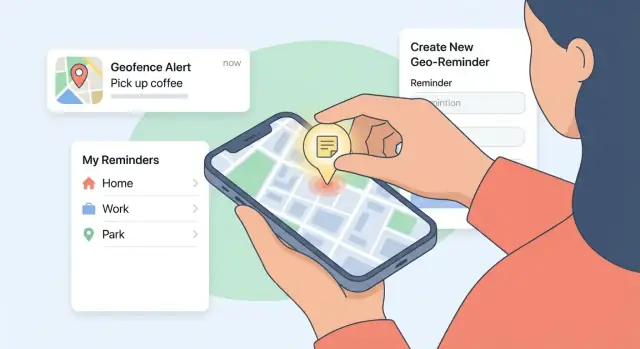
स्थानीय-आधारित नोट्स ऐप बनाना सीखें—योजना, डिज़ाइन, जियोफेंसिंग, तकनीकी स्टैक, गोपनीयता, परीक्षण और लॉन्च के बारे में प्रमुख बातें।
A location-based notes app is a notes app where each note is connected to a place (a specific address), a route (like your commute), or a general area (a radius around a point). Instead of digging through folders or searching at the exact moment you need something, the app uses your device’s location to surface the note automatically.
The core promise is simple: show the right note at the right place.
A note can be attached to a pin on a map, a saved place (like “Home” or “Office”), or a circular boundary (an area you enter or leave). When you cross that boundary, the app can display a reminder or notification.
Some apps also support a “nearby” mode, where opening the app shows notes close to your current position—useful when you don’t want notifications.
People use map-based notes because memory is contextual. A few popular patterns:
It’s tempting to start with shared notebooks, AI summaries, collaborative maps, and complex automation. For an MVP, you’re proving one thing: that users will reliably create notes because location makes them more useful.
Focus on the minimum experience that delivers the promise—create a note, attach a place or area, and have it appear at the right moment. Once people use it in real life, you can iterate based on what they actually do (and where they get annoyed): missed reminders, too many notifications, messy organization, or battery concerns.
An MVP for a location-based notes app isn’t “a smaller app.” It’s the smallest version that proves people will reliably capture notes tied to places and get useful reminders at the right time.
Choose a single “home” audience so every feature decision has a clear yes/no filter. Good options include:
You can support others later, but the MVP should sound like it was built for one group.
Keep jobs phrased as outcomes, not features. A solid MVP usually centers on:
If a feature doesn’t support one of these jobs, it likely belongs after launch.
Avoid vanity numbers and pick metrics that reflect real usage:
Set a baseline target (e.g., “70% of scheduled reminders are delivered within the expected time window”) so you can decide what to fix first.
Write a short “MVP includes / excludes” list. Common nice-to-haves to postpone: shared notes, attachments, advanced automation, full calendar integration, and complex tag systems.
Shipping a focused MVP prevents feature overload and creates cleaner feedback for iteration.
Your MVP should feel simple: create a note, tie it to a place, find it again fast. Everything else is optional.
Start with text notes as the default. Then add one or two formats that match real “on the go” use:
A good rule: every type must share the same core actions—create, edit, archive, and attach a location—so the app stays predictable.
You have three common ways to link notes to where they matter:
For the MVP, support pin + search. Saved places can be lightweight: let users star a location after they’ve used it once.
Instead of forcing users into a hierarchy, offer quick tools:
Folders can wait unless your research shows power users need them early.
Location-based notes are strongest when time is optional. Allow a time window (e.g., “only weekdays 8–10am”) alongside the location trigger. If users skip time, the note still works.
Search should cover title + body + tags + place name/address. Add simple filters like “Nearby,” “Favorites,” and “Archived” so users can find the right note in two taps.
जियोफेंसिंग एक सरल विचार है: आप किसी स्थान के चारों ओर एक अदृश्य वृत्त बनाते हैं, और आपका ऐप उपयोगकर्ता को तब रिमाइंडर दिखाता है जब वह उस क्षेत्र में प्रवेश करता है या निकास करता है। एक स्थान-आधारित नोट्स ऐप के लिए, यह “बाद में याद रखो” को “जब मैं वहाँ हूँ तब याद दिलाओ” में बदल देता है।
Most apps should support three trigger types:
Default to entering for the MVP; it matches user expectations and is easiest to explain.
A good starting default is 100–300 meters. Smaller radii can feel “accurate” but fail in dense cities; larger radii can trigger too early.
Make the radius adjustable with a simple control (like Small / Medium / Large) rather than a technical meter slider. Advanced users can still fine-tune if you offer a numeric option.
Location reminders are only useful if they’re not annoying.
GPS can be unreliable due to poor signal, urban canyons, and battery-saving modes that delay location updates. Handle late triggers gracefully (e.g., “You arrived near X” rather than claiming the user is exactly at the pin), and avoid spamming multiple alerts if the location “bounces” around the boundary.
A location-based notes app feels “instant” only if it works when the network doesn’t. That’s why your data model and offline approach should be decided early—changing them later is expensive.
Start by choosing whether the app works without an account.
A common compromise is: local-first by default, then offer optional sign-in for backup and sync.
Keep the first version simple and explicit. A practical note record often includes:
Avoid storing raw location history. Store only what’s required to power the note.
Define “offline mode” as a product feature: users can create, edit, tag, and search notes without connectivity. When the device is back online, you sync.
If you support multiple devices, plan conflict resolution up front. For an MVP, a reasonable approach is:
updated_at and a per-note versionThis keeps your app reliable without turning sync into a research project.
Location-based notes feel personal: they can reveal where someone lives, works, shops, or spends time. If users don’t trust your app, they won’t grant the permissions you need—and they won’t keep their notes there.
Don’t request location access on first launch “just because.” Instead, wait until the user tries to attach a place to a note or enable a location reminder.
Pair the system prompt with a simple pre-permission screen that explains the benefit in plain language. Keep your privacy copy specific. For example: “We use your location to trigger reminders near places you choose. We don’t track your location in the background unless you turn on ‘Always’ reminders.”
Ship with while-in-use by default, then offer always-on only when the user explicitly enables background reminders.
For a location-based notes app, you usually don’t need continuous GPS logging. Prefer storing:
Anything beyond that should have a clear, user-facing reason.
Include clear options to disable triggers, change notification behavior, delete notes (and associated places), and export data.
A simple “Privacy & Data” section (e.g., /privacy) helps users feel in control—and reduces support issues later.
A location-based notes app succeeds when it feels faster than “I’ll remember it later.” Your UX should minimize decisions, keep context visible, and make the next action obvious.
Map screen: A map with clustered pins plus a lightweight bottom sheet (preview of the selected note/place). This is for “What’s near me?” exploration.
List screen: A sortable, filterable list for “Show me everything.” Include quick filters (Nearby, Due/Triggered, Tagged) and a search bar.
Note editor: Title + body first, then a clear “Location trigger” section. Keep advanced options tucked away.
Place picker: Search places, drop a pin, or choose “Current location.” Show the radius preview on the map.
Settings: Notification toggles, permission status, privacy controls, and a link to /privacy.
Aim for a 4-step path:
Create note → Pick place → Choose trigger (Arrive/Leave) → Save.
Use progressive disclosure: default to a sensible radius (e.g., 200–300 m) and a single notification. Offer “More options” for custom radius, quiet hours, or repeat behavior.
Use readable text sizes, strong contrast, and large tap targets (especially on map pins and the radius control). Support Dynamic Type (iOS) / font scaling (Android). Don’t rely on color alone to communicate triggered vs. not triggered—add labels or icons.
Empty states should explain the value in one line and provide one action: “Add your first place-based note.”
Keep onboarding short: one screen explaining arrive/leave reminders, then permission prompts with plain-language rationale (why location is needed, and how it’s used). If the user skips permissions, keep the app usable with regular notes and show a gentle banner to enable location later.
Your tech stack should follow the MVP, not the other way around. A location-based notes app is mostly about reliable location triggers, fast search, and trust—so prioritize platform features that make those stable.
Native (Swift for iOS, Kotlin for Android) is the safest bet if geofencing and background behavior are central to the experience. You get first-class access to OS features, fewer edge cases, and easier troubleshooting when notifications don’t fire.
Cross-platform (Flutter or React Native) can work well for the UI (map + list + note editor) and speed up MVP delivery. The trade-off is that location/geofencing and background execution often require native modules anyway—so plan for some platform-specific work.
A practical split for MVP: build most screens in Flutter/React Native, but implement location + notification handling with native plugins you control.
Location features behave differently across OS versions and battery modes, so pick a stack where you can debug device-specific issues.
You have three common options:
If you’re trying to ship fast while keeping room to grow, it can help to prototype the full product flow (notes → places → triggers → settings) before you commit to a large engineering investment. For example, teams use Koder.ai to vibe-code MVPs from a chat interface, then export source code and iterate—useful when you want to validate UX, data model, and edge cases early. Koder.ai supports React for web dashboards, Go + PostgreSQL for backends, and Flutter for mobile apps, which maps well to a notes + geofencing product.
Firebase is a common “lightweight sync” route:
Add crash reporting early (Crashlytics, Sentry). Basic analytics (opt-in if possible) helps spot failures like “notification delivered late” or “geofence never triggered,” so you can fix the right problems after launch.
Storage and sync decisions shape how “instant” and “reliable” your location-based notes app feels—especially when the user has poor reception.
Even if you plan cloud sync, treat the on-device database as the source of truth during normal use.
Common choices:
Design your tables/collections so reads are fast for the main screens: “notes near me,” “notes for this place,” and search. Add indexes for place_id, updated_at, and any normalized tag mapping.
If users can store sensitive text (addresses, entry codes, personal reminders), plan encryption at rest. Options include SQLCipher (SQLite) or platform encryption APIs. Keep keys in the OS key store (Keychain on iOS, Keystore on Android) rather than in-app storage.
A practical baseline is per-record updated_at + device_id + version.
For conflicts, choose intentionally:
Document the rule and make it testable; “mystery” overwrites hurt trust.
Use soft delete locally and sync a tombstone (a deletion marker with timestamp). This prevents deleted notes from reappearing after a delayed sync.
Consider retention (e.g., keep tombstones for 30–90 days) to bound database growth while still supporting multi-device consistency.
Location features fail in subtle ways: a reminder fires late, drains the battery, or stops working after an OS update. Testing needs to reflect how people actually move through the world.
Mobile operating systems heavily limit background work. Your app might behave perfectly on a dev phone and still miss triggers in the wild.
Key constraints to account for:
Run a matrix of tests, not a single “walk around the block” check.
Use emulator/simulator location tools to quickly repeat scenarios (enter/exit loops, rapid jumps, long idle times). Then validate with field tests on multiple phones, with different carriers, and with Wi‑Fi on/off.
Track (anonymously) the funnel around location:
This helps you catch reliability issues early and prioritize fixes based on real user impact.
Once your MVP reliably creates a note, links it to a place, and surfaces it later (via search or geofencing reminders), “polish” should aim at speed and confidence—not adding a second product.
People repeat the same GPS notes: “Buy milk,” “Ask reception,” “Park on level 4.” Add Saved Places (Home, Office, Gym) so users don’t have to pin the map every time.
Pair that with lightweight templates:
Templates reduce friction without complicating your offline location notes or data model much—mostly preset text and tags.
Instead of full collaboration on day one, start with export/share:
This creates value immediately without building accounts, permissions, or complex conflict resolution. If you later add a backend like Firebase, sharing can upgrade into “share link” behavior.
Small suggestions can improve quality without touching core flows:
Keep these on-device when possible for a privacy-first location app, and make them easy to dismiss.
Quick capture is a superpower for a map-based notes app. Add:
This helps users create notes in seconds—before they forget why they opened the app—while keeping your MVP focused.
If you want a safe later-phase option, consider collaborative notes for teams only after you’ve nailed reliability, permissions, and push notifications.
Shipping a location-based notes app isn’t only “submit to stores and wait.” The first release sets expectations around accuracy, battery use, and privacy—so your launch materials and iteration plan matter as much as the code.
Before submitting to the App Store / Play Store, prepare a listing that answers the questions users will have after they install:
If you have a public pricing page or plan tiers, keep it consistent with in-app messaging: /pricing.
A short onboarding flow can prevent most negative reviews. Explain:
Consider a lightweight help center page you can update without app releases, e.g. /blog/geofencing-reminders-basics.
Add in-app pathways for:
Define your next three versions before launch:
Post-launch, review analytics weekly and ship small updates fast. Location apps earn trust through consistency.
एक MVP एक मूल व्यवहार साबित करता है: उपयोगकर्ता इसलिए नोट बनाते हैं क्योंकि स्थान उन्हें अधिक उपयोगी बनाता है।
शामिल करें सिर्फ़:
शेयरिंग, बड़े अटैचमेंट, जटिल टैग/फ़ोल्डर और डीप ऑटोमेशन को तब तक टालें जब तक असल उपयोग पैटर्न न दिखें।
एक लक्ष्य दर्शक चुनिये ताकि हर फ़ीचर निर्णय के लिए स्पष्ट हाँ/नहीं फ़िल्टर मिले।
अच्छे MVP दर्शक उदाहरण:
उस समूह के लिए 3–5 Jobs-to-Be-Done लिखें और उन चीज़ों को काट दें जो उनका समर्थन नहीं करतीं।
डाउनलोड्स की बजाय विश्वसनीयता और आदत पर आधारित मीट्रिक्स रखें।
प्रैक्टिकल MVP मीट्रिक्स:
एक साफ़ लक्ष्य सेट करें, जैसे “शेड्यूल किए गए जियोफेंस रिमाइंडर्स में से ≥70% अपेक्षित विंडो के भीतर डिलिवर होते हैं।”
सरल, सुसंगत नियम अपनाएँ:
अपनी परमिशन समझाने वाली स्क्रीन में स्पष्ट लिखें: हम स्थान का उपयोग उन स्थानों के पास रिमाइंडर ट्रिगर करने के लिए करते हैं जो आप चुनते हैं—न कि पृष्ठभूमि में आपकी लोकेशन हिस्ट्री बनाने के लिए।
जब वैल्यू तुरंत दिखे तभी परमिशन माँगे—सही अनुभव बनाए रखने के लिए।
अनुशंसित फ़्लो:
डिफ़ॉल्ट रूप से “While-in-use” चुनें, और केवल तभी “Always” अपसेल करें जब उपयोगकर्ता स्पष्ट रूप से बैकग्राउंड रिमाइंडर्स चालू करे।
अधिकांश वास्तविक मामलों के लिए 100–300 मीटर से शुरुआत करें।
रहنما सिद्धांत:
UI टिप: Small/Medium/Large प्रीसेट दें, और गंभीर उपयोगकर्ताओं के लिए उन्नत न्यूमेरिक ऑप्शन रखें। डिफ़ॉल्ट ट्रिगर “Arrive” रखें; यह समझने में आसान है और उपयोगकर्ता आशा से मेल खाता है।
ऑफलाइन को प्राथमिकता दें: बिना कनेक्टिविटी के भी नोट बनाना, एडिट और सर्च काम करना चाहिए।
आम तौर पर जरूरी फ़ील्ड:
कच्ची लोकेशन हिस्ट्री स्टोर करने से बचें—सिर्फ़ वही स्टोर करें जो नोट को पॉवर करे।
अगर आप सिंक जोड़ते हैं, तो कॉन्फ्लिक्ट व्यवहार पहले से तय करें।
प्रैक्टिकल MVP अप्रोच:
updated_at + version (वैकल्पिक device_id) ट्रैक करेंयदि जियोफेंसिंग विश्वसनीयता महत्वपूर्ण है तो नेटिव बिल्ड कम एज‑केस बनाते हैं।
विकल्प:
एक आम समझौता: UI (मैप/लिस्ट/एडिटर) क्रॉस‑प्लैटफ़ॉर्म में बनाएं और जियोफेंस/नोटिफ़िकेशन के लिए नेटिव लेयर रखें जिसे आप दोनों OS पर डिबग कर सकें।
“ब्लॉक के चारों ओर घूमकर” टेस्ट से आगे जाँचें। लोकेशन अलग‑अलग तरीकों से फेल होता है—डिवाइस, गति और पर्यावरण भर में।
एक उपयोगी टेस्ट मैट्रिक्स:
अनाम रूप से मॉनिटरिंग जोड़ें: परमिशन दिखाई गई → दी/नहीं, जियोफेंस रजिस्टर हुआ → नोटिफ़िकेशन शेड्यूल हुआ → डिलिवर हुआ—ताकि लॉन्च के बाद आप वास्तव में टूट रही चीज़ों को ठीक कर सकें।
डिलीशन्स के लिए, टॉम्बस्टोन्स (soft delete मार्कर) सिंक करें ताकि देरी से आने वाली सिंक के बाद हटाए गए नोट्स फिर से दिखाई न दें।