

08 मई 2025·8 मिनट
विक्रेता स्कोरिंग और समीक्षाओं के लिए वेब ऐप कैसे बनाएं
सीखें कि विक्रेता स्कोरकार्ड और समीक्षाओं के लिए वेब ऐप कैसे योजना बनाएं, डिजाइन करें और बनाएं — डेटा मॉडल, वर्कफ़्लो, अनुमतियाँ और रिपोर्टिंग सुझावों के साथ।
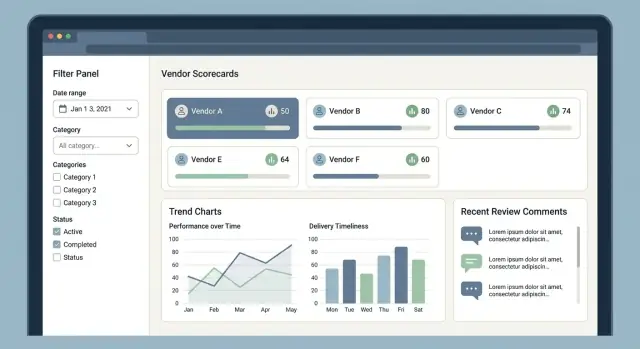
सीखें कि विक्रेता स्कोरकार्ड और समीक्षाओं के लिए वेब ऐप कैसे योजना बनाएं, डिजाइन करें और बनाएं — डेटा मॉडल, वर्कफ़्लो, अनुमतियाँ और रिपोर्टिंग सुझावों के साथ।
Before you sketch screens or pick a database, get crisp on what the app is for, who will rely on it, and what “good” looks like. Vendor scoring apps fail most often when they try to satisfy everyone at once—or when they can’t answer basic questions like “Which vendor are we actually reviewing?”
Start by naming your primary user groups and their day-to-day decisions:
A useful trick: pick one “core user” (often procurement) and design the first release around their workflow. Then add the next group only when you can explain what new capability it unlocks.
Write outcomes as measurable changes, not features. Common outcomes include:
These outcomes will later drive your KPI tracking and reporting choices.
“Vendor” can mean different things depending on your org structure and contracts. Decide early whether a vendor is:
Your choice affects everything: scoring rollups, permissions, and even whether one bad facility should impact the overall relationship.
There are three common patterns:
Make the scoring method understandable enough that a vendor (and an internal auditor) can follow it.
Finally, pick a few app-level success metrics to validate adoption and value:
With goals, users, and scope defined, you’ll have a stable foundation for the scoring model and workflow design that follow.
A vendor scoring app lives or dies by whether the score matches people’s lived experience. Before you build screens, write down the exact KPIs, scales, and rules so procurement, operations, and finance all interpret results the same way.
Start with a core set that most teams recognize:
Keep definitions measurable and tie each KPI to a data source or a review question.
Choose either 1–5 (easy for humans) or 0–100 (more granular), then define what each level means. For example, “On-time delivery: 5 = ≥ 98%, 3 = 92–95%, 1 = < 85%.” Clear thresholds reduce arguments and make reviews comparable across teams.
Assign category weights (e.g., Delivery 30%, Quality 30%, SLA 20%, Cost 10%, Responsiveness 10%) and document when weights change (different contract types may prioritize different outcomes).
Decide how to handle missing data:
Whatever you choose, apply it consistently and make it visible in drill-down views so teams don’t misread “missing” as “good.”
Support more than one scorecard per vendor so teams can compare performance by contract, region, or time period. This avoids averaging away issues that are isolated to a specific site or project.
Document how disputes affect scores: whether a metric can be corrected retroactively, whether a dispute temporarily flags the score, and which version is considered “official.” Even a simple rule like “scores recalculate when a correction is approved, with a note explaining the change” prevents confusion later.
A clean data model is what keeps scoring fair, reviews traceable, and reports believable. You want to answer simple questions reliably—“Why did this vendor get a 72 this month?” and “What changed since last quarter?”—without hand-waving or manual spreadsheets.
At minimum, define these entities:
This set supports both “hard” measured performance and “soft” user feedback, which typically need different workflows.
Model the relationships explicitly:
A common approach is:
scorecard_period (e.g., 2025-10)vendor_period_score (overall)vendor_period_metric_score (per metric, includes numerator/denominator if applicable)Add consistency fields across most tables:
created_at, updated_at, and for approvals submitted_at, approved_atcreated_by_user_id, plus approved_by_user_id where relevantsource_system and external identifiers like erp_vendor_id, crm_account_id, erp_invoice_idconfidence score or data_quality_flag to mark incomplete feeds or estimatesThese power audit trails, dispute handling, and trustworthy procurement analytics.
Scores change because data arrives late, formulas evolve, or someone corrects a mapping. Instead of overwriting history, store versions:
calculation_run_id) on each score row.For retention, define how long you keep raw transactions vs. derived scores. Often you retain derived scores longer (smaller storage, high reporting value) and keep raw ERP extracts for a shorter policy window.
Treat external IDs as first-class fields, not notes:
unique(source_system, external_id)).This groundwork makes later sections—integrations, KPI tracking, review moderation, and auditability—much easier to implement and explain.
A vendor scoring app is only as good as the inputs feeding it. Plan for multiple ingestion paths from day one, even if you start with one. Most teams end up needing a mix of manual entry for edge cases, bulk uploads for historical data, and API sync for ongoing updates.
Manual entry is useful for small suppliers, one-off incidents, or when a team needs to log a review immediately.
CSV upload helps you bootstrap the system with past performance, invoices, tickets, or delivery records. Make uploads predictable: publish a template and version it so changes don’t silently break imports.
API sync typically connects to ERP/procurement tools (POs, receipts, invoices) and service systems like helpdesks (tickets, SLA breaches). Prefer incremental sync (since last cursor) to avoid pulling everything every time.
Set clear validation rules at import time:
Store invalid rows with error messages so admins can fix and re-upload without losing context.
Imports will be wrong sometimes. Support re-runs (idempotent by source IDs), backfills (historical periods), and recalculation logs that record what changed, when, and why. This is critical for trust when a supplier’s score shifts.
Most teams do fine with daily/weekly imports for finance and delivery metrics, plus near-real-time events for critical incidents.
Expose an admin-friendly import page (e.g., /admin/imports) showing status, row counts, warnings, and the exact errors—so issues are visible and fixable without developer help.
Clear roles and a predictable approval path prevent “scorecard chaos”: conflicting edits, surprise rating changes, and uncertainty about what a vendor can see. Define access rules early, then enforce them consistently in the UI and API.
A practical starting set of roles:
Avoid vague permissions like “can manage vendors.” Instead, control specific capabilities:
Consider splitting “export” into “export own vendors” vs. “export all,” especially for procurement analytics.
Vendor Users should typically see only their own data: their scores, published reviews, and the status of open items. Limit reviewer identity details by default (e.g., show department or role rather than a full name) to reduce interpersonal friction. If you allow vendor replies, keep them threaded and clearly labeled as vendor-provided.
Treat reviews and score changes as proposals until approved:
Time-bound workflows help: for example, score changes may require approval only during monthly/quarterly close.
For compliance and accountability, log every meaningful event: who did what, when, from where, and what changed (before/after values). Audit entries should cover permissions changes, review edits, approvals, publishing, exports, and deletions. Make the audit trail searchable, exportable for audits, and protected from tampering (append-only storage or immutable logs).
A vendor scoring app succeeds or fails on whether busy users can find the right supplier fast, understand the score at a glance, and leave trustworthy feedback without friction. Start with a small set of “home base” screens and make every number explainable.
This is where most sessions begin. Keep the layout simple: vendor name, category, region, current score band, status, and last activity.
Filtering and search should feel instant and predictable:
Save common views (e.g., “Critical vendors in EMEA below 70”) so procurement teams don’t rebuild filters every day.
The vendor profile should summarize “who they are” and “how they’re doing,” without forcing users into tabs too early. Put contact details and contract metadata next to a clear score summary.
Show the overall score and the KPI breakdown (quality, delivery, cost, compliance). Every KPI needs a visible source: the underlying reviews, issues, or metrics that produced it.
A good pattern is:
Make review entry mobile-friendly: big touch targets, short fields, and quick commenting. Always attach reviews to a timeframe and (if relevant) a purchase order, site, or project so feedback stays actionable.
Reports should answer common questions: “Which suppliers are trending down?” and “What changed this month?” Use readable charts, clear labels, and keyboard navigation for accessibility.
Reviews are where a vendor scoring app becomes genuinely useful: they capture context, evidence, and the “why” behind the numbers. To keep them consistent (and defensible), treat reviews as structured records first, free-form text second.
Different moments call for different review templates. A simple starting set:
Each type can share common fields but allow type-specific questions, so teams don’t force-fit an incident into a quarterly form.
Alongside a narrative comment, include structured inputs that drive filtering and reporting:
This structure turns “feedback” into trackable work, not just text in a box.
Allow reviewers to attach proof in the same place they write the review:
Store metadata (who uploaded, when, what it relates to) so audits don’t become a scavenger hunt.
Even internal tools need moderation. Add:
Avoid silent edits—transparency protects both reviewers and vendors.
Define notification rules upfront:
Done well, reviews become a closed-loop feedback workflow instead of a one-time complaint.
Your first architectural decision is less about “latest tech” and more about how quickly you can ship a reliable vendor scoring and reviews platform without creating a maintenance burden.
If your goal is to move fast, consider prototyping the workflow (vendors → scorecards → reviews → approvals → reports) in a platform that can generate a working app from a clear spec. For example, Koder.ai is a vibe-coding platform where you can build web, backend, and mobile apps through a chat interface, then export source code when you’re ready to take it further. It’s a practical way to validate the scoring model and roles/permissions before investing heavily in custom UI and integration work.
For most teams, a modular monolith is the sweet spot: one deployable app, but organized into clear modules (Vendors, Scorecards, Reviews, Reporting, Admin). You get straightforward development and debugging, plus simpler security and deployments.
Move toward separate services only when you have a strong reason—e.g., heavy reporting workloads, multiple product teams, or strict isolation requirements. A common evolution path is: monolith now, then split out “imports/reporting” later if needed.
A REST API is typically the easiest to reason about and integrate with procurement tools. Aim for predictable resources and a few “task” endpoints where the system does real work.
Examples:
/api/vendors (create/update vendors, status)/api/vendors/{id}/scores (current score, historical breakdown)/api/vendors/{id}/reviews (list/create reviews)/api/reviews/{id} (update, moderate actions)/api/exports (request exports; returns job id)Keep heavy operations (exports, bulk recalcs) async so the UI stays responsive.
Use a job queue for:
This also helps you retry failures without manual firefighting.
Dashboards can be expensive. Cache aggregated metrics (by date range, category, business unit) and invalidate on meaningful changes, or refresh on a schedule. This keeps “open dashboard” fast while preserving accurate drill-down data.
Write API docs (OpenAPI/Swagger is fine) and maintain an internal, admin-friendly guide in a /blog-style format—e.g., “How scoring works,” “How to handle disputed reviews,” “How to run exports”—and link it from your app to /blog so it’s easy to find and keep updated.
Vendor scoring data can influence contracts and reputations, so you need security controls that are predictable, auditable, and easy for non-technical users to follow.
Start with the right sign-in options:
Pair authentication with role-based access control (RBAC): procurement admins, reviewers, approvers, and read-only stakeholders. Keep permissions granular (e.g., “view scores” vs “view review text”). Maintain an audit trail for score changes, approvals, and edits.
Encrypt data in transit (TLS) and at rest (database + backups). Treat secrets (DB passwords, API keys, SSO certificates) as first-class:
Even if your app is “internal,” public-facing endpoints (password reset, invite links, review submission forms) can be abused. Add rate limiting and bot protection (CAPTCHA or risk scoring) where it makes sense, and lock down APIs with scoped tokens.
Reviews often contain names, emails, or incident details. Minimize personal data by default (structured fields over free text), define retention rules, and provide tools to redact or delete content when required.
Log enough to troubleshoot (request IDs, latency, error codes), but avoid capturing confidential review text or attachments. Use monitoring and alerts for failed imports, scoring job errors, and unusual access patterns—without turning your logs into a second database of sensitive content.
A vendor scoring app is only as useful as the decisions it enables. Reporting should answer three questions quickly: Who is doing well, compared to what, and why?
Start with an executive dashboard that summarizes overall score, score changes over time, and a category breakdown (quality, delivery, compliance, cost, service, etc.). Trend lines are critical: a vendor with a slightly lower score but improving fast may be a better bet than a high scorer that’s slipping.
Make dashboards filterable by time period, business unit/site, vendor category, and contract. Use consistent defaults (e.g., “last 90 days”) so two people looking at the same screen get comparable answers.
Benchmarking is powerful—and sensitive. Let users compare vendors within the same category (e.g., “Packaging suppliers”) while enforcing permissions:
This avoids accidental disclosure while still supporting selection decisions.
Dashboards should link to drill-down reports that explain score movement:
A good drill-down ends with “what happened” evidence: related reviews, incidents, tickets, or shipment records.
Support CSV for analysis and PDF for sharing. Exports should mirror on-screen filters, include a timestamp, and optionally add an internal-use watermark (and viewer identity) to discourage forwarding outside the organization.
Avoid “black box” scores. Each vendor score should have a clear breakdown:
When users can see the calculation details, disputes become faster to resolve—and improvement plans become easier to agree on.
Testing a vendor scoring and reviews platform isn’t just about catching bugs—it’s about protecting trust. Procurement teams need confidence that a score is correct, and vendors need assurance that reviews and approvals are handled consistently.
Start by creating small, reusable test datasets that intentionally include edge cases: missing KPIs, late submissions, conflicting values across imports, and disputes (e.g., a vendor challenges a delivery SLA result). Include cases where a vendor has no activity for a period, or where KPIs exist but should be excluded due to invalid dates.
Your scoring calculations are the heart of the product, so test them like a financial formula:
Unit tests should assert not only final scores, but intermediate components (per-KPI scores, normalization, penalties/bonuses) to make failures easy to debug.
Integration tests should simulate end-to-end flows: importing a supplier scorecard, applying permissions, and ensuring only the right roles can view, comment, approve, or escalate a dispute. Include tests for audit trail entries and for blocked actions (e.g., a vendor attempting to edit an approved review).
Run user acceptance tests with procurement and a pilot vendor group. Track confusing moments and update UI text, validation, and help hints.
Finally, run performance tests for peak reporting periods (month-end/quarter-end), focusing on dashboard load times, bulk exports, and concurrent scoring recalculation jobs.
A vendor scoring app succeeds when people actually use it. That usually means shipping in phases, replacing spreadsheets carefully, and setting expectations about what will change (and when).
Start with the smallest version that still produces useful scorecards.
Phase 1: Internal-only scorecards. Give procurement and stakeholder teams a clean place to record KPI values, generate a supplier scorecard, and leave internal notes. Keep the workflow simple and focus on consistency.
Phase 2: Vendor access. Once internal scoring feels stable, invite vendors to view their own scorecards, respond to feedback, and add context (for example, “shipment delay caused by port closure”). This is where permissioning and an audit trail matter.
Phase 3: Automation. Add integrations and scheduled recalculation once you trust the scoring model. Automating too early can amplify bad data or unclear definitions.
If you want to shorten time-to-pilot, this is another spot where Koder.ai can help: you can stand up the core workflow (roles, review approval, scorecards, exports) quickly, iterate with procurement stakeholders in “planning mode,” and then export the codebase when you’re ready to harden integrations and compliance controls.
If you’re replacing spreadsheets, plan for a transition period rather than a big-bang cutover.
Provide import templates that mirror existing columns (vendor name, period, KPI values, reviewer, notes). Add import helpers such as validation errors (“unknown vendor”), previews, and a dry-run mode.
Also decide whether to migrate historical data fully or only bring in recent periods. Often, importing the last 4–8 quarters is enough to enable trend reporting without turning migration into a data archaeology project.
Keep training short and role-specific:
Treat scoring definitions as a product. KPIs change, categories expand, and weighting evolves.
Set a recalculation policy up front: what happens if a KPI definition changes? Do you recalculate historical scores or preserve the original calculation for auditability? Many teams keep historical results and recalculate only from an effective date.
As you move beyond the pilot, decide what’s included in each tier (number of vendors, review cycles, integrations, advanced reporting, vendor portal access). If you’re formalizing a commercial plan, outline packages and link to /pricing for details.
If you’re evaluating build vs. buy vs. accelerate, you can also treat “how fast can we ship a trustworthy MVP?” as a packaging input. Platforms like Koder.ai (with tiers from free to enterprise) can be a practical bridge: build and iterate quickly, deploy and host, and still keep the option to export and own the full source when your vendor scoring program matures.
एक “कोर यूज़र” चुनकर और पहले रिलीज़ को उनके वर्कफ़्लो के लिए अनुकूलित करके शुरू करें (अक्सर procurement)। नीचे लिखें:
यदि किसी अन्य समूह की सुविधाएँ जोड़नी हों, तो तब जोड़ें जब आप स्पष्ट बता सकें कि वह नया कबिलियत कौन सा निर्णय सक्षम करेगी।
शुरू में किसी एक परिभाषा का चुनाव करें और अपने डेटा मॉडल को उसी के इर्द‑गिर्द डिजाइन करें:
यदि अनिश्चित हों, तो vendor को पैरेंट के रूप में और उसके बच्चे (साइट/सर्विस लाइन) के रूप में मॉडल करें ताकि बाद में रोल‑अप या ड्रिल‑डाउन कर सकें।
Weighted KPIs तब उपयोग करें जब आपके पास भरोसेमंद ऑपरेशनल डेटा हो और आप automation व transparency चाहते हों। Rubrics तब उपयोगी हैं जब प्रदर्शन ज़्यादातर गुणात्मक हो या टीमों के बीच असंगत हो।
एक व्यावहारिक डिफ़ॉल्ट है Hybrid:
जो भी चुनें, तरीका auditor और vendors के लिए समझने योग्य होना चाहिए।
एक छोटा सेट चुनें जिसका अधिकतर स्टेकहोल्डर्स परिचित हों और जिसे लगातार मापा जा सके:
प्रत्येक KPI के लिए परिभाषा, स्केल और डेटा स्रोत UI/रिपोर्ट बनाने से पहले दस्तावेज़ करें।
लोग जो बोलकर समझा सकें ऐसे स्केल चुनें (आम तौर पर 1–5 या 0–100) और हर स्तर का स्पष्ट अर्थ लिखें.
उदाहरण:
“वाइब”-आधारित नंबर से बचें। स्पष्ट थ्रेशहोल्ड्स रिव्यूअर के विवाद कम करते हैं और टीमों/साइट्स के बीच तुलना को निष्पक्ष बनाते हैं।
प्रति KPI एक नीति चुनें और उसे दस्तावेज़ करें:
साथ ही data_quality_flag जैसे फ़ील्ड स्टोर करें ताकि रिपोर्ट्स “खराब प्रदर्शन” और “अज्ञात प्रदर्शन” अलग दिखा सकें।
विवादों को वर्कफ़्लो के रूप में व्यवहार करें और इतिहास को चुपचाप बदलने से बचें:
हर स्कोर रो पर calculation_run_id जैसा वर्शन आइडेंटिफ़ायर रखें ताकि आप भरोसेमंद रूप से बता सकें “पिछली तिमाही से क्या बदला?”।
न्यूनतम रूप से एक ठोस स्कीमा में ये टेबल शामिल हों:
ट्रेसबिलिटी के लिए timestamps, actor IDs, source system + external IDs और score/version reference जैसे फ़ील्ड जोड़ें ताकि हर संख्या समझाई और पुनरुत्पादित की जा सके।
कई इन्गेस्ट पाथ्स प्लान करें:
इम्पोर्ट के समय जरूरी फ़ील्ड, न्यूमेरिक रेंज और डुप्लिकेट डिटेक्शन लागू करें। invalid rows को errors के साथ स्टोर करें ताकि एडमिन उन्हें ठीक करके री‑रन कर सकें।
RBAC इस्तेमाल करें और परिवर्तन को proposal के रूप में हैंडल करें:
हर महत्वपूर्ण इवेंट (edits, approvals, exports, permission changes) को लॉग करें—before/after मानों के साथ—ताकि विश्वास बना रहे और ऑडिट आसान हो।