

Acceptance tests from prompts: turn features into scenarios
Learn acceptance tests from prompts by turning each feature request into 5-10 clear scenarios, covering happy paths and edge cases without bloated test suites.
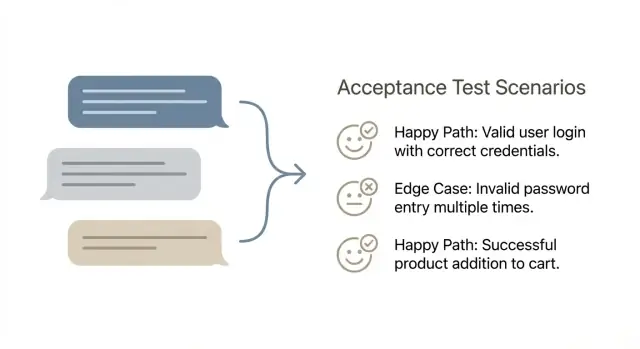
Why feature prompts turn into missed requirements
Chat-style feature prompts feel clear because they read like a conversation. But they often pack choices, rules, and exceptions into a few friendly sentences. The gaps don’t show up until someone uses the feature for real.
Most prompts quietly rely on assumptions: who is allowed to do the action, what counts as “success” (saved, sent, published, paid), what happens when data is missing, and what the user should see when something fails. They also hide fuzzy standards like what “fast enough” or “secure enough” means.
Ambiguity usually shows up late as bugs and rework. A developer builds what they think the prompt means, a reviewer approves it because it looks right, and then users hit the weird cases: duplicate submissions, time zones, partial data, or permission mismatches. Fixing these later costs more because it often touches code, UI text, and sometimes the data model.
Quality doesn’t require huge test suites. It means you can trust the feature in normal use and under predictable stress. A small set of well-chosen scenarios gives you that trust without hundreds of tests.
A practical definition of quality for prompt-built features:
- The main user goal works end-to-end (happy path).
- The top failure modes are handled cleanly (clear errors, no silent corruption).
- The feature behaves consistently (same input, same outcome).
- Nothing dangerous happens by accident (wrong-user access, duplicate actions).
That’s the point of turning prompts into acceptance scenarios: take a fuzzy request and turn it into 5-10 checks that surface the hidden rules early. You’re not trying to test everything. You’re trying to catch the failures that actually happen.
If you build from a quick prompt in a vibe-coding tool like Koder.ai, the output can look complete while still skipping edge rules. A tight scenario set forces those rules to be named while changes are still cheap.
What a good acceptance test scenario looks like
An acceptance test scenario is a short, plain-language description of a user action and the result they should see.
Stay on the surface: what the user can do, and what the product shows or changes. Avoid internal details like database tables, API calls, background jobs, or which framework is used. Those details might matter later, but they make scenarios brittle and harder to agree on.
A good scenario is also independent. It should be easy to run tomorrow on a clean environment, without relying on another scenario having run first. If a scenario depends on prior state, say it clearly in the setup (for example, “the user already has an active subscription”).
A simple shape that works
Many teams use Given-When-Then because it forces clarity without turning scenarios into a full spec.
A scenario is usually “done” when it has one goal, a clear starting state, a concrete action, and a visible result. It should be binary: anyone on the team can say “pass” or “fail” after running it.
Example: “Given a signed-in user with no saved payment method, when they choose Pro and confirm payment, then they see a success message and the plan shown as Pro in their account.”
If you’re building in a chat-first builder like Koder.ai, keep the same rule: test the behavior of the generated app (what the user experiences), not how the platform produced the code.
Pick a scenario format your team will actually use
The best format is the one people will write and read. If half the team uses long narratives and the other half writes terse bullets, you’ll get gaps, duplicates, and arguments about wording instead of quality.
Given-When-Then works well when the feature is interactive and stateful. A simple table works well when you have input-output rules and many similar cases.
If your team is split, pick one format for 30 days and adjust once. If reviewers keep asking “what does success look like?”, that’s usually a sign to move toward Given-When-Then. If scenarios are getting wordy, a table might be easier to scan.
Whatever you pick, standardize it. Keep the same headings, the same tense, and the same level of detail. Also agree on what not to include: pixel-perfect UI details, internal implementation, and database talk. Scenarios should describe what a user sees and what the system guarantees.
Where to store scenarios so they don’t vanish
Put scenarios where work already happens and keep them close to the feature.
Common options include storing them next to the product code, in your tickets under an “Acceptance scenarios” section, or in a shared doc space with one page per feature. If you’re using Koder.ai, you can also keep scenarios in planning mode so they stay with the build history alongside snapshots and rollback points.
The key is to make them searchable, keep one source of truth, and require scenarios before development is considered “started.”
Step-by-step: convert one feature prompt into 5-10 scenarios
Start by rewriting the prompt as a user goal plus a clear finish line. Use one sentence for the goal (who wants what), then 2-4 success criteria you can verify without arguing. If you can’t point to a visible outcome, you don’t have a test yet.
Next, pull the prompt apart into inputs, outputs, and rules. Inputs are what the user provides or selects. Outputs are what the system shows, saves, sends, or blocks. Rules are the “only if” and “must” statements hidden between the lines.
Then check what the feature depends on before it can work. This is where scenario gaps hide: required data, user roles, permissions, integrations, and system states. For example, if you’re building an app in Koder.ai, call out whether the user must be logged in, have a project created, or meet any plan or access requirements before the action can happen.
Now write the smallest set of scenarios that proves the feature works: usually 1-2 happy paths, then 4-8 edge cases. Keep each scenario focused on one reason it might fail.
Good edge cases to pick (only what fits the prompt): missing or invalid input, permission mismatch, state conflicts like “already submitted,” external dependency issues like timeouts, and recovery behavior (clear errors, safe retry, no partial save).
Finish with a quick “what could go wrong?” pass. Look for silent failures, confusing messages, and places where the system could create wrong data.
How to write the happy path without overthinking it
A happy path scenario is the shortest, most normal route where everything goes right. If you keep it boring on purpose, it becomes a reliable baseline that makes edge cases easier to spot later.
Name the default user and default data. Use a real role, not “User”: “Signed-in customer with a verified email” or “Admin with permission to edit billing.” Then define the smallest sample data that makes sense: one project, one item in a list, one saved payment method. This keeps scenarios concrete and reduces hidden assumptions.
Write the shortest path to success first. Remove optional steps and alternate flows. If the feature is “Create a task,” the happy path shouldn’t include filtering, sorting, or editing after creation.
A simple way to keep it tight is to confirm four things:
- The user sees the right screen or state at the right time.
- The system shows the right message (success, confirmation, or next instruction).
- The data is saved (what is stored, not how).
- The user can continue (the next sensible action is available).
Then add one variant that changes only one variable. Pick the variable most likely to break later, like “title is long” or “user has no existing items,” and keep everything else identical.
Example: if your prompt says, “Add a ‘Snapshot created’ toast after saving a snapshot,” the happy path is: user clicks Create Snapshot, sees a loading state, gets “Snapshot created,” and the snapshot appears in the list with the right timestamp. A one-variable variant could be the same steps, but with a blank name and a clear default naming rule.
A practical menu of edge cases to choose from
Edge cases are where most bugs hide, and you don’t need a huge suite to catch them. For each feature prompt, pick a small set that reflects real behavior and real failure modes.
Common categories to pull from:
- Input problems (empty values, too long, wrong format, special characters).
- State problems (no permission, session expired, required data missing, account not verified).
- Concurrency problems (double-click submits twice, two tabs editing at once, retries after a spinner).
- Integration problems (timeouts, unavailable provider, partial failure, rate limits).
- Data problems (duplicates, record deleted mid-flow, stale data, rounding issues).
Not every feature needs every category. A search box cares more about input. A payment flow cares more about integration and data.
Choose edge cases that match risk: high cost of failure (money, security, privacy), high frequency, easy-to-break flows, known past bugs, or issues that are hard to detect after the fact.
Example: for “user changes subscription plan,” scenarios that often pay off are session expiration at checkout, double-click on “Confirm,” and a payment provider timeout that leaves the plan unchanged while showing a clear message.
Worked example: one feature prompt to a tight scenario set
Example feature prompt (plain language):
“When I break something, I want to roll my app back to a previous snapshot so the last working version is live again.”
Below is a compact scenario set. Each scenario is short, but it pins down an outcome.
Happy paths (2)
S1 [Must-have] Roll back to the most recent snapshot
Given I am logged in and I own the app
When I choose “Rollback” and confirm
Then the app deploys the previous snapshot and the app status shows the new version as active
S2 [Must-have] Roll back to a specific snapshot
Given I am viewing the snapshot list for my app
When I select snapshot “A” and confirm rollback
Then snapshot “A” becomes the active version and I can see when it was created
Edge cases (6)
S3 [Must-have] Not allowed (auth)
Given I am logged in but I do not have access to this app
When I try to roll back
Then I see an access error and no rollback starts
S4 [Must-have] Snapshot not found (validation)
Given a snapshot ID does not exist (or was deleted)
When I attempt to roll back to it
Then I get a clear “snapshot not found” message
S5 [Must-have] Double submit (duplicates)
Given I click “Confirm rollback” twice quickly
When the second request is sent
Then only one rollback runs and I see a single result
S6 [Must-have] Deployment failure (failures)
Given the rollback starts
When deployment fails
Then the currently active version stays live and the error is shown
S7 [Nice-to-have] Timeout or lost connection
Given my connection drops mid-rollback
When I reload the page
Then I can see whether rollback is still running or finished
S8 [Nice-to-have] Already on that snapshot
Given snapshot “A” is already active
When I try to roll back to snapshot “A”
Then I’m told nothing changed and no new deployment starts
Each scenario answers three questions: who is doing it, what they do, and what must be true afterward.
How to keep coverage high and suites small
The goal isn’t “test everything.” The goal is to cover the risks that would hurt users, without creating a pile of scenarios nobody runs.
One practical trick is to label scenarios by how you expect to use them:
- Smoke: 1-2 scenarios that prove the feature works end-to-end.
- Regression: 2-6 scenarios for important rules and past bugs.
- Exploratory: a few “try this” checks for odd cases and UX judgment.
Limit yourself to one scenario per distinct risk. If two scenarios fail for the same reason, you probably only need one. “Invalid email format” and “missing email” are different risks. But “missing email on Step 1” and “missing email on Step 2” might be the same risk if the rule is identical.
Also avoid duplicating UI steps across many scenarios. Keep the repeated parts short and focus on what changes. This matters even more when building in a chat-based tool like Koder.ai, because the UI can shift while the business rule stays the same.
Finally, decide what to check now vs later. Some checks are better manual at first, then automated once the feature stabilizes:
- Manual now: wording, layout, visual states, “feels confusing” moments.
- Automate soon: calculations, permissions, data saved correctly, critical flows.
- Automate later: rare device quirks, unusual browser timing, third-party failures.
Common mistakes that make scenarios useless
A scenario should protect you from surprises, not describe how the team plans to build the feature.
The most common failure is turning a user goal into a tech checklist. If the scenario says “API returns 200” or “table X has column Y,” it locks you into one design and still doesn’t prove the user got what they needed.
Another problem is combining multiple goals into one long scenario. It reads like a full journey, but when it fails, nobody knows why. One scenario should answer one question.
Be wary of edge cases that sound clever but aren’t real. “User has 10 million projects” or “network drops every 2 seconds” rarely match production and are hard to reproduce. Pick edge cases you can set up in minutes.
Also avoid vague outcomes like “works,” “no errors,” or “successfully completes.” Those words hide the exact result you must verify.
A quick example of “useful” vs “useless”
If you’re building something like Koder.ai’s “export source code” feature, a weak scenario is: “When user clicks export, the system zips the repo and returns 200.” It tests an implementation, not the promise.
A better scenario is: “Given a project with two snapshots, when the user exports, then the download contains the current snapshot’s code and the export log records who exported and when.”
Don’t forget the “no” paths: “Given a user without export permission, when they try to export, then the option is hidden or blocked, and no export record is created.” One line can protect both security and data integrity.
Quick checklist before you accept the scenario set
Before you treat a scenario set as “done,” read it like a picky user and like a database. If you can’t tell what has to be true before the test starts, or what “success” looks like, it’s not ready.
A good set is small but specific. You should be able to hand it to someone who didn’t write the feature and get the same results.
Use this quick pass to approve (or send back) scenarios:
- Each scenario has one clear precondition and one main outcome.
- Expected results include what the user sees and what is saved.
- Permissions are covered when roles matter (at least one allowed and one denied case).
- Important integrations include at least one realistic failure mode.
- The set stays around 5 to 10 scenarios, with no repeats.
If you’re generating scenarios in a chat-based builder like Koder.ai, hold it to the same standard: no vague “works as expected.” Ask for observable outputs and stored changes, then approve only what you can verify.
Next steps: make prompt-to-tests part of your workflow
Make scenario writing a real step in your process, not a cleanup task at the end.
Write scenarios before implementation starts, while the feature is still cheap to change. This forces the team to answer the awkward questions early: what “success” means, what happens on bad input, and what you won’t support yet.
Use scenarios as your shared definition of “done.” Product owns intent, QA owns risk thinking, and engineering owns feasibility. When all three can read the same scenario set and agree, you avoid shipping something that’s “finished” but not acceptable.
A workflow that holds up in most teams:
- Turn each feature prompt into 5-10 scenarios, including 1 happy path and a small set of edge cases.
- Review them quickly and resolve open questions in plain language.
- Implement what the scenarios describe, then add a scenario if a new requirement appears during development.
- Use the scenarios as the acceptance checklist in review, not a vague “looks good.”
- Update scenarios when the prompt changes, so tests match reality.
If you’re building in Koder.ai (koder.ai), drafting scenarios first and then using planning mode can help you map each scenario to screens, data rules, and user-visible outcomes before you generate or edit code.
For risky changes, take a snapshot before you start iterating. If a new edge case breaks a working flow, rollback can save you from spending a day untangling side effects.
Keep scenarios next to the feature request (or inside the same ticket) and treat them like versioned requirements. When prompts evolve, the scenario set should evolve with them, or your “done” will quietly drift.
FAQ
How do I turn a feature prompt into acceptance scenarios without writing a full spec?
Start with one sentence that states the user goal and the finish line.
Then break the prompt into:
- Inputs (what the user provides)
- Outputs (what the system shows/saves/sends/blocks)
- Rules (the “only if,” “must,” and exceptions)
From there, write 1–2 happy paths plus 4–8 edge cases that match real risks (permissions, duplicates, timeouts, missing data).
Why do chat-style prompts so often miss requirements?
Because prompts hide assumptions. A prompt might say “save,” but not define whether that means drafted vs published, what happens on failure, or who is allowed to do it.
Scenarios force you to name the rules early, before you ship bugs like duplicate submissions, permission mismatches, or inconsistent results.
What scenario format should my team use: Given–When–Then or a table?
Use Given–When–Then when the feature has state and user interaction.
Use a simple input/output table when you have lots of similar rule checks.
Pick one format for a month and standardize it (same tense, same level of detail). The best format is the one your team will actually keep using.
What makes an acceptance test scenario “good”?
A good scenario is:
- Binary (clear pass/fail)
- User-visible (what the user does and what they see)
- Independent (runnable on a clean environment)
- Specific (no “works” or “successfully completes”)
It’s “done” when anyone can run it and agree on the outcome without debate.
What should I avoid putting in acceptance scenarios?
Focus on observable behavior:
- what the user clicks/types
- what the system shows (messages, states)
- what changes persist (created/updated/blocked)
Avoid implementation details like database tables, API response codes, background jobs, or frameworks. Those details change often and don’t prove the user got the outcome they need.
How do I write a happy path scenario without overthinking it?
Write the most boring, normal path where everything works:
- name the real user/role (for example, “signed-in customer with verified email”)
- use minimal realistic data (one project, one item)
- keep steps short (no optional flows)
Then verify four things: correct screen/state, clear success message, data is saved, and the user can continue to the next sensible action.
Which edge cases are worth testing first?
Pick edge cases based on risk and frequency:
- Missing/invalid input (empty, too long, wrong format)
- Permission or session issues (no access, expired login)
- State conflicts (already submitted, already active)
- Concurrency (double-click, two tabs)
- Integration failures (timeout, provider unavailable)
Aim for one scenario per distinct risk, not every possible variation.
What should the app do when something fails (timeouts, errors, partial data)?
Keep it safe and clear:
- No silent partial saves
- Clear error message (what happened and what to do next)
- Safe retry (retry doesn’t duplicate actions)
- State stays correct (for example, the old version remains active if deployment fails)
A failure scenario should prove the system doesn’t corrupt data or mislead the user.
How does this workflow fit when building in Koder.ai?
Treat Koder.ai output like any other app: test what the user experiences, not how the code was generated.
Practical approach:
- write scenarios in Planning Mode before building
- build the feature
- run the scenarios as the acceptance checklist
- use snapshots and rollback before risky changes, so you can recover quickly if an edge case breaks a working flow
Where should we store scenarios so they don’t disappear?
Store them where work already happens and keep one source of truth:
- in the ticket under an “Acceptance scenarios” section
- next to the product code
- in a shared doc space with one page per feature
If you use Koder.ai, keep scenarios in Planning Mode so they stay tied to build history. Most importantly: require scenarios before development is considered started.