

How AI Coding Tools Actually Fit into Production Workflows
A practical guide to using AI coding tools in real production: where they help, how to integrate with PRs, tests, CI/CD, security, and team standards.
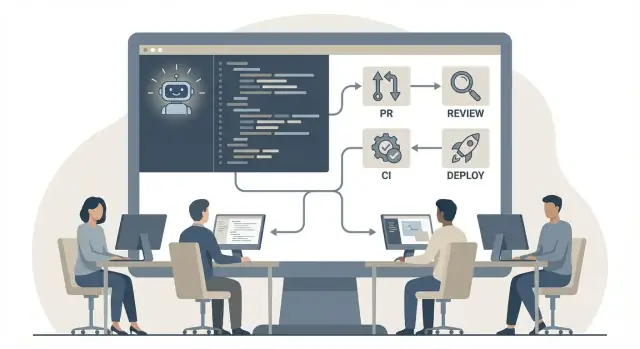
From Demo Wins to Production Reality
Demos are optimized for speed and wow-factor: a clean repo, a narrow task, and a happy path. Day-to-day engineering is the opposite—legacy edges, evolving requirements, partial context, and a codebase full of decisions made for good reasons.
Why demos feel easier than real work
In a demo, the AI can “win” by producing something that runs once. In production, the bar is higher: changes must be understandable, testable, secure, and compatible with existing patterns. The hidden work isn’t typing code—it’s fitting that code into everything around it: error handling, logging, migrations, performance budgets, and operational support.
The real concerns: quality, safety, maintainability
Teams usually worry about three things:
- Quality: Will this introduce subtle bugs or edge cases nobody notices?
- Safety: Could it leak secrets, weaken auth, or violate policies?
- Maintainability: Will we be stuck with confusing code that nobody owns?
These concerns are valid, and they don’t get solved by “better prompts” alone. They get solved by integrating AI assistance into the same guardrails you already trust: code review, tests, CI checks, and clear engineering standards.
Define “production-ready” for your team
“Production-ready” should be explicit. For example: it follows your conventions, includes tests at the right level, updates docs where needed, and passes CI without manual patching. If you can’t describe it, you can’t consistently evaluate AI-generated changes.
Set realistic expectations
Treat AI like a fast junior pair: great at generating options, refactors, and boilerplate—less reliable at making product decisions or understanding historical context. Expect acceleration, not autopilot. The goal is fewer tedious steps while keeping your engineering process in control.
Choosing the Right Use Cases
The fastest way to get value from AI coding tools is to start where the work is repetitive, the inputs are clear, and the output is easy to verify. If you aim them at ambiguous product decisions or tricky architecture from day one, you’ll spend more time untangling suggestions than shipping.
Repetitive vs. high-judgment work
A simple filter: can a reviewer quickly prove the change is correct? If yes, it’s a good candidate. If correctness depends on deep domain context, long-term design tradeoffs, or “what users mean,” treat AI as a brainstorming partner—not the author.
Good starting areas often include:
- Adding or expanding unit tests for existing behavior
- Mechanical refactors (rename, extract method, simplify conditionals)
- Documentation updates (READMEs, inline comments, API usage examples)
Pick 2–3 workflows to start
Choose a small set so the team can learn consistently. For many teams, the best first trio is tests + refactors + docs. Each produces tangible output, and failures are usually visible in review or CI.
Define boundaries: suggestions vs. decisions
Make it explicit what AI may propose (code snippets, test cases, doc drafts) and what humans must decide (requirements, security posture, architecture direction, performance budgets). This keeps accountability clear.
A short “definition of done” for AI-assisted changes
Add a lightweight checklist to your PR template (or team agreement):
- AI output is treated as a draft; author understands and can explain it
- Tests added/updated to cover new or changed behavior
- Edge cases and error handling reviewed, not assumed
- Any generated docs/examples are run or validated
This keeps early wins real—and prevents “looks plausible” from becoming “merged to main.”
How Developers Use AI Day to Day
AI coding tools are most useful when they’re treated like a teammate you can ask quick questions—then verify. In practice, teams mix three “surfaces” depending on the task.
IDE chat vs. inline completion vs. CLI
Inline completion is best for momentum work: writing boilerplate, mapping fields, adding small conditionals, or finishing a familiar pattern. It shines when you already know what you’re building.
IDE chat is better for reasoning and navigation: “Where is this validation enforced?” or “What’s the expected shape of this DTO?” It’s also good for generating a first draft of a function, then refining it with your own judgment.
CLI tools fit batch operations: generating release notes from commits, summarizing failing tests, or drafting a migration plan from a diff. They’re also handy when you want outputs saved to files or used inside scripts.
Some teams also use higher-level vibe-coding platforms (for example, Koder.ai) to go from a chat description to a working web/server/mobile slice—then export the source code and bring it back into the normal repo workflow for review, testing, and CI.
Exploration vs. editing existing code
Use AI for exploration when you’re still framing the problem: clarifying domain terms, listing options, sketching an approach, or asking for risks and edge cases.
Use AI for edits on existing code when you can provide clear constraints: which files to touch, what behavior must not change, and what tests to update. The goal is not a “big rewrite,” but a precise, reviewable patch.
Working with large codebases (context limits)
Context is finite, so developers work around it by:
- Pasting only the relevant function/class plus its immediate dependencies
- Asking the tool to produce a short “local summary” of a file before proposing changes
- Pointing it at search results (symbol names, call sites) rather than entire modules
Keeping changes small and reviewable
A reliable habit: ask for a minimal diff first. Then iterate—one behavior change, one file, one test update—so code review stays fast and regressions are easier to spot.
Prompting That Matches Your Codebase
AI tools get dramatically better when you treat prompts like engineering inputs, not chat messages. The goal isn’t “write code for me,” it’s “extend this codebase without breaking its habits.”
Start with your conventions, not your feature
Before asking for changes, anchor the model in what “normal” looks like:
- Naming: how you name files, classes, variables, and tests
- Patterns: service/repo layers, error handling, logging, feature flags
- Style: lint rules, formatting, doc comment conventions
A quick prompt addition like “Follow existing patterns in src/payments/* and keep functions under ~30 lines unless necessary” often prevents mismatched architecture.
Ask for options and tradeoffs
Instead of requesting a single solution, request 2–3 approaches with implications:
- “Option A: minimal change; Option B: more refactor-friendly. Explain tradeoffs and when each is safer.”
This produces reviewable decisions, not just code.
Request diffs and small steps
Big pasted files are hard to validate. Prefer incremental changes:
- “Propose a git diff limited to
BillingServiceand its tests.” - “Make the smallest change that fixes the bug; explain why it’s correct.”
If the tool can’t emit a clean diff, ask for “changed sections only” and a checklist of files touched.
Given these files: BillingService.ts, billing.test.ts
Goal: add proration support.
Constraints: follow existing naming, keep public API stable.
Output: 2 options + a unified diff for the chosen option.
Capture prompts as reusable snippets
When a prompt reliably produces good results (e.g., “write tests in our style” or “generate migration with rollback”), save it in a team snippet library—alongside examples and gotchas. That’s how prompting becomes process, not folklore.
Pull Requests and Code Review Practices
AI can write code quickly, but production quality still depends on disciplined pull requests (PRs). Treat AI assistance like a powerful junior contributor: helpful for throughput, never a substitute for accountability.
PR hygiene: keep changes reviewable
Small, scoped PRs are the easiest way to prevent “AI sprawl.” Aim for one intent per PR (one bug fix, one refactor, one feature slice). If the AI produced lots of edits, split them into logical commits so reviewers can follow the story.
Good PR descriptions matter even more with AI-assisted changes. Include:
- What changed and why (not just “refactored”)
- Any prompts or instructions that influenced the output (high level)
- Risks and how you tested (unit tests, manual steps)
Require human review for all AI-generated changes
Even if the code looks clean, keep a hard rule: every AI-authored change gets human review. This isn’t about mistrust—it’s about ensuring the team understands what’s being merged and can maintain it later.
How to spot subtle issues
Reviewers should scan for problems that AI often misses:
- Edge cases (null/empty inputs, time zones, retries, concurrency)
- Performance regressions (extra queries, unnecessary allocations, N+1 patterns)
- Security gaps (missing auth checks, unsafe deserialization, injection-prone string building)
- Silent behavior changes (error handling, logging, metrics, backwards compatibility)
Use an AI-aware review checklist
Add a lightweight checklist to your PR template:
- Does this match existing patterns and naming conventions?
- Are tests added/updated for the new behavior?
- Any new dependencies, permissions, or data flows?
- Is the change explainable in plain language by the author?
The goal is simple: keep PRs readable, keep humans responsible, and make “looks right” insufficient without evidence.
Testing: Faster Coverage Without Lower Quality
AI is great at expanding test coverage, but the goal isn’t “more tests.” It’s trustworthy tests that protect behavior you actually care about.
Generating unit tests and edge cases
A practical pattern is to ask the tool to write tests from the public contract: function signature, API response schema, or user-visible rules. It can quickly enumerate edge cases humans often skip—empty inputs, boundary values, nulls, timezone quirks, and error paths.
To keep quality high, keep prompts specific: “Write tests for these scenarios and explain what each test proves.” That explanation makes it easier to spot irrelevant or duplicate cases.
Validating tests (avoiding false confidence)
AI can produce tests that pass for the wrong reason—asserting implementation details, mocking everything, or duplicating the code under test. Treat generated tests like generated code:
- Read assertions first: do they reflect expected outcomes, not internal steps?
- Prefer black-box checks: inputs → outputs, or state changes.
- Run mutation testing (if you use it): tests should fail when logic is subtly broken.
If a test feels brittle, rewrite it around behavior, not structure.
Property-based and fuzz testing ideas
Where inputs are broad (parsers, validators, financial calculations), ask AI for properties: invariants that should always hold. Examples: “round-trip encode/decode returns original,” “sorting is idempotent,” “no negative totals.” It can also suggest fuzz inputs (weird Unicode, large payloads, malformed JSON) that uncover surprising bugs.
Safe test data and fixtures
Never paste real customer records, secrets, or production logs into prompts. Use synthetic fixtures and redact identifiers. If you need realism, generate fake but representative data (sizes, formats, distributions) and store shared fixtures in-repo with clear provenance and review rules.
When done well, AI helps you ship with better confidence—not just faster green checkmarks.
CI/CD Integration and Release Safety
AI coding tools are most useful in CI/CD when they tighten feedback loops without weakening the bar for shipping. Treat AI output as code that must survive the same automated checks and release safeguards as everything else.
Where AI fits in the pipeline
A practical pattern is to let AI help generate changes, then rely on CI to verify them. The best “AI-friendly” stages are deterministic and fast:
- Formatting and linting (auto-fix where possible)
- Type checks and static analysis
- Unit tests and small integration tests
- Build verification and dependency/license checks
If your team uses an AI assistant to draft code, make it easy to run the same checks locally and in CI so failures don’t bounce back and forth.
Gating rules before merge
Keep merge gates explicit and non-negotiable. Common minimums:
- All CI checks green (lint/type/test/build)
- Required code review approvals (including owners for sensitive areas)
- No new high-severity security findings
- Coverage rules that focus on changed code, not vanity targets
This is where AI can help too: generating missing tests or fixing failing checks—without being allowed to bypass them.
Refactors: automate safely, avoid blast radius
AI-assisted refactors work best when they’re scoped: one module, one API, one behavior change. Wide, cross-repo changes are riskier because they amplify subtle mistakes. Prefer incremental PRs and add targeted regression tests before “mechanical” edits.
Release safety: flags, rollbacks, and evidence
Assume AI-produced changes can fail in novel ways. Ship behind feature flags, keep releases small, and make rollback routine. Require a clear rollout plan (what changes, how to monitor, and how to revert) so safety doesn’t depend on heroics when something breaks.
If you’re using a platform that can deploy previews automatically, prioritize features that reduce operational risk—like snapshots and rollback. (For example, Koder.ai supports snapshots and rollback as part of its hosting workflow, which aligns well with “small releases + easy reverts.”)
Security, Privacy, and Compliance Guardrails
AI coding tools are fastest when they’re frictionless—and riskiest when they’re frictionless. Treat them like any other third-party service: define what data can leave your environment, what code can be imported, and who signs off.
Sensitive data: what not to paste into prompts
Set a clear “never share” list and bake it into templates and training:
- Customer data (PII), support tickets, screenshots with user info
- Secrets (API keys, tokens, private keys), internal URLs with credentials
- Proprietary algorithms, unreleased product specs, incident details
Prefer “describe, don’t paste”: summarize the problem, include minimal snippets, and redact identifiers. If possible, route usage through an enterprise plan with data retention controls and admin visibility.
If data residency is a requirement, make sure your chosen tooling can run workloads in the regions you need. Some platforms (including Koder.ai, which runs on AWS globally) can deploy applications in specific countries to help with privacy and cross-border transfer constraints.
License and IP considerations for generated code
Generated code can unintentionally mirror licensed patterns. Require engineers to:
- Avoid prompting with copied proprietary code from external sources
- Run the same license scanning you already use for dependencies
- Add source attribution when code is adapted from a known reference
If your legal/compliance team has a policy, link it in your engineering handbook (e.g., /handbook/ai-use).
Security review: auth, input validation, dependency choices
Make AI output pass the same gates as human code:
- Authentication/authorization checks and least privilege
- Input validation, output encoding, and safe defaults
- Dependency hygiene: pinned versions, no “random” new packages without review
Creating internal guidelines and approval processes
Define who can use which tools, in which repos, with which settings. Add lightweight approvals for high-risk areas (payments, auth, data exports) and document exceptions. When incidents happen, you want a clear audit trail—without blaming the tool.
Maintaining Standards and Architecture Consistency
AI can speed up implementation, but it can also quietly dilute your conventions: naming, layering, error-handling, and “how we do things here.” Treat the tool like a junior contributor—helpful, but guided.
Codify what “good” looks like
Make standards machine-checkable so AI-generated code is nudged into the right shape. Use project templates, linters, and formatting rules, then run them automatically.
A practical combo:
- PR templates that ask for context, impact, and rollout notes
- Linters/formatters enforced in CI (not “best effort” locally)
- A short style guide focused on your non-obvious rules (logging, retries, domain naming)
When the assistant suggests code, it should be easy for developers to run the same checks before pushing.
Use AI to teach internal patterns—without inventing them
New contributors often struggle with internal abstractions (“our repository pattern,” “our event schema,” “how we handle feature flags”). Point AI at real examples and ask it to explain them, then link the explanation back to the source files.
The rule: explanations should cite existing code, not create new conventions. If it can’t find a reference, it’s a signal your docs or examples are missing.
Keep architecture decisions explicit
Architectural decisions should live as ADRs, not as implied behavior in generated code. If a PR introduces a new dependency, boundary, or data model, require an ADR update or a new ADR.
Avoid mystery code
Require rationale in PR descriptions: why this approach, why this tradeoff, and what alternatives were considered. If AI wrote most of it, the human still owns the reasoning.
Team Adoption and Enablement
Rolling out AI coding tools is less about the tool and more about shared habits. The goal isn’t to make everyone “use AI,” but to make the team safer and faster when they choose to.
Start with a pilot, not a mandate
Begin with a small pilot group (4–8 developers across levels) and give them a clear mission: identify where the tool helps, where it hurts, and what guardrails are needed.
Run a short kickoff training (60–90 minutes) covering: what the tool is good at, common failure patterns, and how you expect outputs to be reviewed. Then hold weekly office hours for a month so people can bring real code, prompts, and awkward edge cases.
Publish simple team norms
Create a lightweight “AI do’s and don’ts” doc in your engineering handbook (or /docs/ai-coding). Keep it practical:
- Do: reference existing modules, naming conventions, and error-handling patterns.
- Do: ask for tests and explain the intent of changes.
- Don’t: paste secrets, customer data, or proprietary snippets that violate policy.
- Don’t: accept large refactors without an architectural reason and a human plan.
Resolve disagreements without drama
When someone objects to an AI-assisted change, treat it like any other proposal: require a rationale. Ask: “What risk does this introduce?” and “What evidence would settle it?” (benchmarks, tests, smaller diff, or a short design note). If needed, default to the more conservative change for the current release and schedule follow-up work.
Prevent skill atrophy on purpose
AI should reduce busywork, not reduce understanding. Set learning goals (e.g., “every PR explains the why,” “rotate ownership of tricky modules”) and encourage pairing: one person drives, one evaluates AI suggestions. Over time, this keeps judgment sharp—and makes the tool an assistant, not a crutch.
Measuring Impact Without Gaming Metrics
Measuring AI coding tools is less about proving they “work” and more about learning where they truly help your team ship safer code with less friction. The easiest trap is picking a vanity metric (like “lines generated” or “number of prompts”) and then watching behavior shift to optimize the number instead of the outcome.
Metrics that reflect real delivery
Start with a small set of outcomes you already care about:
- Cycle time: time from first commit to merge, and from merge to release.
- Rework: follow-up commits after review, revert frequency, and fix-forward patches.
- Defect rates: escaped bugs, hotfixes, and incident volume tied to recent changes.
Use these as trend indicators, not as individual performance scoring. If people feel judged, they’ll route around measurement.
Pair numbers with qualitative signals
Quantitative metrics won’t tell you why things changed. Add lightweight qualitative feedback:
- A short monthly pulse survey for developers and reviewers (“Where did AI save time?” “Where did it create churn?”).
- Review notes tagging: “AI-suggested change required significant rewrite” vs. “AI helped clarify intent.”
Track help vs. churn explicitly
When you trial a tool, log a few concrete categories: tests generated, refactors assisted, docs updated, plus negative buckets like “review thrash,” “style drift,” or “incorrect API usage.” Over a few sprints, patterns become obvious.
Adjust policy based on evidence
If AI boosts test coverage but increases flaky tests, tighten guidance: require deterministic assertions and add a review checklist. If it speeds up routine refactors, lean in with templates and examples. Treat tooling and rules as changeable—your goal is measurable improvement, not hype validation.
Common Failure Modes and How to Avoid Them
AI coding tools fail in production for predictable reasons. The fix is rarely “use it less”; it’s using it with the right constraints, checks, and habits.
1) Over-reliance on plausible but wrong code
AI can generate code that looks correct while quietly violating edge cases, error handling, or concurrency rules.
Treat outputs as a draft: ask for assumptions, invariants, and failure modes. Then verify with tests and small experiments (e.g., run against a known failing fixture). If it touches security-sensitive paths, require human-written reasoning in the PR description.
2) Copying patterns that don’t match your system
Tools often mirror generic patterns that conflict with your architecture, naming, logging, or dependency rules.
Reduce drift by providing “house style” context: a short snippet of the preferred layer boundaries, error types, and logging conventions. When asking for code, request it to follow existing modules (e.g., “match patterns in /src/payments/*”). If you have a documented style guide, link it in your PR template (see /blog/pr-templates).
3) Large PRs that hide issues
AI makes it easy to change many files at once, which increases review fatigue and merge surprises.
Set a norm: AI-assisted work should be smaller, not bigger. Split refactors from behavior changes. If a change exceeds a threshold (files/lines), require a plan and staged PRs.
4) Treating AI output as authoritative instead of a draft
Avoid rubber-stamping by making reviewers focus on intent.
In PRs, include: what changed, why, how to validate, and what the AI was asked to do. Review the prompt and the diff—both can contain the bug.
A Practical Rollout Playbook
Rolling out AI coding tools works best as a time-boxed engineering change, not a “try it and see” experiment. The goal in the first month is to make usage predictable, reviewable, and safe—then expand.
A 30-day rollout checklist
Days 1–7: Set guardrails and pick pilots
- Choose 1–2 pilot teams and 2–3 low-risk use cases (e.g., test generation, refactors, documentation updates).
- Define what’s not allowed yet (e.g., auth changes, payment flows, infra policies).
- Decide where AI is permitted: IDE only, chat only, or both.
Days 8–14: Make it reviewable
- Add PR labels like
ai-assistedand require a short “What I verified” note. - Update review expectations: reviewers check behavior, tests, security implications—not “did AI write it.”
Days 15–21: Integrate into daily workflow
- Provide copy-pastable prompts that match your repo conventions.
- Add lightweight checklists for common tasks (new endpoint, schema change, UI component).
Days 22–30: Measure and adjust
- Track a few signals: review turnaround, escaped defects, CI failures, and developer sentiment.
- Hold a 30-minute retro; revise guardrails and allowed use cases.
Documentation that makes usage consistent
Create a short internal page with: approved use cases, “good vs. bad” examples, prompt templates, and a PR review checklist. Keep it practical and update it during retros.
If your team standardizes on a specific platform, document its team settings too—for instance, how planning mode is used, how deployments are handled, and when source code export is required. (Koder.ai, for example, supports planning mode, hosted deployments with custom domains, and full source export—useful when you want fast iteration without losing ownership of the code.)
Periodic audits (monthly/quarterly)
Sample a handful of ai-assisted PRs to check: security issues, licensing/IP risks, test quality, and adherence to architecture standards. Feed findings back into prompts and guidelines.
Next steps: expand safely
After the pilot stabilizes, widen scope by one dimension at a time: more teams, riskier modules, or deeper CI checks—while keeping the same review and audit loops.
FAQ
Why do AI coding demos feel easier than using AI in real production code?
Because demos are optimized for a happy path: a clean repo, a narrow task, and minimal constraints. Production work requires fitting changes into existing standards—tests, error handling, logging, security, compatibility, performance budgets, migrations, and operational support.
A change that “runs once” in a demo can still be unacceptable in production if it’s hard to review, hard to maintain, or risky to ship.
How can a team define “production-ready” for AI-assisted changes?
Make it explicit and checkable. A useful team definition often includes:
- Follows existing conventions (naming, layering, error handling)
- Includes tests at the right level (unit/integration) for the changed behavior
- Updates docs/examples when behavior or usage changes
- Passes CI (lint/type checks/tests/build) without manual patching
- Has a clear rollout/monitoring/rollback plan for risky changes
If you can’t describe it, you can’t consistently evaluate AI-assisted work.
What are the best initial use cases for AI coding tools?
The highest-leverage early use cases are repetitive work with clear inputs and easy verification in review/CI, such as:
- Expanding unit test coverage for existing behavior
- Mechanical refactors (rename, extract method, simplify conditionals)
- Documentation updates (READMEs, API examples, inline comments)
Avoid starting with ambiguous product decisions or architecture rewrites—those require deep context the tool won’t reliably have.
How do you decide whether a task is “repetitive” enough for AI vs. too high-judgment?
Use a simple filter: can a reviewer quickly prove the change is correct?
- If correctness is visible through tests, types, and a small diff, AI is a good fit.
- If correctness depends on domain nuance, long-term design tradeoffs, or unclear requirements, use AI for exploration (options, risks, questions), not for authorship.
Treat AI like a fast junior pair: great at drafts and options, not the final decision-maker.
When should developers use inline completion vs IDE chat vs CLI tools?
Use the surface that matches the job:
- Inline completion: best for momentum and familiar patterns (boilerplate, field mapping, small conditionals).
- IDE chat: best for reasoning and navigation (“where is this validated?”, “what’s the DTO shape?”) and drafting then refining.
- CLI tools: best for batch tasks (summarizing failing tests, drafting release notes, generating a plan from a diff).
Switch surfaces intentionally instead of forcing one tool to do everything.
How do you prompt AI so it matches your codebase conventions and architecture?
Anchor prompts in your repo’s norms before requesting changes:
- Mention the target module/path to mimic (e.g., “follow patterns in
src/payments/*”) - Specify constraints (keep public API stable, limit changes to specific files)
- Ask for a minimal diff first, then iterate
- Request options + tradeoffs when design choices exist
Prompts work best as engineering inputs: constraints, boundaries, and verification steps—not just “write code.”
How can teams keep AI-generated changes small and reviewable in pull requests?
Keep PRs smaller than you would without AI:
- One intent per PR (one fix, one refactor, one feature slice)
- Prefer staged commits so reviewers can follow the story
- Ask the tool for a minimal diff; avoid cross-repo “sweeps”
- Split refactors from behavior changes
Small diffs reduce review fatigue and make subtle failures easier to spot.
Should teams require human review for AI-generated code?
Yes—require human review for all AI-assisted changes. The goal is maintainability and accountability:
- The author must understand and explain the change
- Reviewers check edge cases, performance, security, and backwards compatibility
- PR descriptions should include what changed, why, how it was validated, and notable AI instructions (high level)
The tool can accelerate drafting, but humans still own what ships.
How can AI help with testing without creating false confidence?
Start from the public contract (inputs/outputs, API schema, user-visible rules) and ask for explicit scenarios and edge cases. Then validate that tests provide real signal:
- Read assertions first: do they check outcomes, not implementation details?
- Avoid “mock everything” tests that can’t fail for real regressions
- Prefer black-box checks (inputs → outputs/state changes)
- If you use it, mutation testing can expose weak tests
Generated tests are drafts—review them like production code.
What security, privacy, and CI/CD guardrails matter most when adopting AI coding tools?
Treat AI like any third-party service and define guardrails:
- Never paste secrets, PII, proprietary incident details, or sensitive logs
- Prefer “describe, don’t paste”; redact identifiers and use synthetic fixtures
- Keep merge gates non-negotiable: CI green, required approvals, no high-severity security findings
- Add labels (e.g.,
ai-assisted) and lightweight checklists for verification
If the tool can’t pass your existing standards, it shouldn’t ship—regardless of how fast it generated code.