

AI for CRUD Apps: What It Automates vs What Needs Humans
A practical guide to what AI can reliably automate in CRUD apps (scaffolding, queries, tests) and where human judgment is vital (models, rules, security).
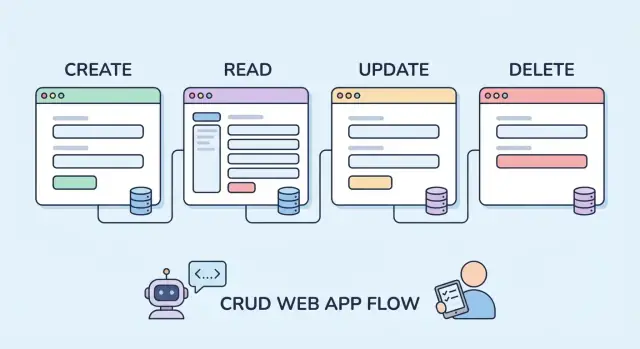
What “AI for CRUD” Really Means
CRUD apps are the everyday tools that let people Create, Read, Update, and Delete data—think customer lists, inventory trackers, appointment systems, internal dashboards, and admin panels. They’re common because most businesses run on structured records and repeatable workflows.
When people say “AI for CRUD apps,” they usually don’t mean an AI that magically ships a finished product on its own. They mean an assistant that speeds up routine engineering work by producing drafts you can edit, review, and harden.
What “automates” typically looks like
In practice, AI automation is closer to:
- Suggests: proposes field names, endpoints, UI layout, or validation rules based on your description.
- Drafts: generates starter code for models, forms, controllers, migrations, and basic tests.
- Completes: fills in repetitive snippets (mapping fields, wiring routes, standard error messages).
That can save hours—especially on boilerplate—because CRUD apps often follow patterns.
Speed-ups vs guarantees
AI can make you faster, but it doesn’t make the result automatically correct. Generated code can:
- Misinterpret domain terms (“customer” vs “account,” “archived” vs “deleted”)
- Apply unsafe defaults (too-broad permissions, missing edge cases)
- Produce code that compiles but doesn’t match your real business rules
So the right expectation is acceleration, not certainty. You still review, test, and decide.
The real split: repeatable vs judgment-heavy work
AI is strongest where the work is patterned and the “right answer” is mostly standard: scaffolding, CRUD endpoints, basic forms, and predictable tests.
Humans remain essential where decisions are contextual: data meaning, access control, security/privacy, edge cases, and the rules that make your app unique.
Where CRUD Apps Are Predictable (and Where They Aren’t)
CRUD apps tend to be built from the same Lego bricks: data models, migrations, forms, validation, list/detail pages, tables and filters, endpoints (REST/GraphQL/RPC), search and pagination, auth, and permissions. That repeatability is exactly why AI-assisted generation can feel so fast—many projects share the same shapes, even when the business domain changes.
The predictable parts
Patterns show up everywhere:
- “Create/Edit” screens often mirror model fields.
- Index pages follow the same needs: sort, filter, paginate.
- Endpoints commonly map to standard operations: list, get, create, update, delete.
- Validation frequently starts as type/format checks (required fields, min/max length, email format).
Because these patterns are consistent, AI is good at producing a first draft: basic models, scaffolded routes, simple controllers/handlers, standard UI forms, and starter tests. It’s similar to what frameworks and code generators already do—AI just adapts faster to your naming and conventions.
The unpredictable parts
CRUD apps stop being “standard” the moment you add meaning:
- Permissions: “Who can edit this?” is rarely just “admin vs user.” It’s often conditional (team membership, record ownership, status, region).
- Data integrity: a tiny mistake in a relationship, uniqueness rule, or cascading delete can silently corrupt data—or block valid workflows.
- State and business transitions: “draft → submitted → approved” rules don’t live in the database schema alone.
- Edge cases: imports, concurrency, partial updates, and “soft delete” behaviors can break assumptions.
These are the areas where a small oversight creates big issues: unauthorized access, irreversible deletions, or records that can’t be reconciled.
A practical rule
Use AI to automate patterns, then deliberately review consequences. If the output affects who can see/change data, or whether data stays correct over time, treat it as high-risk and verify it like production-critical code.
Tasks AI Automates Well: Boilerplate and Scaffolding
AI is at its best when the work is repetitive, structurally predictable, and easy to verify. CRUD apps have a lot of that: the same patterns repeated across models, endpoints, and screens. Used this way, AI can save hours without taking ownership of the product’s meaning.
Scaffolding the “shape” of a feature
Given a clear description of an entity (fields, relationships, and basic actions), AI can quickly draft the skeleton: model definitions, controllers/handlers, routes, and basic pages. You still need to confirm naming, data types, and relationships—but starting from a complete draft is faster than building every file from scratch.
Boilerplate for REST or GraphQL handlers
For common operations—list, detail, create, update, delete—AI can generate handler code that follows a conventional structure: parse input, call a data-access layer, return a response.
This is especially useful when you’re setting up many similar endpoints at once. The key is reviewing the edges: filtering, pagination, error codes, and any “special cases” that aren’t actually standard.
Simple admin dashboards and views
CRUD often needs internal tooling: list/detail pages, basic forms, table views, and an admin-style navigation. AI can produce functional first versions of these screens quickly.
Treat these as prototypes you harden: check empty states, loading states, and whether the UI matches how people actually search and scan data.
Refactoring repetitive code safely
AI is surprisingly helpful at mechanical refactors: renaming fields across files, moving modules, extracting helpers, or standardizing patterns (like request parsing or response formatting). It can also suggest where duplication exists.
Still, you should run tests and inspect diffs—refactors fail in subtle ways when two “similar” cases aren’t truly equivalent.
Initial documentation and comments (with review)
AI can draft README sections, endpoint descriptions, and inline comments that explain intent. That’s useful for onboarding and code reviews—so long as you verify everything it claims. Outdated or incorrect docs are worse than none.
Data Models and Migrations: Helpful Drafts, Risky Assumptions
AI can be genuinely useful at the start of data modeling because it’s good at turning plain-language entities into a first-pass schema. If you describe “Customer, Invoice, LineItem, Payment,” it can draft tables/collections, typical fields, and reasonable defaults (IDs, timestamps, status enums).
Where AI helps immediately
For straightforward changes, AI speeds up the dull parts:
- Drafting basic schema proposals from described entities
- Generating migrations for simple field additions or renames
- Suggesting indexes for common filters/sorts (for example:
tenant_id + created_at,status,email), as long as you verify them against real queries
This is especially handy when you’re exploring: you can iterate on a model quickly, then tighten it once the workflow is clearer.
Where it often slips
Data models hide “gotchas” that AI can’t reliably infer from a short prompt:
- Relationships: one-to-many vs many-to-many, optional vs required links, and what “ownership” means
- Cascading deletes: what should happen when a parent is removed—hard delete, soft delete, restrict, archive, or reassign
- Multi-tenant data: what must be tenant-scoped, how to prevent cross-tenant reads, and which unique constraints should be “unique per tenant” rather than global
These aren’t syntax problems; they’re business and risk decisions.
Human check: safe changes on production data
A migration that’s “correct” can still be unsafe. Before running anything on real data, you need to decide:
- Does this rewrite a large table or lock writes?
- Are there existing rows that violate new constraints?
- Should the change be split into expand/migrate/contract steps?
Use AI to draft the migration and the rollout plan, but treat the plan as a proposal—your team owns the consequences.
Forms and Validation: Fast Generation, Careful Semantics
Forms are where CRUD apps meet real humans. AI is genuinely useful here because the work is repetitive: turning a schema into inputs, wiring up basic validation, and keeping client and server in sync.
What AI generates well
Given a data model (or even a sample JSON payload), AI can quickly draft:
- Form fields mapped to common types (text, number, date, select, checkbox)
- Simple UI components with labels, placeholders, and layout defaults
- Basic validators: required fields, min/max, length limits, email/URL format checks
- Parallel validation stubs on both sides (client-side checks plus server-side guards)
This speeds up the “first usable version” dramatically, especially for standard admin-style screens.
Where semantics get tricky
Validation isn’t just about rejecting bad data; it’s about expressing intent. AI can’t reliably infer what “good” means for your users.
You still need to decide things like:
- The right error messages: clear, specific, and consistent with your tone (and accessible for screen readers)
- Inclusive UX: names, addresses, and phone numbers vary widely; “invalid” can be a product decision, not a technical one
- Edge cases: optional middle names, non-Gregorian dates, zero values that are meaningful, or “N/A” workflows
A common failure mode is AI enforcing rules that feel reasonable but are wrong for your business (e.g., forcing a strict phone format or rejecting apostrophes in names).
Where rules should live
AI can propose options, but you choose the source of truth:
- UI validation for instant feedback (but never as the only gate)
- API validation for consistency across web, mobile, imports, and integrations
- Database constraints for invariants you must never violate (unique keys, foreign keys, non-null)
A practical approach: let AI generate the first pass, then review each rule and ask, “Is this a user convenience, an API contract, or a hard data invariant?”
API and Query Logic: Patterned Work with Sharp Edges
CRUD APIs tend to follow repeatable patterns: list records, fetch one by ID, create, update, delete, and sometimes search. That makes them a sweet spot for AI assistance—especially when you need a lot of similar endpoints across multiple resources.
Where AI helps most
AI is typically good at drafting standard list/search/filter endpoints and the “glue code” around them. For example, it can quickly generate:
- A consistent set of endpoints (
GET /orders,GET /orders/:id,POST /orders, etc.) - Query-builder scaffolding for filters like status, date ranges, and text search
- Mapping code (DTOs, serializers, view models) so responses look consistent across endpoints
That last point matters more than it sounds: inconsistent API shapes create hidden work for front-end teams and integrations. AI can help enforce patterns like “always return { data, meta }” or “dates are always ISO-8601 strings.”
Pagination and sorting: fast patterns, real trade-offs
AI can add pagination and sorting quickly, but it won’t reliably choose the right strategy for your data.
Offset pagination (?page=10) is simple, but it can get slow and inconsistent for changing datasets. Cursor pagination (using a “next cursor” token) performs better at scale, but it’s harder to implement correctly—especially when users can sort by multiple fields.
You still need to decide what “correct” means for your product: stable ordering, how far back users need to browse, and whether you can afford expensive counts.
Common AI pitfalls to watch for
Query code is where small mistakes become big outages. AI-generated API logic often needs review for:
- N+1 queries (looping and fetching related records one-by-one)
- Missing limits (unbounded lists, expensive searches, “download everything” endpoints)
- Unsafe dynamic filters or sorts (directly interpolating user input into queries)
Human review: set performance expectations
Before you accept generated code, sanity-check it against realistic data volumes. How many records will an average customer have? What does “search” mean at 10k vs 10M rows? Which endpoints need indexes, caching, or strict rate limits?
AI can draft the patterns, but humans need to set the guardrails: performance budgets, safe query rules, and what the API is allowed to do under load.
Testing: AI Can Write Many Tests, You Choose the Right Ones
AI is surprisingly good at producing a lot of test code quickly—especially for CRUD apps where patterns repeat. The trap is thinking “more tests” automatically means “better quality.” AI can generate volume; you still have to decide what matters.
Where AI helps immediately
If you give AI a function signature, a short description of expected behavior, and a few examples, it can draft unit tests fast. It’s also effective at creating happy‑path integration tests for common flows like “create → read → update → delete,” including wiring up requests, asserting status codes, and checking response shapes.
Another strong use: scaffolding test data. AI can draft factories/fixtures (users, records, related entities) and common mocking patterns (time, UUIDs, external calls) so you’re not hand-writing repetitive setup every time.
What humans must decide
AI tends to optimize for coverage numbers and obvious scenarios. Your job is to choose meaningful cases:
- Regressions: tests that lock down a bug you already shipped.
- Permissions: verify who can read, create, edit, or delete—and who cannot.
- Concurrency: simultaneous updates, stale writes, idempotency, duplicate submissions.
- Failures: invalid inputs, missing relationships, database errors, network timeouts, and partial success.
A practical rule: let AI draft the first pass, then review each test and ask, “What failure would this catch in production?” If the answer is “none,” delete it or rewrite it into something that protects real behavior.
Auth and Permissions: AI Assists, Humans Own the Risk
Authentication (who a user is) is usually straightforward in CRUD apps. Authorization (what they’re allowed to do) is where projects get breached, audited, or quietly leak data for months. AI can speed up the mechanics, but it can’t take responsibility for the risk.
Where AI helps right away
If you give AI clear requirements text (“Managers can edit any order; customers can only view their own; support can refund but not change addresses”), it can draft a first pass at RBAC/ABAC rules and map them to roles, attributes, and resources. Treat this as a starting sketch, not a decision.
AI is also useful at spotting inconsistent authorization, especially in codebases with many handlers/controllers. It can scan for endpoints that authenticate users but forget to enforce permissions, or for “admin-only” actions that are missing a guard in one code path.
Finally, it can generate the plumbing: middleware stubs, policy files, decorators/annotations, and boilerplate checks.
Where humans must decide
You still have to define the threat model (who might abuse the system), least-privilege defaults (what happens when a role is missing), and audit needs (what must be logged, retained, and reviewed). Those choices depend on your business, not your framework.
Quick review checklist
- Every read path is protected (list, search, export, “download CSV,” background jobs).
- Every write path is protected (create, update, delete, bulk actions, imports).
- Ownership rules are enforced server-side (never trusting hidden form fields).
- Privileged actions are logged with who/what/when (and ideally why).
AI can help you get to “implemented.” Only you can get to “safe.”
Error Handling and Observability: Good Defaults, Hard Choices
AI is helpful here because error handling and observability follow familiar patterns. It can quickly set up “good enough” defaults—then you refine them to match your product, risk profile, and what your team actually needs to know at 2 a.m.
What AI can draft reliably
AI can suggest a baseline package of practices:
- Basic logging around requests, database calls, and third‑party APIs
- Retry patterns for flaky dependencies (with backoff and a max attempt limit)
- Consistent status codes and structured error responses
A typical AI-generated starting point for an API error format might look like:
{
  "error": {
    "code": "VALIDATION_ERROR",
    "message": "Email is invalid",
    "details": [{"field": "email", "reason": "format"}],
    "request_id": "..."
  }
}
That consistency makes client apps easier to build and support.
Metrics and dashboards: good first drafts
AI can propose metric names and a starter dashboard: request rate, latency (p50/p95), error rate by endpoint, queue depth, and database timeouts. Treat these as initial ideas, not a finished monitoring strategy.
The hard choices are human
The risky part isn’t adding logs—it’s choosing what not to capture.
You decide:
- What’s safe to log (and what must never be logged): passwords, tokens, personal data, payment details
- How to handle PII: redaction, hashing, or avoiding collection entirely
- Retention: how long logs and traces are stored, and who can access them
Finally, define what “healthy” means for your users: “successful checkouts,” “projects created,” “emails delivered,” not just “servers are up.” That definition drives alerts that signal real customer impact instead of noise.
Business Rules: The Part AI Can’t “Know” Without You
CRUD apps look simple because the screens are familiar: create a record, update fields, search, delete. The hard part is everything your organization means by those actions.
AI can generate controllers, forms, and database code quickly—but it can’t infer the rules that make your app correct for your business. Those rules live in policy documents, tribal knowledge, and edge-case decisions people make daily.
Turning real work into code
A reliable CRUD workflow usually hides a decision tree:
- Who is allowed to create, edit, or cancel something?
- What counts as “approved,” and what happens when it’s rejected?
- Which exceptions are valid, and who can grant them?
Approvals are a good example. “Manager approval required” sounds straightforward until you define: what if the manager is on leave, the amount changes after approval, or the request spans two departments? AI can draft the scaffolding for an approval state machine, but you must define the rules.
Ambiguity and conflicting requirements
Stakeholders often disagree without realizing it. One team wants “fast processing,” another wants “tight controls.” AI will happily implement whichever instruction appears most recent, most explicit, or most confidently phrased.
Humans need to reconcile conflicts and write a single source of truth: what the rule is, why it exists, and what success looks like.
Definitions that prevent future chaos
Small naming choices create big downstream effects. Before generating code, agree on:
- Statuses (draft, submitted, approved, fulfilled, archived)
- Timestamps (created_at, submitted_at, approved_at) and which are optional
- Ownership (who “owns” a record at each stage and who can transfer it)
Choosing trade-offs on purpose
Business rules force trade-offs: simplicity vs flexibility, strictness vs speed. AI can offer options, but it can’t know your risk tolerance.
A practical approach: write 10–20 “rule examples” in plain language (including exceptions), then ask AI to translate them into validations, transitions, and constraints—while you review every edge condition for unintended outcomes.
Security, Privacy, and Compliance: Non-Negotiable Human Oversight
AI can draft CRUD code quickly, but security and compliance don’t work on “good enough.” A generated controller that saves records and returns JSON may look fine in a demo—and still create a breach in production. Treat AI output as untrusted until reviewed.
Risky patterns AI may accidentally introduce
Common pitfalls show up in otherwise clean-looking code:
- Mass assignment: accepting whole request objects and persisting them can let users set fields they shouldn’t (e.g.,
role=admin,isPaid=true). - Injection risks: string-built queries, unescaped filters, or unsafe “search” endpoints can reintroduce SQL/NoSQL injection.
- Unsafe file uploads: missing file type checks, storing uploads in public paths, or skipping malware scanning.
Broken access control and data leakage
CRUD apps fail most often at the seams: list endpoints, “export CSV,” admin views, and multi-tenant filtering. AI can forget to scope queries (e.g., by account_id) or may assume the UI prevents access. Humans must verify:
- Every read/write path enforces authorization server-side.
- Error messages and logs don’t leak sensitive fields.
- Pagination, search, and bulk actions can’t enumerate other users’ data.
Compliance isn’t a code snippet
Requirements like data residency, audit trails, and consent depend on your business, geography, and contracts. AI can suggest patterns, but you must define what “compliant” means: what gets logged, how long data is retained, who can access it, and how deletion requests are handled.
Human responsibilities (no shortcuts)
Run security reviews, vet dependencies, and plan incident response (alerts, rotation of secrets, rollback steps). Set clear “stop the line” release criteria: if access rules are ambiguous, sensitive data handling is unverified, or auditability is missing, the release pauses until resolved.
A Practical Workflow: Make AI Useful Without Losing Control
AI is most valuable in CRUD work when you treat it like a fast draft partner—not an author. The goal is simple: shorten the path from idea to working code while keeping accountability for correctness, security, and product intent.
Tools like Koder.ai fit this model well: you can describe a CRUD feature in chat, generate a working draft across UI and API, and then iterate with guardrails (like planning mode, snapshots, and rollback) while keeping humans responsible for permissions, migrations, and business rules.
1) Prompt with constraints and acceptance criteria
Don’t ask for “a user management CRUD.” Ask for a specific change with boundaries.
Include: framework/version, existing conventions, data constraints, error behavior, and what “done” means. Example acceptance criteria: “Reject duplicates, return 409,” “Soft-delete only,” “Audit log required,” “No N+1 queries,” “Must pass existing test suite.” This reduces plausible-but-wrong code.
2) Generate alternatives, then choose deliberately
Use AI to propose 2–3 approaches (e.g., “single table vs join table,” “REST vs RPC endpoint shape”), and require trade-offs: performance, complexity, migration risk, permission model. Pick one option and record the reason in the ticket/PR so future changes don’t drift.
3) Add code review gates for high-risk areas
Treat some files as “always human-reviewed”:
- Permissions/auth: roles, scopes, object-level checks
- Migrations: defaults, backfills, indexes, reversibility
- Data access: query filters, tenant boundaries, pagination
- Logging/observability: PII redaction, correlation IDs, error levels
Make this a checklist in your PR template (or in /contributing).
4) Keep a source-of-truth spec
Maintain a small, editable spec (README in the module, ADR, or a /docs page) for core entities, validation rules, and permission decisions. Paste relevant excerpts into prompts so generated code stays aligned instead of “inventing” rules.
5) Measure success beyond “it shipped”
Track outcomes: cycle time for CRUD changes, bug rate (especially permission/validation defects), support tickets, and user success metrics (task completion, fewer manual workarounds). If those aren’t improving, tighten prompts, add gates, or reduce AI scope.
FAQ
What does “AI for CRUD apps” actually mean?
“AI for CRUD” usually means using AI to generate drafts of repetitive work—models, migrations, endpoints, forms, and starter tests—based on your description.
It’s best viewed as acceleration for boilerplate, not a guarantee of correctness or a replacement for product decisions.
Which CRUD tasks are the best fit for AI assistance?
Use AI where the work is patterned and easy to verify:
- Scaffolding models/routes/controllers
- Drafting list/detail/create/update/delete handlers
- Generating basic forms and standard validations
- Mechanical refactors (renames, extraction, formatting)
Avoid delegating judgment-heavy decisions like permissions, data meaning, and risky migrations without review.
What are the most common failure modes in AI-generated CRUD code?
Generated code can:
- Misread domain terms (e.g., “archived” vs “deleted”)
- Choose unsafe defaults (over-broad access, missing tenant scoping)
- Miss edge cases (imports, concurrency, partial updates)
Treat output as untrusted until it passes review and tests.
How should I prompt AI to generate useful CRUD code drafts?
Provide constraints and acceptance criteria, not just a feature name. Include:
- Framework/version and existing conventions
- Data constraints (unique per tenant, soft-delete rules)
- Error behavior (e.g., “return 409 on duplicates”)
- Performance guardrails (no unbounded lists, no N+1 queries)
- Security requirements (object-level authorization, audit logging)
The more “definition of done” you supply, the fewer plausible-but-wrong drafts you’ll get.
Can AI safely design my data model and relationships?
AI can propose a first-pass schema (tables, fields, enums, timestamps), but it can’t reliably infer:
- Correct relationships (1:N vs N:M, optional vs required)
- Ownership and tenant boundaries
- Delete behavior (restrict, cascade, soft delete, archive)
Use AI to draft options, then validate them against real workflows and failure scenarios.
What should I review before trusting an AI-generated migration?
A migration can be syntactically correct and still be dangerous. Before running it on production data, check:
- Whether it locks tables or rewrites large datasets
- Whether existing rows violate new constraints
- Whether you should use expand/migrate/contract steps
AI can draft the migration and rollout plan, but you should own the risk review and execution plan.
How do I use AI for forms and validation without harming UX?
AI is great at mapping schema fields to inputs and generating basic validators (required, min/max, format). The risky part is semantics:
- Don’t enforce overly strict “reasonable” rules (names, phones, addresses vary)
- Keep server-side validation as the real gate
- Use DB constraints only for invariants you must never violate
Review each rule and decide if it’s UX convenience, API contract, or hard invariant.
What should I watch for in AI-generated API and query logic?
AI can quickly scaffold endpoints, filters, pagination, and DTO/serializer mappings. Then review for sharp edges:
- N+1 queries and missing indexes
- Unbounded lists or expensive searches
- Unsafe dynamic filters/sorts (don’t interpolate user input into queries)
- Pagination strategy trade-offs (offset vs cursor)
Validate against expected data volumes and performance budgets.
How can AI help with testing without creating meaningless coverage?
AI can generate lots of tests, but you decide which ones matter. Prioritize:
- Permission tests (who can/can’t read/write)
- Regression tests for bugs you’ve shipped
- Failure-path tests (invalid input, missing relations)
- Concurrency/idempotency cases (double submits, stale updates)
If a test wouldn’t catch a real production failure, rewrite or delete it.
How should I handle auth, permissions, and safety when using AI?
Use AI to draft RBAC/ABAC rules and the plumbing (middleware, policy stubs), but treat authorization as high-risk.
A practical checklist:
- Protect every read path (list/search/export/background jobs)
- Protect every write path (bulk actions/imports included)
- Enforce ownership server-side (never trust hidden fields)
- Log privileged actions with who/what/when (and ideally why)
Humans must define the threat model, least-privilege defaults, and audit needs.