

How AI Turns Vague Prompts into Production-Ready Architectures
See how AI can turn vague prompts into production-ready architectures: framing requirements, surfacing assumptions, mapping tradeoffs, and validating designs.
What “prompt to architecture” really means
A “vague prompt” is the normal starting point because most ideas begin as intent, not a spec: “Build a customer portal,” “Add AI search,” or “Stream events in real time.” People know the outcome they want, but not yet the boundaries, risks, or engineering choices that make it feasible.
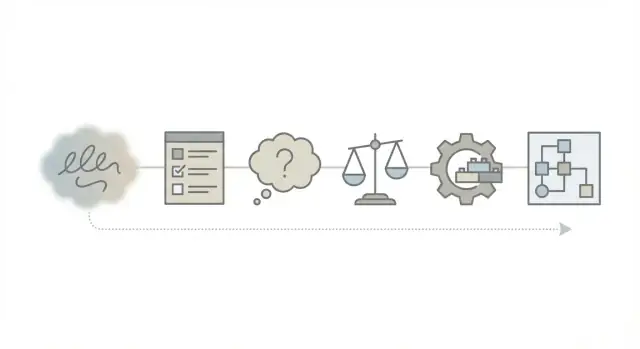
“Prompt to architecture” is the workflow of turning that intent into a coherent plan: what to build, how the pieces fit, where data flows, and what must be true for it to work in production.
What “production-ready architecture” means
Production-ready isn’t “has diagrams.” It means the design explicitly addresses:
- Reliability: what breaks, how it recovers, and what happens under load
- Security: how access is controlled, how secrets are stored, and how threats are mitigated
- Cost: what drives spend and how it’s monitored and controlled
- Operability: monitoring, backups, deployments, and how you debug failures at 2 a.m.
Where AI helps—and where it can mislead
AI is strong at accelerating early thinking: generating candidate architectures, suggesting common patterns (queues, caches, service boundaries), surfacing missing non-functional requirements, and drafting interface contracts or checklists.
AI can mislead when it sounds confident about specifics it can’t verify: picking technologies without context, underestimating operational complexity, or skipping constraints that only your org knows (compliance, existing platforms, team skills). Treat outputs as proposals to challenge, not answers to accept.
What this post will and won’t cover
This post covers a practical, repeatable workflow for moving from prompt → requirements → assumptions → options → decisions, with tradeoffs you can trace.
It won’t replace domain expertise, detailed sizing, or a security review—and it won’t pretend there’s a single “correct” architecture for every prompt.
Step 1: Turn the prompt into a clear problem statement
A vague prompt usually mixes goals (“build a dashboard”), solutions (“use microservices”), and opinions (“make it fast”). Before you sketch components, you need a problem statement that’s specific enough to test and argue about.
Problem statement (who needs what, and why now)
Write one or two sentences that name the primary user, the job they’re trying to do, and the urgency.
Example: “Customer support managers need a single view of open tickets and SLA risk so they can prioritize work daily and reduce missed SLAs this quarter.”
If the prompt doesn’t identify a real user, ask for one. If it doesn’t say why it matters now, you can’t rank tradeoffs later.
Success metrics (how you’ll know it worked)
Turn “good” into measurable outcomes. Prefer a mix of product and operational signals.
- Product: time to complete the main task, adoption rate, error rate, conversion, NPS
- Operational: p95 latency, uptime target, cost per request, on-call pages/week
Pick a small set (3–5). Too many metrics creates confusion; too few hides risk.
User journeys and key flows
Describe the “happy path” in plain language, then list edge cases that will shape the architecture.
Happy path example: user signs in → searches a customer → sees current status → updates a field → audit log recorded.
Edge cases to surface early: offline/poor connectivity, partial permissions, duplicate records, high-volume imports, timeouts, retries, and what happens when a dependency is down.
Out-of-scope (to prevent design creep)
Call out what you are not building in this version: integrations you won’t support yet, advanced analytics, multi-region, custom workflows, or full admin tooling. Clear boundaries protect schedules and make later “Phase 2” conversations easier.
Once these four pieces are written, the prompt becomes a shared contract. AI can help refine it, but it shouldn’t invent it.
Step 2: Extract requirements and constraints
A vague prompt often mixes goals (“make it easy”), features (“send notifications”), and preferences (“use serverless”) into one sentence. This step separates them into a requirements list you can design against.
Functional requirements (what it must do)
Start by pulling out concrete behaviors and the moving parts they touch:
- Features: user signup/login, search, checkout, admin dashboard, audit logs
- Data: what you store (users, orders, events), how long you keep it, and who can access it
- Integrations: payment provider, email/SMS, CRM, analytics, existing internal APIs
A good check: can you point to a screen, API endpoint, or background job for each requirement?
Non-functional requirements (how well it must do it)
These shape architecture more than most people expect. Translate vague words into measurable targets:
- Latency: “Pages load fast” → “95% of requests under 300ms.”
- Uptime: “Always available” → “99.9% monthly uptime.”
- Privacy/compliance: “Handle EU customers” → “GDPR basics: deletion requests, data export, minimal retention.”
Constraints (what you can’t change)
Capture boundaries early so you don’t design an ideal system nobody can ship:
- Budget & timeline: fixed launch date, cloud spend limits
- Team skills: strong Python, limited Kubernetes experience
- Existing systems: must use current database, SSO, or message bus
Acceptance criteria in plain language
Write a few “done means…” statements anyone can verify, for example:
- “A new user can register, confirm email, and log in within 2 minutes.”
- “Support can refund an order and the customer receives confirmation within 1 minute.”
- “Personal data can be deleted on request, including backups within 30 days.”
These requirements and constraints become the input to the candidate architectures you’ll compare next.
Step 3: Surface assumptions and unknowns early
A vague prompt rarely fails because the tech is hard—it fails because everyone silently fills in missing details differently. Before proposing any architecture, use AI to pull those silent assumptions into the open and separate what’s true from what’s guessed.
Common hidden assumptions to list
Start by writing down the “defaults” people usually imply:
- Traffic and growth: Are we building for 50 users/day, or 50k concurrent users? Is usage spiky (e.g., launches) or steady?
- Data quality: Is incoming data clean and structured, or messy with duplicates, missing fields, and inconsistent formats?
- User behavior: Do users tolerate delays? Will they retry aggressively? Do they expect real-time updates?
- Operations: Who supports this? Is there on-call coverage? Are weekend outages acceptable?
These assumptions strongly shape choices like caching, queues, storage, monitoring, and cost.
Split “knowns” vs “unknowns” vs “needs research”
Ask the AI to create a simple table (or three short lists):
- Knowns: Confirmed requirements from the prompt or stakeholders
- Unknowns: Missing details that block confident decisions
- Needs research: Questions requiring spikes, vendor checks, benchmarks, legal review, or user testing
This prevents the AI (and the team) from treating guesses as facts.
Questions the AI should ask before committing to a design
Useful questions include:
- What are the top 3 user journeys, and what does “fast enough” mean for each?
- What data must be stored, for how long, and who is allowed to access it?
- What failure modes are acceptable (partial outage, delayed processing, read-only mode)?
- What integrations exist, and what are their rate limits and reliability?
- What constraints are fixed: budget, deadline, cloud/provider, compliance?
Document assumptions so they can be challenged later
Write assumptions down explicitly (“Assume peak 2,000 requests/min,” “Assume PII present”). Treat them as draft inputs to revisit—ideally linking each to who confirmed it and when. That makes later tradeoffs and architecture changes easier to explain, defend, and reverse.
Step 4: Propose candidate architectures, not one answer
A vague prompt rarely implies a single “correct” design. The fastest way to get to a production-ready plan is to sketch a few viable options, then choose a default and clearly explain what would make you switch.
Option A (default first): Simple monolith + managed services
For most early-stage products, start with one deployable backend (API + business logic), a single database, and a small set of managed services (auth, email, object storage). This keeps deployment, debugging, and changes straightforward.
Choose this when: the team is small, requirements are still shifting, and traffic is uncertain.
Option B: Standard modular monolith + async jobs
Same single deployable, but with explicit internal modules (billing, users, reporting) and a background worker for slow tasks (imports, notifications, AI calls). Add a queue and retry policies.
Choose this when: you have long-running tasks, periodic spikes, or need clearer ownership boundaries—without splitting into separate services.
Option C: Scalable services (only if the requirements demand it)
Split a few components into separate services when there’s a strong driver: strict isolation (compliance), independently scaling a hotspot (e.g., media processing), or separate release cycles.
Choose this when: you can point to specific load patterns, org boundaries, or risk constraints that justify the added operational overhead.
What changes between options
Across these options, call out the differences explicitly:
- Components: single API vs API + worker vs multiple deployables
- Cost: fewer moving parts vs additional queue, monitoring, and service-to-service traffic
- Complexity: simpler local development vs more deployments, versioning, and failure modes
A good AI-assisted output here is a small decision table: “Default = A, switch to B if we have background jobs, switch to C if X metric/constraint is true.” This prevents premature microservices and keeps the architecture tied to real requirements.
Step 5: Model data and boundaries
A surprising amount of “architecture” is really just agreeing on what the system’s data is, where it lives, and who is allowed to change it. If you model this early, later steps (components, interfaces, scaling, security) become far less guessy.
Define the core domain objects (and who owns them)
Start by naming the handful of objects your system revolves around—usually nouns from the prompt: User, Organization, Subscription, Order, Ticket, Document, Event, etc. For each object, capture ownership:
- Source of truth: which system/service is allowed to write updates?
- Readers: who consumes it (other services, analytics, customer support)?
- Lifecycle: created/updated/deleted, plus any “soft delete” rules
This is where AI is useful: it can propose an initial domain model from the prompt, then you confirm what’s real vs. implied.
Choose storage patterns that match access needs
Decide whether each object is primarily transactional (OLTP)—lots of small reads/writes that must be consistent—or analytical (aggregations, trends, reporting). Mixing these needs in one database often creates tension.
A common pattern: an OLTP database for the app, plus a separate analytics store fed by events or exports. The key is to align storage with how the data is used, not how it “feels” conceptually.
Plan the data flow end-to-end
Sketch the path data takes through the system:
- Ingestion: APIs, uploads, webhooks, batch imports
- Transformation: validation, enrichment, deduplication
- Retention and deletion: how long data is kept, and how it’s removed
Surface data risks early
Call out risks explicitly: PII handling, duplicated records, conflicting sources (two systems claiming to be the truth), and unclear deletion semantics. These risks define boundaries: what must stay internal, what can be shared, and what needs audit trails or access controls.
Step 6: Map components and interfaces
Once you have boundaries and data in place, convert them into a concrete component map: what exists, what it owns, and how it talks to everything else. This is where AI is most useful as a “diagram generator in words”—it can propose clean separations and spot missing interfaces.
Define modules and responsibilities
Aim for a small set of components with clear ownership. A good check is: “If this breaks, who fixes it, and what changes?” For example:
- API Gateway / BFF: request routing, auth enforcement, rate limits
- Core service(s): business rules and workflows
- Data store(s): persistence and query patterns (not just “a database”)
- Async workers: long-running tasks, retries, scheduled jobs
- Observability: logging, metrics, tracing (as first-class components)
Choose how components communicate (and why)
Pick a default communication style and justify exceptions:
- REST/HTTP for simple request/response and human-debuggable flows
- Events / pub-sub when multiple consumers react to the same change
- Queues for background work, smoothing spikes, and reliable retries
AI can help by mapping each use case to the simplest interface that meets latency and reliability needs.
External dependencies and failure behavior
List third-party services and decide what happens when they fail:
- Timeouts, retries with backoff, and circuit breakers
- Degraded mode (serve cached data? allow read-only?)
- Clear error contracts (what clients can expect)
Integration map (systems, APIs, auth)
Write a compact “integration table”:
- Payments → Provider API (REST), OAuth2 client credentials, idempotency keys
- Email/SMS → Messaging API (REST), API key, retry queue on 5xx
- Analytics → Event stream, service token, drop-on-overload policy
This map becomes the backbone for implementation tickets and review discussions.
Step 7: Design for production concerns (before coding)
A design can look perfect on a whiteboard and still fail on day one in production. Before you write code, make the “production contract” explicit: what happens under load, during failures, and under attack—and how you’ll know it’s happening.
Reliability: plan for failure paths
Start by defining how the system behaves when dependencies are slow or down. Add timeouts, retries with jitter, and clear circuit-breaker rules. Make operations idempotent (safe to retry) by using request IDs or idempotency keys.
If you call third-party APIs, assume rate limits and build backpressure: queues, bounded concurrency, and graceful degradation (e.g., “try later” responses rather than pile-ups).
Security: decide who can do what
Specify authentication (how users prove identity) and authorization (what they can access). Write down the top threat scenarios relevant to your system: stolen tokens, abuse of public endpoints, injection via inputs, or privilege escalation.
Also define how you’ll handle secrets: where they live, who can read them, rotation cadence, and audit trails.
Performance: targets, not vibes
Set capacity and latency targets (even rough ones). Then choose tactics: caching (what, where, and TTL), batching for chatty calls, async work via queues for long tasks, and limits to protect shared resources.
Observability: you can’t fix what you can’t see
Decide on structured logs, key metrics (latency, error rate, queue depth), distributed tracing boundaries, and basic alerts. Tie each alert to an action: who responds, what to check, and what “safe mode” looks like.
Treat these choices as first-class architecture elements—they shape the system as much as endpoints and databases.
Step 8: Make tradeoffs explicit and traceable
Architecture isn’t a single “best” answer—it’s a set of choices under constraints. AI is useful here because it can list options quickly, but you still need a clear record of why you chose one path, what you gave up, and what would trigger a change later.
Use a simple tradeoff table
| Option | Cost | Speed to ship | Simplicity | Scale headroom | Notes / When to revisit |
|---|---|---|---|---|---|
| Managed services (DB, queues, auth) | Medium–High | High | High | High | Revisit if vendor limits/features block needs |
| Self-hosted core components | Low–Medium | Low–Medium | Low | Medium–High | Revisit if ops burden exceeds team capacity |
| Monolith first | Low | High | High | Medium | Split when deploy frequency or team size demands |
| Microservices early | Medium–High | Low | Low | High | Only if independent scaling/ownership is required now |
Decide where to accept risk vs. invest in safeguards
Write down “acceptable failures” (e.g., occasional delayed emails) versus “must not fail” areas (e.g., payments, data loss). Put safeguards where failures are expensive: backups, idempotency, rate limits, and clear rollback paths.
Operational tradeoffs that affect your team
Some designs increase on-call load and debugging difficulty (more moving parts, more retries, more distributed logs). Prefer choices that match your support reality: fewer services, clearer observability, and predictable failure modes.
Technology tradeoffs: managed vs. self-hosted
Make the decision criteria explicit: compliance needs, customization, latency, and staffing. If you choose self-hosted for cost, note the hidden price: patching, upgrades, capacity planning, and incident response.
Step 9: Capture decisions, alternatives, and reversibility
Great architectures don’t just “happen”—they’re the result of many small choices. If those choices live only in chat logs or someone’s memory, teams repeat debates, ship inconsistently, and struggle when requirements shift.
Use ADRs to make decisions searchable
Create an Architecture Decision Record (ADR) for each key choice (database, messaging pattern, auth model, deployment approach). Keep it short and consistent:
- Context: what problem you’re solving and the constraints
- Decision: what you chose
- Alternatives considered: 2–3 viable options
- Why: the reasoning and tradeoffs
- Consequences: what this enables and what it limits
AI is especially useful here: it can summarize options, extract tradeoffs from discussions, and draft ADRs that you then edit for accuracy.
Build “exit ramps” into the design
Assumptions change: traffic grows faster, compliance becomes stricter, or an external API becomes unreliable. For each major assumption, add an exit ramp:
- “If we exceed X requests/sec, move from single DB to read replicas.”
- “If vendor API SLA drops below Y, introduce a queue + retry worker.”
This turns future change into a planned move, not a fire drill.
Add proof points and version decisions
Attach testable milestones to risky choices: spikes, benchmarks, small prototypes, or load tests. Record expected outcomes and success criteria.
Finally, version ADRs as requirements evolve. Don’t overwrite history—append updates so you can trace what changed, when, and why. If you need a lightweight structure, link to an internal template like /blog/adr-template.
Step 10: Validate the architecture with reviews and evidence
A draft architecture isn’t “done” when it looks clean on a diagram. It’s done when the people who will build, secure, run, and pay for it agree it works—and when you have evidence to back up the tricky parts.
Run a focused architecture review
Use a short checklist to force important questions to the surface early:
- Security: authentication/authorization model, secrets handling, least privilege, audit logs
- Privacy: data classification, retention, access controls, PII flow mapping, deletion requests
- Failure modes: degraded behavior, retries and backoff, idempotency, dead-letter queues, rate limits
- Operational readiness: monitoring, alerting, runbooks, on-call ownership, backup/restore
Keep the output concrete: “What will we do?” and “Who owns it?” rather than general intentions.
Validate with numbers (ranges, not wishful thinking)
Instead of a single throughput estimate, produce load and cost ranges that reflect uncertainty:
- Traffic: P50 / P95 requests per second (e.g., 50–200 RPS typical, 500–1,000 RPS peak)
- Storage growth: monthly range plus retention assumptions
- Cost drivers: model/API usage, compute autoscaling, data egress, managed databases
Ask the AI to show its math and assumptions, then sanity-check against current analytics or comparable systems.
Assess dependency and vendor risk
List critical dependencies (LLM provider, vector DB, queue, auth service). For each, capture:
- What breaks if it’s unavailable?
- How hard is it to switch providers?
- Are there contractual, regional, or compliance constraints?
Define human sign-off points
Make reviews explicit, not implied:
- Product: user flows, SLAs, scope boundaries
- Security/Privacy: threat model outcomes, data handling approvals
- Ops/SRE: observability plan, incident response, capacity assumptions
- Engineering: interfaces, milestones, migration plan
When disagreements remain, record them as decisions-to-make with owners and dates—then move forward with clarity.
How to collaborate with AI effectively during design
AI can be a strong design partner if you treat it like a junior architect: capable of generating options quickly, but needing clear context, checks, and direction.
Write prompts that force assumptions and constraints into the open
Start by giving the AI a “box” to work inside: business goal, users, scale, budget, deadlines, and any non-negotiables (tech stack, compliance, hosting, latency, data residency). Then ask it to list assumptions and unknowns first before proposing solutions.
A simple rule: if a constraint matters, state it explicitly—don’t expect the model to infer it.
Where a vibe-coding platform can help
If your goal is to go from “architecture plan” to “working system” without losing decisions in handoffs, a workflow tool matters. Platforms like Koder.ai can be useful here because the same chat that helps you clarify requirements can also carry those constraints into implementation: planning mode, repeatable iterations, and the ability to export source code when you’re ready to own the pipeline.
This doesn’t remove the need for architecture reviews—if anything, it raises the bar for documenting assumptions and non-functional requirements—because you can move from proposal to running app quickly.
Prompt templates you can reuse
Use short templates that produce structured output:
You are helping design a system.
Context: <1–3 paragraphs>
Constraints: <bullets>
Non-functional requirements: <latency, availability, security, cost>
Deliverables:
1) Assumptions + open questions
2) 2–3 candidate architectures with pros/cons
3) Key tradeoffs (what we gain/lose)
4) Draft ADRs (decision, alternatives, rationale, risks)
Iterate with “critique and refine” loops
Ask for a first pass, then immediately request a critique:
- “What’s brittle or risky in this design?”
- “Which requirements are not satisfied yet?”
- “What would you simplify if we had half the time?”
This keeps the model from locking onto a single path too early.
Watch for common failure modes
AI can sound confident while being wrong. Common issues include:
- Hallucinated services/features—require links or explicit uncertainty
- Ignored constraints (cost, data residency, team skills)—ask it to trace each design choice back to a requirement
- Overengineering—force a “smallest viable architecture” option
If you want, you can capture the outputs as lightweight ADRs and keep them alongside the repo (see /blog/architecture-decision-records).
Mini walkthrough: from vague prompt to ready-to-build plan
A vague prompt: “Build a system that alerts customers when a delivery will be late.”
1) Turn it into requirements
AI helps translate that into concrete needs:
- Users: operations team, end customers
- Core flow: ingest shipment status → detect delay risk → notify → track outcomes
- Non-functional: alerts within 2 minutes of status change, 99.9% availability, audit trail for disputes
2) Assumptions that change the architecture
Two early questions often flip the design:
- Assumption A: status updates arrive in real time from carriers (webhooks). If true, event-driven processing fits.
- Assumption B: updates are polled every 15 minutes. If true, you need scheduling, rate-limit handling, and your “2 minute” alert SLA may be impossible without renegotiating inputs.
By writing these down, you prevent building the wrong thing quickly.
3) Options → tradeoff call
AI proposes candidate architectures:
-
Option 1: Synchronous API: carrier webhook → delay scoring service → notification service
- Pros: simple, fewer moving parts
- Cons: webhook timeouts can cause lost updates; spikes can overload scoring
-
Option 2: Queue-based: webhook → enqueue event → workers score delays → notifications
- Pros: absorbs bursts, retries safely, better observability
- Cons: more components, eventual consistency
Tradeoff decision: choose queue-based if carrier reliability and traffic spikes are risks; choose synchronous if volume is low and carrier SLAs are strong.
4) Final plan and deliverables
Deliverables to make it buildable:
- Context and sequence diagrams
- Data model + event schema
- ADRs documenting the queue vs. synchronous choice
- Runbooks (failure modes, retries, on-call checks)
- Backlog epics (carrier integration, scoring rules, notification templates, monitoring)
FAQ
What does “prompt to architecture” mean in practice?
“Prompt to architecture” is the workflow of turning an intent (“build a customer portal”) into a buildable plan: requirements, assumptions, candidate options, explicit decisions, and an end-to-end view of components and data flows.
Treat AI output as a proposal you can test and edit—not as a final answer.
What makes an architecture “production-ready” (beyond having diagrams)?
Production-ready means the design explicitly covers:
- Reliability: failure modes, recovery, retries, idempotency
- Security: authn/authz, secrets handling, least privilege, auditability
- Cost: main cost drivers and controls
- Operability: monitoring, alerting, backups/restore, deploys, and how you debug incidents
Diagrams help, but they’re not the definition.
How do I turn a vague prompt into a clear problem statement?
Write 1–2 sentences that specify:
- Primary user (who)
- Job to be done (what)
- Why now (urgency/timeframe)
If the prompt doesn’t name a real user or urgency, ask for them—otherwise you can’t rank tradeoffs later.
How should I pick success metrics that actually drive architectural decisions?
Choose 3–5 measurable metrics mixing product and operational outcomes, for example:
- Product: task completion time, adoption rate, error rate
- Operational: p95 latency, uptime target, cost per request, on-call pages/week
Avoid “metric sprawl”: too many makes priorities unclear; too few hides risk.
How do I surface assumptions and unknowns before choosing technologies?
List hidden defaults early (traffic, data quality, user tolerance for delays, on-call coverage), then split into:
- Knowns: confirmed by stakeholders
- Unknowns: missing details blocking decisions
- Needs research: spikes, benchmarks, vendor/legal checks
Document assumptions explicitly (with who/when confirmed) so they can be challenged and revised.
What are good “candidate architectures” to compare early on?
Start with multiple viable options and pick a default with clear “switch conditions,” for example:
- Simple monolith + managed services: fastest to ship, simplest ops
- Modular monolith + async jobs: same deployable, clearer boundaries, queue/worker for slow work
- Selective services: only when scaling/isolation/release independence is required
The point is traceable tradeoffs, not a single “correct” design.
What data modeling decisions matter most early in architecture?
Name core domain objects (nouns like User, Order, Ticket, Event) and for each define:
- Source of truth (who can write)
- Readers/consumers (who needs it)
- Lifecycle (create/update/delete, retention, soft-delete rules)
Then align storage with access patterns (OLTP vs analytics) and sketch the end-to-end data flow (ingestion → validation/enrichment → retention/deletion).
How should I plan for third-party failures and rate limits?
For each dependency (payments, messaging, LLMs, internal APIs), define failure behavior:
- Timeouts + retries (with backoff/jitter)
- Circuit breakers and bounded concurrency
- Degraded modes (cached reads, read-only, “try later” responses)
- Clear client error contracts
Assume rate limits exist and design backpressure so spikes don’t cascade into outages.
How do ADRs and “exit ramps” make architecture decisions safer?
Use Architecture Decision Records (ADRs) to capture:
- Context and constraints
- Decision
- Alternatives considered
- Why (tradeoffs)
- Consequences
Add “exit ramps” tied to triggers (e.g., “if we exceed X RPS, add read replicas”). Keep ADRs searchable and versioned; a lightweight template can live at a relative link like /blog/adr-template.
How do I use AI effectively without being misled by confident-sounding outputs?
Give AI a tight box: goal, users, scale, constraints (budget, deadlines, compliance, stack), and ask it to:
- List assumptions + open questions first
- Propose 2–3 options with pros/cons
- Map choices back to requirements
Then run “critique and refine” loops (what’s brittle, what’s missing, what to simplify). Watch for confident specifics it can’t verify and require explicit uncertainty where needed.