

How AI-Generated Code Helps Reduce Framework Lock-In Early
See how AI-generated code can reduce early framework lock-in by separating core logic, speeding experiments, and making later migrations simpler.
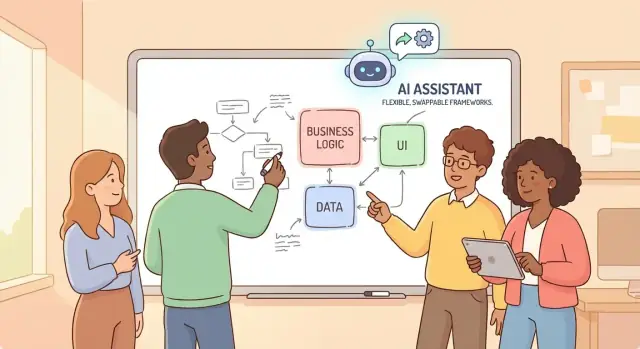
What Framework Lock-In Means for Early Products
Framework lock-in happens when your product becomes so tied to a specific framework (or vendor platform) that changing it later feels like rewriting the company. It’s not just “we’re using React” or “we chose Django.” It’s when the framework’s conventions seep into everything—business rules, data access, background jobs, authentication, even how you name files—until the framework is the app.
What lock-in looks like in plain terms
A locked-in codebase often has business decisions embedded inside framework-specific classes, decorators, controllers, ORMs, and middleware. The result: even small changes (like moving to a different web framework, swapping your database layer, or splitting a service) turn into large, risky projects.
Lock-in usually happens because the fastest path early on is to “just follow the framework.” That’s not inherently wrong—frameworks exist to speed you up. The problem starts when framework patterns become your product design instead of remaining implementation details.
Why early-stage products are most vulnerable
Early products are built under pressure: you’re racing to validate an idea, requirements are changing weekly, and a small team is juggling everything from onboarding to billing. In that environment, it’s rational to copy-paste patterns, accept defaults, and let scaffolding dictate structure.
Those early shortcuts compound quickly. By the time you reach “MVP-plus,” you may discover that a key requirement (multi-tenant data, audit trails, offline mode, a new integration) doesn’t fit the original framework choices without heavy bending.
The real goal: delay irreversible decisions
This isn’t about avoiding frameworks forever. The goal is to keep your options open long enough to learn what your product actually needs. Frameworks should be replaceable components—not the place where your core rules live.
Where AI-generated code fits (and where it doesn’t)
AI-generated code can reduce lock-in by helping you scaffold clean seams—interfaces, adapters, validation, and tests—so you don’t have to “bake in” every framework decision just to move fast.
But AI can’t choose architecture for you. If you ask it to “build the feature” without constraints, it will often mirror the framework’s default patterns. You still need to set the direction: keep business logic separate, isolate dependencies, and design for change—even while shipping quickly.
If you’re using an AI development environment (not just an in-editor helper), look for features that make these constraints easier to enforce. For example, Koder.ai includes a planning mode you can use to spell out boundaries up front (e.g., “core has no framework imports”), and it supports source code export—so you can keep portability and avoid being trapped by tooling decisions.
How Lock-In Happens (Usually by Accident)
Framework lock-in rarely starts as a deliberate choice. It usually grows out of dozens of small “just ship it” decisions that feel harmless in the moment, then quietly become assumptions baked into your codebase.
The usual triggers
A few patterns show up again and again:
- Tight coupling: business rules directly call framework helpers (requests, sessions, ORM models) instead of your own thin abstractions.
- Vendor-specific APIs: you reach for the easiest built-in solution—queues, auth, storage, analytics—without a boundary around it.
- Quick hacks that stick: a prototype shortcut becomes “temporary production,” then nobody wants to touch it because it works.
AI-generated code can accelerate this accident: if you prompt for “working code,” it will often produce the most idiomatic, framework-native implementation—which is great for speed, but it can harden dependencies faster than you expect.
Where lock-in hides (with examples)
Lock-in often forms in a few high-gravity areas:
- Routing and controllers: route params and middleware assumptions spread everywhere (e.g., “everything has access to the request object”).
- Authentication and authorization: roles, sessions, and guards tied to one provider’s concepts make future changes painful.
- Data models: business logic living inside ORM models creates a web of implicit behavior tied to that ORM.
- UI component systems: once every screen depends on a specific component library’s styling and state patterns, swapping it becomes a rewrite.
Accidental vs. intentional lock-in
Lock-in isn’t always bad. Choosing a framework and leaning into it can be a smart trade when speed matters. The real problem is accidental lock-in—when you didn’t mean to commit, but your code no longer has clean seams where another framework (or even a different module) could plug in later.
What AI-Generated Code Can (and Can’t) Do
AI-generated code usually means using tools like ChatGPT or in-editor assistants to produce code from a prompt: a function, a file scaffold, tests, a refactor suggestion, or even a small feature. It’s fast pattern-matching plus context from what you provide—useful, but not magical.
What it can do well (early on)
When you’re moving from prototype to MVP, AI is most valuable for the time sinks that don’t define your product:
- Scaffolding: setting up folders, basic CRUD endpoints, simple UI components, config files, and boilerplate.
- Glue code: mapping data between modules, wiring services together, writing small adapters, and handling repetitive transformations.
- Refactors on rails: renaming, extracting helpers, splitting files, and cleaning up duplication—especially when you already know the direction you want.
Used this way, AI can reduce lock-in pressure by freeing you to focus on boundaries (business rules vs. framework glue) instead of rushing into whatever the framework makes easiest.
What it can’t do (and where lock-in sneaks in)
AI won’t reliably:
- Choose an architecture for you or understand long-term maintenance tradeoffs.
- Spot subtle coupling (e.g., business logic embedded in ORM models, framework-specific decorators spread everywhere).
- Keep patterns consistent across a growing codebase without strong guidance.
A common failure mode is “it works” code that leans heavily on convenient framework features, quietly making future migration harder.
The right mindset: AI output is a draft
Treat AI-generated code like a junior teammate’s first pass: helpful, but it needs review. Ask for alternatives, request framework-agnostic versions, and verify that core logic stays portable before you merge anything.
Separate Business Logic from the Framework
If you want to stay flexible, treat your framework (Next.js, Rails, Django, Flutter, etc.) as a delivery layer—the part that handles HTTP requests, screens, routing, auth wiring, and database plumbing.
Your core business logic is everything that should remain true even if you change the delivery method: pricing rules, invoice calculations, eligibility checks, state transitions, and policies like “only admins can void invoices.” That logic shouldn’t “know” whether it’s being triggered by a web controller, a mobile button, or a background job.
The simplest boundary: framework code calls your code
A practical rule that prevents deep coupling is:
Framework code calls your code, not the other way around.
So instead of a controller method packed with rules, your controller becomes thin: parse input → call a use-case module → return a response.
Use-case driven modules (and how AI helps)
Ask your AI assistant to generate business logic as plain modules named after actions your product performs:
CreateInvoiceCancelSubscriptionCalculateShippingQuote
These modules should accept plain data (DTOs) and return results or domain errors—no references to framework request objects, ORM models, or UI widgets.
AI-generated code is especially useful for extracting logic you already have inside handlers into clean functions/services. You can paste a messy endpoint and request: “Refactor into a pure CreateInvoice service with input validation and clear return types; keep the controller thin.”
A quick smell test
If your business rules import framework packages (routing, controllers, React hooks, mobile UI), you’re mixing layers. Flip it: keep imports flowing toward the framework, and your core logic stays portable when you need to swap the delivery layer later.
Use Adapters and Interfaces to Keep Options Open
Adapters are small “translators” that sit between your app and a specific tool or framework. Your core code talks to an interface you own (a simple contract like EmailSender or PaymentsStore). The adapter handles the messy details of how a framework does the job.
This keeps your options open because swapping a tool becomes a focused change: replace the adapter, not your whole product.
Where adapters matter most
A few places lock-in tends to sneak in early:
- Database access: wrapping an ORM or database client so your business logic doesn’t depend on query syntax or models.
- HTTP clients: isolating a vendor SDK or a particular HTTP library behind
HttpClient/ApiClient. - Queues and background jobs: hiding whether you use SQS, RabbitMQ, Redis queues, or a framework-specific job runner.
- File/storage: abstracting local disk vs S3/GCS and their auth, paths, and upload semantics.
When these calls are sprinkled directly through your codebase, migration turns into “touch everything.” With adapters, it becomes “swap a module.”
How AI helps: generate pairs, fast
AI-generated code is great at producing the repetitive scaffolding you need here: an interface + one concrete implementation.
For example, prompt for:
- an interface (
Queue) with methods your app needs (publish(),subscribe()) - an implementation (
SqsQueueAdapter) that uses the chosen library - a second “fake” implementation for tests (
InMemoryQueue)
You still review the design, but AI can save hours on boilerplate.
Keep adapters thin and swappable
A good adapter is boring: minimal logic, clear errors, and no business rules. If an adapter grows too smart, you’ve just moved lock-in to a new place. Put business logic in your core; keep adapters as replaceable plumbing.
Generate Contracts First: Schemas, Types, and Validation
Framework lock-in often starts with a simple shortcut: you build the UI, wire it directly to whatever database or API shape is convenient, and only later realize every screen assumes the same framework-specific data model.
A “contract first” approach flips that order. Before you hook anything to a framework, define the contracts your product relies on—request/response shapes, events, and core data structures. Think: “What does CreateInvoice look like?” and “What does an Invoice guarantee?” rather than “How does my framework serialize this?”
Start with a schema, not a controller
Use a schema format that’s portable (OpenAPI, JSON Schema, or GraphQL schema). This becomes the stable center of gravity for your product—even if the UI moves from Next.js to Rails, or your API moves from REST to something else later.
Let AI generate the boring (but critical) glue
Once the schema exists, AI-generated code is especially useful because it can produce consistent artifacts across stacks:
- Types/interfaces (TypeScript types, Kotlin data classes, etc.) derived from the schema
- Runtime validators (e.g., Zod/Ajv rules) so your app rejects invalid data early
- Test fixtures: valid and invalid payload examples, plus edge cases you didn’t think to write
This reduces framework coupling because your business logic can depend on internal types and validated inputs, not on framework request objects.
Version contracts to enable gradual change
Treat contracts like product features: version them. Even lightweight versioning (e.g., /v1 vs /v2, or invoice.schema.v1.json) lets you evolve fields without a big-bang rewrite. You can support both versions during a transition, migrate consumers gradually, and keep your options open when frameworks change.
Use AI to Build a Safety Net with Tests
Tests are one of the best anti-lock-in tools you can invest in early—because good tests describe behavior, not implementation. If your test suite clearly states “given these inputs, we must produce these outputs,” you can swap frameworks later with far less fear. The code can change; the behavior must not.
Why tests reduce lock-in
Framework lock-in often happens when business rules get tangled up with framework conventions. A strong set of unit tests pulls those rules into the spotlight and makes them portable. When you migrate (or even just refactor), your tests become the contract that proves you didn’t break the product.
How AI helps you test the right things
AI is especially useful for generating:
- Unit tests around business rules (pricing, eligibility, permissions, state transitions)
- Edge cases you forget when you’re moving fast (empty inputs, time zones, rounding, duplicate submissions)
- Regression tests from bug reports (“this used to fail; it must never fail again”)
A practical workflow: paste a function plus a short description of the rule, then ask AI to propose test cases, including boundaries and “weird” inputs. You still review the cases, but AI helps you cover more ground quickly.
Aim for a test pyramid (not a test tower)
To stay flexible, bias toward many unit tests, a smaller number of integration tests, and few end-to-end tests. Unit tests are faster, cheaper, and less tied to any single framework.
Avoid framework-heavy test helpers when you can
If your tests require a full framework boot, custom decorators, or heavy mocking utilities that only exist in one ecosystem, you’re quietly locking yourself in. Prefer plain assertions against pure functions and domain services, and keep framework-specific wiring tests minimal and isolated.
Prototype Faster Without Cementing the Stack
Early products should behave like experiments: build something small, measure what happens, then change direction based on what you learn. The risk is that your first prototype quietly becomes “the product,” and the framework choices you made under time pressure become expensive to undo.
Treat prototypes as disposable experiments
AI-generated code is ideal for exploring variations quickly: a simple onboarding flow in React vs. a server-rendered version, two different payment providers, or a different data model for the same feature. Because AI can produce workable scaffolding in minutes, you can compare options without betting the company on the first stack that happened to ship.
The key is intent: label prototypes as temporary, and decide up front what they’re meant to answer (e.g., “Do users complete step 3?” or “Is this workflow understandable?”). Once you have the answer, the prototype has done its job.
Time-box, then discard on purpose
Set a short time window—often 1–3 days—to build and test a prototype. When the time box ends, choose one:
- Discard the code and keep only the learnings.
- Rebuild the chosen approach cleanly, using the prototype as a reference.
This prevents “prototype glue” (quick fixes, copy-pasted snippets, framework-specific shortcuts) from turning into long-term coupling.
Document decisions as you iterate
As you generate and tweak code, keep a lightweight decision log: what you tried, what you measured, and why you chose (or rejected) a direction. Capture constraints too (“must run on existing hosting,” “needs SOC2 later”). A simple page in /docs or your project README is enough—and it makes future changes feel like planned iterations, not painful rewrites.
Refactor Early and Often to Prevent Deep Coupling
Early products change weekly: naming, data shapes, even what “a user” means. If you wait to refactor until after growth, your framework choices harden into your business logic.
AI-generated code can help you refactor sooner because it’s good at repetitive, low-risk edits: renaming things consistently, extracting helper functions, reorganizing files, and moving code behind clearer boundaries. Used well, that reduces coupling before it becomes structural.
High-value refactor targets (where lock-in hides)
Start with changes that make your core behavior easier to move later:
- Service boundaries: Extract “what the business does” into services (e.g.,
BillingService,InventoryService) that don’t import controllers, ORM models, or framework request objects. - DTOs / view models: Introduce plain data shapes for input/output instead of passing framework models everywhere. Keep mapping at the edges.
- Error handling: Replace framework-specific exceptions sprinkled across the codebase with your own error types (e.g.,
NotFound,ValidationError) and translate them at the boundary.
Small, reversible steps (with tests after each)
Refactor in increments you can undo:
- Add or update tests around the behavior you’re touching.
- Ask AI to make one change (rename, extract, move) and explain the diff.
- Run tests immediately; only then do the next step.
This “one change + green tests” rhythm keeps AI helpful without letting it drift.
Avoid big-bang rewrites
Don’t ask AI for sweeping “modernize the architecture” changes across the entire repo. Large, generated refactors often mix style changes with behavior changes, making bugs hard to spot. If the diff is too big to review, it’s too big to trust.
Plan for Migration Even If You Never Migrate
Planning for migration isn’t pessimism—it’s insurance. Early products change direction quickly: you may switch frameworks, split a monolith, or move from “good enough” auth to something compliant. If you design with an exit in mind, you often end up with cleaner boundaries even if you stay put.
The parts that are hardest to move later
A migration usually fails (or becomes expensive) when the most entangled pieces are everywhere:
- State management: UI state bleeding into business rules, or framework-specific stores becoming the source of truth.
- Data layer: ORM models doubling as API contracts, queries scattered across screens, and migrations coupled to framework conventions.
- Auth and permissions: session handling, middleware, and authorization checks sprinkled throughout controllers/components.
These areas are sticky because they touch many files, and small inconsistencies multiply.
Use AI to draft a realistic migration plan
AI-generated code is useful here—not to “do the migration,” but to create structure:
- Draft a migration checklist tailored to your stack (routes, state, data models, auth flows). Start with a template like
/blog/migration-checklist. - Propose an incremental sequence (“move auth first, then data access, then UI”), including what to keep stable (contracts, IDs, event names).
- Generate a risk table (what might break, how to detect it, rollback steps), which you can turn into issues.
The key is to ask for steps and invariants, not just code.
Build a “strangler” path
Instead of rewriting everything, run a new module beside the old one:
- Create a new service/module with the same external contracts (schemas, endpoints, events).
- Route a small percentage of traffic—or a single feature—through the new path.
- Expand coverage until the old module becomes a thin shell you can delete.
This approach works best when you already have clear boundaries. For patterns and examples, see /blog/strangler-pattern and /blog/framework-agnostic-architecture.
If you never migrate, you still benefit: fewer hidden dependencies, clearer contracts, and less surprise tech debt.
Practical Guardrails for AI-Generated Code
AI can ship a lot of code quickly—and it can also spread a framework’s assumptions everywhere if you don’t set boundaries. The goal isn’t to “trust less,” but to make it easy to review and hard to accidentally couple your core product to a specific stack.
Review checks that prevent hidden lock-in
Use a short, repeatable checklist in every PR that includes AI-assisted code:
- No framework types in core modules (no
Request,DbContext,ActiveRecord,Widget, etc.). Core code should talk in your terms:Order,Invoice,UserId. - Minimal globals and singletons. If it can’t be constructed with parameters, it’s harder to test and harder to move.
- Dependencies point inward. UI/API layers can import core; core should not import UI/API/framework packages.
- Serialization stays at the edges. Converting JSON/HTTP/form data should happen in adapters, not in business logic.
Lightweight standards that AI can follow
Keep standards simple enough that you’ll enforce them:
- Define folder boundaries like
core/,adapters/,app/(or similar) and a rule: “core has zero framework imports.” - Use naming that signals intent:
*Service(business logic),*Repository(interface),*Adapter(framework glue). - Add one dependency rule tool (or a tiny script) to fail builds when forbidden imports appear.
Prompt hygiene: make constraints explicit
When asking AI for code, include:
- the target folder (e.g., “generate code for
/corewith no framework imports”), - allowed dependencies,
- a small example of your preferred interface style.
This is also where AI platforms with an explicit “plan then build” workflow help. In Koder.ai, for instance, you can describe these constraints in planning mode and then generate code accordingly, using snapshots and rollback to keep changes reviewable when the generated diff is larger than expected.
Automate enforcement early
Set up formatters/linters and a basic CI check on day one (even a single “lint + test” pipeline). Catch coupling immediately, before it becomes “how the project works.”
Checklist: Staying Flexible in the First 90 Days
Staying “framework-flexible” isn’t about avoiding frameworks—it’s about using them for speed while keeping your exit costs predictable. AI-generated code can help you move fast, but the flexibility comes from where you place the seams.
The core tactics that delay lock-in
Keep these four tactics in view from day one:
- Separate business logic from the framework: put pricing rules, onboarding rules, and permissions in plain modules/services that don’t import framework-specific packages.
- Use adapters and interfaces: treat the framework, database, queues, auth, and email as replaceable “plugs.” Your app calls an interface; an adapter implements it.
- Generate contracts first: define schemas/types/validation (e.g., request/response shapes) before wiring endpoints. AI is great at scaffolding consistent types and validators.
- Use AI to build a safety net with tests: high-signal unit tests around business rules, plus a few integration tests around critical flows, make refactors and migrations realistic.
Week 1 checklist (quick, practical)
Aim to complete these before your codebase grows:
- Create a
/core(or similar) folder that holds business logic with no framework imports. - Define API and domain contracts (schemas/types) and generate validators.
- Add interfaces for storage, auth, email, payments, and implement the first adapters.
- Ask AI to generate unit tests for the top 5 rules (billing, permissions, eligibility, etc.) and run them in CI.
- Establish a rule: framework code lives at the edges (controllers/routes/views), not in core logic.
Through day 90 (keep exits affordable)
Revisit the seams every 1–2 weeks:
- Refactor duplicated logic back into core services.
- Keep adapters thin; resist “just one shortcut” that leaks framework objects into core.
- When AI generates code, require it to follow your contracts and interfaces, and reject direct coupling.
If you’re evaluating options for moving from prototype to MVP while staying portable, you can review plans and constraints at /pricing.
FAQ
What is framework lock-in (beyond just “we picked a framework”)?
Framework lock-in is when your product’s core behavior becomes inseparable from a specific framework or vendor’s conventions (controllers, ORM models, middleware, UI patterns). At that point, changing frameworks isn’t a swap—it’s a rewrite because your business rules depend on framework-specific concepts.
What are the early warning signs that my codebase is getting locked in?
Common signs include:
- Business rules that import framework types (e.g.,
Request, ORM base models, UI hooks) - Controllers/components that contain most of the “real logic”
- Auth, data access, and background jobs wired directly throughout the codebase
- Small changes (new tenant model, audit trail, integration) requiring changes across many files
If migration feels like touching everything, you’re already locked in.
Why are early-stage products more vulnerable to lock-in than later-stage ones?
Early teams optimize for speed under uncertainty. The fastest path is usually “follow the framework defaults,” which can quietly make framework conventions your product design. Those shortcuts compound, so by “MVP-plus” you may discover new requirements don’t fit without heavy bending or major rewrites.
Can AI-generated code actually reduce lock-in, or does it make it worse?
Yes—if you use it to create seams:
- Extract business logic into plain services/use-cases
- Generate interfaces/adapters for databases, queues, auth, storage
- Produce validators/types from schemas so the core depends on contracts, not framework objects
AI helps most when you direct it to keep the framework at the edges and your rules in core modules.
How do I prompt AI so it doesn’t bake in framework-specific patterns everywhere?
AI tends to produce the most idiomatic, framework-native solution unless you constrain it. To avoid accidental lock-in, prompt with rules like:
- “Generate this in
/corewith no framework imports” - “Return plain DTOs and domain errors”
- “Add an adapter layer; framework code only wires inputs/outputs”
Then review for hidden coupling (ORM models, decorators, request/session usage in core).
What’s the simplest way to separate business logic from the framework?
Use a simple rule: framework code calls your code, not the other way around.
In practice:
- Keep controllers/routes/components thin: parse input → call a use-case → format response
- Put rules in modules like
CreateInvoiceorCancelSubscription - Pass plain data structures (DTOs) into core logic
If core logic can run in a script without booting the framework, you’re on the right track.
What are adapters, and where do they help most with lock-in?
An adapter is a small translator between your code and a specific tool/framework. Your core depends on an interface you own (e.g., EmailSender, PaymentsGateway, Queue), and the adapter implements it using a vendor SDK or framework API.
This keeps migrations focused: swap the adapter instead of rewriting business logic across the app.
What does “contract-first” mean, and how does it prevent lock-in?
Define stable contracts first (schemas/types for requests, responses, events, and domain objects), then generate:
- Types/interfaces from the schema
- Runtime validation (so invalid data is rejected early)
- Test fixtures and edge-case payloads
This prevents the UI/API from coupling directly to an ORM model or a framework’s serialization defaults.
How do tests reduce framework lock-in, and what should I test first?
Tests describe behavior, not implementation, so they make refactors and migrations safer. Prioritize:
- Many unit tests around business rules (pricing, permissions, state transitions)
- A smaller set of integration tests for critical paths
- Minimal end-to-end tests
Avoid test setups that require a full framework boot for everything, or your tests become another source of lock-in.
What practical PR checklist can prevent AI-assisted code from increasing lock-in?
Use guardrails in every PR (especially AI-assisted ones):
- Core modules must not import framework packages or types
- Serialization and request parsing stay at the edges
- Dependencies point inward (UI/API can import core; core can’t import UI/API)
- Adapters remain thin (no business rules)
If the diff is too large to review, split it—big-bang AI refactors often hide behavior changes.