

How AI Tools Help Visual and Verbal Thinkers Work Better
Learn how AI tools help visual and verbal thinkers plan, explain, and create—using images, voice, and text—plus practical workflows and tips.
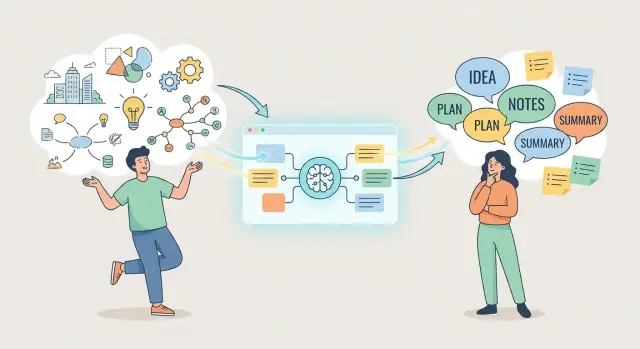
Visual vs. verbal thinking: what it means
People often describe their thinking style as “visual” or “verbal,” but it’s less like two separate types of brains and more like two common ways of processing information.
What’s a visual thinker?
A visual thinker tends to understand and remember ideas through images: sketches, diagrams, spatial relationships, color, and “seeing” how parts connect. They may prefer a quick drawing over a long explanation, and they often spot patterns or inconsistencies by looking at a structure (a chart, a layout, a flow).
What’s a verbal thinker?
A verbal thinker tends to work through ideas with words: talking, writing, reading, and organizing language into clear sequences. They may clarify a problem by describing it, drafting an outline, or asking precise questions that narrow down what matters.
Most people are a mix (and it changes by task)
Even if you lean strongly one way, you’ll probably switch modes depending on what you’re doing. Planning a project might start as a messy mind map (visual), then become a numbered action list (verbal). Reviewing feedback may be easiest as bullet points, while brainstorming a new concept might be faster with rough sketches.
What to expect from AI
AI can support thinking by translating between formats—turning notes into diagrams, diagrams into summaries, voice into text, or scattered ideas into an outline. But it doesn’t “know” your goals unless you provide them. You still decide what’s true, what matters, and what to do next.
In the rest of this article, we’ll look at how multimodal AI tools handle images, text, and audio; where they help most in everyday work; practical workflows for switching between visual and verbal modes; and common pitfalls to avoid.
How AI tools “speak” in images, words, and audio
AI isn’t limited to chatting in text. Many tools are multimodal, meaning they can take in (and sometimes produce) words, images, and audio. That matters because you can start in the format that matches how you naturally think—then translate it into a format other people (or future-you) can use.
Text: the classic chat experience
Text-based chat tools are best when you already have thoughts in words, even if they’re messy.
For example, you can paste rough meeting notes and ask the AI to:
- turn them into a clean outline
- draft a short summary for a teammate
- pull out action items and owners
The tool “speaks” in paragraphs, bullets, and structure—helpful for verbal thinkers and for anyone who needs clarity.
Images: seeing and describing
Image-capable tools can analyze a picture and respond in text. You might upload a photo of a whiteboard, a sketch, a slide, or a messy diagram and ask:
- “What does this diagram show?”
- “List the main components and how they relate.”
- “Turn this sketch into steps I can follow.”
Some tools can also generate images from prompts, which can help visual thinkers explore variations quickly (layouts, concepts, mood boards), then choose one to refine.
Audio: speaking your thoughts out loud
Voice tools let you dictate instead of typing. A common workflow is:
- record a quick voice note while walking
- transcribe it (speech-to-text)
- ask the AI to clean it up into a plan, email draft, or checklist
This is especially useful when ideas arrive faster than you can type.
Chat vs. image tools vs. voice tools (and why it matters)
A “chat” tool is usually optimized for dialogue and writing. An “image” tool is tuned for describing, extracting, or generating visuals. A “voice” tool focuses on capture (transcription) and hands-free use. Many products combine these capabilities, but the strengths still differ.
Common limits to keep in mind
Multimodal AI can be impressive, but it can also:
- make confident mistakes (especially with unclear images or noisy audio)
- reflect bias in phrasing or assumptions
- miss key context you didn’t provide (who the audience is, what “good” looks like)
Treat outputs as a strong first draft, then add your intent, constraints, and final judgment.
Where AI helps most in everyday work
Most people don’t need AI for “big ideas” every day—they need help with small, frequent moments where thinking gets stuck. The best uses are the ones that remove friction from your normal workflow.
The everyday tasks AI can lighten
AI is especially useful for:
- Organizing ideas: turning messy notes into categories, a checklist, or a simple plan.
- Brainstorming: generating options when you have a blank page (titles, angles, next steps).
- Explaining: rewriting something so it’s clearer, shorter, more persuasive, or better suited to a specific audience.
- Editing: catching repetition, improving flow, tightening wording, and aligning tone.
Match the task to your thinking style
If you think visually, AI helps most when you can see the problem: convert a rough sketch or a screenshot into a written summary, ask for a mind-map-style outline, or turn scattered concepts into labeled groups you can rearrange.
If you think verbally, AI shines when you can talk it through: dictate a voice note and have it turned into structured bullets, ask follow-up questions as if you’re in a conversation, or request a clean draft based on your spoken explanation.
Why switching formats reduces mental load
When you’re stuck, the issue often isn’t the idea—it’s the format. Moving from words → visuals (an outline into a simple diagram) or visuals → words (a sketch into a paragraph) shifts the work to a channel that feels easier. That reduces cognitive strain and makes decisions more straightforward.
A simple decision rule
Start with the format that feels easiest right now:
- If you want to draw it, start with a sketch or screenshot.
- If you want to say it, start with a voice note.
- If you want to write it, start with messy bullets.
Then ask AI to translate it into the other format once you have something concrete to work with.
AI support for visual thinkers
Visual thinkers often start with a blur: fragments, sketches, arrows, and “I’ll know it when I see it.” AI can help by turning that blur into something you can label and refine—without forcing you to write a perfect paragraph first.
From messy idea to mind-map structure
If your thoughts arrive as clusters, ask AI to propose a mind map outline you can paste into your favorite tool. Give it your rough notes (even incomplete), and request:
- 5–7 main branches (themes)
- 2–4 sub-branches per theme
- suggested labels using short, visual nouns and verbs
You’re not committing to the structure—you’re generating a starting “canvas” to react to.
Generating prompts, diagrams, and visual metaphors
Even if you don’t consider yourself “artistic,” AI can translate abstract concepts into clear visual directions. For example, ask for:
- a simple diagram description (boxes/arrows) for a process
- a visual metaphor (e.g., “airport security line” to explain prioritization)
- an image prompt for a consistent style you can reuse in slides
The win is speed: you can iterate by tweaking a prompt rather than redrawing from scratch.
Converting visuals into words (without losing meaning)
If you sketch a workflow on paper or take a screenshot of a whiteboard, AI can help turn it into:
- captions and labels that match what’s on the page
- step-by-step explanations for teammates who prefer text
- a summary and a “next actions” list that mirrors the diagram
This is especially useful when you need to document your thinking after the fact.
Spatial planning help for slides and pages
Many visual thinkers struggle not with content, but with layout decisions. Ask AI for slide-layout suggestions based on your goal: hierarchy (what should be biggest), grouping (what belongs together), and flow (left-to-right vs. top-to-bottom).
A practical prompt: “Give me three layout options—minimal, balanced, and data-heavy—then explain what each optimizes for.”
AI support for verbal thinkers
If you think best by talking, reading, and shaping ideas in sentences, AI can act like a patient editor and note-taker. The goal isn’t to replace your voice—it’s to help you capture it faster and make it easier for other people to follow.
Capture ideas as you speak
Verbal thinkers often get momentum while talking, not typing. Use dictation and voice notes to get raw thinking out of your head without slowing down.
For meetings, AI transcription can turn a messy audio stream into usable notes: speaker-separated text, action items, and decisions. A helpful habit is to end a meeting recording with a 20‑second summary in your own words—AI can use that as a strong signal when generating the recap.
Turn raw thoughts into structure
Once you’ve got a transcript or a rambling voice note, ask AI to shape it into:
- an outline (sections + key points)
- talking points for a presentation
- a short script you can read or adapt
This is especially useful when you have too many ideas and need a “good enough” structure to react to.
Make your writing clearer without losing your tone
AI is strong at cleanup tasks: simplify complex sentences, shorten paragraphs, remove repetition, and adjust tone (friendlier, more formal, more confident). Paste a paragraph and specify what you want to keep: “Keep my phrasing where possible; only fix clarity.”
Generate examples and analogies on demand
When you know what you mean but can’t quite say it, ask for 5 analogies tailored to your audience (customers, executives, kids). Then pick one and have AI refine it into a single sentence you’d actually say.
If you want to go further, save your best prompts in a personal template doc (see /blog/prompt-library).
Practical workflows that bridge images and words
Some tasks start as a picture in your head, others as sentences. Multimodal tools make it easier to move between formats without losing the thread. Treat AI as a translator: image → explanation, speech → structure, bullets → story.
Workflow 1: sketch/photo → AI explanation → refine the picture
Start with anything visual: a rough sketch on paper, a screenshot, a whiteboard photo, or a messy diagram.
Ask AI to describe what it sees, name the parts, and infer what the diagram is trying to show. Then request a cleaner version: “Turn this into a simple 5-box flow,” or “List what’s missing or unclear.”
Use the response to revise the image (redraw, simplify labels, remove extra arrows). Repeat once more with the updated picture as a quick clarity check.
Workflow 2: voice ramble → AI outline → convert outline into a diagram
If you think out loud, record a 2–5 minute voice note and transcribe it with speech-to-text.
Prompt AI to extract: a one-sentence purpose, 3–6 main points, and a logical order. Then ask: “Convert this outline into a diagram description: nodes + connections.”
Build the diagram in your tool of choice (mind map, flowchart, sticky notes) using the node list as your starting point.
Workflow 3: bullets → AI slide storyline → add visuals last
Begin with rough bullets (not full paragraphs). Ask AI to propose a slide-by-slide storyline: titles, one key message per slide, and suggested visuals (icon, chart, example screenshot).
Only after the narrative makes sense, add visuals to support each message.
What to save so this becomes repeatable
Save your best prompts, keep 1–2 key intermediate versions (outline/diagram spec), and finish with a short “final summary” that captures decisions, assumptions, and next steps.
Prompt ideas you can copy and adapt
Good prompts are less about “clever wording” and more about a repeatable pattern: context + goal + audience + constraints. If you’re not sure where to start, write one sentence for each, then ask for multiple options so you can choose.
Prompt patterns (use these as templates)
Pattern: Context → Goal → Audience → Constraints → Options
- Context: what you’re working with (notes, a draft, a screenshot, a rough idea)
- Goal: what “done” looks like (a plan, a summary, a script)
- Audience: who it’s for (your manager, customers, your future self)
- Constraints: tone, length, format, tools, time limits
- Options: “Give me 3–5 approaches and recommend one.”
Prompts for visual thinkers
Diagram-first prompt
Context: I’m planning a [project/meeting/training] with these points: [paste bullets]. Goal: Turn this into a diagram-first plan. Audience: Me and one teammate. Constraints: Use a simple flowchart with 6–10 nodes. Options: Give 3 diagram structures (timeline, decision tree, hub-and-spoke). Describe each and tell me which fits best.
Metaphor prompt (to “see” the idea)
Context: Here’s the topic: [topic]. Goal: Help me understand it as a visual metaphor. Audience: Non-experts. Constraints: Give 3 metaphor options, each with a labeled “map” of what corresponds to what.
Layout prompt (slides / one-pager)
Context: I need a one-page overview of [thing]. Goal: Propose a layout. Audience: Busy stakeholders. Constraints: Header + 3 blocks + a sidebar; each block max 40 words. Options: Provide 3 layout variations and explain the trade-offs.
Prompts for verbal thinkers
Outline prompt (clean structure)
Context: Here are my messy notes: [paste]. Goal: Turn them into a clear outline. Audience: [who]. Constraints: Use H2/H3 headings; keep it under 400 words. Options: Give 3 outline options (problem-solution, chronological, Q&A). Recommend one.
Clarity prompt (tighten language)
Context: Here’s a paragraph I wrote: [paste]. Goal: Make it easier to understand without losing meaning. Audience: Smart non-specialists. Constraints: Keep the same length; replace jargon; highlight changes as bullets.
Role-play prompt (pressure-test reasoning)
Act as a skeptical reviewer. Context: My claim is: [claim] and my support is: [bullets]. Goal: Find weak spots and suggest stronger wording. Constraints: Ask 5 tough questions, then propose 2 improved versions (cautious vs. confident).
Ask for options, then choose
When you get results, don’t settle for the first pass. Use a follow-up like:
Give me 4 alternatives with different tones (direct, friendly, formal, playful). Then ask me 3 questions to pick the best one.
This keeps you in control: the AI generates variety; you decide what fits your intent and audience.
Using AI for thinking, not just writing or drawing
It’s easy to treat AI like a faster keyboard or a quicker sketchpad. The bigger win is using it as a thinking partner: something that helps you explore options, test your reasoning, and translate fuzzy ideas into clearer structure.
Brainstorming that actually expands the idea
When you feel stuck, don’t ask for “more ideas.” Ask for movement:
- Variations: “Give me 10 variations of this concept, each with a different goal.”
- Opposites: “What’s the opposite approach, and when would it work better?”
- What-if angles: “What if the constraint was time / budget / audience size—how would the solution change?”
This works for visual thinkers (who can then pick a few to sketch) and verbal thinkers (who can turn the best options into a short outline).
Sense-checking before you commit
AI is useful as a “second set of eyes,” especially when you’ve been staring at the same plan for too long.
Try: “Review my plan and point out gaps, assumptions, missing steps, and risks. Then suggest a revised sequence.”
If you have a diagram, paste a quick description of it (or an image, if your tool supports it) and ask for the same critique.
Explaining for different audiences
A good idea fails when it can’t be communicated.
Ask for two versions:
- “Explain this in 5 sentences for a busy stakeholder.”
- “Explain this in a detailed version with context, examples, and edge cases.”
Then compare: the short version reveals the core message; the long version reveals missing logic.
Deciding with fewer blind spots
For choices that feel subjective, ask for structure:
“List pros/cons of option A vs B, then give me the key questions I should answer before choosing. Highlight what would change your recommendation.”
You’re still the decision-maker—but AI helps you see the decision more clearly.
Common pitfalls and how to avoid them
AI can feel like a superpower for both visual and verbal thinkers—until small mistakes compound into bad decisions or bland output. A few guardrails keep the benefits without the headaches.
1) Over-trusting confident answers
Models often sound certain even when they’re guessing. This is especially risky when you’re using AI to “explain” a diagram, summarize a meeting, or generate a plan.
Treat AI output as a draft, not a verdict. Ask for sources, assumptions, and alternatives (“What might be wrong with this?”). For anything important—money, health, legal, public claims—verify with primary references and a human expert when needed.
2) Losing your own voice
If you paste prompts and publish the first result, your work can start to sound generic. To keep your style:
- provide a sample you wrote and ask the AI to match it
- request multiple tones, then merge the best parts
- add your own examples, opinions, and constraints before finalizing
3) Privacy basics (don’t paste sensitive data)
Avoid sharing client details, internal docs, passwords, financial info, or anything covered by NDA. When you need help with structure, use placeholders.
“Client A,” “Project X,” and “$AMOUNT” usually work. Save the real details for your local notes and final edits.
4) Copyright and attribution for text and images
AI-generated visuals can accidentally resemble copyrighted styles or specific works, and text can echo phrasing it has seen before.
If you’re creating public content, keep a record of your inputs, credit any human sources you used, and run a quick originality check on key passages. When in doubt, rewrite in your own words or use licensed assets.
5) Human review is non-negotiable
Use AI to think faster—not to outsource responsibility. Build a final “human pass” into your workflow: check facts, tone, accessibility, and whether the output matches your intent.
Making AI part of a repeatable workflow
A lot of people try AI once, get a decent output, and then forget what they asked—or can’t recreate the result next week. The fix is simple: treat AI like a step in your workflow, not a one-off helper.
Start with small steps and single-purpose prompts
Instead of asking for “a full plan,” break the work into short stages you can repeat: clarify the goal, gather inputs, generate options, pick one direction, polish.
Single-purpose prompts are easier to debug and reuse:
- “Turn these notes into 5 bullet takeaways.”
- “Ask me 7 questions to fill missing details.”
- “Draft 3 alternative headlines for this outline.”
Use a quick checklist to keep outputs usable
Before prompting, run a mini checklist:
- What do I need to know? (facts, context, constraints)
- What do I need to make? (outline, slide, diagram, script, email)
This keeps visual and verbal thinkers aligned: you’re naming the information and the artifact separately.
Build templates for repeated work
Save a few prompt templates you can copy into any chat:
- Brief template: audience, goal, constraints, tone, examples
- Outline template: section titles + what each section must answer
- Storyboard template: scene-by-scene visuals + matching narration
Store these in a notes app so they’re always ready.
A simple tool stack that stays out of your way
You don’t need a complex setup. A reliable stack is:
- Notes app (capture ideas, templates, decisions)
- AI chat (draft, summarize, question, reformat)
- Diagram or slides tool (turn structure into visuals)
If you want to formalize it, keep one “Workflow” note with links to your templates (for example: /blog/prompt-templates) and a short “definition of done” for common tasks.
If part of your workflow is turning ideas into something shippable—not just clearer notes—tools like Koder.ai can extend this “translator” concept into building software. You can describe an app in plain language (verbal) or start from a rough spec (visual structure), and Koder.ai helps generate a working web/mobile/backend project you can iterate on via chat, export as source code, and deploy.
Accessibility and neurodiversity considerations
AI tools can make work materials easier to access by letting you choose the format that fits you best: read, listen, speak, or look. That flexibility can be helpful for many learning preferences and neurodivergent work styles—without assuming any diagnosis or making medical claims.
Multimodal inputs and outputs
If you process information visually, it can help to turn a block of text into a diagram, a step-by-step flow, or a set of labeled “tiles.” If you process information verbally, it can help to turn a messy sketch, screenshot, or meeting notes into clear sentences you can react to.
Practical options to try:
- Image → text: ask for an explanation of a chart, a plain-language caption, or the “three key takeaways.”
- Text → structure: ask for a simple mind map outline you can recreate in your tool of choice.
- Audio → text: dictate thoughts, then ask for an outline or action list.
Reading support (without rewriting everything)
When reading feels slow or overwhelming, AI can help you reduce the load:
- summaries at different lengths (1 sentence, 5 bullets, 1 page)
- simpler-language versions for quick comprehension
- mini glossaries of unfamiliar terms with examples
You stay in control by asking it to keep meaning the same and to flag anything it’s uncertain about.
Speaking support for clearer communication
For people who think out loud—or who want more confidence speaking—AI can provide:
- practice scripts (short, natural phrasing, tailored to your role)
- pacing tips (where to pause, what to emphasize)
- gentle rehearsal prompts (likely questions, concise answers)
If you share sensitive details, use tools and settings that match your privacy needs, and consider anonymizing names or data before uploading.
Conclusion: choose the format that unlocks your best thinking
AI works best when it matches how you naturally process information.
If you think in pictures, use AI to generate quick visual options, turn screenshots into structured notes, and convert messy ideas into maps you can reorganize. If you think in words, use it to talk through problems, draft outlines, compress long documents into clear summaries, and test phrasing until it “clicks.”
The real advantage is multimodal: you can start in your strongest format and then translate into the other when you need to communicate, decide, or ship.
Try this today (5 minutes each)
- Visual thinker: paste a rough sketch or screenshot and ask for “a numbered explanation + next actions.”
- Verbal thinker: record a 2-minute voice note and ask for “an outline + a one-sentence goal.”
- Bridge both: ask for “three diagram labels” and “a 100-word brief” for the same idea.
- Reduce revisions: request “two alternative versions” (short + detailed) before you commit.
- Decision support: ask for “pros/cons + what I should do first in 15 minutes.”
How to tell it’s working
Pick one recurring task (weekly update, proposal, content draft) and track for two weeks:
- Time saved: minutes from start to “ready to share.”
- Clarity: can someone summarize your output correctly after one read?
- Fewer revisions: count how many passes you need before it feels done.
If you want more workflows and prompt templates, browse /blog. If you’re comparing tool options or plans, see /pricing.
FAQ
What’s the difference between visual and verbal thinking?
Visual thinking means you process ideas through images, spatial relationships, and “seeing” connections (sketches, diagrams, layouts). Verbal thinking means you process through language—talking, reading, writing, and sequencing ideas into words.
Most people use both; the mix often changes by task.
How can I tell whether I’m more of a visual or verbal thinker?
Try noticing what you do when you’re stuck:
- If you want to draw it (arrows, boxes, spatial grouping), you’re leaning visual.
- If you want to talk or write it out (lists, explanations, questions), you’re leaning verbal.
Also watch what helps you remember: images/structure vs. wording/phrases.
Why does my thinking style change depending on what I’m doing?
Because the “best” format depends on the task. Planning might start as a mind map (visual) and end as a checklist (verbal). Brainstorming may be faster in sketches, while documenting decisions is often clearer in bullets.
Switching modes is normal—and useful.
How does AI help visual and verbal thinkers differently?
Use AI as a translator between formats:
- Turn rough notes into an outline, summary, or action list.
- Turn a whiteboard photo into steps, labels, and next actions.
- Turn a voice note into structured bullets.
The key is to provide your goal and audience so the translation matches what you need.
What’s the simplest way to use AI when I feel stuck?
If you’re stuck, change the medium:
- Words → visuals: ask for a diagram description (nodes + connections) or a mind-map outline.
- Visuals → words: upload a sketch/screenshot and ask for a numbered explanation.
- Speech → structure: dictate, transcribe, then ask for a clean outline.
Format shifts often reduce mental load and make decisions easier.
How do I use AI with a whiteboard photo or messy sketch?
A good workflow is:
- Take a clear photo (good lighting, minimal glare).
- Ask: “Describe what this shows. List the components and relationships.”
- Follow with: “Turn this into steps + missing/unclear parts.”
- Redraw or relabel, then re-check once.
Treat the output as a draft—verify that it matches what you meant.
How can verbal thinkers use voice notes and AI effectively?
A practical pipeline:
- Record a 2–5 minute voice note.
- Transcribe it (speech-to-text).
- Ask AI for: purpose (1 sentence), 3–6 main points, and a logical order.
- Ask: “Convert this into a diagram description: nodes + connections.”
You get both clarity (outline) and a starting structure for a diagram.
How do I turn an AI-generated outline into a diagram or mind map?
Ask for a “diagram spec” in text that you can build in any tool:
- Nodes (labels)
- Connections (A → B)
- Groupings (themes/sections)
- Optional: legend or decision points
Prompt example: “Convert this outline into a 6–10 node flowchart description with arrows and decision points.”
What are the biggest limitations to keep in mind with multimodal AI?
Common pitfalls include:
- Confident mistakes: ask for assumptions, alternatives, and what might be wrong.
- Missing context: specify audience, definition of done, constraints, and examples.
- Generic voice: provide a writing sample and request “keep my phrasing where possible.”
Build in a quick human review for facts, tone, and intent.
How do I make these AI workflows repeatable instead of one-off?
Start with a repeatable template and save what works:
- A few prompt patterns (context → goal → audience → constraints → options)
- 1–2 intermediate artifacts (outline + diagram spec)
- A final summary with decisions, assumptions, and next steps
Keeping templates in a single note (e.g., a personal prompt library) makes results easier to recreate.