

Alibaba’s Merchant OS: Commerce, Logistics, and Cloud Together
Learn how Alibaba links marketplaces, logistics, and cloud tools into an operating system for merchants—powering sales, fulfillment, data, and cross-border trade.
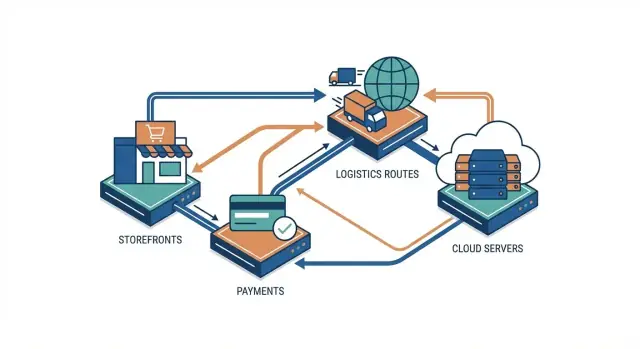
What “an operating system for merchants” means here
When people call Alibaba an “operating system for merchants,” they don’t mean a piece of software you install on a laptop. They mean a connected set of services that helps a business sell, ship, run day-to-day operations, and scale—without stitching together dozens of unrelated tools.
At a practical level, a merchant OS answers four recurring questions:
- Where will demand come from? (finding customers and converting them)
- How will orders be fulfilled reliably? (delivery speed, tracking, returns)
- How will the business be operated? (inventory, customer service, forecasting)
- How will it grow across categories and borders? (new channels, new regions)
The three pillars you’ll see throughout this article
Alibaba’s version is easiest to understand as three pillars working together:
- Commerce: marketplaces and selling tools that create demand and transactions.
- Logistics: fulfillment and delivery coordination that turns shipping into a customer-facing feature.
- Cloud services: the computing and data “back office” that runs systems, analytics, and automation.
Why integration matters more than any single product
Many merchants can buy comparable components elsewhere: a marketplace presence, a shipping carrier account, and cloud hosting. The distinctive claim of a “merchant OS” is integration: order data flows into fulfillment; fulfillment status flows back to customer updates; operational data feeds forecasting and ad targeting.
When those loops are tight, merchants spend less time reconciling spreadsheets and more time improving margins, service levels, and repeat purchase.
This section (and the article) is a high-level model of how the system works, not a product recommendation or investment advice. The goal is to give you a clear mental map so you can evaluate what to adopt, what to integrate, and what to keep independent.
A simple map of Alibaba’s merchant flywheel
Think of Alibaba’s “merchant OS” as a set of connected loops that keep commerce running smoothly: generating demand, converting it into transactions, fulfilling orders, supporting customers—and producing data at every step.
The core flow (end to end)
At its simplest, the system can be mapped like this:
Demand → transaction → fulfillment → service → repeat
- Demand: shoppers discover products through search, recommendations, livestreams, and ads.
- Transaction: product pages, carts, promotions, and checkout turn attention into orders.
- Fulfillment: picking, packing, line-haul, last-mile delivery, returns.
- Service: customer support, dispute handling, refunds, seller performance management.
The “flywheel” idea is simply that these steps reinforce each other: better fulfillment tends to improve ratings and repeat purchases; better demand tools improve sell-through; better service reduces churn. It’s not magic—just compounding operational improvements.
Where the data is created (and why it matters)
Each stage creates signals a merchant can use:
- Search and browsing: keywords, clicks, dwell time, wishlist/favorites (what customers want, even before they buy).
- Ads and campaigns: impressions, CTR, conversion, cost per order (what it costs to acquire demand).
- Orders and payments: basket size, cancellation rate, preferred payment methods (what converts and where friction exists).
- Delivery events: scan times, on-time rates, failed delivery reasons, return triggers (what breaks in fulfillment).
- Service interactions: complaint categories, refund reasons, chat resolution time (what customers actually experience).
When these signals are connected, a merchant can answer practical questions like: “Are we losing sales because of price, content, or shipping speed?”
Marketplace vs. full stack (the key difference)
A marketplace mainly concentrates demand and provides rules plus tools for selling.
A full stack extends beyond listing and checkout into the operational layers that determine customer experience—especially logistics coordination, service workflows, and the cloud systems that store and process the data.
This map is useful because it clarifies what’s being integrated: not just where orders are created, but how orders get delivered and learned from.
Commerce layer: marketplaces as demand engines
Alibaba’s “commerce layer” is where demand is created and captured. For merchants, the marketplaces aren’t just sales channels—they’re distribution engines that bundle audience, merchandising tools, and performance feedback in one place.
The three marketplace jobs: discovery, trust, conversion
Discovery starts with search, recommendations, live streaming, and category browsing. A well-optimized listing can surface alongside huge brands, which is why content quality (titles, attributes, short videos, reviews) matters as much as price.
Trust signals are the second job. Buyers look for store ratings, verified product information, return policies, fulfillment promises, and social proof (reviews, repeat purchases, creator endorsements). These signals reduce “unknown seller” anxiety and make comparison faster.
Conversion is where merchandising and checkout mechanics do their work: clear variants, shipping expectations, timely customer service, and promos that feel simple (not confusing). Even small tweaks—bundles, add-ons, and minimum-order incentives—can lift average order value (AOV).
What merchants actually use day to day
Most merchants operate a toolkit that looks like this:
- Storefront & merchandising: store pages, product catalogs, pricing ladders, bundles
- Promotions: coupons, time-limited deals, membership perks
- Ads: keyword/search ads, display/recommendation placements, retargeting
- CRM & retention: buyer groups, post-purchase messaging, loyalty programs, repeat-buyer offers
Multi-platform is the norm
Many brands split their approach: domestic channels (e.g., Taobao/Tmall) for scale and repeat behavior, and cross-border channels (e.g., AliExpress) for reach and new-market testing. The goal is consistent: grow qualified traffic, turn first-time buyers into repeat buyers, and increase AOV—while keeping acquisition costs predictable.
In the merchant OS model, this is the “front office”: it generates demand signals that the logistics, payments, and cloud layers can then fulfill and optimize.
Logistics layer: how delivery becomes a product feature
For a merchant, “logistics” isn’t just a cost center. It’s part of what the customer experiences: when it arrives, whether it’s intact, and how predictable the process feels. On large marketplaces, that experience directly shapes repeat purchases and even what products shoppers are willing to buy.
The fulfillment chain, end to end
A typical order’s journey can be understood as four connected steps:
- Inbound: goods move from factory or supplier into a distribution network (often in larger, scheduled shipments).
- Warehousing: inventory is stored, counted, and positioned close to demand to reduce delivery time.
- Picking & packing: individual orders are assembled accurately and packaged to survive transit.
- Last mile: the final handoff to the customer—usually the most visible (and most failure-prone) part.
When these steps are coordinated, delivery becomes a feature: “arrives tomorrow,” “arrives in a 2-hour window,” “easy returns.” Those promises aren’t marketing—each one is a process commitment.
Why speed and reliability change conversion
Faster delivery can lift conversion because it reduces the customer’s “waiting risk.” But reliability often matters even more than raw speed: missed delivery dates drive cancellations, negative reviews, and higher support costs. Predictable delivery windows also reduce buyer hesitation on higher-value items, where trust and planning matter.
Tracking events aren’t just status updates
Every scan and handoff creates tracking events (received at warehouse, picked, dispatched, out for delivery, delivered, return initiated). When treated as operational data, these events help merchants:
- spot bottlenecks (e.g., picking delays vs. carrier delays)
- reduce lost parcels through earlier exception handling
- improve inventory placement by learning where orders originate
Self-fulfilled vs. network-supported models
Merchants can self-fulfill (ship from their own warehouse, manage carriers, own the service level) or use a network-supported model (shared warehouses, standardized processes, integrated last-mile options). Self-fulfillment offers control; network support offers scale, consistency, and often better delivery promises—especially during peaks.
Cainiao in context: orchestration and visibility
Cainiao is best understood as the “control layer” that helps merchants and partners coordinate logistics across many moving parts. Rather than being only a delivery provider, it focuses on orchestration: aligning what’s in stock, where it sits, which carrier can take it, and how the parcel should move from pickup to final mile.
What orchestration can coordinate
At scale, logistics is a network problem. An orchestration layer can coordinate:
- Carriers and last‑mile partners (different strengths by route, region, service level)
- Warehouses and fulfillment sites (where items are stored, packed, and handed off)
- Routing and handoffs (how parcels transfer between hubs, cross-border lanes, and local delivery)
- Exception handling (delays, address issues, customs holds, failed delivery attempts)
For a merchant, the practical benefit is having a consistent way to plan and execute shipments even when the underlying providers vary by country or channel.
Visibility: fewer “Where is my order?” moments
Visibility is not just a tracking page—it’s shared status across the merchant, warehouse, and carrier. When events (picked, packed, departed, arrived, out for delivery, delivered) are captured in a common timeline, teams can spot problems earlier and answer customers faster.
That reduces:
- Lost or “unknown status” packages (because gaps show up as exceptions)
- Support workload (fewer manual chases with carriers, more templated responses)
- Refunds and reshipments driven by uncertainty rather than confirmed failure
Cost levers merchants can influence
A coordinated network also opens up cost control beyond “negotiate a cheaper rate.” Common levers include:
- Consolidation: combining shipments to lower per-unit handling and linehaul costs
- Zoning and routing choices: selecting lanes and handoffs that reduce distance or costly last-mile segments
- Inventory placement: stocking closer to demand so delivery is faster and cheaper, with fewer cross-region shipments
The key point: logistics becomes a managed system with measurable trade-offs—speed, cost, and reliability—rather than a patchwork of one-off shipping decisions.
Cloud layer: the computing “back office” for trade
If marketplaces create demand and logistics fulfills it, cloud is the “back office” that keeps everything running: the servers that host your storefront and internal tools, the storage that holds product photos and receipts, and the databases that track orders, inventory, customers, and returns.
Cloud basics (without the jargon)
Think of cloud services as renting computing instead of owning it. You can:
- Host websites and apps so they’re available globally.
- Store files (images, videos, invoices) safely and cheaply.
- Use databases to keep transactional records consistent—so “paid,” “packed,” and “shipped” don’t drift out of sync across systems.
For merchants, this matters less as “IT” and more as reliability: fewer slow checkouts, fewer broken integrations, and faster changes when you launch a new product line.
What cloud solves in retail day to day
Retail is spiky. Campaigns, influencer moments, and holiday peaks can multiply traffic in minutes. Cloud infrastructure lets merchants scale capacity up and down, so you’re not paying for peak all year—or crashing at the worst time.
It also supports features customers now expect: personalization (recommending relevant products), search that stays fast as catalogs grow, and analytics that turn events—views, carts, refunds—into actions like adjusting pricing or replenishment.
SaaS-style tools merchants actually use
Most merchants don’t “build software”; they adopt tools that plug into operations:
- ERP for finance and purchasing
- OMS (order management) to route orders to warehouses and manage exceptions
- Customer service systems for tickets, chat, and returns
Cloud makes these tools easier to deploy across teams and regions, and easier to integrate with marketplaces and fulfillment partners.
One practical gap appears when the “standard tools” don’t quite match your workflow (for example, a custom returns decision tree, an internal SLA dashboard, or a lightweight reconciliation app across channels). This is where rapid internal app development can matter. Platforms like Koder.ai are designed for this exact layer: building web, backend, and even mobile tools through a chat-driven workflow, so teams can prototype and ship internal ops apps faster—without waiting on long development cycles. That can be especially useful for stitching together data from commerce, logistics, and finance into one operational view.
Security and compliance as practical concerns
Merchants handle sensitive data: customer identities, addresses, payment signals, and sometimes cross-border paperwork. The cloud layer helps by offering access controls (who can see what), encryption, monitoring for suspicious activity, and region-specific data handling options—important when selling across multiple markets with different rules.
Done well, cloud becomes the quiet enabler: faster launches, smoother peaks, and cleaner handoffs between commerce and logistics.
Data and analytics: turning activity into decisions
A “merchant OS” only earns its name if it helps you decide what to do next, not just record what happened. In Alibaba’s ecosystem, analytics is the connective tissue between commerce (what shoppers do), logistics (what actually ships), and cloud (where it’s processed and shared across tools).
The activity stream: what gets measured
Most merchant decisions can be traced back to a handful of practical data sources:
- Ads performance (impressions, clicks, cost, conversions)
- Search terms and ranking signals (what people type, what they see, what they click)
- Product page behavior (views, add-to-cart, bounce, Q&A, reviews)
- Orders and returns (basket size, repeat rate, refund reasons)
- Delivery events and scans (handoff times, exceptions, on-time rate)
Individually, each dataset answers a narrow question. Together, they describe demand, supply, and service quality—often at SKU level.
Turning insights into outcomes
When merchants connect these signals, analytics can improve day-to-day execution:
- Pricing: spot price sensitivity by tracking conversion changes against small price tests.
- Inventory: align replenishment with search demand and regional delivery performance.
- Marketing ROI: shift budget toward keywords and creatives that lead to delivered (not just paid) orders.
The feedback loop that compounds
The loop is simple: data → decisions → better performance → better data. Cleaner listings and faster delivery raise conversion, which produces clearer signals for ad targeting and forecasting.
A caution: don’t let one channel define “truth”
Platform data is powerful, but it can bias decisions if it’s the only lens. A keyword that looks unprofitable may still build brand demand, and marketplace metrics may miss what’s happening on other channels.
Keep a lightweight cross-check—your own margins, customer support reasons, and external demand trends—before locking strategy to a single dashboard.
Cross-border trade: where the system approach matters most
Cross-border selling isn’t just “domestic ecommerce, but farther away.” The moment an order crosses a border, you add moving parts that can break the customer experience: customs clearance, import duties/VAT, restricted goods rules, longer delivery windows, and a more expensive returns path.
What makes a system approach valuable is that these steps aren’t independent. A storefront promise (delivery time, landed price, return policy) only works if logistics execution and data systems can actually support it end to end.
What cross-border adds operationally
A merchant has to get four things right at the same time:
- Customs and taxes: classifying goods, declaring value, generating paperwork, and deciding whether to show DDP (duties paid) or leave fees to the buyer.
- Returns: deciding where returns go (back to origin, a consolidation hub, or a local address) and how refunds are triggered.
- Last‑mile delivery: handing off to local couriers with predictable tracking and delivery attempts.
- Local expectations: language, sizing, payment methods, and service norms that influence conversion as much as shipping speed.
Localized storefronts + regional partners
Localized storefronts matter because they set accurate expectations: language, currency, estimated delivery dates, and clear tax messaging. On the logistics side, regional partners (local carriers, customs brokers, warehouse operators) become extensions of your brand—especially when the customer asks, “Where is my order?”
Ship-from-origin vs. local stock
Most merchants choose between two models:
- Ship from origin: lower inventory risk, simpler assortment expansion, but slower delivery and more complex returns.
- Hold local stock: faster delivery and cheaper returns, but requires forecasting, compliance, and capital tied up in inventory.
A simple cross-border journey (example)
A shopper in Spain orders a beauty device from a merchant in China. The storefront shows the landed price (including VAT) and a 7–10 day estimate. After payment, the order is routed to a fulfillment site, export documents are generated, and the parcel moves to an international line-haul.
At EU entry, it clears customs using the pre-submitted data; tracking updates stay consistent. The parcel is then handed to a Spanish last‑mile carrier for final delivery.
If the customer returns it, the label routes the item to a regional returns hub for inspection and a faster refund, instead of shipping it all the way back to origin.
Payments and trust: reducing friction and risk
A merchant OS isn’t only about getting traffic and shipping parcels. It also has to make checkout feel effortless and make risk feel manageable—both for shoppers and sellers. When payments and trust features are tightly connected to the commerce flow, they can reduce drop-off at checkout and lower the operational burden of handling disputes.
The building blocks that keep transactions moving
Most large commerce ecosystems rely on a familiar set of components:
- Payments rails that support cards, bank transfers, and local methods, ideally with fast confirmation.
- Identity and account controls (account verification, device signals, login protection) to prevent takeovers and fake accounts.
- Fraud screening (rule-based checks plus machine-learning scoring) to flag high-risk orders before fulfillment.
- Dispute handling and refunds with clear timelines, evidence collection, and status visibility for both parties.
In Alibaba’s ecosystem, payment experiences are often associated with Alipay, which is operated by Ant Group. Alibaba and Ant have had a close historical relationship, but they are separate entities, and product integration can vary by market, product line, and regulatory requirements.
Why trust tools directly affect conversion and retention
From a shopper’s point of view, trust is a precondition to paying—especially for new merchants, higher-priced items, and cross-border orders. Practical features that tend to improve conversion include:
- Clear buyer protection and refund policies (what’s covered, what’s excluded, how long it takes).
- Transparent dispute workflows that reduce uncertainty and “support ping-pong.”
- Consistent seller performance signals (ratings, on-time delivery metrics, return rates) that help buyers decide faster.
For merchants, strong risk controls can reduce chargebacks, shrink loss from fraudulent orders, and cut support time. That can improve margins and encourage repeat selling—retention on the merchant side.
Regulations shape what’s available
Payments, identity checks, and data handling are heavily regulated, and requirements differ across countries (e.g., KYC/AML rules, consumer protection, data residency). As a result, which payment methods are offered, how disputes are handled, and what verification steps are required may change by region—even within the same overall platform experience.
How merchants typically adopt the stack (from small to large)
Most merchants don’t “buy the whole Alibaba ecosystem” on day one. Adoption usually looks like a staircase: start with demand, add fulfillment reliability, then invest in tools that remove operational bottlenecks.
A practical starter path (week 1–4)
-
Choose a channel: pick the marketplace that matches your category and target customers (domestic vs. cross-border).
-
List a small, focused catalog: start with your best sellers, clear variants, and pricing that can absorb shipping and returns.
-
Kick-start demand with ads and promos: use basic sponsored placements and simple promotions first; focus on one or two key keywords and creatives.
-
Ship with a reliable default: use the simplest shipping setup that hits your promised delivery times—speed and predictability beat complexity early.
Scaling steps (month 2–12)
As order volume grows, typical upgrades include:
- Warehouse options: move from self-fulfillment to regional warehousing or marketplace-linked fulfillment where it improves delivery speed and reduces “where is my order?” tickets.
- Inventory automation: connect store and warehouse stock so you stop overselling, canceling orders, and manually reconciling spreadsheets.
- Analytics: graduate from “sales totals” to SKU-level profitability, ad ROI, and refund reasons—then trim the catalog accordingly.
The “don’t skip” checklist
Customer service response times, a clear returns policy, consistent product quality, accurate product pages, and proactive handling of late shipments. These basics protect your rating, which directly affects traffic and conversion.
Decision points: cloud tools vs. simple apps
Stay with simpler apps if you have one channel, limited SKUs, and stable demand. Consider cloud-based tooling when you’re managing multiple storefronts/regions, frequent promotions, complex inventory rules, or you need faster reporting than manual exports.
A good rule: invest when coordination work (people + spreadsheets) becomes your biggest cost. In practice, that investment can be either buying a more “complete” suite—or building small internal tools that remove friction (exception queues, SKU profitability views, returns triage). If you do build, speed matters: solutions like Koder.ai can help teams spin up these internal apps quickly (with options like planning mode, snapshots, rollback, and source code export) so operations don’t wait months for a custom system.
Why it works: network effects, integration, and trade-offs
Alibaba’s “merchant OS” works because it links three things merchants usually buy separately—demand (marketplaces), delivery (logistics), and operations (cloud/data). When those parts reinforce each other, the whole system gets harder to replace with a single alternative.
Network effects, explained simply
Marketplaces tend to grow through a feedback loop: more buyers make the venue more attractive to sellers, and more sellers increase selection and price competition, which attracts even more buyers. This isn’t magic—it’s convenience. If customers can reliably find what they want, they return; if merchants can reliably find customers, they invest more in listings, ads, and service.
Integration creates retention (and switching costs)
Logistics and cloud services strengthen this loop by reducing friction.
When fulfillment is predictable—fast shipping, fewer lost parcels, clearer tracking—delivery becomes part of the product experience, not a separate headache. Merchants then build their promises (shipping times, returns, cross-border options) around that capability.
Cloud and data tools deepen the tie-in: inventory planning, campaign analytics, customer service workflows, and fraud controls can end up connected to the same order and logistics data. The more a business customizes these workflows, the more time and risk it takes to move elsewhere.
Trade-offs to consider
The benefits come with costs: platform fees, advertising pressure, and dependency on policy or algorithm changes. There’s also competitive tension—platforms can promote certain categories, formats, or house brands, affecting visibility.
Practical diversification (without promises)
A common hedge is to avoid single-point failure: keep clean product data that can be exported, maintain an off-platform customer list where rules allow, test additional channels, and negotiate logistics alternatives for key lanes. Diversification won’t remove risk, but it can reduce how much any one change disrupts your sales.
Takeaways and a merchant-ready evaluation checklist
Alibaba’s “merchant OS” idea is easiest to understand as three coordinated layers: commerce, logistics, and cloud. Each layer is valuable on its own, but the bigger advantage comes from end-to-end coordination—the same order information can inform marketing, inventory placement, delivery promises, customer service, and financial reconciliation.
A simple framework: sell, ship, run
- Sell (commerce): marketplaces and traffic tools that create demand and convert shoppers.
- Ship (logistics): fulfillment and delivery capabilities that turn speed, reliability, and visibility into part of the product.
- Run (cloud): the operational “back office” for scaling systems—data, apps, security, and integrations that keep the business consistent across channels and regions.
When these three parts share data and workflows, merchants can reduce manual handoffs, react faster to demand changes, and set clearer customer expectations (for example, accurate delivery dates).
5 questions to ask before committing to any ecosystem
- Where will demand come from? Are you buying access to audience/traffic, or mainly tools to manage your own channels?
- How portable is your business? If you switch providers later, can you export product data, customers (where allowed), and performance history?
- What delivery promise can you confidently make? Can the logistics layer support your target speed, coverage, returns, and tracking experience?
- How integrated is the stack in practice? Do orders, inventory, customer service, and finance reconcile automatically—or will you rely on spreadsheets and custom workarounds?
- What are the true costs and lock-ins? Look beyond fees to include ads, tooling, integration effort, required service levels, and dependence on specific APIs.
If you’re comparing ecosystems, map each option to sell–ship–run and identify where you’ll accept dependency versus where you need control.
For more strategy breakdowns, browse /blog. If you’re evaluating plans or costs, check /pricing.
FAQ
What does “an operating system for merchants” mean in the context of Alibaba?
It means a connected set of services that helps a business sell, ship, operate, and scale without piecing together lots of separate tools.
In this article’s model, the idea is less about one product and more about how data and workflows connect end to end (demand → transaction → fulfillment → service → repeat).
What are the three pillars of Alibaba’s “merchant OS” described in the article?
The three pillars are:
- Commerce: marketplaces and selling tools that generate demand and orders.
- Logistics: fulfillment and delivery coordination that turns shipping into part of the customer experience.
- Cloud services: the computing and data layer that runs systems, analytics, and automation.
The advantage comes from how these pillars share data and feed each other.
Why does integration matter more than any single marketplace, shipping provider, or cloud tool?
Integration is the differentiator because it reduces manual reconciliation and tightens feedback loops:
- Order data flows into fulfillment.
- Fulfillment status flows back into customer updates and service.
- Operational data improves forecasting, inventory decisions, and ad targeting.
That typically translates into fewer spreadsheet workflows and more consistent execution at scale.
What is the “merchant flywheel” and how does it work end to end?
The flywheel is the connected loop:
- Demand → transaction → fulfillment → service → repeat
When each step improves (better listings, faster and more reliable shipping, faster service), the system produces better ratings, higher conversion, and more repeat purchases—creating compounding operational gains.
What kinds of data signals does a merchant generate across commerce, logistics, and service?
Useful signals show up at each stage:
- Search/browsing: keywords, clicks, wishlist activity.
- Ads/campaigns: CTR, conversion, cost per order.
- Orders/payments: basket size, cancellations, payment preferences.
- Delivery events: on-time rates, failure reasons, return triggers.
- Service: complaint categories, refund reasons, resolution time.
Connecting these helps answer practical questions like whether sales loss is driven by price, content, or shipping reliability.
How is a marketplace different from a “full stack” merchant system?
A marketplace mainly provides demand concentration plus selling rules and tools.
A full stack goes further into operational layers that shape customer experience—especially:
- fulfillment coordination and returns,
- service workflows and performance management,
- cloud systems to store/process shared order and logistics data.
This distinction matters when you’re evaluating what’s truly integrated versus what you must assemble yourself.
Why do delivery speed and reliability affect conversion and repeat purchases?
Logistics is part of what customers experience: when it arrives, whether it’s intact, and how predictable it feels.
Speed can lift conversion, but reliability often matters more because missed dates increase cancellations, negative reviews, and support workload. Predictable delivery windows also reduce hesitation on higher-value items.
What role does Cainiao play in the logistics layer?
Cainiao is presented as an orchestration and visibility layer rather than just a single carrier.
Practically, orchestration can coordinate:
- carriers and last-mile partners,
- warehouses and fulfillment sites,
- routing and handoffs (including cross-border lanes),
- exception handling (delays, address issues, customs holds).
The merchant benefit is more consistent planning and a shared status timeline that reduces “Where is my order?” friction.
How does the cloud layer help merchants in day-to-day retail operations?
Cloud is the operational back office that keeps systems reliable and scalable:
- hosting storefronts and internal tools,
- storing assets like images and invoices,
- keeping orders/inventory consistent via databases,
- handling traffic spikes during promotions.
It also enables adoption of SaaS-style tools (ERP, OMS, customer service systems) and supports security/compliance needs when operating across regions.
How do merchants typically adopt the stack from small to large, and when should they upgrade tools?
A practical adoption path is:
- Weeks 1–4: choose a channel, list a focused catalog, use simple ads/promos, ship with a reliable default.
- Months 2–12: upgrade fulfillment options, automate inventory sync, move to SKU-level profitability and refund-reason analytics.
A common decision rule in the article: invest in deeper tooling when coordination work (people + spreadsheets) becomes your biggest cost.