

Audit trails for small business apps: what to log and query
Audit trails for small business apps: what to log, how to query it fast, and how to keep admin logs readable without ballooning storage costs.
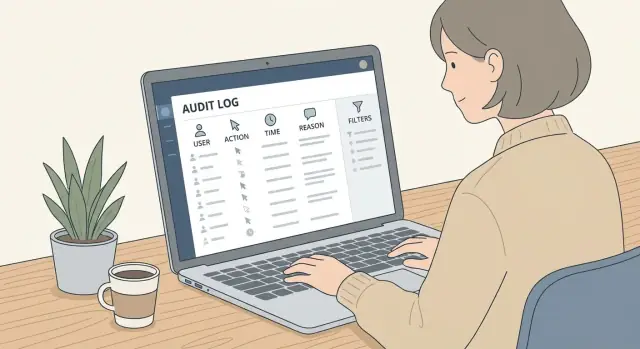
What an audit trail is and why small teams need it
An audit trail is a history of important actions in your app, recorded in a way that answers: who did it, what changed, when it happened, and what it affected. Think of it like a receipt for admin and user activity, so you can explain what happened later without guessing.
That’s different from debugging logs. Debug logs help engineers fix bugs (errors, stack traces, performance). Audit logs are for accountability and support. They should be consistent, searchable, and kept for a defined period.
Small teams usually add audit trails for practical reasons:
- Support: “Why can’t I access this project?” or “Who changed my invoice status?”
- Disputes: proving whether an action happened and by whom
- Mistakes: quickly finding the last known good setting before something broke
- Basic controls: customer expectations, simple security reviews, internal accountability
- Visibility: tracking admin actions like role changes and exports
An audit trail isn’t a security tool by itself. It won’t stop a bad actor, and it won’t automatically detect fraud. If your permissions are wrong, the log will only show that the wrong thing happened. And if someone can edit or delete logs, you can’t rely on them. You still need access controls and protection around the audit data.
Done well, an audit trail gives you calm, fast answers when something goes wrong, without turning every incident into a team-wide investigation.
Start with the questions your audit trail must answer
An audit trail is only useful if it answers real questions quickly. Before you log anything, write down the questions you expect to ask when something breaks, a customer complains, or a security review arrives.
Start by picking the actions that create risk or confusion. Focus on events that change money, access, data, or trust. You can always add more later, but you can’t reconstruct history you never captured.
A practical starter set often includes:
- Sign-in activity (login/logout, failed login attempts)
- Permission and role changes
- Create/update/delete of key records (customers, invoices, orders)
- Exports, downloads, and API key changes
- Billing and subscription changes
Next, decide how strong the record needs to be. Some events are mainly for troubleshooting (a user changed notification settings). Others should be tamper-evident because they matter financially or legally (granting admin access, changing payout details). Tamper-evident doesn’t have to be complex, but it should be a conscious choice.
Finally, design for the reader. Support might check logs daily. Admins might only open them during an incident. An auditor might request a filtered report once a year. That affects event naming, how much context you include, and which filters matter most.
Define the core fields: who, what, when, and why
If you standardize four basics - who did it, what they did, when it happened, and why it happened - you can keep logs consistent across features and still make them easy to search later.
Who (the actor)
Capture the person (or system) behind the action. Use stable IDs, not display names.
Include:
- User ID and role at the time of the action
- Workspace/account/tenant ID (so events never mix across customers)
- Impersonation flag (and who initiated it), if admins can act for someone else
- Actor type (human, API key, automated job), when relevant
What (the event)
Describe the action in a predictable way. A good pattern is: action name + target type + target ID.
Also record where it happened so support can trace the source:
- Action name (for example,
user.invite,billing.plan.change,project.delete) - Target type and target ID
- Feature or screen name (what the admin recognizes)
- Endpoint or internal handler name (helps connect UI actions to code paths)
When (time and traceability)
Store a single canonical timestamp (usually UTC) so sorting works, then show it in the admin’s local timezone in the UI.
Add one identifier that ties related events together:
- Request ID or correlation ID (the same ID across all log entries from one request)
Why (intent)
Many apps skip this, then regret it during a dispute. Keep it lightweight:
- Reason codes (small fixed list like “security”, “customer request”, “cleanup”, “billing”)
- Optional note field for short context (avoid sensitive info)
- Optional ticket or reference ID (to connect to support conversations)
Example: an admin changes a user’s role. “Who” is the admin’s user ID and role, plus the workspace ID. “What” is role.change on user:123. “When” is a UTC timestamp plus a request ID. “Why” is “security” with a short note like “requested by account owner” and an internal ticket number.
Log changes without leaking sensitive data
Good audit trails show what changed, but they shouldn’t become a second database full of secrets. The safest rule is simple: log enough to explain the action, not enough to recreate private data.
For important updates, capture a before and after snapshot only for the fields that matter. If a record has 40 fields, you rarely need all 40. Pick the small set that answers, “What did this action affect?” For example, when an admin updates an account, log status, role, and plan, not the full profile.
Make the entry readable. A short diff summary like “status changed: trial -> active” or “email updated” helps support scan quickly, while structured details remain available for filtering and investigations.
Also record the source of the change. The same update means different things if it came from the UI versus an API key or a background job.
Sensitive fields need extra care. Use one of these patterns, depending on risk:
- Avoid logging raw values for secrets (passwords, tokens, private keys)
- Mask partially for identifiers (card last4, phone ending)
- Hash when you only need matching (confirm “same value” without storing it)
- Log “changed: true” when the value itself isn’t needed
Example: a customer’s payout account is updated. The audit entry can say “payout_method changed” and store the provider name, but not the full account number.
Make logs readable for admins and support
An audit trail is only useful if a non-technical admin can scan it and understand what happened in seconds. If the log reads like internal codes and raw JSON, support will still end up asking the user for screenshots.
Use action names that read like sentences. “Invoice approved” is instantly clear. “INV_APPR_01” isn’t. Treat the action as the headline, then put details underneath.
A simple pattern that works well is to store two forms of the same event: a short human summary and a structured payload. The summary is for quick reading. The payload is for accurate filtering and investigations.
Keep naming consistent across the app. If you call it “Customer” in one place and “Client” in another, searching and reporting gets messy.
Include enough context so support can answer questions without a long back-and-forth. For example: workspace/account, plan or tier, feature area, entity name, and a clear outcome (“Succeeded” or “Failed”, with a short reason).
In the admin view, show the action, actor, time, and target first. Let admins expand for details. Day to day stays clean, but the data still holds up when something goes wrong.
How admins should query audit logs day to day
Admins open audit logs when something feels off: a setting changed, an invoice total moved, or a user lost access. The fastest path is a small set of filters that match those questions.
Keep the default view simple: newest first, with a clear timestamp (include timezone) and a short summary line. Consistent sorting matters because admins often refresh and compare what changed in the last few minutes.
A practical everyday filter set is small but predictable:
- User (who did it)
- Date range (last hour, 24 hours, custom)
- Action (created, updated, deleted, login, permission change)
- Target (type + ID, like Invoice #1842)
Add a lightweight text search over the summary so admins can find “password”, “domain”, or “refund”. Keep it scoped: search summaries and key fields, not large payloads. That keeps search fast and avoids surprise storage and indexing costs.
Pagination should be boring and reliable. Show page size, total results when possible, and a “jump to ID” option so support can paste an event ID from a ticket and land on the exact record.
Exports help when issues span days. Let admins export a chosen date range and include the same filters used on screen so the file matches what they saw.
Step by step: adding audit trails to an existing app
Start small. You don’t need to cover every click. Capture the actions that could hurt you if something goes wrong or if a customer asks, “Who changed this?”
First, list high-risk actions. This is usually anything related to sign-in, billing, permissions, and destructive actions like deletes or exports. If you’re not sure, ask: “If this happens and we can’t explain it, would it be a serious problem?”
Next, design a simple event schema and treat it like an API: version it. That way, if you rename fields or add new ones later, older events still make sense and your admin screens don’t break.
A practical build order:
- Pick 10-20 high-risk actions and define stable event names.
- Define the event fields once (actor, target, action, time, reason, request ID, outcome) and add a schema version.
- Add one audit logging helper and call it from each high-risk action, instead of sprinkling custom logging everywhere.
- Store events in a dedicated table or log store, then build a basic admin viewer with search by user, date range, and event type.
- Add alerts only for a few critical events, after you trust the data.
Keep the helper strict and boring. It should accept known event names, validate required fields, and redact sensitive values. For updates, log what changed in a readable way (for example, “role: member -> admin”), not a full dump of the record.
Example: when someone changes a payout bank account, log the actor, the account affected, the time, and the reason (like “requested by customer via phone”). Store only the last 4 digits or a token, not the full account number.
Common mistakes that make audit trails useless
Most audit trails fail for simple reasons: teams either log everything and drown in noise, or they log too little and miss the one event that matters.
A common trap is logging every tiny system event. If admins see dozens of entries for one button click (autosaves, background sync, retries), they stop looking. Instead, log user intent and outcomes. “Invoice status changed from Draft to Sent” is useful. “PATCH /api/invoices/123 200” usually isn’t.
The opposite mistake is skipping high-risk events. Teams often forget deletes, exports, login method changes, role and permission edits, and API key creation. Those are exactly the actions you need during a dispute or suspected account takeover.
Be careful with sensitive data. An audit log is not a safe place to dump full payloads. Storing passwords, access tokens, or raw customer PII in plain text turns a safety feature into a liability. Log identifiers and summaries, and redact fields by default.
Inconsistent action names also kill filtering. If one part of the app writes user.update, another writes UpdateUser, and a third writes profile_changed, your queries will miss events. Pick a small set of verbs and stick to them.
Costs creep up when there’s no retention plan. Logs feel cheap until they aren’t.
A quick test: could a non-technical admin read one entry and understand who did what, when, and what changed?
Keep storage costs under control with retention and tiers
Audit trails can get expensive because logs grow quietly and nobody revisits the settings. The fix is straightforward: decide what must be kept, for how long, and at what level of detail.
Start by setting different retention windows by event type. Security and permission events usually deserve longer retention than everyday activity. Keep login, role changes, API key events, and data export events longer than “viewed page” style events.
A practical approach is to use tiers so recent investigations stay fast while older history stays cheap:
- Hot (0 to 30 days): full event detail, fast filters, quick search
- Warm (31 to 180 days): full detail but compressed and slower queries
- Cold (6 to 12 months): summarized events (who did what to which object, plus counts)
- Archive (12+ months): stored for compliance only, pulled in batches when needed
To keep size down, avoid duplicating big payloads. Instead of logging full “before” and “after” records, store the changed fields and a stable reference (record ID, version ID, snapshot ID, or export job ID). If you need proof, store a checksum or a pointer to versioned data you already keep elsewhere.
Finally, estimate growth so you can spot surprises early: events per day x average event size x days retained. Even rough numbers help you choose between “full detail for 30 days” and “full detail for 180 days” before costs creep up.
A realistic example: tracking a sensitive change
Payroll settings are classic “high risk, low frequency” changes. One common case: an employee updates their bank account details, and an admin later needs to confirm who changed it and when.
What the log entry should look like
A good activity line is readable without opening a detail view:
“2026-01-09 14:32 UTC - Jane Admin (admin) updated Employee #482 payout bank account - reason: ‘Employee requested update’ - ticket: PAY-1834”
When you open the entry, the details show a tight before/after diff (only for fields that changed):
entity: employee
entity_id: 482
action: update
actor: user_id=17, name="Jane Admin", role="admin"
changed_fields:
  bank_account_last4: "0421" -> "7789"
  bank_routing_last4: "1100" -> "2203"
reason: "Employee requested update"
reference: "PAY-1834"
Notice what’s missing: no full account number, no full routing number, no uploaded documents. You log enough to prove what happened, without storing secrets.
How an admin finds it in seconds
Start broad, then narrow with filters:
- Date range: last 7 days
- Action: “update”
- Area: “Payroll” (or entity = employee)
- Target: Employee ID 482 (or search by name)
- Field: “bank_account” (optional)
Once found, the admin can close the loop by adding a short note (for example, “Verified with employee on call”) or attaching the internal ticket/reference ID. That link to a business reason keeps future reviews from turning into guesswork.
Quick checklist before you ship
Before you turn on audit trails in production, do a quick pass with a real admin in mind: someone busy, not technical, and looking for fast answers.
- High-risk events are covered: access or role changes, record removals, data exports, payment or plan actions, and sign-in activity (including failures).
- An admin can find the story fast: filter by actor and by the thing affected (customer, invoice, project, etc.) and get results quickly.
- Sensitive details are protected: passwords, tokens, full card data, and secrets never appear; private fields are redacted by default.
- The “reason” field is optional but guided: prompts help people leave useful notes (for example “customer requested”, “policy update”, “bug fix”) without forcing it.
- Retention and export are ready: exports match on-screen filters, and retention rules are set now (with a quarterly review reminder).
Next steps: a simple rollout plan
If you want audit trails people actually use, start small and ship something useful in a week. The goal isn’t to log everything. The goal is to answer “who changed what and when” without turning your database into a junk drawer.
Pick your first set of actions. A good starter set is around 10 events focused on money, access, and settings. Give each one a clear, stable name that will still make sense a year from now.
Then lock down a simple event schema and stick to it. For each action, write one sample event with realistic values. This forces decisions early, especially around what “why” means in your app (support ticket, user request, scheduled policy, admin correction).
A rollout plan that stays practical:
- Choose 10 high-value actions and define event names.
- Define core fields (actor, target, timestamp, action, summary, reason, request_id) and one sample event per action.
- Build a basic admin viewer: date range, actor, action type, and a plain-language summary line.
- Set retention now and estimate growth using sample data.
- Run a test week: verify summaries read well, queries are fast, and nothing sensitive leaks.
If you’re building through a chat-driven platform like Koder.ai (koder.ai), it helps to treat audit events and the admin viewer as part of the initial plan so they get generated alongside your features instead of being patched in later.
After the first release, add events only when you can name the question they answer. That keeps the log readable and your storage costs predictable.
FAQ
What is an audit trail in an app?
An audit trail records important actions so you can see who did something, what changed, when it happened, and which record it affected. It helps with support questions, disputes, permission issues, and accidental changes.
What should a small business app log first?
Start with actions that affect access, money, sensitive settings, or customer data. Log sign-ins and failures, role changes, record deletes, exports, billing updates, and API key changes before you worry about ordinary clicks.
What details should identify the person who made a change?
Use stable user IDs, the actor's role at that moment, and the workspace or tenant ID. Also record whether a person acted through impersonation, an API key, or an automated job.
Which fields belong in every audit event?
Record a clear action name, the target type and ID, a UTC timestamp, the outcome, and a request or correlation ID. Add a reason code or short note when the action needs business context.
Should audit logs include before and after values?
Store only the fields needed to explain the change. For an account update, logging the status, role, and plan usually helps more than saving the entire profile before and after.
How do we keep sensitive data out of audit logs?
Never log passwords, access tokens, private keys, or full payment and bank details. Mask identifiers when useful, such as last four digits, use hashes when you only need to compare values, or record that a sensitive field changed without storing it.
How can admins read audit logs quickly?
Show the action, actor, time, target, and outcome first, using plain language such as "Invoice approved." Put structured details behind an expandable view so support can scan the history quickly and still inspect the exact data when needed.
Which audit log filters do admins need?
Provide filters for actor, date range, action, and target record. A small text search over summaries and important fields helps with day-to-day cases, while an event ID lets support jump straight from a ticket to one log entry.
How do we add audit trails to an existing app?
Begin with roughly 10 to 20 high-risk actions and use one shared logging helper that validates event names and redacts sensitive fields. Version the event schema so older records remain understandable when the app changes.
How can we control audit log storage costs?
Keep recent detailed events in fast storage, move older records to cheaper tiers, and set retention by event type. Permission changes, exports, and API key events often need longer retention than low-risk activity. Estimate storage from daily event volume, average event size, and retention length.