

Babysitter info card app: routines, allergies, contacts
Babysitter info card app planning: what to include, how to keep it current, and simple ways to share routines, allergies, and emergency contacts safely.
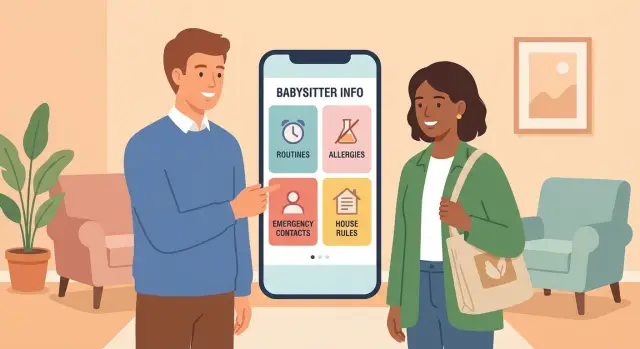
Why a babysitter info card helps in real life
Even great sitters miss key details, and it’s usually not carelessness. They’re walking into a new home, learning your kids’ names, figuring out locks and lights, and trying to keep the evening moving. With multiple kids, different routines, or a sitter who works with other families, small details blur fast.
Most problems show up when everyone is tired or rushed: an allergy rule gets forgotten, a “take with food” medicine note is missed, or bedtime turns into a battle because the sitter never heard the exact steps that work for your child. A calm night can flip quickly if the sitter has to dig through old texts to confirm what to do.
A single, consistent babysitter info card (in an app or as a one-page card) beats scattered messages. The same facts live in the same place every time, so sitters don’t have to guess which thread is current. You also cut down on back-and-forth calls for basic questions.
It helps prevent things like:
- Snack mistakes when allergies are involved
- Confusion about bedtime order (bath, book, lights out)
- Missed “if X happens, do Y” rules (night wakings, screen time)
- Wasted time searching for contacts or the pediatrician
An app can go further than paper because you can update one line once (like a new backup contact) and know the latest version is what the sitter sees.
What to include on the card (the essentials)
A good babysitter info card should answer the sitter’s first questions without hunting through texts. Aim for the smallest set of details that helps someone act fast and feel confident.
Start with the basics for each child: full name, nickname they answer to, and age. A photo is optional, but it can help a first-time sitter confirm the right child at school pickup or when meeting a grandparent at the door.
Allergy information is non-negotiable. Write the trigger (peanuts, eggs, cats), what symptoms usually show up, and what you want the sitter to do first. Keep it plain and specific, for example: “Hives and lip swelling: give antihistamine, then call us.” If you have an epinephrine auto-injector, note where it is and when to use it.
Medical notes should stay short. Include only what a sitter must know: medicine name, exact timing, exact dose if needed, and where it’s stored. Skip long history.
If you want a simple structure, keep it to a small set of sections:
- Kids: name, nickname, age (photo optional)
- Allergies: trigger, typical symptoms, first action
- Meds: name, when to give, where stored
- Contacts: parents, backup adult, pediatrician, poison control
- Address and entry: full address, gate/parking notes, door quirks
Add address details that prevent delays. Include the full address as it appears on mail, plus practical notes like “blue door by the courtyard” or “buzz unit 3B.” If you use a gate code or lockbox, write the exact steps so the sitter isn’t stuck outside with groceries or a sleeping child.
Routines and house rules that prevent confusion
A sitter can handle almost anything if they know your normal rhythm. Trouble shows up in the in-between moments: “Does bedtime start at 7:30 or is that lights-out?” “Is one episode after dinner OK?” A clear routine and a few house rules stop guesswork.
Write routines as steps, not paragraphs. Include the small details that matter: comfort items (blanket, stuffed animal), where they are kept, and what you say when you hand them over. If your child falls asleep only after a certain song or needs a hallway night-light, note it.
Routine notes that actually help
Keep it practical so a first-time sitter can copy what you do:
- Meals: usual times, where they sit, and “easy yes” foods for picky nights
- Naps and bedtime: the order (bath, pajamas, teeth, story), plus any non-negotiables
- Behavior: what works (two choices, a timer), what makes it worse, and one calming routine
- Screens: what’s allowed, time limit, and where devices go when screen time is over
- Food safety: choking hazards to avoid and how you cut common foods (grapes, hot dogs)
Transportation rules prevent awkward calls later. If you don’t want car rides, say so. If walks are fine, add boundaries like “stay on our block” or “playground is OK, but don’t cross the main road.” If a car seat might be used, note where it is and any basics you want followed.
A quick example: Friday night is pizza night, but your child melts down if bedtime skips the usual tooth-brushing song. A sitter who sees “pizza by 6:15, one show, then teeth + song, then two short books” can keep the evening smooth.
Safety and emergency info that fits on one screen
A sitter shouldn’t have to hunt for safety details while a child is crying or a smoke alarm is beeping. Keep the emergency block short, clear, and easy to scan.
Start with “where things are.” Write the exact location, not just the item: “First aid kit: top shelf, hall closet” beats “in the closet.” Do the same for any approved meds (and note what is not allowed), a flashlight, and the circuit breaker panel.
Add clear safety boundaries in plain words. Name off-limits rooms, where doors should stay locked, and any special rules like balcony doors staying closed, pool gate always latched, and no backyard after dark.
For fire safety, include the simplest possible plan: which exits to use from the main rooms, the outside meeting spot, and one sentence on when to call 911 (for smoke, fire, or if you can’t quickly confirm everyone is safe).
Trusted neighbor info matters when you’re unreachable. Include one trusted contact with name, apartment or house number, and what they can help with. If there’s someone nearby you don’t want involved, say so clearly.
Finish with pet notes. Many “emergencies” are really pet problems: a dog slips out, a cat gets into the nursery. Note feeding rules, door habits, and any bite or scratch risk.
A compact emergency section often includes:
- First aid kit, flashlight, circuit breaker: exact locations
- Approved meds: what, where, and what not to give
- Boundaries: off-limits areas, balcony/pool/yard rules
- Fire plan: exits, meeting spot, when to call 911
- People and pets: trusted neighbor, pet safety notes
How to structure the info so sitters can scan it
A sitter often reads your notes while juggling a bag, a door code, and a kid asking for a snack. Make the most important facts visible in 5 seconds, and the rest easy to find later.
Two “master cards” usually work best: one per household (address, entry notes, pets) and one per child (allergies, routine, comfort tips). That way you can update a bedtime change for one kid without rewriting everything.
Put information in urgency order. If something could change what a sitter does in an emergency, it belongs at the top.
A simple order that works:
- Emergency actions: what to do first, then who to call
- Medical: allergies, meds, where they are stored
- Access: address, entry instructions, alarm notes (if you choose to share)
- Routine: meals, bath, bedtime, screen time
- Nice-to-know: preferences, comfort items, neighbor notes
Use short labels and plain words. Replace paragraphs with tight lines like “Allergy: peanuts (hives). EpiPen: top kitchen cabinet.” If you have special house rules, add the “why” in a few words so it feels reasonable: “No trampoline when alone (prior injury).”
Add trust signals: a clear timestamp and owner. “Last updated: 2026-01-21 (Sam).” Sitters take notes more seriously when they know it’s current.
Optional details can help, but only if they don’t bury the essentials. Photos, full schedules, and long stories belong on a second page or behind a second tap. Required items (allergies, emergency contacts, address) should never be hard to find.
Step-by-step: create your babysitter info card in 30 minutes
Set a timer for 30 minutes and aim for one screen. Don’t chase perfect wording. Focus on making sure a sitter can act without texting you for basics.
A simple 5-step build
- Start with the non-negotiables. Write allergies, medications (if any), and who to call first. Add each parent or guardian’s phone number, plus one local backup adult.
- Turn your evening into steps. Use short lines with times only where it helps. Example: “7:00 dinner, 7:20 bath, 7:45 two books, 8:00 lights out.”
- Add clear house rules and boundaries. Keep it direct: screen time limits, food rules, where kids can play, what’s off-limits.
- Do a 30-second scan test. Pretend you’re the sitter at the doorway. Can you find allergy info, emergency contacts, and bedtime in under 30 seconds? If not, shorten and move the most important lines to the top.
- Run a quick ‘what’s unclear?’ check. Share it with a sitter (or a friend) and ask what they’d still text you about. Revise only those parts.
A quick layout that works
Put the urgent items first, then the “normal night” details. Many families label sections like: Emergency, Health, Routine, House Rules, Notes.
If your child has a peanut allergy, write exactly what to do, not just the label. “Peanut allergy: use EpiPen in kitchen drawer, then call 911, then call Mom.” That’s the level of clarity that makes a babysitter info card actually useful.
Sharing and updates without losing control
The easiest card is the one your sitter can open in seconds, but you still want control over what they see and how long they can access it.
A shareable link or QR code is convenient because you can update the info once and everyone sees the latest version. The downside is access: if a link gets forwarded, it can spread. Screenshots are the opposite: they’re private and work offline, but they get outdated fast and you can’t pull them back.
A practical approach:
- Use a link or QR when you have frequent updates or multiple sitters.
- Keep a single screenshot page for “always true” basics (address, emergency contacts, allergies) as a backup.
- Keep a printed copy on the fridge for the no-phone moment.
Offline access matters. If your home has weak signal or the sitter has no data, make sure the essentials are available without internet: a printed sheet, a saved screenshot, or a note stored on their phone before you leave.
For privacy, split information into two layers. The sitter needs what helps them keep kids safe and follow your routine, not your full personal life. As a rule, share emergency contacts, address, entry instructions, allergy plan, and the care schedule. Keep extra-sensitive details offline (account numbers, documents, legally sensitive notes).
To keep it current, set a simple monthly reminder, and also review after changes like a new medication, a new pickup person, or a schedule shift.
If you rotate sitters, consider giving each sitter their own version or access window. If you’re building an internal tool, Koder.ai (koder.ai) can be a practical way to prototype a simple babysitter info card app from a chat prompt and export the source code for your own use.
Common mistakes that make the card less useful
The biggest problem isn’t missing info. It’s buried info. If a sitter has to hunt for what matters, they’ll miss it when they’re tired, rushed, or holding a crying kid.
A common mistake is hiding allergy details among fun facts and preferences. Allergies, medicines, and the first action step should be near the top, written in plain words. Avoid fuzzy lines like “he sometimes reacts.” Write what the reaction looks like, what triggers it, and what you want the sitter to do first.
Another issue is contact overload. If you list five adults with no order, the sitter will freeze. Give a clear priority and a backup plan. For example: call parent 1, then parent 2, then the nearby backup adult, then emergency services if needed.
Outdated details are more dangerous than missing details. Old door codes, an old address, a medication your child no longer takes, or an expired auto-injector can send someone down the wrong path.
Tone matters, too. Sitters follow clear instructions better than strict-sounding rules. “No screens, period” is easy to ignore when a kid melts down. “Screens only after homework, max 20 minutes, approved shows only” is specific and doable.
Quick fixes that make the card easier to use:
- Put allergies and emergency steps at the top.
- Replace “sometimes” with clear signs and actions.
- Limit contacts and label the order to call.
- Add a “Last updated” date and check it monthly.
- Write rules as actions the sitter can follow.
Quick checklist before you hand it to a sitter
Do a two-minute handoff check right before you walk out. Even if you use an app, these items are worth saying out loud once.
The 5-point handoff check
- Emergency basics: Confirm the exact home address, when to call 911 (and that it’s always OK to call if unsure), both parents’ numbers, and one nearby backup adult.
- Health notes: Restate allergies and what a reaction looks like, where any meds are stored, and the pediatrician name.
- Routine and food: Confirm the next meal or snack, bedtime time, the 2-3 bedtime steps that matter most, comfort items, and any “never” foods.
- House basics: Show the door lock setup, where the key is (if any), and any pet rules. Wi-Fi details are optional.
- Safety boundaries: Point out off-limits areas, where exits are, and one meeting spot outside if you ever need to leave fast.
Before you go, ask the sitter to repeat back the one thing you most want done tonight (for example: “Lights out by 8:30, no sweets after dinner”). That single recap prevents most misunderstandings.
Example: a first-time sitter on a busy Friday night
Maya, a first-time sitter, arrives at 5:45 pm on a hectic Friday. Two kids are excited and loud, dinner is half-prepped, and the parents are running late. One child, Leo, has a nut allergy. The parents hand over a one-screen card and do a 60-second handoff.
Before the door closes, Maya scans the card and confirms three things: the approved snacks, what an allergic reaction can look like for Leo, and who to call if she can’t reach the parents.
Later, the kids ask for a granola bar from the pantry. Maya checks the Snacks line and sees a clear rule: “No shared snacks unless they are on the approved list.” She picks an approved option instead. Ten minutes after that, Leo says his mouth feels itchy. Maya doesn’t guess. She checks the symptoms section and sees Leo’s early signs listed in plain words.
She follows the steps:
- Stop food and wash hands/face
- Check for hives, swelling, or trouble breathing
- Use the listed medication only if the symptoms match
- Call parents, then the backup contact if no answer in 5 minutes
- If breathing issues appear, call emergency services
The parents are unreachable for 10 minutes (phones on silent in a meeting). Maya calls the backup contact, a neighbor, who arrives quickly and stays calm while Maya monitors Leo. Clear instructions prevent panic and keep everyone focused.
Afterward, the parent updates the card: they add a new snack rule (“No pantry snacks without checking the list”) and replace vague wording like “watch him” with specific signs and clear timing for who to call next.
Next steps: keep it simple, then consider an app
A good card beats a perfect card you never finish. Make a one-screen version a tired sitter can read in under a minute.
Start with the basics only: bedtime steps, food and allergy notes, “call us if…” rules, and how to handle a meltdown or refusal. Once that works, expand without making it harder to scan.
A simple way to improve it over time:
- Draft the first version today and read it out loud.
- Ask someone who has never watched your kids to role-play one scenario using only the card.
- Add only what they asked for.
- Save a dated version so you know what the sitter saw.
If you update often, or you have more than one child, a babysitter info card app can help. The most useful upgrades are simple: separate profiles per child, a sitter view that avoids parent-only notes, and templates for common situations (weeknight, sick day, overnight).
Decide early what you will never store in the app. Keep extra-sensitive details offline, even if the app is private: ID documents, banking info, and details you wouldn’t want shared widely. If you use alarm codes or lockbox codes, consider sharing them separately and changing them regularly.
FAQ
Do I really need a babysitter info card if I already text sitters?
Yes. A one-page card is often enough if it includes allergies, meds, emergency contacts, address/entry, and the bedtime routine. Keep extras (photos, detailed schedules, long notes) off the main card so the sitter can scan it fast.
What are the must-have sections to include on the card?
Put the highest-risk items first: allergy triggers and what to do, any required meds, and who to call in what order. Next add address and entry steps, then the routine, then house rules and preferences.
How should I write allergy instructions so they’re actually useful?
Write the trigger, the usual symptoms for your child, and the first action you want taken. Also add where the medication is stored and when to use it, so the sitter doesn’t have to guess under stress.
How much medical detail is too much for a babysitter card?
Only include what a sitter must do during their shift: the exact medicine name, when to give it, where it’s stored, and any clear “do not give” notes. If it’s complicated, add one short line that tells them to call you before giving anything non-urgent.
Which contacts should I include, and in what order?
List parent/guardian numbers first, then one local backup adult, then the pediatrician and poison control. Label the call order clearly so the sitter doesn’t waste time choosing whom to contact.
How do I write routines so a sitter can follow them quickly?
Use short steps and include the few details that matter most, like comfort items, the exact bedtime order, and one strategy that works for behavior. Avoid long paragraphs; the sitter needs something they can follow while multitasking.
Should I include house rules, or is that too strict?
Yes, if you care about limits like screen time, off-limits rooms, food rules, or whether car rides are allowed. Write rules as actions the sitter can follow, and add a brief reason only when it helps compliance (like a prior injury).
What safety and emergency details should be on one screen?
Keep it short and location-based: where the first aid kit is, approved meds and where they are, key safety boundaries (pool, balcony, yard), and a simple fire plan with exits and a meeting spot. The goal is quick decisions, not a full manual.
Is it better to share the card as a link/QR, screenshot, or printed page?
A link or QR code is easiest to keep current, but it’s harder to control if it gets forwarded. A printed copy or saved screenshot works offline and is more private, but it can go out of date, so add a “Last updated” line and review it monthly.
How do I keep the card updated without rewriting everything each time?
Create two master cards: one for the household (address, entry, pets, emergency locations) and one per child (allergies, meds, routine). Then do a quick scan test: can someone find allergies, who to call, and bedtime in under 30 seconds?