

Babysitting Request Board: Simple Scheduling for Busy Families
Set up a babysitting request board so parents post dates and times, sitters claim open slots, and everyone stays aligned with simple rules and updates.
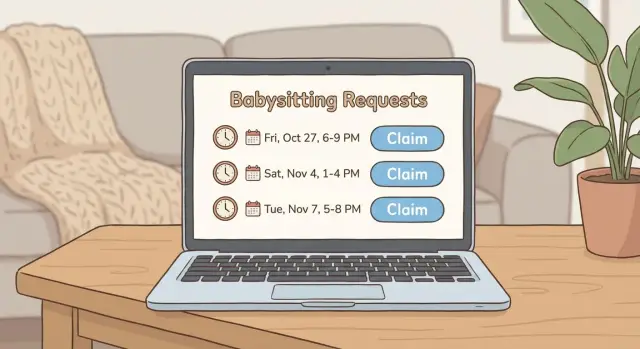
Why families need a shared babysitting request board
Babysitting plans often start with one simple question: “Can anyone watch the kids Friday night?” Then things get messy. Messages sink in group chats, someone replies hours later, and two people think they booked the same slot. Other times, everyone assumes someone else will help, and the night arrives with no clear plan.
A shared board prevents most of that by giving everyone one place to check. Instead of repeating details in multiple threads, the request sits in one spot with the date, start and end time, location, and notes. Sitters can see what’s needed at a glance, and parents can see what’s covered without asking again.
It also helps more people than you might expect: parents, sitters, grandparents, relatives, trusted neighbors who trade coverage, and co-parents who need the same information.
A request board reduces awkward back-and-forth. If a sitter can’t do it, they don’t claim it. If they can, they claim it, and everyone sees the update right away. That visibility prevents double-booking and “Wait, I thought you had it.”
Set expectations early. This is simple coordination for a small trusted group. It won’t vet people, negotiate pay, or manage long-term staffing. It’s just a clean way to share needs and availability so scheduling feels calm instead of frantic.
Decide the rules before you build anything
A babysitting request board works best when the rules are clear before the first request goes up. If you skip this, small misunderstandings turn into frustration, and people stop using it.
Start with roles:
- Who can post requests (parents only, or also grandparents and guardians)?
- Who can claim slots (only approved sitters, or anyone in the group)?
If your group includes teens, decide what “approved” means. For example: met in person, understands house rules, and has emergency contacts.
Next, choose a claiming rule. Many groups use first-come-first-served because it’s simple. Others add a priority rule (like “siblings first” for late nights). If you use priority, write it in one sentence so it doesn’t turn into an argument.
Confirmation and timing
A claim shouldn’t feel final until it’s confirmed. Set a response window and define what counts as confirmed. For example:
- The parent acknowledges a claim within 2 hours.
- If the parent doesn’t respond, the slot opens again.
- “Confirmed” means both sides replied with a clear yes.
Cancellations and no-shows
Cancellations happen, so agree on what “good notice” is (24 hours is common, but your group may need less). Also decide what happens after a no-show: a quick check-in, a short pause from claiming, or a requirement to message the group before claiming again.
Example: A parent posts Saturday 6-10 PM. A sitter claims at 9 AM. If the parent doesn’t confirm by 11 AM, the claim expires and someone else can take it. Rules like this keep things predictable.
Choose the simplest format that fits your group
The best setup is the one people will actually use. Start with two questions: how many people will post requests, and how often?
For a small, tight-knit group, low-tech can work. A paper board on the fridge might be enough when the coordination happens face-to-face.
Once you have more sitters, more requests, or more than one family, confusion shows up fast. That’s when a single shared place helps. Common formats include a paper board, a shared spreadsheet, a group chat with a fixed template, or a simple web app.
Whatever you choose, pick one official place where requests live. If someone posts in the chat, someone else updates a spreadsheet, and a third person texts a sitter directly, nobody knows what’s current. Treat everything else as notifications.
Example: If three families share five sitters, a spreadsheet might work at first. But when two sitters claim the same Friday at 7 PM because they saw different updates, you’ll want one board that shows the current status in one place.
Sketch the basic flow: post, claim, confirm
A babysitting request board works when the flow is obvious in five seconds. Keep it simple and make each action feel clear.
The minimum screens to ship
If you’re building a digital board, three screens are enough for most families:
- Requests list: what’s open, when it starts, and who posted it
- Request details: full info, plus one clear action button
- Claim confirmation: a quick “Are you sure?” step to prevent mistakes
Extra features can wait until people ask for them.
Statuses that prevent confusion
Every request should have one status, and only the next logical step should be allowed. A simple set covers nearly everything: Open (no sitter yet), Claimed (someone offered), Confirmed (parent accepted), Cancelled (no longer needed).
If a request is Confirmed, it should be obvious on the list, and the claim button should disappear.
Keep notifications simple too. Pick one method and stick to it: an email or text alert for new requests and confirmations, or a rule where everyone checks the board once a day. Mixing methods is where people miss updates.
Design for phones first. Use big buttons, short forms, and a clear time display. Include date, start and end time, and time zone if your family spans cities. “Sat, Feb 3, 6:00-9:30 PM” prevents most scheduling mistakes.
What to include in each babysitting request
A good request answers a sitter’s first questions without a long back-and-forth. Keep it short but complete.
Start with the basics: date, start time, and end time. For location, some groups share the exact address, while others post a neighborhood and share the address after claiming.
Include:
- Number of kids and ages
- Any must-know notes (allergies, bedtime steps, pets, parking)
- Who to contact if something feels off
Money can be awkward, so make it plain. If you pay, state the rate and how you’ll pay (cash, transfer app, etc.). If it’s a swap, say so.
A simple template:
- When: date, start-end time
- Where: address or neighborhood
- Kids: number + ages
- Notes: allergies, bedtime, pets, parking, screen time
- Pay: rate + method (or “swap”)
Finally, include a claim deadline if you need one. Example: “Please claim by Tuesday 6 PM, and confirm by 8 PM.” That prevents “maybe” holds and keeps the slot out of limbo.
How claiming a slot should work (without confusion)
A request board needs one obvious action: “Claim this slot.” If people have to comment, text, and DM to do the same thing, you’ll get crossed wires.
When someone claims, ask for a few details so the family isn’t guessing: sitter name, best contact method, and a short note like “can arrive 10 minutes early” or “needs parking.”
Then show a clear step: Pending confirmation. A claim isn’t final until the parent confirms. This avoids the common problem where a sitter thinks they’re booked, but the parent is still checking details.
A short confirmation message removes ambiguity. A template helps:
- Confirmed for: [Date], [Start-End]
- Location: [Address or general area]
- Pay: [$ rate], [cash/app], [minimum hours]
- Kids: [# and ages], bedtime notes if relevant
- Backup plan: if you are late or sick, text [name] by [time]
If two people try to claim at once, use one rule and stick to it. For example: the first complete claim gets “pending,” and the slot stays locked until it’s confirmed or released.
Make it easy to reopen a slot. One clear action like “Release slot” should remove the claim and return the request to Open.
If you want to build this digitally without starting from scratch, a form-based prototype in Koder.ai can help you enforce steps like statuses, claiming, and confirmation while you test what your group actually needs.
Safety and privacy basics for family scheduling
A babysitting request board can accidentally expose sensitive patterns: when your home is busy, who will be with your kids, and how to reach you. The safest board collects only what’s needed to coordinate.
Limit what gets posted to the group. Names and time slots are usually enough. Avoid full addresses, door codes, school names, custody notes, or travel plans in the request itself. Share sensitive details privately after a sitter is confirmed.
Keep access approved-only. This should never be a public page where anyone can view or claim a slot. Use an invite list, and remove access when someone is no longer part of the circle.
Decide where emergency information lives. Many families keep a single “emergency card” per child (allergies, pediatrician, authorized pickup, emergency contacts). A solid rule is: only confirmed sitters see emergency info, and only for the shift they accepted.
If you want written guidelines, keep them short:
- Post only date, time, general location (if needed), and number/ages of kids
- Share sensitive details (address, entry notes, medical info) only after confirmation
- Approved-only access; no forwarding invites without a parent’s OK
- Delete old requests and remove contact info after a set time
- If a phone is lost, change passwords and rotate any codes
A final reminder helps: the board is for coordination, not screening. Each family still decides who they trust.
Common mistakes that make boards fail
Most boards don’t fail because families are disorganized. They fail because people stop trusting what they see.
The quickest way to break trust is mixing channels. If requests are posted on the board but updates happen in texts and side chats, nobody knows what’s current. Then you get two sitters thinking they’re booked, or nobody showing up because everyone assumed someone else confirmed.
Time confusion is another big one. “Friday night” sounds clear until someone asks: start at 6 or 7? End at 9 or after bedtime? If your family spans time zones, even a one-hour difference can create real problems.
Common failure points:
- Treating “claimed” as the same as “confirmed”
- Leaving start and end times vague
- Asking too many questions up front, so people skip the form
- Having no easy way to cancel, so people disappear
- Making changes outside the board, so the board becomes outdated
Cancellations deserve a simple rule. Update the board first, then message the parent (or group) right away with a short note like “sorry, got sick” so nobody has to guess.
Quick checklist before you share it with everyone
Before you invite the whole group, test the board with one parent and one sitter. Nobody should need a walkthrough.
Run a quick end-to-end check:
- Posting is fast: can a parent add a date and time and hit “Post” in about a minute?
- Claiming is obvious: does a sitter immediately see “Waiting for confirmation” or “Confirmed”?
- Essentials are required: time window, location rule (address or general area), number of kids, key care notes
- Status is visible: can everyone tell open vs claimed vs confirmed vs cancelled?
- Cancellations work: does it clearly reopen the slot, and is the next step obvious?
If anything feels fuzzy, fix it before you expand. Confusion spreads fast, and once people stop trusting the board, they go back to private texts.
One small improvement that helps a lot: a single confirmation moment. After a sitter claims, the parent taps Confirm and the board stamps it with a time. That tiny receipt cuts down on “Are you actually coming?” messages.
A realistic example: one request from start to finish
Here’s what this can look like without endless texts.
On Monday, Family A posts a request: Friday, 6-10 PM. They include the basics: two kids (ages 3 and 6), dinner is handled, bedtime is 8:30, and “Please arrive 10 minutes early so we can walk through the routine.”
An hour later, Jamie claims the slot and adds a phone number plus: “I can do it. Please confirm so I can lock it in.”
Family A confirms that evening. On the board, they mark the slot as Confirmed and note the pay rate and payment method. Then they send private details separately (entry instructions, alarm notes, door code). The board stays clean, and sensitive info stays off the main page.
On Thursday evening, Jamie has an emergency and cancels with about 24 hours notice. Jamie marks the slot as Cancelled, and the request returns to Open. Family A adds: “Still needed - please claim if you can.”
Taylor claims the reopened slot and gets confirmed.
After Friday night, Family A marks the request complete and adds a short wrap-up note: “Kids asleep by 8:45. Payment sent and confirmed.” Over time, that’s what turns a board into a reliable rhythm.
Next steps: keep it simple and improve over time
Start with the smallest group that still has real need: one family plus a couple of trusted sitters. When the flow feels easy, invite the next family. If you expand too early, every small confusion multiplies into more messages.
Keep feedback light. After a busy weekend, ask one question: what was confusing or annoying this time? Look for specific answers like “I didn’t know if it was taken” or “I couldn’t tell when to show up,” then fix those first.
Add only one improvement at a time. When you change three things at once, nobody knows what caused the new problem.
Upgrades that usually help (in order): confirmation step, basic notifications for new posts and claims, a calendar-style view, short sitter profiles, and a simple history of who claimed what.
If people are using it, don’t rebuild it. Make one small improvement, confirm it solved a real problem, then move on.
FAQ
Why use a babysitting request board instead of a group chat?
A shared board keeps every request, update, and status in one place, so nobody has to hunt through old messages. It cuts down on double-booking and the “I thought you had it” problem because everyone sees the same current information.
Who should be allowed to post requests and claim slots?
Start with one clear rule: parents (and guardians) can post requests, and only people you’ve approved can claim them. If teens are included, define “approved” in plain terms like having met in person and having emergency contacts on file.
What’s the simplest fair rule for claiming a slot?
First-come-first-served is the simplest default and works well for most groups. If you need priority, keep it to one sentence so it’s easy to apply and doesn’t turn into debates.
How do we avoid confusion between “claimed” and “confirmed”?
Treat a claim as “pending” until the parent confirms with a clear yes. A simple response window (like two hours) prevents a slot from sitting in limbo and makes it obvious when someone else can take it.
What information should every babysitting request include?
Post the date, start and end time, and a clear location rule (exact address or general area). Add number of kids, ages, and one or two must-know notes like allergies or bedtime, so a sitter can decide quickly without a long back-and-forth.
Is it safe to use a shared board for family scheduling?
Yes, if you keep it minimal and private by default. Share only what’s needed to coordinate on the board, and send sensitive details like door codes, full address, and medical notes only after the sitter is confirmed.
How should cancellations and last-minute changes work?
Set an expectation for notice (24 hours is common) and make the first step “update the board,” then message the parent right away. If cancellations are easy and visible, the board stays trustworthy and people keep using it.
What’s the biggest mistake that makes these boards fail?
Use one official place where requests live, and treat everything else as notifications only. When updates happen in side texts while the board stays stale, people stop trusting it and the system breaks down.
If we build a simple web app, what are the minimum features we need?
A basic setup can be just three views: a list of requests, a request details page, and a quick claim confirmation step. If you build it, keep statuses simple like Open, Claimed, Confirmed, and Cancelled so it’s obvious what happens next.
How do we roll this out without confusing everyone?
Start with one family and two or three trusted sitters, then run a full test from post to claim to confirm to cancel. If you want a fast prototype, Koder.ai can help you create a form-based flow with statuses and permissions so you can test the process before adding extras.