

Ballmer’s Microsoft: Scale, Enterprise Sales, and Cash Flywheels
How Steve Ballmer leveraged Microsoft’s enterprise distribution to scale Windows, Office, and servers—turning renewals, upgrades, and standardization into compounding cash flow.
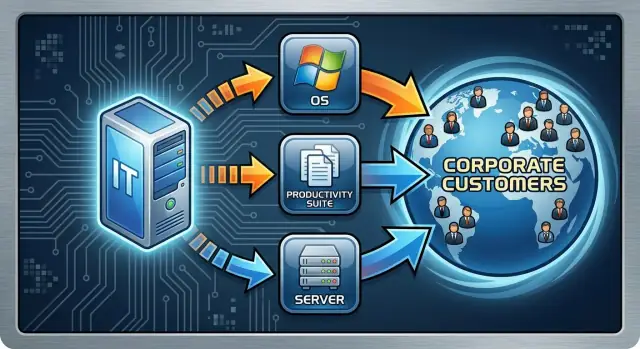
The Big Idea: Distribution Turns Adoption into Compounding
The core question for Ballmer-era Microsoft isn’t “Were the products the best?” It’s: What happens when you can put a product in front of almost every enterprise buyer, every year, through a repeatable sales and procurement motion? At that point, distribution scale can matter more than marginal feature differences, because it shapes what gets standardized—and what becomes the default.
A “compounding cash machine,” in plain terms
A compounding cash machine is a business where:
- customers keep buying again (renewals, upgrades, expansions)
- each additional unit costs relatively little to deliver (software margins)
When those forces reinforce each other, revenue doesn’t have to be “re-won” from scratch every cycle. It accumulates—contract by contract, department by department—until the next purchase becomes the path of least resistance.
Scope: enterprise software, not hype cycles
This section is about enterprise distribution: procurement processes, IT standards, multi-year agreements, and risk-avoiding buyers. That’s a different world than consumer apps, where adoption can swing quickly based on trends. In enterprises, the dominant force is often “What will be supported, compatible, and approved?” not “What’s coolest this quarter?”
The mechanisms we’ll unpack
Microsoft’s scale advantage showed up through a handful of repeatable mechanisms:
- Standardization: once an organization standardizes on a platform, internal tools, training, and workflows align around it.
- Renewals and enterprise agreements: spending becomes recurring, predictable, and easier to expand than to replace.
- Bundling and suite economics: one vendor relationship can cover multiple needs, reducing purchasing friction.
- Channel reach and procurement familiarity: partners, resellers, and a well-worn buying process make adoption easier—and switching harder.
The through-line is simple: distribution turns “a product people choose” into “a product organizations assume,” and that assumption is where compounding begins.
Ballmer Era Context: Building on Microsoft’s Installed Base
Steve Ballmer became CEO in 2000, inheriting a company that was already the default supplier for much of corporate computing: Windows on most desktops, Office in most knowledge-worker workflows, and a growing foothold in servers and development tools. His tenure is best understood as a growth-and-expansion phase built on that foundation—less about inventing distribution from scratch and more about turning an existing footprint into repeatable enterprise revenue.
What “scale advantage” meant in enterprise markets
In enterprise software, scale advantage isn’t just “being big.” It’s having reach plus repeatability:
- Reach: a large base of customers that already buy, deploy, and standardize on your software.
- Repeatability: a sales and delivery model that can be copied account-to-account—procurement templates, volume licensing, partner delivery, and predictable renewals.
When a product is already deployed widely, every new release, add-on, or adjacent product has a shorter path to consideration. IT teams know the vendor, security teams know the update process, and procurement knows the paperwork. That reduces friction in ways that don’t show up in a feature checklist.
Leadership choices vs. structural advantages
Ballmer’s leadership emphasized executing against the enterprise: leaning into large account sales, suites, and long-term licensing relationships. But the compounding effect also came from structural realities Microsoft already had: entrenched desktop standards, broad administrator familiarity, and a partner channel trained to implement Microsoft stacks.
This context matters because it frames Microsoft’s “scale advantage” as both strategy (how aggressively to monetize and extend the base) and structure (how hard it is for enterprises to unwind what’s already standard).
What Enterprise Distribution Actually Means
Enterprise distribution isn’t just “having salespeople.” It’s the full system that gets a product bought, approved, rolled out, and renewed across large organizations—repeatably.
The three channels working together
At Microsoft under Ballmer, enterprise distribution typically combined:
- Direct sales (account teams): people who own the relationship with a company, navigate stakeholders, and build multi-year plans.
- Partners (resellers, integrators, consultants): third parties who implement, customize, and bundle solutions—often the difference between “interesting software” and “working deployment.”
- Procurement relationships: an established path through legal, security, compliance, and finance that makes buying the next product faster than the first.
Why enterprises buy differently
Large companies optimize for risk reduction more than novelty. Purchases must satisfy security reviews, regulatory constraints, data retention rules, vendor viability checks, and budget cycles. Decision timelines are longer, and the “buyer” is rarely one person—IT, security, finance, and line-of-business leaders all have veto power.
That reality rewards vendors with proven processes: standard contracts, predictable support, and an installed base that reduces perceived uncertainty.
How distribution creates a default choice
Once a vendor is trusted, it often becomes part of the standard shortlist. That doesn’t guarantee every deal, but it means competitors must work harder just to be considered.
Account coverage and expansion
“Account coverage” is how thoroughly a vendor can serve one company: mapping stakeholders, understanding projects, and spotting adjacent needs. The compounding effect appears when one relationship enables multi-product expansion—selling another product is cheaper when the vendor is already approved, known, and deployed.
Standardization and Switching Costs: Why Customers Stay
Enterprise customers don’t just “buy software.” They standardize on a vendor so thousands of people can do work the same way, with fewer exceptions to manage.
Standardization lowers the daily friction
When a company standardizes on Microsoft tooling, it reduces training and support complexity in plain, practical ways. New hires learn one set of apps. Help desks troubleshoot a smaller set of issues. IT can write one set of policies, one set of deployment steps, and one set of security controls.
That uniformity matters more than it sounds: even a small reduction in “how many ways can this break?” turns into real savings when you multiply it across every laptop, every department, and every month.
Switching costs are mostly work, not money
Customers often stay because changing vendors is a lot of effort. It means migrating files and mailboxes, reworking templates, retraining users, updating internal guides, and dealing with the inevitable compatibility surprises.
It also means re-integrating everything that quietly depends on the old tools: add-ins, macros, reports, and line-of-business systems.
The quiet glue: formats, APIs, and admin tooling
Document formats and collaboration workflows create defaults: if everyone exchanges .docx and .xlsx files, the “safe” choice is the tool that opens them perfectly.
APIs and integrations deepen that default. Admin tooling—group policies, patching, identity, device management—makes the platform easier to run at scale, which makes it harder to replace.
Caveat: lock-in isn’t absolute
Even with real lock-in, enterprises still negotiate hard at renewal time, and many deliberately multi-source (for example, mixing productivity, email security, and endpoint tools) to keep leverage and avoid single-vendor risk.
The Suite Strategy: One Relationship, Many Products
Microsoft’s suite strategy was less about “selling more stuff” and more about lowering the friction of buying. Once an enterprise already had a vendor relationship, procurement approvals, account teams, and deployment patterns, adding the next product often felt like an extension of what was already in motion.
Suite economics: fewer sales motions, more revenue per account
Enterprise selling is expensive: long cycles, many stakeholders, and heavy support before and after purchase. The suite model amortizes that cost. A single relationship can support multiple renewals, upgrades, and new product lines—raising lifetime value without needing an entirely new go-to-market effort each time.
Bundling and Enterprise Agreements as procurement shortcuts
Bundling (and later, Enterprise Agreements) simplified buying in a way procurement teams appreciated: one negotiation, standardized terms, predictable budgeting, and a clearer view of compliance. Instead of repeated point purchases, customers could commit at scale and adjust counts over time, which made expansion feel like an administrative change rather than a brand-new project.
The cross-sell paths that compounded
Microsoft’s portfolio had natural “adjacent” steps:
- Windows ↔ Office: standard desktops created demand for standard productivity tools (and vice versa).
- Desktop to server: once Microsoft was trusted on endpoints, it was easier to pitch Windows Server, Exchange, and SQL Server.
- Management and tooling: as footprints grew, so did the need for management, security, and systems tools.
This is the classic “land and expand” motion—before it had a SaaS label. A foothold product established credibility, distribution, and budget access; the suite turned that foothold into compounding account growth.
Licensing, Renewals, and Pricing Power
Microsoft’s enterprise engine wasn’t just “selling software.” It was selling permission to use software at scale—structured in ways that fit how big organizations budget, audit, and standardize.
Licensing, in plain terms
Most enterprise licensing boils down to a few familiar meters:
- Per seat (per user): pay for each person who needs access (common for Office-style productivity tools).
- Per device: pay for each computer running the software (useful when multiple people share machines).
- Per server (or per processor/core): pay based on the servers that run the system (typical for Windows Server and database workloads).
These models map neatly to inventory lists enterprises already maintain—employees, endpoints, servers—making spending defensible and trackable.
Why renewals and upgrades get predictable
Once a product is rolled out broadly, the organization builds routines around it: onboarding checklists, help-desk scripts, security policies, document templates, internal training. That turns software into part of operations, not a one-off purchase.
From the finance side, multi-year agreements and annual true-ups can create a steady cadence: renew, adjust counts, keep compliance in good standing. Even upgrades become less about “Should we buy?” and more about “When do we schedule the migration?”
Where pricing power really comes from (and where it doesn’t)
Pricing power isn’t magic; it often comes from standardization. When a company standardizes on Windows + Office (or a server stack), switching isn’t just swapping licenses—it’s reworking workflows, retraining staff, migrating files, and retesting integrations.
That said, enterprises still push back hard. Standardization creates leverage for the vendor, but procurement creates counter-leverage.
The buyer’s view: negotiation is a process
Large customers rarely pay list price. Deals typically involve:
- Long negotiation cycles: legal, security, IT, finance, and procurement all weigh in.
- Volume discounts: larger deployments earn better rates, especially when bundled across products.
- Competitive bids: rivals are invited in to anchor pricing and force concessions.
The win for Microsoft was that once embedded, negotiations often focused on terms and scope—not whether the whole platform would be replaced.
Ecosystem Scale: Partners, Training, and the Trust Loop
Microsoft’s enterprise advantage wasn’t only about selling directly to big companies. It was also about surrounding products with an ecosystem that made adoption feel safer—and staying put feel easier.
Scale turns into support
A large installed base funds the “boring” infrastructure that enterprises quietly depend on: clear documentation, predictable release notes, admin guides, security advisories, and well-maintained knowledge bases. On top of that, formal training and certifications create repeatable skill paths—whether you’re a Windows admin, an Exchange operator, or a .NET developer.
Partners amplify this effect. Systems integrators, resellers, managed service providers, and ISVs build offerings around what customers already buy. That expands the practical capabilities of the core product without Microsoft having to deliver every custom integration itself.
Why CIOs trust big ecosystems
For a CIO, perceived risk matters as much as feature checklists. A broad partner network signals: “If this breaks, someone can fix it.” Procurement teams also like vendors with proven reference customers and standardized implementation playbooks. The ecosystem becomes a form of insurance—especially when the system will touch identity, email, endpoints, and servers.
Talent availability reinforces adoption
Ecosystem scale creates a labor-market flywheel. When many companies use the same tools, more people learn them. When more admins and developers know them, hiring gets easier, projects get cheaper, and migrations feel less risky. That “availability of talent” becomes a hidden switching cost: replacing a platform isn’t just moving software; it’s retraining staff and rebuilding institutional knowledge.
The tradeoff: scale can slow change
Big ecosystems aren’t pure upside. They can encourage conservatism, add compatibility constraints, and pile on layers of tooling from different partners. Over time, that complexity can slow upgrades and make it harder to simplify.
Still, under Ballmer, Microsoft benefited from this trust loop: more adoption created more partners and skills, which lowered perceived risk, which drove more adoption.
The Cash Flywheel: How Scale Funds More Scale
Microsoft under Ballmer didn’t just sell software—it built a repeatable flywheel where scale produced cash, and cash reinforced scale.
The flywheel in plain terms
Enterprise software throws off unusually predictable cash once it’s broadly deployed. That cash can be reinvested into three things that strengthen distribution:
- Sales coverage: more account managers, specialists, and support capacity for large customers.
- Product investment: steady funding for new versions, integrations, security work, and enterprise features.
- Ecosystem expansion: partners, training, certifications, events, and documentation that reduce friction for adoption.
Why distribution gets cheap after it’s built
Once channels and relationships exist—procurement contacts, reseller networks, enterprise agreements—the incremental cost of selling to the next seat or the next division drops sharply. The sales motion is still real work, but the platform (contracts, compliance language, partner incentives, deployment playbooks) is already in place.
That’s a key compounding mechanic: you don’t pay from scratch each time you extend usage. You extend an existing relationship.
Predictable cash enables long planning horizons
Licensing and renewals create cash flows that finance planning over years, not quarters. Predictability lets a company:
- commit to multi-year product roadmaps,
- staff enterprise teams confidently,
- invest ahead of demand (data centers, support, partner programs).
A simple loop you can expand
Think of it as a closed loop:
- Installed base grows →
- Renewals + expansion revenue increase →
- Cash becomes more predictable →
- More investment in sales/product/ecosystem →
- Enterprise trust and reach improve →
- Installed base grows (back to step 1)
This is how distribution turns adoption into a compounding cash machine: each turn makes the next turn easier.
Case Study 1: Windows + Office as a Corporate Default
Windows and Office became a “default” in many companies less because of one killer feature and more because they fit how enterprises buy, deploy, and standardize.
Windows: the standard desktop image
Large organizations aim to keep endpoints predictable. A single Windows desktop image is easier to manage at scale: IT can patch, secure, and support a consistent setup across thousands of machines. Compatibility expectations reinforced that choice—internal apps, third‑party tools, device drivers, and security software were commonly tested first (or only) on Windows.
Once a company standardized, changing the base OS wasn’t a simple upgrade—it meant retesting applications, rewriting deployment scripts, retraining support teams, and handling exceptions for departments that depended on specific tools.
Office: collaboration through file compatibility
Office compounded the standardization effect. Word, Excel, and PowerPoint weren’t just individual tools; they were a shared “language” for documents and spreadsheets. If your customers, suppliers, or other departments sent files in familiar formats, the lowest-friction response was to use the same suite.
Collaboration behaviors reinforced this: templates, macros, shared document workflows, and “send me the deck” culture all favored staying compatible. Even when alternatives existed, the cost of mismatched formatting or broken spreadsheets often outweighed the savings.
The compounding effect: each seat adds inertia
Every additional Windows + Office seat didn’t just add revenue—it increased the organization’s internal dependency:
- More shared files and templates created more reasons to keep formats consistent.
- More trained users reduced tolerance for change.
- More integrated processes (add-ins, approvals, reporting) raised migration effort.
This is observable network inertia: the more people using the same standards, the more valuable (and harder to replace) those standards become. Over time, “default” status became less a decision and more an outcome of accumulated compatibility, manageability, and coordination benefits.
Case Study 2: Servers and Databases Through Enterprise Reach
Microsoft’s push into servers and databases is often framed as a product story (Windows Server, SQL Server, management tools). But the distribution story mattered just as much: many CIOs and procurement teams were already buying Microsoft at scale for desktops, identity, and productivity.
Existing relationships made “one more Microsoft contract” easier
Once an enterprise had an account team, support motion, and enterprise agreement structure in place, adding server products could feel like an extension of a familiar relationship rather than a brand-new vendor bet. The same stakeholders who standardized on Windows and Office were often involved—directly or indirectly—in infrastructure decisions.
That lowered the internal friction of adoption:
- Procurement already knew how to negotiate, audit, and renew Microsoft licenses.
- Security and compliance teams were familiar with Microsoft’s documentation and processes.
- IT leadership could align roadmaps across desktop, identity, and server strategy.
Procurement incentives: fewer vendors for core infrastructure
For core systems—directory services, email, file/print, app hosting, databases—enterprises tend to prefer fewer strategic suppliers. Fewer vendors can mean fewer legal reviews, fewer support escalations, and fewer renewal calendars to manage. Even when a best-of-breed option existed elsewhere, the “vendor sprawl” cost was real and visible.
Microsoft’s enterprise reach made it plausible to bundle infrastructure purchases into broader agreements, simplifying budgeting and approvals.
Integrated tooling reduced deployment and admin costs
On the ground, integration often mattered more than feature checklists. Windows Server paired naturally with Active Directory, Group Policy, and the existing Windows admin skill base. SQL Server fit into the same operational ecosystem—monitoring, patching, authentication, and support channels.
Management tooling (and the broader Microsoft stack) could reduce time spent stitching systems together:
- Shared identity and access patterns
- Consistent management interfaces and automation
- Clearer support boundaries (“one throat to choke”)
A careful contrast: not automatic wins, but easier trials
Competitors in databases and servers had strong products and entrenched positions. Microsoft didn’t win every account. But enterprise distribution changed the starting point: pilots were easier to approve, expansions were easier to justify, and renewals could ride along with existing relationships—turning incremental adoption into steady, repeatable growth.
Where Scale Can Backfire: Limits and Blind Spots
Scale is a superpower, but it’s also a set of constraints. The same enterprise distribution that makes adoption feel “automatic” can make change feel painfully slow—internally and for customers.
Slow turns, big committees
When a company serves thousands of large accounts, even small product decisions carry compatibility, support, and rollout risks. That tends to create heavier processes: more reviews, more stakeholder alignment, more “don’t break anything” thinking.
The trade-off is real: reliability and predictability go up, but product shifts get harder. Teams can become optimized for incremental upgrades instead of bolder bets—especially when existing revenue streams are already compounding.
Distribution can mask weak spots (for a while)
Strong sales coverage, bundled contracts, and procurement familiarity can keep a product in the default position even if competitors have better features.
But this protection is temporary. Over time, gaps show up in user satisfaction, admin burden, security posture, or total cost. If customers feel the pain often enough—or if a credible alternative proves it can integrate, migrate, and support at enterprise scale—inertia breaks.
External pressure grows with size
Large incumbents also face more outside constraints: public scrutiny, procurement rules, and regulatory attention. Being the “default” can invite closer examination and slower strategic freedom than smaller rivals enjoy.
The core lesson
Compounding isn’t just inertia. Distribution multiplies value—but only if value keeps showing up. The companies that keep their flywheel spinning treat scale as a responsibility: they keep earning renewals with real improvements, not just familiarity.
Actionable Lessons for Teams Selling to Enterprises Today
Microsoft’s Ballmer-era playbook translates cleanly into modern SaaS: win a few “default” accounts, expand inside them over time, and protect renewals with operational excellence. The product matters—but the compounding happens in distribution and retention.
Translate the lessons into SaaS mechanics
Think in three enterprise primitives:
- Accounts: land a credible foothold (one team, one region, one workflow) with a clear deployment path.
- Renewals: treat renewal as a product outcome, not a procurement event—usage, admin happiness, and support quality are renewal drivers.
- Expansion: expand deliberately (more seats, more modules, more use cases) once the first deployment is stable and measurable.
A modern example of the same “distribution + retention” logic is how teams adopt internal build platforms. Tools like Koder.ai don’t just help you write code faster; they try to make shipping software a repeatable enterprise motion—planning mode for alignment, snapshots/rollback to reduce rollout risk, and source code export so adoption doesn’t feel like a one-way door.
A practical checklist you can run next quarter
Build a repeatable channel
Start with one motion you can teach: a consistent discovery script, a standard pilot, and a referenceable implementation plan. If partners are part of your model, define exactly what they do (implementation, change management, training) and how they get paid.
Reduce switching pain (the ethical way)
Enterprises don’t fear new software—they fear migration risk. Make switching boring:
- Data import tools and clear rollback steps
- Admin controls, audit logs, and permissions that match enterprise expectations
- Training assets for both end users and IT
Expand per account without creating resentment
Expansion works best when it follows value:
- Tie seat growth to adoption milestones
- Offer add-ons that remove real friction (security, compliance, integrations)
- Make cross-sell feel like a coherent “suite,” not a pile-on
Don’t copy bundling unless it earns its place
Bundling can accelerate adoption, but only when customers understand the value and the pricing is legible. Avoid “discount spaghetti” that hides true costs or forces customers into features they don’t need. If your bundle doesn’t reduce procurement work, simplify deployment, or improve outcomes, it will backfire in renewal negotiations.
Suggested internal links for the final draft
For readers who want to operationalize this section, consider linking to:
- /blog/pricing-strategy
- /blog/enterprise-sales-basics
- /blog/customer-retention-playbook
- /blog/plg-vs-sales-led
FAQ
What does “enterprise distribution” actually mean in this context?
In enterprise software, distribution is the repeatable system that gets you bought, approved, deployed, and renewed at scale.
It includes direct account teams, partners who implement, and procurement/legal/compliance pathways that make the next purchase easier than the first.
Why can distribution matter more than product features in enterprises?
Because once you can reliably reach most enterprise buyers every year, the default choice often wins over the “slightly better” feature set.
Distribution scale drives standardization, renewals, and expansion—so revenue compounds instead of being re-won from scratch each cycle.
What is a “compounding cash machine” in plain terms?
It’s a business where:
- customers keep buying again (renewals, upgrades, expansions)
- incremental delivery is cheap (software-like margins)
When those reinforce each other, growth comes from accumulating contracts and seats over time, not constant net-new reinvention.
How does standardization make a vendor become the “default”?
Standardization means one set of tools, policies, training, and workflows across thousands of employees.
It reduces day-to-day friction (support, onboarding, compliance), but it also creates inertia—replacing the platform becomes a large operational project.
What are “switching costs,” and why aren’t they mainly about money?
Switching costs in enterprises are mostly work, not license price:
- migrating mailboxes/files and redoing templates/macros
- retraining users and updating internal documentation
- retesting integrations, add-ins, and line-of-business dependencies
Even when alternatives are good, the migration risk and coordination effort can dominate the decision.
How does Microsoft’s suite strategy create compounding growth?
The suite strategy lowers buying friction by turning “new product” decisions into extensions of an existing relationship.
If procurement, security review patterns, and support channels already exist, adding another module or workload can feel like an administrative expansion rather than a brand-new vendor bet.
What role do Enterprise Agreements and bundling play in enterprise adoption?
Enterprise Agreements (and bundling) can function as procurement shortcuts:
- one negotiation and standardized terms
- predictable budgeting and compliance
- easier seat count adjustments (true-ups) over time
This tends to make expansion simpler than replacement, especially when multiple products ride along in the same contract structure.
Why do partners and training ecosystems matter so much to enterprise sales?
Partners (integrators, resellers, consultants, ISVs) make software deployable in the messy reality of large organizations.
A broad ecosystem also creates a trust loop:
- more documentation, training, and certifications
- more available talent to hire
- more “someone can fix it” confidence for CIOs
That lowers perceived risk and speeds adoption.
How did Windows and Office help Microsoft expand into servers and databases?
Desktop presence reduced friction for adjacent infrastructure products because:
- procurement already knew the Microsoft buying process
- IT/security teams were familiar with tooling and support motions
- admins had transferable skills (identity, policies, management)
This didn’t guarantee wins, but it made pilots and incremental adoption easier to approve and scale.
Where can scale and distribution backfire for an enterprise incumbent?
Scale can create real constraints:
- slower product turns due to compatibility and rollout risk
- distribution masking product gaps (temporarily)
- increased scrutiny and customer pushback during renewals
The durable lesson is that compounding only persists if the vendor keeps earning renewals with meaningful improvements—not just familiarity.