

Best Products to Build With AI Coding Tools (and What to Avoid)
Learn which product types fit AI coding tools best—MVPs, internal apps, dashboards, automations—and which to avoid, like safety- or compliance-critical systems.
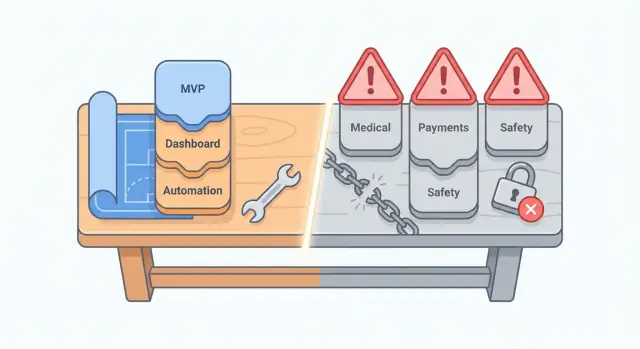
How to Choose the Right Product for AI-Assisted Coding
AI coding tools can write functions, generate boilerplate, translate ideas into starter code, and suggest fixes when something breaks. They’re especially good at speeding up familiar patterns: forms, CRUD screens, simple APIs, data transforms, and UI components.
They’re less reliable when requirements are vague, the domain rules are complex, or the “correct” output can’t be quickly verified. They may hallucinate libraries, invent configuration options, or produce code that works in one scenario but fails in edge cases.
If you’re evaluating a platform (not just a code assistant), focus on whether it helps you turn specs into a testable app and iterate safely. For example, vibe-coding platforms like Koder.ai are designed around producing working web/server/mobile apps from chat—useful when you can validate outcomes quickly and want fast iteration with features like snapshots/rollback and source-code export.
Why product type matters more than language
Choosing the right product is mostly about how easy it is to validate outcomes, not whether you’re using JavaScript, Python, or something else. If you can test your product with:
- clear inputs and expected outputs,
- fast feedback cycles (minutes, not weeks), and
- low consequences when something is wrong,
then AI-assisted coding is a strong fit.
If your product requires deep expertise to judge correctness (legal interpretations, medical decisions, financial compliance) or failures are costly, you’ll often spend more time verifying and reworking AI-generated code than you’ll save.
A simple way to decide quickly
Before you build, define what “done” means in observable terms: screens that must exist, actions users can take, and measurable results (e.g., “imports a CSV and shows totals that match this sample file”). Products with concrete acceptance criteria are easier to build safely with AI.
This article ends with a practical checklist you can run in a few minutes to decide whether a product is a good candidate—and what guardrails to add when it’s borderline.
Set expectations: AI accelerates, humans own quality
Even with great tools, you still need human review and testing. Plan for code review, basic security checks, and automated tests for the parts that matter. Think of AI as a fast collaborator that drafts and iterates—not a replacement for responsibility, validation, and release discipline.
What AI Coding Tools Are Great At (and Where They Struggle)
AI coding tools shine when you already know what you want and can describe it clearly. Treat them as extremely fast assistants: they can draft code, suggest patterns, and fill in tedious pieces—but they don’t automatically understand your real product constraints.
Where they’re strong
They’re especially good at accelerating “known work,” such as:
- Speed and scaffolding: generating a project skeleton, setting up routes, models, basic UI components, and wiring common libraries.
- Boilerplate and repetition: CRUD screens, form validation basics, API clients, admin pages, test stubs, and documentation drafts.
- Refactors and cleanup: renaming, extracting components/functions, translating code between styles, and spotting obvious duplication.
- Explaining existing code: helping you understand unfamiliar modules so you can make safer changes.
Used well, this can compress days of setup into hours—especially for MVPs and internal tools.
Where they struggle
AI tools tend to break down when the problem is underspecified or when details matter more than speed:
- Unclear requirements: if the goal is fuzzy, the code can look plausible while solving the wrong problem.
- Edge cases and real data: unusual inputs, messy user behavior, concurrency, retries, time zones, and performance bottlenecks.
- Security-sensitive details: auth flows, permissions, secrets handling, and safe defaults (they may omit critical checks).
- Integration quirks: third-party APIs with odd limits, inconsistent payloads, and brittle webhooks.
“Happy path” vs. real-world usage
AI-generated code often optimizes for the happy path: the ideal sequence where everything succeeds and users behave predictably. Real products live in the unhappy paths—failed payments, partial outages, duplicate requests, and users who click buttons twice.
Where output needs extra verification
Treat AI output as a draft. Verify correctness with:
- clear acceptance criteria and examples,
- unit/integration tests that cover edge cases,
- manual review of security and error handling,
- small production-like trials with real-ish data.
The more costly a bug is, the more you should lean on human review and automated tests—not just fast generation.
Best to Build: MVPs and Clickable-to-Working Prototypes
MVPs (minimum viable products) and “clickable-to-working” prototypes are a sweet spot for AI coding tools because success is measured by learning speed, not perfection. The goal is narrow scope: ship quickly, get it in front of real users, and answer one or two key questions (Will anyone use this? Will they pay? Does this workflow save time?).
What an MVP should look like with AI-assisted coding
A practical MVP is a short time-to-learn project: something you can build in days or a couple of weeks, then refine based on feedback. AI tools are great at getting you to a functional baseline fast—routing, forms, simple CRUD screens, basic auth—so you can focus your energy on the problem and the user experience.
Keep the first version centered on 1–2 core flows. For example:
- Browse → request/purchase
- Create → share
- Log in → complete one task → see result
Define a measurable outcome for each flow (e.g., “user can create an account and finish a booking in under 2 minutes” or “a team member can submit a request without Slack back-and-forth”).
MVP-friendly product examples
These are strong candidates for AI-assisted MVP development because they’re easy to validate and easy to iterate:
- Simple marketplaces: a directory with submissions, basic search/filters, and a “contact seller” or “request quote” flow
- Booking prototypes: a niche scheduling app for a specific service with availability, confirmation emails, and an admin view
- Niche utilities: calculators, onboarding checklists, lightweight CRM-for-one-purpose, simple inventory for a small category
What makes these work is not feature breadth, but clarity of the first use case.
Design for change (because you will change it)
Assume your MVP will pivot. Structure your prototype so changes are cheap:
- Use configuration (settings, simple rules tables) instead of hard-coding logic everywhere
- Keep data models minimal; add fields only when you can justify them with real usage
- Build with replaceable pieces: a basic email provider now, a more advanced system later
A useful pattern is: ship a “happy path” first, instrument it (even lightweight analytics), then expand only where users get stuck. That’s where AI coding tools provide the most leverage: fast iteration cycles rather than one big build.
Best to Build: Internal Tools for Small Teams
Internal tools are one of the safest, highest-leverage places to use AI coding tools. They’re built for a known group of users, used in a controlled environment, and the “cost of being slightly imperfect” is usually manageable (because you can fix and ship updates quickly).
Great internal-tool examples
These projects tend to have clear requirements and repeatable screens—perfect for AI-assisted scaffolding and iteration:
- Admin panels for managing records (customers, vendors, assets)
- Inventory trackers (stock in/out, locations, reorder notes)
- Request intake forms (IT help, purchase requests, content approvals)
- Simple scheduling tools (on-call rotations, room bookings)
Why they fit AI-assisted development
Small-team internal tools typically have:
- Known users and workflows: you can interview the people who will actually use it.
- Controlled permissions: fewer edge cases than public apps.
- Fast feedback loops: you can test changes the same day and refine quickly.
This is where AI coding tools shine: generating CRUD screens, form validation, basic UI, and wiring up a database—while you focus on workflow details and usability.
If you want this accelerated end-to-end, platforms like Koder.ai are often a good match for internal tools: they’re optimized for spinning up React-based web apps with a Go + PostgreSQL backend, plus deployment/hosting and custom domains when you’re ready to share the tool with the team.
Must-haves you shouldn’t skip
Internal doesn’t mean “no standards.” Make sure you include:
- Authentication (SSO if you have it; otherwise email/password + MFA)
- Roles and permissions (at least admin vs. member)
- Audit logs for key actions (edits, approvals, deletions)
- Backups and recovery (database backups, export options)
Start with one workflow, then expand
Pick a single team and solve one painful process end-to-end. Once it’s stable and trusted, extend the same foundation—users, roles, logging—into the next workflow instead of starting over each time.
Best to Build: Dashboards and Reporting Apps
Dashboards and reporting apps are a sweet spot for AI coding tools because they’re mostly about pulling data together, presenting it clearly, and saving people time. When something goes wrong, the impact is often “we made a decision a day late,” not “the system broke production.” That lower downside makes this category practical for AI-assisted builds.
Great fits (with concrete examples)
Start with reporting that replaces spreadsheet busywork:
- KPI dashboards for sales, marketing, or support (pipeline health, conversion rate, ticket backlog)
- Weekly reports that auto-generate a consistent summary (including charts + a short narrative)
- Data explorers for common questions (“show me churn by plan,” “filter by region and date”)
Start read-only to reduce risk
A simple rule: ship read-only first. Let the app query approved sources and visualize results, but avoid write-backs (editing records, triggering actions) until you trust the data and permissions. Read-only dashboards are easier to validate, safer to roll out broadly, and faster to iterate.
What you must define up front
AI can generate the UI and query plumbing quickly, but you still need clarity on:
- Data definitions: what exactly counts as “active user,” “qualified lead,” or “churn”?
- Refresh schedules: real-time, hourly, daily—plus what happens when a refresh fails
- Access control: who can see what (teams, regions, customer segments), and whether data should be masked
A dashboard that “looks right” but answers the wrong question is worse than no dashboard.
Watch out for metric drift and mismatched sources
Reporting systems fail quietly when metrics evolve but the dashboard doesn’t. That’s metric drift: the KPI name stays the same while its logic changes (new billing rules, updated event tracking, different time windows).
Also beware of mismatched source data—finance numbers from the warehouse won’t always match what’s in a CRM. Make the source of truth explicit in the UI, include “last updated” timestamps, and keep a short changelog of metric definitions so everyone knows what changed and why.
Best to Build: Integrations and Workflow Automations
Integrations are one of the safest “high leverage” uses of AI coding tools because the work is mostly glue code: moving well-defined data from A to B, triggering predictable actions, and handling errors cleanly. The behavior is easy to describe, straightforward to test, and easy to observe in production.
Great examples to start with
Pick a workflow with clear inputs, clear outputs, and a small number of branches. For example:
- CRM-to-email sync (new lead → add to a mailing list, tag, and confirm)
- Slack alerts (failed payments, new high-value signups, incident notifications)
- Invoice export (accounting system → CSV/JSON export to S3, weekly summary email)
- Webhooks (receive events → validate → transform → forward to another API)
These projects fit AI-assisted coding well because you can describe the contract (“when X happens, do Y”), then verify it with test fixtures and real sample payloads.
Design for reliability, not just “it worked once”
Most automation bugs show up under retries, partial failures, and duplicate events. Build a few basics from the start:
- Queues for async work (so a slow API doesn’t block your app)
- Retries with backoff for transient failures (timeouts, rate limits)
- Idempotency so reprocessing the same event doesn’t create duplicates (use idempotency keys, de-dupe tables, or “upsert” patterns)
Even if AI generates the first pass quickly, you’ll get more value by spending time on edge cases: empty fields, unexpected types, pagination, and rate limits.
Add monitoring that makes failures obvious
Automations fail silently unless you surface them. At minimum:
- Structured logs with correlation IDs
- Alerts when error rates spike or queues back up
- A simple failure dashboard showing stuck jobs, last success time, and top error causes
If you want a helpful next step, add a “replay failed job” button so non-engineers can recover without digging into code.
Best to Build: Content and Knowledge Tools with Guardrails
Content and knowledge apps are a strong fit for AI coding tools because the “job” is clear: help people find, understand, and reuse information that already exists. The value is immediate, and you can measure success with simple signals like time saved, fewer repeated questions, and higher self-serve rates.
What to build (practical examples)
These products work well when they’re grounded in your own documents and workflows:
- Internal search across docs, tickets, wikis, and policies
- Auto-tagging and categorization for knowledge bases
- Summarization of long docs, meeting notes, or support threads
- Document Q&A for “What’s our policy on X?” or “How do I do Y?”
Start with retrieval before “smart” generation
The safest and most useful pattern is: retrieve first, generate second. In other words, search your data to find the relevant sources, then use AI to summarize or answer based on those sources.
This keeps answers grounded, reduces hallucinations, and makes it easier to debug when something looks wrong (“Which document did it use?”).
Guardrails that keep it trustworthy
Add lightweight protections early, even for an MVP:
- Citations/links to the exact documents used
- Human review for high-impact outputs (policy, legal, customer-facing)
- Feedback buttons (“helpful / not helpful”, “flag as incorrect”) to improve prompts and content
Plan for cost control from day one
Knowledge tools can get popular quickly. Avoid surprise bills by building in:
- Response caching for repeated questions
- Rate limits per user/team
- Clear usage caps (and a fallback: “Try again later” or “Search results only”)
With these guardrails, you get a tool people can rely on—without pretending the AI is always right.
Avoid: Safety-Critical and Life-Critical Systems
AI coding tools can speed up scaffolding and boilerplate, but they’re a poor fit for software where a small mistake can directly harm someone. In safety-critical work, “mostly correct” isn’t acceptable—edge cases, timing issues, and misunderstood requirements can become real-world injuries.
Why this category is especially risky
Safety- and life-critical systems sit under strict standards, detailed documentation expectations, and legal liability. Even if the generated code looks clean, you still need proof it behaves correctly under all relevant conditions, including failures. AI outputs can also introduce hidden assumptions (units, thresholds, error handling) that are easy to miss in review.
Examples to avoid
A few common “sounds useful” ideas that carry outsized risk:
- Medical advice tools that interpret symptoms, recommend treatment, or generate clinical guidance
- Dosing calculators (medications, insulin, pediatric dosing) where a rounding or unit conversion error is dangerous
- Industrial safety controls (emergency stop logic, interlocks, alarms, pressure/temperature control loops)
- Anything that automates decisions about patient triage or prioritization without strong safeguards
If you attempt it anyway
If your product truly must touch safety-critical workflows, treat AI coding tools as a helper, not an author. Minimum expectations usually include:
- Domain experts embedded in the team (clinical, industrial safety, human factors)
- Formal requirements, test traceability, and independent verification/validation
- Security review, reliability engineering, and audit-ready documentation
- Conservative fail-safe behavior and clear human override paths
If you’re not prepared for that level of rigor, you’re building risk, not value.
Safer alternatives that still help
You can create meaningful products around these domains without making life-or-death decisions:
- Education and training apps (e.g., explanations, scenario practice) clearly labeled as non-clinical
- Documentation helpers that summarize procedures or maintenance logs for professionals to review
- Triage “intake” tools that collect information and route it to humans—no recommendations, no scoring that implies urgency
If you’re unsure where the boundary is, use the decision checklist in /blog/a-practical-decision-checklist-before-you-start-building and bias toward simpler, reviewable assistance over automation.
Avoid: Regulated Finance and High-Compliance Workflows
Building in regulated finance is where AI-assisted coding can hurt you quietly: the app may “work,” but fail a requirement you didn’t realize existed. The cost of being wrong is high—chargebacks, fines, frozen accounts, or legal exposure.
What falls into this category
These products often look like “just another form and database,” but they carry strict rules around identity, auditability, and data handling:
- Payment processing flows (card capture, refunds, disputes)
- KYC/AML onboarding and monitoring
- Tax filing and reporting
- Payroll calculations, payslips, and remittances
Why AI-generated code is risky here
AI coding tools can produce plausible implementations that miss edge cases and controls that regulators and auditors expect. Common failure modes include:
- Subtle compliance failures: missing consent language, incomplete audit trails, or incorrect reporting logic
- Security gaps: insecure token handling, weak access controls, or leaking sensitive data in logs
- Data retention and deletion mistakes: storing documents longer than allowed, or failing to prove deletion
- Vendor and jurisdiction rules: requirements vary by country, processor, and even merchant category
The tricky part is that these issues may not show up in normal testing. They surface during audits, incidents, or partner reviews.
If you must build it anyway
Sometimes finance functionality is unavoidable. In that case, reduce the surface area of custom code:
- Prefer certified providers for payments, identity verification, tax, and payroll—and integrate via their supported APIs
- Keep custom logic to orchestration (routing, UI, basic state management), not “core compliance” decisions
- Treat AI output as a draft: require professional review, explicit threat modeling, and documented test evidence (including negative tests and audit logging checks)
If your product’s value depends on novel financial logic or compliance interpretation, consider delaying AI-assisted implementation until you have domain expertise and a validation plan in place.
Avoid: Security-Critical Components and Cryptography
Security-sensitive code is where AI coding tools are most likely to hurt you—not because they “can’t write code,” but because they often miss the unglamorous parts: hardening, edge cases, threat modeling, and secure operational defaults.
Generated implementations may look correct in happy-path tests while failing under real-world attack conditions (timing differences, replay attacks, broken randomness, unsafe deserialization, confused-deputy bugs, subtle auth bypasses). These issues tend to be invisible until you have adversaries.
What not to hand-roll with AI
Avoid building or “improving” these components using AI-generated code as the primary source of truth:
- Cryptography primitives and protocols (encryption modes, signature schemes, key exchanges, custom JWT signing/verification)
- Authentication and authorization foundations (token validation, session management, multi-tenant access control)
- Security agents and network enforcement (VPN clients, endpoint/security agents, packet filters)
- Anything involving key management (key rotation logic, secure storage formats, custom KMS wrappers)
Even small changes can invalidate security assumptions. For example:
- Swapping a crypto mode, mishandling nonces, or “optimizing” comparisons can break confidentiality.
- Mis-parsing a JWT or skipping an audience/issuer check can turn into an instant account takeover.
Use proven providers and libraries instead
If your product needs security features, build them by integrating established solutions rather than inventing them:
- Prefer auth providers (OIDC/SAML via enterprise-ready vendors) instead of custom login/token systems.
- Use well-maintained cryptography libraries and follow their official recipes. Don’t ask an AI tool to “implement AES-GCM” or “write an OAuth server.”
- Stick to standard patterns: short-lived tokens, refresh token rotation, server-side session invalidation, and centrally enforced authorization.
AI can still help here—generate integration glue code, configuration scaffolding, or test stubs—but treat it like a productivity assistant, not a security designer.
Secure defaults you must enforce (even for “simple” apps)
Security failures often come from defaults, not exotic attacks. Bake these in from day one:
- Secrets handling: never hardcode API keys; use environment variables/secret managers; rotate regularly.
- Least privilege: narrow IAM roles, scoped tokens, minimal database permissions.
- Logging and auditability: record auth events, permission checks, and admin actions (without logging secrets).
- Dependency hygiene: pin versions, monitor advisories, and avoid unreviewed copy-pasted snippets.
If a feature’s main value is “we securely handle X,” it deserves security specialists, formal review, and careful validation—areas where AI-generated code is the wrong foundation.
A Practical Decision Checklist Before You Start Building
Before you ask an AI coding tool to generate screens, routes, or database tables, take 15 minutes to decide whether the project is a good fit—and what “success” looks like. This pause saves days of rework.
A simple scoring model (fast, honest, useful)
Score each item from 1 (weak) to 5 (strong). If your total is under ~14, consider shrinking the idea or postponing it.
- Clarity: Can you describe the user, the problem, and the workflow in 5–7 sentences? Do you know the “happy path”?
- Risk: What’s the worst plausible outcome if the app is wrong (money, safety, privacy, reputation)? Lower-risk projects score higher.
- Testability: Can you verify results with examples, expected outputs, and automated tests—without “eyeballing” everything?
- Scope: Can one person ship a useful version in 1–2 weeks? If not, reduce scope until it can.
Build-readiness checklist
Use this checklist as your pre-build spec. Even a half-page note is enough.
- Requirements: Key screens/actions, user roles, and edge cases (invalid inputs, empty states, timeouts).
- Data access: Where data lives, who owns it, and how you’ll authenticate. If you don’t have access yet, pause.
- Error handling: What users see when something fails, plus safe defaults (e.g., “no changes saved”).
- Observability: Basic logs, metrics, and alerts. Decide what you’ll track (errors per day, latency, failed jobs) so you can debug later.
Define “done” (so the prototype doesn’t become a mess)
A project is “done” when it has:
- Tests: At least smoke tests for the main flow, plus one or two critical edge cases.
- Docs: A short README: how to run it, key configs, and how to deploy.
- Rollback plan: How to revert a release or disable a feature quickly.
- Ownership: One named person responsible for fixes, updates, and user feedback.
If you’re using an end-to-end builder like Koder.ai, make these items explicit: use planning mode to write acceptance criteria, lean on snapshots/rollback for safer releases, and export the source code when the prototype graduates into a longer-lived product.
Templates, help, or pause?
Use templates when the product matches a common pattern (CRUD app, dashboard, webhook integration). Hire help when security, data modeling, or scaling decisions could be expensive to undo. Pause when you can’t clearly define requirements, don’t have lawful access to data, or can’t explain how you’ll test correctness.
FAQ
What matters most when choosing a product to build with AI coding tools?
Prioritize products where you can quickly verify correctness with clear inputs/outputs, fast feedback loops, and low consequences for mistakes. If you can write acceptance criteria and tests that catch wrong behavior in minutes, AI-assisted coding tends to be a strong fit.
Why does product type matter more than programming language for AI-assisted coding?
Because the bottleneck is usually validation, not syntax. If outcomes are easy to test, AI can accelerate scaffolding in any common language; if outcomes are hard to judge (complex domain rules, compliance), you’ll spend more time verifying and reworking than you save.
What are AI coding tools best at in real projects?
They’re typically strongest at:
- Generating project skeletons (routes, basic UI, models)
- Boilerplate (CRUD screens, forms, validation basics)
- Refactors (renames, extraction, deduplication)
- Explaining unfamiliar code so you can change it safely
Where do AI coding tools struggle the most?
Common weak spots include:
- Vague requirements (solves the wrong problem convincingly)
- Edge cases (retries, time zones, concurrency, messy inputs)
- Security-sensitive details (auth, permissions, secrets)
- Third-party integration quirks (rate limits, brittle webhooks)
Treat generated code as a draft and verify with tests and review.
How should I define 'done' so AI output is easier to validate?
Define “done” in observable terms: required screens, actions, and measurable results. Example: “Imports this sample CSV and totals match expected output.” Concrete acceptance criteria make it easier to prompt well and to test what AI generates.
What does a good AI-assisted MVP look like?
Keep it narrow and testable:
- Focus on 1–2 core flows end-to-end
- Ship a “happy path” first, then expand where users get stuck
- Keep models minimal; add fields only when justified by usage
- Prefer configuration over hard-coded rules when you expect change
Why are internal tools a safe high-leverage category for AI-assisted development?
Because they have known users, controlled environments, and fast feedback. Still, don’t skip basics:
- Authentication (SSO if available; otherwise MFA)
- Roles/permissions (at least admin vs member)
- Audit logs for key actions
- Backups/export and a recovery plan
What guardrails make dashboards and reporting apps safer to build with AI?
Start read-only to reduce risk and speed validation. Define up front:
- Metric definitions (what “active user” means)
- Refresh cadence and failure behavior
- Access control and data masking
Also show “last updated” timestamps and document a source of truth to prevent silent metric drift.
How do I make AI-built integrations and automations reliable?
Design for real-world failures, not “it worked once”:
- Use queues for async work
- Retries with backoff for transient errors
- Idempotency to handle duplicate events
- Monitoring: structured logs, alerts, and a simple failure dashboard
Test with real sample payloads and fixtures for each integration.
What types of products should I avoid building primarily with AI coding tools?
Avoid using AI-generated code as the foundation for:
- Safety- or life-critical systems (medical dosing, industrial controls)
- Regulated finance/compliance-heavy workflows (KYC/AML, tax, payroll)
- Security-critical components (auth foundations, cryptography, key management)
If you’re unsure, run a quick scoring pass (clarity, risk, testability, scope) and use the build-readiness checklist in /blog/a-practical-decision-checklist-before-you-start-building.