

Big app vs small tools: how to choose the right setup
Choosing big app vs small tools means weighing scope, permissions, reporting, and adoption risk before you merge every workflow.
What problem are you really trying to solve
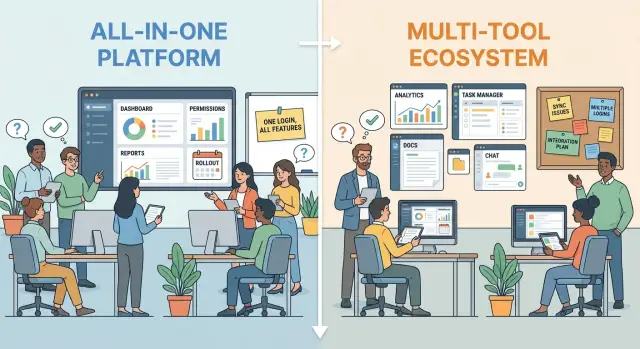
The choice between one big app and several smaller tools affects daily work more than most teams expect. It changes where people click, what they can see, who has access, and how smoothly work moves from one person to the next. Cost matters, but wasted time, duplicate work, and confusion usually do more damage.
So the real question is not big app vs small tools. It is this: which work truly needs to stay together every day?
Teams often merge too early. A support team, a finance team, and a field team may all need records, but they do not always need the same screens, rules, or steps. Put everything in one place too soon, and people start working around the tool instead of with it.
That friction shows up in small ways first. Forms get longer. Permissions get messy. Reports try to serve everyone and end up helping no one. Training takes longer because each person has to learn parts of the system they never use.
Too many separate tools create a different problem. Data gets split across apps. Teams wait on updates from each other. A handoff that should take two minutes turns into a message, a spreadsheet export, and a follow-up call.
You are probably dealing with a workflow problem, not a software preference, if the same data is entered in more than one place, teams argue about which version is current, reports do not match across departments, or simple handoffs depend on manual updates.
A good test is to follow one real task from start to finish. If a customer request starts in support, needs approval, and then triggers billing, ask whether those steps need one shared system or just clean connections between tools.
Even when you are building custom software, the question stays the same. Faster app creation does not remove the need to define clear boundaries. What belongs in one place is the work that shares the same data, timing, owners, and decisions. Everything else may be better kept separate.
When one big app makes more sense
A single app works best when different teams are all moving through the same process. If sales, operations, support, and finance all touch the same work, splitting that work across separate tools often creates delays and mistakes. People start asking which system has the latest update, and small gaps become real problems.
One big app is especially useful when the same record moves through many steps. A lead becomes a customer, a customer gets onboarded, a ticket gets opened, an invoice gets sent. If all of that lives in one place, the handoff is cleaner. The next person can see the full history without chasing screenshots, exports, or status updates.
That shared view helps managers too. Instead of checking three dashboards and a spreadsheet, they can look at one status view and quickly see what is moving, what is stuck, and where the bottlenecks are. This is often the strongest case for a larger system: everyone is looking at the same work in the same format.
Reporting is usually easier as well. Shared data means fewer duplicate records and fewer debates about whose numbers are right. If your team needs regular reports on volume, speed, errors, or conversion, one system can save a lot of cleanup time.
A single app makes the most sense when most of these are true:
- Teams follow one common process most of the time.
- The same record passes through several roles or departments.
- Leaders need one clear view of progress and delays.
- Reports depend on shared, consistent data.
- One team can own rules, fields, and change requests.
That last point matters more than many teams expect. A big app needs clear ownership. Someone has to decide how statuses work, who can change fields, and what happens when a team asks for a new step. Without that, the app gets messy fast.
A simple example is a client project that moves from sale to setup to delivery to billing. When the work is tightly connected, one app usually beats four separate tools.
When several small tools work better
Smaller tools are often the better choice when teams do not actually share the same day-to-day work. Sales, support, finance, and operations may all touch the same customer, but they usually need different screens, rules, and reports. Forcing them into one system can slow everyone down.
This is where the decision becomes practical. If each team is solving a different problem, separate tools can keep each workflow clear and easy to use.
A small tool also makes sense when one process changes often. Maybe the support team updates its intake steps every month, while finance needs a stable approval flow that should not move. Keeping those workflows separate lets one team adapt quickly without disrupting everyone else.
That separation also limits the damage when something breaks. If a form, permission rule, or automation fails in one tool, the problem stays local. You are fixing one workflow, not untangling an issue that now affects half the company.
Simple tools are often easier to adopt. People learn faster when the app shows only what they need for their job. A short learning curve matters more than perfect standardization if the goal is to get people using the system every day.
Smaller tools tend to fit better when teams use different terms and approval rules, when one workflow changes much more often than the others, when not everyone should see the same data, or when past rollouts failed because the system felt too heavy.
Local flexibility can be more valuable than one set of standard rules. A warehouse team may need a fast mobile checklist, a manager may need a simple reporting view, and HR may need tighter access controls. Trying to merge all of that into one app can create clutter instead of consistency.
In practice, some companies build a few focused internal apps instead of one giant system. That can work well when each app is narrow, clear, and easy to own.
Compare the hard parts
The real test is not the feature list. It is the friction you create or remove once real people start using the setup every day.
Start with scope. Write down which tasks use the same data, follow the same steps, or depend on the same approval path. If sales, support, and billing all need the same customer record, one shared app may save time. If each team works in a very different way, forcing everything into one place can make the tool feel heavy.
A simple way to compare scope is to ask four questions:
- Which tasks use the same records?
- Which steps happen in the same order every time?
- Which teams need to hand work to each other?
- Which work can stay separate without causing delays?
Permissions matter just as much. A merged system can sound neat until you realize one team should see prices, another should only update status, and a manager must approve changes before anything goes live. If access rules are complex, they need to be part of the decision from the start.
Reporting is another common trap. Decide which numbers must come from one source and which reports can stay separate. If leadership needs one clear view of revenue, support volume, and delivery status, a split setup can easily create arguments about whose numbers are right.
Then look at adoption risk. Ask who has to change habits, how much training they need, and what happens if they resist. A tool that looks perfect on paper can still fail if five teams have to rebuild their daily routine at once.
Finally, count integration cost in plain terms. Look at how often people copy and paste data, where the same information gets entered twice, which errors happen because tools do not sync, and how much time is spent fixing mismatched records.
For example, a small operations team might keep forms, approvals, and reporting in one app, but leave design work in a separate tool. That keeps shared data together without forcing every workflow into the same system.
If you are building a custom setup, do this comparison before you merge everything. It is much easier to design around real permissions, reporting needs, and team habits than to untangle them later.
How to decide step by step
If you are stuck, do not start with products. Start with the work itself. A clear map of how people actually get things done will tell you more than any feature chart.
Write each workflow on one page in plain language. Keep it simple enough that someone new could follow it. Note what starts the work, who touches it, what needs approval, and what the final result should be.
Then compare your options in a practical order.
- Put related work together. If two tasks depend on the same customer record, the same approval path, or the same deadline, they probably belong in one system.
- Mark the odd cases. Special requests, one-off client needs, and rare approvals often reveal whether one tool can really handle the job.
- Score each setup. Use four basic checks: fit for the real process, control over permissions, quality of reporting, and how much training people will need.
- Look for hidden cost. A tool may seem cheap or simple until you add manual updates, duplicate data, and extra handoffs.
- Test the smallest useful version first. Do not move everything at once. Pilot one workflow, learn where people get stuck, and fix that before a wider rollout.
A short scorecard helps keep the choice grounded. A sales team and support team may both need the same customer history, but only a few people should see billing notes. That points you toward a setup with shared records and clear permissions, not just a long list of features.
If your pilot works, expand carefully. Keep the main process in one place, but allow a few side tools where they truly solve a special case better. That balance is often smarter than forcing every task into one app.
This is where fast prototyping can help. Tools like Koder.ai let teams sketch a web, server, or mobile app from chat, which makes it easier to test a small internal workflow before committing to a larger rebuild.
A realistic example
Picture a small SaaS company with four teams touching the same customer account: sales, onboarding, support, and billing.
Sales wants leads, deal stage, call notes, and likely plan. Onboarding needs the same customer record, plus setup tasks, deadlines, and handoff notes. Support needs account history too, but works best when agents can move quickly through tickets. Billing is different again, because it deals with invoices, refunds, failed payments, and sensitive access.
This is where the decision gets real.
If sales and onboarding use separate systems with no shared record, basic work starts to break. A sales rep promises a custom setup, but onboarding never sees that note. The customer repeats the same details twice. Reports get messy too, because no one can clearly tell whether slow growth comes from weak sales or poor onboarding.
In that case, one core app for customer data makes sense. It can hold account details, deal status, onboarding milestones, owner notes, and basic reporting across the customer journey. That shared view reduces confusion and makes reporting much easier.
But support may still need its own tool. A support team often cares more about speed than about keeping every workflow in one place. Agents need quick ticket routing, saved replies, service rules, and a clean queue. If support is forced into a large all-purpose system, simple tasks can become slow and awkward.
Billing can push the split even further. Not everyone who can view sales or onboarding notes should be able to issue refunds, change payment details, or access financial records. Strict billing permissions often make a separate billing system the safer choice, even if customer data stays synced with the core app.
A sensible middle ground is one main app for customer records, sales, and onboarding, plus one dedicated support tool and one tightly controlled billing system. That setup is less tidy on paper than putting everything in one place. In real life, it often works better because it matches how each team actually works.
Common mistakes to avoid
The biggest mistakes usually happen before the software is chosen. Teams get excited about reducing tool sprawl, then rush past the messy details that decide whether the setup will actually work.
One common error is treating similar language as shared work. Two teams may both say "case," "client," or "approval," but mean very different things. Sales might update a deal every day, while finance needs locked records and a clear audit trail. Similar labels do not always mean the workflow belongs in one system.
Another mistake is leaving permissions for later. A combined tool can look clean in a demo, then become complicated when real access rules show up. Contractors, managers, regional teams, and external partners rarely need the same view. If those edge cases appear late, the project gets slower and more expensive.
Reporting causes trouble too when teams build dashboards before agreeing on the source of truth. A report can look polished and still be wrong. If teams define revenue, active customer, or completed task differently, reporting becomes a fight instead of a decision tool.
Many companies also force one launch date on everyone. Different teams adopt change at different speeds. Support may be ready in two weeks, while operations is still cleaning old data. One big rollout often creates stress, workarounds, and quiet resistance.
And when adoption is weak, teams often blame training alone. Training matters, but people also avoid tools that add steps, hide needed data, or make simple work slower. Low adoption is often a design or process problem, not just a training problem.
Phased testing helps avoid these mistakes. If you can prototype one workflow first, you can check permissions, reports, and daily usability before asking every team to change at once.
A quick checklist before you commit
Before you merge tools or split work across more apps, stop and check a few practical things. The best choice usually depends less on feature lists and more on how work actually moves day to day.
Use this checklist before you commit:
- Shared core record: Do the workflows revolve around the same main record, such as one customer, one order, or one project?
- Permission reality: Can one permission model handle real exceptions across teams?
- Reporting fit: Will managers get the reports they actually use, not just the reports the system happens to offer?
- Safe testing: Can you test the change with one team, one region, or one workflow first without interrupting daily work?
- Fallback plan: If people do not adopt the new setup, do you know how you will step back without chaos?
A quick example makes this easier to judge. Say a company wants sales, support, and billing in one app. If all three teams depend on the same customer record, need shared history, and can work within one access model, bringing them together may help. But if billing needs tighter access and very different reports, pushing everything into one place may create more friction than value.
If you are unsure, test the idea before replacing anything important. Even a simple prototype can show where permissions break, where reports fall short, and whether people will actually use the new setup.
Next steps
Do not end this decision with a vague plan. Write it in one clear sentence that anyone can repeat. For example: "We will keep finance and support in separate tools, but test one shared dashboard for 30 days." That turns a fuzzy debate into something practical.
Then run a short pilot instead of a full rollout. Keep it small, with one team, one workflow, and a fixed time limit. Measure a few simple things: time to finish a routine task, number of manual handoffs, reporting accuracy, permission problems, and how many people return to the old process.
When the pilot ends, review the results with the people doing the work each day. Do not rely only on managers or the team that picked the tool. The most useful feedback usually comes from the person updating records, pulling reports, fixing mistakes, or chasing approvals before lunch.
Ask plain questions. What felt faster? What created extra clicks? Which permissions were confusing? Did reporting improve, or did people start keeping side notes in a spreadsheet again? Those answers will tell you more than a polished demo.
Keep an exit plan before you begin. If the merged app adds too much friction, decide in advance how you will step back without chaos. That might mean keeping the current tools active for a short overlap, saving a clean export of key data, or agreeing on a date when the test stops unless it clearly helps.
If you want to test both paths quickly, a platform like Koder.ai can help you prototype a small app from chat and put something real in front of users. That is often enough to compare one larger workflow against a few smaller tools without committing to a full rebuild.
The best next step is not the biggest one. It is the smallest test that gives you a clear yes, no, or not yet.
FAQ
When does one big app make the most sense?
Choose one app when the same record moves through several teams every day and each step depends on shared history. It works best when people need one view of progress, delays, and ownership.
If teams mostly do separate work with different rules, one big app usually adds clutter instead of clarity.
When should I use several small tools instead?
Several small tools are better when teams solve different problems, change processes at different speeds, or need very different screens and permissions. A focused tool is often easier to learn and faster to use.
This setup only works well if handoffs are clear and important data stays in sync.
How can I tell if we have a workflow problem, not a tool problem?
Look for repeated data entry, arguments about which record is current, mismatched reports, or handoffs that depend on manual updates. Those are usually workflow problems, not just software preferences.
A good check is to follow one real task from start to finish and note where people copy, paste, wait, or chase missing information.
What should I compare before merging workflows?
Start with the work, not the product. Write each workflow in plain language, note who touches it, what needs approval, and which data must stay shared.
Then compare options using four simple checks: process fit, permission control, reporting quality, and training effort.
Why do permissions matter so much in this decision?
Permissions should be part of the decision from day one. A setup can look simple until you realize one team can edit prices, another can only change status, and a manager must approve certain actions.
If access rules are strict or sensitive, a separate tool is often safer than forcing everything into one system.
Will one system always give me better reporting?
Reporting usually gets easier when shared work uses one source of truth. Fewer duplicate records means fewer debates about whose numbers are right.
But not every report needs one system. Decide which metrics must come from shared data and which can stay separate without causing confusion.
Should I pilot the new setup before a full rollout?
Yes. Start with one team, one workflow, and a short time limit. That keeps risk low and shows where people get stuck before you change everything.
Measure practical results such as task time, manual handoffs, reporting accuracy, permission issues, and whether people drift back to the old process.
What hidden costs do teams usually miss?
The biggest hidden costs are manual updates, duplicate records, sync errors, and extra follow-up between teams. A tool can look cheaper at first and still waste hours every week.
Count how often people re-enter data, fix mismatches, or wait for another team to update a separate system.
Can we mix one core app with a few separate tools?
Yes, that is often the smart middle ground. Keep a shared core app for records and cross-team visibility, then use dedicated tools where speed, security, or special workflows matter more.
Support and billing are common examples because they often need different queues, rules, and access controls.
How can I test both options without a long build?
Use the smallest useful prototype first. A quick test helps you check permissions, reporting, and daily usability before you commit to a bigger rebuild.
Koder.ai can help you prototype a web, server, or mobile app from chat, which makes it easier to test one workflow and compare a larger app against smaller tools.