

Bob Kahn and TCP/IP: The Invisible Layer Powering Apps
Learn how Bob Kahn helped shape TCP/IP, why reliable packet networking matters, and how its design still supports apps, APIs, and cloud services.
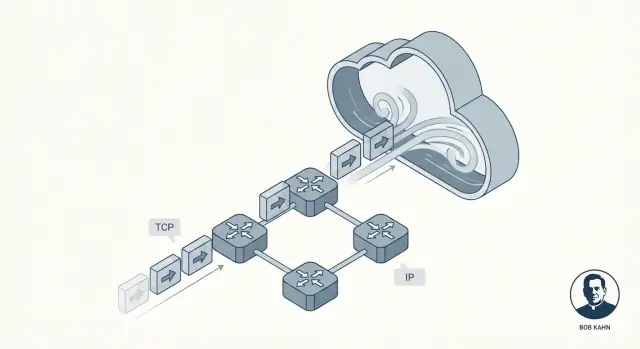
Why TCP/IP Is the Hidden Foundation of Modern Software
Most apps feel “instant”: you tap a button, a feed refreshes, a payment completes, a video starts. What you don’t see is the work happening underneath to move tiny chunks of data across Wi‑Fi, cellular networks, home routers, and data centers—often across several countries—without you having to think about the messy parts in between.
That invisibility is the promise TCP/IP delivers. It’s not a single product or a cloud feature. It’s a set of shared rules that lets devices and servers talk to each other in a way that usually feels smooth and dependable, even when the network is noisy, congested, or partly failing.
Bob Kahn was one of the key people behind making that possible. Along with collaborators like Vint Cerf, Kahn helped shape the core ideas that became TCP/IP: a common “language” for networks and a method for delivering data in a way applications can trust. No hype required—this work mattered because it turned unreliable connections into something software could reliably build on.
Packet networking, explained like you’re busy
Instead of sending a whole message as one continuous stream, packet networking breaks it into small pieces called packets. Each packet can take its own path to the destination, like separate envelopes going through different post offices.
What you’ll learn in this article
We’ll unpack how TCP creates the feeling of reliability, why IP intentionally doesn’t promise perfection, and how layering keeps the system understandable. By the end, you’ll be able to picture what’s happening when an app calls an API—and why these decades-old ideas still power modern cloud services.
The Problem TCP/IP Needed to Solve
Early computer networks weren’t born as “the Internet.” They were built for specific groups with specific goals: a university network here, a military network there, a research lab network somewhere else. Each one could work well internally, but they often used different hardware, message formats, and rules for how data should travel.
That created a frustrating reality: even if two computers were both “networked,” they still might not be able to exchange information. It’s a bit like having many rail systems where the tracks are different widths and the signals mean different things. You can move trains inside one system, but crossing into another system is messy, expensive, or impossible.
Internetworking: connecting networks, not just computers
Bob Kahn’s key challenge wasn’t simply “connect computer A to computer B.” It was: how do you connect networks to each other so that traffic can pass through multiple independent systems as if they were one bigger system?
That’s what “internetworking” means—building a method for data to hop from one network to the next, even when those networks are designed differently and managed by different organizations.
Why shared rules (protocols) mattered
To make internetworking work at scale, everyone needed a common set of rules—protocols—that didn’t depend on any single network’s internal design. Those rules also had to reflect real constraints:
- Networks would fail, drop data, or deliver it out of order.
- No central operator could micromanage every connection.
- New networks would keep getting added over time.
TCP/IP became the practical answer: a shared “agreement” that let independent networks interconnect and still move data reliably enough for real applications.
Bob Kahn’s Contribution in Plain English
Bob Kahn is best known as one of the key architects of the Internet’s “rules of the road.” In the 1970s, while working with DARPA, he helped move networking from a clever research experiment into something that could connect many different kinds of networks—without forcing them all to use the same hardware, wiring, or internal design.
The core idea: make networks talk to each other
ARPANET proved computers could communicate over packet-switched links. But other networks were emerging too—radio-based systems, satellite links, and additional experimental networks—each with its own quirks. Kahn’s focus was interoperability: enabling a message to travel across multiple networks as if it were a single network.
Instead of building one “perfect” network, he pushed an approach where:
- Each local network can keep its own design.
- A common protocol sits on top and moves data across network boundaries.
- The “glue” is general enough to work over future networks no one has invented yet.
Working with Vint Cerf, Kahn co-designed what became TCP/IP. A lasting outcome was the clean separation of responsibilities: IP handles addressing and forwarding across networks, while TCP handles reliable delivery for applications that need it.
Why developers still benefit today
If you’ve ever called an API, loaded a web page, or shipped logs from a container to a monitoring service, you’re relying on the internetworking model Kahn championed. You don’t have to care whether packets cross Wi‑Fi, fiber, LTE, or a cloud backbone. TCP/IP makes all of that look like one continuous system—so software can focus on features, not wiring.
The TCP/IP Layering Idea: Simple but Powerful
One of the smartest ideas behind TCP/IP is layering: instead of building one giant “do everything” network system, you stack smaller pieces where each layer does one job well.
This matters because networks aren’t all the same. Different cables, radios, routers, and providers can still interoperate when they agree on a few clean responsibilities.
IP: addressing and routing between networks
Think of IP (Internet Protocol) as the part that answers: Where is this data going, and how do we move it closer to that place?
IP provides addresses (so machines can be identified) and basic routing (so packets can hop from network to network). Importantly, IP does not try to be perfect. It focuses on moving packets forward, one step at a time, even if the path changes.
TCP: reliable delivery on top of IP
Then TCP (Transmission Control Protocol) sits above IP and answers: How do we make this feel like a dependable connection?
TCP handles the “reliability” work applications usually want: ordering data correctly, noticing missing pieces, retrying when needed, and pacing delivery so the sender doesn’t overwhelm the receiver or the network.
A simple postal analogy (without stretching it)
A useful way to picture the split is a postal system:
- IP is like the addressing and routing network that moves envelopes between cities and post offices.
- TCP is like tracking and confirmation that makes sure a multi-part shipment arrives complete and in the right order.
You don’t ask the street address to guarantee the package arrives; you build that assurance on top.
Why this “simple stack” stayed powerful
Because responsibilities are separated, you can improve one layer without redesigning everything else. New physical networks can carry IP, and applications can rely on TCP’s behavior without needing to understand how routing works. That clean division is a major reason TCP/IP became the invisible, shared foundation under nearly every app and API you use.
Packet Switching: Speed, Flexibility, and Chaos
Packet switching is the idea that made large networks practical: instead of reserving a dedicated line for your whole message, you chop the message into small pieces and send each piece independently.
What a “packet” is (and why chunks win)
A packet is a small bundle of data with a header (who it’s from, who it’s to, and other routing info) plus a slice of the content.
Breaking data into chunks helps because the network can:
- Share links between many users (no one “owns” the wire).
- Route around slow or broken parts of the network.
- Recover from problems by resending only missing pieces, not the whole file.
Different paths, mixed order
Here’s where the “chaos” starts. Packets from the same download or API call might take different routes through the network, depending on what’s busy or available at that moment. That means they can arrive out of order—packet #12 might show up before packet #5.
Packet switching doesn’t try to prevent that. It prioritizes getting packets through quickly, even if the arrival order is messy.
Why packets get lost
Packet loss isn’t rare, and it’s not always anyone’s fault. Common causes include:
- Congestion: routers run out of buffer space and drop packets.
- Noise/interference: especially on wireless links.
- Outages and reroutes: a link fails mid-stream, and some packets never make it.
Imperfection is a feature, not a bug
The key design choice is that the network is allowed to be imperfect. IP focuses on forwarding packets as best it can, without promising delivery or order. That freedom is what lets networks scale—and it’s why higher layers (like TCP) exist to clean up the chaos.
How TCP Makes Unreliable Networks Feel Reliable
IP delivers packets on a “best effort” basis: some may arrive late, out of order, duplicated, or not at all. TCP sits above that and creates something applications can trust: a single, ordered, complete stream of bytes—the kind of connection you expect when you upload a file, load a web page, or call an API.
Reliability, in plain terms
When people say TCP is “reliable,” they usually mean:
- Ordered: data is delivered to the app in the same order it was sent.
- Complete: missing pieces are detected and resent.
- No gaps: the app reads a continuous stream, not scattered packets.
The key mechanisms (and why they work)
TCP breaks your data into chunks and labels them with sequence numbers. The receiver sends back acknowledgments (ACKs) to confirm what it got.
If the sender doesn’t see an ACK in time, it assumes something was lost and performs a retransmission. This is the core “illusion”: even though the network may drop packets, TCP keeps trying until the receiver confirms receipt.
Flow control vs. congestion control
These sound similar but solve different problems:
- Flow control protects the receiver. It says, “I’m busy—send more slowly so my buffer doesn’t overflow.”
- Congestion control protects the network. It says, “The path between us is overloaded—back off to avoid making the traffic jam worse.”
Together, they help TCP stay fast without being reckless.
Timeouts that adapt
A fixed timeout would fail on both slow and fast networks. TCP continuously adjusts its timeout based on measured round-trip time. If conditions worsen, it waits longer before resending; if things speed up, it becomes more responsive. This adaptation is why TCP keeps working across Wi‑Fi, mobile networks, and long-distance links.
A Design Choice That Scaled: End-to-End Thinking
One of the most important ideas behind TCP/IP is the end-to-end principle: put “smarts” at the edges of the network (the endpoints), and keep the middle of the network relatively simple.
Intelligence at the edges
In plain terms, the endpoints are the devices and programs that actually care about the data: your phone, your laptop, a server, and the operating systems and applications running on them. The network core—routers and links in between—mainly focuses on moving packets along.
Instead of trying to make every router “perfect,” TCP/IP accepts that the middle will be imperfect and lets endpoints handle the parts that require context.
Why a simpler core enabled growth
Keeping the core simpler made it easier to expand the Internet. New networks could join without requiring every intermediary device to understand every application’s needs. Routers don’t need to know whether a packet is part of a video call, a file download, or an API request—they just forward it.
What belongs where (with examples)
At the endpoints, you typically handle:
- Reliability: retransmissions, ordering, deduplication (TCP).
- Security: encryption and identity (often TLS at the application/OS level).
- App behavior: timeouts, retries, caching, rate limits.
In the network, you mostly handle:
- Addressing and forwarding (IP).
- Basic packet handling and congestion signals.
The trade-off
End-to-end thinking scales well, but it pushes complexity outward. Operating systems, libraries, and applications become responsible for “making it work” over messy networks. That’s great for flexibility, but it also means bugs, misconfigured timeouts, or overly aggressive retries can create real user-facing problems.
Why IP’s “Best Effort” Model Was a Feature
IP (Internet Protocol) makes a simple promise: it will try to move your packets toward their destination. That’s it. No guarantees about whether a packet arrives, arrives only once, arrives in order, or arrives within any particular time.
That might sound like a flaw—until you look at what the Internet needed to become: a global network made from many smaller networks, owned by different organizations, constantly changing.
What routers do (and don’t do)
Routers are the “traffic directors” of IP. Their main job is forwarding: when a packet arrives, the router looks at the destination address and chooses the next hop that seems best right now.
Routers don’t track a conversation the way a phone operator might. They generally don’t reserve capacity for you, and they don’t wait around to confirm a packet got through. By keeping routers focused on forwarding, the core of the network stays simple—and can scale to an enormous number of devices and connections.
Why “best effort” scales globally
Guarantees are expensive. If IP tried to guarantee delivery, order, and timing for every packet, every network on Earth would have to coordinate tightly, store lots of state, and recover from failures in the same way. That coordination burden would slow growth and make outages more severe.
Instead, IP tolerates messiness. If a link fails, a router can send packets along a different route. If a path gets congested, packets may be delayed or dropped, but traffic can often continue via alternate routes.
The outcome is resilience: the Internet can keep working even when parts of it break or change—because the network isn’t forced to be perfect to be useful.
From Apps and APIs to Packets: What’s Really Happening
When you fetch() an API, click “Save,” or open a websocket, you’re not “talking to the server” in one smooth stream. Your app hands data to the operating system, which chops it into packets and sends them across many separate networks—each hop making its own decisions.
A simple mapping: developer actions → TCP/IP behavior
- HTTP request / API call: your app writes bytes (an HTTP request). TCP turns that byte stream into segments, numbers them, and expects acknowledgements. IP wraps each segment in a packet and routes it.
- Opening a connection: a TCP handshake sets up shared state (sequence numbers, window sizes). It’s not free—it adds time before the first useful byte.
- Uploading a file: TCP may have plenty of throughput available, but performance can still feel slow if latency is high.
Latency vs throughput (and why your app “feels” slow)
- Latency is how long it takes a message to go there and back (round trip). High latency hurts chatty patterns: lots of small requests, many redirects, repeated API calls.
- Throughput is how much data per second can be delivered. Low throughput hurts big transfers: images, backups, video.
A common surprise: you can have great throughput and still experience sluggish UI because each request waits on round trips.
Retries and timeouts: why apps re-do what TCP already tries
TCP retries lost packets, but it can’t know what “too long” means for your user experience. That’s why applications add:
- Timeouts: “If no response in 2 seconds, show an error.”
- Retries: “Try again once.” Useful for transient drops, but risky for operations like payments unless requests are idempotent.
When “bugs” are actually network realities
Packets can be delayed, reordered, duplicated, or dropped. Congestion can spike latency. A server can respond but the response never reaches you. These show up as flaky tests, random 504s, or “it works on my machine.” Often the code is fine—the path between machines isn’t.
TCP/IP in the Cloud: Same Rules, Bigger Scale
Cloud platforms can feel like a completely new kind of computing—managed databases, serverless functions, “infinite” scaling. Underneath, your requests still ride the same TCP/IP foundations Bob Kahn helped set in motion: IP moves packets across networks, and TCP (or sometimes UDP) shapes how applications experience that network.
What changes in the cloud (mostly packaging)
Virtualization and containers change where software runs and how it’s packaged:
- A “server” might be a virtual machine, a container, or a short-lived function.
- Networks are often software-defined, stitched together by the provider.
But those are deployment details. The packets still use IP addressing and routing, and many connections still rely on TCP for ordered, reliable delivery.
What stays the same (the patterns you can recognize)
Common cloud architectures are built from familiar networking building blocks:
- Load balancers accept client TCP connections (often HTTPS) and distribute traffic to backend services.
- Service-to-service calls inside a cluster are still network calls—HTTP/gRPC over TCP is common—just between private IPs.
- Databases and caches (managed or self-hosted) are reached over standard protocols riding TCP (for example, a database driver maintaining a TCP session).
Even when you never “see” an IP address, the platform is allocating them, routing packets, and tracking connections behind the scenes.
Reliability is still a shared job
TCP can recover from dropped packets, reorder delivery, and adjust to congestion—but it can’t promise the impossible. In cloud systems, reliability is a team effort:
- Network: routing, capacity, packet loss, transient failures.
- OS/runtime: socket buffers, timeouts, DNS caching, connection reuse.
- Application: retries with backoff, idempotency, sensible timeouts, and graceful degradation.
This is also why “vibe-coding” platforms that generate and deploy full-stack apps still depend on the same fundamentals. For example, Koder.ai can help you spin up a React web app with a Go backend and PostgreSQL quickly, but the moment that app talks to an API, a database, or a mobile client, you’re back in TCP/IP territory—connections, timeouts, retries, and all.
TCP vs UDP and What Developers Choose Today
When developers say “the network,” they’re often choosing between two workhorse transports: TCP and UDP. Both sit on top of IP, but they make very different trade-offs.
TCP: the reliable stream (and its hidden costs)
TCP is a great fit when you need data to arrive in order, without gaps, and you’d rather wait than guess. Think: web pages, API calls, file transfers, database connections.
That’s why so much of the everyday internet rides on it—HTTPS runs over TCP (via TLS), and most request/response software assumes TCP’s behavior.
The catch: TCP reliability can add latency. If one packet is missing, later packets may be held back until the gap is filled (“head-of-line blocking”). For interactive experiences, that waiting can feel worse than an occasional glitch.
UDP: simple, fast, and app-controlled
UDP is closer to “send a message and hope it gets there.” There’s no built-in ordering, retransmission, or congestion handling at the UDP layer.
Developers choose UDP when timing matters more than perfection, such as live audio/video, gaming, or real-time telemetry. Many of these apps build their own lightweight reliability (or none at all) based on what users actually notice.
A major modern example: QUIC runs over UDP, letting applications get faster connection setup and avoid some TCP bottlenecks—without requiring changes to the underlying IP network.
Practical guidance for choosing
Pick based on:
- Reliability needs: Must every byte arrive, in order? Favor TCP.
- Latency sensitivity: Is “now” more important than “perfect”? Consider UDP.
- Control: Do you want the app to decide what to retry, what to skip, and how to recover? UDP (or QUIC) gives more room to design behavior.
What “Reliable” Still Can’t Guarantee: Real-World Pitfalls
TCP is often described as “reliable,” but that doesn’t mean your app will always feel reliable. TCP can recover from many network problems, yet it can’t promise low delay, consistent throughput, or a good user experience when the path between two systems is unstable.
Common network issues you’ll still hit
Packet loss forces TCP to retransmit data. Reliability is preserved, but performance can crater.
High latency (long round-trip time) makes every request/response cycle slower, even if no packets are lost.
Bufferbloat happens when routers or OS queues hold too much data. TCP sees fewer losses, but users see huge delays and “laggy” interactions.
Misconfigured MTU can cause fragmentation or blackholing (packets disappear when “too big”), creating confusing failures that look like random timeouts.
What this looks like inside apps
Instead of a clear “network error,” you’ll often see:
- Timeouts on API calls that usually work.
- Slow uploads or downloads that start fast, then crawl.
- “Flaky” connections: repeated reconnects, stalled streams, or partial page loads.
These symptoms are real, but they’re not always caused by your code. They’re often TCP doing its job—retransmitting, backing off, and waiting—while your application clock keeps ticking.
Practical debugging starting points
Start with a basic classification: is the problem mostly loss, latency, or path changes?
- Ping-style checks help you reason about latency and loss (even if ICMP is sometimes blocked).
- Traceroute-style thinking helps locate where delay or drops begin.
- Add logs and metrics: request duration, timeout counts, retry counts, and queue/backpressure signals.
If you’re building quickly (say, prototyping a service in Koder.ai and deploying it with hosting and custom domains), it’s worth making these observability basics part of the initial “planning mode” checklist—because networking failures show up first as timeouts and retries, not as neat exceptions.
Design with failure in mind
Assume networks misbehave. Use timeouts, retries with exponential backoff, and make operations idempotent so retries don’t double-charge, double-create, or corrupt state.
FAQ
What is TCP/IP, and why does it matter for modern apps?
TCP/IP is a shared set of networking rules that lets different networks interconnect and still move data predictably.
It matters because it makes unreliable, heterogeneous links (Wi‑Fi, LTE, fiber, satellite) usable for software—so apps can assume they can send bytes and get responses without understanding the physical network details.
What was Bob Kahn’s key contribution to the Internet’s design?
Bob Kahn helped drive the “internetworking” idea: connect networks to each other without forcing them to share the same internal hardware or design.
With collaborators (notably Vint Cerf), that work shaped the split where IP handles addressing/routing across networks and TCP provides reliability for applications on top.
What is packet switching in plain terms, and why is it used?
Packet switching breaks a message into small packets that can travel independently.
Benefits:
- Better link sharing (many users share the same paths)
- Easier rerouting around failures
- Resend only what was lost instead of the whole message
Why doesn’t IP guarantee delivery or ordering?
IP focuses on one job: forward packets toward a destination address. It doesn’t guarantee delivery, order, or timing.
That “best effort” model scales globally because routers can stay simple and fast, and the network can keep working even as links fail, routes change, and new networks join.
How does TCP make an unreliable network feel reliable?
TCP turns IP’s best-effort packets into an application-friendly ordered byte stream.
It does this with:
- Sequence numbers (so data can be reordered)
- ACKs (confirm what arrived)
- Retransmissions (resend what’s missing)
- Adaptive timeouts (don’t assume one fixed network speed)
What’s the difference between TCP flow control and congestion control?
They solve different problems:
- Flow control protects the receiver from being overwhelmed (receiver advertises how much it can accept).
- Congestion control protects the network path from overload (sender backs off when the path shows signs of congestion).
In practice, good performance requires both: a fast sender must respect the receiver and the network.
Why is TCP/IP “layering” such a big deal for developers?
Layering separates responsibilities so each part can evolve independently.
- Lower layers can change (new Wi‑Fi standards, new fiber gear, new cloud fabrics)
- Upper layers can keep working (TCP behavior, application protocols)
For developers, this means you can build APIs without redesigning your app for every network type.
What does the end-to-end principle mean in practice?
The end-to-end principle keeps the network core (routers) relatively simple and puts “smarts” at the endpoints.
Practical implication: apps and operating systems handle things like reliability, timeouts, retries, and encryption (often via TLS), because the network can’t tailor behavior for every application.
How do latency and throughput affect API performance differently?
Latency is round-trip time; it hurts chatty patterns (many small requests, redirects, repeated calls).
Throughput is bytes per second; it matters for large transfers (uploads, images, backups).
Practical tips:
- Reuse connections (keep-alive/pooling) to avoid repeated handshakes
- Batch requests where possible
- Set timeouts based on user experience, not just “eventually TCP will deliver”
When should developers use TCP vs UDP (and where does QUIC fit)?
Choose based on what you need:
- Pick TCP when every byte must arrive in order (web pages, APIs, databases).
- Consider UDP when timeliness matters more than perfection (real-time audio/video, gaming).
- QUIC (often used by HTTP/3) runs over UDP to reduce setup time and avoid some TCP limitations.
Rule of thumb: if your app is request/response and correctness-first, TCP (or QUIC via HTTP/3) is usually the starting point.