

Brendan Burns and Kubernetes: Ideas That Shaped Orchestration
A practical look at Brendan Burns’ Kubernetes-era orchestration ideas—declarative state, controllers, scaling, and service operations—and why they became standard.
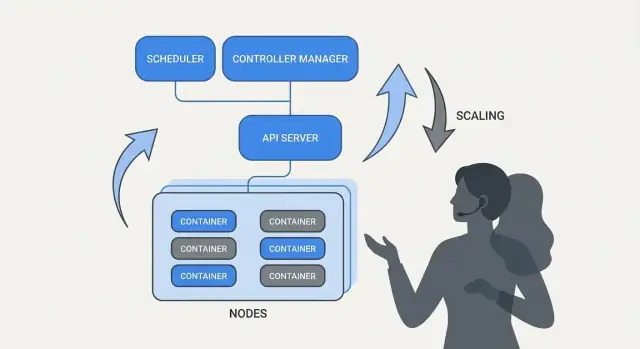
Why Kubernetes Changed Everyday Operations
Kubernetes didn’t just introduce a new tool—it changed what “day-to-day ops” looks like when you’re running dozens (or hundreds) of services. Before orchestration, teams often stitched together scripts, manual runbooks, and tribal knowledge to answer the same recurring questions: Where should this service run? How do we roll out a change safely? What happens when a node dies at 2 a.m.?
What “orchestration” actually solves
At its core, orchestration is the coordination layer between your intent (“run this service like this”) and the messy reality of machines failing, traffic shifting, and deployments happening continuously. Instead of treating each server as a special snowflake, orchestration treats compute as a pool and workloads as schedulable units that can move.
Kubernetes popularized a model where teams describe what they want, and the system continually works to make reality match that description. That shift matters because it makes operations less about heroics and more about repeatable processes.
Three outcomes teams felt immediately
Kubernetes standardized operational outcomes that most service teams need:
- Deployment: a consistent way to declare what should run, update it, and verify it’s healthy.
- Scaling: a practical path from one instance to many, without redesigning the service or hand-provisioning machines.
- Service operations: stable ways for services to find each other, route traffic, and keep working as instances change.
A note on scope and sources
This article focuses on the ideas and patterns associated with Kubernetes (and leaders like Brendan Burns), not a personal biography. And when we talk about “how it started” or “why it was designed this way,” those claims should be grounded in public sources—conference talks, design docs, and upstream documentation—so the story stays verifiable rather than myth-based.
Brendan Burns in the Kubernetes Origin Story (High Level)
Brendan Burns is widely recognized as one of the three original co-founders of Kubernetes, alongside Joe Beda and Craig McLuckie. In early Kubernetes work at Google, Burns helped shape both the technical direction and the way the project was explained to users—especially around “how you operate software” rather than just “how you run containers.” (Sources: Kubernetes: Up & Running, O’Reilly; Kubernetes project repository AUTHORS/maintainers listings)
Open source collaboration shaped the design
Kubernetes wasn’t simply “released” as a finished internal system; it was built in public with a growing set of contributors, use cases, and constraints. That openness pushed the project toward interfaces that could survive different environments:
- clear, versioned APIs rather than hidden implementation details
- portable behaviors across cloud providers and on-prem setups
- extension points so the core could stay relatively small while still supporting many needs
This collaborative pressure matters because it influenced what Kubernetes optimized for: shared primitives and repeatable patterns that lots of teams could agree on, even if they disagreed on tools.
What “standardized” really means here
When people say Kubernetes “standardized” deployment and operations, they usually don’t mean it made every system identical. They mean it provided a common vocabulary and a set of workflows that can be repeated across teams:
- “deployment,” “service,” “ingress,” “job,” “namespace” as shared terms
- a consistent model for declaring what you want (and letting the system work toward it)
- predictable ways to roll out changes, scale, and recover from failures
That shared model made it easier for docs, tooling, and team practices to transfer from one company to another.
Kubernetes the project vs. the ecosystem
It’s useful to separate Kubernetes (the open-source project) from the Kubernetes ecosystem.
The project is the core API and control plane components that implement the platform. The ecosystem is everything that grew around it—distributions, managed services, add-ons, and adjacent CNCF projects. Many real-world “Kubernetes features” people rely on (observability stacks, policy engines, GitOps tools) live in that ecosystem, not in the core project itself.
The Core Idea: Declarative Desired State
Declarative configuration is a simple shift in how you describe systems: instead of listing the steps to take, you state what you want the end result to be.
In Kubernetes terms, you don’t tell the platform “start a container, then open a port, then restart it if it crashes.” You declare “there should be three copies of this app running, reachable on this port, using this container image.” Kubernetes takes responsibility for making reality match that description.
Desired state vs. imperative scripts
Imperative operations are like a runbook: a sequence of commands that worked last time, executed again when something changes.
Desired state is closer to a contract. You record the intended outcome in a configuration file, and the system continually works toward that outcome. If something drifts—an instance dies, a node disappears, a manual change sneaks in—the platform detects the mismatch and corrects it.
Before/after: runbook commands vs. YAML
Before (imperative runbook thinking):
- SSH into a server
- Pull the new container image
- Stop the old process
- Start the new process
- Update a load balancer rule
- If traffic spikes, repeat on more servers
This approach is workable, but it’s easy to end up with “snowflake” servers and a long checklist that only a few people trust.
After (declarative desired state):
apiVersion: apps/v1
kind: Deployment
metadata:
  name: checkout
spec:
  replicas: 3
  selector:
    matchLabels:
      app: checkout
  template:
    metadata:
      labels:
        app: checkout
    spec:
      containers:
      - name: app
        image: example/checkout:1.2.3
        ports:
        - containerPort: 8080
You change the file (for example, update image or replicas), apply it, and Kubernetes’ controllers work to reconcile what’s running with what’s declared.
Why it reduces toil and drift
Declarative desired state lowers operational toil by turning “do these 17 steps” into “keep it like this.” It also reduces configuration drift because the source of truth is explicit and reviewable—often in version control—so surprises are easier to spot, audit, and roll back consistently.
Controllers and Reconciliation: The System That Keeps Things True
Kubernetes feels “self-managing” because it’s built around a simple pattern: you describe what you want, and the system continuously works to make reality match that description. The engine of that pattern is the controller.
What a controller is (in plain terms)
A controller is a loop that watches the current state of the cluster and compares it to the desired state you declared in YAML (or via an API call). When it spots a gap, it takes action to reduce that gap.
It’s not a one-time script and it’s not waiting for a human to click a button. It runs repeatedly—observe, decide, act—so it can respond to change at any moment.
Reconciliation: how Kubernetes “keeps things true”
That repeated compare-and-correct behavior is called reconciliation. It’s the mechanism behind the common promise of “self-healing.” The system doesn’t magically prevent failures; it notices drift and corrects it.
Drift can happen for mundane reasons:
- a process crashes
- a node disappears
- someone scales something up or down
- a deployment is updated
Reconciliation means Kubernetes treats those events as signals to re-check your intent and restore it.
The outcomes people actually care about
Controllers translate into familiar operational results:
- Replace failed pods: if a pod dies, a controller notices you still want it and schedules a new one.
- Keep replica counts steady: if you asked for 5 replicas and only 4 are running, Kubernetes works to create the missing one.
- Maintain rollout progress: during updates, controllers move the system toward the new version while keeping the desired availability.
The key is that you’re not manually chasing symptoms. You’re declaring the target, and the control loops do the continuous “keeping it so” work.
Why this scales beyond one feature
This approach isn’t limited to one resource type. Kubernetes uses the same controller-and-reconciliation idea across many objects—Deployments, ReplicaSets, Jobs, Nodes, endpoints, and more. That consistency is a big reason Kubernetes became a platform: once you understand the pattern, you can predict how the system will behave as you add new capabilities (including custom resources that follow the same loop).
Scheduling as a Product Feature, Not a Manual Task
If Kubernetes did only “run containers,” it would still leave teams with the hardest part: deciding where each workload should run. Scheduling is the built-in system that places Pods onto the right nodes automatically, based on resource needs and rules you define.
That matters because placement decisions directly affect uptime and cost. A web API stuck on a crowded node can become slow or crash. A batch job placed next to latency-sensitive services can create noisy-neighbor problems. Kubernetes turns this into a repeatable product capability instead of a spreadsheet-and-SSH routine.
What the scheduler is optimizing for
At a basic level, the scheduler looks for nodes that can satisfy your Pod’s requests.
- CPU/memory requests: requests reserve capacity for placement decisions. If you request 500m CPU and 1Gi memory, Kubernetes will only consider nodes with enough available resources.
This single habit—setting realistic requests—often reduces “random” instability because critical services stop competing with everything else.
Common constraints teams actually use
Beyond resources, most production clusters rely on a few practical rules:
- Affinity / anti-affinity: “place these together” (for caching locality) or “keep these apart” (to avoid one node failure taking out every replica).
- Taints and tolerations: mark certain nodes as special-purpose (GPU nodes, system nodes, compliance nodes) and allow only approved workloads to land there.
How this reduces outages
Scheduling features help teams encode operational intent:
- Spread replicas across nodes to survive node failures.
- Isolate “spiky” jobs away from customer-facing services.
- Keep expensive nodes (like GPU) from being consumed by the wrong workloads.
The key practical takeaway: treat scheduling rules like product requirements—write them down, review them, and apply them consistently—so reliability doesn’t depend on someone remembering the “right node” at 2 a.m.
Scaling: From One Instance to Thousands Without Rewriting
One of Kubernetes’ most practical ideas is that scaling shouldn’t require changing your application code or inventing a new deployment approach. If the app can run as one container, the same workload definition can usually grow to hundreds or thousands of copies.
Scaling has two layers
Kubernetes separates scaling into two related decisions:
- How many pods to run (more copies of your app for more throughput or redundancy).
- How much cluster capacity you have (enough nodes—and the right size nodes—to place those pods).
That split matters: you can ask for 200 pods, but if the cluster only has room for 50, “scaling” becomes a queue of pending work.
Autoscaling, conceptually (HPA, VPA, Cluster Autoscaler)
Kubernetes commonly uses three autoscalers, each focused on a different lever:
- Horizontal Pod Autoscaler (HPA): changes the number of pods based on signals like CPU usage, memory, or custom application metrics.
- Vertical Pod Autoscaler (VPA): adjusts pod resource requests/limits so each pod gets more (or less) CPU/memory.
- Cluster Autoscaler: adds or removes nodes so the scheduler has enough room to place the pods you’ve asked for.
Used together, this turns scaling into policy: “keep latency stable” or “keep CPU around X%,” rather than a manual paging routine.
What “good scaling” depends on
Scaling only works as well as the inputs:
- Metrics: CPU is easy but not always meaningful; request rate, queue depth, and latency often match real load better.
- Resource requests/limits: these tell the scheduler what a pod needs. Without them, placement and autoscaling decisions become guesswork.
- Load patterns: spiky traffic, slow warm-ups, and heavy background jobs change how quickly scaling should react.
Common pitfalls
Two mistakes show up repeatedly: scaling on the wrong metric (CPU stays low while requests time out) and missing resource requests (autoscalers can’t predict capacity, pods get packed too tightly, and performance becomes inconsistent).
Safe Deployments: Rollouts, Health Checks, and Rollbacks
A big shift Kubernetes popularized is treating “deploying” as an ongoing control problem, not a one-time script you run at 5 PM on Friday. Rollouts and rollbacks are first-class behaviors: you declare what version you want, and Kubernetes moves the system toward it while continuously checking whether the change is actually safe.
Rollouts as a controlled transition
With a Deployment, a rollout is a gradual replacement of old Pods with new ones. Instead of stopping everything and starting again, Kubernetes can update in steps—keeping capacity available while the new version proves it can handle real traffic.
If the new version starts failing, rollback isn’t an emergency procedure. It’s a normal operation: you can revert to a previous ReplicaSet (the last known good version) and let the controller restore the old state.
Probes: preventing “bad but running” releases
Health checks are what turn rollouts from “hope-based” to measurable.
- Readiness probes determine whether a Pod should receive traffic. A container can be running but not ready (warming caches, waiting for dependencies). Readiness prevents sending users to an instance that can’t respond correctly yet.
- Liveness probes detect when a container is stuck or unhealthy and needs a restart. This avoids the slow failure mode where a process is alive but broken.
Used well, probes reduce false successes—deployments that look fine because Pods started, but are actually failing requests.
Deployment strategies: rolling, blue/green, canary
Kubernetes supports a rolling update out of the box, but teams often layer additional patterns on top:
- Blue/green: keep two full environments and switch traffic from old (blue) to new (green) once green is verified.
- Canary: send a small percentage of traffic to the new version, watch metrics, then expand gradually.
Safety you can measure (and automate)
Safe deployments depend on signals: error rate, latency, saturation, and user impact. Many teams connect rollout decisions to SLOs and error budgets—if a canary burns too much budget, promotion stops.
The goal is automated rollback triggers based on real indicators (failed readiness, rising 5xx, latency spikes), so “rollback” becomes a predictable system response—not a late-night hero moment.
Service Operations: Discovery, Routing, and Stable Networking
A container platform only feels “automatic” if other parts of the system can still find your app after it moves. In real production clusters, pods are created, deleted, rescheduled, and scaled all the time. If every change required updating IP addresses in configs, operations would turn into constant busywork—and outages would be routine.
Why service discovery matters
Service discovery is the practice of giving clients a reliable way to reach a changing set of backends. In Kubernetes, the key shift is that you stop targeting individual instances (“call 10.2.3.4”) and instead target a named service (“call checkout”). The platform handles which pods currently serve that name.
Services, selectors, and endpoints (plain English)
A Service is a stable front door for a group of pods. It has a consistent name and virtual address inside the cluster, even when the underlying pods change.
A selector is how Kubernetes decides which pods are “behind” that front door. Most commonly it matches labels, such as app=checkout.
Endpoints (or EndpointSlices) are the living list of actual pod IPs that currently match the selector. When pods scale up, roll out, or get rescheduled, this list updates automatically—clients keep using the same Service name.
Stable addresses, load balancing, and traffic routing
Operationally, this provides:
- Stable addressing: apps talk to a Service DNS name instead of chasing pod IPs.
- Load balancing: traffic gets distributed across healthy pods behind the Service.
- Predictable routing: you can separate “who should receive traffic” (labels/selectors) from “where the pods happen to be running.”
For north–south traffic (from outside the cluster), Kubernetes typically uses an Ingress or the newer Gateway approach. Both provide a controlled entry point where you can route requests by hostname or path, and often centralize concerns like TLS termination. The important idea is the same: keep external access stable while the backends change underneath.
Self-Healing: What It Really Means in Production
“Self-healing” in Kubernetes isn’t magic. It’s a set of automated reactions to failure: restart, reschedule, and replace. The platform watches what you said you wanted (your desired state) and keeps nudging reality back toward it.
Restart: when a container crashes
If a process exits or a container becomes unhealthy, Kubernetes can restart it on the same node. This is usually driven by:
- Liveness probes: “Is this container still functioning?” If not, restart it.
- Restart policies: rules for when restarts should happen.
A common production pattern is: a single container crashes → Kubernetes restarts it → your Service keeps routing only to healthy Pods.
Reschedule and replace: when a node fails
If an entire node goes down (hardware issue, kernel panic, lost network), Kubernetes detects the node as unavailable and starts moving work elsewhere. At a high level:
- The node is marked unhealthy/not ready.
- Pods that were running there are considered lost.
- Controllers create replacement Pods on other healthy nodes to restore the desired replica count.
This is “self-healing” at the cluster level: the system replaces capacity, rather than waiting for a human to SSH in.
Observability: how you know it’s healing
Self-healing only matters if you can verify it. Teams typically watch:
- Logs (app logs and platform events) to see what restarted and why
- Metrics like restart counts, failed probes, and node readiness
- Alerts when healing isn’t working (e.g., repeated CrashLoopBackOff, replica shortage, or too many evictions)
Misconfigurations that break self-healing
Even with Kubernetes, the “healing” can fail if the guardrails are wrong:
- Bad or missing liveness/readiness probes (false positives or never-ready Pods)
- No resource requests/limits, leading to unpredictable scheduling or OOM kills
- Too few replicas (a single Pod can’t provide continuity)
- Overly aggressive probe timings that cause restart storms
- Workloads relying on node-local state without a durable storage strategy
When self-healing is set up well, outages become smaller and shorter—and more importantly, measurable.
Standard APIs and Extensibility: How Kubernetes Became a Platform
Kubernetes didn’t win only because it could run containers. It won because it offered standard APIs for the most common operational needs—deploying, scaling, networking, and observing workloads. When teams agree on the same “shape” of objects (like Deployments, Services, Jobs), tools can be shared across orgs, training is simpler, and handoffs between dev and ops stop relying on tribal knowledge.
Why standard APIs change team workflows
A consistent API means your deployment pipeline doesn’t have to know the quirks of every app. It can apply the same actions—create, update, roll back, and check health—using the same Kubernetes concepts.
It also improves alignment: security teams can express guardrails as policies; SREs can standardize runbooks around common health signals; developers can reason about releases with a shared vocabulary.
Extending Kubernetes: CRDs and Operators
The “platform” shift becomes obvious with Custom Resource Definitions (CRDs). A CRD lets you add a new type of object to the cluster (for example, Database, Cache, or Queue) and manage it with the same API patterns as built-in resources.
An Operator pairs those custom objects with a controller that continuously reconciles reality to the desired state—handling tasks that used to be manual, like backups, failovers, or version upgrades. The key benefit is not magic automation; it’s reusing the same control loop approach Kubernetes applies to everything else.
Fit with GitOps, CI/CD, and policy checks
Because Kubernetes is API-driven, it integrates cleanly with modern workflows:
- GitOps: the desired state lives in Git; changes are reviewed like code.
- CI/CD: pipelines can apply manifests, wait for readiness, and promote versions.
- Policy checks: admission controllers can block risky configs before they reach production.
If you want more practical deployment and ops guides built on these ideas, browse /blog.
What Teams Can Apply Today (Even Outside Kubernetes)
The biggest Kubernetes ideas—many associated with Brendan Burns’ early framing—translate well even if you’re running on VMs, serverless, or a smaller container setup.
Patterns that improve day-to-day operations
Write down the “desired state” and let automation enforce it. Whether it’s Terraform, Ansible, or a CI pipeline, treat configuration as the source of truth. The outcome is fewer manual deploy steps and far fewer “it worked on my machine” surprises.
Use reconciliation, not one-off scripts. Instead of scripts that run once and hope for the best, build loops that continually verify key properties (version, config, number of instances, health). This is how you get repeatable ops and predictable recovery after failures.
Make scheduling and scaling explicit product features. Define when and why you add capacity (CPU, queue depth, latency SLOs). Even without Kubernetes autoscaling, teams can standardize scale rules so growth doesn’t require rewriting the app or waking someone up.
Standardize rollouts. Rolling updates, health checks, and quick rollback procedures reduce the risk of changes. You can implement these with load balancers, feature flags, and deployment pipelines that gate releases on real signals.
A safe adoption checklist
- Define a service’s desired state: version, config, dependencies, and minimum instance count
- Add health endpoints (liveness and readiness equivalents) and wire them into your load balancer or deploy pipeline
- Automate rollout steps: deploy, verify, shift traffic, and roll back on failure
- Create a small “reconciler”: scheduled checks that correct drift (wrong config, missing instances)
- Add scaling triggers with clear limits (max instances, cooldowns, approval rules)
What this doesn’t solve by itself
These patterns won’t fix poor app design, unsafe data migrations, or cost control. You still need versioned APIs, migration plans, budgeting/limits, and observability that ties deploys to customer impact.
Next steps
Pick one customer-facing service and implement the checklist end-to-end, then expand.
If you’re building new services and want to get to “something deployable” faster, Koder.ai can help you generate a full web/backend/mobile app from a chat-driven spec—typically React on the frontend, Go with PostgreSQL on the backend, and Flutter for mobile—then export the source code so you can apply the same Kubernetes patterns discussed here (declarative configs, repeatable rollouts, and rollback-friendly operations). For teams evaluating cost and governance, you can also review /pricing.
FAQ
What problem does “orchestration” actually solve in day-to-day operations?
Orchestration coordinates your intent (what should run) with real-world churn (node failures, rolling deploys, scaling events). Instead of managing individual servers, you manage workloads and let the platform place, restart, and replace them automatically.
Practically, it reduces:
- manual placement (“which node?”)
- runbook-driven deploy steps
- configuration drift from ad-hoc fixes
What does “declarative desired state” mean in Kubernetes terms?
Declarative config states the end result you want (e.g., “3 replicas of this image, exposed on this port”), not a step-by-step procedure.
Benefits you can use immediately:
- the config becomes a reviewable source of truth (often in Git)
- the system can detect drift and correct it
- rollbacks are simpler because you can revert to a known-good declaration
What are controllers and reconciliation, and why do they matter?
Controllers are continuously running control loops that compare current state vs desired state and act to close the gap.
This is why Kubernetes can “self-manage” common outcomes:
- recreate Pods after crashes
- maintain replica counts during failures
- progress (or halt) rollouts based on health signals
How does Kubernetes scheduling reduce outages compared to manual placement?
Scheduling decides where each Pod runs based on constraints and available capacity. If you don’t guide it, you can end up with noisy neighbors, hotspots, or replicas co-located on the same node.
Common rules to encode operational intent:
- resource requests (CPU/memory) for predictable placement
- affinity/anti-affinity to spread or co-locate
- taints/tolerations for special-purpose nodes (GPU, compliance, system)
Why are CPU/memory requests and limits so important?
Requests tell the scheduler what a Pod needs; limits cap what it can use. Without realistic requests, placement becomes guesswork and stability often suffers.
A practical starting point:
- set requests to typical steady-state usage
- set limits carefully (too low causes throttling/OOM; too high can hide contention)
- revisit after observing real metrics (p95, peaks, and warm-up behavior)
How do rollouts, probes, and rollbacks work together for safer deployments?
A Deployment rollout replaces old Pods with new Pods gradually while trying to maintain availability.
To keep rollouts safe:
- add readiness probes so new Pods don’t receive traffic before they’re truly ready
- add liveness probes to restart stuck/broken processes
- use rollback as a normal operation by reverting to a previous known-good revision
When should I use rolling vs. blue/green vs. canary deployments?
Kubernetes provides rolling updates by default, but teams often add higher-level patterns:
- Rolling: gradual replacement; simplest and built-in.
- Blue/green: two full environments; switch traffic when green is verified.
- Canary: send a small slice of traffic to the new version; expand based on metrics.
Choose based on risk tolerance, traffic shape, and how quickly you can detect regressions (error rate/latency/SLO burn).
How does Kubernetes service discovery stay stable when Pods change?
A Service gives a stable name and virtual address for a changing set of Pods. Labels/selectors determine which Pods are “behind” the Service, and EndpointSlices track the actual Pod IPs.
Operationally, this means:
- clients call
service-nameinstead of chasing Pod IPs - scaling and rescheduling don’t require config changes in clients
- load balancing happens across healthy backends
What’s the difference between HPA, VPA, and Cluster Autoscaler, and what goes wrong most often?
Autoscaling works best when each layer has clear signals:
- HPA: changes replica count based on metrics (CPU, memory, or custom metrics like QPS/latency).
- VPA: adjusts Pod requests/limits to better match real usage.
- Cluster Autoscaler: adds/removes nodes so pending Pods can be scheduled.
Common pitfalls:
- scaling on a metric that doesn’t match user pain (CPU low, latency high)
- missing requests (autoscalers can’t plan capacity well)
- slow warm-ups without appropriate stabilization windows
How do CRDs and Operators turn Kubernetes into a platform (not just a container runtime)?
CRDs let you define new API objects (e.g., Database, Cache) so you can manage higher-level systems through the same Kubernetes API patterns.
Operators pair CRDs with controllers that reconcile desired state to reality, often automating:
- provisioning and upgrades
- backups and restores
- failover workflows
Treat them like production software: evaluate maturity, observability, and failure modes before relying on them.