

How to Build a Mobile App for Location-Based Reminders
Learn how to build a mobile app for location-based reminders: geofencing basics, permissions, UX patterns, notifications, testing, and privacy.
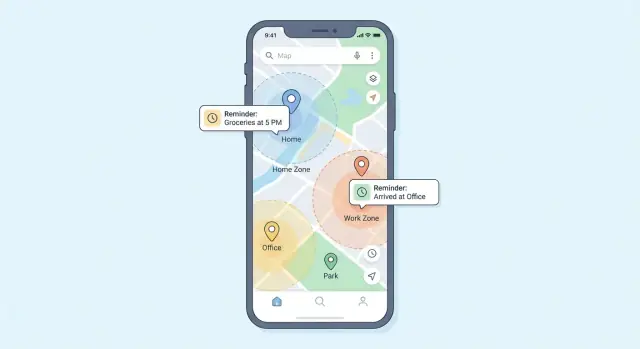
What Location-Based Reminders Are (and Why Users Love Them)
Location-based reminders are alerts your app sends when someone arrives at or leaves a real-world place. Instead of firing at 3:00 PM, the reminder triggers when the user’s phone detects it crossed a boundary around a location—often called a geofence.
That shift (time → place) is why people love them: the reminder shows up at the moment it’s actually useful, not when the user happens to be busy.
Examples users instantly understand
A good mental model is: “Remind me when I’m there.” Common scenarios include:
- Near a store: “Buy milk when I’m near Trader Joe’s.”
- At the office: “Ask about the timesheet when I arrive at work.”
- Leaving home: “Turn off the heater when I leave.”
These work because they’re tied to routines. The best apps make it frictionless to attach a reminder to places the user already visits.
The core building blocks (no mystery terms)
To build this feature, you’ll combine a few straightforward pieces:
- Location signals: The phone’s GPS, Wi‑Fi, and cell data help estimate where the user is.
- Geofencing: A rule like “if the user enters/leaves a circle around this point, trigger.”
- Notifications: A local notification (or push, depending on your design) that surfaces the reminder.
- Storage: A way to save reminders, their locations, and whether they’ve fired.
What this guide will cover
This article focuses on practical steps for building location-based reminders with real iOS and Android considerations: choosing an approach, designing a simple setup flow, handling permissions and privacy, making geofences reliable, and keeping battery use under control.
Start With Requirements and Use Cases
Before choosing SDKs or drawing screens, get specific about what people are trying to accomplish. Location-based reminders feel “magical” when they match real routines—and annoying when they fire at the wrong time.
Clarify user goals (use cases that actually happen)
Start by listing your top scenarios and who they serve:
- Home: “Take out the trash when I get home,” “Start laundry,” “Water plants on weekends.”
- Work: “Ask about the contract when I arrive,” “Badge in,” “Don’t forget laptop on the way out.”
- Errands: “Buy milk when I’m near the grocery store,” “Return package when I’m by the post office.”
- Travel: “Turn on roaming at the airport,” “Pick up keys when I reach the hotel.”
- Routines: “Gym check-in,” “Medication pickup when near pharmacy.”
For each scenario, note:
- Precision needed: exact storefront vs. neighborhood
- Urgency: must-not-miss vs. nice-to-have
- Repeat behavior: once, always, or “only once per day”
Decide trigger types
Define which triggers you’ll support from day one:
- Enter: notify when the user arrives.
- Exit: notify when the user leaves (great for “don’t forget…”).
- Dwell (if supported): notify after staying for X minutes.
- Time windows: only trigger during allowed times (e.g., weekdays 8–6) to reduce noise.
Define reminder content
Minimum content is title + location + trigger. Common additions:
- Checklist items (quick “done” taps)
- Attachments/links (parking spot photo, order number)
- Repeat rules (every weekday, “only once per day,” skip next)
Set success metrics early
Pick measurable targets so you can make trade-offs later:
- Delivery rate: % reminders that fire within the expected window
- Snooze/dismiss rate: signals usefulness vs. annoyance
- Battery impact: background usage per day/session
- Opt-in rate: location permission + notification permission acceptance
Choose Your Technical Approach
Your technical choices determine how reliable reminders feel, how much battery you use, and how much work it takes to ship on iOS and Android.
Geofencing APIs vs. continuous tracking
For most reminder apps, start with system geofencing (region monitoring) rather than always tracking the user.
- Geofencing APIs let the OS wake your app when a device enters or exits a defined area. This is usually the best default: lower battery use, simpler privacy story, and fewer background issues.
- Continuous tracking (frequent location updates) can feel “more precise,” but it’s expensive: higher battery drain, more permissions friction, and more chances the OS throttles you in the background.
A practical pattern is geofencing first, with short, targeted bursts of higher-precision tracking only when the user is actively engaged (for example, while navigating).
Accuracy tradeoffs (GPS vs Wi‑Fi vs cell)
Location isn’t a single signal—it’s a blend.
- GPS: best outdoors; slower to lock and weaker indoors.
- Wi‑Fi positioning: strong in cities and indoors; depends on nearby networks.
- Cell towers: lowest precision, but works almost everywhere.
Design for this variability: choose sensible minimum radius values, and avoid promising street-level accuracy.
Offline and poor-signal behavior
Decide what should happen if the user has limited connectivity:
- Geofencing can still trigger without data, but location updates may be delayed or less accurate.
- When the signal is poor, triggers might be late. Be explicit in UX copy (e.g., “may trigger within a few minutes”).
- Queue events locally and sync later so reminders and analytics don’t break when the network returns.
Platform scope: native vs cross-platform vs hybrid
Pick based on team skills and the importance of background reliability:
- Native (Swift/Kotlin): best access to location/background features and fastest debugging.
- Cross-platform (Flutter/React Native): faster shared UI, but background/geofence edge cases may require native modules.
- Hybrid/web: typically the weakest option for geofencing and background notifications.
If reminders must be dependable in the background, prioritize the approach that gives you the most control over OS-specific behavior.
Fast prototyping without locking yourself in
If you want to validate UX and workflows before investing heavily in native edge cases, you can prototype the reminder setup flow, storage model, and admin dashboards quickly with Koder.ai. It’s a vibe-coding platform where you build web, server, and mobile apps via chat—useful for iterating on things like reminder creation, scheduling rules, status views, and sync behavior.
Koder.ai can generate a typical production stack (React on web, Go + PostgreSQL on the backend, Flutter for mobile) and supports source-code export, deployment/hosting, custom domains, and snapshots/rollback—handy when you’re testing variants of onboarding or permissions copy and need to revert safely.
Design the UX: Simple Setup, Clear Controls
A location-based reminder is only as good as the setup flow. If users can’t create one in under a minute—or don’t trust it’s “armed”—they’ll abandon it. Aim for a small set of predictable screens with clear, everyday language.
Key screens to include
1) Create reminder
Keep the form lightweight: title, optional notes, and a prominent “Add location” action. Let users save without leaving the screen, and show the chosen place inline (name + small map preview).
2) Pick location
Support multiple, familiar ways to choose a spot:
- Search a place (autocomplete and recognizable names)
- Drop a pin (tap-and-hold, then fine-tune with a draggable pin)
- Recent places (last used locations for quick reuse)
- Saved places (Home, Work, Favorites)
3) Manage list
The list should answer one question at a glance: “What’s active?” Show status chips like Active, Paused, or Needs permission. Include quick actions (pause, edit, delete) without burying them.
4) Settings
Keep settings minimal: permission help, notification preferences, units (miles/km), and a short “battery-friendly mode” explanation.
Controls users understand
For each reminder, offer two simple choices:
- Trigger: “When I arrive” / “When I leave”
- Radius: a slider with plain guidance like “Smaller = more precise, may be less reliable” and “Larger = more forgiving.”
Add sensible presets (e.g., 100m, 300m, 1km) so users don’t have to guess.
Reliability UX: build trust
Location features can feel unpredictable, so show reassurance:
- Active status on the reminder details screen
- Last check timestamp (e.g., “Last checked 3 min ago”)
- A lightweight Test mode (simulates a trigger and sends a sample notification)
When something prevents operation (permissions off, notifications disabled), show one clear call to action like “Fix settings,” not a wall of text.
Handle Permissions and Privacy Up Front
Location reminders only work when users trust you with sensitive data. Treat permissions and privacy as product features, not last-minute checkboxes.
Pick the right permission level (and explain it clearly)
Most platforms offer two common location modes:
- “While Using”: access location only when the app is on screen (or actively in use).
- “Always” (background location): access location even when the app is closed—typically needed for true geofencing reminders that must fire without opening the app.
Ask for the minimum you need. If your first version works with “While Using,” start there and upgrade to “Always” only when the user enables features that require it.
Show an in-app rationale screen before the OS prompt
Don’t drop users straight into the system dialog. Add a short pre-permission screen that explains:
- what you’re asking for (“Allow location in the background”)
- the benefit (“So your reminder can trigger when you reach the store—even if the app is closed”)
- what you don’t do (“We don’t track your location constantly or sell it” — only if true)
This usually improves opt-in rates and reduces confusion.
Give control in Settings
Include simple toggles for:
- enabling/disabling location-based reminders
- managing notification categories (e.g., “Arrivals,” “Departures,” “Daily summaries”)
When something is disabled, show what’s missing and provide a one-tap path to re-enable.
Privacy-friendly defaults and easy data deletion
Default to collecting the least data possible: store saved places and reminder rules, not raw location history.
Add a clear option to delete data (single reminder, all places, or full account data) and confirm what will be removed. If you have a privacy policy page, link it from onboarding and settings (for example, /privacy).
Model Your Data and Storage
A location-based reminders app feels “simple” on the surface, but it needs a clear data model underneath so reminders fire reliably, stay editable, and remain debuggable when users ask, “Why didn’t I get notified?”
Core entities (keep them explicit)
At minimum, model these concepts separately:
- Reminder: title, notes, priority, created/updated timestamps, and a link to where and when it should trigger.
- Place / Geofence: a saved location (lat/lng, radius, label like “Home”), plus metadata like “created from search” vs “dropped pin.” Multiple reminders may reference the same place.
- Schedule (optional but useful): rules like “only weekdays,” “only between 9–5,” or “after a specific date.” Even if you start with “any time,” a schedule entity prevents painful refactors later.
- Status: enabled/disabled, completed, snoozed-until, last-triggered-at.
- Notification log: a lightweight history of sent notifications (timestamp, reminder id, reason). Keep it prunable; it’s mainly for support and debugging.
Storage choices: local first
For most apps, a local database is the right foundation:
- iOS: Core Data (or SQLite underneath), optionally with CloudKit later.
- Android: Room (SQLite).
- Cross-platform: SQLite, Realm, or a platform-native approach per OS.
Local-first keeps reminders working offline and reduces privacy risk because data doesn’t have to leave the device.
Sync only if you truly need it
Sync adds complexity: accounts, encryption, migration, customer support, and conflict resolution. If you don’t need multi-device support at launch, consider export/backup (JSON/CSV) or OS-level backups first.
If sync is in scope, plan conflicts up front: use stable IDs, track updated_at, and define rules like “last write wins” or “completed always wins.” For power users editing on multiple devices, a simple “show conflict and let the user choose” flow can be better than guessing silently.
Implement Geofencing Reliably
Geofencing is the core mechanic behind location-based reminders: your app defines a “virtual boundary,” and the system notifies you when a user enters or exits it.
What a geofence really is
A geofence is typically:
- A center point (latitude/longitude)
- A radius (for example, 100–500 meters)
- One or more events: on enter, on exit (sometimes dwell)
Because the OS is doing the monitoring, you don’t get constant GPS updates. That’s good for battery, but it also means geofences have system limits (like a maximum number of monitored regions) and can be delayed or skipped in edge conditions.
Platform behavior: iOS vs Android
On iOS, region monitoring is managed by the system and can work even if your app is not running, but it’s constrained by OS-defined limits and may take time to trigger depending on movement and device state.
On Android, geofencing is commonly implemented via Google Play services. Behavior varies by device maker and power-saving settings; background restrictions can impact reliability if you’re not using the recommended APIs and foreground services appropriately.
When you can’t register everything: dynamic geofences
If users can create many reminders, don’t try to monitor them all at once. A practical fallback is dynamic registration:
- Keep all reminders in your database.
- Monitor only the nearest N geofences (within a reasonable distance from the last known location).
- Refresh the monitored set when the user moves meaningfully or after a time interval.
This approach stays within OS limits while still “feeling” complete.
Reducing false triggers
Geofences can fire multiple times or at odd moments. Add guardrails:
- Debounce alerts (ignore repeats for a short window).
- Enforce a minimum time between notifications per reminder.
- Optionally use speed checks (e.g., ignore “arrived” while moving fast on a highway).
Treat geofence events as signals, then confirm whether a reminder should notify before you alert the user.
Send Notifications Users Actually Want
A location trigger is only half the job—the other half is delivering a reminder that feels timely, helpful, and easy to act on. If notifications are noisy or confusing, users will disable them (or delete the app).
Local vs. push: pick the right tool
For most location-based reminders, local notifications are the best default: the device detects the geofence event and shows the reminder without needing your server. This keeps triggers fast and reliable even with spotty connectivity.
Use push notifications when you truly need server involvement—examples include shared lists, team assignments, or reminders that must sync across devices. A common pattern is: geofence triggers locally, and you optionally sync “completed/snoozed” state in the background.
Make the notification actionable
Don’t force users to open the app for basic actions. Provide quick controls that match how people behave in real life:
- Mark as done
- Snooze (e.g., 10 minutes / 1 hour)
- Open details (shows note, list, or checklist)
Keep the title short (“Buy milk”) and use the body for context (“You’re near Trader Joe’s”).
Respect quiet hours and time windows
Add quiet hours and optional time windows per reminder (“only notify 8am–8pm”). If a user arrives outside the window, you can delay the alert until the window opens or show a silent badge update—either reduces annoyance.
Survive restarts and updates (when possible)
Users expect reminders to keep working after phone restarts and app updates. Persist geofences/reminders in storage and re-register them on app launch.
On Android, consider restoring on reboot (where platform policies allow). On iOS, plan for the system to manage region monitoring limits and re-register what you can when the app runs again.
Make It Battery-Friendly and Stable in the Background
Location-based reminders only feel “magic” when they work quietly. The challenge is that background work is heavily constrained: battery is limited, and both iOS and Android enforce strict policies to stop apps from running or polling location constantly.
Why background location is constrained
Modern mobile OSes treat continuous GPS and frequent background wake-ups as high-cost. If your app overuses them, users see battery drain, the OS may throttle background execution, and reliability can get worse.
Use OS-recommended APIs (not continuous GPS)
Prefer geofencing and region monitoring APIs provided by the platform. They’re designed to use a mix of signals (GPS, Wi‑Fi, cell) and wake your app only when needed.
Avoid always-on GPS tracking unless your core use case truly requires turn-by-turn accuracy. For reminders, it rarely does.
Practical ways to reduce battery drain
Small choices make a big difference:
- Use a larger radius where possible (e.g., 150–300m instead of 50m).
- Limit active geofences per user (and stay comfortably under OS caps).
- Refresh geofences only when it matters: edits, schedule changes, or meaningful movement.
- Adapt to context: if the user is stationary, avoid unnecessary re-registration; if they’re moving quickly, prefer simpler boundaries.
Be transparent: add a “Battery impact” note
Include a short “Battery impact” section in Settings or Help explaining:
- which permission level you use (e.g., “While Using” vs “Always”)
- how geofences work in the background
- practical tips users can apply (fewer places, larger radius, disabling unused reminders)
This builds trust—and reduces support tickets. For permission copy guidance, link to your privacy section at /privacy.
Test in the Real World (Not Just in the Emulator)
Geofencing and background location features can look perfect in a demo, then fail quietly in real life. The difference is the operating system: iOS and Android aggressively manage background work, permissions, connectivity, and battery. Treat testing as a product feature, not a final chore.
Build a practical testing matrix
Test across a mix of:
- Devices (older + newer hardware, different chipsets/GPS quality)
- OS versions you support
- Permission states: Always, While Using, Denied, and “Ask Next Time” (Android)
- App states: foreground, background, killed/force-quit
Include at least one “fresh install” path to confirm onboarding and permission prompts work from zero.
Simulate locations—then validate on foot and in a car
Emulators are great for fast iteration:
- iOS Simulator: GPX routes / simulated location
- Android Emulator: Extended Controls → Location (single points + routes)
But do real-world runs too. Walk a simple route with two fences (enter + exit), then repeat while driving. Driving exposes timing issues (missed boundaries, delayed callbacks) that walking won’t.
Edge cases that break reminders
Plan explicit tests for:
- Airplane mode / poor reception (does it trigger later when connectivity returns?)
- Low Power Mode / Battery Saver
- Device reboot (are geofences re-registered?)
- App force-quit and relaunch (especially on iOS)
Add local diagnostics without collecting extra user data
When a reminder doesn’t fire, you need evidence. Log a small set of events locally (not to your servers by default): permission changes, geofence registered/removed, last known location timestamp, trigger received, notification scheduled/sent.
Provide an in-app “Export Debug Log” button that shares a file with support. This helps diagnose missed triggers while keeping privacy expectations clear.
Launch Checklist: Onboarding, Support, and Store Prep
A location-based reminders app can feel “broken” if a single setting is off. A strong launch plan is mostly about setting expectations, guiding permissions, and giving users a fast path to fix issues.
Onboarding that explains the trigger (without jargon)
Keep onboarding short, but specific about when reminders fire:
- A reminder triggers when the device enters (or exits) an area—not when the app is open.
- Alerts can be delayed by OS rules, low power mode, or disabled location access.
- Users may need to allow Always (or Allow all the time) location for reliable geofencing.
Add a simple “test reminder” step so users can confirm notifications work before they rely on the app.
In-app help that prevents support tickets
Create a lightweight Help page in Settings (and link to it from onboarding). Make it scannable with common issues:
Missed alert?
- Check the reminder is enabled and the radius isn’t too small.
- Verify notification permissions are on.
- Confirm location permission is set correctly (especially “Always”).
Works once, then stops?
- Review battery optimization/background restrictions (common on Android).
- Ask users to disable battery saving for the app if needed.
Location seems wrong?
- Suggest turning on “Precise location” (iOS) / high accuracy (Android) where applicable.
If you offer paid tiers, include a short “Contact support” section and (if relevant) a link to your plan details like /pricing.
Store listing prep: clarity beats hype
Your store page should reduce confusion before install:
- Feature bullets: “Remind me when I arrive,” “Works in the background,” “Custom radius,” “Snooze,” etc.
- Privacy summary: what location you collect, whether it’s stored on-device, and when background location is used.
- Screenshots: show the reminder setup flow, permission prompts, and a sample notification.
Write copy that matches your actual behavior. If reminders may be delayed sometimes, don’t promise “instant” alerts—promise reliable reminders with clear setup guidance.
Iterate Safely: Features, Accessibility, and Analytics
Shipping v1 is only the beginning. For location-based reminders, small changes can have big effects on battery, reliability, and trust—so plan iterations that are easy to test and easy to roll back.
Feature improvements that don’t destabilize geofencing
Add capabilities in layers, keeping your core geofencing logic unchanged where possible:
- Recurring reminders (e.g., “Every weekday when I arrive at work”) built on top of the same place/radius model.
- Shared lists for families or teams, with clear ownership rules and conflict handling.
- Templates (“Grocery run”, “Post office”) to speed setup.
- Smart suggestions that stay local-first when you can (e.g., suggest a reminder for a frequently used place) and are easy to disable.
If you change how background location is handled, release behind a feature flag and monitor crash rates and notification delivery before rolling out broadly.
Accessibility: design for everyone
Location-based reminders should be usable with one hand, one sense, or one tap:
- Support large text without truncating key controls like radius and place names.
- Add voice input for reminder text and place search.
- Ensure screen reader labels make flows understandable (“Notify when I arrive”, “Radius: 200 meters”).
International and offline considerations
People enter addresses differently worldwide. Accept varied address formats, and let users choose units for geofence radius (meters/feet). For an offline maps strategy, cache recent places and allow selecting saved locations even when map tiles aren’t available.
Analytics that respect privacy
Measure what helps you improve without tracking people. Keep analytics opt-in, store aggregate metrics (e.g., reminder created, geofence triggered, notification opened), and use minimal identifiers. Avoid logging precise coordinates; bucket distances and timing instead.
A short “How we measure” note in /privacy builds confidence while supporting better mobile app development decisions.
FAQ
What is a location-based reminder?
Location-based reminders trigger when the device enters or exits a defined area (a geofence) around a place—like a store, home, or the office.
They’re popular because they show up at the moment the reminder is actually useful, not at an arbitrary time.
What requirements should I define before building location-based reminders?
Start by writing down the top real routines you’re serving (home, work, errands, travel) and how precise each needs to be.
For each use case, decide:
- Precision: storefront vs. neighborhood
- Urgency: can it be late by a few minutes?
- Frequency: one-time vs. repeat
- Trigger: enter, exit, (optional) dwell, and any time windows
Should I use geofencing APIs or continuous location tracking?
For most reminder apps, prefer system geofencing/region monitoring.
- Pros: lower battery use, simpler privacy story, better background behavior
- Cons: OS limits (number of regions), possible delays, less deterministic timing
Use short bursts of continuous tracking only for special cases (e.g., active navigation), not as your default.
Which trigger types should a first version support?
A practical v1 usually supports:
- Enter: “Remind me when I arrive”
- Exit: “Remind me when I leave” (great for “don’t forget…”)
- Optional: time windows (weekday-only, 8–6) to reduce noise
Add dwell later if the platform support and UX value are clear.
What data model do I need for reliable location reminders?
A simple, robust model separates:
- Reminder: title/notes + links to place + trigger type
- Place/Geofence: lat/lng, radius, label (Home/Work), metadata (searched vs pin)
- Status: enabled, completed, snoozed-until, last-triggered-at
- Notification log (small): timestamps + reminder id for debugging
This keeps reminders editable and makes “why didn’t it fire?” troubleshooting possible.
What location permissions should I request, and when?
Ask for the minimum permission that matches your feature:
- While Using: good if reminders only work when the app is active
- Always / Allow all the time: typically required for geofences that must fire when the app is closed
Use a short in-app rationale screen before the OS prompt explaining what you need, why, and what you don’t do (only if true).
What UX elements make users trust location-based reminders?
Keep setup fast and confidence high:
- Create screen: title + “Add location”
- Pick location: search, drop pin, recent/saved places
- Clear controls: When I arrive/leave and a radius with presets (e.g., 100m/300m/1km)
- Trust signals: Active/Paused/Needs permission, “Last checked” timestamp, and a test notification option
When blocked (permissions/notifications off), show one clear “Fix settings” action.
Should location-based reminders use local notifications or push notifications?
Default to local notifications for most location reminders because geofence triggers happen on-device and work better with poor connectivity.
Use push notifications only when a server must be involved (shared reminders, assignments, cross-device coordination). A common hybrid: trigger locally, then sync completion/snooze state in the background.
How do I keep location reminders battery-friendly?
Common guardrails:
- Prefer OS geofencing over frequent GPS polling
- Use a larger radius when possible (more forgiving, fewer precise checks)
- Limit active geofences and stay under platform caps
- Refresh monitored geofences only on meaningful movement or edits
- Add a simple Settings note on battery impact and link to /privacy for transparency
How should I test and debug geofencing reminders in production-like conditions?
Test across real-world states, not just emulators:
- Permissions: Always / While Using / Denied
- App states: foreground, background, killed/force-quit
- Conditions: low power mode, battery saver, airplane mode, reboot
Add local diagnostics (registered/removed geofences, trigger received, notification scheduled/sent) and an in-app Export Debug Log so support can troubleshoot without collecting extra location history.