

How to Build a Website Optimized for Programmatic SEO
Learn how to plan, build, and maintain a website for programmatic SEO: page templates, data sources, internal links, QA, and indexing control.
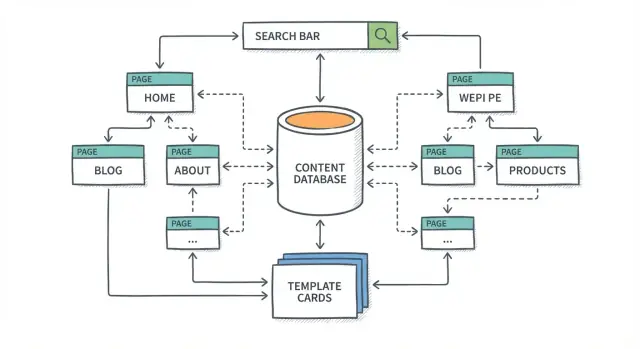
What Programmatic SEO Is (and What It Isn’t)
Programmatic SEO (often shortened to pSEO) is a way to create many search-optimized pages from a repeatable template, powered by structured data. Instead of writing every page from scratch, you build a system that combines:
- a page template (the layout and copy “slots”)
- a content database (the facts that fill those slots)
- a publishing workflow (how pages get generated and updated)
The goal isn’t to “game” Google—it’s to publish helpful pages for lots of closely related searches that would be impractical to cover manually.
What pSEO is
At its best, pSEO produces pages that feel made for a specific query, because the data and structure are consistent.
Examples include directories, location pages, product or tool comparisons, “alternatives” pages, pricing pages by plan, or pages that explain the same concept across many categories.
What pSEO isn’t
pSEO is not spinning text, copying near-identical pages, or flooding your site with low-value URLs. If the only thing that changes on each page is a keyword swapped into a headline, you’re building thin content at scale—and that usually fails.
When pSEO is a good fit (and when it isn’t)
pSEO works well when you have repeatable search intent and reliable data (features, specs, locations, reviews, categories, availability, etc.). It’s a poor fit when every page needs deep original reporting, unique expert opinion, or heavy storytelling.
Set the right expectation: scale quality, not page count
The win comes from a system that can publish hundreds or thousands of pages without dropping usefulness. That means planning for four core parts from day one: templates, data, publishing, and quality assurance (QA)—so every page stays accurate, unique enough, and worth indexing.
Start With Goals, Audience, and a Clear Topic Cluster
Programmatic SEO only works when it’s tied to a concrete business outcome. Before you think about pages, templates, or scale, decide what you want the site to achieve—and for whom.
Define the primary goal
Pick one primary conversion goal you can measure end-to-end. Common options include sign-ups, demo requests, purchases, or lead form submissions. A clear goal helps you prioritize which pages deserve the most attention, which CTAs to use, and which metrics actually matter.
If you have multiple goals, choose a “main” one for the first rollout. You can always expand later once you’ve proven what drives results.
Identify your audience by their questions
List your target audiences in plain language (for example: “independent designers,” “HR managers at 50–200 person companies,” or “homeowners comparing solar installers”). Then write down the questions they search—especially the comparison, evaluation, and “best for” questions that signal intent.
A helpful prompt: what would a customer type into Google right before they’re ready to choose a solution?
Decide what success looks like
Don’t stop at rankings. Define success as a small set of metrics across the funnel:
- Visibility: rankings for your core queries
- Demand: clicks and qualified visits
- Business impact: conversions (and ideally conversion rate)
This prevents you from scaling pages that get traffic but don’t convert.
Start with one topic cluster
Choose one primary topic cluster that’s tightly connected to your product and has enough variation to justify many pages. A good cluster is specific, repeatable, and useful—so every new page answers a real question, not just a keyword variation.
Choose Page Types That Match Search Intent
Programmatic SEO works best when you standardize page types—repeatable formats that answer the same kind of question for many variations (cities, tools, categories, features). The trick is choosing formats that match what the searcher is trying to do.
Common pSEO page types (and when they work)
- Location pages: “service in [city]”, “best [category] in [city]”, “near me” variations.
- Comparison pages: “[tool A] vs [tool B]”, “[product] alternatives”, “best [tool] for [use case]”.
- Directories / listings: “top [category]”, “[category] directory”, “companies offering [service]”.
- Use case pages: “[tool] for [job role]”, “[product] for [industry]”, “how to [task] with [tool]”.
Each of these can scale, but only if the intent is clear and the page genuinely helps.
Map page types to intent: informational vs transactional
Search intent is usually a mix, but you can group it:
- Informational intent (learn and understand): “what is…”, “how to…”, “examples of…”. This fits use case pages and some directory queries when people are researching.
- Transactional intent (choose and act): “best…”, “pricing”, “reviews”, “vs”, “alternatives”. This fits comparison pages, “best of” directories, and location pages where the next step is contacting, booking, or buying.
A fast check: if the query implies a decision, your template should make that decision easier (clear pros/cons, filters, pricing ranges, CTAs).
Define the unique value beyond the template
Templates are only the frame. The value should come from what changes per page and what’s hard to compile manually, such as:
- Real attributes and specs (features, categories, availability, service area)
- Pricing ranges or plan summaries (when accurate)
- Side-by-side differences for comparisons
- “Best for” guidance tied to the query
- Freshness signals: last updated date, new entries, recently verified data
If a page would still “make sense” with all variables removed, it’s probably too generic.
Pick one page type for an MVP
Start with one page type you can execute well. Document it on a single page so everyone builds the same thing:
- Target query pattern (e.g., “X vs Y”, “X in City”)
- Intended user action (subscribe, request a demo, contact, shortlist)
- Required data fields (must-have vs nice-to-have)
- Template sections (what appears, in what order)
- Rules for when not to generate the page
This MVP becomes the blueprint you can scale—without scaling mistakes.
Keyword Research for Patterns (Not Single Keywords)
Programmatic SEO works when you stop hunting for “the perfect keyword” and start looking for repeatable keyword patterns you can serve with one page type. The goal isn’t volume at any cost—it’s finding combinations that produce genuinely useful pages.
1) Find head terms and safe modifiers
Start with a small set of “head terms” that describe what your site offers (products, services, tools, categories). Then collect modifiers people naturally add when they’re trying to decide, compare, or find something local.
Examples of modifier families:
- Location: in {city}, near {neighborhood}, {state}
- Use case: for {job}, for {industry}, for {goal}
- Comparison: vs {alternative}, alternatives to {brand}
- Selection: best {head term} for {modifier}, top-rated, cheapest
“Safe” means the modifier changes the page in a meaningful way. If the modifier barely changes the answer, the resulting pages will feel repetitive.
2) Group keywords into patterns (not lists)
Instead of tracking thousands of separate keywords, map them into a handful of templates you can validate:
- “X in Y” (e.g., accountants in Austin)
- “X vs Z” (e.g., Mailchimp vs Klaviyo)
- “Best X for Y” (e.g., best running shoes for flat feet)
For each pattern, define what unique information your page can provide. If you can’t describe the unique value in one sentence, the pattern is probably weak.
3) Filter out patterns that create thin or repetitive pages
Common red flags:
- Y has no real inventory/data (you’d publish pages with empty lists)
- The same items would appear in nearly every variant
- Your content database can’t support meaningful differences (pricing, availability, specs, reviews, regulations)
A quick test: pick 10 keyword variants from the pattern and outline what would change on each page. If the outline is 90% identical, filter the pattern out.
4) Estimate scale after filtering
Only after quality checks, estimate scale:
Pages per pattern = (valid head terms) × (valid modifiers) × (allowed combinations)
Be conservative. It’s better to launch 200 high-intent pages you can expand than 20,000 near-duplicates that you’ll have to prune later.
Build a Content Database That Can Power Thousands of Pages
Programmatic SEO only works when every page is backed by real, structured information. Before you design templates or write copy, treat your site like a publishing system: your database is the source of truth, and pages are the output.
Start by defining your data sources
List the systems that already contain the facts your pages will show—then decide what you’ll ingest and standardize. Common sources include a product catalog, marketplace listings, location records, reviews, pricing tables, and technical specs.
The goal is consistency: if “screen size” appears on 10,000 pages, it should be one field with one format, not a mix of “15 in,” “15-inch,” and “15\rinches.”
Set required fields per page type
Each template-driven page type needs a minimum dataset to be useful. Create rules for what’s required before a page can publish (or be indexable):
- Title field (human-readable, not an ID)
- Short description or summary
- Core attributes (the ones users compare)
- At least one differentiator (pricing, availability, rating, location coverage, etc.)
If required fields are missing, generate a fallback experience (or no page at all) rather than publishing thin pages.
Plan for freshness and update flow
Decide how updates move from the source into your pages: scheduled syncs, real-time updates, or a hybrid. Also define what happens when data changes—price updates, discontinued items, renamed categories—so URLs and on-page content don’t drift out of date.
Add governance (so quality scales)
Assign ownership: who is responsible for accuracy, and who fixes errors when users report problems? A simple workflow—validation rules, error queues, and a clear “data owner”—prevents small issues from multiplying across thousands of pages.
Design Templates That Are Helpful, Not Just Scalable
Programmatic SEO works best when your templates behave like great landing pages—not empty shells filled with data. The goal is simple: a visitor should understand the answer (and the next step) in seconds.
Start with a clear page hierarchy
Create a reusable template with predictable sections. A common, effective flow is:
- A specific H1 that mirrors the query (“Best X for Y”, “X in City”, “X vs Y”)
- A short summary that gives the conclusion up front
- The main data-driven module (table, list, directory cards)
- Supporting context and decision help
This structure makes pages easier to scan and reduces the risk of “template-driven pages” feeling generic.
Separate fixed, data-driven, and editorial content
Define what will be the same on every page (fixed), what will be pulled from your content database (data-driven), and what will be written by humans (editorial).
For example:
- Fixed: section headings, UI components, disclaimers, “how to use this page” copy
- Data-driven: pricing, specs, locations, availability, ratings, feature flags
- Editorial: a short “How to choose” guide, edge cases, caveats, and recommendations
This mix improves “SEO quality control” because it forces you to plan uniqueness and usefulness, not just scale.
Add components that match real decisions
Helpful templates often include a short FAQ, quick comparisons (“top alternatives”), pros/cons, and clear next steps (filters, related pages, or a primary CTA). Each component should answer a real follow-up question, not just add words.
If you’re unsure, review the top-ranking pages for your query type and match the intent—then make it easier to act.
URL Structure, Metadata, and Structured Data at Scale
When you publish hundreds (or thousands) of template-driven pages, small inconsistencies multiply quickly. Clear URL rules, metadata guardrails, and structured data standards help search engines understand your pages—and help your team avoid a maintenance headache later.
URL rules: readable, consistent, stable
Pick a URL pattern you can keep for years. Avoid baking temporary details into URLs (dates, campaign codes, internal IDs) unless they’re truly part of the user’s mental model.
A good rule of thumb: one concept per folder, one “entity” per slug.
- Consistent hierarchy: /category/entity (or /use-case/location)
- Human-readable slugs: use words people recognize, not database keys
- Stable formatting: decide early on hyphens, casing, pluralization, and trailing slashes
Example patterns:
- /templates/invoice/contractor
- /pricing/seo-tools/ahrefs-alternative
- /cities/italy/rome
If you later need to change URLs, plan redirects carefully—but the best win is avoiding changes in the first place.
Metadata at scale (with guardrails)
Template your title tags, meta descriptions, and headings, but add rules that prevent junk outputs.
Good guardrails include:
- Length limits (e.g., truncate titles after a sensible character count)
- Fallback logic when a field is missing (don’t print “undefined”)
- Uniqueness checks so pages don’t share identical titles/descriptions
Example title logic:
- Title: “{Primary Term} Templates for {Audience} | {Brand}”
- H1: “{Primary Term} templates for {Audience}”
Write templates that still sound natural when variables change. If a variable might be awkward (“USA” vs “United States”), normalize it in your data layer.
Structured data that fits the page
Schema markup won’t fix thin content, but it can improve clarity and eligibility for rich results. Common options for pSEO pages:
- Organization (site-wide)
- Product (if you truly offer a product with price/availability)
- FAQ (only for real, on-page FAQs)
- BreadcrumbList (especially helpful at scale)
Keep schema consistent across templates and validate regularly.
Avoid duplicates: canonicals and parameter handling
Template-driven sites often generate near-duplicates via filters, sort orders, and tracking parameters.
- Use canonical tags to point variants to the preferred URL.
- Configure analytics/tracking parameters so they don’t create indexable URLs.
- If filters must exist, decide which combinations are indexable and block or noindex the rest.
A little discipline here prevents your site from competing with itself.
Site Architecture and Internal Linking for Discoverability
Programmatic SEO succeeds when search engines (and people) can easily understand how your pages relate. The simplest way to do that is to organize your site like a library: a few clear “aisles” (hubs), then progressively more specific pages underneath.
Build hubs people actually want to browse
Start with category and subcategory hub pages that summarize the collection and help users narrow options. A good hub isn’t just a list—it explains what the category is, who it’s for, and offers filters or “popular choices” to guide exploration.
For example, a hub can link to:
- Top subcategories (e.g., by use case, price range, or location)
- A handful of best-known items (“Most popular in this category”)
- Helpful related guides (e.g., /blog/how-to-choose-x)
Use breadcrumbs and contextual links to reinforce relationships
Breadcrumbs (Home → Category → Subcategory → Item) make hierarchy obvious and create consistent internal links across thousands of pages. They also help users jump “up” a level without hitting back repeatedly.
Contextual links are the other half: links that appear within the content because they genuinely help the reader. On a detail page, that might be “Similar alternatives,” “Nearby locations,” or “Often compared with.” These links are especially useful for pSEO sites because they connect long-tail pages to one another without forcing everything through the homepage.
Define linking rules so scale doesn’t become chaos
Instead of hand-picking links, set clear rules your system can apply everywhere:
- “Top related items” based on shared attributes (type, features, price band)
- “Nearby locations” within a defined radius
- “Similar alternatives” (same intent, different brand/provider)
Keep it restrained. Avoid link spam—don’t add blocks of links just because you can. If a link doesn’t help someone decide, compare, or navigate, it probably doesn’t belong.
If you want a mental model: every page should have a path up (breadcrumbs), sideways (related pages), and forward (next best step, like a subcategory or comparison).
Technical SEO Essentials for Programmatic Sites
Programmatic SEO can fail for a simple reason: search engines can’t reliably crawl, render, or understand your pages. Before scaling, make sure every template-driven page is technically “easy” for Google to access and interpret.
Indexability: the crawl-and-index checklist
Start with the basics that control whether pages are even eligible to rank.
- robots.txt: block admin, filters, and infinite spaces (like internal search results), but don’t accidentally block your template URLs or key assets (CSS/JS).
- XML sitemaps: generate sitemaps dynamically and split them (e.g., 50k URLs per file). Include only canonical, indexable URLs.
- Canonicalization: every page should declare its preferred URL via
\u003clink rel=\"canonical\"\u003e, especially if you have parameters, sorting, or near-duplicate variants. - Meta robots / HTTP headers: use
noindex,followfor low-value pages you still want crawled for link flow.
Performance: speed basics that scale
Small performance issues become big when you multiply them by thousands of pages.
- Enable caching (CDN + server caching) for template pages.
- Serve correctly sized responsive images (avoid shipping huge originals).
- Use lazy loading for below-the-fold images and non-critical widgets.
Mobile usability and accessibility
Most crawling and ranking evaluation is effectively mobile-first. Ensure templates don’t break on small screens, buttons are tappable, and text is readable. Add accessibility fundamentals (semantic headings, alt text for informative images, clear focus states) so templates work for everyone.
Rendering: avoid crawl surprises
If key content is generated in the browser, crawlers may see an empty or partial page.
- Prefer server-side rendering (SSR) or pre-rendering for template content.
- If you use client-side rendering, ensure critical content and links exist in the initial HTML, and test with Google’s URL Inspection tool.
Implementation note: if you’re building a pSEO site as a productized system (templates + database + publishing + SSR), using a platform like Koder.ai can speed up the scaffolding. You can prototype React-based page templates, connect structured data (for example, PostgreSQL), and iterate on publishing workflows via chat—then export source code when you want full control over SEO-critical details like SSR, canonicals, sitemaps, and internal linking rules.
Quality Control: Prevent Thin, Duplicate, and Broken Pages
Programmatic SEO succeeds or fails on consistency. When you publish hundreds (or thousands) of template-driven pages, small data issues become site-wide problems: empty fields create “thin” pages, repeated blurbs create duplicates, and one bad URL pattern can generate a flood of 404s.
Define “publish-ready” checks
Before any page is allowed to go live, run automated validation rules against your content database and rendered pages. Treat this like a pre-flight checklist.
- Missing fields: block publishing if required attributes (e.g., price, location, specs, description) are empty.
- Duplicated text: flag pages where templated sections exceed a similarity threshold (especially intros and FAQs).
- Broken links: verify internal links resolve (200 status) and external links don’t time out.
Add content quality rules (minimum unique value per page)
Templates scale structure; your data must supply the substance. Set clear rules like:
- Each page must include at least X unique details (e.g., 5–10 attributes or comparisons) beyond the shared template.
- Every page needs one unique paragraph derived from data (not just a swapped keyword in a generic sentence).
- If a page can’t meet the rule, don’t publish it—redirect it to a category page or keep it noindexed until data improves.
Review samples from every batch
Even great automation misses edge cases. For each publishing batch, manually review a small but consistent sample (for example, 20–50 pages), focusing on readability, duplicated sections, incorrect substitutions, and “empty-state” UI.
Monitor for spikes and regressions
Set alerts for sudden increases in:
- 404 errors (new URL bugs, deleted items)
- Duplicate titles/meta descriptions
- Thin pages (low word count, missing key sections)
Quality control isn’t a one-time gate—it’s an ongoing system that protects your programmatic SEO results as the database and templates evolve.
Indexing Strategy: Roll Out Safely and Control What Gets Indexed)
Programmatic SEO can generate pages faster than Google can understand them. A smart indexing strategy prevents you from flooding the index with weak pages, and it helps your best pages get discovered sooner.
Start small, prove value, then scale
Launch in a controlled batch first (for example, 50–200 pages per template). Monitor impressions, clicks, crawl stats, and quality signals (engagement, conversions, support tickets). Once the template is clearly useful, expand in waves. This “small batch → learn → expand” approach reduces risk and gives you clean comparisons between versions.
Use noindex as a safety valve
Not every generated page deserves indexing on day one. Apply noindex to pages that are incomplete, low-information, or missing required data (e.g., no reviews, no pricing, no images, or too few items to compare). Keep them accessible for users if needed, but don’t ask search engines to index them until they meet your quality bar.
A practical rule: if the page can’t answer the query better than a category page, it probably shouldn’t be indexed yet.
Submit sitemaps by section (and keep them accurate)
Create XML sitemaps separated by page type or directory (e.g., /cities/, /alternatives/, /integrations/). This makes it easier to:
- Track indexing coverage per template
- Roll out (or pause) a specific section safely
- Update sitemaps reliably as entities change
Only include canonical, indexable URLs in sitemaps—otherwise you’re sending mixed signals.
Plan redirects for churn
Entities change: products get renamed, locations merge, listings are removed. Maintain a redirect map so URL changes don’t create 404s or waste link equity. When an entity is removed, redirect to the closest relevant page (parent category, replacement entity, or a search/results page) rather than dumping everything onto the homepage.
Measure, Iterate, and Maintain Your pSEO System
Programmatic SEO is never “set and forget.” The real advantage is that once your system is live, you can improve outcomes by changing data, templates, and rules—without rewriting thousands of pages.
Track performance by template type, cluster, and intent
Don’t look only at “site traffic.” Break reporting down by:
- Template type (e.g., “{service} in {city}” vs. comparison pages)
- Topic cluster (the group of related pages sharing the same database)
- Search intent (informational vs. transactional)
This helps you spot patterns like: one template ranks well but converts poorly, or one cluster drives conversions even with modest traffic.
Measure beyond traffic
Traffic is a leading indicator, not the goal. Add KPIs that reflect business impact and page usefulness:
- Conversions (sign-ups, leads, purchases)
- Assisted conversions (pages that introduce users before they convert elsewhere)
- Engagement (scroll depth, time on page, return visits)
- SERP quality (CTR, impressions, ranking distribution)
When a template gets impressions but low CTR, iterate on titles/meta descriptions and on-page structure. When it gets traffic but low engagement, the content or data is likely missing what people expect.
Build iteration loops
Run a regular cadence (weekly or biweekly): review winners/losers, then adjust templates, expand data coverage (more attributes, fresher values), and refine internal linking rules to guide users to the next best page.
Create a maintenance plan
Plan for reality: data changes, discontinued items, new locations, and emerging query patterns. Define rules for:
- Updating stale pages automatically
- Merging or redirecting duplicates
- Retiring pages that no longer match intent
If you’re running your pSEO build as a living product (not a one-off project), operational features like snapshots and rollback can be practical safeguards. For example, teams using Koder.ai often lean on that kind of workflow to ship template changes quickly while still having a “revert” path if a release introduces duplicate metadata, broken internal links, or indexing issues.
A pSEO site stays strong when measurement feeds continuous, structured improvement.
FAQ
What is programmatic SEO (pSEO)?
Programmatic SEO (pSEO) is a system for creating many search-targeted pages from a repeatable template filled with structured data.
It’s most effective when pages change in meaningful ways (attributes, comparisons, availability, location details), not just by swapping a keyword into a headline.
Is programmatic SEO just a way to game search engines?
No. pSEO isn’t about “gaming” Google—it’s about publishing genuinely helpful pages for lots of closely related queries that would be impractical to write one-by-one.
If your pages are thin or near-identical, that’s not “pSEO done right,” and it usually underperforms.
When is programmatic SEO a bad fit?
It’s a poor fit when each page requires deep original reporting, unique expert opinion, or heavy storytelling.
If the page can’t be meaningfully differentiated with data (or would be 90% identical across variants), you’ll likely create repetitive content that’s hard to justify indexing.
What page types work best for pSEO?
Common high-performing page types include:
- Location pages (e.g., “service in {city}”)
- Comparisons (e.g., “{tool A} vs {tool B}”, “alternatives to {brand}”)
- Directories/listings (e.g., “top {category}”)
- Use case pages (e.g., “{tool} for {job role}”)
Choose the type that best matches what the searcher is trying to decide or do.
How do you do keyword research for pSEO without creating thin pages?
Look for repeatable keyword patterns you can serve with one template, like:
- “X in Y”
- “X vs Z”
- “Best X for Y”
Then sanity-check quality: pick 10 variants and outline what would change. If the outline is mostly identical or your database can’t support differences, drop that pattern.
What should a pSEO content database include?
Treat your database as the source of truth for every page. Start by defining:
- Data sources (catalog, listings, reviews, pricing, locations)
- Required fields per page type (title, summary, core attributes)
- Normalization rules (consistent formats like “15-inch”)
If required fields are missing, publish a fallback (or don’t publish) instead of generating low-value pages.
How do you prevent thin or duplicate pages at scale?
Use automated “publish-ready” checks, such as:
- Block pages with missing required fields
- Flag duplicated templated text above a similarity threshold
- Detect empty lists/modules (no inventory)
- Validate internal links (no 404s)
A practical rule: if the page can’t add unique value beyond a category page, keep it unpublished or noindex it.
What URL and metadata rules matter most for programmatic sites?
Set stable URL rules early:
- One concept per folder, one entity per slug
- Human-readable slugs (avoid internal IDs)
- Consistent formatting (hyphens, pluralization, trailing slash)
At scale, also add guardrails for titles/meta descriptions (length limits, fallbacks, uniqueness checks) so templates don’t produce junk outputs.
How should internal linking and site architecture work for pSEO?
Focus on making it easy for crawlers and users to understand hierarchy:
- Hub pages (category/subcategory) that help people browse
- Breadcrumbs to reinforce structure (and scale internal links)
- Contextual links like “similar alternatives” or “nearby locations”
Define linking rules (based on shared attributes) and keep it restrained—avoid link blocks that don’t help decisions or navigation.
What’s the safest indexing strategy for a programmatic SEO launch?
Roll out in small batches (e.g., 50–200 pages per template), measure outcomes, then expand in waves.
Use noindex as a safety valve for incomplete/low-information pages, and keep XML sitemaps clean (canonical, indexable URLs only). Plan redirects for churn (renames, removals) so you don’t accumulate 404s.