

Build AI‑First Apps for Change: Progress Over Perfection
Learn a practical mindset for AI-first products: ship small, measure outcomes, and iterate safely so your app improves with changing data, users, and models.
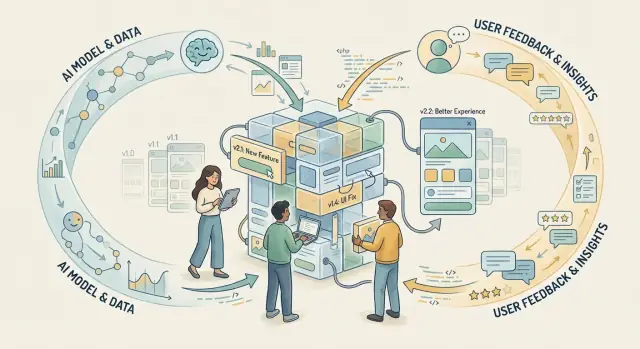
What “AI-first” Really Means (and What It Doesn’t)
“AI-first” doesn’t mean “we added a chatbot.” It means the product is designed so machine learning is a core capability—like search, recommendations, summarization, routing, or decision support—and the rest of the experience (UI, workflows, data, and operations) is built to make that capability reliable and useful.
AI-first, in plain terms
An AI-first application treats the model as part of the product’s engine, not a decorative feature. The team assumes outputs may vary, inputs will be messy, and quality improves through iteration rather than a single “perfect” release.
What AI-first is not
It’s not:
- A bolt-on feature that lives in one corner of the app and is hard to measure.
- A model demo mistaken for a product (great outputs in a few examples, unclear value in real use).
- A promise of certainty, where the model is expected to be right 100% of the time.
The mindset shift: optimize for learning
Traditional software rewards getting requirements “right” up front. AI products reward learning quickly: what users actually ask for, where the model fails, which data is missing, and what “good” looks like in your context.
That means you plan for change from day one—because change is normal. Models update, providers change behavior, new data arrives, and user expectations evolve. Even if you never swap models, the world your model reflects will keep moving.
What this article will help you do
The rest of this guide breaks the AI-first approach into practical, repeatable steps: defining outcomes, shipping a small MVP that teaches you the most, keeping AI components replaceable, setting up evaluation before you optimize, monitoring drift, adding safety guardrails and human review, and managing versioning, experiments, rollbacks, cost, and ownership.
The goal isn’t perfection. It’s a product that gets better on purpose—without breaking every time the model changes.
Why Perfection Breaks Down Faster in AI Products
Traditional software rewards perfectionism: you spec the feature, write deterministic code, and if the inputs don’t change, the output won’t either. AI products don’t work that way. Even with identical application code, the behavior of an AI feature can shift because the system has more moving parts than a typical app.
The real moving parts (beyond “the model”)
An AI feature is a chain, and any link can change the outcome:
- User needs and context: what people ask for, how they phrase it, what “good” looks like today.
- Data: new documents, outdated content, missing fields, changing distributions.
- Prompts and instructions: small wording tweaks, different system messages, new tools.
- Model versions and providers: upgrades, deprecations, altered safety behavior, different defaults.
- Costs and latency: token pricing changes, rate limits, peak-time slowdowns.
- Regulations and policy: privacy requirements, retention rules, consent expectations.
Perfection in one snapshot doesn’t survive contact with all of that.
Why drift happens when code doesn’t change
AI features can “drift” because their dependencies evolve. A vendor may update a model, your retrieval index may refresh, or real user questions may shift as your product grows. The result: yesterday’s great answers become inconsistent, overly cautious, or subtly wrong—without a single line of app code changing.
The hidden cost of perfectionism
Trying to “finalize” prompts, pick the “best” model, or tune every edge case before launch creates two problems: slow shipping and stale assumptions. You spend weeks polishing in a lab environment while users and constraints move on. When you finally ship, you learn the real failures were elsewhere (missing data, unclear UX, wrong success criteria).
A better goal: adapt without breaking trust
Instead of chasing a perfect AI feature, aim for a system that can change safely: clear outcomes, measurable quality, controlled updates, and fast feedback loops—so improvements don’t surprise users or erode confidence.
Design Around Outcomes, Not Model Capabilities
AI products go wrong when the roadmap starts with “Which model should we use?” instead of “What should a user be able to do afterward?” Model capabilities change quickly; outcomes are what your customers pay for.
Define success in plain language
Start by describing the user outcome and how you’ll recognize it. Keep it measurable, even if it’s not perfect. For example: “Support agents resolve more tickets on the first reply” is clearer than “The model generates better responses.”
A helpful trick is to write a simple job story for the feature:
- When I’m handling a complicated customer question,
- I want a suggested draft that cites our policy and previous case notes,
- So I can reply in under 3 minutes without missing key details.
This format forces clarity: context, action, and the real benefit.
List constraints before you pick a model
Constraints shape the design more than model benchmarks. Write them down early and treat them as product requirements:
- Safety/trust: What topics require refusal, escalation, or extra verification?
- Privacy/compliance: What data is allowed in prompts and logs?
- Latency: How fast does the experience need to feel “instant”?
- Budget: What’s your target cost per task (or per user)?
- Accuracy needs: What is unacceptable failure vs. acceptable imperfection?
These decisions determine whether you need retrieval, rules, human review, or a simpler workflow—not just a “bigger model.”
Define “good enough” for v1
Make v1 explicitly narrow. Decide what must be true on day one (e.g., “never invent policy citations,” “works for the top 3 ticket categories”) and what can wait (multi-language, personalization, advanced tone controls).
If you can’t describe v1 without naming a model, you’re still designing around capabilities—not outcomes.
Start Small: The AI MVP That Teaches You the Most
An AI MVP isn’t a “mini version of the final product.” It’s a learning instrument: the smallest slice of real value you can ship to real users so you can observe where the model helps, where it fails, and what actually needs to be built around it.
Pick a narrow v1 that ships fast
Choose one job the user already wants done and constrain it aggressively. A good v1 is specific enough that you can define success, review outputs quickly, and fix issues without redesigning everything.
Examples of narrow scopes:
- Draft a reply for one message type (e.g., “refund request”) instead of “handle support.”
- Summarize one document format (e.g., sales call transcript) instead of “summarize anything.”
- Extract a small set of fields (e.g., name, date, amount) instead of “parse all details.”
Keep inputs predictable, limit output formats, and make the default path simple.
Separate must-have flows from nice-to-have enhancements
For v1, focus on the minimum flows that make the feature usable and safe:
- Must-have: clear user intent, one primary action, basic error handling, and an easy way to correct the AI.
- Nice-to-have: advanced customization, multiple tones/styles, long history memory, automation, and integrations.
This separation protects your timeline. It also keeps you honest about what you’re trying to learn versus what you hope the model can do.
Roll out in stages, not all at once
Treat launch as a sequence of controlled exposures:
- Internal testing: dogfood with your team, capture failure cases, and build a review habit.
- Limited beta: a small group of friendly users and a clear feedback channel.
- Broader release: expand only after you’ve stabilized the top issues.
Each stage should have “stop” criteria (e.g., unacceptable error types, cost spikes, or user confusion).
Set a learning window and what you’ll measure
Give the MVP a target learning period—typically 2–4 weeks—and define the few metrics that will decide the next iteration. Keep them outcome-based:
- Task completion rate (with and without AI)
- Time saved per task
- Edit rate / acceptance rate
- Top failure categories (tracked weekly)
- Cost per successful outcome
If the MVP can’t teach you quickly, it’s probably too big.
Build for Replaceability: Modular AI Components
AI products change because the model changes. If your app treats “the model” as a single baked-in choice, every upgrade turns into a risky rewrite. Replaceability is the antidote: design your system so prompts, providers, and even whole workflows can be swapped without breaking the rest of the product.
A simple modular blueprint
A practical architecture separates concerns into four layers:
- UI layer: collects user intent, shows results, gathers feedback.
- Orchestration layer: decides what to do next (tools to call, steps to run, fallbacks).
- Model layer: the single gateway to LLMs (and other models), with consistent inputs/outputs.
- Data layer: retrieval, permissions, logging, and storage.
When these layers are cleanly separated, you can replace a model provider without touching the UI, and you can rework orchestration without rewriting your data access.
Keep providers interchangeable
Avoid scattering vendor-specific calls across the codebase. Instead, create one “model adapter” interface and keep provider details behind it. Even if you don’t switch vendors, this makes it easier to upgrade models, add a cheaper option, or route requests by task.
// Example: stable interface for any provider/model
export interface TextModel {
  generate(input: {
    system: string;
    user: string;
    temperature: number;
    maxTokens: number;
  }): Promise<{ text: string; usage?: { inputTokens: number; outputTokens: number } }>;
}
Prefer configuration over code changes
Many “iterations” shouldn’t require a deployment. Put prompts/templates, safety rules, thresholds, and routing decisions in configuration (with versioning). That lets product teams adjust behavior quickly while engineering focuses on structural improvements.
Define safe swap points
Make the boundaries explicit: what inputs the model receives, what outputs are allowed, and what happens on failure. If you standardize the output format (e.g., JSON schema) and validate it at the boundary, you can replace prompts/models with far less risk—and roll back quickly when quality dips.
A note on tooling: shipping fast without locking yourself in
If you’re using a vibe-coding platform like Koder.ai to stand up an AI MVP, treat it the same way: keep model prompts, orchestration steps, and integration boundaries explicit so you can evolve components without rewriting the whole app. Koder.ai’s snapshots and rollback workflow map well to the “safe swap points” idea—especially when you’re iterating quickly and want a clear way to revert after a prompt or model change.
Measure What Matters: Evaluation Before Optimization
Shipping an AI feature that “works on my prompt” is not the same as shipping quality. A demo prompt is hand-picked, the input is clean, and the expected answer lives in your head. Real users arrive with messy context, missing details, conflicting goals, and time pressure.
Evaluation is how you turn intuition into evidence—before you spend weeks tuning prompts, swapping models, or adding more tooling.
From “it looks good” to repeatable quality
Start by writing down what “good” means for this feature in plain language. Is the goal fewer support tickets, faster research, better document drafts, fewer mistakes, or higher conversion? If you can’t describe the outcome, you’ll end up optimizing the model’s output style instead of the product result.
Build a small evaluation set (that hurts a little)
Create a lightweight eval set of 20–50 real examples. Mix:
- Typical cases: what you expect most users to do
- Edge cases: ambiguous requests, missing context, long inputs, tricky formatting, sensitive topics, and “I changed my mind” follow-ups
Each example should include the input, the context the system has, and a simple expected outcome (not necessarily a perfect “gold answer”—sometimes it’s “asks a clarifying question” or “refuses safely”).
Track outcome-aligned metrics
Choose metrics that match what your users value:
- Success rate (task completed correctly)
- Time saved (steps reduced, minutes avoided)
- User satisfaction (thumbs up/down, short survey, retention)
Avoid proxy metrics that look scientific but miss the point (like average response length).
Add qualitative review loops
Numbers won’t tell you why something failed. Add a quick weekly spot-check of a handful of real interactions, and collect lightweight feedback (“What was wrong?” “What did you expect?”). This is where you catch confusing tone, missing context, and failure patterns your metrics won’t reveal.
Once you can measure the outcome, optimization becomes a tool—not a guess.
Assume Change: Monitoring, Drift, and Fast Feedback
AI features don’t “settle.” They move as users, data, and models move. If you treat your first good result as a finish line, you’ll miss a slow decline that only becomes obvious when customers complain.
What to watch (beyond uptime)
Traditional monitoring tells you whether the service is running. AI monitoring tells you whether it’s still helpful.
Key signals to track:
- Quality drops: lower acceptance rates, fewer “thumbs up,” more manual edits, reduced task completion.
- User complaints: spikes in support tickets, repeated “this is wrong,” or specific confusion patterns.
- Cost spikes: rising tokens/compute per request, more retries, higher context lengths.
- Latency increases: longer response times, timeouts, or degraded performance during peak load.
Treat these as product signals, not just engineering metrics. A one-second latency increase may be acceptable; a 3% rise in incorrect answers may not.
Drift: why “it worked yesterday” isn’t a guarantee
Drift is the gap between what your system was tested on and what it faces now. It happens for multiple reasons:
- Data changes: customer vocabulary shifts, seasonality, new SKUs, new policies.
- Model updates: vendor releases, fine-tuning changes, different safety filters.
- New use cases: users push the feature into workflows you didn’t design for.
Drift isn’t a failure—it’s a fact of shipping AI. The failure is noticing too late.
Alerts, owners, and incident response
Define alert thresholds that trigger action (not noise): “refund requests +20%,” “hallucination reports >X/day,” “cost/request >$Y,” “p95 latency >Z ms.” Assign a clear responder (product + engineering), and keep a short runbook: what to check, what to roll back, how to communicate.
Keep a changelog for accountability
Track every meaningful change—prompt edits, model/version swaps, retrieval settings, and configuration tweaks—in a simple changelog. When quality shifts, you’ll know whether it’s drift in the world or drift in your system.
Safety and Trust: Guardrails and Human-in-the-Loop
AI features don’t just “fail”—they can fail loudly: sending the wrong email, leaking sensitive info, or giving confident nonsense. Trust is built when users see the system is designed to be safe by default, and that someone is accountable when it isn’t.
Guardrails: filters, blocked actions, safe defaults
Start by deciding what the AI is never allowed to do. Add content filters (for policy violations, harassment, self-harm guidance, sensitive data), and block risky actions unless specific conditions are met.
For example, if the AI drafts messages, default to “suggest” rather than “send.” If it can update records, restrict it to read-only until a user confirms. Safe defaults reduce blast radius and make early releases survivable.
Human review where impact is high
Use human-in-the-loop for decisions that are hard to reverse or have compliance risk: approvals, refunds, account changes, legal/HR outputs, medical or financial guidance, and customer escalations.
A simple pattern is tiered routing:
- Low impact: AI acts with guardrails (auto-suggest)
- Medium impact: AI acts, but requires confirmation
- High impact: AI proposes, human approves
Communicate uncertainty clearly
Users don’t need model internals—they need honesty and next steps. Show uncertainty through:
- Confidence signals (e.g., “Likely” vs “Not sure”)
- Citations or links to source data when available
- Clear options: “Review,” “Ask a follow-up,” “Escalate to support”
When the AI can’t answer, it should say so and guide the user forward.
Rollback plan for quality drops
Assume quality will dip after a prompt or model change. Keep a rollback path: version prompts/models, log which version served each output, and define a “kill switch” to revert to the last known good configuration. Tie rollback triggers to real signals (spike in user corrections, policy hits, or failed evaluations), not gut feeling.
Iteration Discipline: Versioning, Experiments, and Rollbacks
AI products improve through frequent, controlled change. Without discipline, each “small tweak” to a prompt, model, or policy becomes a silent product rewrite—and when something breaks, you can’t explain why or recover quickly.
Treat prompts and configs like code
Your prompt templates, retrieval settings, safety rules, and model parameters are part of the product. Manage them the same way you manage application code:
- Version everything (prompts, system messages, tool schemas, policies, thresholds).
- Require reviews for changes that affect user-facing behavior.
- Add test gates: automated checks that run before a change can ship (for example, regression evals on a small reference set).
A practical trick: store prompts/configs in the same repo as the app, and tag every release with the model version and configuration hash. That alone makes incidents easier to debug.
Run experiments, not guesses
If you can’t compare, you can’t improve. Use lightweight experiments to learn quickly while limiting blast radius:
- A/B tests when you have enough traffic and clear success metrics.
- Staged rollouts (5% → 25% → 100%) when behavior is hard to predict.
- Shadow mode when you want to measure a new approach without affecting users (run it in parallel, log results).
Keep experiments short, with a single primary metric (e.g., task completion rate, escalation rate, cost per successful outcome).
Make rollback a first-class feature
Every change should ship with an exit plan. Rollback is easiest when you can flip a flag to revert to the last known-good combination of:
- model
- prompt/config
- safety policy
Define “done” with operational readiness
Create a definition of done that includes:
- Evaluation readiness: what dataset, what metrics, and what thresholds must pass.
- Monitoring readiness: what you’ll track after release (quality signals, costs, errors) and who is on point.
- Decision notes: a short log of why you changed a model, prompt, or policy—so future you can repeat wins and avoid past mistakes.
Operational Reality: Cost, Ownership, and Maintainability
AI features don’t “ship and forget.” The real work is keeping them useful, safe, and affordable as data, users, and models change. Treat operations as part of the product, not an afterthought.
Build vs. buy: a simple decision filter
Start with three criteria:
- Speed: If you need value in weeks, buying (hosted LLMs, managed vector DBs, labeling tools) usually wins.
- Control: If you need strict data residency, custom behavior, or deep integration, building (or self-hosting) can be worth it.
- Risk: If mistakes carry high legal/brand impact, choose the option that gives you clearer guarantees—often buy for mature safety/compliance features, or build when you must verify every step.
A practical middle path is buy the foundation, build the differentiator: use managed models/infrastructure, but keep your prompts, retrieval logic, evaluation suite, and business rules in-house.
Budget for the costs that don’t show up in the demo
AI spend is rarely just “API calls.” Plan for:
- Inference: per-request model costs, plus peak traffic headroom.
- Storage: logs, conversation history, embeddings, and datasets.
- Labeling and review: human feedback, gold sets, and QA time.
- Monitoring tooling: quality dashboards, safety filters, alerting, and incident tracking.
If you publish pricing, link the AI feature to an explicit cost model so teams aren’t surprised later (see /pricing).
Assign clear ownership (or it won’t happen)
Define who is on the hook for:
- Evaluations: maintaining test sets, running release gates, and approving changes.
- Incident response: handling hallucination spikes, harmful outputs, or outages.
- Updates: model/version upgrades, prompt changes, retriever tuning, and rollback procedures.
Make it visible: a lightweight “AI service owner” role (product + engineering) and a recurring review cadence. If you’re documenting practices, keep a living runbook in your internal /blog so lessons compound instead of resetting each sprint.
Where Koder.ai can fit in an AI-first operating model
If your bottleneck is turning an idea into a working, testable product loop, Koder.ai can help you get to the first real MVP faster—web apps (React), backends (Go + PostgreSQL), and mobile apps (Flutter) built through a chat-driven workflow. The key is to use that speed responsibly: pair rapid generation with the same evaluation gates, monitoring, and rollback discipline you’d apply in a traditional codebase.
Features like planning mode, source code export, deployment/hosting, custom domains, and snapshots/rollback are especially useful when you’re iterating on prompts and workflows and want controlled releases rather than “silent” behavior changes.
A Practical Checklist to Become AI-First (Without Chaos)
Being “AI-first” is less about picking the fanciest model and more about adopting a repeatable rhythm: ship → measure → learn → improve, with safety rails that let you move fast without breaking trust.
The mindset in one paragraph
Treat every AI feature as a hypothesis. Release the smallest version that creates real user value, measure outcomes with a defined evaluation set (not gut feeling), then iterate using controlled experiments and easy rollbacks. Assume models, prompts, and user behavior will change—so design your product to absorb change safely.
Copy/paste checklist (v1)
Use this as your “before we ship” list:
- V1 scope: One user job, one workflow, clear success criteria (e.g., “reduce handle time” or “increase completion rate”).
- Guardrails: Define what the AI must not do (restricted topics, privacy constraints, no irreversible actions without confirmation).
- Evaluation set: 30–200 real examples that represent typical and tricky cases; label what “good” looks like.
- Success metrics: One outcome metric (business/user) + one quality metric (accuracy/helpfulness) + one safety metric (policy violations).
- Human fallback: A clear escape hatch (manual review, “request help,” or “try again”) for low-confidence outputs.
- Monitoring: Log inputs/outputs, failures, latency, and user feedback signals; set alert thresholds.
- Versioning: Track model/prompt/config versions per request so you can compare releases.
- Rollback plan: One-click revert to the last known-good version; document who can trigger it and when.
A 30-day action plan (4 weeks)
Week 1: Pick the smallest valuable slice. Define the user outcome, constraints, and what “done” means for v1.
Week 2: Build the eval set and baseline. Collect examples, label them, run a baseline model/prompt, and record scores.
Week 3: Ship to a small cohort. Add monitoring, human fallback, and tight permissions. Run a limited rollout or internal beta.
Week 4: Learn and iterate. Review failures, update prompts/UX/guardrails, and ship v1.1 with a changelog and rollback ready.
If you do only one thing: don’t optimize the model before you can measure the outcome.
FAQ
What does “AI-first” mean in practice?
“AI-first” means the product is designed so that ML/LLMs are a core capability (e.g., search, recommendations, summarization, routing, decision support), and the rest of the system (UX, workflows, data, operations) is built to make that capability reliable.
It’s not “we added a chatbot.” It’s “the product’s value depends on AI working well in real use.”
What are common misconceptions about being AI-first?
Common “not AI-first” patterns include:
- A bolt-on AI feature that’s hard to measure.
- A model demo that looks good on curated prompts but doesn’t hold up with real users.
- An expectation of 100% correctness (no plan for uncertainty, drift, or fallbacks).
If you can’t explain the user outcome without naming a model, you’re likely building around capabilities, not outcomes.
How do I define success for an AI feature without getting stuck on model choice?
Start with the user outcome and how you’ll recognize success. Write it in plain language (and ideally as a job story):
- When …
- I want …
- So I can …
Then pick 1–3 measurable signals (e.g., time saved, task completion rate, first-reply resolution) so you can iterate based on evidence, not aesthetics.
What constraints should I decide before choosing a model?
List constraints early and treat them as product requirements:
- Safety/trust boundaries (what must be refused or escalated)
- Privacy/compliance limits (what data can enter prompts/logs)
- Latency targets (what feels “instant”)
- Budget (target cost per task/user)
- Accuracy needs (unacceptable vs. tolerable errors)
These constraints often determine whether you need retrieval, rules, human review, or a narrower scope—not just a bigger model.
What does a “good” AI MVP look like?
A good AI MVP is a learning instrument: the smallest real value you can ship to observe where AI helps and where it fails.
Make v1 narrow:
- One job (e.g., “draft replies for refund requests”)
- Predictable inputs
- Constrained output format
Set a 2–4 week learning window and decide upfront what metrics will determine the next iteration (acceptance/edit rate, time saved, top failure categories, cost per success).
How should I roll out an AI feature to reduce risk?
Roll out in stages with explicit “stop” criteria:
- Internal dogfooding (collect failure cases)
- Limited beta (small cohort + clear feedback channel)
- Broader release (only after top issues stabilize)
Define stop triggers like unacceptable error types, cost spikes, or user confusion. Treat launch as controlled exposure, not a single event.
How do I make AI components replaceable (so model changes don’t break the product)?
Design for modular swap points so upgrades don’t require rewrites. A practical separation is:
- UI layer (intent + feedback)
- Orchestration layer (steps, tools, fallbacks)
- Model layer (single gateway with stable I/O)
- Data layer (retrieval, permissions, logging)
Use a provider-agnostic “model adapter” and validate outputs at the boundary (e.g., schema validation) so you can switch models/prompts safely—and roll back quickly.
How do I evaluate quality before I start optimizing prompts and models?
Create a small eval set (often 20–50 real examples to start) that includes typical and edge cases.
For each example, record:
- Input
- Context the system has
- Expected outcome (not always a “gold answer”—sometimes “ask a clarifying question” or “refuse safely”)
Track outcome-aligned metrics (success rate, time saved, user satisfaction) and add a weekly qualitative review to understand why failures happen.
What should I monitor to detect drift and quality regressions?
Monitor signals that reflect whether the system is still helpful, not just “up”:
- Quality drops (acceptance rate, more edits, lower completion)
- Complaint spikes (“this is wrong,” support tickets)
- Cost spikes (tokens/request, retries)
- Latency increases (timeouts, p95 growth)
Maintain a changelog of prompt/model/retrieval/config updates so when quality shifts you can separate external drift from your own changes.
How do I build safety and trust into an AI-first product?
Use guardrails and human review proportional to impact:
- Default to suggest, not send
- Restrict to read-only until confirmation for risky actions
- Add content filters for sensitive topics and policy violations
- Use tiered routing:
- Low impact: AI suggests with guardrails
- Medium impact: requires confirmation
- High impact: AI proposes, human approves
Also treat rollback as a first-class feature: version prompts/configs/models per request and keep a kill switch to revert to the last known good setup.