

Build a Coaching Program Website With Funnel-Based Content
Learn how to structure a coaching website like a funnel: attract the right leads, capture emails, build trust, and convert visitors into calls and enrollments.
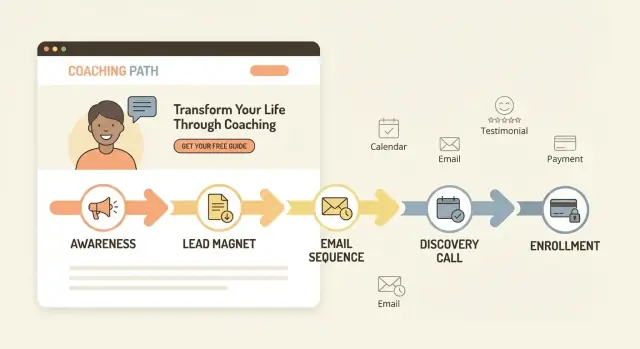
What Funnel-Based Content Means for Coaching Websites
Funnel-based content means your coaching website isn’t a set of disconnected pages or random blog posts—it’s a guided path. Each piece of content has a specific job: move the right visitor one step closer to a conversation (or an application) and, ultimately, enrollment.
Instead of optimizing for “more traffic,” you optimize for qualified action: email sign-ups from your ideal client, discovery call bookings, and program applications that make sense for both sides.
The goal: progression, not pressure
A good content funnel feels helpful and natural. Visitors should quickly understand who you help, what problem you solve, and what to do next—without hunting for links or reading a novel.
The core funnel stages we’ll use
In this guide, we’ll build content around a simple set of stages:
- Attract: content that matches real searches and questions (often blog posts and social links)
- Capture: a lead magnet and opt-in that turns visitors into subscribers
- Nurture: an email nurture sequence that builds trust and clarifies fit
- Convert: a coaching sales page that answers objections and invites the next step
- Enroll: a low-friction discovery call booking or application flow that makes saying “yes” easy
What you’ll have by the end
By the time you finish, you’ll have a clear website flow and the core assets to support it:
- A conversion-focused homepage that points to one primary next step
- A lead magnet + opt-in page (or section) and a thank-you step
- A short email sequence that prepares people to buy
- A sales page built around real client questions
- A booking or application setup that reduces drop-off
The result is a coaching website that acts like a system—turning attention into conversations and conversations into program enrollment.
Start With One Clear Offer and One Ideal Client
A funnel-based coaching website works best when it’s built around one clear promise for one specific type of person. If you try to speak to everyone, your copy gets vague—and vague sites don’t convert.
Define who it’s for (and who it’s not)
Start with a plain-English description of your ideal client. Include practical details (role, stage, situation) and a clear “not for” line to reduce mismatched inquiries.
For example:
- For: first-time managers leading former peers
- Not for: executives who already have a leadership team and want enterprise consulting
This kind of clarity makes your content feel personal, and it filters leads before they reach your inbox.
Pin down the problem, outcome, and objections
Your offer needs a tight triangle:
- Main problem: what’s painful right now (in their words)
- Desired outcome: what “better” looks like in daily life
- Common objections: why they hesitate (time, cost, “will this work for me?”)
When you name objections early, your pages feel honest—like you understand the decision.
Choose one primary conversion action
Pick a single next step and build the site around it: book a discovery call, apply, or buy now. Everything else is secondary.
One primary action keeps the funnel clean and makes your calls-to-action consistent across the homepage, about page, and program page.
Create a simple message map
A message map is a one-page reference that keeps your website copy consistent:
- One-sentence promise (what you help them achieve)
- 3–5 key benefits (specific, measurable where possible)
- Your method (a simple framework name is enough)
- Proof cues (results, credentials, differentiators)
- CTA phrasing (the exact button text you’ll repeat)
With this in place, writing each page becomes faster—and your funnel reads like one coherent conversation.
Plan Your Site Map Around the Funnel
Your site map should mirror the decisions a potential client needs to make: “Is this for me?”, “Do I trust you?”, and “What’s the next step?” When your pages match that sequence, your website feels simple—because it is.
Essential pages for most coaching funnels
Most coaching programs only need a handful of core pages to support a clean content funnel:
- Home: quick clarity + the primary next step
- About: credibility, your approach, who you help
- Offer / Program: what it is, outcomes, how it works, pricing (or “starting at”)
- Proof: testimonials, case studies, results, logos, credentials
- Book / Apply: one clear conversion action
- Blog: funnel-aligned articles that lead to your opt-in or next step
- Contact: for press, partnerships, and simple inquiries
- Legal: privacy policy, terms, disclaimers (especially for health/finance niches)
The recommended path (how visitors should move)
Design the site so visitors naturally flow in one direction.
For organic/content traffic:
Blog → Offer (or Proof) → Book/Apply
For direct traffic:
Home → Offer → Proof → Book/Apply
Your navigation should support this, not compete with it. A good rule: keep the top menu to 4–6 items (Home, Offer, About, Proof, Blog, Book/Apply). Everything else can live in the footer.
Application vs calendar booking (when to use which)
Choose calendar booking when:
- your program is lower-priced or straightforward
- you serve a clear niche and don’t need heavy screening
- you want speed and fewer steps
Choose an application when:
- your program is premium, high-touch, or limited-capacity
- you need to qualify fit (goals, budget, readiness)
- you want to reduce no-shows and “just curious” calls
Either way, the Book/Apply page should be the primary destination across the site—so every page answers questions and then points to that next step.
Build a Homepage That Moves Visitors to the Next Step
Your homepage isn’t the place to explain everything. Its job is to help the right person quickly think, “This is for me,” and then take one clear next step.
Start with the purpose: clarity + direction
A conversion-focused homepage should do two things within the first screen:
- Clarify who you help (specific person + specific outcome)
- Direct them to the next step (one primary call-to-action)
If visitors have to “figure out” what you do, they’ll bounce—even if your coaching program is excellent.
A simple homepage order that works
Here’s a practical section flow you can copy:
- Headline + subheadline: who you help and what changes.
- Value in plain language: 3–5 short bullets or a tight paragraph on your approach.
- Proof: a few testimonials, client results, logos, or credibility markers.
- Offer snapshot: what the program is, who it’s for, and what they get (high level).
- Primary CTA section: repeat the same next step with a clear button.
Keep it skimmable. Most people won’t read top to bottom—they’ll scan for relevance.
Strong CTA examples (choose one primary)
Make your button text match the commitment level:
- “Book a discovery call” (high intent, good for premium coaching)
- “Download the guide” (ideal for first-time visitors)
- “Take the quiz” (great when you want segmentation)
You can include a secondary link (like “View the program”), but don’t give five equal options.
Accessibility and mobile readability basics
Use short paragraphs, clear headings, and high-contrast text. Buttons should be large enough for thumbs, with action-focused labels (not “Submit”). Avoid walls of text, and make sure your primary CTA is easy to find on mobile.
Create a Lead Magnet and a Simple Opt-In Flow
A lead magnet is the “first yes” in your content funnel: a small, valuable resource someone can get in exchange for their email. For coaching, the best lead magnets don’t try to teach everything—they create momentum and prove your approach works.
What makes a great coaching lead magnet
A good lead magnet is:
- A quick win: something they can use in 10–20 minutes (clarity, a decision, a plan for the next step)
- Specific: aimed at one situation and one type of person (your ideal client)
- Credible: it reflects how you coach—your framework, your language, your point of view—so the right people feel understood
Lead magnet ideas that work well for coaches
Pick a format you can create in a day and improve later:
- Checklist: “Before you book a discovery call, check these 7 readiness signs.”
- Template: a weekly planning template, reflection journal, boundary script, or goal-setting worksheet
- Mini training (10–15 minutes): one concept + one exercise (host it as a simple video or audio)
- Quiz: a short self-assessment that ends with a tailored next step
- Email course (3–5 days): one lesson per day that builds toward your method
Opt-in page essentials (keep it simple)
Your opt-in page should be focused and scannable:
- One clear promise (headline): what they’ll get and the outcome it supports
- 3–5 benefit bullets: results and relief, not features
- A quick preview: what’s inside (modules, pages, sections, or a “what you’ll complete” outline)
- One call to action: email field + a button with action language (e.g., “Send me the template”)
- Privacy note: one line like “No spam. Unsubscribe anytime.”
A thank-you page that guides the next action
Don’t end the experience at “Thanks.” Use the thank-you page to guide one next step:
- Warm action: invite them to /book a call or /apply if they’re ready
- Helpful action: link to your best starter post or a short “what to do next” video
- Expectation setting: tell them when the resource arrives and what email to look for
This flow is small, but it’s where your website starts turning attention into real conversations.
Write an Email Nurture Sequence That Prepares People to Buy
An email nurture sequence turns a new subscriber into a confident, informed lead. The goal isn’t to “sell harder”—it’s to build trust, deliver a few real wins, and calmly handle objections people already have (time, money, “will this work for me?”, fear of failing again).
A simple 6-email nurture sequence (copy-and-paste structure)
Email 1 — Welcome + set expectations (Day 0)
Deliver the lead magnet, tell them what to expect next, and ask one quick reply question (“What are you struggling with most?”).
Email 2 — Quick win (Day 1–2)
Teach one small step they can do in 10 minutes. Keep it specific.
Email 3 — Your story + the “before/after” (Day 3–4)
Share a short turning-point story that explains why your approach exists.
Email 4 — Handle a common objection (Day 5–6)
Pick one: time, consistency, confidence, support, or past failures. Show a reframe and a practical example.
Email 5 — Proof (Day 7–9)
Share a client result with context: starting point, what you changed, and the outcome.
Email 6 — Invite (Day 10–12)
Explain who your program is for, what happens next, and invite them to take one clear action.
What to link inside your emails
Keep links minimal and intentional:
- One helpful blog post: /blog (or a specific post)
- One case study or testimonial page: /case-studies
- Your booking or application page: /book or /apply
Keep emails helpful (and compliant)
Use honest subject lines (no tricks), include your mailing address if required by your email provider, and always add a clear unsubscribe link. Most importantly: write like a coach, not a billboard—every email should stand on its own as useful, even if the reader never buys.
Design a Coaching Sales Page That Answers Real Questions
A coaching sales page isn’t just a “buy now” pitch. Its job is to qualify (help the wrong people self-select out), educate (clarify what changes and how), and invite action (book a call, apply, or enroll) with zero confusion about the next step.
A simple sales page structure that converts
1) The outcome (and a believable promise)
Lead with the result your client wants, plus a short line on what makes it realistic (timeframe, effort, support level).
2) Who it’s for (and who it’s not for)
Be specific: situation, goals, and readiness. A quick “not for you if…” reduces mismatched calls.
3) Your method (the path, not your life story)
Explain your approach in 3–5 steps. Keep it practical so readers can picture themselves doing it.
4) What’s included
Spell out deliverables: session frequency, messaging support, templates, community, feedback, and any boundaries (response times, office hours).
5) FAQ + objections
Use real questions from DMs and consults.
6) CTA (one primary action)
Repeat the same button and wording throughout (e.g., “Apply Now” or “Book a Discovery Call”). Link to /apply or /book.
Pricing: three clean options
- Public pricing: best for straightforward programs and higher trust
- “Starting at” pricing: useful with tiers or customization
- Call-first (no price shown): acceptable for premium/limited spots—just explain what the call decides and who it’s for
Objections you should address directly
Cover the big four: time, money, fit (“Will this work for someone like me?”), and fear of failure (“What if I don’t follow through?”). When your page answers these calmly, your calls become shorter—and more qualified.
Add Trust Builders: Testimonials, Case Studies, and Credibility
People don’t buy coaching because the website is pretty—they buy because they trust you can help them get a specific result. Trust builders reduce the “is this for real?” feeling and make the next step (opt-in, booking, applying) feel safe.
Types of proof that work (and why)
Use a mix so visitors can find the kind of validation they personally rely on:
- Testimonials: quick social proof that your work is helpful and supportive
- Mini case studies: a short story showing the starting point, what happened, and the outcome
- Metrics with context: “reduced weekly overwhelm from 8/10 to 3/10 in 6 weeks” (paired with who it was for and what you did)
- Credentials and credibility signals: relevant certifications, professional background, media mentions, training, partnerships, or notable clients (only if they matter to the offer)
How to get testimonials that sound specific (not generic)
When asking, prompt clients with questions that create a clear before/after:
- Before: What was your situation? What had you tried?
- During: What did we focus on together? What felt different?
- After: What changed (results, habits, confidence, decisions)?
- Result detail: Timeframe, measurable outcomes, or a concrete moment (“I finally had the conversation…”)
Example structure you can edit into a strong testimonial:
“Before coaching, I was ____. After __ weeks, I ____. The most helpful part was ____. I’d recommend this to ____.”
Ethical proof (that keeps you credible)
Get written permission to publish. Don’t imply guarantees (“you will earn $10k/month”) or hide important context. If you share metrics, add a brief note like “results vary based on effort and circumstances.”
Where to place proof across your funnel
Add proof in small doses, repeatedly:
- Homepage: one strong testimonial near the primary call-to-action
- Sales page: testimonials next to key objections (time, cost, fit) + 1–2 mini case studies
- Emails: short client wins that match the reader’s current struggle
- Booking/application page: a reassurance block (“what it’s like to work together”) with 2–3 relevant quotes
Set Up Booking or Applications Without Friction
Your “next step” should match your offer and your buyer’s readiness. If you make people jump through hoops too early—or let unqualified leads book your calendar—you’ll feel it fast.
“Book a call” vs “Apply” vs “Buy now”
Book a call works best when:
- Your program is mid-to-high ticket and needs a quick fit check
- The offer is clear, but prospects have questions
Apply is better when:
- You have limited spots, strict eligibility, or a high-touch delivery model
- You want to filter for commitment before spending time on calls
Buy now fits when:
- The program is lower ticket, well-defined, and doesn’t require approval
- You can deliver onboarding and expectations clearly after purchase
What a high-converting booking page includes
Keep this page simple and specific:
- Who it’s for: 3–5 bullets describing the ideal client (and a short “not a fit” note)
- What happens on the call: reassurance that it’s a conversation, not a lecture
- Agenda: goals → current blockers → whether your program matches → next steps
- Time + format: duration, Zoom/phone, and what to prepare
- One CTA: the scheduler embed/button—nothing else competing
Use a short pre-call questionnaire
Aim for 5–8 fields to qualify without creating friction:
- What outcome are you trying to achieve in the next 90 days?
- What have you tried already?
- Biggest obstacle right now?
- Timeline to start?
- Investment range (optional, but clarifying)
- Anything that would make this a “no”?
Reduce no-shows with confirmations and reminders
Set up an immediate confirmation email with the calendar invite, the meeting link, and what to bring.
Add reminders (e.g., 24 hours and 1 hour before). If you use applications, send a status email (“received,” “approved,” or “not a fit”) so people aren’t left guessing.
Publish Funnel-Aligned Blog Content That Feeds the Opt-In
Your blog isn’t “extra content”—it’s the top of your content funnel. Each post should attract the right person (awareness), help them name their problem (clarity), and give them a next step that leads to your opt-in (action).
If a reader finishes a post and doesn’t know what to do next, the funnel breaks.
Turn posts into awareness → opt-in
Write posts that solve one small, specific problem your ideal client is already searching for. Teach just enough to create momentum, then offer a lead magnet that continues the same thread.
Example: a post about “why you keep procrastinating” can naturally invite a checklist like “The 10-minute reset routine” via /free-guide.
Blog topic templates (pick 6–10)
Use these as plug-and-play formats aligned to common coaching stages:
- Symptom-to-root-cause: “If you’re experiencing ___, it might be because ___.”
- Mistakes list: “5 mistakes keeping you from ___ (and what to do instead).”
- Myth-busting: “No, you don’t need ___ to ___.”
- Quick win framework: “The 3-step plan to ___ in 15 minutes a day.”
- Decision post: “Should you ___ or ___? A simple test.”
- Readiness/self-assessment: “Are you ready for ___? 7 signs to look for.”
- Objection handler: “What if ___? How to move forward without ___.”
- Case-style breakdown: “How a client went from ___ to ___ (without ___).”
- Toolbox post: “My go-to scripts/templates for ___.”
Internal linking rules (keep it simple)
Every blog post should link to:
-
One opt-in that matches the post’s promise (e.g., /free-guide)
-
One business page that moves them closer to working with you—either /book for a call or /program for enrollment
Keep links contextual (inside sentences), not buried in a long list.
A simple content calendar
Start with 1 post per week (or biweekly if you’re busy). Aim for 900–1,400 words per post: long enough to be genuinely useful, short enough to finish in one sitting.
Publish consistently for 8–12 weeks, then double down on the posts that drive the most opt-ins.
Choose a Simple Tech Stack and Track the Right Actions
A conversion-focused coaching website doesn’t need a pile of software. It needs a few tools that work together and make the next step obvious for your visitor.
The essential tools (keep it lean)
At minimum, you’ll want:
- Website builder/CMS (where your pages and blog live)
- Email provider (to deliver your lead magnet and nurture subscribers)
- Forms/opt-in tool (embedded or pop-up, connected to your email list)
- Calendar + scheduling (for discovery call booking or application interviews)
- Analytics (to see what’s working and what’s not)
If your website builder already includes forms or basic email, you can start there and upgrade later.
If you want to move faster than a traditional build, a vibe-coding platform like Koder.ai can also be a practical option: you describe the funnel pages you need (home, program, opt-in, emails, booking flow) in a chat interface, then iterate quickly as you refine messaging. For teams that care about ownership and reliability, Koder.ai supports source code export, deployment/hosting, custom domains, and snapshots/rollback—useful when you’re testing funnel changes over time.
How to choose tools that won’t slow you down
Use these criteria to keep decisions simple:
- Ease of use: you should be able to edit copy and publish without help
- Cost: predictable monthly pricing; avoid paying for features you won’t use yet
- Integrations: native connections between forms → email → calendar, or a reliable connector
- Support: clear documentation and responsive help when something breaks
Track only the actions that map to enrollment
Skip vanity metrics and track a few key steps:
- Email signups (opt-in form submissions)
- Thank-you page views after an opt-in (a clean “conversion” signal)
- Booking completions (appointments actually scheduled, not just calendar page visits)
Use UTM links in your emails and social bios so you know what sources lead to signups and bookings.
Don’t forget the basic site pages
Create simple legal and trust pages such as /privacy and /terms. (This isn’t legal advice—if you’re unsure what you need, consult a qualified professional.)
Launch, Test, and Improve Your Funnel Over 30 Days
Launching isn’t the finish line—it’s the start of learning what your visitors actually do. A simple 30-day improvement cycle keeps you moving without constantly rebuilding your site.
Test the funnel end-to-end (before you announce it)
Go through your funnel like a brand-new visitor on desktop and mobile. Do it yourself, then ask one friend to do it while you watch.
Check every step:
- Every link works (nav, buttons, footer, emails) and goes to the right page
- Every form submits and shows a clear confirmation message
- Your opt-in triggers the right email and the download/thank-you page appears
- Your booking/application flow works, including time zones and confirmation emails
- Payment/enrollment steps (if any) are clear and error-free
If you use tracking, confirm that key events fire: opt-in, booking, application submit, and purchase.
Small improvements that often lift conversions
You don’t need big redesigns. Start with a few quick tests:
- Headline test: make the first headline more specific (who it’s for + outcome + timeframe)
- CTA wording: replace “Submit” with “Get the guide” or “Book a discovery call”
- Proof placement: move one strong testimonial closer to the first CTA
- Reduce friction: cut extra fields on forms and remove distracting links on conversion pages
Change one thing at a time so you know what helped.
A simple 30-day iteration plan
Days 1–3: Fix obvious issues (broken links, confusing steps, mobile layout problems).
Days 4–10: Improve clarity: tighten headline, rewrite first CTA, add one proof block near the top.
Days 11–20: Review data weekly (page views, opt-in rate, booking rate). Collect 5–10 pieces of qualitative feedback: “What made you hesitate?”
Days 21–30: Run one focused experiment (new CTA wording, different lead magnet title, proof higher on the page). Keep what wins; revert what doesn’t.
Quick checklist + key links
- Clicked every link and button on mobile + desktop
- Tested opt-in, emails, downloads, and booking/application confirmation
- Made one conversion improvement (headline/CTA/proof)
- Reviewed numbers weekly and captured real visitor feedback
Key pages to review: /pricing, /contact, /blog
FAQ
What does “funnel-based content” mean for a coaching website?
Funnel-based content turns your website into a guided path where each page or post has a clear job (attract, capture, nurture, convert, enroll). Instead of chasing “more traffic,” you focus on qualified actions like email sign-ups, discovery call bookings, and applications from the right people.
Why do I need one clear offer and one ideal client to make the funnel work?
Because clarity converts. When you serve one clear ideal client with one clear promise, your copy becomes specific, your calls-to-action stay consistent, and you get fewer mismatched inquiries. If you try to speak to everyone, your message turns vague and visitors don’t know what to do next.
What are the core stages of a coaching content funnel?
Use these stages:
- Attract: blog posts that match real searches
- Capture: a lead magnet + opt-in
- Nurture: a short email sequence that builds trust and fit
- Convert: a sales page that answers questions and objections
- Enroll: a booking or application flow with low friction
Each stage should point to one next step so the visitor always knows where to go.
What pages do I actually need for a funnel-based coaching website?
A lean funnel-friendly site map usually includes:
- Home (clarity + primary CTA)
- About (credibility + approach)
- Offer/Program (outcomes, how it works, inclusions, pricing/starting at)
- Proof (testimonials/case studies)
- Book/Apply (the primary conversion page)
- Blog (top-of-funnel content)
- Contact (non-sales inquiries)
- Legal (e.g., /privacy, /terms)
Keep top navigation to 4–6 items and push everything else to the footer.
Should my primary CTA be “Book a call,” “Apply,” or “Buy now”?
Pick one primary action based on your offer:
- Book a discovery call: best when prospects need a fit check and have questions
- Apply: best for premium/high-touch or limited-capacity programs that need screening
- Buy now: best for lower-ticket, well-defined offers that don’t require approval
Then make that action the consistent CTA across your home, offer, proof, and blog content.
What should a high-converting coaching homepage include?
Aim for a homepage that delivers clarity + direction above the fold:
- A specific headline (who you help + outcome)
- A single primary CTA (same wording site-wide)
- A short section on your approach (3–5 bullets)
- Proof near the first CTA (testimonial/result)
- A brief offer snapshot and a repeated CTA
Keep paragraphs short and make the CTA easy to tap on mobile.
What makes a great lead magnet for coaches (and what formats work best)?
Choose something that creates a quick win in 10–20 minutes and matches your ideal client’s situation. Effective formats include:
- Checklist (readiness signs)
- Template (planning, scripts, worksheets)
- Mini training (10–15 minutes)
- Quiz (with a tailored next step)
- 3–5 day email course
Your opt-in page should focus on one promise, 3–5 benefit bullets, one email field, and a simple privacy note.
What should I put in an email nurture sequence for my coaching funnel?
A practical 6-email sequence is enough:
- Welcome + deliver the lead magnet (ask one reply question)
- Quick win (10-minute action)
- Your story (why your method exists)
- One objection (time, money, fit, fear of failure)
- Proof (a client result with context)
- Invite (who it’s for + one clear next step)
Keep links minimal: one helpful resource and one conversion link (e.g., /book or /apply).
How should a coaching sales page be structured to convert?
Use a structure that qualifies, clarifies, and invites:
- Outcome + a believable promise (timeframe/support)
- Who it’s for / not for
- Your method in 3–5 practical steps
- What’s included (and boundaries like response times)
- Objection-handling FAQ (time, money, fit, fear of failure)
- One repeated primary CTA linking to /book or /apply
If you don’t show pricing, explain what the call/application decides and who it’s intended for.
What should I track to know if my funnel-based content is working?
Track actions that map directly to enrollment:
- Email sign-ups (form submissions)
- Thank-you page views (clean conversion signal)
- Booking completions (appointments scheduled)
Use UTMs in emails and social links to see what sources drive sign-ups and calls. Then run small 30-day improvements (headline specificity, CTA wording, proof placement, fewer form fields) one change at a time.