

How to Build an HR Hiring Pipeline & Interview Web App
Learn how to plan, design, and build a web app for HR teams to manage hiring stages, interviews, feedback, permissions, integrations, and reporting.
Define goals and target users
Before you sketch screens or pick a tech stack, get specific about who you’re building for and what pain you’re removing. HR teams, recruiters, hiring managers, and interviewers experience the same hiring process very differently—and a “one size fits all” app often ends up pleasing no one.
Define the problem (in plain terms)
Write a short problem statement that describes the current friction:
- Where does work get stuck (handoffs, approvals, missing feedback)?
- What errors happen (duplicate candidates, lost notes, wrong stage)?
- What’s costly (slow scheduling, inconsistent decisions, poor visibility)?
Aim for something concrete like: “Hiring managers can’t see where candidates are, and interviews take too long to coordinate.”
Clarify what “pipeline” and “interview management” mean for your teams
“Pipeline” could mean a simple stage list (Applied → Screen → Onsite → Offer) or a more detailed workflow that changes by role or location. Likewise, “interview management” might include just scheduling, or also preparation (who interviews, what to cover), feedback collection, and final decisions.
Capture definitions with a few real examples:
- Typical stages for 2–3 job families
- Who moves candidates between stages
- What triggers an interview (and what “ready” means)
Decide build vs. buy—and your differentiator
Compare building to an applicant tracking system you could configure. Building is usually justified when you need a unique workflow, tighter integrations, or a simpler experience for a specific company size.
If you do build, write down what makes your app meaningfully different (for example: “fewer scheduling loops” or “manager-first visibility”).
Set success metrics you’ll actually track
Pick 3–5 metrics tied to daily work, such as:
- Time-to-hire and time-in-stage
- Number of scheduling back-and-forth messages
- Interview feedback completion rate within 24 hours
- Drop-off rate between key stages
- Stakeholder satisfaction (quick monthly pulse)
These goals will guide later choices like permissions, scheduling, and analytics (see /blog/create-reporting-and-analytics-hr-will-trust).
Map the hiring workflow and pipeline stages
Before you design screens or pick features, get clarity on how hiring actually moves through your organization. A well-mapped workflow prevents “mystery steps,” inconsistent stage names, and stalled candidates.
Start with the end-to-end flow
Most teams follow a core path like: sourcing → screening → interviews → offer. Write that flow down and define what “done” means for each step (for example, “Screening complete” might mean a phone screen is logged and a pass/fail decision is recorded).
Keep stage names action-oriented and specific. “Interview” is vague; “Hiring Manager Interview” and “Panel Interview” are clearer and easier to report on.
Capture common variations (without creating chaos)
Different departments will need different steps. Sales might include a role-play; engineering might include a take-home assignment; executive roles may require additional approvals.
Instead of one giant pipeline, map:
- A default pipeline template used by most roles
- A few approved variants (for example: Engineering, Leadership, High-Volume)
This keeps reporting consistent while still fitting real workflows.
Identify handoffs, bottlenecks, and ownership
For every stage, document:
- Owner: who must act next (recruiter, coordinator, hiring manager, interviewer)
- Inputs: what they need to proceed (resume, notes, availability, assignment results)
- Exit criteria: what must be recorded to move forward
Pay attention to where candidates stall—commonly between “screening → scheduling” and “interviews → decision.” These are prime spots for automation later.
Define notifications and reminders per step
List the moments where the app should nudge someone:
- New candidate assigned to a recruiter
- Interview feedback overdue after 24–48 hours
- Offer approval waiting on a specific stakeholder
Tie reminders to stage ownership so nothing relies on memory or inbox archaeology.
Decide MVP features and a phased roadmap
An HR web application can quickly balloon into a full applicant tracking system. The fastest way to ship something useful is to agree on a tight MVP, then plan the next releases so stakeholders know what’s coming (and what’s intentionally not in v1).
Pick an MVP scope that supports a full hiring loop
Your MVP should let a team move a real candidate from “applied” to “hired” without spreadsheets. A practical baseline is:
- Candidate profile: contact details, resume/attachments, role applied for, notes, tags
- Pipeline board: stages, drag-and-drop movement, basic filters, activity timeline
- Interview scheduling: propose times, confirm attendees, calendar invites
- Feedback: scorecards, comments, decision (advance/reject), visibility rules
If a feature doesn’t help move candidates through stages or reduce coordination overhead, it’s likely not MVP.
Prioritize with impact vs. effort (and risk)
Create a simple matrix with “candidate throughput/time saved” on one axis and “build complexity” on the other. Treat these as must-have for v1: reliable pipeline status, scheduling that actually works, and feedback that’s easy to submit.
Push nice-to-have items (automation rules, advanced analytics, AI summaries) to later phases—especially anything that adds compliance or data risk.
Decide what’s configurable vs. hard-coded
HR teams rarely work the same way. Define what admins can configure from day one:
- Pipeline stages (names, order, optional stage-level requirements)
- Scorecards (criteria, rating scale, required fields)
- Email templates (rejection, next steps, interview confirmation)
Keep configurations bounded so the UI stays simple and supportable.
Document key user stories by role
Write a short set of user stories for:
- HR admins (create roles, stages, templates, compliance settings)
- Recruiters (add candidates, move stages, schedule interviews, message candidates)
- Interviewers (see assigned interviews, submit scorecards quickly)
- Hiring managers (review pipeline, compare finalists, approve decisions)
These stories become your acceptance checklist for v1 and a clean phased roadmap for v2/v3.
Design the data model and relationships
A hiring app lives or dies on its data model. If the relationships are clear, you can add features (new pipeline stages, scheduling, reporting) without rewriting everything.
Core entities to start with
Plan a small set of “source of truth” tables/collections:
- Candidate: person-level profile (name, email, phone, location, links)
- Job: the role you’re hiring for (title, department, hiring manager, status)
- Application: the join between Candidate and Job (more on this below)
- Stage: pipeline steps (for example: Applied, Screen, Onsite, Offer), often defined per job
- Interview: scheduled event tied to an application (time, interviewers, type)
- Feedback: evaluation entries tied to an interview or application
- User: recruiters, interviewers, admins
In practice, Application becomes the anchor for most workflow data: stage changes, interviews, decisions, and offers.
Model the many-to-many reality
Candidates often apply to multiple jobs, and jobs have many candidates. Use:
- Candidate (1) → Application (many)
- Job (1) → Application (many)
This avoids duplicating candidate data and lets you track job-specific status, compensation expectations, and decision history per application.
Files, notes, and communication history
For resumes and attachments, store metadata in your database (file name, type, size, uploaded_by, timestamps) and keep the binary files in object storage.
Notes and messages should be first-class records:
- Note (application_id, author_id, body, visibility)
- Communication (application_id, channel, direction, subject, body/summary, sent_at)
This structure makes search and reporting much easier later.
Audit trails you’ll thank yourself for
Add an AuditEvent table early to record changes to stages, offers, and evaluations:
- who changed it (user_id)
- what changed (entity + field)
- before/after values
- when it happened
This supports accountability, debugging, and HR trust when someone asks, “Why was this candidate moved to Rejected?”
Set up roles, permissions, and access rules
Permissions are where HR apps earn trust—or lose it. A clear access model prevents accidental oversharing (like compensation details) and makes collaboration smoother.
Define the core roles
Start with a small set of roles that match how hiring decisions are actually made:
- HR admin: manages org settings, templates, data retention, and global permissions
- Recruiter: owns jobs, moves candidates through stages, communicates with candidates
- Hiring manager: reviews candidates for their roles, requests interviews, makes decisions
- Interviewer: sees only what they need to interview and submit feedback
- Viewer: read-only access for stakeholders (for example: finance partner or exec sponsor)
Keep roles consistent, then allow fine-grained exceptions with “overrides” rather than creating dozens of custom roles.
Protect sensitive fields with field-level rules
Not all candidate data should be visible to everyone. Define permission rules per category/field, not just per page:
- Compensation: current salary, expectations, offer details
- Private notes: recruiter notes, reference checks, internal concerns
- Diversity/EEO fields: store separately and restrict access (and in many cases, keep it out of the decision workflow)
A practical pattern: most users can view the candidate profile, but only specific roles can view or edit sensitive fields.
Support team-level access (department, job, location)
Hiring is usually segmented. Add “scopes” so access can be limited by:
- Department/team (for example: Sales vs. Engineering)
- Job/requisition (only roles assigned to that job)
- Location/entity (important for multi-country organizations)
This avoids giving a recruiter in one region access to candidates for another.
Secure internal sharing without forwarding PDFs
Stakeholders will want to review profiles quickly. Provide controlled sharing:
- Invite internal users to a job with a role (viewer/interviewer/manager)
- Share read-only links that require login and can be revoked
- Log activity (who viewed, downloaded, or commented)
This keeps candidate profiles inside your app instead of being copied into email threads.
Create the UX for pipelines and candidate views
A hiring app lives or dies on whether busy recruiters can understand status at a glance and take the next action without thinking. Aim for a small set of consistent screens with predictable controls and clear “what happens next” cues.
Key screens to design first
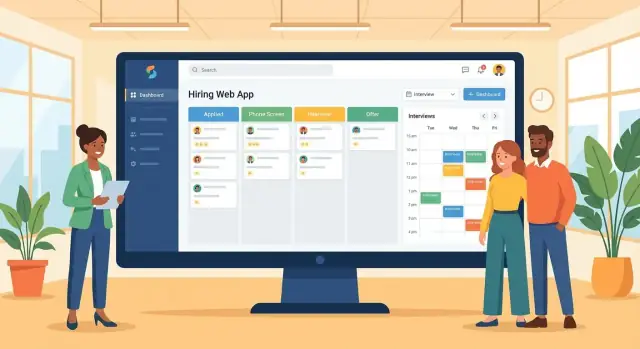
Pipeline board (Kanban-style): show each job’s stages as columns with candidate cards. Cards should surface only what’s needed to decide the next step: name, current stage, last activity date, owner, and one or two key tags (for example: “Needs schedule,” “Strong referral”). Keep the board focused—details belong elsewhere.
Candidate profile: one page that answers: who is this person, where are they in the process, and what do we need to do now? Use a clean layout: summary header, stage timeline, notes/activity feed, files (resume), and an “Interviews” block.
Job page: job details, hiring team, stage definitions, and an overview of funnel counts. This is also where admins adjust stage names and required feedback.
Interview calendar: a calendar view for interviewers and recruiters, with quick access to availability, interview type, and video/location details.
Make the primary actions obvious
Every screen should highlight the top 3–5 actions: move stage, schedule interview, request feedback, send message, assign owner. Use a single primary button per view and consistent placement (for example: top-right). Confirm destructive actions like reject/withdraw.
Bulk actions without accidents
Bulk reject, tag, or assign owner is essential for high-volume roles. Reduce mistakes with selection counters, “Undo” toasts, and safeguards like “Reject 23 candidates” confirmations plus optional reason templates.
Accessibility basics that prevent drop-off
Support keyboard navigation on the pipeline board, visible focus states, sufficient contrast, and readable form labels. Keep error messages specific (“Interview time is required”) and don’t rely on color alone to show status.
Build interview scheduling and coordination
Interview scheduling is where hiring pipelines often slow down: too many back-and-forth emails, missed time zones, and unclear ownership. Your app should make scheduling feel like a guided workflow with clear next steps, while still allowing recruiters to override when reality gets messy.
Support common interview types
Start with a few interview templates that cover most teams, and let admins customize later:
- Phone screen (short, recruiter-led)
- Technical interview (coding task, live pairing, or take-home review)
- Panel interview (multiple interviewers in one slot)
- Case study / presentation (longer slot plus materials)
Each type should define default duration, required interviewer roles, location (video/in-person), and whether candidate preparation materials are required.
Scheduling flow that reduces coordination work
A practical scheduling flow usually needs:
- Collect availability from interviewers (and optionally the candidate) with time zone awareness.
- Suggest times based on conflicts, buffers, and working hours.
- Send confirmations to all participants with a single source of truth (the interview event page).
- Handle rescheduling without losing context: keep a history of changes and notify everyone.
Design for edge cases: last-minute interviewer swaps, split panels, or “hold” slots that expire if not confirmed.
Calendar integrations (and a manual fallback)
If you integrate calendars, focus on two essentials: conflict checking and event creation.
- Google Calendar and Microsoft 365 are the usual first targets.
- Ask early whether you need two-way sync or one-way “create event only.” Two-way is more complex but prevents drift.
Always include a manual mode: recruiters can paste an external meeting link, mark an event as “scheduled,” and track attendance without integration.
Interviewer briefing packs
Reduce inconsistent interviews by generating a briefing pack per event. Include:
- Role summary and what “good” looks like
- Candidate CV/portfolio and relevant notes
- Recommended questions (or a question bank link)
- Practical details: time, format, attendees, and any tasks
Link the pack from the candidate profile and the interview event so it’s reachable in one click.
Implement feedback, scorecards, and decision support
Feedback is where a hiring pipeline management app either earns trust—or creates friction. HR teams need structured evaluations that are easy to complete, consistent across interviewers, and auditable later.
Build scorecards that standardize “what good looks like”
Create scorecards per role and per interview type (screen, technical, hiring manager, culture add). Keep each scorecard short, with clear criteria, definitions, and a rating scale (for example 1–4 with anchors like “no evidence / some / solid / exceptional”). Include an “evidence” field so interviewers describe what they observed rather than writing vague opinions.
For an applicant tracking system, scorecards should be searchable and reportable so they can feed an HR analytics dashboard without manual cleanup.
Separate private notes, shared feedback, and final recommendation
Interviewers often need a scratchpad. Support:
- Private notes (visible only to the author)
- Shared feedback (visible to the panel and recruiters)
- Recommendation (hire / no hire / lean / needs more data)
This reduces accidental oversharing and supports role-based access control: recruiters may see everything, while a cross-functional interviewer may only see what’s relevant.
Late feedback: reminders and escalation rules
Late scorecards delay decisions and candidate scheduling. Add automated nudges: a reminder after the interview, another before a decision meeting, then an escalation to the hiring manager if feedback is still missing. Make deadlines configurable by stage in the recruiting workflow.
Decision support without biasing outcomes
Create a decision view that summarizes signals: average ratings by criterion, strengths/risks themes, and “missing feedback” alerts. To reduce anchoring bias, consider hiding other people’s ratings until the interviewer submits their own, and show evidence snippets alongside scores.
When designed well, this module becomes the “single source of truth” for hiring decisions and reduces back-and-forth in chat and email.
Add communication, search, and productivity tools
A hiring app can have a perfect pipeline and still feel slow if recruiters can’t communicate quickly, find the right candidates, and keep a clean record of what happened. These “small” tools are what make teams actually adopt the system.
Email templates + communication history
Start with a few reusable email templates for the moments that repeat every day: application confirmation, interview invite, follow-up, request for availability, and rejection. Keep templates editable per role/team and allow quick personalization (name, role, location).
Just as important: log every message. Store a clear sent/received timeline on the candidate profile so anyone can answer, “Have we contacted them yet?” without digging through inboxes. Include attachments and metadata like sender, time, and related job.
Status updates that stay consistent (and humane)
Make candidate status updates easy, but standardized. Offer a controlled list of rejection reasons (for example: “salary mismatch,” “skills gap,” “not available,” “withdrew”) with optional notes.
This helps with reporting and reduces accidental wording differences across the team. Also separate internal-only fields from what’s shared externally—rejection reasons may be for analysis only.
Tags, search, and filters recruiters rely on
Add flexible tags for skills, seniority, languages, clearance, or sourcing channel. Then pair it with fast search and filters recruiters naturally use:
- Stage (for example: Phone Screen, Onsite)
- Owner / recruiter
- Location / remote eligibility
- Skills / tags
- Date ranges (applied, last contacted)
Aim for “find in 10 seconds” on both a single job and across all roles.
Practical import/export (CSV)
HR teams still live in spreadsheets. Provide CSV import for backfilling candidates and CSV export for audits, sharing shortlists, or offline reviews. Include field mapping, validation (duplicates, missing emails), and an export that respects permissions.
Later, these same tools become the backbone for bulk actions (bulk email, bulk move stage) and smoother day-to-day operations.
Plan privacy, security, and compliance
Hiring apps handle some of the most sensitive data a company collects: identity details, resumes, interview notes, and sometimes equality or health information. Treat privacy and security as core product requirements—not a checkbox at launch.
Define your compliance scope early
Start by documenting what regulations apply and what you must be able to prove later. For many teams that means GDPR / UK GDPR, plus local employment rules.
Be explicit about:
- Lawful basis for processing (for example: legitimate interest vs. consent) and when you need explicit consent
- Retention periods (for example: delete or anonymize candidates after X months unless they opt into a talent pool)
- Where data is stored and transferred (for example: EU/UK hosting, subprocessors, backups)
Collect less, and isolate sensitive data
Minimize the fields you collect by default. If a piece of information isn’t needed to evaluate a candidate, don’t ask for it.
When you do need sensitive data (for example: diversity monitoring, accommodations), keep it separate from the main hiring record and restrict access tightly. This reduces accidental exposure and supports “need-to-know” access.
Secure storage, encryption, and safe downloads
At a minimum, encrypt data in transit (TLS) and at rest. Pay special attention to attachments (CVs, portfolios, ID documents): store files in a private bucket with short-lived signed URLs and no public access.
Control downloads and sharing:
- Watermark or label exported files where appropriate
- Prevent “anyone with the link” access; require authentication
- Consider blocking downloads for some roles and allowing view-only previews
Auditability: logs and user requests
Build an access log that records who viewed or exported candidate profiles and files, with timestamps. HR teams often need this for investigations and audits.
Also plan operational workflows for data subject rights:
- Export candidate data in a readable format
- Delete/anonymize across records, attachments, and backups where feasible
- Track requests with a simple internal ticketing flow and clear SLAs
Good compliance design makes the app easier to trust—and much easier to defend during audits.
Create reporting and analytics that HR will trust
Reporting is where an HR web application either earns confidence or creates endless “can you double-check this?” messages. Aim for analytics that are easy to verify, consistent over time, and clear about what each number means.
Start with the metrics HR actually uses
Build around pipeline health and speed:
- Conversion rates by stage (for example: Applied → Screen → Interview → Offer → Hired)
- Time in stage (median and 75th percentile often tell a truer story than averages)
- Time-to-hire (from requisition open date or first stage entry—choose one and stick to it)
Show these per job, because each role has different realities. A high-volume support role and a senior engineering role shouldn’t be forced into the same benchmark.
Per-job dashboards + leadership summaries
Provide two levels of views:
- Per-job dashboard: funnel chart, stage aging list, upcoming interviews, and “stuck candidates” alerts
- Team/department summary: total open roles, hires this quarter, bottleneck stages, and workload indicators (candidates per recruiter)
Keep filters simple and predictable (date range, job, department, location, source). If a filter changes a number, make that obvious.
Make definitions explicit to avoid misleading charts
Most reporting disputes come from unclear definitions. Add tooltips or a small “Definitions” drawer that states:
- What counts as a stage entry (first time only vs. every time a candidate re-enters)
- How you handle withdrawn and rejected candidates
- Whether time-in-stage pauses when “On hold” is selected
When possible, let HR click from a metric into the underlying candidate list (“Show me the 12 candidates in Onsite > 14 days”).
Exporting for stakeholders and quarterly reviews
Enable exports that match real workflows: CSV for spreadsheets, PDF snapshots for updates, and scheduled email reports. Include filters and definitions in the export header so numbers don’t lose context when forwarded.
If you want a single north-star view, add an /reports page with saved report templates (for example: “Quarterly Hiring Review” and “Diversity Funnel (if enabled)”) that HR can reuse without rebuilding charts.
Integrations, testing, and launch checklist
Integrations and rollout decisions can make or break adoption. Treat them as product features: clear scope, reliable behavior, and ownership for ongoing support.
Choose integrations that remove daily friction
Start with the systems recruiters already live in:
- Email (Gmail/Outlook): send templated messages, log replies, and keep a full audit trail
- Calendars (Google/Microsoft): two-way sync for interviews, attendee updates, and cancellations
- HRIS (for example: Workday, BambooHR): import employees/teams, push hired candidates, and prevent duplicate records
- Background checks: trigger checks at a defined stage and capture status updates
- E-sign: generate offer packets, track completion, and store signed documents
Define what’s “source of truth” for each data type (candidate profile, interview events, offer docs) to avoid conflicts.
API + webhooks: design for partners you don’t have yet
Even if you integrate later, design now:
- A stable REST API for core objects (candidates, jobs, stages, interviews, feedback)
- Webhooks for key events (candidate moved, interview scheduled, offer sent) with retries and signing
- Clear rate limits, versioning, and an internal “integration logs” view for support
Testing plan: catch the real-world edge cases
Focus on failures that frustrate HR teams:
- Permissions: role-based access control across orgs/teams, stage visibility, and private notes
- Scheduling: time zones, reschedules, double-booking, and calendar invite edits
- Data migrations: importing existing pipelines, deduping candidates, and validating required fields
Deployment and rollout checklist
- Staging + production environments, automated deploys, and rollbacks
- Monitoring (errors, queue health, webhook delivery), backups, and restore drills
- A phased rollout: pilot team → company-wide, with training and a feedback channel
- Launch readiness: onboarding checklist, default templates, and a support/SLA plan
A practical build option: shipping faster with Koder.ai
If your goal is to validate the workflow quickly (pipeline board, scheduling, scorecards, and permissions) before investing in a large engineering effort, a vibe-coding platform like Koder.ai can help you get to a working internal app faster. You describe the recruiting workflow in chat, iterate on screens, and generate a React-based web app with a Go + PostgreSQL backend under the hood—then export the source code when you’re ready to take it in-house. Features like planning mode, snapshots, and rollback are especially useful when you’re testing early MVP assumptions with HR stakeholders and need to move quickly without losing stability.
FAQ
How do I define the target users and problem for a hiring pipeline app?
Start by naming 2–4 primary user groups (HR admins, recruiters, hiring managers, interviewers) and write one concrete pain per group.
Then draft a one-sentence problem statement you can test with stakeholders, like: “Hiring managers can’t see candidate status and interviews take too long to coordinate.”
What’s the best way to map our hiring workflow before building screens?
Write down:
- The core end-to-end flow (sourcing → screening → interviews → offer)
- What “done” means for each stage (exit criteria)
- Who owns the next action at each step
This prevents “mystery steps,” inconsistent stage names, and stalled candidates.
How do we support different hiring processes without creating pipeline chaos?
Create:
- One default pipeline template for most roles
- A small set of approved variants (e.g., Engineering, Leadership, High-Volume)
Keep stage names action-oriented (e.g., “Hiring Manager Interview” instead of “Interview”) so reporting stays consistent.
Which success metrics should we track from day one?
Pick 3–5 metrics tied to daily behavior, not vanity charts:
- Time-to-hire and time-in-stage
- Scheduling back-and-forth count
- Feedback completion rate within 24 hours
- Drop-off between key stages
- Monthly stakeholder satisfaction pulse
Use these metrics to guide later decisions about permissions, scheduling, and analytics.
What should be included in an MVP for a hiring pipeline and interview app?
A practical MVP supports a full hiring loop without spreadsheets:
- Candidate profile (contact, attachments, notes, tags)
- Pipeline board (stages, move candidate, basic filters)
- Interview scheduling (propose times, invite attendees)
- Feedback/scorecards (submit quickly, record decision)
Defer advanced automation and AI features until the core loop is reliable.
Why is an Application entity so important in the data model?
Model Candidate and Job as separate entities, and use Application as the workflow anchor.
This handles the many-to-many reality (one candidate can apply to multiple jobs) while keeping job-specific stage history, interviews, and decisions tied to the right application.
How should we design roles and permissions for HR trust and safety?
Start with a small, consistent role set:
- HR admin
- Recruiter
- Hiring manager
- Interviewer
- Viewer
Add field-level protections for sensitive data (compensation, private notes, EEO/diversity data) and support access scopes by department/job/location to avoid overexposure.
What scheduling workflow reduces back-and-forth the most?
Use a guided flow:
- Collect interviewer (and optionally candidate) availability with time zone awareness
- Suggest times based on conflicts, buffers, and working hours
- Confirm via a single “source of truth” interview event page
- Support rescheduling with a change history
Integrate Google/Microsoft calendars for conflict checks and event creation, but keep a manual fallback for teams without integrations.
How do we make interview feedback structured, fast, and less biased?
Use short, role- and interview-type-specific scorecards with clear criteria and a simple rating scale.
Separate:
- Private notes (author only)
- Shared feedback (panel + recruiters)
- Final recommendation (hire/no hire/lean)
Add reminders and escalation when feedback is overdue, and consider hiding others’ ratings until submission to reduce anchoring bias.
How do we build reporting HR will actually trust?
Make every metric clickable down to the underlying candidate list and publish definitions for key calculations (stage entry rules, handling withdrawn/rejected, on-hold timing).
Support practical exports (CSV/PDF) and saved report templates so stakeholders can reuse consistent views. For more detail on analytics design, see /blog/create-reporting-and-analytics-hr-will-trust.