

Build a Law Firm Web App for Cases, Docs, and Deadlines
A practical guide to planning, designing, and building a secure case management web app for law firms: matters, documents, tasks, and deadline alerts.
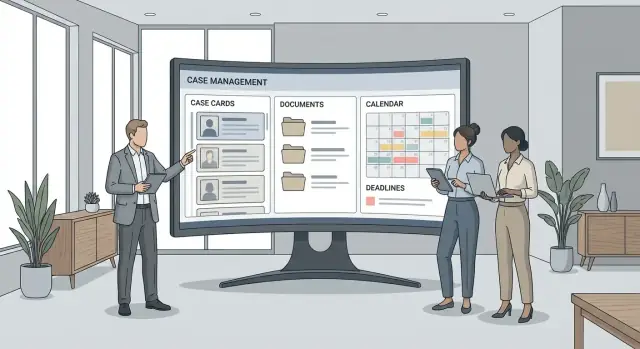
Define the App’s Goals and Primary Users
A law firm app succeeds when it solves a specific, painful problem better than email threads, shared drives, and spreadsheets. Start by writing a one-sentence promise, such as: “Give everyone a single place to see matter status, find the latest document, and trust that deadlines won’t be missed.” That promise keeps features from drifting.
Define the problem you solve
Most firms feel the pain in three areas:
- Visibility: Partners want instant answers (“Where is this matter today?”), without chasing updates.
- Speed: Staff need to file, send, and retrieve documents fast—using consistent naming and the right version.
- Fewer missed deadlines: Court dates, filing deadlines, and internal review dates need clear ownership and reminders.
Be explicit about what you will not solve in v1 (billing, accounting, e-discovery), so the app stays focused.
Identify your primary users
List users by what they need, not their job titles:
- Attorneys: quick matter overview, critical dates, key documents, “next action” clarity.
- Paralegals / legal assistants: high-volume document handling, checklist-driven tasks, templated workflows.
- Admins / firm ops: user management, permissions, reporting, consistency across teams.
- Clients (optional): a secure portal to view selected documents, messages, and upcoming milestones.
Choose top workflows and success metrics
Write 5–10 workflows your app must make easy: open a matter, upload a document, assign a task, file/add deadlines, share updates with the team/client.
Then decide how you’ll measure success:
- Time saved per matter (e.g., finding documents, preparing status updates)
- Fewer errors (missed/late deadlines, wrong document versions)
- Adoption rate (weekly active users, matters managed in-app)
These metrics will guide every product decision that follows.
Map the Core Data Model (Matters, Clients, Contacts)
A clear data model is the foundation of law firm case management and matter management web app features. If the objects and relationships are messy, everything downstream—permissions, search, reporting, and deadline tracking for lawyers—feels inconsistent.
Start with the “big four” objects
Define the primary records your app will revolve around:
- Firm (Tenant): the account boundary for data isolation and billing.
- User: attorneys, paralegals, assistants, admins (linked to a firm).
- Client: the organization or individual who hires the firm.
- Matter/Case: the unit of work (often many matters per client).
A practical rule: most activity in a legal app should attach to a matter (and inherit the matter’s client and permissions).
Add the objects lawyers expect to attach to a matter
Once the main objects are stable, model the “attachments” that make the product useful:
- Contacts: people and entities related to a client or matter (opposing counsel, court clerk, adjuster).
- Parties: plaintiff/defendant, petitioner/respondent, witness, etc. (often a role applied to a contact).
- Notes: internal notes and client-facing notes (keep visibility explicit).
- Tasks and Events: to support calendar and task automation.
- Documents: the backbone of legal document management (files plus metadata).
Keep these as separate objects rather than stuffing everything into a single “activity” table; it makes filtering, reporting, and permissions clearer.
Plan statuses and stages
Matters usually move through a small set of stages, for example:
- Intake → Active → Awaiting (e.g., waiting on court/client) → Closed
Store both a simple status (for fast filtering) and optional detailed fields (practice area, case type, jurisdiction, court, matter owner).
Decide what must be searchable vs. archived
Search drives daily use. Make sure the following are indexed and filterable: client name, matter name/number, contacts, key dates, and document metadata. For closed matters, prefer an archive flag over deleting—especially if you later need an audit trail for legal apps or to reopen a file.
Design Matter Workflows and Screens
Great legal apps feel “quiet”: staff can move a matter forward without hunting for buttons or re-entering the same information. Start by identifying the few screens people will live in every day, then design each around the decisions they need to make.
The Matter Overview (your home base)
Make the matter overview a single page that answers three questions at a glance:
- What’s happening next? Show next task, next deadline, and who owns each.
- What just happened? List recent documents (uploaded, generated, shared) and recent activity.
- What’s important about this matter? Display a compact summary: client, matter type, status, court/jurisdiction (if relevant), and key dates.
Keep it scannable: use clear labels, avoid dense tables, and default to the most common view. Advanced details can live behind “View more” drawers.
A simple intake flow (with a conflict-check placeholder)
Intake should be fast and forgiving. Use a step-by-step flow:
- New client / existing client selection
- New matter basics (matter name, type, responsible attorney, status)
- Conflict check placeholder (e.g., “Pending / Cleared / Needs review” plus notes)
- Assignment (team members, initial tasks)
Even if your first version doesn’t implement full conflict checking, include the placeholder so the workflow matches real office behavior.
Matter templates that reduce rework
Create matter types (templates) with pre-filled fields and default task lists. For example: “Uncontested Divorce,” “Personal Injury,” “Commercial Lease Review.” Templates should set:
- Default fields (status, key date labels)
- A starter task list with suggested due dates relative to intake
Keep screens approachable for non-technical staff
Use plain language (“Assigned to,” “Due date,” “Upload document”), consistent buttons, and minimal required fields. If users can’t complete a screen in under a minute, it’s probably doing too much.
Build Document Management That Lawyers Will Use
Document management is where many legal apps win or lose adoption. Lawyers won’t change habits for a “nice” interface; they will change if the system makes it faster to find the right file, prove who did what, and avoid sending the wrong draft.
Start with a folder structure that matches real work
Keep the default structure simple and consistent across matters (e.g., Pleadings, Correspondence, Discovery, Research, Client Materials). Let firms adjust templates, but don’t force them to invent a taxonomy.
Add lightweight tagging that supports common legal needs:
- Matter (always required)
- Category (pleading, exhibit, invoice, engagement letter)
- Privilege / confidentiality (privileged, work product, public)
- Version / status (draft, filed, executed)
Upload, preview, and download without friction
Uploading should work from drag-and-drop and mobile. Include a clear progress indicator and a retry path when connections fail.
Decide file limits early. Many firms store large PDFs and scanned exhibits, so set a generous default (e.g., 100–500 MB) and enforce it consistently. If you need lower limits, explain them at the moment of upload and offer alternatives (split files, compress, or upload via desktop sync).
Previews matter: inline PDF viewing and thumbnailing reduce “download-check-delete” cycles.
Versioning that matches legal edits
Support both patterns:
- Replace file (minor fixes, corrected scans)
- New version (draft cycles, redlines, filed vs. signed copies)
Show a clear version history, and restrict who can upload new versions to avoid accidental overwrites.
Metadata that supports audit and retrieval
Capture and display key metadata:
- Who uploaded and when
- Source (email import, portal upload, manual upload)
- Document type and optional notes
This metadata enables quick filtering and later supports defensible review if something is questioned.
Implement Deadlines, Tasks, and Reminder Rules
Deadlines are the part of a law firm web app that people will either trust instantly—or never trust again. The goal isn’t just to “add a due date.” It’s to make sure everyone understands what the date represents, who owns it, and how the firm will be reminded in time.
Define deadline types (and treat them differently)
Not all deadlines behave the same way, so make the type explicit. Common categories include:
- Court dates (hearings, conferences, depositions)
- Filing deadlines (response due, motion deadline)
- Internal reminders (prepare draft, send client update)
Each type can have its own defaults: required fields, reminder timing, and visibility. For example, a court date may require a location and assigned attorney, while an internal reminder may require only an assignee and notes.
Time zones, business hours, and “no ambiguous times”
Law firms often operate across jurisdictions. Store all deadlines with:
- A clear time zone (typically the matter’s jurisdiction by default)
- An explicit due time (avoid “end of day” as a magical value)
- A business-hours rule for reminders (e.g., don’t send notifications at 2:00 a.m.)
A practical approach: store timestamps in UTC, display in the matter time zone, and let each user choose a personal display time zone. When a deadline is “date-only” (common for filing deadlines), render it clearly as such and schedule reminders at a consistent firm-wide time (e.g., 9:00 a.m. local).
Recurring tasks and follow-ups
Recurring work keeps matters moving: “check service status weekly,” “follow up with client every 14 days,” “review discovery responses monthly.” Support recurrence patterns (weekly/monthly/custom) and make them editable per occurrence. Lawyers frequently need “skip this week” or “shift just this one.”
Also consider follow-up chains: completing one task can auto-create the next (e.g., “File” → “Confirm acceptance” → “Send client confirmation”).
Notifications that don’t get ignored
Offer in-app + email by default, with optional SMS for truly urgent items. Every notification should include: matter name, deadline type, due date/time, and a direct link to the item.
Add two behaviors that users quickly expect:
- Snooze with common options (1 hour, tomorrow morning, 1 week)
- Escalation rules (e.g., if not acknowledged within 24 hours, notify supervising attorney or practice group lead)
Make reminder timing configurable (firm-wide defaults + per-deadline overrides). That flexibility is what lets the app fit different practices without becoming complicated.
Set Up Permissions, Roles, and an Audit Trail
Permissions are where a law-firm app either earns trust quickly—or creates daily friction. Start with a clear role model, then add matter-level access so teams can collaborate without oversharing.
Define roles that match real firm workflows
Create a small set of default roles that cover most firms:
- Firm admin: manages users, roles, templates, and firm-wide settings
- Attorney: full matter work, documents, tasks, and communications
- Paralegal: drafting, filing support, checklists, tasks; limited admin powers
- Billing: time/expenses, invoices, payment status; limited access to documents
- Client: secure portal access to only what you explicitly share
Keep permissions understandable (“Can view documents”, “Can edit deadlines”) rather than dozens of tiny toggles that no one can audit.
Add matter-level permissions (ethical walls)
Firm-wide roles are not enough. In legal work, access often depends on the specific matter (conflicts, sensitive clients, internal investigations). Support matter-level rules such as:
- Who can view a matter
- Who can edit key fields (status, responsible attorney, deadlines)
- Who can upload/download/delete documents
Default to least privilege: a user shouldn’t see a matter unless they’re assigned or explicitly granted access.
Build an audit trail you can trust
Log security-meaningful events, including:
- Login/logout and failed login attempts
- Viewing or downloading a sensitive document
- Deleting documents or records
- Permission and role changes (who granted access to whom)
Make the audit log easy to review: filters by user, matter, action, date range, plus an export (CSV/PDF) for internal reviews and compliance requests. The log should be append-only, with timestamps and the acting user recorded consistently.
Security and Privacy Basics for Legal Data
Legal apps handle highly sensitive information, so security needs to be a first-class feature—not a “later” task. The goal is simple: reduce the chance of unauthorized access, limit damage if something goes wrong, and make safe behavior the default.
Transport security and passwords
Use HTTPS everywhere (including internal admin tools and file download links). Redirect HTTP to HTTPS and set HSTS so browsers won’t accidentally fall back to insecure connections.
For accounts, never store passwords in plain text. Use a modern, slow password hashing algorithm (Argon2id preferred; bcrypt acceptable) with unique salts, and enforce reasonable password policies without making logins miserable.
Encrypt files and separate storage
Case files are often more sensitive than metadata. Encrypt files at rest, and consider separating file storage from the primary app database:
- Store documents in dedicated object storage (or a separate files service), with per-file access controls.
- Keep only references/metadata in the app database.
- Generate time-limited download URLs so shared links don’t live forever.
This separation also makes it easier to rotate keys, scale storage, and limit blast radius.
MFA and session handling
Offer multi-factor authentication (MFA), at least for admins and users with access to many matters. Provide recovery codes and a clear reset process.
Treat sessions like keys: set idle timeouts, short-lived access tokens, and refresh tokens with rotation. Add device/session management so users can sign out of other devices, and protect cookies (HttpOnly, Secure, SameSite).
Retention and deletion (without overpromising)
Plan for data retention rules early: exporting a matter, deleting a user, and purging documents should be explicit tools—not manual database work. Avoid claiming compliance with specific regulations unless you’ve verified requirements with counsel; instead, document what controls you provide and how firms can configure them.
Search, Filters, and Reporting
A law firm app is only as useful as its ability to find information quickly. Search and reporting aren’t “nice to have” features—they’re what users rely on when they’re on a call, in court, or trying to answer a partner’s question in two minutes.
Decide the search scope (and make it obvious)
Start by being explicit about what search covers. A single search bar can work well, but users need clear scoping and results grouping.
Common scopes to support:
- Matters (matter name/number, opposing party, court, tags)
- Clients and contacts (names, emails, phone numbers, companies)
- Notes and communications (internal notes, call logs, email summaries)
- Documents (file name, metadata, and—if feasible—full-text within the file)
If full-text document search is too heavy for an MVP, ship metadata search first and add full-text indexing later. The key is not surprising users: label results like “File name matches” vs “Document text matches.”
Filters that match how lawyers triage work
Filters should reflect real workflows, not technical fields. Prioritize:
- Status (open/closed/on hold)
- Practice area (family, PI, litigation, real estate)
- Assigned user (responsible attorney, paralegal)
- Date ranges (created, last activity, next deadline)
Make filters “sticky” per user where it helps (e.g., default to “My open matters”).
Reports people will actually open
Keep reports short, standard, and exportable:
- Upcoming deadlines (by date, by matter, by assignee)
- Inactive matters (no activity in X days)
- Workload by assignee (tasks due, matters active)
Simple exports for real-world needs
Provide one-click exports to CSV (analysis, backups) and PDF (sharing, filing). Include the filters used in the export header so reports remain defensible and understandable later.
Integrations Law Firms Commonly Expect
A law firm app rarely lives alone. Even small teams expect it to fit into the tools they already open all day—calendar, email, PDFs, and billing. The key product decision isn’t “can we integrate?”, it’s “what level of integration is worth the complexity for our MVP?”
Calendar sync (Google Calendar / Microsoft 365)
Start by deciding whether you need one-way or two-way sync.
One-way sync (app → calendar) is simpler and often enough: when a deadline or hearing date is created, the app publishes an event. The calendar remains a “view,” while the app stays the system of record.
Two-way sync is more convenient but riskier: if someone edits an event in Outlook, should it change the matter deadline? If you go two-way, define clear rules for conflict resolution, ownership (which calendar?), and what fields can be edited safely.
Email integration (save-to-matter, shared inbox triage)
Firms want to attach emails and attachments to a matter with minimal effort. Common patterns:
- Email-to-matter: forward to a special address that files the message under the right matter (use a matter code in the subject).
- Add-in/button: “Save to Matter” from Gmail/Outlook for one-click filing.
For shared inboxes (e.g., intake@), teams often need triage: assign an email thread to a matter, tag it, and track who handled it.
E-sign and PDF tools
Most firms expect sending documents for signature without leaving the app. Typical flow: generate a PDF, select signers, track status, then automatically store the signed copy back to the matter.
For PDFs, “table stakes” often includes merge, basic editing, and optional OCR if you handle scanned documents.
Accounting/billing handoff
Even if you don’t build billing, firms want clean exports: matter codes, time entries, and invoice data that can be pushed to (or pulled by) accounting tools. Define a consistent matter ID early so billing systems don’t drift from your records.
Choose the Tech Stack and High-Level Architecture
A law firm app lives or dies on reliability: pages must load quickly, search must feel instant, and documents can’t “go missing.” A simple, well-understood architecture is usually better than a clever one—especially if you expect to hire new developers later.
A simple architecture that scales
Start with three clear layers:
- Web app (frontend): the UI lawyers and staff use all day.
- API (backend): authentication, permissions, matter logic, deadlines, and integrations.
- Data stores: a relational database for core records, plus file storage for documents.
This keeps responsibilities clean. Your database handles structured data (matters, clients, tasks), while a dedicated file store handles uploads, versions, and large PDFs.
Stack choices that support teams
Pick technology with strong libraries for auth, security, and background jobs. A common, team-friendly setup is:
- React (or another mainstream framework) for the web app
- Node.js (NestJS/Express) or Python (Django/FastAPI) for the API
- PostgreSQL for the database
What matters is consistency and hiring availability—not chasing the newest framework.
If you want to validate your architecture quickly before investing in a full dev cycle, a vibe-coding platform like Koder.ai can help you scaffold a React UI with a Go + PostgreSQL backend from a structured chat brief—useful for prototyping matter screens, permissions flows, and deadline rules. (You should still review security, tenancy isolation, and audit logging carefully before production.)
Multi-tenancy: separate firms safely
If multiple firms will use the product, plan for multi-tenancy from day one. Two common approaches:
- Tenant IDs on every table plus strict query patterns
- Postgres Row-Level Security (RLS) to enforce tenant isolation at the database layer
RLS is powerful, but adds complexity; tenant IDs are simpler but require disciplined coding and testing.
Hosting: backups, monitoring, and logs
Choose managed hosting where you get:
- Automated backups and tested restore procedures
- Monitoring (uptime, errors, slow queries) and alerting
- Centralized logs for troubleshooting and audit needs
This is the foundation for everything that follows—especially permissions, document storage, and deadline automation.
MVP Scope, Roadmap, and Prioritization
A law firm app can grow endlessly, so you need a clear “first useful version” that helps a real firm run matters next week—not a feature catalog.
Define the MVP (what must ship first)
Start with the smallest set of screens that supports daily work end-to-end:
- Matter list + matter detail: status, practice area, assigned team, key dates, and linked people (client, opposing counsel, court).
- Document upload and organization: upload to a matter, basic folders/tags, version notes, and download/share.
- Tasks and assignments: create tasks per matter, assign to a user, due date, simple status.
- Calendar view: matter deadlines and tasks shown on a calendar.
- Reminders: configurable reminders (e.g., 7/3/1 days before due date) with email/in-app notifications.
If a feature doesn’t directly support “open matter → add docs → track work → hit deadlines,” it’s probably not MVP.
If you’re trying to get to a pilot quickly, consider building the MVP as a thin, end-to-end slice first (even with placeholders), then hardening. Tools like Koder.ai can be useful here because they support “planning mode” for scoping and can accelerate basic CRUD + authentication scaffolding—while still letting you export source code when you’re ready for a traditional engineering workflow.
Defer advanced items (avoid early complexity)
Push these to later releases unless you have a paying pilot firm demanding them:
- OCR and full-text search at scale
- Complex billing, trust accounting, LEDES invoicing
- Deep analytics, custom report builders, and extensive workflow automation
Plan onboarding so data gets in fast
Adoption often fails at setup. Include:
- CSV import for contacts and matters
- A guided setup checklist (firm name, users, roles, reminder defaults)
- A sample matter for training
Roadmap milestones (and writing plan)
A practical roadmap: MVP → security/permissions → search/reporting → integrations. For the full guide, aim for ~3,000 words so each milestone gets concrete examples and trade-offs. If you want, you can map these milestones to specific sections like /blog/testing-deployment-maintenance for easy navigation later.
Testing, Deployment, and Ongoing Maintenance
Shipping a legal case management app isn’t just “does it work?”—it’s “does it work under pressure, with real permissions, and with time-based rules that cannot slip.” This section focuses on the practical steps that keep you out of trouble after launch.
Test the critical paths (end-to-end)
Start with a small set of workflows you can run repeatedly on every release:
- Upload → virus scan (if used) → save → permission check → download (including versioning if you support it)
- Matter access rules: attorney vs. paralegal vs. admin vs. client portal user
- Deadline rules: create trigger → schedule reminders → verify they fire at the right time and only for the right people
Use realistic fixtures: a matter with multiple parties, a mix of confidential docs, and a few deadlines across time zones.
QA checklist for security basics
Add a lightweight checklist your team must sign off each release:
- Access checks on every sensitive endpoint (server-side, not just UI)
- Rate limiting on login, search, and document download
- Logging for security-relevant events (failed logins, permission denials, export actions)
If you maintain an audit trail, include tests that validate “who did what, when” is captured for key actions.
Deployment plan: staging, migrations, rollbacks
Use a staging environment that mirrors production settings. Practice database migrations on staging with a copy of anonymized data. Every deploy should have a rollback plan (and a defined “no-downtime” expectation if firms rely on the app during business hours).
If your platform supports it, snapshots and rollbacks can reduce operational risk. For example, Koder.ai includes snapshotting and rollback features in its workflow, which can be helpful while you iterate rapidly—though you should still treat database migrations and restores as first-class, tested procedures.
Maintenance habits that prevent painful surprises
Operational basics matter:
- Automated backups with restore drills (don’t just back up—prove you can restore)
- Incident response: who gets paged, how you communicate, what you document
- A user support loop: collect feedback, tag issues by severity, and feed your roadmap with real firm workflows
FAQ
How do I define clear goals for a law firm app before building features?
Write a one-sentence promise that names the outcome and the pain it removes (e.g., “one place for matter status, latest docs, and reliable deadlines”). Use it as a filter: if a feature doesn’t directly support that promise, push it out of v1.
Who are the primary users of a case management web app, and how do I pick success metrics?
Define “primary users” by needs, not titles:
- Attorneys: matter snapshot, key dates, next action
- Paralegals/assistants: high-volume doc handling, checklists, templates
- Admin/ops: permissions, consistency, reporting
- Clients (optional): a restricted portal for selected items
Then pick 5–10 must-win workflows and track metrics like time saved, fewer deadline errors, and weekly active usage.
What core data model should a legal case management app start with?
Start with the “big four”: Firm (tenant), User, Client, Matter. Then attach what lives on a matter:
- Contacts/Parties (with roles)
- Documents (+ metadata)
- Tasks/Events
- Notes (with explicit visibility)
A good rule is: most activity should attach to a matter and inherit its permissions to keep access control and reporting predictable.
What screens should be in the first version of a matter workflow?
Ship a “Matter Overview” that answers three things fast:
- What’s next (next task/deadline + owner)
- What just happened (recent activity + recent documents)
- What matters (status, court/jurisdiction, key dates, summary)
Keep advanced details behind “View more,” and ensure common actions take under a minute.
How do I design document management that lawyers will actually use?
Use consistent defaults (folders + tags) across matters so teams don’t reinvent structure. Keep tagging lightweight:
- Matter (required)
- Category (pleading, correspondence, exhibit, etc.)
- Privilege/confidentiality
- Version/status (draft, filed, executed)
Pair that with frictionless upload/preview (drag-and-drop, clear progress, inline PDF viewing).
What’s the simplest versioning approach for legal documents?
Support both workflows:
- Replace file for minor fixes/corrected scans
- New version for draft cycles and filed/signed milestones
Always show a version history and capture “who/when/source.” Limit who can create new versions to prevent accidental overwrites and make accountability clear.
How should a law firm app handle deadlines across time zones and recurring tasks?
Treat deadline types differently (court dates vs filing deadlines vs internal reminders). Make time unambiguous:
- Store timestamps in UTC
- Display in the matter’s time zone (with user override)
- For date-only deadlines, render as date-only and schedule reminders at a consistent local time
Also add recurrence with “edit this occurrence” support so real-world exceptions don’t break the system.
What notification rules prevent deadline reminders from being ignored?
Default to in-app + email, and reserve SMS for truly urgent items. Each reminder should include matter name, deadline type, due date/time, and a direct link.
Add:
- Snooze (1 hour, tomorrow morning, 1 week)
- Escalation if not acknowledged (e.g., notify supervising attorney after 24 hours)
Keep firm-wide defaults, but allow per-deadline overrides for edge cases.
How do I set permissions and audit logs so firms can trust the app?
Use simple firm roles (admin, attorney, paralegal, billing, client) plus matter-level access control (“ethical walls”). Default to least privilege: users shouldn’t see a matter unless assigned or explicitly granted.
Log security-meaningful actions (permission changes, downloads of sensitive docs, deletions, failed logins) in an append-only audit trail with filters and export (CSV/PDF).
What security and privacy fundamentals are non-negotiable for legal data?
Cover the basics early:
- HTTPS everywhere + HSTS
- Password hashing with Argon2id (or bcrypt)
- MFA at least for admins
- Encrypt files at rest; store files in dedicated object storage with time-limited download links
- Strong session handling (timeouts, rotation, device/session management)
For retention/deletion, provide explicit tools (export, purge) and describe controls honestly rather than claiming compliance you haven’t verified.