

How to Build a Lightweight Project Tracking Mobile App
Step-by-step guide to plan, design, and build a lightweight project tracking app: must-have features, MVP scope, UX tips, tech choices, and launch checklist.
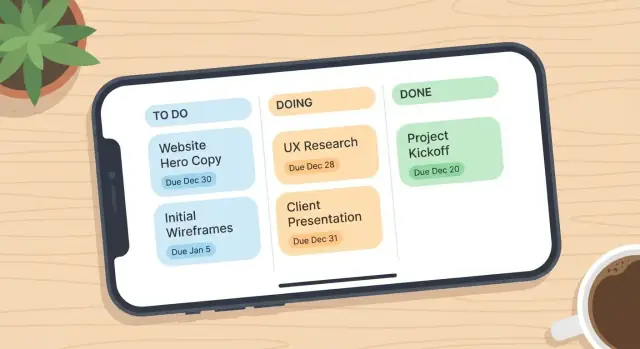
What “Lightweight Project Tracking” Should Deliver
“Lightweight” isn’t a synonym for “missing features.” It means the app keeps work moving with minimal setup, minimal tapping, and minimal mental load.
What “lightweight” really means
A lightweight project tracking app prioritizes speed over completeness:
- Fewer features: only what’s needed to capture tasks, update status, and see what’s next.
- Faster flow: add or update an item in seconds, ideally from one screen.
- Less setup: no long onboarding wizards, complicated templates, or mandatory hierarchies.
If users need a manual to track a to-do, it’s not lightweight.
Who it’s for (and why that matters)
Lightweight project tracking works best for:
- Solo users juggling personal projects or freelance work
- Small teams that don’t want process overhead
- Field work where updates happen on the move, often with poor connectivity
- Students managing assignments and group tasks
These audiences share one need: they must be able to log progress quickly, even in short bursts.
What success looks like
Define success in measurable behaviors:
- Shorter update time (e.g., “mark task done” in under 5–10 seconds)
- More frequent, smaller updates rather than weekly catch-ups
- Fewer missed deadlines because upcoming work is visible and reminders are timely
Common pitfalls to avoid
The fastest way to lose “lightweight” is to copy full project suites. Watch out for:
- Too many screens for basic actions
- Overly detailed statuses, custom fields, and permissions early on
- Feature creep that adds complexity before you’ve proven the core workflow
Clarify the Audience and Core Use Cases
Before you define features, define who the app is for. Lightweight apps win when they fit a daily rhythm—often under 30 seconds per interaction.
Pick primary users (not “everyone”)
Choose one primary user type and one secondary. For example:
- Primary: individual contributors who need a simple task list tied to small projects
- Secondary: team leads who want quick visibility (not full project control)
Write a one-sentence promise for the primary user, such as: “Capture work in seconds and stay on top of what’s due today.” This promise helps you say “no” later.
Define 2–3 core use cases
Limit v1 to a handful of repeatable moments:
- Quick task add: capture a task, attach it to a project, optionally add a due date.
- Daily check-in: view “Today” and “Overdue,” update status in a tap.
- Fast handoff (optional): assign/transfer ownership, or @mention someone if the app is team-based.
From these use cases, list the top jobs the app must support:
- Capture tasks (fast entry)
- Assign/own tasks
- Set due dates
- Mark done (and undo)
Decide what you will not build in v1
Be explicit about exclusions. Common “not in v1” items include Gantt charts, resource planning, time tracking, custom workflows, and complex reporting. Put these in a “Later” list so stakeholders feel heard without bloating the MVP.
Translate goals into simple KPIs
Pick metrics that reflect real value, not vanity:
- Weekly active users (WAU)
- Tasks created per active user
- Tasks completed per active user
- % of tasks with due dates (signals planning behavior)
These KPIs keep “project management features” focused on everyday usefulness rather than complexity.
Choose an MVP Feature Set (and Keep It Small)
A lightweight project tracking app should make three daily actions effortless: capture a task, see what’s next, and mark progress.
The must-haves (ship these first)
Start with the smallest set that still feels like “project tracking,” not a notes app:
- Projects: a simple list of projects with a name and optional color/icon.
- Tasks: create, edit, complete, and reopen.
- Statuses: keep it minimal—e.g., To do, Doing, Done (avoid custom workflows in MVP).
- Due dates: optional on each task, with an obvious “no due date” state.
- Basic notes: a plain text field for context (no formatting required).
If you can’t explain how a feature improves one of these daily actions, it probably doesn’t belong in version 1.
Nice-to-haves (choose 1–2, not 6)
These can improve speed, but they add UI and edge cases:
- Reminders (local notifications are often enough for MVP)
- Simple tags (optional; don’t force a taxonomy)
- Search (especially once users have 50+ tasks)
- Attachments (heavier than expected: storage, permissions, sync)
A practical rule: only add a nice-to-have if it reduces drop-off during the first week.
Team basics (optional, and easy to overbuild)
If you want collaboration, keep it lean:
- Shared projects with a small member list
- @mentions in task notes
- Activity feed limited to “created/updated/completed” events
Avoid roles, custom permissions, and advanced threaded discussions in the MVP.
Keep setup short
On first launch, users should be tracking in under a minute. Offer two paths:
- Start blank (fastest)
- Project templates (a couple of pre-made lists like “Personal Errands” or “Weekly Planning”)
The goal is momentum: less configuration, more completed tasks.
Design the UX: Fast Entry, Fast Updates, Low Friction
Lightweight apps succeed or fail on “time-to-done.” If adding or updating a task takes more than a few seconds, users will postpone it—and the app becomes an afterthought.
Map the key screens (keep the map small)
Aim for a short, clear set of screens that cover 90% of daily behavior:
- Home: a focused list (Today, Overdue, Upcoming, or by Project) with quick filters and search.
- Project: a simple project overview with its tasks, lightweight progress cues, and quick “Add task.”
- Task details: only what’s needed to finish the task—title, status, due date, notes, assignee (if applicable).
- Add task: fast entry first; optional fields can expand.
- Settings: notifications, default views, account, basic preferences.
If you find yourself adding “Dashboard,” “Reports,” and “Team Hub” at this stage, you’re drifting away from lightweight.
Keep navigation obvious
Pick a navigation structure users recognize immediately:
- Bottom tabs work well when you have 3–5 top-level areas (Home, Projects, Search, Settings).
- A single Home with filters can be even lighter: Home shows tasks and projects with a top filter bar (Today / Project / Status) and search.
Whichever you choose, make the “Add” action reachable with one thumb. A floating add button is common, but a persistent “+” in the header can also work if it’s consistently placed.
Design for quick updates
Most interactions are updates, not creation. Optimize for:
- One-tap status change (checkbox to complete, swipe to “In progress,” long-press for more actions).
- Inline editing for title and due date—avoid forcing a full edit form for tiny changes.
- Smart defaults: new tasks inherit the current project, due date defaults to “none,” priority is optional.
A good test: can a user mark three tasks complete and reschedule one in under 15 seconds?
Accessibility basics (non-negotiable)
Lightweight doesn’t mean minimal effort. Build in a few accessibility wins:
- Readable type with support for system font scaling
- Strong contrast for text, icons, and status indicators
- Large tap targets (especially for checkboxes, menus, filters)
These choices reduce mis-taps and friction for everyone—exactly what a productivity UX should do.
Plan the Data Model and Task Workflow
The app feels fast when the underlying model is simple. Before you design screens or APIs, decide what “things” exist in your system and how they move from start to done.
Define the core objects (keep it boring on purpose)
Start with only what you need to support the MVP:
- User
- Project
- Task
- Comment (optional, but useful for context without adding more fields)
- Tag (optional; add only if users truly need filtering beyond projects)
If you’re unsure about Tag, skip it and revisit after you see real usage.
Keep task fields minimal
A task should be creatable in a few seconds. Recommended fields:
- title (required)
- status (required)
- due_date (optional)
- assignee/owner (optional; for solo apps, default to the current user)
- priority (optional; avoid complex scoring)
You can add notes later, but comments often cover context without bloating the task form.
Design a small, clear workflow
Limit statuses to 3–5 max so users don’t spend time “managing the management.” A practical set:
- To do → Doing → Done
If you need one more, consider Blocked—but only if you plan to use it in filtering or reminders.
Plan timestamps and a basic audit trail
Even small apps benefit from reliable history. Include:
- created_at, updated_at for every object
- completed_at on tasks (set when status becomes Done)
This enables features later (recent activity, overdue views, weekly summaries) without redesigning the database.
Pick a Practical Tech Stack for a Small App
A lightweight project tracking app wins when it’s easy to build, easy to maintain, and cheap to run. Optimize for iteration speed more than theoretical scale.
Platform: Native vs cross-platform
If you want the fastest path to “works great on most phones,” cross-platform is usually the best default.
- Cross-platform (React Native or Flutter): one codebase for iOS and Android, faster MVP, smaller team.
- Native (Swift + Kotlin): best access to platform-specific UI patterns and performance, but you’ll maintain two apps.
If your app is mostly lists, forms, reminders, and sync, cross-platform is typically enough.
Backend: Managed, simple API, or local-first
Three practical options:
- Managed backend (Firebase/Supabase): quick setup for auth, database, storage, push.
- Simple API (Node/Express, Django, or similar): more control; you run and monitor servers.
- Local-first (SQLite + optional sync): best for offline reliability; add sync once the model is stable.
For a lightweight tracker, managed backend or local-first usually reduces risk.
Keep the stack small (maintenance costs add up)
Avoid mixing multiple databases, multiple state-management approaches, and custom analytics from day one. Fewer moving parts means fewer bugs and less dependency churn.
Cost and speed checklist
Before committing, confirm:
- Hosting and database pricing at your expected user count
- Authentication (email, Apple/Google sign-in) is supported out of the box
- Push notifications are included (or easy to integrate)
- Backups and basic monitoring are available without extra infrastructure
If you can’t explain your stack to a new teammate in five minutes, it’s probably too complex for an MVP.
Rapid MVP option: build and iterate with Koder.ai
If your goal is to validate the UX and workflow quickly, a vibe-coding platform like Koder.ai can help you prototype and ship a first version faster.
Because Koder.ai generates full applications through a chat interface (with a planning mode to clarify scope up front), it’s well-suited to a “keep it small” MVP process: you can iteratively refine screens like Today, Project, and Task details without committing to weeks of manual scaffolding.
A few practical ways it maps to this type of app:
- Frontend and mobile paths: Koder.ai supports modern stacks (web with React; mobile with Flutter), which aligns well with list/form-heavy task tracking.
- Backend foundation: it can pair a Go backend with PostgreSQL, a solid fit for the simple data model described above.
- Safer iteration: snapshots and rollback help you experiment with UX changes (like inline editing vs. full edit screens) without risking stability.
- Portability: source code export reduces lock-in concerns when you outgrow the initial setup.
Handle Offline Mode and Sync Without Headaches
Offline support can feel “small” until users rely on it. For a lightweight tracker, the goal isn’t perfect offline parity—it’s predictable behavior that keeps people moving when reception is bad.
Decide what works offline (and say it plainly)
Start with a clear promise:
- View cached tasks: last opened projects and task lists should be available without a connection.
- Create and edit offline: allow adding tasks, checking items off, changing due dates, writing comments offline.
If something won’t work offline (e.g., inviting teammates), disable it and explain why in one sentence.
Pick a sync strategy you can explain
Keep sync rules simple enough to fit in a help tooltip:
- Last-write-wins is easiest: the most recent edit overwrites the older one. Often fine for personal tracking or small teams.
- Conflict prompts are safer for shared tasks, but add friction.
A practical compromise: use last-write-wins for low-risk fields (status, due date) and prompt only for high-risk text fields (description, notes).
Design visible, calming states
Users don’t hate syncing—they hate uncertainty. Add consistent indicators:
- Offline when the app can’t reach the server
- Syncing… when changes are uploading
- Last updated: 2 min ago when viewing cached content
Also show a small “pending” badge on tasks edited offline until confirmed.
Minimize data to reduce failures
Sync breaks most often when you move too much data. Fetch only what the current screen needs (title, status, due date) and load heavy details (attachments, long comments) on demand.
Smaller payloads mean faster sync, fewer conflicts, and less battery drain—exactly what a lightweight app should feel like.
Add Reminders and Notifications Users Won’t Disable
Notifications help only when they’re predictable and rare. If your app pings users for every comment, status change, and background sync, they’ll silence it.
Keep notifications limited and genuinely useful
Start with a short, opinionated set:
- Due today (morning reminder)
- Overdue (once per day until resolved)
- Assigned to you (only when someone assigns a task directly)
Everything else (likes, edits, activity feed noise) should stay in-app.
Give users control over noise
Offer controls where users naturally think about context:
- Per-project toggles: “Notify me about this project” on/off
- Per-notification toggles: Due today / Overdue / Assigned to me
A safe default is to enable “Assigned to me” and “Due today,” and keep “Overdue” on but conservative.
Support simple reminders (time-based and due-date based)
Two reminder types cover most needs without turning into a calendar app:
- Time-based: “Every weekday at 9:00 AM, show what’s due.”
- Due-date based: “Remind me at 10:00 AM on the due date.”
Make reminders fast to set while editing a task—ideally one tap to pick “Today,” “Tomorrow,” or “On due date,” plus an optional time.
Avoid spam with batching and digests
If multiple tasks become overdue overnight, don’t send five alerts. Batch them:
- A single notification: “3 tasks overdue in Client Onboarding.”
- Optional daily digest delivered once at a chosen time
In the copy, be specific and actionable. Show the task name, project, and a next step (e.g., “Mark done” or “Snooze”) instead of vague messages.
Cover Security, Privacy, and Basic Permissions
Lightweight doesn’t mean casual about trust. People will put real work details into your app—client names, deadlines, internal notes—so you need a few fundamentals from day one.
Authentication: pick the simplest safe option
Match login to your audience rather than adding every method:
- Email magic link for teams that hate passwords
- Email + password for consumer familiarity (requires resets and abuse handling)
- SSO (Google/Microsoft/Okta) for organizations that require it
Keep sessions secure (short-lived access tokens, refresh tokens, device logout).
Basic permissions: don’t over-design roles
Start with the smallest permission model that supports your core workflow:
- Private projects (only the creator can view)
- Shared projects (invite others)
If shared projects exist, add roles only when you truly need them:
- Owner/Admin: manage members and settings
- Member: create/update tasks
- Viewer (optional): read-only for stakeholders
Avoid complicated per-task permissions early; they create UI friction and support tickets.
Protect data at rest and in transit
Use HTTPS/TLS for all network calls, and encrypt sensitive data on the server.
On-device, store as little as possible. If you support offline access, cache only what the user needs and use platform secure storage (Keychain/Keystore) for tokens.
Also: don’t store secrets in the app bundle (API keys, private certificates). Anything shipped to the device should be assumed discoverable.
Privacy basics: be clear and minimize collection
Collect only what you need (email, name, project data). Make analytics optional where appropriate, and document what you track.
Add export for trust and portability
An Export option builds credibility and reduces lock-in concerns. Provide:
- CSV for spreadsheets and quick reporting
- JSON for backups and migrations
Include projects, tasks, and timestamps so users can actually reuse the data.
Analytics and Feedback Loops for Smart Iteration
You don’t need “big data” to improve a lightweight project tracking app—you need a few signals that tell you what people actually do, where they hesitate, and what breaks.
Instrument the events that map to success
Start with a short list of key events:
- Create task (core action)
- Complete task (proof the app helps)
- Open project (project-level engagement)
Add minimal context (e.g., “from quick add vs. project view”), but avoid collecting content like task titles.
Find friction points early
Track drop-offs that hint at confusion or annoyance:
- Onboarding drop-off (which step people abandon)
- Notification opt-out (after which prompt, and how soon after install)
- Time-to-first-task (how long before a user gets value)
If a change improves completion rates but increases opt-outs, it may be adding pressure rather than usefulness.
Make feedback easy and actionable
Add two simple in-app options:
- Report a problem (include device/app version; let users describe what happened)
- Suggest a feature (one text field; optional email)
Route both to a lightweight triage process so every message becomes either a bug, an experiment, or a “not now.”
Use metrics to prune, not just add
Treat analytics as a way to remove clutter:
- If a feature is rarely used and adds taps, hide it behind an “Advanced” area or remove it.
- If a screen has high exits, simplify the default view.
Small, consistent iterations beat big redesigns—especially for productivity apps people open in a hurry.
Testing Plan: Reliability Matters More Than Extra Features
A lightweight project tracking app only feels “lightweight” when it’s dependable. Slow sync, missed updates, and confusing task states create mental load fast.
Start with a practical test checklist
Before adding more features, make sure the core loop is solid. Run this checklist on every build:
- Create a task (with and without a due date)
- Edit task title, notes, due date, assignee (if you have one)
- Change status through the workflow (To do → Doing → Done)
- Reorder tasks or move between lists/projects (if supported)
- Offline edits: create/edit/complete with no connection
- Reconnect and sync: confirm uploads and fresh downloads
- Conflict behavior: edit the same task on two devices, then sync
Test on real devices (and bad conditions)
Emulators are useful, but they don’t reproduce real mobile conditions. Use at least a couple of physical devices and include slower networks.
Focus areas:
- Slow or unstable connections (throttling, airplane mode toggles)
- App background/foreground transitions during save or sync
- Battery saver / low power mode (may delay background work)
- Older OS versions and smaller screens (if they’re in your audience)
Edge cases that frequently break trust
A few “small” bugs can make users question the whole system:
- Duplicate tasks created by double-taps, retries, or repeated sync
- Timezone changes shifting due dates or reminders
- Due date parsing/display (midnight boundaries, “today” vs. specific date)
- Notifications firing at the wrong time after time changes
Add automation where it pays off
Keep automated tests focused on reliability:
- Unit tests for the data model (statuses, due dates, sorting)
- API tests for create/update flows and idempotency (avoid duplicates)
- One or two end-to-end “critical path” tests: create → complete → sync
Treat every bug fix as a test case you never want to rediscover.
Launch Checklist and First Updates After Release
Launching a lightweight project tracking app isn’t just “submit to the store and wait.” A smooth release is mostly about clear positioning, low-risk rollout, and fast follow-ups based on real usage.
Prepare your store assets (before you build hype)
Write copy that matches what the app actually does on day one: fast task capture, quick updates, and simple tracking. Avoid “all-in-one” promises.
Create 3–6 screenshots that tell a short story:
- A project with a few tasks
- One-tap status update
- Today view (or equivalent)
- Optional: reminders/notifications screen
Pair them with a short description that explains who it’s for (“quick personal and small-team tracking”) and what it intentionally doesn’t do (no complex Gantt charts).
Keep onboarding to 1–3 steps
Onboarding should confirm value quickly, not teach every feature:
- Create a project (or pick a sample project)
- Add the first task
- Optional: enable reminders
If you include a sample project, make it skimmable and easy to delete—users should feel in control immediately.
Plan rollout: reduce risk, increase signal
Start with a small beta and staged release so you can watch stability and engagement without exposing everyone to early bugs:
- Set up crash monitoring and performance alerts
- Track the first-run funnel (install → first task → first update)
- Watch support channels and reviews daily during week one
First updates after release (v1.1 mindset)
Your post-launch checklist should be ruthless:
- Read reviews and tag recurring themes (confusion, missing feature, bug)
- Fix top crashes and the most common “can’t complete a task” issues first
- Ship a focused v1.1 with 1–2 improvements that remove friction, not new complexity
If you want a sanity check, compare release notes against your MVP scope from earlier sections—and keep it small.
FAQ
What does “lightweight project tracking” actually mean?
“Lightweight” means low friction, not “missing essentials.” In practice:
- You can add or update a task in seconds (often from one screen).
- Setup is minimal (no mandatory hierarchies, templates, or long onboarding).
- The app focuses on the daily loop: capture work → see what’s next → mark progress.
Who is a lightweight project tracking app best for?
It works best when updates happen in short bursts and people don’t want process overhead, such as:
- Solo users managing personal projects or freelance work
- Small teams that need visibility without heavy governance
- Field work where connectivity is unreliable
- Students tracking assignments and group tasks
What are the core use cases to design around in v1?
A practical v1 should cover repeatable moments:
- Quick task add (title, project, optional due date)
- Daily check-in (Today/Overdue with one-tap updates)
- Fast handoff (optional: assign or mention someone)
If a feature doesn’t support these moments, it’s usually not MVP material.
What features are “must-haves” in an MVP?
Start with the smallest set that still feels like project tracking:
- Projects (simple list)
- Tasks (create/edit/complete/reopen)
- Minimal statuses (e.g., To do / Doing / Done)
- Optional due dates
- Basic notes (plain text)
These cover most daily behavior without turning the app into a full suite.
What should you intentionally avoid building in version 1?
Common “not in v1” items that bloat UI and slow iteration include:
- Gantt charts and timelines
- Resource planning
- Time tracking
- Custom workflows and complex permissions
- Advanced reporting dashboards
Keep a “Later” list so ideas aren’t lost, but don’t ship them until the core loop is proven.
Which KPIs best measure whether the app is working?
Use metrics that reflect real value and habit formation:
- WAU (weekly active users)
- Tasks created per active user
- Tasks completed per active user
- % of tasks with due dates (signals planning)
Pair KPIs with a speed target like “mark done in under 5–10 seconds.”
How do you design the UX for fast entry and fast updates?
Keep your screen map small and optimize for updates:
- Home (Today/Overdue/Upcoming or by Project)
- Project view (task list + quick add)
- Task details (only necessary fields)
- Add task (fast entry first; expand optional fields)
Aim for one-tap completion and inline edits so users don’t open full forms for tiny changes.
What should the data model and workflow look like for a lightweight tracker?
Start with a simple set of objects and fields:
- Objects: User, Project, Task (optional: Comment; optional: Tag)
- Task fields: title (required), status (required), due_date (optional), owner/assignee (optional), priority (optional)
- Timestamps: created_at, updated_at, completed_at
Keep statuses to 3–5 max so users don’t spend time “managing the management.”
What tech stack is practical for a small lightweight tracking app?
Pick one of these approaches based on speed vs. control:
- Cross-platform (React Native/Flutter): usually fastest for list/form apps
- Managed backend (Firebase/Supabase): fastest auth + database + push for MVP
- Local-first (SQLite + optional sync): best for offline reliability
A good rule: if your app is mostly tasks, reminders, and sync, keep the stack simple and easy to explain to a new teammate.
How should offline mode and sync work without causing headaches?
Make offline behavior predictable and easy to describe:
- Allow viewing cached lists and making basic edits offline.
- Use a simple sync strategy (often last-write-wins), and only prompt for conflicts when it truly matters.
- Show clear states like “Offline,” “Syncing…,” and a “pending” marker for unsynced changes.
Minimize payload size to reduce failures and battery drain.