

How to Build a Class Booking Mobile App: Step-by-Step Guide
Learn how to plan, design, and launch a mobile app for booking classes or lessons, from core features and payments to testing, release, and growth.
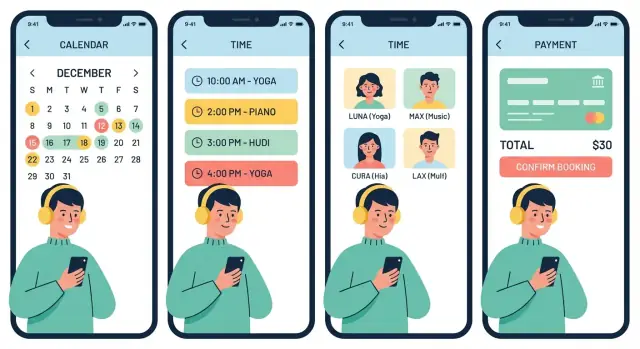
Clarify Your Booking App Concept and Audience
Before you think about screens or features, get specific about what people are booking and who the app is for. “Classes” can mean very different things: fitness sessions, tutoring, music lessons, language schools, creative workshops, or small-group coaching. Each has different expectations around pricing, scheduling, and cancellations.
Start with a clear audience
Write down your primary users in one sentence. For example: “Busy parents booking weekly tutoring for their kids” or “Gym members reserving limited spots in group classes.” This clarity will guide everything from reminders to checkout flow.
Single business app vs. multi-instructor marketplace
Decide whether you’re building for one business (one studio/school) or a marketplace with many instructors.
- Single business app: simpler operations, consistent rules, easier quality control. Growth usually depends on one brand.
- Marketplace: more supply and variety for customers, but harder to manage onboarding, payouts, support, and trust (ratings, verification, disputes).
If you’re unsure, pick the model you can support operationally today. You can expand later, but switching models mid-build can be expensive.
One-time bookings or recurring relationships?
Many lesson businesses rely on repeats: weekly classes, multi-week courses, punch cards, or packages. One-time bookings are simpler, but recurring options often improve retention and revenue predictability. Your choice affects the entire booking logic (reschedules, credits, attendance tracking).
Define what “success” means
Set 3–4 metrics you’ll track from day one:
- Bookings per week (demand)
- Retention (how many return in 30–60 days)
- Cancellation rate (policy fit and schedule quality)
- Optional: Fill rate per class or instructor
These targets keep your app concept focused—and prevent building features that don’t move the numbers.
Validate Demand with Simple Research
Before you design screens or pick tools, confirm that real people will actually switch to your app. You don’t need a big survey—just enough evidence that the booking problem is frequent, painful, and worth paying to fix.
Talk to both sides: students and instructors
Do 8–15 short interviews total (even 15 minutes each). Aim for a mix of new and regular attendees, plus instructors or front-desk staff.
Ask about their current booking flow and where it breaks:
- What’s the most annoying part of booking, rescheduling, or canceling?
- What causes missed classes (forgetting, unclear instructions, waitlists, payment issues)?
- What do they use today (Instagram DMs, spreadsheets, Calendly, Mindbody, WhatsApp), and why?
- What would make them change?
Write down exact phrases—these become your app’s marketing copy later.
Map the current journey end-to-end
On one page, map: discovery → schedule → pay → attend → review.
For each step, note:
- Where users get stuck or abandon
- How long it takes (and who has to do manual work)
- What errors happen most (double-booking, wrong location, unclear refunds)
This journey map helps you prioritize booking app features that remove friction, not just add options.
Pick one niche first—and turn it into a promise
Resist building a “class booking app for everything.” Start with one vertical (e.g., yoga studios, music lessons, tutoring) to reduce complexity and speed up adoption.
Then turn your findings into a tight problem statement and app promise:
- Problem: who struggles, with what, and how often
- Promise: the measurable outcome (e.g., “book in 30 seconds,” “fewer no-shows,” “automatic waitlist fills”)
If you can’t state this clearly, your MVP will be unfocused—and harder to sell.
Define User Roles and Core Use Cases
Before you list features, get clear on who will use the class booking app and what jobs they need to accomplish. Most booking apps have three common roles—student, instructor, and admin/owner—but you don’t have to ship all of them on day one.
Student (the buyer)
The student experience should be frictionless: find a class, understand what it includes, and complete a booking without confusion.
Typical student use cases include browsing upcoming classes, booking a spot, paying, rescheduling or canceling within policy, and receiving reminders so they actually show up.
Instructor (the operator)
Instructors care about control and clarity: “What am I teaching, when, and who’s attending?”
Common instructor use cases include setting or managing availability, viewing the class roster, and messaging students with key updates (location, what to bring, last-minute changes). If your model requires approval, add approve/deny flows—but only if it’s operationally necessary.
Admin/owner (the business)
The owner/admin role is about configuring the business and reducing day-to-day chaos.
Typical admin use cases include managing class offerings and schedules, setting pricing and discount rules, defining cancellation/no-show policies, and controlling staff permissions (who can edit classes, issue refunds, or message customers).
Decide what’s in v1 vs later
A practical MVP path is:
- v1: Student booking + payments + basic admin management (classes, schedule, policies)
- v1.5: Instructor tools (availability, roster, messaging)
- Later: Advanced permissions, multi-location management, and deeper messaging/CRM
If you’re a single studio, you can often start with “student + owner” and add instructor accounts once operations stabilize. If you’re building a marketplace, instructor onboarding and availability management usually needs to be part of v1.
To keep scope tight, write 5–10 “must work” scenarios (e.g., “student books and pays,” “student reschedules within policy,” “owner cancels class and students are notified”). Those scenarios become your product checklist and test plan.
Choose the Must-Have Features for an MVP
An MVP for a class booking app isn’t a “small version of everything.” It’s the smallest set of capabilities that lets real customers find a class, reserve a spot, and pay—without your team doing manual work behind the scenes.
Start with the core booking loop
Your mobile app for bookings should support this end-to-end flow:
- Browse classes
- Pick a session
- Confirm availability
- Pay (or reserve)
- Receive confirmation + reminders
If any step is missing, you’ll lose users or create operational headaches.
MVP features to include (and why)
Class listings and filters. Give users a clean catalog with filters like location, level, price, time, and instructor. Even for a single studio app, filters reduce “scroll fatigue.” In a marketplace vs single studio app, location and instructor filters become essential.
Scheduling basics. Support time slots, capacity limits, and recurring sessions. Add waitlists early—when popular classes fill up, a waitlist prevents lost revenue and reduces front-desk admin.
Payments and subscriptions (minimal but complete). Start with card payments plus one popular wallet in your region. Include deposits (if your cancellation policy depends on it), refunds, and promo codes. If your business relies on memberships, begin with simple payments and subscriptions (e.g., a monthly plan plus class credits) rather than a complex tier system.
Notifications that prevent no-shows. Push notifications for bookings should cover booking confirmation, reminders, schedule changes/cancellations, and waitlist updates. Keep messages short and action-oriented.
Accounts that build trust. Profiles, saved payment methods, and booking history are table stakes for a lesson scheduling app. Booking history also reduces support tickets (“Did I book this?”) and helps users rebook.
What to postpone
Skip advanced analytics dashboards, referrals, in-app chat, and deep calendar sync until the booking flow is stable and you’ve validated demand. Keep one internal “app MVP checklist” and tie every feature to a real user problem.
Model Your Scheduling and Pricing Rules
Before you design screens or write code, get your scheduling and pricing rules out of your head and into a simple, shared document. Most booking apps don’t fail because of the calendar UI—they fail because the rules behind that UI were never clearly defined.
Service catalog: what can be booked?
Start by listing every “bookable thing” you’ll offer. Keep it structured so it can turn into data later:
- Class types (e.g., Yoga Flow, Beginner Guitar, SAT Prep)
- Durations (45/60/90 minutes, or fixed per class)
- Levels (beginner/intermediate/advanced)
- Locations/rooms (Studio A vs Studio B, online vs in-person)
Decide early whether you’re scheduling 1:many classes (one instructor, multiple attendees) or 1:1 lessons (one instructor, one attendee). The rules and pricing often differ.
Availability rules: when can people book?
Define availability as policies, not just a calendar.
- Working hours per location and/or instructor
- Breaks (lunch, cleaning/reset time)
- Holidays and closures (one-off dates and recurring rules)
- Buffers (e.g., 10 minutes before/after for setup)
Also set boundaries that prevent last-minute chaos: “Bookings must be made at least 2 hours in advance” or “Same-day bookings allowed until 5pm.” These limits reduce customer support issues later.
Capacity and inventory: how many seats exist?
For group classes, capacity is your “inventory.” Be explicit about:
- Seats per class (and whether it varies by room)
- Cut-off times (e.g., booking closes 15 minutes before start)
- Overbooking rules (usually avoid; if you allow it, define exactly when and how)
If you plan to support waitlists, define what happens when a seat opens: does the next person get auto-enrolled (and possibly charged), or do they get a time-limited offer?
Pricing model: what are people paying for?
Pick the simplest model that matches your business:
- Per class (single purchase)
- Packs/credits (e.g., 5-class pack valid for 60 days)
- Memberships/subscriptions (monthly recurring, may include limits or perks)
Write down edge cases now: Does a pack work across all class types or only specific categories? Do memberships include unlimited bookings, or a monthly allowance? Clarity here directly impacts checkout flow and your booking app features scope.
Policies: cancellations, no-shows, refunds
Keep policies clear and short enough to fit on one screen:
- Cancellation window (e.g., free cancel up to 12 hours before)
- No-show rule (fee charged, credit forfeited, or strike system)
- Refund approach (when allowed, how long it takes, and whether fees are retained)
If your rules are simple, your app will feel simple. Customers will trust it more because they’ll know what happens before they tap “Book.”
Design the User Experience and Key Screens
A class booking app succeeds or fails on how quickly someone can find a class, understand the price, and reserve a spot with confidence. Aim for a “3-minute booking”: minimal typing, no surprises, and clear next steps.
The core screens you’ll likely need
Onboarding should explain the value in one or two screens, then get out of the way. Let users browse before forcing account creation; ask for sign-up when they try to book.
Search / Browse is where most sessions start. Use simple filters (date, time, location, level, price) and make results scannable: class name, instructor, duration, next available time.
Class detail is your decision page. Show:
- Real-time availability (spots left)
- Total price upfront (including taxes/fees if applicable)
- What to bring, cancellation window, and location
Calendar / Schedule helps users manage what they’ve booked and what’s coming up. Make it easy to reschedule or cancel within policy, and offer optional calendar sync.
Checkout should be boring—in a good way. Keep it to one page where possible, repeat the total price, and confirm the date/time clearly.
Profile is for membership status, payment methods, credits, receipts, and policy links.
Booking UX basics (avoid costly drop-offs)
Show only bookable options. If a class is full, label it clearly and offer “Join waitlist” or “See next available.” Confirm the booking instantly with a clear success state and a visible “Add to calendar” action.
Accessibility and trust
Use readable font sizes, strong contrast, and large tap targets—especially for time slots and payment buttons. Trust signals matter: instructor bios, reviews, clear cancellation/refund policies, and secure payment cues (recognizable payment method icons, concise reassurance text).
Link to your policies from checkout and profile (e.g., /terms, /privacy) so users never feel trapped.
Pick a Tech Approach That Fits Your Budget and Timeline
Your tech choices should follow your MVP scope—not the other way around. The goal is to ship a reliable booking flow quickly, then improve.
Mobile: Native vs. Cross-Platform
Native apps (Swift for iOS, Kotlin for Android) usually deliver the smoothest performance and best access to device features. The trade-off is cost: you’re effectively building two apps.
Cross-platform frameworks (React Native, Flutter) let you share most code across iOS and Android, which often means a faster launch and simpler maintenance. The trade-off is that certain advanced UI interactions or integrations may take extra effort.
A practical rule: if you need to move fast with a tight budget, start cross-platform. If your brand depends heavily on premium interactions (or you already have separate iOS/Android teams), go native.
If you want to prototype (or even ship) faster without committing to a full custom build immediately, a vibe-coding platform like Koder.ai can help you turn your booking flow into a working web app, backend, and even a Flutter mobile app from a chat-based spec—useful when you’re still iterating on scheduling rules, roles, and MVP scope. It also supports planning mode and source-code export, so you can validate quickly and still keep a path to owning the codebase.
Backend Basics You’ll Need (Even for an MVP)
Most booking apps require the same core building blocks:
- Database to store users, classes, instructors, schedules, and bookings
- API (your app’s “bridge”) to read/write data securely
- Admin dashboard for non-technical operations: creating classes, editing times, managing instructors, issuing refunds
- Job scheduler for time-based tasks like reminder notifications, follow-ups, and “class starts in 1 hour” messages
Real-time availability: avoid double-bookings
Availability is where booking apps often fail. If two people tap “Book” at the same time, your system must prevent overselling.
This usually means using database transactions or a locking/reservation approach (temporarily holding a spot for a short window while the user completes payment). Don’t rely on “checking availability” alone—make the booking action atomic.
Third-party services to consider
You don’t need to build everything from scratch. Common add-ons include:
- Analytics to see where users drop off in the booking flow
- Email/SMS providers for confirmations and reminders
- Maps if locations matter (studios, instructors, directions)
Choosing a sensible stack upfront keeps your first release on schedule—without painting you into a corner later.
Set Up Payments, Refunds, and Subscriptions
Payments are where a booking app either feels effortless—or quickly loses trust. Define your payment model early (pay per class, deposits, subscriptions, packs), because it affects your database, receipts, and cancellation rules.
Payment providers: what they handle (and what you still own)
Most apps use a provider like Stripe, Adyen, Square, or Braintree. They typically handle card storage, 3D Secure / SCA, fraud checks, customer receipts, and the dispute/chargeback workflow.
You still need to decide when to capture funds (at booking vs. after attendance), what “successful payment” means for creating a reservation, and how you’ll support failed payments.
Refund and cancellation flows
Real life is messy: people cancel late, teachers get sick, and schedules change.
Support these common outcomes:
- Full refunds (class canceled by you)
- Partial refunds (e.g., cancellation fee kept)
- Credits instead of refunds (store credit wallet)
- Deposits (non-refundable, or refundable only within a window)
Make the rules visible during checkout and in the booking details screen, then mirror them in confirmation emails.
Subscriptions and class packs
If you sell “10-class packs” or monthly memberships, treat them as a balance system:
- Track remaining credits per user
- Reserve a credit when booked, return it if refunded
- Handle renewals, expirations, and failed renewal payments
If you want users to compare options, link to your plan page (for example: /pricing).
Taxes and invoices
Decide what must appear in-app (price breakdown, tax/VAT, business details) versus by email (invoice/receipt PDF, legal terms). Many providers can generate receipts, but invoicing requirements vary—confirm what’s required for your region before you ship.
Handle Accounts, Privacy, and Security Fundamentals
A booking app handles personal schedules, messages, and money—so basic account and security choices affect trust from day one. You don’t need enterprise-level complexity, but you do need clear rules, sensible defaults, and a plan for what happens when something breaks.
Accounts and sign-in (keep it simple)
Offer authentication options that match your audience and reduce support tickets:
- Email + password (widely understood; add password reset)
- Phone number + one-time code (great for mobile-first users)
- Social sign-in (Apple/Google) to speed up onboarding
Make it easy to change email/phone later, and consider optional two-step verification for staff accounts.
What data to store (and what to avoid)
Store only what you need to run bookings and support customers:
- Keep: name, contact details, booking history, attendance status, membership/credit balances
- Avoid storing: card numbers, CVV, or raw bank details
Use a payment provider to handle sensitive payment data and return only tokens/IDs to your app. This reduces risk and compliance burden.
Privacy basics users expect
Privacy isn’t just legal checkboxes—users want control:
- Clear consent for notifications and marketing messages
- Email/SMS preferences (transactional vs. promotional)
- A straightforward way to request data deletion and account closure
Have a visible privacy policy link (for example, in Settings and during signup) and keep support scripts ready for deletion requests.
Operational security for staff
Most real-world issues come from internal mistakes. Add:
- Role-based access (instructors vs. front desk vs. admins)
- Audit logs for changes to schedules, prices, refunds, and cancellations
This makes it easier to resolve disputes like “I didn’t cancel that class.”
Reliability: plan for the boring failures
Security also means being able to recover quickly:
- Automated backups and tested restores
- Basic monitoring (errors, payment failures, booking drop-offs)
- A lightweight incident checklist: who investigates, who communicates, and what gets paused (e.g., new bookings) if needed
These fundamentals protect revenue, reduce downtime, and keep your brand credible.
Test the Booking Flow and Prevent Common Failures
Testing a class booking app isn’t just about “no crashes.” It’s about protecting the moments where money changes hands and schedules get locked. A small bug can create double-bookings, angry students, and messy refunds.
Build confidence with the right tests
Start with unit tests for your scheduling rules: capacity limits, cancellation windows, credit packs, and pricing. Then add integration tests that cover the full chain—booking → payment confirmation → seat allocation → notification.
If you use a payment provider, test webhook/callback handling thoroughly. You want clear behavior for “payment succeeded,” “payment failed,” “payment delayed,” and “chargeback/refund.” Also verify idempotency (the same callback arriving twice shouldn’t create two bookings).
Hunt the edge cases that break real apps
Focus on failure-prone scenarios:
- Last seat race condition: two users tap “Book” at the same time.
- Waitlist promotion: a spot opens and the next person is promoted; confirm payment/hold logic.
- Time zones + DST: instructor in one zone, student in another, and daylight saving shifts.
- Calendar sync conflicts: events should land at the right local time after changes.
Test on real devices and bad networks
Use a small device matrix: older phones, small screens, and different OS versions. Simulate low connectivity and airplane-mode transitions.
For push notifications, verify delivery, deep links to the right class, and what happens when notifications are disabled.
Beta rollout + a lightweight QA checklist
Run a beta with a handful of instructors and students before public release. For each release, keep a simple QA checklist (booking, cancel, reschedule, refund, waitlist, and notifications) and require it before shipping updates.
If you need help planning releases, keep notes in a shared doc linked from /blog/app-mvp-checklist.
Launch Plan: App Store, Operations, and First Users
A smooth launch is less about hype and more about removing friction—both for app reviewers and for your first customers. Before you invite users, make sure the app is “operationally complete,” not just “feature complete.”
App Store readiness (Apple + Google)
Plan one checklist for store submission, because delays here can stall everything else.
Prepare:
- Store assets: app icon, screenshots for common device sizes, and a clear description that matches what the app actually does.
- Privacy labels/disclosures: document what data you collect (email, location, payment status, analytics) and why.
- Review guidelines compliance: avoid vague promises (“best prices”), ensure account deletion works if required, and don’t block key screens behind a broken login.
Operational readiness
Your first users will test your business, not just your UI.
Set up:
- A monitored support email (and a response time target).
- A short FAQ that answers the top issues: rescheduling, refunds, and what happens if an instructor cancels.
- A clear cancellation policy page (link it in-app and from the store listing), e.g. /cancellation-policy.
Start local, measure the right things
Launch in one city or with one studio network first. This keeps supply, support, and scheduling edge cases manageable while you learn.
Track two metrics daily:
- Onboarding drop-off (where people quit: phone verification, account creation, class selection)
- First-booking completion rate (search → details → pay → confirmation)
Rollback plan for critical bugs
Assume something will break. Have a simple rollback plan: the last stable build ready to resubmit, server-side feature flags to disable risky features, and a status update message template for users.
If you’re hosting the backend yourself, prioritize snapshots/backups and a tested restore process so you can recover quickly when a deployment goes wrong.
Grow After Launch with Marketing and Iteration
Launching your class booking app is the start of the work—not the finish. Growth comes from two loops running in parallel: getting new users in and giving them reasons to come back.
Retention levers that increase repeat bookings
Retention is usually cheaper than acquisition, so bake it into your weekly plan:
- Smart reminders: confirmations, “tomorrow” nudges, and last-minute alerts that reduce no-shows (without spamming).
- Rebooking prompts: after a class ends, suggest the next relevant slot (“Same time next week?”) or a short series pass.
- Loyalty perks: simple rewards like “book 5, get 1 free” or member-only time slots.
- Referrals: a clear give/get offer (e.g., “Give $10, get $10”) tied to first completed booking.
If you’re building in public, consider making referrals and content part of your growth engine: platforms like Koder.ai run programs where customers can earn credits for publishing content or referring users—an approach you can mirror inside your own booking app once the core flow is stable.
Help instructors (or staff) grow with better tools
If instructors love the backend, they’ll promote the app and stick around.
Focus on features that save time and increase income clarity:
- Faster schedule editing (bulk changes, easy cancellations, waitlist handling)
- Payout reporting (what was earned, what’s pending, what was refunded)
- Performance stats (fill rate, repeat students, peak times)
Analytics that actually matter
Pick a small set of metrics and review them every week:
- CAC (customer acquisition cost): how much you spend to get one new active customer
- Conversion rate: from install → signup → first booking
- Churn: who stops booking and when
- LTV (lifetime value): revenue per customer over time
- No-show rate: by class type, time, instructor, and reminder setup
Build a roadmap based on measurable impact
Keep a “next features” list, but prioritize only what moves your metrics. Common upgrades after launch include messaging, video lessons, multi-location support, and gift cards.
A good rhythm: ship one small improvement every 1–2 weeks, announce it in-app, then measure whether it improves bookings, retention, or operational load.
FAQ
What should I define before building a class booking app?
Start with one audience and one booking problem. A yoga studio, tutoring service, and instructor marketplace need different rules for schedules, payments, and cancellations.
Should I build for one studio or a marketplace?
Choose a single business app if one studio or school controls classes and staff. Choose a marketplace only if you can handle instructor onboarding, payouts, support, and disputes from the start.
How do I validate demand before development?
Talk to 8 to 15 students, instructors, or front-desk staff. Ask how they book now, where they get stuck, and what would make them switch.
What features belong in a class booking app MVP?
For most businesses, start with browsing, class details, live availability, booking, payment, confirmation, reminders, and simple admin controls. Add advanced messaging and analytics after people complete bookings reliably.
How should scheduling rules work?
Use recurring sessions, capacity limits, booking cutoffs, buffers, and clear cancellation rules. Write these policies before designing the calendar, because they drive every booking decision.
Which payment model should I start with?
Offer the simplest payment model that matches the business, such as per-class purchases, class packs, or monthly memberships. Show the full price and cancellation terms before payment.
How do I prevent double-bookings?
Use database transactions or short seat holds during checkout. The final booking action must reserve the seat and record payment together, so two people cannot take the last spot.
What makes the booking experience easier for users?
Let people browse before asking them to create an account. On the class page, show the time, instructor, location, spots left, total price, and cancellation window clearly.
How should I handle privacy and security?
Use a payment provider for card data, store only the details you need for bookings, and give staff roles limited permissions. Keep audit records for refunds, schedule edits, and cancellations.
What should I test before launching the app?
Test booking, cancellation, rescheduling, refunds, waitlists, payment callbacks, time zones, and weak network connections. Run a small beta with real instructors and students before a wider launch.