

How to Build a Mobile App for Lightweight CRM Notes
A practical step-by-step guide to plan, design, and build a lightweight mobile app for CRM notes, from MVP features to sync, security, and launch.
Define the Problem and the MVP Goal
A “CRM notes” app isn’t a mini version of Salesforce. It’s a fast capture tool that keeps context attached to a person: what was discussed, what was promised, and what should happen next.
Decide who you’re building for (and what they call a “note”)
Different audiences record different kinds of context:
- Sales reps: call outcome, objections, next step, deal timing
- Freelancers/consultants: project status, decisions, who owes what, follow-up date
- Support and success teams: issue summary, workaround, sentiment, escalation status
Pick one primary audience for the MVP. If you try to serve everyone, you’ll design generic fields that fit no one.
Define the core job: capture in under 10 seconds
Your MVP goal should be a single, measurable promise: after a call or meeting, a user can open the app and save a useful note in under 10 seconds.
That requirement forces good product decisions: minimal taps, a clean “Add note” screen, and smart defaults (e.g., last contacted person, timestamp included automatically).
Set success metrics you can track from week one
Choose metrics that reflect real usage, not vanity installs:
- Time to add a note (median seconds from open → save)
- Weekly active users (WAU) who save at least one note
- Notes per contact (are people building history, or abandoning?)
Be explicit about what the app will not do (yet)
Write the “not now” list into the MVP definition so scope doesn’t creep:
- No full sales pipeline or deal stages
- No invoicing or payment tracking
- No complex reporting dashboards
If the MVP nails fast, reliable note capture, you’ll earn the right to add reminders and extras later—without turning it into a full CRM.
Know Your Users and Their Note-Taking Workflow
A lightweight CRM notes app succeeds when it fits naturally into the moments people already take notes. Before you decide on screens or features, get specific about who is writing notes and when they need them back.
Identify your must-have user types
Start with 2–3 core user profiles you can design for on day one:
- Solo operator (freelancer, agent, founder): needs speed, minimal setup, quick recall before a call, and reminders that don’t require admin work.
- Small team member (sales, service, field rep): needs consistent note structure, fast search, shared visibility (at least later), and easy tagging for accounts or projects.
- Manager (team lead): needs high-level visibility (recent activity, follow-up risks), light reporting signals (e.g., “last contacted”), and confidence that notes are captured reliably.
Write down what each person is trying to avoid (extra typing, duplicate entry, forgetting context) as well as what they want to achieve (follow-ups that feel personal, fewer missed commitments).
Map the “note moments” that matter
Your MVP should support the most common situations:
- Right after calls: capture outcome, objections, next steps, and a follow-up date.
- After on-site visits: log observations, stakeholders present, and commitments made.
- Before follow-ups: skim the last note in seconds to refresh context.
- During travel / between meetings: one-handed entry, offline access, and quick reminders.
Collect real notes and learn the pattern
Ask 5–10 target users for 10–20 real, anonymized notes (or have them rewrite them without names). Look for repeated fields and phrasing: “next step,” “budget,” “decision maker,” “preferred channel,” “timeline.” These patterns become your default templates and suggested fields.
Find what existing tools get wrong
Document the top frustrations with current options:
- Too slow to open and capture a thought
- Too many fields that feel like “admin”
- Hard to search or filter by person, topic, or urgency
These pain points are your design constraints: faster capture, lighter structure, and better retrieval—without turning the app into a full CRM.
Choose Features for a Lightweight CRM Notes App
A lightweight CRM notes app wins on speed: open, find a person, capture a note, and set a follow-up—without wading through “CRM admin” screens. Start by drawing a hard line between what the MVP must do every day and what can wait.
MVP must-haves (the daily loop)
These features support the core workflow of remembering conversations and acting on them:
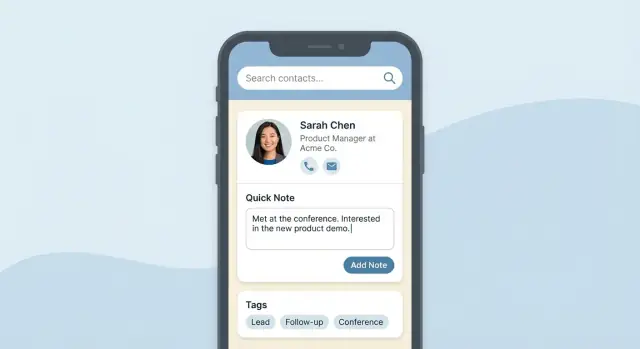
- Contacts list with fast scrolling and a clear “recently viewed” or “recently updated” area.
- Quick add note from a contact screen (one tap, cursor ready).
- Search that finds people and keywords inside notes.
- Tags for lightweight organization (e.g., “Lead,” “Partner,” “Renewal,” “Personal”).
- Reminders / follow-ups tied to a contact and a specific note.
Decide how notes connect to people (keep it simple)
Use a straightforward one-to-many model:
- One person can have many notes.
- If you support organizations, a note can be linked to a person, an organization, or both—but avoid complex “deal” objects in the MVP.
This structure keeps your app flexible without turning it into a full CRM.
Build a timeline view per contact
Make the contact screen feel like a conversation history. A reverse chronological timeline (newest first) helps users:
- Recall the latest context instantly.
- Spot gaps (“We haven’t talked in 2 months”).
- See reminders and outcomes next to the notes that created them.
Nice-to-haves (add only after the basics feel effortless)
Once the MVP is stable and fast, consider:
- Voice-to-text for in-the-moment notes.
- Note templates (e.g., “Intro call,” “Follow-up,” “Meeting recap”).
- Attachments (photos, PDFs) with clear limits.
- Business card scan if it genuinely reduces manual entry.
The rule: if a feature slows down “find contact → add note → set follow-up,” it doesn’t belong in a lightweight CRM notes MVP.
Sketch the User Experience and Key Screens
A lightweight CRM notes app lives or dies on how quickly someone can capture context after a call or meeting. Your MVP UX should optimize for the shortest loop: open app → select contact → add note → save. If any of those steps feels slow, users will fall back to their default notes app.
Design the “fastest path”
Aim for a single, obvious primary action on each screen. For example: the Home screen highlights Search and Recent contacts; the Contact screen highlights “Add note.” Keep typing friction low with a focused note editor (title optional, body first, minimal formatting).
Plan the key screens
You can cover most workflows with five screens:
- Home / Contacts: search bar, recent contacts, and an “Add contact” entry point.
- Contact details: contact info plus a timeline of notes and reminders.
- Add note: fast editor with quick tags and optional template snippets.
- Search: global search across contacts + note text + tags.
- Settings: backup/sync toggle, privacy controls, theme, and notification preferences.
Micro-interactions that feel “instant”
Small touches reduce taps without adding complexity:
- One-tap call/email from the Contact details screen.
- Quick tags (chips) on the Add note screen to categorize in one tap.
- Recent contacts and “last viewed” history to resume quickly.
Accessibility basics (don’t leave them for later)
Use readable default font sizes, large tap targets, and clear contrast. Offer a dark mode option and ensure key actions (Save, Add note, Search) are reachable with one hand. These choices make the app feel simpler for everyone, not just users with accessibility needs.
Model Your Data: Contacts, Notes, Tags, and Reminders
A lightweight CRM notes app lives or dies by its data model. If you keep the core entities small and consistent, everything else—search, sync, reminders, exports—gets simpler.
Start with the core entities
For an MVP, you typically need:
- User: who owns the data and settings.
- Contact: the person you’re writing about.
- Organization (optional): useful if many contacts share a company, but skip it if you’re unsure.
- Note: the actual conversation log.
- Tag: lightweight categorization (e.g., “follow-up”, “pricing”, “hot lead”).
- Reminder: a scheduled nudge tied to a contact or note.
Keep fields minimal (you can always add later)
Resist turning notes into a complex CRM record. A practical Note can be just:
- note text
- created time
- contact ID
- optional outcome (e.g., “Left voicemail”, “Sent quote”)
For Contact, start with a display name plus one or two identifiers (phone/email). Add “job title”, “address”, and other CRM-style fields only when you see repeated demand.
Design for search from day one
Most users will treat your app like memory. Plan for:
- Full-text search across note text
- Tag filtering
- Date range filtering (e.g., “last 30 days”)
This usually means storing timestamps consistently and keeping tags as a first-class object (not just a comma-separated string).
Decide on multi-device support early
Even if you don’t ship sync in v1, decide now whether a user will log in on multiple devices. It affects how you generate IDs, how you handle edits to the same note, and whether reminders should exist on-device, in the cloud, or both.
Select a Tech Approach Without Overcomplicating It
The best tech choices for a mobile CRM notes app are the ones you can ship, debug, and maintain without turning the MVP into a science project. Start by picking your client approach, then decide whether you need cloud sync now or later.
If you want to move faster than a traditional build pipeline, a vibe-coding platform like Koder.ai can help you prototype the core flow (contacts → notes → reminders) via chat, then iterate with snapshots and rollback as you test on devices.
Native vs cross-platform (what to trade off)
Native (Swift for iOS, Kotlin for Android)
If you already know one platform well, native is often the fastest path to a smooth UI and strong performance—especially for “instant search” and large lists of contact notes.
Cross-platform (Flutter or React Native)
If you want one codebase, cross-platform can save time and keep UI behavior consistent between iOS and Android. It’s a solid fit for an app MVP where the core screens are lists, editors, filters, and reminders.
A simple rule: if you’re solo or small-team and want both platforms early, go cross-platform. If you need the absolute best platform polish and you’re shipping one OS first, go native.
Backend: local-only vs cloud sync
No backend (local-only) is the simplest: notes live on the device, work fully offline, and you can still add export/backup later. This is great for privacy-sensitive users and quick validation.
Cloud sync is worth it when your users clearly need multi-device access (phone + tablet), shared work phones, or easy recovery after reinstall. If you do sync, keep the first version narrow: sign-in, sync, conflict handling, and backup—nothing else.
Storage options: offline first
For the on-device database, use something boring and proven:
- SQLite (directly or via a wrapper like Room on Android)
- A simple local database layer in Flutter/React Native that supports indexing and full-text search if needed
For server sync, pair it with a straightforward database (PostgreSQL is a common choice) and store only what you must: contacts, notes, tags, and reminders.
Keep the stack maintainable
Pick defaults you can explain in one paragraph in your build guide: one client framework, one local database, and (optionally) one backend. Simple stacks make features like offline notes, sync and backup, and push notifications easier to add without rewriting everything later.
Plan Offline Mode, Sync, and Backup
A lightweight CRM notes app has to feel dependable. If a salesperson finishes a call in an elevator or a founder jots down details on a flight, the app can’t “wait for internet.” Treat offline capability, syncing, and backups as core product behavior—not add-ons.
Offline-first: write locally, always
Design the MVP so every note, edit, tag, and reminder is saved to a local database first. The UI should confirm the save instantly, even with zero signal.
A simple rule: if it’s on screen, it’s already stored on the device. Sync is a separate background concern.
Sync rules: keep them predictable
Define clear syncing behavior up front:
- When to sync: on app open, periodically in the background, and after a burst of edits (with a short delay).
- Conflict handling: if two devices edit the same note, pick a default (often “last write wins”) and provide a lightweight safety net like “View previous versions” for that note.
- Deletions: use soft deletes (a “deleted” flag) so a delete can sync reliably. Consider a short undo window or a trash view so users can recover mistakes.
Keep the rules visible in settings with plain language: what syncs, when, and what happens if something conflicts.
Backups: trust is a feature
Even if you use cloud sync, offer backups users control:
- Device backup support (iOS/iCloud, Android/Google backup where applicable).
- Export options like CSV/JSON so users can take their contact notes elsewhere.
Exports double as reassurance: users don’t feel locked in.
Plan for data migration early
Your schema will change (new fields like “company,” “last contacted,” or richer reminders). Use versioned migrations so updates don’t wipe local data.
As a practical MVP standard: add a migration test that installs an old build’s database and upgrades it to the newest schema without losing contacts or notes.
Handle Privacy and Security from Day One
People will store sensitive contact notes: negotiation details, personal preferences, follow‑up history, and reminders. If your lightweight CRM notes app feels unclear or risky, users won’t trust it—no matter how fast the UI is.
Set clear privacy expectations
Be explicit about what data you collect and why. In onboarding (and in a short, readable Privacy page), answer:
- What you store: contacts, contact notes, tags, reminders, attachments (if any)
- Where it lives: on-device only, in your cloud, or both (for sync and backup)
- Who can access it: the user only, or also team admins for shared workspaces
If you offer offline notes, say so plainly: “Your notes are available without internet; sync runs when you’re back online.”
Minimum security that covers most real risks
Start with a baseline that’s practical for an MVP but still credible:
- Encryption in transit: all API traffic over HTTPS/TLS.
- Secure storage: use the platform’s secure key storage (iOS Keychain / Android Keystore) for tokens and encryption keys, and encrypt local databases when feasible.
- Device lock support: respect system passcode/biometric protections, and consider an optional in-app lock for shared devices.
Avoid building “custom crypto.” Use established libraries and default OS protections.
Authentication options that match your product
For a solo mobile CRM notes app, a passwordless email link or magic code keeps friction low. If you support teams, add SSO later, but ensure sessions can be revoked and devices can be signed out remotely.
Compliance basics (even for an MVP)
Plan for the requests you’ll inevitably get:
- Data export and deletion (account deletion that actually removes synced data)
- Retention rules (how long backups persist)
- Audit logs if you’re selling to B2B teams (who accessed/edited shared contact notes and when)
A simple “Security & Privacy” screen in Settings can link to /privacy and /security and reduce support load.
Build the MVP in Small, Testable Steps
A lightweight CRM notes app succeeds when the “write something about this person, fast” loop feels effortless. The safest way to get there is to build in thin slices you can test on real devices every few days—not big, risky batches.
Start with one core flow (and make it smooth)
Ship the smallest version that supports the main job:
-
Create a contact (or select one from an existing list)
-
Add a note
-
View notes as a simple timeline on the contact
If any of these steps feels slow—too many taps, too much typing, confusing labels—fix that before adding anything else. This core flow is what users will judge you on in the first 30 seconds.
Add small quality-of-life wins early
Once the core flow is stable, add a few features that reduce friction without expanding scope:
- Recent contacts so users can jump back into ongoing conversations
- Quick actions like “Add note” from a contact list row
- Note templates (e.g., “Call summary,” “Next steps,” “Follow-up date”) to speed up consistent entries
These are “small code, big payoff” improvements that keep the MVP shippable.
Delay search and tagging until the note model is settled
Search and tags are powerful, but they depend on your note structure being correct. If you change how notes are stored (or what fields exist) after building search, you’ll spend time rewriting indexing and filters.
A practical sequence:
- Finalize note fields (text, timestamp, optional template type)
- Confirm timeline display and editing behavior
- Then add tagging and search on top
Keep it MVP: avoid roles and advanced permissions
It’s tempting to add teams, shared accounts, and permission levels. For an MVP, skip complex roles and advanced permissions; they multiply edge cases and slow testing. Focus on a single-user experience you can polish, measure, and iterate quickly.
Add Reminders and Useful Extras (Without Turning It Into a Full CRM)
A lightweight CRM notes app gets more valuable when it helps people follow through—without requiring pipelines, deals, or complex setup. The trick is to add “just enough” extras that support the note-taking habit.
Reminders that feel like follow-ups
Start with a simple follow-up reminder tied to a contact (or to a specific note):
- Due date/time (today, tomorrow, next week, custom)
- Optional notification (push notification only if the user enables it)
- Snooze (e.g., 1 hour, tomorrow morning, next Monday)
Keep the reminder UI minimal: one tap to set, one tap to mark done, and an easy way to reschedule. Avoid turning reminders into tasks with priorities, statuses, and assignments.
Small integrations that remove friction
Integrations should save time, not add configuration screens.
- Import phone contacts (opt-in, with a clear explanation of what’s imported)
- Calendar link (attach an event to a note, or jump to the device calendar from a contact)
- Email summary (send yourself a weekly digest of upcoming follow-ups and recent notes)
If you offer integrations, make them optional and easy to turn off.
Exports that make the app trustworthy
Users feel safer when they can take their data with them:
- Share a contact timeline (all notes in chronological order)
- Send a note (copy/share sheet to email or messaging)
- Generate a PDF for a contact or a date range (useful for handoffs)
If you’re deciding what’s included in free vs. paid, document it clearly on /pricing. For related product decisions and MVP trade-offs, a short “why we built it this way” post in /blog can also reduce support questions.
Test for Speed, Reliability, and Real-World Use
A lightweight CRM notes app wins or loses in the small moments: a quick note after a call, a reminder set while walking into a meeting, a search result found before you forget the detail. Testing should mirror those moments—not just happy-path demos on fast Wi‑Fi.
A practical testing checklist
Focus on the behaviors that most often break trust:
- Offline behavior: create/edit notes in airplane mode, restart the app, then reconnect. Confirm nothing disappears and the UI clearly shows what’s pending.
- Sync conflicts: edit the same note on two devices, then sync. Verify your conflict rule works (e.g., “last edit wins” or “show both versions”), and that it’s explained in plain language.
- Search accuracy: test partial names, tags, and common misspellings. Make sure results feel predictable and don’t hide recent notes.
- Performance: measure time to open the app, time to open a contact, and time to save a note. Watch for slowdowns with 1,000+ contacts and long note histories.
Usability tests that reflect real life
Run short sessions with 5–8 people and time key tasks. One benchmark that matters: how long it takes to add a note from a lock screen (or the fastest entry point your app supports). If it’s more than a few taps or requires too much typing, people will fall back to their default notes app.
Error handling users can trust
When something fails, avoid vague alerts. Use clear messages (“Sync paused—no internet”), offer Retry, and prevent duplicate contacts by warning before creating near-matches.
Analytics basics (without creeping people out)
Track only essential events: note created, reminder set, search used, sync error shown. Make analytics optional, explain it during onboarding, and never log note content.
Launch, Onboard Users, and Iterate
A lightweight CRM notes app wins or loses in the first five minutes. Your launch isn’t just “publish to the store”—it’s the moment users decide whether the app is faster than their current workaround (Apple Notes, Google Keep, or scribbles in a CRM).
Prepare store assets that prove speed
Your screenshots should tell a simple story: open app → find contact → add a note → later, search it. Lead with the “fast note flow” and search, not settings.
Keep captions practical:
- “Add a note to a contact in 2 taps.”
- “Search across contact notes instantly.”
- “Works offline. Syncs when you’re back.”
If you have a short preview video, show real taps and real timing. Avoid slow animations—your value is speed.
Write onboarding that respects attention
Onboarding should be a short tour, not a lecture. Aim for 3–5 screens max, each with one promise:
- Create a first contact note (guided)
- Find notes later with search and tags
- Understand reminders (optional)
- Explain permissions in plain language (contacts, notifications)
Include sample note templates so users aren’t staring at an empty screen. Examples: “Call summary,” “Next steps,” “Pain points,” “Follow-up date.” Templates make the app feel useful before the user writes their first real note.
When requesting permissions, explain the “why” right before the prompt. If they skip, keep the app functional and offer a gentle retry later from Settings.
Plan support and feedback from day one
You don’t need a big help center, but you do need a clear path for users to report issues and ask questions.
Create:
- A small FAQ inside the app (offline mode, sync, backups, deleting data)
- A single feedback channel (email or in-app form)
- A lightweight roadmap page like /roadmap (or a “What’s next” screen)
Track what people actually do: how many notes per contact, how often search is used, where users drop off in onboarding.
Iterate without turning it into a full CRM
Post-launch improvements should deepen the core loop—capture and retrieve contact notes—rather than expanding into deals and pipelines.
Good early iterations:
- Better search (typos, highlights, filters by tags/contact)
- More templates and quick actions (e.g., “Add follow-up”)
- Team sharing only if your users truly need it
- Small integrations (calendar links, basic export) before large CRM integrations
If you add push notifications for reminders, keep them helpful and specific: “Follow up with Maya (last note: pricing questions).” Users should feel assisted, not spammed.
If you built (or accelerated) your MVP on Koder.ai, consider documenting what worked—planning mode decisions, the screens you generated first, and how snapshots helped you test faster. Koder.ai also offers an earn-credits program for creating content or referrals, which can offset early experimentation costs while you iterate.
FAQ
What’s the right MVP goal for a lightweight CRM notes app?
Define one measurable promise: a user can open the app and save a useful note in under 10 seconds after a call or meeting. That goal forces the right constraints: minimal taps, smart defaults (last contact, timestamp), and a focused “Add note” screen.
Who should I build the first version for?
Pick one primary audience and design the note structure around their reality.
- Sales reps: outcome, objections, next step, timing
- Consultants: decisions, who owes what, follow-up date
- Support: issue summary, workaround, sentiment, escalation
Trying to serve all of them usually leads to generic fields that help no one.
Which success metrics should I track from week one?
Track metrics that reflect real usage and speed:
- Median time to add a note (open → save)
- WAU who save at least one note
- Notes per contact (whether people build history)
Avoid vanity metrics like installs unless they connect to note creation.
What features should I explicitly exclude from the MVP?
Write a “not now” list into the MVP definition so scope doesn’t creep:
- No deal stages or pipeline
- No invoicing/payment tracking
- No heavy reporting dashboards
If the fast capture loop works, you can add reminders and extras later without becoming a full CRM.
How do I map the real note-taking workflow before designing screens?
Design around the moments users actually take notes:
- Right after calls (capture outcome + next step)
- Before a follow-up (skim the last note in seconds)
- Between meetings/travel (one-handed entry, offline)
Build screens and defaults for these “note moments,” not for admin workflows.
How do I decide what fields and templates a “note” should have?
Ask 5–10 target users for 10–20 anonymized notes and look for repeated patterns like “next step,” “timeline,” “decision maker,” or “preferred channel.” Turn those patterns into:
- Default templates/snippets
- Suggested fields (kept optional)
- Quick tags
This keeps structure lightweight while still making notes searchable later.
What are the MVP must-have features for a CRM notes app?
A strong MVP daily loop includes:
- Contacts list with recents
- One-tap Add note from a contact
- Search across contacts + note text
- Tags for lightweight organization
- Follow-up reminders tied to a contact/note
Anything that slows “find contact → add note → set follow-up” should wait.
What’s a good data model for contacts and notes?
Use a simple one-to-many model: one contact has many notes. Keep “organization” optional, and avoid deals in v1.
A minimal note can be:
- Text
- Created timestamp
- Contact ID
- Optional outcome (e.g., “Sent quote”)
This keeps timelines, search, and sync simpler to implement.
Which screens should the first version include?
Optimize for the shortest loop: open app → select contact → add note → save.
A practical set of five screens is:
- Home/Contacts (search + recents)
- Contact details (timeline)
- Add note (cursor ready, quick tags)
- Search (global)
- Settings (sync/backup/privacy/notifications)
Prioritize micro-interactions that reduce taps, like quick tags and “recent contacts.”
How should I handle offline mode, sync, and backups without overbuilding?
Make the app offline-first: write to a local database immediately, then sync in the background.
For sync, define predictable rules:
- When to sync (open, periodic, after edits)
- Conflict handling (often “last write wins,” plus a safety net like versions)
- Deletions (soft delete + undo/trash)
Also offer exports (CSV/JSON) so users feel they can take their data elsewhere.