

How to Build a Mobile App for Simple Location-Aware Prompts
A practical guide to building a mobile app that triggers simple prompts by location—MVP planning, geofences, permissions, testing, and privacy.
What “Location-Aware Prompts” Means (With Examples)
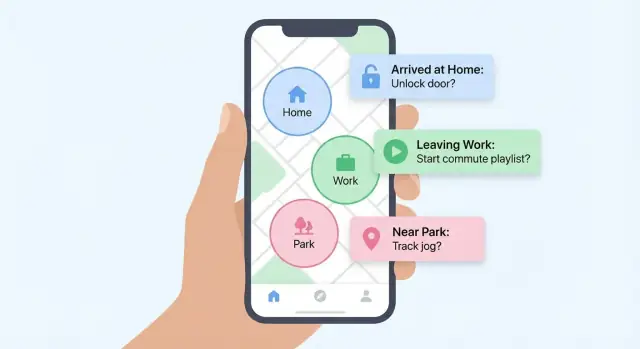
A location-aware prompt is a message your app shows when a user enters or leaves a real-world place. Think of it as a reminder tied to where you are, not what time it is.
A simple definition
At its core, a location-aware prompt has three parts:
- A place (for example, “Home” or “Grocery store”)
- A trigger (arrive, leave, or nearby)
- A prompt (a short message or checklist)
Example: “When I arrive at the pharmacy, remind me to pick up my prescription.”
Common, practical use cases
Location-aware prompts work well for everyday nudges that benefit from context:
- Reminders: “When I leave the office, remind me to call the mechanic.”
- Checklists: “When I arrive at the gym: water bottle, towel, lock.”
- Safety notes: “When I get to the trailhead: share location with a friend.”
- Habit nudges: “When I get home: take vitamins.”
The key is that the prompt shows up at the moment it’s easiest to act—when the user is already in the right place.
What “simple” means in this guide
“Simple” doesn’t mean low-quality—it means focused:
- One clear trigger (arrive/leave)
- A basic rule set (which location, what message, maybe time windows)
- Minimal setup (a few taps, no complicated automation builder)
You’re not building a full “if-this-then-that” system. You’re building a reliable reminder tool.
What this guide covers (and what it won’t)
This guide walks from idea to release: defining an MVP, choosing an architecture, handling permissions clearly, detecting location efficiently, delivering prompts with good UX, and shipping with privacy in mind.
It won’t cover advanced routing, turn-by-turn navigation, social location sharing, or high-frequency tracking for fitness analytics—those change complexity, battery requirements, and privacy expectations significantly.
Start With the MVP: Triggers, Prompts, and Rules
An MVP for location-aware prompts isn’t “a smaller version of the full app.” It’s a clear promise: when someone reaches a place, the app reliably nudges them in a helpful way—without draining battery or sending spammy alerts.
Start by defining three things: trigger types, prompt formats, and the rules that keep the experience sane.
Choose your trigger types
Keep the first release to triggers you can explain in one sentence each:
- Enter: fire when the user arrives within a radius (e.g., “At the grocery store”).
- Exit: fire when they leave (e.g., “Leaving the office”).
- Dwell: fire after they’ve stayed for a minimum time (e.g., “After 10 minutes at the gym”).
- Time window: restrict when any trigger can fire (e.g., weekdays 8am–6pm).
If you’re unsure, start with Enter + time window. It covers most reminder use cases and keeps edge cases manageable.
Decide prompt formats
Pick one primary delivery method and one fallback. More formats can wait.
- Notification: best for immediate, hands-off reminders. Make it actionable (e.g., “Mark done,” “Snooze”).
- In-app card: useful when the user is already in the app; good for context and history.
- Widget: convenient, but adds surface area and QA work—consider it a second-iteration feature.
A practical MVP combo is notification + in-app card: notifications catch attention; the app shows what fired and why.
Set limits that prevent “notification chaos”
Even a simple location-based reminders app needs guardrails:
- Max saved locations: set an initial cap (e.g., 20–50) to simplify performance and testing.
- Radius range: enforce sensible bounds (for example, 100m–1km) so users don’t create triggers that fire constantly.
- Frequency caps: add rules like “no more than once per X minutes per location” and “one active prompt per location at a time.”
These limits make the app feel thoughtful, not noisy.
Define MVP success metrics upfront
Before adding features, decide what “working” means. For a first version, focus on a few measurable signals:
- Activation rate: % of installs that create at least one location-aware prompt.
- Prompt saves: average number of prompts created per active user.
- Retention: do users come back after the first week once the novelty wears off?
If those numbers improve, you’ve earned the right to expand trigger types, add widgets, and build smarter scheduling.
Pick Your Tech Stack and App Architecture
Your tech choices should follow one question: how reliably can the app notice a place-related trigger and show a prompt—without draining battery or confusing users?
Native vs. cross-platform
Native (iOS with Swift + Core Location, Android with Kotlin + Location APIs) tends to be the most predictable for background location behavior, system restrictions, and debugging. It’s often the fastest route to a “works everywhere” MVP if your team already knows the platforms.
Cross-platform (Flutter, React Native) can speed up UI development and keep one codebase, but location features depend heavily on plugins. That can be fine for a simple app, but timelines can slip if you hit edge cases (background limits, manufacturer quirks, OS updates) and need to patch native code anyway.
A practical rule: if location triggers are the main feature, default to native unless your team is already shipping location-heavy apps in your chosen cross-platform stack.
If you want to prototype quickly (or ship a first version with fewer handoffs), a vibe-coding platform like Koder.ai can help you generate a working app from a chat-based spec—often using Flutter for mobile, with optional React for web and a Go + PostgreSQL backend when you decide you need sync.
A simple architecture that ships
For an MVP, keep it small:
- Mobile app: handles creating prompts, monitoring triggers, and showing notifications.
- Local storage: SQLite/Room (Android), Core Data/SQLite (iOS), or a lightweight database layer.
- Optional backend: only if you truly need it.
This approach supports offline use naturally: prompts still work even with no signal.
When you actually need a backend
Add a backend when you need multi-device sync, shared lists (family/team), analytics, or server-driven experiments. Otherwise, a backend increases cost, privacy surface area, and failure modes.
If you do add a backend, keep the boundary clean: store only the objects you need for sync, and keep trigger evaluation on-device when possible.
Data model basics
Keep the core objects clear and boring:
- Prompt: title, message, enabled, priority.
- Location: saved place details (label + coordinates + radius).
- Schedule: optional time windows or days.
- Trigger history: when it fired, what matched, whether the user acted.
With this model, you can iterate later without rewriting the app’s foundation.
Location Permissions Without Confusing Users
Location features fail most often at the moment you ask for permission. People aren’t refusing “location,” they’re refusing uncertainty. Your job is to explain exactly what will happen, and when.
Explain the “why” before the system popup
Don’t lead with the OS dialog. Show a simple, one-screen explanation first:
- What you’ll use location for (e.g., “Remind you when you arrive at the grocery store”)
- When you’ll access it (e.g., “Only when you create or run a reminder”)
- What you won’t do (e.g., “We don’t store your movement history”)
Keep it plain, specific, and short. If you can’t explain it in two sentences, the feature is probably too broad.
iOS vs Android: the choices users actually see
On iOS, most users will choose between When In Use and Always. If your app needs prompts while the app is closed, explain why Always is required—and ask for it only after the user has created at least one location prompt.
On Android, users typically grant foreground location first, then you request background location separately. Treat this as a two-step trust flow: earn foreground access with visible value, then request background access when it’s necessary.
Precise vs approximate location
Many phones allow precise or approximate location. If the user picks approximate, don’t break the experience. Instead:
- Widen your trigger area (bigger radius)
- Add a note like “For tighter reminders, enable Precise Location”
If permission is denied: keep the app useful
Provide a fallback: allow time-based reminders, manual “I’m here” check-ins, or a saved-address picker that triggers only when the app is open.
Also add a clear path to re-enable permissions later (e.g., a settings screen with an explanation and a button that opens system settings).
How to Detect Location: Geofences vs GPS Tracking
Choosing how your app “knows where the user is” is the biggest decision for battery life and reliability. For simple location-aware prompts (like “remind me when I arrive at the grocery store”), you usually want the lightest option that still feels accurate.
Geofencing: best for arrive/leave prompts
Geofencing lets you define a virtual boundary around a place (a circle with a radius). The OS watches for “enter” and “exit” events and wakes your app only when needed.
This is ideal when your prompts are place-based and binary: arrive, leave, or both. It’s also easier to explain to users: “We’ll alert you when you get near this location.”
Recommended defaults for simple apps:
- Radius: 150–300 meters (smaller feels precise but can be flaky)
- Debounce / cooldown: 10–30 minutes per location to prevent spam
- Max triggers per day: 3–10 per rule (depending on your app’s purpose)
Significant location change vs continuous GPS tracking
If you need “roughly where am I” updates (for example, to refresh nearby rules), significant location change is a good middle ground. The device reports updates only when it detects meaningful movement, which is far less power-hungry than constant GPS.
Continuous GPS tracking should be reserved for genuinely real-time needs (fitness tracking, navigation). It can drain battery quickly, increases privacy sensitivity, and is overkill for most reminder-style prompts.
Edge cases to plan for
- GPS drift: triggers can fire near the edge. Use a slightly larger radius and add cooldown.
- Tall buildings / underground: signals get noisy. Expect delays or missed triggers; allow manual “run now” in-app.
- Rapid movement (car/train): users can cross a small geofence too fast. Favor larger radii and avoid ultra-short cooldowns.
A practical approach: start with geofences for primary rules, then add significant-change updates only if you need extra reliability.
Delivering Prompts: Notifications and In-App UX
A location trigger is only useful if the prompt shows up at the right moment and feels easy to act on. Treat delivery as a product feature: timing, wording, and the “next tap” matter as much as detecting the place.
Local vs push: choose the simplest tool
For most MVPs, local notifications are the fastest path to reliable prompts. They fire on-device, work without a server, and keep your architecture simple.
Use push notifications only when you truly need server-driven behavior—like syncing reminders across devices, changing prompts remotely, or sending prompts tied to shared calendars or teams.
Prevent “notification fatigue” with smart throttling
Even a helpful reminder becomes noise if it repeats too often. Add lightweight controls you can explain in plain language:
- Cooldowns (e.g., “Don’t remind me again for 30 minutes”)
- Quiet hours (e.g., no prompts during sleep or meetings)
- Max repeats (e.g., stop after 3 ignored prompts)
These rules also protect your app’s reputation: fewer annoyed users, fewer uninstalls.
Make prompts actionable, not just informative
A good prompt answers: “What should I do next?” Build notifications that do something:
- Snooze (5/15/60 minutes)
- Mark done (and optionally log it)
- Open the app straight to the relevant reminder
- Open map if the prompt involves navigating or checking nearby tasks
Pair notifications with a calm in-app moment
When users open the app from a prompt, land them on a focused screen: the reminder text, quick actions, and a subtle confirmation (“Done” state). Avoid dumping them into a busy dashboard—keep the experience consistent with the urgency of the interruption.
Designing the Prompt Setup Experience
A location-aware prompt is only as good as the moment someone can set it up without thinking too hard. The goal is a “create prompt” flow that feels familiar, forgiving, and quick—especially because location selection can be the most confusing part for non-technical users.
The “Create Prompt” flow: place, radius, message
Keep the flow focused on three decisions:
- Choose a place (where the reminder should trigger)
- Choose a radius (how close is “close enough”)
- Write the message (what you want to be reminded about)
A practical default is to prefill the message field with a short template (for example, “Remember to…”) and preselect a reasonable radius so users aren’t forced to understand meters/feet before they can proceed.
Picking a location: map, search, or current location
Offer multiple ways to select a place, but don’t show everything at once.
Search first is often the fastest option: a search bar with places autocomplete helps people find “Home,” “Whole Foods,” or a specific address without fiddling with a map.
Add two supporting options:
- Use current location for quick setups (“Remind me when I get back here”). Make it explicit that this pins the location at the moment they tap it.
- Map picker for edge cases (parks, trailheads, parking lots). If you include a map, keep interactions simple: drag a pin, show the address/place name, and provide a clear “Confirm location” button.
Radius UI that people understand
Most users don’t think in meters. Use a slider with plain-language labels (for example, “Very close,” “Nearby,” “A few blocks”) while still showing the numeric value for clarity. A small preview line like “Triggers within ~200 m of this place” reduces surprises.
Managing prompts after creation
Once prompts exist, people need quick control without deleting work:
- Enable/disable toggle per prompt for temporary pauses
- Duplicate to reuse a setup (same place, new message)
- Archive for old prompts you don’t want cluttering the main list
Keep the list scannable: show the place name, a one-line message preview, and a subtle status (“Enabled,” “Paused,” “Archived”).
Accessibility basics that prevent friction
Location UX often relies on small map controls—so accessibility needs to be intentional:
- Readable text and strong contrast, especially for the selected address and radius
- Large tap targets for toggles, map buttons, and “Confirm” actions
- Clear focus order and labels for screen readers (for example, “Radius slider, 200 meters”)
A setup experience that’s quick, clear, and reversible will reduce support issues and increase the chance users keep creating (and trusting) location-based reminders.
Offline Support, Battery Life, and Background Limits
A location-aware prompts app should still work when the user has spotty reception, low battery, or the app hasn’t been opened in days. Designing for those constraints early keeps your “simple” app from becoming unreliable.
Offline-first storage (so prompts always fire)
Treat the device as the source of truth for triggering reminders. Store prompts locally (for example: name, latitude/longitude, radius, enabled state, last-edited timestamp). When the user edits a prompt, write it to local storage immediately.
If you plan any kind of account or sync later, queue changes in an “outbox” table: create/update/delete actions with timestamps. When the network is available, send the queued actions and mark them as completed only after the server confirms.
Background limits: what you can rely on
Both iOS and Android limit what apps can do in the background, especially if users don’t open them often.
The dependable approach is to rely on OS-managed location triggers (geofences / region monitoring) rather than running your own background loop. OS-managed triggers are designed to wake your app at the right moment without keeping it active all day.
Be careful with assumptions:
- Your app may not get immediate callbacks in every scenario (power saving modes, device reboot, system scheduling).
- Background execution time after a trigger can be short; keep work minimal: decide whether to show a prompt, then schedule a notification.
Battery: avoid polling
Frequent GPS polling is one of the fastest ways to drain battery and get your app uninstalled. Prefer:
- Geofences for “arrive/leave” reminders
- Low-power location modes when you truly need periodic updates
- Batching work (update multiple reminders in one pass)
If you add sync later: conflict handling
If prompts can be edited on multiple devices, decide a simple conflict policy up front. A practical default is “last write wins” using a server timestamp, while keeping a local edit timestamp for transparency and debugging. For deletes, consider a tombstone record so a deleted prompt doesn’t reappear after an older device syncs.
Privacy and Security for Location-Based Features
Location-based reminders feel personal, which means users will judge your app by how respectfully it treats their data. Good privacy isn’t just a policy—it’s product design.
Collect less than you think you need
Start with the smallest possible dataset. If a reminder only needs to fire when someone enters a place, you usually don’t need to store a trail of where they’ve been.
- Collect the minimum data needed; avoid storing full location history
- Prefer saving user-defined places (e.g., “Grocery store geofence”) over raw GPS logs
- Keep timestamps only when they’re required for features like “only on weekdays”
Process on-device whenever you can
If your app can decide “trigger met, show prompt” locally, do it. On-device processing reduces exposure and simplifies compliance because less data leaves the phone.
- Make prompt processing on-device when possible
- If you must use a server (sync across devices), send only what’s necessary (e.g., place IDs and trigger states)
Make privacy understandable inside the app
Don’t hide privacy behind legal text. Add a short, plain-language screen in onboarding and in settings.
- Add a clear privacy screen: what you track, why, and how to delete
- Include controls like: pause location features, delete saved places, delete all app data
Security basics that prevent common failures
Treat stored locations like sensitive data.
- Encrypt local databases or key-value storage where locations or place names are saved
- Use TLS for all network traffic and authenticate requests properly
- Restrict internal access: only the parts of your app that need location should be able to read it
A simple rule: if you can’t clearly explain your data use in two sentences, you’re probably collecting too much.
Testing and Debugging Location Triggers
Location features often “work on your phone” but fail for real users because conditions are messy: weak signal, different devices, battery restrictions, and unpredictable movement. A good test plan makes these failures visible early.
Test in real conditions (not just at your desk)
Do at least a few runs outside with the app installed on a normal build (not a debug-only shortcut).
- Walking tests: approach, enter, and exit the same place from different directions.
- Driving tests: faster movement can skip boundaries or delay updates. Try a route that passes near (but not through) the target area.
- Spotty GPS tests: underground parking, dense streets, or indoors near windows.
- Low power mode tests: battery saver settings can delay background updates on both iOS and Android.
Keep notes on: expected trigger time, actual trigger time, and whether the app was open, backgrounded, or force-closed.
Use simulators and mock locations for repeatability
Real-world tests are essential, but they’re slow. Add repeatable tests with:
- Simulated routes (steady movement past a boundary)
- “Jump” tests (teleport from far away to inside the zone)
- Edge tests (hover around the boundary to see if you get repeated triggers)
Mocking lets you reproduce a bug exactly and confirm the fix without needing to revisit the same street corner.
Build a device matrix (small, but intentional)
Location behavior varies across Android vendors and OS versions. Cover:
- At least one older Android, one recent Android, and one iPhone model
- Multiple permission states: Allow Once, While Using, Always, and Denied
- Background restrictions: default settings vs aggressive battery optimization
Logging without collecting sensitive history
Treat logs as a debugging tool, not a location diary. Record events like:
- Timestamp, trigger type (enter/exit), prompt ID
- Permission state and whether background updates are allowed
- Accuracy level and a coarse reason code for failures (e.g., “permission_denied”, “location_unavailable”)
Avoid storing raw coordinates or long location trails. If you need location for debugging, keep it optional, short-lived, and clearly user-controlled.
Publishing: Store Requirements and Release Checklist
Getting a location-aware prompts app approved is mostly about clarity: you must justify why you access location, especially in the background, and show users you’re respectful with data.
Store requirements that affect location permissions
iOS (App Store):
Apple reviews the permission text you provide. Your location permission “purpose strings” must plainly explain what users get. If you request “Always” location, be prepared to justify why prompts won’t work reliably with “While Using.”
Android (Google Play):
Google is strict about background location. If you request it, you’ll likely need to complete a Play Console declaration explaining the feature and why foreground-only access isn’t enough. You’ll also need to complete Data Safety details (what you collect, how it’s used, whether it’s shared).
Write store descriptions that explain the benefit
In your App Store / Play Store listing, describe the user benefit in one sentence before any technical detail:
“Get reminders when you arrive at the grocery store, so you don’t forget your list.”
Also mention:
- When prompts trigger (arriving, leaving, nearby)
- That location is used only to deliver reminders
- If background location is optional and what degrades without it
Rollout plan: test, beta, staged release
Use a simple rollout sequence:
- Internal testing (team devices, multiple OS versions)
- Closed beta (real users, real places)
- Staged release (start at a small percentage, then expand)
Track crash rates, permission opt-in rates, and whether triggers fire reliably.
Release checklist (don’t skip)
- Permission prompts match your in-app explanation
- Privacy policy reflects location usage
- Add a support page path like /help/location-permissions for troubleshooting and “Why do you need this?” questions
- Screenshots and copy avoid implying constant tracking if you’re using geofences
Measuring Success and Planning the Next Iteration
Shipping a location-aware prompts MVP is only half the job. The other half is proving it works for real people, then deciding what to build next based on evidence—not guesses.
Analytics to add early (so you don’t fly blind)
Track a few events from day one:
- Prompt created (include basic metadata like “radius bucket” or “trigger type,” not raw coordinates)
- Permission granted / denied (and whether the user later changed it)
- Trigger fired (when the system thinks the user entered/left)
These three alone tell you whether users are setting up prompts, whether the app can legally detect location, and whether the core feature actually runs.
If you build with a backend (for example, for multi-device sync), keep analytics privacy-first: aggregate where possible, avoid raw coordinates, and clearly document what you record.
Measure quality, not just volume
High trigger counts can still mean a bad experience. Add quality signals:
- False triggers: prompts that fire when the user says “that wasn’t right” (add a simple thumbs down)
- Missed triggers: prompts users expected but never saw (collect via “Did this remind you at the right time?”)
- Notification opens: opens, dismisses, and “ignored” time
A practical goal for an MVP is to reduce false and missed triggers week over week.
Effort and cost reality check
Plan ongoing work beyond initial build:
- MVP scope: 2–4 core screens, basic rules, notification delivery
- Design: clarity beats polish; budget for onboarding copy and permission education
- QA: real-device testing across cities, buildings, and commute patterns
- Maintenance: OS updates, permission behavior changes, edge-case fixes
If you’re aiming to ship faster, consider tooling that reduces boilerplate and iteration time. For example, Koder.ai supports snapshots and rollback plus source code export, which can be helpful when you’re testing lots of OS and device permutations.
Next iteration ideas (when the MVP proves value)
Prioritize features that increase re-use:
- Shared prompts (family or team)
- Templates (“When I arrive at the gym…”)
- Calendar integration (only remind on certain days)
- Widgets for quick create and quick snooze
FAQ
What is a location-aware prompt?
A location-aware prompt is a reminder that triggers based on where the user is, not when it is.
It typically includes:
- A saved place (label + coordinates + radius)
- A trigger (enter/exit/dwell)
- A short message or checklist delivered via notification or in-app UI
What’s the simplest MVP feature set for a location-aware prompts app?
A solid MVP focuses on reliability and clarity:
- Triggers: start with Enter (and optionally a time window)
- Delivery: local notifications + an in-app card/history
- Guardrails: radius limits, cooldowns, and a cap on saved locations
This keeps setup simple and avoids “notification chaos.”
Which trigger types should I support first: enter, exit, or dwell?
Start with Enter + time windows.
- Enter covers most real reminders (“when I arrive…”) and is easy to explain.
- Time windows reduce false/annoying triggers (e.g., weekdays only).
Add Exit or Dwell later, once you’ve validated reliability and UX.
How do I choose a geofence radius and prevent repeated triggers?
Use defaults that balance accuracy and reliability:
- Radius: ~150–300 m (smaller can be flaky; larger can feel imprecise)
- Cooldown/debounce: 10–30 minutes per location
- Daily cap (optional): 3–10 fires per rule, depending on the use case
Also enforce sensible bounds (e.g., don’t allow 10 m or 50 km radii).
How should I handle location permissions without confusing users?
Ask for permission only after you’ve explained the benefit in-app.
Practical flow:
- Show a short screen: what you’ll do, when you’ll access location, and what you won’t store.
- Request foreground first.
- Request background/Always only after the user creates at least one location prompt and you can justify why it’s needed.
If denied, keep the app useful with fallbacks (time-based reminders or “run when app is open”).
What should my app do if the user enables approximate (not precise) location?
Don’t break the experience—adapt it:
- Increase the allowed radius (approximate location needs a larger buffer)
- Warn gently: “For tighter reminders, enable Precise Location.”
- Keep triggers and throttling conservative to avoid false fires
Design so the app still functions, just with less precision.
Geofencing vs GPS tracking: which should I use for location triggers?
For simple arrive/leave reminders, prefer OS-managed geofencing/region monitoring.
- Geofences: low power; OS wakes your app only when needed
- Significant location change: good for “rough updates” or refreshing rules
- Continuous GPS tracking: usually overkill for reminders; higher battery and privacy sensitivity
Default to geofences, then add significant-change updates only if you need extra reliability.
Do I need a backend, or can everything run locally?
Start offline-first:
- Store prompts locally so they fire without a network.
- Only add a backend for real needs like multi-device sync, shared lists, or experiments.
If you add sync later, queue edits (create/update/delete) and use a simple conflict policy like last write wins, plus tombstones for deletes.
How do I design notifications so they’re helpful instead of annoying?
Make notifications actionable and predictable:
- Actions: Mark done, Snooze, Open app to the exact prompt
- Throttling: cooldowns, quiet hours, and “stop after X ignores”
- In-app: show what fired and why (a calm history/card view)
This reduces fatigue and increases trust in the reminders.
How do I test and debug location triggers reliably across devices?
Use a mix of real-world and repeatable tests:
- Walk/drive past the same geofence from different directions
- Test edge cases: low power mode, poor GPS, fast movement, app backgrounded
- Use simulator/mock locations for reproducible “jump” and boundary-hover tests
Log events without collecting sensitive history (e.g., timestamp, trigger type, prompt ID, permission state—avoid raw coordinate trails).