

How to Build a Mobile Meal Planning App for Multiple Families
Learn how to design and build a mobile meal-planning app for multiple families with shared calendars, grocery lists, dietary rules, roles, and privacy controls.
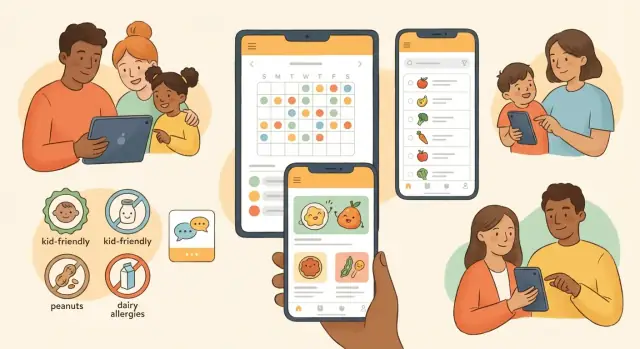
What “meal planning across families” really means
Meal planning across families isn’t just “shared recipes.” It’s coordination between separate households that may shop at different stores, cook on different nights, and follow different rules—while still trying to feel like one plan.
At its core, the problem is simple: people who share responsibility for feeding others (kids, elders, roommates) need a single, trusted place to decide what’s being cooked, when, by whom, and what needs to be bought—without endless texting.
The real-world coordination problem
Multi-household planning shows up when a child spends weekdays with one parent and weekends with another, when grandparents help with dinners, or when two families co-host meals. Even roommates can fit the pattern: separate schedules, shared fridge, shared costs.
Primary users usually include:
- Parents and co-parents coordinating custody schedules
- Caregivers (nannies, babysitters) who need clarity and limits
- Teens who cook occasionally and want simple tasks
- Grandparents or relatives contributing a meal once a week
- Roommates splitting shopping and cooking
Common pain points your app should solve first
Across these groups, the same issues repeat:
- Duplicate shopping (“We both bought pasta.”)
- Conflicting schedules (late practice nights, travel, custody swaps)
- Dietary constraints (allergies, religious rules, preferences) getting lost in chat
- Lack of ownership (“Who is cooking on Tuesday?”)
- Last-minute changes that don’t update everyone
Pick a north star metric that matches the job
Choose one measure that reflects successful coordination. A practical north star metric is meals planned per week per household group (or “shared meals confirmed”). If that number rises, you’re reducing chaos—and users will feel it quickly.
Target use cases and user stories
Multi-family meal planning isn’t one “big family chat” with recipes thrown in. It’s a set of overlapping groups, each with their own rules, schedules, and level of trust. Defining a few clear use cases early keeps your MVP focused and prevents features that only work for one household.
1) Single family with two homes (co-parents)
Here, coordination matters more than creativity.
User stories:
- As a co-parent, I want to see a shared plan for the kid’s dinners this week, so I don’t duplicate meals or forget ingredients.
- As a parent, I want to tag meals as “works for picky eater” and “15 minutes,” so handoffs between homes are smoother.
- As either parent, I want to split grocery responsibilities by day (Mon–Wed vs Thu–Sun), so the plan matches custody schedules.
2) Extended families sharing meals on weekends
This is about predictable traditions and avoiding accidental conflicts.
User stories:
- As a host, I want to propose two meal options for Sunday and let relatives vote, so planning doesn’t become a group text debate.
- As a guest with dietary needs, I want to privately mark allergies, so the host sees what matters without broadcasting details.
3) Friends/roommates doing rotating dinners
Simplicity wins: who cooks, what’s for dinner, and who buys what.
User stories:
- As a roommate, I want a rotation schedule that automatically assigns cooking nights, so it feels fair.
- As the cook, I want the grocery list to update when I swap a recipe, so I don’t manually rewrite items.
4) Community groups (childcare co-ops, church groups) with permissions
This requires structure and “need-to-know” access.
User stories:
- As an organizer, I want to create a group meal calendar where members can sign up, so coverage is clear.
- As a member, I want my contact info visible only to organizers, so I can participate without oversharing.
Must-have features for a first version (MVP)
An MVP for a meal planner mobile app that supports multi-household meal planning should focus on the moments where families actually coordinate: “Who’s planning?”, “What are we eating?”, and “Who’s buying what?” If you nail those, people will forgive missing extras like nutrition charts or elaborate meal prep scheduling.
1) Accounts with a clear multi-family structure
Start with a simple model: one user can belong to more than one “family” or household (for example: two co-parents’ homes, grandparents, or a shared cabin group). Make it obvious which household you’re viewing so meals and lists don’t mix.
Keep setup lightweight: create a household name, choose a week start day, and you’re done. This foundation supports a credible family meal planning app without forcing users into complex settings.
2) Invites and onboarding that don’t require tech skills
Joining needs to be frictionless, especially for relatives.
Offer:
- Invite link (share via text/email)
- QR code for in-person setup
- Optional contact list selection to send invites quickly
Show a short “what happens next” screen: they join the household, see the shared calendar, and can add to the list.
3) A shared weekly meal calendar (the “source of truth”)
The core screen should be a weekly grid where anyone can add a meal (even just “Tacos”) to a day/time. Support quick edits and a simple “planned by” label. This is where family calendar meals become real coordination instead of vague intentions.
4) A shared grocery list with real-time updates
Your shared grocery list app experience should feel instant: add an item, everyone sees it; check it off, it updates for others. Allow basic grouping (Produce, Dairy) and a “notes” field (“gluten-free tortillas”). This tight recipe and grocery sync loop is what makes the app useful on day one.
If you want a clean boundary, park “nice-to-haves” (recipes, dietary restrictions tracking, reminders) for later on your roadmap.
Recipes: capture, reuse, and adapt
A multi-family meal planner lives or dies on how easy it is to save a recipe once—and then reuse it across weeks, households, and different appetites. Your goal for the first version isn’t a “perfect cookbook”; it’s a fast, reliable recipe workflow that reduces typing and prevents mistakes on grocery day.
Recipe card basics (MVP)
Start with a simple recipe card that covers what people actually reference while cooking:
- Servings (the baseline for scaling)
- Ingredients (quantity, unit, ingredient name)
- Steps (plain text, ordered)
- Notes (kid swaps, “make extra for lunch,” oven quirks)
Keep fields forgiving: users should be able to write “1 can chickpeas” without getting blocked by strict validation.
Portion scaling that doesn’t break trust
Portion scaling is one of the fastest ways to make the app feel “smart,” but only if it’s predictable.
- Let users change servings (e.g., 4 → 6) and automatically recalculate ingredient quantities.
- Round sensibly (e.g., 1.5 tbsp is fine; 0.33 eggs is not—prompt to round up).
- Show the original and the scaled value when editing so people can sanity-check.
If you support multiple households, consider storing a household-level “default servings” so one family’s version doesn’t overwrite another’s.
Leftovers and repeat-meal shortcuts
Busy families often plan patterns, not individual meals. Add two shortcuts:
- Repeat meal: reuse the same recipe next week without re-adding it.
- Plan leftovers: after scheduling a dinner, offer “Add leftovers for lunch tomorrow” to create a second meal instance without duplicating the recipe.
Import options: URL now, photo later
For early traction, prioritize URL import (paste a link → parse title, ingredients, steps) and manual entry that’s quick on mobile.
Put photo-to-text on the roadmap: capture images now (as attachments) and add OCR later, so users can still store grandma’s handwritten recipe without waiting for advanced parsing.
Dietary rules, allergies, and preferences
When multiple households share a meal plan, food rules stop being “nice to have” and become a safety feature. Your app should make it easy to record what people can’t eat, what they won’t eat, and what they’re choosing to avoid—without turning setup into a questionnaire marathon.
Model rules in three layers
Diet types are broad defaults that shape suggestions and filtering: vegetarian, vegan, halal, kosher, low-sodium, diabetic-friendly, etc. Treat these as reusable “profiles” a family can apply to one or more members.
Allergens and must-avoid ingredients are non-negotiable. Let users mark ingredients (and optionally categories like “tree nuts”) as “must avoid.” If you support packaged foods later, map these to standardized allergen tags.
Preferences should be softer and ranked. A simple scale works well:
- “Dislike” (try to avoid in suggestions)
- “Prefer not” (low priority)
- “Cannot eat” (acts like a must-avoid)
This distinction prevents “no mushrooms” from blocking a whole week of planning the way a peanut allergy must.
Conflict alerts that help, not annoy
As meals are added, run a fast check against everyone assigned to that meal (or that household’s default diners).
Good conflict alerts are specific and actionable:
- Highlight the rule being broken (“Contains shrimp: shellfish allergy”)
- Offer quick fixes (“Swap ingredient,” “Choose alternative recipe,” or “Assign different diners”)
Avoid policing users. Let them override with a clear reason (“Adults only meal,” “Allergen-free substitution confirmed”), and log the override so other parents can trust the plan.
Roles, permissions, and family governance
When multiple households share a plan, “who can change what” matters as much as recipes. Clear roles prevent accidental edits, reduce friction between parents, and make the app feel safe enough to use every week.
A simple role model that covers most families
Start with five roles that map to real-life expectations:
- Owner: creates the multi-family group, manages billing (if any), can delete the group, and has full access.
- Admin: manages members and roles, can approve plans (if you add approvals), and can override conflicts.
- Editor: can add meals, edit the week, and contribute recipes and grocery items.
- Viewer: can view the plan and grocery list, but can’t change shared content.
- Kid account: a restricted viewer/editor hybrid (e.g., can check off grocery items or add snack requests, but can’t edit the weekly plan).
Keep the permission rules readable in the UI (“Editors can change meals for this week”) so nobody has to guess.
Who can add meals, edit recipes, and finalize the week
Treat the weekly plan and the recipe box as separate permission areas. Many groups want anyone to propose meals, but fewer people should be able to finalize the week.
A practical default:
- Editors can propose meals (add to a draft week) and add grocery items.
- Admins/Owners can finalize the week (locks the plan until reopened).
- Recipe editing can be either “all Editors” (casual groups) or “Admins only” (more controlled groups).
Optional approval workflows (without slowing everyone down)
Approvals should be opt-in and lightweight. Example: “Changes to finalized weeks require approval” or “New recipes need admin approval before they appear for everyone.” Let groups toggle this in settings, and keep it per-household if needed.
Audit trail: trust through visibility
Even with good permissions, mistakes happen. Add an audit trail that answers: who changed what and when. Show it on key objects (week plan, recipe, grocery list) with a simple history view and a “revert” option for admins. This reduces arguments and makes shared planning feel fair.
Grocery list that works in real life
A shared grocery list is where a multi-household meal planning app either feels magical or instantly frustrating. Real shopping involves different stores, different habits, and quick edits while someone’s in the aisle with spotty reception.
Multiple stores and shopping categories
Support more than one list at a time—because families don’t shop in one place. A practical setup is:
- Lists per store (Costco, local market, pharmacy)
- Sections per aisle/category (Produce, Dairy, Pantry, Household)
Make categories editable. One family groups by aisle, another by meal (“Taco night”), and both should be able to organize without fighting the system.
Smart merging that respects quantities
When two households add “eggs,” your app shouldn’t create a messy duplicate list. Smart merging should:
- Detect duplicates ("tomato" vs "tomatoes")
- Combine quantities sensibly (2 + 1 = 3), while keeping units clear ("2 cans" + "1 can")
- Preserve notes ("gluten-free" or "for lunches")
Let users split merged items when needed (e.g., one family wants free-range, another doesn’t). The goal is fewer taps, not forced compromises.
Pantry staples and recurring items
Most lists aren’t built from recipes—they’re built from “we’re always out of this.” Add a lightweight pantry staples feature:
- A staples list per household (or shared across households if they want)
- Recurring cadence (weekly milk, monthly detergent)
- One-tap “add to next shop”
This reduces list fatigue and keeps the app useful even when families don’t plan meals perfectly.
Offline mode for shopping (and sane sync)
Grocery shopping is often offline or low-signal. The list should remain fully usable without internet: check/uncheck, edit quantities, add new items.
On sync, handle conflicts in a predictable way. If two people edit the same item, keep the most recent change but show a small “Updated” indicator with an undo option. For deletions, consider a short “recently removed” area so nothing disappears permanently by accident.
If you want, you can connect this experience back to meal plans later (e.g., “Add ingredients from this week”), but the grocery list must stand on its own first.
Scheduling, reminders, and shared calendars
Scheduling is where multi-household meal planning either feels magically simple or quickly falls apart. The goal is to make “what are we eating, and who’s responsible?” obvious at a glance—without forcing everyone into the same routine.
Meal time slots that fit real families
Start with a predictable structure: breakfast, lunch, dinner, and snacks. Even if some households only plan dinners, fixed slots help avoid ambiguity (e.g., “Is this meal for Tuesday lunch or dinner?”).
A practical approach is to let users toggle which slots they care about per household, while still keeping a consistent weekly view. That way, one family can plan snacks for school days, while another only plans dinners.
Handling availability and scheduling conflicts
Across families, conflicts are normal: kids at different houses, late practices, travel, or “we’re eating out.” Your scheduler should support:
- Marking a slot as Not at home, Leftovers, or Eat out
- Assigning a meal to a household (or a specific caregiver) so responsibility is clear
- Lightweight notes like “pickup at 6:30” or “needs to be packable”
The key is not perfect automation—it’s preventing double-booking and last-minute surprises.
Notifications people won’t mute
Reminders should be helpful and specific:
- Cook reminder: “Dinner tonight: Tacos at Dad’s (start at 5:30)”
- Shopping prompt: “You’re missing 4 items for Wed dinner—add to grocery list?”
- Meal changed alert: “Thursday dinner changed to Pasta—review ingredients”
Let users choose frequency and quiet hours per household so the app respects different routines.
Shared calendar sync (optional)
Keep calendar integration optional and simple.
- Export (one-way): easiest to build and safest—publish a read-only feed so meals show up in Apple/Google Calendar.
- Two-way sync: powerful but tricky—requires conflict rules (what wins if someone edits the calendar?), duplicate prevention, and strong privacy controls.
For an MVP, export is usually enough; you can add two-way sync later once scheduling behavior is stable.
Privacy and safety for multi-household sharing
Multi-household meal planning sounds harmless, but it quickly involves sensitive details: kids’ schedules, dietary restrictions, home routines, even addresses if you support deliveries. Treat privacy and safety as core product features, not “settings” people hunt for.
Family spaces vs. personal notes
Define clear boundaries between shared spaces (a “family circle” or household group) and private space (personal notes, drafts, favorites).
A practical rule: anything that can surprise another parent should default to private. For example, “I don’t like Dad’s chili” belongs in personal notes, while “peanuts trigger an allergy” belongs in shared dietary rules.
Make the sharing state obvious in the UI (“Shared with: Smith Household + Lee Household” vs “Only me”), and allow one-tap conversion between private and shared when appropriate.
Data minimization: collect less, explain more
Only collect what you need to deliver the feature:
- If reminders can work with time windows, don’t require exact addresses.
- If age is only needed for child safety controls, store an age range instead of a birthdate.
Also explain why you ask for something (“Used to prevent accidental sharing with minors”) and provide a way to delete it. Users trust apps that are transparent and predictable.
Controls for minors
If your app supports kid profiles, build restricted profiles:
- No inviting new members
- No viewing other households’ contact details
- Limited sharing (e.g., can see meal plan and grocery list, but not private notes)
Include “guardian approval” flows for changes that affect other households, like sharing a recipe publicly within a group.
Safe invite handling
Invites are a common abuse vector. Prefer expiring invites and make them revocable.
Key controls:
- Revoke links and regenerate new ones
- Block users across all shared spaces
- Report abuse from within the invite/join screen
If you publish guidelines, link them from the invite flow (e.g., /community-guidelines) so expectations are set before people join.
Data model and syncing basics (without overengineering)
A multi-family meal planning app succeeds or fails on whether the core data stays simple, shareable, and predictable. Start with a small set of objects, make ownership clear, and only add complexity when a real feature needs it.
Core data objects (keep them boring)
You can cover most MVP needs with these building blocks:
- User: profile, notification settings, and the families they belong to.
- Family: the sharing boundary (who can see what). Think “workspace.”
- Household: a sub-group inside a family (e.g., “Mom’s house” and “Dad’s house”). Useful for custody schedules and separate pantries.
- Recipe: title, ingredients, steps, servings, tags, and optional nutrition.
- MealPlan: date + meal slot (breakfast/dinner) + recipe (or “leftovers”) + assigned household.
- ListItem: grocery/task entries with quantity, unit, store note, checked state, and optional link to a recipe ingredient.
A practical pattern: store ingredients as text in the recipe at first, plus a lightweight parsed structure (name/amount/unit) only if you need scaling and auto-summing.
Multi-tenant separation between families
Treat each Family as a tenant. Every shared object should carry a family_id (and optionally household_id). Enforce this on the server so a user can only read/write objects for families they belong to.
If you allow “cross-family sharing,” model it explicitly (e.g., a recipe can be “copied into another family”) rather than making one recipe visible everywhere.
Real-time updates: what must be live vs. can wait
Not everything needs instant sync:
- Live sync: grocery list check/uncheck, quantity edits, and list additions. These are high-collision moments in stores.
- Near-real-time (refresh on open/pull-to-refresh): meal plans, recipes, tags, and notes.
- Periodic background sync: cached recipe images, older plans, and analytics.
To avoid conflicts early on, use “last write wins” for list items, but add a simple updated_at and updated_by so users can understand what happened.
Backup and recovery basics
Offer a family export (JSON/CSV) for recipes, meal plans, and lists. Keep it human-usable: one file per family, with timestamps.
For restore, start with “import into a new family” to avoid overwriting. Pair that with automated server backups and a clear retention policy, even if it’s just daily snapshots.
Technology choices for a small team
Small teams win by shipping a dependable first version quickly, then tightening quality as real families start using it. The best tech stack is the one that keeps your iteration loop short while still handling offline use, syncing, and notifications.
Cross-platform: native vs. React Native vs. Flutter
If you have two mobile engineers (or fewer), cross-platform is usually the fastest path.
React Native is a strong choice when you want quick UI iteration and easy hiring, especially if you already use TypeScript on the web. Flutter can feel more “all-in-one” with consistent UI across iOS/Android, but it may require more specialized experience.
Go native (Swift/Kotlin) if your team already has the skills and you expect heavy use of OS-level features from day one (complex background tasks, deep calendar integrations). Otherwise, native often doubles your surface area for bugs and maintenance.
Backend: managed services vs. a custom API
Managed backends (Firebase, Supabase, AWS Amplify) can cover authentication, databases, file storage (for recipe photos), and push tokens with less ops work. That’s ideal for an MVP—especially with multi-household sharing where auth and security rules matter.
A custom API (e.g., Node/Express or Django) can pay off later if you have unusual data access patterns or complex permissions. But it adds ongoing responsibilities: deployments, migrations, monitoring, and incident response.
If you want to move faster without committing to a long backend build on day one, a vibe-coding workflow can help you prototype the full stack end-to-end. For example, Koder.ai can generate a working React admin/dashboard, a Go API with PostgreSQL, and a Flutter client from a structured chat spec—then let you export the source code and iterate with your team. It’s especially useful for validating multi-tenant permissions, shared calendar screens, and real-time grocery list interactions before you harden your architecture.
Push notifications and background sync
Meal planning apps live or die by timely reminders. Build notifications early, but keep them configurable (quiet hours, per-household settings).
For background sync, aim for “good enough” reliability: cache recent plans and the grocery list locally, then sync when the app opens and periodically when the OS allows it. Avoid promising instant sync everywhere; instead show clear “last updated” states.
Analytics and logging that respect privacy
Track product health without collecting sensitive details. Prefer event-based analytics (e.g., “created meal,” “shared list”) over logging recipe titles or notes.
For debugging, use crash reporting (Crashlytics/Sentry) and structured logs with redaction. Document what you collect in a plain-language privacy page and link it from settings (e.g., /privacy).
Testing, launch plan, and roadmap
A multi-family meal planning app succeeds or fails on trust and day-to-day usability. Treat testing and launch as part of the product, not a final checkbox.
Usability tests with real families (and real edge cases)
Run sessions with at least 6–10 households that represent your hardest scenarios: split custody schedules, grandparents who “just want the list,” and families managing serious allergies. Give them tasks (e.g., “Add a peanut-free week and share it with the other home”) and watch where they hesitate.
Key things to validate early:
- Confusing ownership: who can edit a shared plan vs. their own copy
- Allergy visibility: whether warnings are seen before cooking or shopping
- Offline/poor connectivity moments at the store
Feature flags and phased rollout
Ship an MVP behind feature flags so you can adjust behavior without disrupting everyone. Start with a closed beta (invite-only), then expand to a waitlist-based public beta. Roll out high-risk features (shared editing, notifications, cross-household syncing) gradually.
Practical launch checklist:
- Crash reporting and basic analytics (activation, weekly retention)
- In-app feedback with screenshots
- A “panic button” reset for broken shared plans
Monetization ideas (validate carefully)
Begin with a generous free tier so families can form the habit. Test premium upgrades that map to clear value: multiple households, advanced dietary rules, longer recipe storage, or additional shared calendars. Keep pricing simple; see /pricing.
Roadmap: what to build next
Once core planning and sharing feel effortless, prioritize:
- Meal suggestions based on favorites and dietary rules
- Budgets and cost estimates tied to the grocery list
- Simple nutrition summaries (not medical advice)
- Integrations (calendar providers, grocery delivery, voice assistants)
Write your roadmap as hypotheses (“this will reduce planning time”) and re-test quarterly with the same types of families.
FAQ
What does “meal planning across families” mean in practice?
It’s coordinating meals between separate households that share responsibility for feeding the same people (often kids). The key is a single, trusted place to decide:
- what’s being cooked
- when it happens
- who owns it
- what needs to be bought
It’s more about reducing confusion than sharing recipes.
Why isn’t a group text or chat thread enough for multi-household meal planning?
Because chat doesn’t create a reliable “source of truth.” Messages get buried, people interpret plans differently, and updates don’t propagate cleanly.
A dedicated weekly plan + shared list makes ownership and changes explicit, which prevents duplicate shopping and last-minute surprises.
What’s a good north star metric for a multi-family meal planning app?
Start with one coordination metric that reflects reduced chaos. A practical choice is:
- Meals planned per week per household group (or “shared meals confirmed”)
If that number rises, you’re likely improving clarity and follow-through across households.
What are the must-have MVP features to ship first?
For an MVP, focus on four foundations:
- multi-household structure (so meals/lists don’t mix)
- frictionless invites (links + QR)
- a shared weekly meal calendar (simple grid + “planned by”)
- a real-time shared grocery list (add/check/edit instantly)
Everything else (nutrition, complex meal prep flows) can come later.
How do you make onboarding easy for grandparents, teens, or caregivers?
Keep setup lightweight:
- create a household name
- choose a week start day
- invite others with a link/QR
- land them directly on the shared weekly calendar and grocery list
A short “what happens next” screen reduces confusion for less technical relatives.
What recipe features matter most in an early version?
Use a simple, predictable recipe card:
- servings
- ingredients (quantity, unit, name)
- steps
- notes
Allow “messy” inputs (e.g., “1 can chickpeas”) so people can save recipes fast on mobile without strict validation getting in the way.
How should portion scaling work without breaking user trust?
Portion scaling is only helpful if users trust it:
- recalculate quantities when servings change
- round sensibly (avoid fractions like 0.33 eggs)
- show original vs. scaled values while editing
For multiple households, consider household-level default servings so one family’s scaling doesn’t overwrite another’s expectations.
How should an app handle allergies, dietary rules, and preferences across households?
Model rules in three layers:
- Diet types (vegetarian, halal, low-sodium)
- Allergens/must-avoid (non-negotiable)
- Preferences (ranked, softer constraints)
Then provide specific, actionable conflict alerts (what’s wrong + suggested fixes) and allow overrides with a reason so the plan remains trustworthy.
What roles and permissions do you need for multi-household planning?
A practical, easy-to-explain set of roles is:
- Owner
- Admin
- Editor
- Viewer
- Kid account (restricted)
Also separate permissions for weekly plan vs. recipe box. Many groups want broad proposing rights, but fewer people should be able to finalize or lock a week.
What makes a shared grocery list actually work in real life?
Design for real shopping conditions:
- multiple lists (often per store)
- editable categories/sections
- smart merging (dedupe items, combine quantities, preserve notes)
- offline-first edits with predictable sync and a “recently removed” safety net
The grocery list should be useful even when users don’t plan meals perfectly.