

How to Build a Mobile PKM App: From Idea to Launch
Learn how to plan, design, and build a mobile personal knowledge management app—from core features and data model to sync, privacy, testing, and launch.
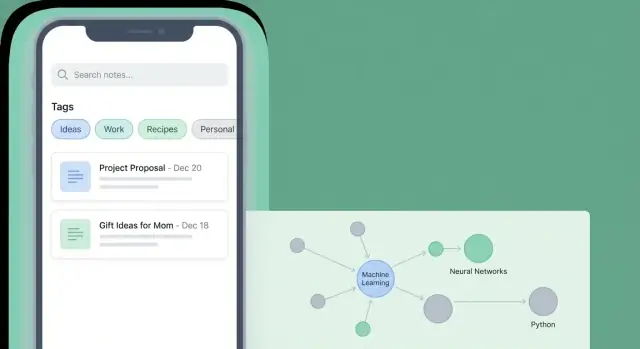
Clarify the Goal: What Your PKM App Should Do
Before you sketch screens or pick a tech stack, decide what “personal knowledge” means in your app. For some people it’s mostly quick notes and meeting minutes. For others it’s web clips, highlights, bookmarks, and research artifacts. A clear definition prevents feature sprawl and keeps your v1 focused.
Define “personal knowledge” for your users
Start by choosing the core content types you’ll support on day one. Keep the list short and tied to real use cases:
- Notes (text-first, maybe with checklists)
- Web clips or links (save a URL with a title, optional excerpt)
- Attachments (photos, PDFs) only if your audience truly needs them
- Tasks only if your PKM is meant to replace a to-do app (otherwise, skip)
The key question: What are users trying to remember or reuse later? Your data model and UI should serve that answer.
Pick the primary jobs-to-be-done
Most PKM apps succeed or fail on a few repeating behaviors. Choose which ones you’ll optimize for:
- Capture: saving something the moment it appears (a thought, a quote, a link).
- Organize: lightly shaping the information so it’s not lost (inbox, tags, folders).
- Retrieve: finding it again under time pressure (search, filters, recents).
- Connect: linking ideas across notes (backlinks, references, “related notes”).
- Review: resurfacing important items (favorites, reminders, daily notes).
You don’t have to perfect all five in v1, but you should explicitly pick the two or three you’ll make excellent.
Choose a target audience and core scenarios
A “PKM user” isn’t one person. Students may care about lecture notes and exam review. Researchers need citations, PDFs, and linking. Professionals often want meeting notes, decisions, and fast retrieval.
Write 2–3 concrete scenarios (one paragraph each) such as: “A consultant captures action items in a meeting and retrieves them by client name next week.” These scenarios become your product north star when you debate features.
Set v1 success metrics
Define how you’ll know v1 is working—measurably:
- Capture speed (time from unlock to saved note)
- Search success (how often users find what they want without repeated queries)
- Retention (do users come back and add notes across multiple weeks?)
With the goal, audience, and metrics in place, every design and engineering decision becomes easier—and your PKM app stays coherent instead of turning into “everything for everyone.”
Define the MVP Feature Set (and What to Skip)
An MVP for a PKM mobile app isn’t “the smallest app you can ship.” It’s the smallest app that reliably supports a complete habit: capture → organize lightly → find later.
Must-haves for v1
Keep the core tight and friction-free:
- Quick capture: a fast “New note” action, optional templates, and an Inbox concept so users can save ideas without deciding where they belong.
- Basic editor: plain text/Markdown, checklists, links, and simple formatting. The editor must feel instant and never lose input.
- Light organization: tags (and optionally a single folder/notebook level). Don’t force users into complex hierarchies.
- Search: fast full-text search across titles and content, plus tag filtering. This is the “payoff” moment for PKM.
If these four aren’t great, extra features won’t matter.
Nice-to-haves to defer (on purpose)
These can be excellent, but they add design, data, and support complexity:
- AI summaries, rewriting, and smart suggestions
- Graph view / backlink visualization
- Collaboration, sharing, and team workspaces
- Advanced formatting, publishing, web clipping, task management, or calendar integration
Deferring them keeps the product easier to test—and easier for users to understand.
Decide platforms: iOS, Android, or both
- Ship one platform first if you’re a small team: faster learning, fewer edge cases.
- Ship both if your audience is split and your tech choice supports it well.
A practical rule: pick the platform you can maintain with confidence for 12 months.
A simple scope statement (anti–feature creep)
Write one paragraph you can return to when new ideas appear:
“Version 1 helps individuals capture notes in seconds, add tags, and find anything later with search—offline. No AI, no collaboration, and no complex organization until the core capture-and-retrieval loop is consistently fast and reliable.”
Plan the Core User Flows and Screens
Once your scope is clear, design the everyday paths users will repeat. A PKM app wins when capture and retrieval feel effortless—not when it has the most options.
Map the “home base” screens
Start by listing the few screens that carry most of the experience:
- Inbox: a default landing spot for quick capture and imported items.
- Note: reading and editing a single note.
- Search: global search with recent queries and filters.
- Tags (or Library): browsing by tag and seeing tag details.
- Settings: account, sync, backups, privacy, editor preferences.
If you can’t explain what each screen is for in one sentence, it’s probably doing too much.
Design capture-first flows
Your core flow should be “open → capture → move on.” Plan for:
- One-tap add from the Inbox (a plus button that’s always visible).
- Share-sheet import (text snippets, links, PDFs, images) that lands in the Inbox with a clear “Saved” confirmation.
- Fast edits later: a captured item should be easy to expand into a full note when the user has time.
A practical pattern: every captured item starts as an “Inbox note” with minimal fields, then can be tagged, titled, and filed later.
Keep navigation simple
Pick one primary navigation model and commit:
- Bottom tabs work well for 4–5 top-level destinations (Inbox, Search, Tags, Settings).
- A side menu can work if you expect long lists (many notebooks/workspaces), but keep the first level short.
Avoid hiding Search behind multiple taps—retrieval is half the product.
Plan empty states and onboarding
Empty states are part of your UX, not an afterthought. For Inbox, Tags, and Search, show a short hint and one clear action (e.g., “Add your first note”).
For first-run onboarding, aim for three screens max: what the Inbox is, how to capture (including share sheet), and how to find things later. Link to a deeper help page if needed (e.g., /blog/how-to-use-inbox).
Model Your Knowledge: Data Types, Metadata, and Links
Your PKM app will only feel “smart” if the underlying model is clear. Decide what kinds of things a person can save—and what those things have in common.
Choose your core “items”
Start by naming the objects your app stores. Common options include:
- Notes: freeform text, checklists, or structured templates.
- Sources: a saved URL, a book/article record, or a file reference.
- Highlights: excerpts tied back to a source.
- Tasks: lightweight to-dos, optionally linked to notes.
- Attachments: images, PDFs, audio—often stored separately but referenced by notes.
You don’t have to ship all of these in v1, but you should decide whether your app is “notes-only” or “notes + sources,” because it changes how linking and search behave.
Define metadata that stays consistent
Metadata is what makes notes sortable, searchable, and trustworthy. A practical baseline:
- Title (or auto-title from the first line)
- Created / updated timestamps
- Tags (multi-select)
- Links (to other items)
- Pin/favorite
- Status (e.g., inbox, active, archived)
Keep metadata minimal and predictable. Every extra field is another thing users must maintain.
Decide how connections work
Connections can be:
- Manual links: the user explicitly links note A to note B.
- Backlinks: show “what links here” automatically.
- Related items: suggested connections based on shared tags or text similarity (great later, not required now).
Make links first-class: store them as data, not just text, so you can render backlinks and navigate reliably.
Plan for change: versioned schemas and migrations
Your model will evolve. Add a schema version to your local database and write migrations so updates don’t break existing libraries. Even simple rules—“we can add fields anytime, but we can’t rename without a migration”—save you from painful releases later.
Design the Note Editor and Capture Tools
The editor is where people spend most of their time, so small decisions strongly shape whether your PKM app feels “instant” or “in the way.” Aim for an editor that starts quickly, never loses text, and makes common actions one tap away.
Choose the editing experience
Pick one primary format for v1:
- Plain text: fastest to build and hard to break; great if your app is capture-first.
- Markdown: a sweet spot for many PKM users—portable, searchable, and easy to sync.
- Rich text: friendly for mainstream audiences but heavier to implement and keep consistent across devices.
If you support Markdown, decide early which extensions you’ll allow (tables? task lists?) to avoid compatibility issues later.
Make formatting fast (without clutter)
Formatting should be optional but frictionless. Add lightweight shortcuts for the basics: headings, bold/italic, links, and checklists. If your audience includes developers, include code blocks; otherwise consider deferring them to keep the toolbar simple.
Good mobile patterns include:
- A compact formatting bar that appears above the keyboard
- “Slash commands” (e.g., /todo, /h2) for power users
- Smart lists: hitting return continues a checklist automatically
Attachments and capture tools
Decide what “notes” can hold. Common must-haves are images (camera + gallery), plus optional PDFs, audio, and scanned documents. Even if you don’t build full annotation in v1, store attachments reliably and show clear previews.
Also invest in capture entry points: share sheet, quick-add widget, and a one-tap “New note” action. These often matter more than fancy editor controls.
Saving, drafts, and conflict handling
Use auto-save by default, with visible reassurance (e.g., a “Saved” state) but no modal dialogs. Keep a local draft if the app closes mid-edit.
If you’ll support sync later, design now for conflicts: preserve both versions and let users compare, rather than silently overwriting. The fastest way to lose trust is losing notes.
Information Architecture: Tags, Folders, and Inbox
A PKM app lives or dies on whether you can put something away quickly and find it again later. The trick is choosing an organization system that stays consistent on a small mobile screen—without forcing users to overthink every save.
Pick your “primary axis”: folders, tags, or both
Folders are great when notes naturally belong to one place (e.g., “Work,” “Personal,” “Study”). They feel familiar, but they can become restrictive when a note fits multiple contexts.
Tags shine when notes need multiple labels (e.g., #meeting, #idea, #book). They’re flexible, but they require clear rules so tags don’t turn into duplicates (#todo vs #to-do).
Using both can work if you keep the contract simple:
- Use folders for broad areas (5–10 max)
- Use tags for attributes and cross-cutting themes
If you can’t explain the difference in one sentence, users won’t remember it.
Add a lightweight Inbox for unprocessed notes
Mobile capture is often “save now, organize later.” An Inbox gives permission to do that.
Design it as a default destination for quick notes, voice snippets, links, and photos. Then support easy processing with a few fast actions: assign folder, add tags, pin, or convert to a task (if you support tasks).
Make filtering feel instant
Retrieval should start from what people already know: “I wrote this recently,” “it was about X,” “it was tagged Y.” Add lightweight tools like:
- Tag chips at the top of lists (tap to filter)
- Recents and Recently edited views
- Saved searches (e.g., “Inbox + #reading”)
These reduce the need to navigate around, which matters on mobile.
Avoid deep nesting (it backfires on phones)
Deep folder trees look tidy but slow people down. Prefer shallow structure with strong search and filtering. If you support nesting, keep it limited and make moving notes between levels painless (drag, multi-select, and “Move to…”).
Search and Retrieval: Make Finding Notes Effortless
Search is the feature that turns a pile of notes into a usable knowledge base. Treat it as a core workflow, not a nice-to-have, and be explicit about what “searchable” means in v1.
Decide what gets indexed (and what doesn’t)
Start with full-text search over note titles and bodies. This covers most use cases while keeping complexity manageable.
Attachments are trickier: PDFs, images, and audio require extraction (OCR, speech-to-text) that can bloat your MVP. A practical compromise is to index attachment filenames and basic metadata now, and add content extraction later.
Also index the metadata users expect to query:
- Tags
- Created/updated dates
- Note type (note, task, highlight, clip, etc.)
Add search helpers that reduce typing
Mobile search needs assistance. Build a search screen that feels guided, especially for non-power users:
- Suggestions while typing (matching titles/tags)
- Recent searches (tap to rerun)
- Quick filters (tag, date range, type)
Keep filters one tap away, and make active filters visible so users understand why results changed.
Plan for large libraries: incremental indexing
If indexing happens all at once, performance will collapse as users grow from 200 notes to 20,000.
Use incremental indexing: update the index when a note changes, and batch background work when the app is idle/charging. If you support offline-first storage, index locally so search works without connectivity.
Make results readable
A good result list answers “Is this the note I need?” without opening each item.
Show:
- Highlighted matches in title/body
- A short context snippet (one or two lines around the match)
- Light metadata (tag chips or last edited date)
That combination makes retrieval feel instant—even when the library isn’t.
Offline, Sync, and Backups (Without Surprises)
People trust a PKM app when it behaves predictably on a plane, in a basement, or on a flaky café Wi‑Fi. The simplest way to earn that trust is to be explicit about what works offline, when data leaves the device, and how recovery works if something goes wrong.
Offline-first vs. cloud-first
Offline-first means notes are saved to the device immediately; sync happens in the background when connectivity returns. Users experience it as “it always works,” but you must handle conflicts and local storage carefully.
Cloud-first means the source of truth is on a server; the app may cache content, but saving often depends on being online. It reduces conflict complexity, yet users can lose confidence when they see spinners or “can’t save right now.”
For most personal notes, offline-first is the safer default—as long as you’re honest about sync status.
Choose a sync approach
You have three common options:
- Account-based cloud sync (your backend): best cross-platform experience and fine-grained control, but adds server costs and security responsibilities.
- Platform storage sync (iCloud / Google Drive): quicker to ship and users may already trust it; behavior differs across platforms and debugging can be tricky.
- Manual export/import: lowest complexity and no accounts, but users must remember to do it.
Many teams start with manual export for v1, then add cloud sync once retention proves the app’s value.
Conflict rules and clear messaging
Edits will collide. Decide rules up front and describe them in plain language:
- Prefer automatic merge for simple fields (tags, metadata).
- For note bodies, use last edit wins only if you also keep the overwritten version.
- When unsure, create a “Conflicts” copy: “We saved both versions so nothing is lost.”
Surface a small sync indicator and a human-readable status (“Synced 2 min ago”, “Sync paused—offline”).
Backups and exports users can understand
Offer backups that don’t trap people:
- One-tap export to Markdown (portable), PDF (share/print), and JSON (full fidelity for migrations).
- Optional scheduled backups to Files/iCloud/Drive.
- A restore flow that previews what will be imported before it changes the library.
Privacy and Security for Personal Notes
A PKM app often holds sensitive material: meeting notes, medical reminders, private ideas, and scans of documents. Treat privacy and security as product features, not “later” tasks.
Decide what lives on-device vs. on servers
Start by choosing an explicit data model for storage:
- Store notes locally by default. This reduces exposure and makes offline use natural.
- Only sync what the user asks to sync. If you offer accounts, keep server-side storage minimal and avoid collecting note contents for analytics.
- Be clear about backups. If you support cloud backup, explain whether it’s end-to-end encrypted or readable by your servers.
A simple rule: the less you collect and transmit, the less you have to protect.
Security basics users expect
Cover baseline protections that make people comfortable:
- Support device encryption (iOS/Android file protection). Store local data using platform-recommended encrypted storage.
- Add an app lock (PIN/password) with an optional biometric unlock (Face ID/Touch ID/fingerprint).
- Harden session behavior: auto-lock on backgrounding, optional “hide content in app switcher,” and timeouts for sensitive screens.
Permissions: optional, explained, and reversible
Many PKM features need permissions (camera for scanning, microphone for voice capture, files for import). Make them opt-in:
- Ask only when the feature is used, not on first launch.
- Explain plainly what you will do with access—and what you won’t.
- Offer alternatives (e.g., manual entry if microphone access is declined).
Put privacy choices in the app, not only on a website
Add a small Privacy & Security screen in Settings that documents:
- What data is stored locally vs. synced
- What permissions you may request and why
- How to export/delete data
- How to contact support for privacy questions
Keep it short, readable, and easy to find (for example, from /settings).
Pick a Tech Stack That Fits Your Scope
Your tech stack should support the two things PKM users notice immediately: how fast the app feels and how trustworthy their notes are (no missing edits, no weird sync conflicts). It’s tempting to copy what bigger apps use, but your v1 will be better if the stack matches your scope.
Native vs. cross-platform
Native (Swift for iOS, Kotlin for Android) is a strong choice when you want the best platform feel, top performance for large note lists, and easier access to OS features (share sheets, widgets, background tasks). The trade-off is building and maintaining two codebases.
Cross-platform (Flutter or React Native) can get you to market faster with one UI codebase. Flutter often shines for consistent UI and smooth scrolling; React Native can be great if you already have strong JavaScript/TypeScript experience. The risk is spending extra time on edge cases like text input behavior, selection, and platform-specific integrations.
Local storage (and encryption)
For a PKM mobile app, local storage is your foundation:
- SQLite is predictable, widely supported, and excellent for search indexes and structured metadata.
- Realm (or similar object databases) can speed up development with simpler data modeling, but confirm how it handles migrations and large datasets.
If you plan to store sensitive notes, decide early whether you need at-rest encryption (device-level encryption may not be enough for your audience). Encryption choices can affect indexing and search, so don’t bolt this on at the end.
Cloud components: only what you actually need
If your v1 is offline-first, you can often ship without a backend. Add cloud pieces only when they solve a real problem:
- Auth if users need multi-device sync or account recovery
- A sync service if you need conflict handling and versioning
- Storage for attachments and backups
Speed up prototypes (without committing too early)
If you want to validate screens and flows quickly—Inbox, editor, tags, and search—tools like Koder.ai can help you generate a working web or mobile-style prototype from a chat prompt, then iterate fast. It’s especially useful when you want to test product decisions (navigation, empty states, processing the Inbox) before you invest in a full native implementation.
Koder.ai also supports source code export and a planning mode, which can be handy for turning a PKM spec into a structured build plan you can hand to your team.
Prototype the editor early
Before committing, build a tiny prototype that includes: typing in long notes, formatting, links, undo/redo, and scrolling through thousands of notes. Editor performance and “feel” are hard to predict on paper—testing early can save weeks of rework later.
Testing, Performance, and Reliability
A PKM app is only useful if it feels dependable. Notes must load quickly, edits must never vanish, and “it worked yesterday” can’t be a common story. Test the risky parts first, then keep regressions from sneaking back in.
Start by testing the hardest parts early
Don’t wait until the end to discover your editor corrupts formatting or your search becomes slow after 5,000 notes.
Focus early prototypes on:
- The editor: typing latency, undo/redo, large notes, attachments, paste from other apps, and recovery after app kill.
- Search speed: cold start indexing time, incremental search results, and highlighting matches without stutter.
- Sync edge cases (if you sync): conflicts, duplicate notes, partial uploads, clock skew, and “same note edited on two devices.”
Build a realistic test plan (offline, slow networks, big libraries)
Write a checklist you can run before each release candidate:
- Create a library with 10k+ notes (generated text is fine) and measure startup, search, and scrolling.
- Simulate offline-first scenarios: create/edit/delete notes while offline, restart the app, then reconnect.
- Test bad connections: high latency, packet loss, captive portals, and switching between Wi‑Fi and cellular.
- Verify data integrity: after any crash or forced close, the last saved content should be correct.
If you can automate parts of this (even a few smoke tests), do it—reliability is mostly about preventing repeats.
Usability tests on the core flows
Run short sessions with 3–5 people and watch quietly. Validate that users can:
- Capture a note in under 10 seconds
- Tag it (or move it) without hunting
- Find it later using search/filters
- Create and follow a link between notes
Crash reporting and analytics with privacy-respecting defaults
Set up crash reporting from day one so you can fix real-world issues fast. For analytics, collect only what you need (e.g., feature usage counts, not note content), make it opt-in where appropriate, and explain it in settings.
Launch Plan and What to Improve After v1
A v1 launch is less about “shipping everything” and more about shipping a clear promise: what your PKM app is great at, who it’s for, and how it stays trustworthy with users’ notes.
App Store / Play Store essentials
Before you submit, prepare a small but complete store package:
- Screenshots that tell a story: capture → organize → find. Add short captions (3–6 words).
- Listing text: lead with outcomes (“capture ideas fast”, “find notes in seconds”), then key features (offline, search, sync).
- Privacy labels: be precise about what you collect (ideally minimal). If notes are encrypted or never leave the device unless sync is enabled, say so plainly.
Onboarding that doesn’t get in the way
Keep onboarding to 2–3 screens or a single interactive checklist. Add lightweight tooltips only where users might get stuck (first tag, first link, first search).
Include a simple help page in-app (“How to…”) that links to /blog for guides and, if you offer a paid tier, /pricing for plan details.
Build a feedback loop from day one
Make feedback easy while the context is fresh:
- In-app “Send feedback” with optional screenshot/logs
- A support email address visible in settings
- A public roadmap page (even a simple board) so users see progress
What to improve after v1
Use early feedback to prioritize a few high-impact upgrades:
- Importers (Apple Notes, Google Keep, Markdown, CSV)
- Home screen widgets for quick capture and recent notes
- Reminders tied to notes (lightweight, not a full task manager)
- Integrations (share sheet, calendar hooks, read-it-later)
Ship small updates frequently, and communicate changes inside release notes and your help page.
FAQ
What should my PKM app do in v1 to avoid feature sprawl?
Start by choosing 2–3 primary jobs-to-be-done to excel at (usually capture, organize lightly, and retrieve). Then limit v1 content types to what supports those jobs (often just text notes + links). A tight definition prevents “everything for everyone” scope creep.
What are the must-have features for an MVP PKM mobile app?
A solid v1 reliably supports the habit loop: capture → light organization → find later.
Practical must-haves:
- One-tap quick capture into an Inbox
- A fast, dependable editor (plain text or Markdown)
- Tags (and optionally one folder/notebook level)
- Full-text search with tag filtering
Which features should I intentionally skip until after v1?
Defer features that add heavy complexity before you’ve proven retention:
- AI summaries/suggestions
- Graph view/backlink visualization
- Collaboration and sharing
- Advanced formatting, publishing, full task management, deep calendar integrations
Ship them only after your core loop is fast and reliable.
Should I launch on iOS, Android, or both?
Pick the platform you can maintain confidently for the next 12 months.
- One platform first (iOS or Android) if you’re a small team and need faster learning.
- Both if your audience is split and your tech choice supports it well.
Avoid doubling scope before you’ve validated the product’s core habit.
What core screens and user flows should a PKM app have?
Keep your “home base” small and obvious:
- Inbox (default landing)
- Note (read/edit)
- Search (global, with filters)
- Tags/Library (browse)
- Settings (sync, privacy, editor prefs)
If you can’t explain a screen’s purpose in one sentence, it’s likely overloaded.
How should I model notes, metadata, and links in a PKM app?
Choose a clear, minimal model:
- Core item: usually Note (optionally “Source/Link” as a separate type)
- Consistent metadata: title, created/updated, tags, status (inbox/active/archived), pin/favorite
- Links as real data (not just text) so you can support backlinks later
Add a schema version and plan migrations early so libraries don’t break on updates.
Should my note editor be plain text, Markdown, or rich text?
Pick one primary editing format for v1 and make it feel instant.
- Plain text: simplest and hard to break
- Markdown: portable and popular with PKM users
- Rich text: friendlier, but more complex across platforms
Whatever you choose, prioritize: fast startup, reliable autosave, and recovery after app kill.
How do I make search fast and useful, even with large note libraries?
Treat search as a core workflow:
- Full-text index titles + bodies from day one
- Also index tags and basic metadata (dates, type/status)
- Use incremental indexing as notes change (don’t reindex everything)
- Make results scannable with highlighted matches + short context snippets
For MVP, index attachment filenames/metadata first and add OCR/transcription later.
How should I handle offline use, sync, and conflicts without losing notes?
Offline-first is usually the safest trust-building default: save locally immediately and sync in the background.
For sync/backups, common paths:
- Start with manual export/import (low complexity)
- Add account-based sync once retention proves value
- Or use iCloud/Drive as a middle ground (but expect platform quirks)
Define conflict rules up front and preserve both versions when in doubt.
What privacy and security basics should a personal notes app include?
Design privacy as a product feature:
- Store notes on-device by default; sync only when enabled
- Avoid collecting note contents for analytics
- Add app lock + optional biometrics and “hide in app switcher”
- Request permissions only when needed (camera/mic/files)
- Provide clear export/delete options and a readable Privacy & Security screen in Settings
The less data you collect and transmit, the less you must protect.