

How to Build a Simple Time Awareness Mobile App, Step by Step
Learn how to design and build a simple time awareness mobile app: core features, UX patterns, tech choices, notifications, testing, and launch steps.
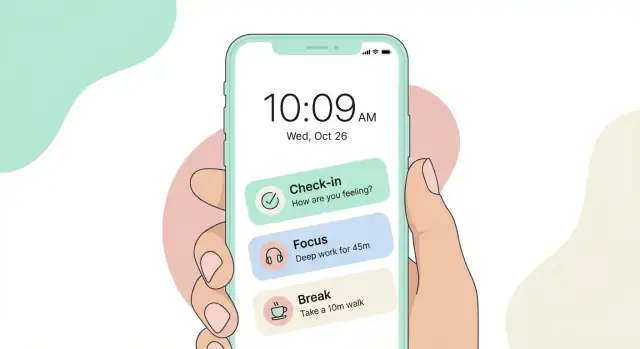
What “Simple Time Awareness” Means (and Who It Helps)
“Simple time awareness” is the habit of noticing where your time is going while you’re in the middle of a day—not producing a perfect log of every minute.
A time awareness app is less like a spreadsheet and more like a gentle nudge: pause, look up, and decide what you want the next block of time to be about. It’s about intention, not accounting.
What it is (in plain terms)
Simple time awareness typically includes quick check-ins, lightweight timers, and small reflections. The goal is to reduce “autopilot” moments—scrolling longer than you meant to, task-switching without realizing it, or starting the day with no clear plan.
It is not full time tracking. You’re not asking users to categorize every activity or reconstruct their day. You’re giving them a few small prompts that help them steer.
Who benefits most
This approach helps people who feel busy but can’t explain where the hours go, including:
- Students who lose track of time between classes and study sessions
- Remote workers who drift between tasks and meetings
- Anyone trying to limit social media or build a focused routine
Scenario 1: A remote worker starts a “45-minute focus” session before writing. When the timer ends, the app asks one question: “Did you work on the thing you intended?” That single checkpoint prevents an afternoon of accidental task-hopping.
Scenario 2: Someone trying to curb evening scrolling gets a 9:30 PM check-in: “How do you want the next hour to feel?” They choose “calm” and switch to a short wind-down routine.
Success criteria (after 2 weeks)
Define success as a change the user can feel:
- Fewer “Where did the time go?” moments
- More starts and finishes of short focus blocks
- Higher confidence that evenings and mornings match their priorities
What the app will not do
To avoid feature creep, be explicit:
- No detailed time sheets or manual categorization
- No surveillance-style monitoring or selling “productivity guilt”
- No complex goal systems that require daily maintenance
If users can get value in under 10 seconds per check-in, you’re building the right kind of simplicity.
Define the MVP: The One Loop Your App Must Nail
An MVP for a time awareness app isn’t “a smaller app.” It’s one promise your product keeps perfectly, every day. Your goal is to help someone notice time, make a tiny decision, and feel clearer afterward—without needing motivation or setup.
Start with the smallest outcomes
Before features, define the outcomes a user should get in under 30 seconds:
- Check-in: “What am I doing right now, and is it what I meant to do?”
- Reflect: a quick label or note (focused, drifting, break, admin, commute).
- Adjust: pick a next step (continue, switch task, take a short break, set a timer).
If an idea doesn’t directly improve one of these outcomes, it doesn’t belong in the MVP.
Choose one primary loop
Pick a single loop and design everything around making it fast and calm:
Prompt → quick action → feedback
- Prompt: a gentle nudge at a reasonable moment (or user-initiated check-in).
- Quick action: one tap + optional 3–10 word note. No menus, no configuration.
- Feedback: immediate confirmation plus a tiny payoff (e.g., “Logged: Deep work” or “Break started: 5 min”).
A good rule: the loop should be completable with one hand, in under 10 seconds, with sound off.
Add one retention hook (keep it gentle)
Retention doesn’t need gamification. Choose one:
- Streaks: only if they’re forgiving (e.g., “3 check-ins this week,” not “don’t break the chain”).
- Daily/weekly summaries: a calm recap like “Most common mode: meetings. Best focus window: 10–12.”
You can combine both, but keep the MVP version minimal: one screen that makes progress feel real.
Write a one-page PRD
Capture clarity early with a one-page PRD:
- Goals: what success looks like (e.g., “users complete 3 check-ins/day”).
- Constraints: minimal setup, offline-friendly, no sensitive data required.
- Must-have screens: Home/check-in, quick log, simple history/summary, basic settings.
If you can’t describe the MVP on one page, the loop isn’t tight enough yet.
Core Features and User Flows
A simple time awareness app works best when it’s built around a small set of “things” the user creates, sees, and edits. If you keep the core entities clear, the rest of the product (screens, notifications, analytics) becomes much easier to design.
Define your core entities (3–5)
Start with a tight model that matches what people actually do.
- Check-in: a quick moment where the user records “where time went” or “what I’m doing now.” It can be as lightweight as one tap on a label.
- Session: a bounded period (e.g., a focus timer, a work block, or “from 2:00–2:25”). Sessions help users see patterns, not just isolated moments.
- Reminder: a scheduled prompt to check in. Keep reminder settings simple: time, frequency, and optional quiet hours.
- Note (optional): one short text field tied to a check-in or session. Notes are useful, but they should never be required.
If you’re tempted to add tags, projects, goals, calendars, or complex reports, save them for later. Your MVP needs a fast “record → reflect” loop.
Sketch the user flow: install to first success
Your first successful check-in should happen within a minute of opening the app.
A clean flow is:
- First open: a single sentence explaining the app (“Log quick check-ins to notice how your day is going”).
- Choose granularity: ask one question: “How detailed should check-ins be?” (more below).
- Pick default reminders (optional): offer 2–3 presets (e.g., “3 times a day,” “Hourly,” “No reminders”).
- Home screen: one obvious action: Check in.
- Confirmation + tiny reward: after saving, show the latest entry and a small hint like “You can add a note, or you’re done.”
Designing around this flow prevents a common mistake: building settings, profiles, and dashboards before the user can do the basic action smoothly.
Choose time granularity early
Granularity changes everything: UI, reminders, and summaries.
- Minutes (more precise): better for focus timers and detailed tracking, but easier to overwhelm users.
- Broad blocks (morning/afternoon/evening, or “now/next/later”): faster, calmer, and often more sustainable.
A practical compromise is offering broad blocks by default, with an option to switch to minutes later. If you do support minutes, don’t force users to pick an exact end time—allow “stop now” and estimate duration.
Plan offline behavior (and what “sync” means)
People will check in on the subway, in buildings with weak signal, or while battery saver is on. Your MVP should work offline by default.
- Offline-first: check-ins, sessions, and notes should save locally and appear instantly.
- Sync (if any): be explicit. Is sync just backup to the user’s device account? Or cross-device access? If you can’t do cross-device reliably yet, don’t imply it.
- Conflict handling: for an MVP, avoid complex merges. Prefer “last write wins” plus a simple “restore previous” option if edits collide.
When these decisions are made up front, your “Core Features” stop being a wishlist and become a coherent, testable set of user actions.
UI/UX Patterns for a Calm, Fast Experience
A time awareness app should feel like a quick glance, not a task. The best UI pattern is “one clear action, then you’re done.” Reduce choices on every screen, keep labels plain, and avoid visual noise that makes users second-guess.
Make the home screen a single-purpose dashboard
Treat the home screen as a calm status view:
- Current time shown prominently (this is the anchor).
- Next check-in time right below it, so users immediately understand what’s coming.
- One primary button (for example: “Check in” or “Start focus”) that never moves.
If you add secondary actions (history, settings), keep them small and consistent—icons or subtle text in the corners.
Design a 5–15 second check-in
The check-in screen should be completable with one tap:
- One question at a time (e.g., “How are you using this moment?”).
- Large, thumb-friendly options.
- An optional note field that’s hidden until tapped, so it doesn’t slow people down.
Use friendly microcopy like “Optional” or “Skip” to remove pressure.
Keep history lightweight and non-judgmental
History works best as a quick reassurance: a timeline of check-ins or calendar dots for consistency. Avoid heavy charts by default; a simple “You checked in 4 times this week” is enough to support awareness without turning it into performance.
Settings that respect attention
Settings should be short and clearly grouped:
- Reminders (frequency)
- Quiet hours
- Privacy controls
Typography and spacing for real-life glances
Use large type, generous spacing, and high contrast so the app works while walking, commuting, or between meetings. Aim for big tap targets and stable layouts to prevent mis-taps and reduce friction.
Tech Choices: iOS/Android, Cross-Platform, and Data Storage
The best tech choice for a time awareness app is the one your team can ship, maintain, and polish without distractions. Early versions should favor simplicity: fast screens, reliable notifications, and data that never “mysteriously” disappears.
Native vs. cross-platform
Native (Swift for iOS, Kotlin for Android) is the safest bet if you care most about platform feel and the least friction with system features like notifications, widgets, Focus modes, and accessibility.
Cross-platform (Flutter or React Native) can be a great fit when you want one codebase and faster iteration, especially for small teams.
Trade-offs to expect:
- Speed of development: cross-platform is often faster for UI and shared logic.
- Platform polish: native typically wins on subtle interactions, text rendering, and “it just feels right.”
- Edge-case time/notification behavior: native gives you more predictable control and better tooling when things go wrong.
A practical rule: if your MVP depends heavily on reminders, background behavior, or widgets, lean native. If the MVP is mainly logging/check-ins and simple timers, cross-platform is usually fine.
If you want to validate the product loop before committing to a full engineering pipeline, a vibe-coding approach can help. For example, Koder.ai lets teams prototype and ship web, backend, and mobile-adjacent functionality via a chat interface (with source code export, deployment, and rollback). It’s especially useful for quickly testing your data model (check-ins/sessions/reminders), summary screens, and admin tooling—then moving to a production-grade mobile client when the loop proves sticky.
Backend: start with none (or keep it tiny)
For an MVP, consider no backend at all: store everything on-device and optionally support export/import later. This reduces cost, legal/privacy surface area, and failure points.
If you must sync early (multi-device use is core), keep it minimal: authentication + simple cloud storage for a small user dataset.
Local data storage options
Pick one local store and commit to it:
- Built-in stores: Core Data (iOS) or Room (Android) for structured data and migrations.
- SQLite: great if you want direct control and portability.
- Realm: fast to adopt, friendly developer experience, good for offline-first.
A minimal stack a small team can maintain
- App: Native (Swift/Kotlin) or Flutter/React Native
- Data: one local database + simple file export
- Analytics: lightweight, event-based (only what you need)
- Optional: a small sync service later, once the MVP proves value
Notifications and Reminders Without Being Annoying
Reminders are the moment your app interrupts someone’s day—so they need to feel like a gentle nudge, not a nag. The goal is to support awareness ("What time is it? What was I about to do?") while staying easy to ignore when life is busy.
Choose three reminder types (and keep them simple)
A good time awareness app usually needs only a few ways to prompt a check-in:
- Scheduled reminders: A daily rhythm (e.g., 9:30am, 2:00pm) for predictable check-ins.
- Contextual (time-window) reminders: A flexible window like “sometime between 1–3pm” to avoid interrupting meetings or commutes.
- Manual reminders: A “Remind me later” or “Set a one-off nudge” flow when the user notices they’re drifting.
The key is making the default light: one or two reminders per day, then let users add more only if they ask for it.
Quiet hours and frequency caps
People stop trusting apps that ping too often. Add controls that prevent notification overload:
- Quiet hours: No notifications during sleep or protected time (user-set, not assumed).
- Frequency caps: A hard limit like “no more than 3 reminders per day” or “at least 2 hours between reminders.”
These options should be quick to find and easy to change—ideally from the same screen where reminders are configured.
Write copy that feels human and actionable
Notification text should be short, kind, and clear about the next step. Avoid guilt.
Examples:
- “Quick check-in: what are you doing right now?”
- “Time check—still on your priority?”
- “Want a 30-second reset?”
Add quick actions that reduce friction
Let people respond without opening the app:
- “Check in now” to log a quick state.
- “Snooze 15 min” (and maybe “Snooze 1 hour”).
- “Skip today” for days when reminders would just irritate.
Plan the tricky edge cases
Reminders can behave strangely if you don’t handle:
- Time zones: Decide whether reminders follow local time or the original schedule.
- Daylight saving changes: Prevent double-fires or missing a day.
- Missed reminders: If the phone was off, avoid sending a burst later; summarize instead (e.g., “2 check-ins missed—resume now?”).
Building Helpful Feedback Loops (Summaries, Streaks, Insights)
Feedback loops are what make a simple time awareness app feel supportive instead of “empty.” The trick is to keep feedback small, clear, and optional—so users feel guided, not judged.
Micro-feedback right after an action
Every core action should get a calm confirmation, plus one tiny insight.
For example, after a mindful check-in or a completed focus session:
- Confirmation: “Check-in saved” or “25-minute focus block completed.”
- Tiny insight: “That’s your 3rd check-in today” or “You focused 10 minutes longer than yesterday.”
Keep the insight factual and lightweight. Avoid popups that demand attention or ask for extra taps.
Summaries that speak plain language
Daily and weekly summaries should be readable in a few seconds, with simple metrics instead of complex charts. Think:
- Total focused minutes
- Number of check-ins
- Most common time window used (e.g., “Mornings”)
- Missed vs. completed reminders (presented neutrally)
Add one short sentence that interprets the numbers without overreaching: “You tended to start later on weekdays.” If you can’t say it confidently, don’t say it.
Streaks and insights—without making it addictive
Streaks can motivate, but they can also create pressure. Use “streaks” as gentle continuity, not a game:
- Prefer “active days this week” over an all-or-nothing streak.
- Offer a grace day or “life happens” reset.
- Celebrate consistency, not volume: “You checked in on 4 days” is healthier than “Open the app daily.”
Personalization that respects real schedules
Let users define goals that fit their lives: flexible schedules, custom time windows, and adjustable targets (e.g., “2 focus blocks on weekdays”). When you nudge, suggest options—“Want to move this reminder to 10:30?”—rather than guilt messages.
The goal is a feedback loop that helps users notice patterns and adjust, while keeping the app calm and easy to leave.
Analytics: What to Measure (Without Over-Collecting)
Analytics should answer a small set of product questions: Are people getting value quickly? Which reminders help, and which annoy? Where do users drop off? If you can’t name the decision a metric will support, don’t track it.
Track only what you need
For a simple time awareness app, the useful “event data” can stay minimal:
- Event name (e.g.,
set_reminder,check_in,snooze,dismiss) - Timestamp
- Basic settings that change behavior (reminder frequency, quiet hours on/off)
Avoid storing free-form text, contact lists, location, or anything that could reveal a user’s identity unless it’s essential.
Define 5–8 key metrics
Pick a short list you can review weekly:
- Activation: % who set a first reminder (or start a first timer)
- First check-in rate: % who complete a check-in within 24 hours
- Check-ins per day: median check-ins per active user
- Retention: day 1 / day 7 return rate
- Snooze rate: snoozes per reminder shown
- Dismiss rate: reminders dismissed without action
- Notification disable rate: users turning reminders off
These metrics tell you whether reminders create habits—or friction.
Use funnels to spot drop-offs
Create one simple funnel and keep it consistent:
Install → first reminder created → first reminder delivered → first check-in
If many users stall between “created” and “delivered,” you may have permission or scheduling issues. If “delivered” is high but “check-in” is low, the reminder content or timing likely needs work.
Privacy basics that build trust
Use anonymized IDs by default. Offer an opt-out for analytics where possible, and keep the app functional if a user opts out.
A lightweight weekly dashboard
A basic dashboard should show week-over-week changes in your key metrics, plus a short notes area for experiments (e.g., “new reminder copy shipped on Tuesday”). This keeps iteration focused and prevents data overload.
Accessibility, Localization, and Common Time Bugs
A “simple” time awareness app can fail fast if it’s hard to read, hard to operate, or confusing across regions. Treat accessibility and localization as core functionality, not polish.
Accessibility essentials (that also improve usability)
Support large text and dynamic type so the interface doesn’t break when users increase font size. Keep layouts flexible: buttons should grow, labels should wrap, and key actions should stay reachable.
Use strong color contrast and avoid relying on color alone (for example, don’t make “overdue” only red without an icon or label). Every interactive element needs a clear, descriptive screen reader label—especially custom controls like time pickers, toggles for “quiet hours,” and “snooze” actions.
Localization and time formats
Time is highly regional. Respect device settings for 12/24-hour time, first day of week, and local date formats. Avoid hard-coding strings like “AM/PM” or “Mon–Sun.” When showing ranges (e.g., quiet hours), present them in the user’s format and language.
Be careful with time zones and daylight saving time. Store timestamps in a consistent format (commonly UTC) and convert for display. If a user travels, clarify whether reminders follow the current location or a chosen “home” time zone.
QA checklist for time + notifications
Test on real devices (not only simulators), including low battery mode and poor connectivity. Validate these flows end-to-end:
- Create, edit, delete reminders; confirm the next fire time updates correctly
- Snooze behavior (multiple snoozes, across midnight, during daylight saving changes)
- Quiet hours: notifications suppressed, then resume reliably afterward
- Permission edge cases: first ask, “Don’t Allow,” later enabling in settings
- App reinstall, device restart, and OS updates
Graceful error states
If notifications are disabled, don’t just show a blank state. Explain what won’t work, provide an in-app alternative (e.g., on-screen check-ins), and guide users to re-enable permissions with clear, non-blaming language.
User Testing and Iteration: Prove It Works Early
Your app succeeds or fails on a few moments: a user opens it, does a quick check-in, understands what happened today, and decides whether reminders feel supportive or irritating. You can validate all of that before writing much code.
Start with a clickable prototype (not a build)
Create a lightweight prototype that simulates the core loop: open → check-in → see a simple summary → set or adjust a reminder. Then run 5–10 short interviews with people who match your target audience.
Keep sessions practical: ask them to complete tasks while thinking out loud. Watch where they hesitate, what they ignore, and what they try to tap that isn’t tappable.
Validate the three make-or-break details
Focus your questions and observations on:
- Reminder frequency: How often feels acceptable? What times of day? Should reminders pause during meetings, commute, or sleep?
- Check-in speed: Can they log the moment in under 5–10 seconds without feeling rushed?
- Clarity of summaries: Do they understand what the app is telling them (today vs. week, totals vs. streaks, “focus” vs. “break”)?
If users can’t explain the summary in their own words, it’s not clear enough.
Iterate with small, reversible changes
Be cautious with A/B tests early on. With small user numbers, you’ll get noisy results and may optimize the wrong thing. Prefer changes you can roll back quickly—copy tweaks, one-screen layout adjustments, or a simpler reminder setting.
Add in-app feedback where it’s most relevant (after a reminder or after a summary) with a single question:
“Was this helpful?”
Optionally allow one short free-text note, but don’t force it.
Decide what to cut before the next version
After each round, write down the top 3 problems that block the core loop. Then explicitly cut features that don’t fix those problems. If a new idea doesn’t improve check-in speed, reminder comfort, or summary clarity, it waits.
Launch Checklist and a Practical Roadmap
Launching a simple time awareness app is mostly about trust: it must open fast, behave predictably, and deliver reminders when it said it would. A tight checklist keeps you from shipping “almost working” basics.
Store assets that explain the loop
Your screenshots should teach the app in seconds. Aim for 3 frames that mirror the main loop:
-
Choose a rhythm (e.g., check-in every 60 minutes)
-
Get a calm prompt (a gentle nudge, not a demand)
-
Log in one tap (e.g., “On track / Behind / Break”) and return to life
Use short captions and show real UI states (including the lock screen notification style, if allowed by the store rules).
Onboarding that earns the notification permission
Don’t ask for notification access on the first screen. First, let the user pick their check-in style and see a preview of how a reminder looks. Then ask at the moment it’s clearly useful: “Want me to nudge you at 3:00?” If they say no, offer a quiet fallback (in-app banners) and a clear path to enable later.
Plain-language privacy and permissions
Keep it simple:
- What you store (e.g., check-in timestamps, optional notes)
- What you don’t store (e.g., no contacts, no location)
- Why you need permissions (notifications only for reminders)
Release checklist (minimum quality bar)
Before you ship, confirm:
- Crash-free start on a range of devices and OS versions
- Reminder reliability (time changes, low power mode, reboot, do-not-disturb)
- Backups/restore work (or clearly state if data stays only on-device)
- Settings changes apply immediately (schedule, quiet hours, timezone)
Post-launch roadmap: 3 improvements from real usage
Pick three upgrades you can validate with early users:
-
Smarter quiet hours (meetings, sleep windows)
-
More flexible schedules (weekdays vs weekends)
-
Better summaries (one weekly insight that encourages, not judges)
Ship small updates quickly, and keep the core loop unchanged unless users prove it’s confusing.
FAQ
What is “simple time awareness,” and how is it different from full time tracking?
“Simple time awareness” is lightweight noticing, not detailed accounting. The app helps users pause, see what they’re doing, and choose the next block intentionally—often with a quick check-in, a short timer, and a tiny reflection.
Who benefits most from a simple time awareness app?
It’s best for people who feel busy but can’t explain where the hours go—especially:
- Students juggling classes and study blocks
- Remote workers drifting between tasks and meetings
- Anyone trying to reduce autopilot scrolling and build a steadier routine
What’s the one core loop the MVP should nail?
A tight MVP loop is:
- Prompt: a gentle nudge (or user-initiated)
- Quick action: one tap + optional 3–10 word note
- Feedback: immediate confirmation and a small payoff (e.g., “Break started: 5 min”)
If you can’t complete it one-handed in under 10 seconds, it’s too heavy for the MVP.
What core data entities should the app be built around?
Start with 3–5 entities you can explain simply:
- Check-in (what I’m doing right now)
- Session (a bounded focus/break block)
- Reminder (scheduled prompt)
- Note (optional, never required)
Avoid projects/tags/goals in v1 unless they directly speed up the check-in loop.
Should the app use minute-level tracking or broad time blocks?
Default to broad blocks because they’re calmer and more sustainable. Offer “minutes” later for users who want precision.
A practical compromise is:
- Broad labels by default
- Optional timers/sessions for focus blocks
- “Stop now” instead of forcing exact end times
What should onboarding look like to get users to their first successful check-in fast?
Make “first success” happen in under a minute:
- One-sentence explanation of the app
- Pick check-in granularity
- Choose a reminder preset (or “No reminders”)
- Land on a home screen with one clear action: Check in
- Show confirmation + a tiny reward (“Saved: Deep work”)
Don’t put dashboards and settings before the first check-in.
What UI/UX patterns make the app feel calm and fast?
Use a “calm dashboard” pattern:
- Current time as the anchor
- Next check-in time visible
- One primary button that never moves
For check-ins, keep it to one question, big tap targets, and an optional note field hidden behind a tap.
How do you design reminders that aren’t annoying?
Start gentle and make it easy to ignore:
- Default to 1–2 reminders/day
- Add quiet hours and frequency caps
- Provide quick actions like Check in now, Snooze 15 min, and Skip today
Write human, non-guilting copy (“Quick check-in: what are you doing right now?”).
Should the MVP work offline, and what does “sync” mean early on?
For an MVP, offline-first is the safest default:
- Save check-ins/sessions locally and show them instantly
- Be explicit about what “sync” means (backup vs. cross-device)
- Keep conflicts simple (e.g., “last write wins” + “restore previous”)
If multi-device isn’t reliable yet, don’t imply it.
What analytics should you measure without over-collecting user data?
Track only what supports clear product decisions:
- Events like
check_in,set_reminder,snooze,dismiss - Timestamps
- A few behavior-changing settings (frequency, quiet hours)
Avoid collecting free-form text or sensitive data. Offer analytics opt-out where possible and keep the app usable without tracking.