

How to Build a Mobile App for Subscription Usage Insights
Plan and build a mobile app that turns subscription activity into clear insights: tracking, key metrics, dashboards, alerts, privacy, data pipeline, and rollout.
Goals, Audience, and What “Usage Insights” Means
Before you design screens or pick analytics tools, get clear on who the app is for and what decisions it should support. “Usage insights” isn’t just charts—it’s a small set of reliable signals that explain how subscribers use your product and what to do next.
Define the primary users (and their questions)
Most subscription usage insights apps serve more than one audience:
- Customers (self-serve): “Am I getting value?”, “What did I use this week?”, “How close am I to limits?”, “Which features should I try next?”
- Support / Success: “Is this user stuck?”, “Did they activate key features?”, “What changed before the complaint?”
- Product / Growth: “Which behaviors predict renewal?”, “Where does onboarding drop off?”, “What segments churn after week 2?”
Make these questions concrete. If you can’t write the question in one sentence, it’s probably not a mobile-friendly insight.
Decisions the app should enable
Insights should drive action. Common decision goals include:
- Reduce churn: detect low engagement early and trigger a save play.
- Improve onboarding: highlight missing activation steps and guide next actions.
- Upsell or expand: show approaching limits, team adoption, or advanced feature value.
Success criteria (how you’ll know it works)
Define measurable outcomes such as:
- Adoption: % of target users who open insights at least once.
- Engagement: weekly active viewers of insights (WAU) and return rate.
- Business impact: retention lift, churn reduction, or improved activation rate.
Scope for this guide (and what’s out)
This guide focuses on defining metrics, tracking events, joining data sources, privacy basics, and building clear mobile dashboards with alerts.
Out of scope: custom ML models, deep experimentation frameworks, and enterprise-grade billing system implementation.
Define the Subscription Model and Lifecycle
Before you design dashboards, you need a shared definition of what a “subscription” is in your product. If the backend, billing provider, and analytics team each use different meanings, your charts will disagree—and users will lose trust.
Map the lifecycle states you’ll report on
Start by writing down the lifecycle stages your app will recognize and display. A practical baseline is:
- Trial → the user has access but hasn’t paid yet
- Paid (active) → payment captured and access granted
- Renewal → a new billing period starts (successful or failed)
- Pause → user-initiated suspension (with clear rules for access)
- Cancel → user ends auto-renew (may still have access until period end)
- Win-back → user returns after churn (new subscription or reactivation)
The key is to define what triggers each transition (a billing event, an in-app action, or an admin override) so your “active subscribers” count doesn’t depend on guesswork.
Identify the core entities (and their IDs)
Your subscription usage insights app will typically need these entities, each with a stable identifier:
- User (person)
- Account (household/team/company)
- Device (important for mobile attribution and multi-device usage)
- Subscription (the contract you’re measuring)
- Plan (price/feature bundle)
- Invoice / payment (billing outcomes)
Decide early which ID is the “source of truth” for joining (for example, subscription_id from your billing system) and make sure it flows into analytics.
Handle multiple subscriptions per user/account
Many products eventually support more than one subscription: add-ons, multiple seats, or separate plans for different accounts. Decide rules such as:
- Can one user have multiple active subscriptions?
- If an account has several subscriptions, which one determines access?
- When you show usage vs. entitlement, is entitlement tied to the plan, the subscription, or the account?
Make these rules explicit so your dashboards don’t double-count revenue or undercount usage.
Document edge cases that change the story
Edge cases often drive the biggest reporting surprises. Capture them up front: refunds (full vs. partial), upgrades/downgrades (immediate vs. next renewal), grace periods (access after failed payment), chargebacks, and manual credits. When these are defined, you can model churn, retention, and “active” status in a way that stays consistent across screens.
Select the Right Usage Metrics and Segments
Your app’s “usage insights” are only as good as the choices you make here. The goal is to measure activity that predicts renewal, upgrades, and support load—not just what looks busy.
Decide what “usage” means for your product
Start by listing the actions that create value for the subscriber. Different products have different value moments:
- Sessions (opened app, active minutes)
- Feature actions (exports, saves, uploads, searches, edits)
- Value produced (time saved, tasks completed, files processed)
- Content consumed (lessons finished, videos watched, articles read)
If you can, prefer value produced over pure activity. “3 reports generated” usually tells you more than “12 minutes in app.”
Pick your first 10–20 metrics (actionable beats impressive)
Keep the initial set small so dashboards stay readable on mobile and teams actually use them. Good starter metrics often include:
- Active subscribers (daily/weekly/monthly)
- Activation rate (reached the key value moment)
- Core feature adoption (used Feature X at least once)
- Usage frequency (days active per week)
- Depth (actions per active day)
- Content completion (completion %)
Avoid vanity metrics unless they support a decision. “Total installs” is rarely helpful for subscription health.
Define each metric precisely (so everyone reads it the same way)
For every metric, write down:
- Numerator / denominator (e.g., subscribers who completed onboarding step 3 / subscribers who started onboarding)
- Time window (last 7 days, current billing cycle, trailing 30 days)
- Filters (exclude internal users, exclude trials, include only paid)
- Counting rules (unique users vs events, dedupe logic, timezone)
These definitions should live next to the dashboard as plain-language notes.
Add segmentation dimensions that explain “why”
Segments turn a single number into a diagnosis. Start with a few stable dimensions:
- Plan / tier (basic vs premium)
- Region (country, time zone)
- Acquisition channel (organic, ads, referral)
- Device OS (iOS vs Android)
Limit segments at first—too many combinations make mobile dashboards hard to scan and easy to misinterpret.
Create an Event Tracking Plan and Schema
A subscription usage insights app is only as good as the events it collects. Before you add any SDKs, write down exactly what you need to measure, how you’ll name it, and what data each event must carry. This keeps dashboards consistent, reduces “mystery numbers,” and makes later analysis much faster.
1) Design an event taxonomy (names + properties)
Create a small, readable catalog of events that covers the full user journey. Use clear, consistent naming—typically snake_case—and avoid vague events like clicked.
Include, for every event:
- Event name (e.g.,
subscription_started,feature_used,paywall_viewed) - What it means in plain English
- When it fires (screen, trigger, timing)
- Required properties (must be present)
- Optional properties (nice to have)
- Example payload
A lightweight example:
{
  "event_name": "feature_used",
  "timestamp": "2025-12-26T10:15:00Z",
  "user_id": "u_123",
  "account_id": "a_456",
  "subscription_id": "s_789",
  "feature_key": "export_csv",
  "source": "mobile",
  "app_version": "2.4.0"
}
2) Add identifiers carefully
Plan identifiers up front so you can connect usage to subscriptions later without guesswork:
user_id: stable after login; don’t use email as an ID.account_id: for team/workspace products.subscription_id: ties usage to a specific plan and billing period.device_id: useful for debugging and offline delivery, but treat as sensitive.
Decide rules for guest users (temporary IDs) and what happens at login (ID merge).
3) Offline mode and delayed delivery
Mobile tracking must handle spotty connections. Use an on-device queue with:
- Retries with backoff
- Deduplication keys (an
event_idUUID per event) - Safe batching (send small batches to avoid timeouts)
Also set a maximum retention window (for example, drop events older than X days) to avoid reporting misleading late activity.
4) Versioning so the schema can evolve
Your schema will change. Add schema_version (or maintain a central registry) and follow simple rules:
- Only add new fields as optional first
- Don’t rename fields without mapping old → new
- Document changes and release notes for analysts and developers
A clear tracking plan prevents broken charts and makes your usage insights trustworthy from day one.
Data Sources and How You’ll Join Them
Subscription usage insights only feel “true” when the app connects behavior, payments, and customer context. Before you design dashboards, decide which systems are the sources of record—and how you’ll stitch them together reliably.
Core data sources to include
Start with four categories that typically explain most subscription outcomes:
- App events: feature usage, session activity, key actions (e.g., “exported report,” “watched lesson,” “created project”). This is the behavioral “why.”
- Billing provider: plan, price, renewals, upgrades/downgrades, refunds, failed payments, trials, cancellations. This is the revenue “what.”
- CRM / support: account owner, customer tier, tickets, CSAT, reasons for cancellation, notes from support. This is the context “how it’s going.”
- Marketing attribution: channel, campaign, install source, referrer, promo codes. This is the “where they came from.”
Where you store and transform data
You generally have two workable paths:
-
Data warehouse-first (e.g., BigQuery/Snowflake) where you transform data into clean tables and power dashboards from a single source.
-
Managed analytics-first (e.g., product analytics tools) for faster setup, with a lighter warehouse layer for billing/support joins.
If you plan to show revenue-aware insights (MRR, churn, LTV), a warehouse (or at least a warehouse-like layer) becomes hard to avoid.
Identity resolution: making joins trustworthy
Most joining problems are identity problems. Plan for:
- Guest → signed-in linking: store an anonymous device/user id, then link to a user_id on signup/login.
- Cross-device usage: use a stable account/user identifier once authenticated.
- Account merging: define rules for duplicates (same email, same billing customer, manual support merge) and keep an audit trail.
A simple approach is to maintain an identity map table that relates anonymous IDs, user IDs, and billing customer IDs.
Data freshness: real time vs daily
Define freshness by use case:
- Real-time or near real-time for alerts (failed payment, usage drop, trial nearing end).
- Daily summaries for trends, cohorts, and weekly/monthly reports.
Being explicit here prevents overbuilding pipelines when a daily update would meet the product promise.
Privacy, Consent, and Data Minimization
Subscription usage insights only work long-term if people trust how you handle data. Treat privacy as a product feature: make it understandable, easy to control, and limited to what you truly need.
Say what you collect—and why
Use plain language that answers two questions: “What are you tracking?” and “What do I get out of it?” For example: “We track which features you use and how often, so your dashboard can show your activity trends and help you avoid paying for unused tiers.” Avoid vague terms like “improve our services.”
Keep this explanation close to the moment you ask for consent, and mirror it in Settings with a short “Data & Privacy” page.
Design consent flows for your regions
Build consent as a configurable flow, not a one-time screen. Depending on where you operate and your policies, you may need:
- Opt-in for analytics (common in stricter regimes)
- Opt-out with clear controls and no dark patterns
- Separate choices for product analytics, personalization, and marketing
Also plan for “withdraw consent” behavior: stop sending events immediately, and document what happens to previously collected data.
Minimize sensitive data (and aggregate early)
Default to non-identifying data. Prefer counts, time ranges, and coarse categories over raw content. Examples:
- Track “watched_video=true” instead of video titles
- Use hashed or internal IDs instead of email
- Aggregate on-device or server-side (daily/weekly) when user-level detail isn’t required
Retention and access control
Define retention periods by purpose (e.g., 13 months for trends, 30 days for raw logs). Limit who can view user-level data, use role-based access, and keep an audit trail for sensitive exports. This protects customers and reduces internal risk.
Mobile UX: Dashboards That Are Clear on Small Screens
Mobile dashboards succeed when they answer one question per screen, quickly. Instead of shrinking a web analytics UI, design for thumb-first scanning: big numbers, short labels, and clear “what changed?” signals.
Sketch the core screens (and keep them focused)
Start with a small set of screens that map to real decisions:
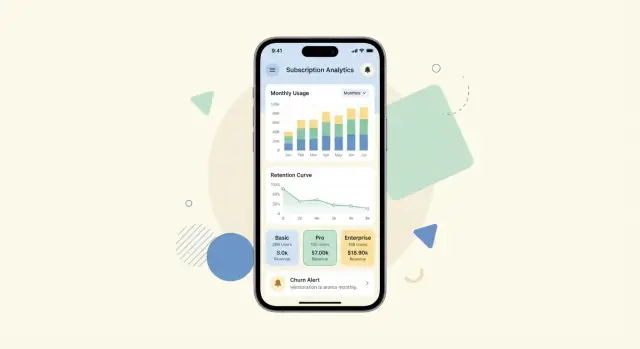
- Overview: a few top subscription KPIs (e.g., active subscribers, churn, revenue), each as a card with a tiny trend.
- Trends: one metric at a time with a date range selector and a simple comparison (vs. previous period).
- Cohorts: a compact retention view (e.g., week 0–8), with tap-to-explain and a way to switch segments.
- Plan comparison: side-by-side plan cards showing usage distribution and key differences (e.g., “% hitting limits”).
- User details (drill-down): timeline-style activity and subscription status, plus “recommended next action” (e.g., upgrade prompt, outreach).
Mobile-friendly visual patterns
Use cards, sparklines, and single-purpose charts (one axis, one legend). Prefer chips and bottom sheets for filters so users can adjust segments without losing context. Keep filters minimal: segment, plan, date range, and platform is usually enough.
Avoid dense tables. If you must show a table (e.g., top plans), make it scrollable with a sticky header and a clear “sort by” control.
Empty states and “what this means”
Analytics screens often start empty (new app, low volume, filtered to zero). Plan for:
- A clear reason: “No data for this period/segment.”
- A next step: “Try expanding the date range” or “Remove the ‘Enterprise’ filter.”
- A brief definition under each metric (“what this means”) and a tap target for a deeper explanation.
Export and sharing
If stakeholders need to act outside the app, add lightweight sharing:
- CSV export for tables and cohorts.
- Share link to a specific view (respecting permissions).
- Internal report action: send the current dashboard snapshot to email/Slack.
Make these options available from a single “Share” button per screen so the UI stays clean.
Subscription KPIs and Cohorts to Include
A usage insights app is only as useful as the KPIs it puts next to real behavior. Start with a tight set of subscription metrics that executives recognize, then layer in “why” metrics that connect usage to retention.
Core subscription KPIs (the non-negotiables)
Include the metrics people use to run the business day to day:
- MRR/ARR: show current value and net change (new, expansion, contraction, churn).
- Renewal rate: especially for annual plans and enterprise contracts.
- Churn: separate logo churn (customers) from revenue churn (MRR).
- ARPU: average revenue per user/account; useful for plan and segment comparisons.
- LTV: even if modeled simply at first, it helps prioritize retention work.
Usage-to-retention links (turn metrics into explanations)
Pair subscription KPIs with a small set of usage signals that typically predict retention:
- Activation: % of new subscribers who complete the “aha” action within a timeframe.
- Habit formation: weekly active days, streaks, or repeat core action rate.
- Feature adoption: adoption of 1–3 sticky features, not every feature.
The goal is to let someone answer: “Churn rose—did activation drop, or did a key feature stop getting used?”
Cohorts that matter on mobile
Cohorts make trends readable on small screens and reduce false conclusions.
- Trial cohort: conversion and early drop-off by trial start week.
- Month-0 cohort: retention and usage for the first 30 days after first payment.
- Plan-level cohorts: Basic vs Pro vs annual, plus add-ons if relevant.
Guardrails to prevent misleading charts
Add light but visible guardrails:
- Minimum sample size indicator (e.g., “n < 30” warning).
- Seasonality notes (holidays, promo periods) on retention and renewal views.
- Definition tooltips (what counts as churn, active, renewal) so teams don’t argue over numbers.
If you need a quick reference for definitions, link to a short glossary page like /docs/metrics-glossary.
Alerts, Notifications, and Actionable Recommendations
A usage insights app is most valuable when it helps people notice changes and do something about them. Alerts should feel like a helpful assistant, not a noisy alarm bell—especially on mobile.
Pick alert types that map to real decisions
Start with a small set of high-signal alerts:
- Anomalies: “Usage is 3× higher than your usual weekly pattern.”
- Drop in usage: “Team activity is down 40% vs last week.”
- Nearing limits: “You’ve used 85% of your seats/credits/API calls.”
- Renewal risk signals: “Low usage in the last 14 days; renewal is in 10 days.”
Each alert should answer two questions: What changed? and Why should I care?
Choose channels with clear expectations
Use channels based on urgency and user preference:
- In-app: Best for contextual nudges and a “notification center” people can review later.
- Push notifications: Reserve for time-sensitive items (limits, failed payments, imminent renewal). Keep them short and link to the exact screen.
- Email summaries (optional): Great for weekly rollups and stakeholders who don’t open the app daily.
Make rules understandable—and tunable
Users should be able to adjust:
- Thresholds: e.g., 70% / 85% / 95% of limit
- Frequency: instant vs daily digest
- Snooze: mute for 1 day / 1 week
Explain rules in plain language: “Alert me when weekly usage drops by more than 30% compared to my 4-week average.”
Always include a next step
Pair alerts with recommended actions:
- Education: “Try the ‘Automations’ feature to reduce manual work.”
- Feature tips: “Invite teammates to increase adoption.”
- Plan changes: “Upgrade to avoid overage fees” or “Downgrade if you’re consistently under 30%.”
The goal is simple: every alert should lead to a clear, low-effort action inside the app.
Architecture and Tech Stack Options
A subscription usage insights app usually has two jobs: collect events reliably and turn them into fast, readable dashboards on a phone. A simple mental model helps you keep scope under control.
A practical high-level architecture
At a high level, the flow looks like this:
Mobile SDK → ingestion → processing → API → mobile app.
The SDK captures events (and subscription state changes), batches them, and sends them over HTTPS. An ingestion layer receives those events, validates them, and writes them to a durable store. Processing aggregates events into daily/weekly metrics and cohort tables. The API serves pre-aggregated results to the app so dashboards load quickly.
Choosing a tech approach that fits your team
Pick what your team can maintain:
- Mobile app: Native (Swift/Kotlin) when you need the best performance and platform UI patterns; cross-platform (Flutter/React Native) when you need one codebase and faster iteration.
- Backend: Any familiar web framework works (Node, Python, Go, Java). Prefer boring and well-supported libraries for auth, rate limiting, and caching.
- Storage/analytics: Start with a relational database for aggregates and user/account metadata. If you already use a warehouse, publish aggregates from there into a serving database for mobile-friendly queries.
If you want to prototype this end-to-end quickly (especially the “mobile UI + API + database” loop), a vibe-coding platform like Koder.ai can help you validate the dashboard screens, event ingestion endpoints, and aggregation tables from a single chat-driven workflow. It’s particularly useful for iterating on data contracts and UI states (empty states, loading, edge cases) while keeping deployment and rollback straightforward via snapshots.
Scalability basics you should plan for early
Batch events on-device, accept payloads in bulk, and enforce rate limits to protect your ingestion. Use pagination for any “top items” lists. Add a cache (or CDN where appropriate) for dashboard endpoints that many users open repeatedly.
Security essentials
Use short-lived tokens (OAuth/JWT), enforce least-privilege roles (e.g., viewer vs. admin), and encrypt transport with TLS. Treat event data as sensitive: restrict who can query raw events, and audit access—especially for customer support workflows.
Data Quality, Testing, and Observability
If your data is wrong, your dashboard becomes a confidence killer. Treat data quality as a product feature: predictable, monitored, and easy to fix.
Data quality checks that run every day
Start with a small set of automated checks that catch the most common failures in subscription usage insights:
- Missing fields: event name, user ID, timestamp, subscription status/plan, app version.
- Outliers: sudden spikes in “trial_started,” negative durations, impossible values (e.g., 10,000 sessions in an hour).
- Duplicates: repeated events caused by retries, offline queues, or double instrumentation.
- Late events: events arriving hours/days after they happened, which can distort cohorts and churn metrics.
Make these checks visible to the team (not hidden in a data team inbox). A simple “Data Health” card inside the admin view is often enough.
A QA workflow for new events
New events should not go straight to production dashboards.
Use a lightweight validation flow:
- Staging pipeline that mirrors production transformations.
- Test accounts with known behaviors (start trial, cancel, renew, heavy usage).
- Golden queries that verify counts and key ratios before release.
Add a “versioned schema” mindset: when the event tracking schema changes, you should know exactly which app versions are affected.
Observability for the analytics system itself
Instrument the pipeline like any other product system:
- Pipeline latency: time from event creation to dashboard availability.
- Drop rates: events rejected due to schema errors or size limits.
- Join coverage: percentage of events that successfully join to subscription records.
A calm playbook for broken metrics
When a metric breaks, you want a repeatable response:
- Freeze the affected dashboard tile with a clear note (“Data delayed for iOS 5.2”).
- Identify the scope (platform, version, plan segment).
- Backfill or reprocess, then document the root cause and prevention step.
This playbook prevents panic—and keeps stakeholders trusting the numbers.
MVP Launch, Feedback Loop, and Iteration Roadmap
An MVP for a subscription usage insights app should prove one thing: people can open the app, understand what they’re seeing, and take a meaningful action. Keep the first release intentionally narrow—then expand based on real usage, not guesses.
Define a “thin but useful” MVP
Start with a small set of metrics, a single dashboard, and basic alerts.
For example, your MVP might include:
- 3–5 core metrics (e.g., active subscribers, renewals, churn rate, trial-to-paid conversion)
- One primary segmentation toggle (e.g., plan tier or new vs. existing subscribers)
- One dashboard screen optimized for mobile scanning (top KPIs + one trend chart)
- Simple alerts (threshold-based) like “churn up 20% week-over-week” or “renewals down vs. last 7 days”
The goal is clarity: every card should answer “So what?” in one sentence.
Run a focused beta and collect feedback
Beta test with internal teams first (support, marketing, ops), then a small set of trusted customers. Ask them to complete tasks like “Find why revenue dipped this week” and “Identify which plan is driving churn.”
Capture feedback in two streams:
- Qualitative: quick interviews + 1–2 in-app questions (“Was this insight clear?”)
- Quantitative: what they actually tap and ignore
Track usage of the insights feature
Treat your analytics UI as a product. Track:
- Dashboard views and repeat visits
- Filters/segments used (and which ones are never used)
- Alert engagement (open rate, dismissals, actions taken after opening)
This tells you whether insights are genuinely helpful—or just “nice-looking charts.”
Plan the iteration roadmap
Iterate in small releases:
-
Add new metrics only when the existing ones are used consistently.
-
Improve explanations (plain-language tooltips, “why it changed” notes).
-
Introduce smarter segmentation (cohorts like new vs. retained users, high-value vs. low-value plans) once you know which questions people ask most.
Next steps
- Review your MVP scope and compare with your business goals
- See packaging ideas on /pricing
- Explore more guides in /blog
If you’re building this as a new product line, consider doing a fast prototype pass before committing to a full engineering cycle: with Koder.ai you can sketch the mobile dashboards, stand up a Go + PostgreSQL backend, and iterate in “planning mode,” with source code export available when you’re ready to move to a traditional repo and pipeline.
FAQ
What does “usage insights” mean in a subscription app?
“Usage insights” are a small set of trustworthy signals that explain how subscribers use the product and what action to take next (reduce churn, improve onboarding, drive expansion). They’re not just charts—each insight should support a decision.
Who are the main audiences for a usage insights app, and how do I define their needs?
Start by writing the one-sentence questions each audience needs answered:
- Customers: value, progress, limits, next best feature
- Support/Success: who’s stuck, what changed, risk signals
- Product/Growth: behaviors that predict renewal, onboarding drop-offs, churn segments
If a question can’t fit on one mobile screen, it’s probably too broad for an “insight.”
Which subscription lifecycle states should I model and report on?
Define the subscription lifecycle states you will display and what triggers each transition, such as:
- Trial → Paid (active) → Renewal (success/failed)
- Pause, Cancel (end auto-renew), Win-back
Be explicit about whether transitions come from billing events, in-app actions, or admin overrides so “active subscribers” isn’t ambiguous.
What identifiers do I need to join usage, billing, and customer data reliably?
Pick stable IDs and make them flow through events and billing data:
user_id(not email)account_id(team/workspace)subscription_id(best for tying usage to entitlement and billing periods)device_id(useful, but treat as sensitive)
Also decide how you merge guest → logged-in identities so usage doesn’t fragment across IDs.
How do I choose usage metrics that actually predict retention or upgrades?
Choose metrics that reflect value created, not just activity. Good starter categories:
- Activation (reached the “aha” moment)
- Core feature adoption (used Feature X at least once)
- Frequency (days active per week)
- Depth (actions per active day)
- Limits/entitlement utilization (seats/credits/API calls)
Keep your first set small (often 10–20) so mobile dashboards stay scannable.
What should a “metric definition” include to avoid confusion?
For each metric, document (next to the dashboard if possible):
- Numerator/denominator
- Time window (e.g., last 7 days vs current billing cycle)
- Filters (paid only, exclude internal users)
- Counting rules (unique users vs events, dedupe, timezone)
Clear definitions prevent teams from arguing over numbers and protect trust in the app.
How should I design event tracking for mobile (including offline use)?
A practical plan includes:
- A clear event taxonomy (consistent names like
snake_case) - Required properties (IDs, timestamp, app version)
- An
event_idUUID for deduplication - Offline queue with retries/backoff and safe batching
- A rule for late events (e.g., drop events older than X days)
- Schema evolution via
schema_version
This prevents broken dashboards when mobile connectivity or app versions vary.
What data sources should a subscription insights app integrate first?
Start with four sources that explain most outcomes:
- App events (behavior)
- Billing provider (plan, renewals, refunds, failures)
- CRM/support (tickets, CSAT, cancellation reasons)
- Attribution (channel, campaign, promos)
Then decide where transforms happen (warehouse-first vs analytics-first) and maintain an identity map to link records across systems.
What are the best mobile UX patterns for dashboards on small screens?
Design mobile screens to answer one question per view:
- Overview cards (big number + tiny trend)
- Single-metric trend screen with simple comparisons
- Compact cohorts with tap-to-explain
- Drill-down user/account timeline with “next action”
Use cards, sparklines, chips/bottom sheets for filters, and strong empty states (“No data—try a longer range”).
How do I implement alerts without overwhelming users?
Keep alerts high-signal and action-oriented:
- Drop in usage vs baseline
- Nearing limits (70/85/95%)
- Renewal risk (low usage + renewal soon)
- Anomalies (unusual spikes)
Let users tune thresholds, frequency, and snooze, and always include a next step (educate, invite teammates, upgrade/downgrade, contact support).