

How to Build a Nail Salon App: Booking, Reminders & Loyalty
Plan and launch a nail salon mobile app with online booking, automated reminders, and a loyalty program. Key features, costs, and build steps.
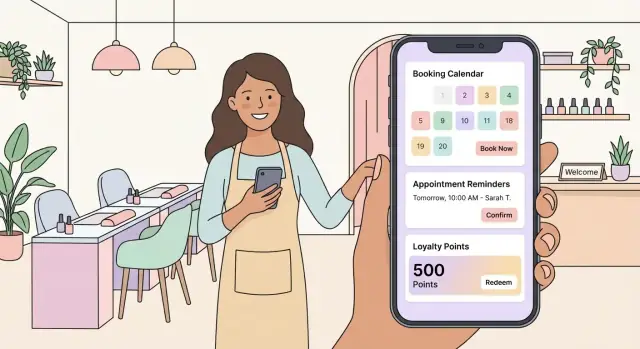
What a Nail Salon App Should Achieve
A nail salon app isn’t “just a booking button.” It’s a tool that removes friction from the three moments that matter most: choosing a service, reserving a time, and coming back again.
The problems it should solve
For clients, the app should eliminate phone calls, back-and-forth messages, and uncertainty. People want to see real availability, understand service options (gel vs. acrylic, add-ons, durations), and confirm in seconds.
For staff, the app should reduce interruptions and manual admin. A good nail salon app keeps the calendar accurate, prevents double-booking, and makes it easy to see who’s coming in, what they booked, and any notes that affect timing.
Expected outcomes you can plan for
When bookings and reminders are consistent, most salons see:
- Fewer no-shows and late arrivals (because expectations and policies are clear)
- Faster booking (less time spent coordinating times and services)
- More repeat visits (because loyalty rewards and rebooking are effortless)
Who it’s for (and what each role needs)
- Clients: simple booking, rescheduling, reminders, receipts, loyalty status
- Reception/front desk: calendar overview, quick edits, waitlist handling, deposits/no-show policies
- Technicians: daily schedule, service details, timing buffers, client notes
- Managers/owners: performance insights, staff utilization, marketing and retention tools
What “success” looks like after launch (KPIs)
Track a small set of numbers weekly:
- No-show rate and late-cancel rate
- Booking conversion: visitors who start booking vs. complete booking
- Rebooking rate within 30 days (or your typical cycle)
- Average time to fill empty slots (especially same-day)
- Repeat revenue share (from returning clients)
If these improve, your nail salon app is doing its job—even before you add advanced features.
Define Scope, Audience, and Platform
A nail salon app can quickly expand into “everything for everyone.” The fastest way to keep costs under control (and ship sooner) is to define what success looks like for your first release, who it’s for, and where it will run.
Start with user stories (real tasks)
Write down the actions clients and staff must be able to complete without calling the salon. Common user stories include:
- “As a client, I want to book a service with a preferred tech at a convenient time.”
- “As a client, I want to reschedule or cancel within the salon’s policy.”
- “As a client, I want to pay (or leave a deposit) and get a receipt.”
- “As a client, I want to earn points and redeem rewards without confusion.”
- “As staff, I want my calendar to stay accurate when appointments change.”
If a story can’t be tied to revenue, reduced no-shows, or a better client experience, it likely belongs later.
Decide what ships in Version 1 vs. later
A practical V1 for most salons is: service menu, staff selection, availability, booking, basic client accounts, payment/deposit, and confirmations.
Good “later updates” (once booking is stable) usually include: packages/memberships, gift cards, referrals, advanced analytics, multi-location support, and marketing automations.
Define your audience (and their constraints)
Be specific:
- New clients: need clear pricing, location info, and trust signals (policies, reviews).
- Regulars: want one-tap rebooking, saved preferences, and loyalty status.
Also consider local needs: primary languages, accessibility expectations, and whether most clients discover you via Instagram/Google versus walk-ins.
Choose platforms: iOS, Android, or both
If your clients skew iPhone-heavy (common in some metro areas), starting with iOS can reduce initial complexity. If your area is mixed, launching both iOS and Android avoids leaving revenue on the table.
If budget is tight, consider a single cross-platform build so the booking flow stays consistent, and expand after you validate demand.
Set Up Services, Staff, and Scheduling Rules
Before you design screens or write a line of code, define what the salon actually sells and how time gets allocated. Most booking issues (and frustrated clients) come from messy service definitions or unclear availability.
Build a service catalog that books correctly
Start with a clear list of services and make each item “schedulable.” For every manicure/pedicure type, store:
- Duration (e.g., 30/45/60 minutes) — avoid “varies” unless you add rules
- Base price and optional tiering (classic / gel / builder)
- Add-ons (nail art, chrome, removal, repair) with their own time + price
A simple rule: if it changes time or cost, model it as a separate add-on so the app can calculate totals automatically.
Create staff profiles with real constraints
Each team member should have a profile that mirrors reality, not a generic schedule:
- Skills/services they can perform (e.g., only some technicians do extensions)
- Working hours by day (often different on weekends)
- Breaks (fixed lunch or flexible break windows)
- Time off (vacations, sick days, training)
This prevents the common “booked with the wrong person” problem and keeps available slots trustworthy.
Set availability rules: buffers, conflicts, and resources
Decide how strict the calendar must be:
- Buffers between appointments (e.g., 5–10 minutes for cleanup) or only for specific services
- Double-booking prevention (usually “never,” unless you intentionally allow it for quick add-ons)
- Room/resource limits if needed (e.g., only two pedicure chairs). Even with great staff scheduling, limited stations can create hidden clashes.
Define booking and cancellation rules (and message them clearly)
If you plan to use deposits, set when they’re required (e.g., for long services or new clients) and what happens when someone cancels.
For cancellation windows and late arrivals, focus on simple, friendly messaging inside the booking flow (and in confirmation screens). Keep it practical: what clients should do, how to reschedule, and what the salon expects—without trying to sound like a legal contract.
Getting these rules right early makes the rest of the app—reminders, payments, loyalty, and reporting—much easier to build and maintain.
Design the Booking Experience End to End
A booking flow should feel like a conversation: a few clear choices, immediate feedback, and a confident “you’re booked” moment. Aim for the shortest path to an appointment, while still letting clients control the details.
The client booking flow (front of house)
Start with a simple sequence: choose service → choose staff (optional) → pick a time slot → confirm.
On the service step, show duration and price so clients don’t second-guess later. When staff selection is optional, offer a default like “Any available” to speed things up and increase fill rate.
For time slots, display only what’s actually available. If a service takes 75 minutes, don’t tease 60-minute gaps. After selection, use a confirmation screen that summarizes: service, staff, date/time, total price, deposit (if any), and salon policies.
Reschedule, cancel, and status clarity
Rescheduling should be as easy as booking: pick a new slot, confirm, then show the updated status immediately (e.g., “Rescheduled—pending approval” or “Rescheduled—confirmed”).
For cancellations, add a clear confirmation step that states any fees or deposit rules before the client commits.
Waitlist when you’re fully booked
When no slots are available, offer a waitlist with preferred days/times and staff preferences. If a slot opens, notify the client and hold it for a short window.
Admin controls (back of house)
On the admin side, enable staff to approve/adjust bookings, block times (breaks, meetings), and quickly add walk-ins without breaking the schedule. Keep every change logged so disputes are easier to resolve.
Add Automated Reminders That Reduce No-Shows
Automated reminders are one of the highest-ROI features in a nail salon app: they protect revenue, keep the schedule predictable, and remove the awkward “Did you forget?” follow-up. The key is to make reminders helpful (not spammy) and easy for clients to control.
Pick the right reminder channels (push, SMS, email)
Most salons end up using a mix, because each channel has different trade-offs.
- Push notifications: Great when clients have your app installed and notifications enabled. They’re fast and inexpensive, but they don’t reach people who disable push.
- SMS: Best reach and typically the most effective at preventing no-shows. The downside is cost per message and stricter consent requirements.
- Email: Useful for receipts and long-form details, but weaker for urgent reminders (many clients won’t see it in time).
A common approach is: push + email by default, with SMS as an opt-in “high priority reminders” option.
Timing that feels considerate (and works)
Use a simple schedule that covers the whole journey:
- Instant confirmation right after booking (or after a deposit is paid). This reduces confusion and accidental double-booking.
- 24-hour reminder to catch genuine forgetfulness and give time to reschedule.
- 2-hour reminder as a “leave now” nudge—especially helpful if you have parking or entry instructions.
If you support rescheduling/cancellation rules, include the cutoff in the 24-hour message (e.g., “Free changes until 6pm today”).
What every reminder should include
Keep reminders short, scannable, and action-oriented. Include:
- Service name(s) and duration
- Date/time (with timezone if relevant)
- Tech/staff name (optional, but clients like it)
- Salon address plus a map link
- Contact method (tap-to-call or message)
- A clear Manage booking link (reschedule/cancel)
Example copy (push): “Tomorrow 3:00 PM: Gel manicure with Mia (60 min). 12 Market St. Manage: /bookings/123”.
Consent, opt-out, and quiet hours
Build reminders around client control from day one:
- Opt in clearly for SMS and marketing messages; keep transactional reminders separate.
- Provide easy opt-out per channel in Settings (e.g., toggles for push/SMS/email).
- Add quiet hours (for example, 9pm–8am) so the app delays non-urgent notifications.
Quiet hours matter most for the 2-hour reminder: if an early appointment falls inside quiet hours, send the reminder the evening before instead.
If you want to go further, allow clients to choose “Reminder frequency” (confirmation only vs. standard vs. all). This reduces complaints while still protecting your calendar.
Build a Loyalty Program Clients Will Actually Use
A loyalty program only works if clients understand it in five seconds and can feel progress after every visit. Keep the rules simple, make the rewards desirable, and show the payoff clearly inside the app.
Choose a model that fits your salon
Pick one primary mechanic and do it well:
- Points per visit or per dollar (easy to scale with service price)
- Stamp card (e.g., “5 visits = $10 off”)
- Tiers (Silver/Gold/VIP for higher-frequency clients)
- Referrals (reward both the referrer and the new client)
If you’re unsure, start with points per visit. It’s straightforward and doesn’t require complex math.
Make earning and redemption rules obvious
Clients shouldn’t need to ask staff how it works. Define rules like:
- When points are earned (after a completed appointment, not at booking)
- What counts (services only, or products too)
- Expiration (ideally none, or a long window with clear reminders)
- Redemption (one reward per visit, minimum spend, exclusions)
Keep the reward menu short: 3–5 perks max (e.g., “$5 off,” “Free nail art add-on,” “10% off gel”).
Build the client-facing views
Inside the app, include a dedicated Loyalty screen with:
- Current balance (points/stamps and progress to next reward)
- Available perks with a “Redeem” button and clear terms
- Reward history (earned and redeemed, with dates)
- Referral status (invite link/code, pending/approved rewards)
Prevent abuse without punishing honest clients
Add lightweight protections:
- One account per phone number/email (verify at signup)
- Points granted only when staff marks the appointment as completed
- Staff override for corrections, with a required reason
- An audit log for loyalty changes (who, when, what, why)
These basics deter gaming while keeping the experience frictionless for regulars.
Payments, Deposits, and Receipts
Payments are where a “nice” booking flow turns into a business tool. For V1, decide whether your nail salon app should take payment in-app, support pay-at-salon, or offer both.
In-app payments vs. pay-at-salon (V1 choices)
Pay-at-salon is the simplest: fewer checkout screens, fewer payment support issues, and it works for walk-ins or last-minute changes. The downside is higher no-show risk.
In-app payments (card / wallet) reduce front-desk time and make deposits possible, but they add compliance, receipts, refunds, and payment-failure edge cases. A practical V1 approach is:
- Default to pay-at-salon, with optional deposits for higher-risk appointments
- Add full prepayment later, once booking volume is steady
Deposits: when they help (and when they hurt)
Deposits work best when the appointment blocks meaningful time (e.g., long sets, peak hours) or when you have frequent late cancellations. They can hurt conversions when clients are new, price-sensitive, or just “checking availability.” Consider making deposits conditional:
- Only for specific services, times, or new clients
- Clearly shown before confirmation (“Deposit required today, remainder paid at the salon”)
Receipts, refunds, and cancellation outcomes
Keep outcomes simple and consistent. After any transaction, generate a receipt in-app and by email/SMS.
For cancellations, define a small set of statuses (e.g., canceled in time, late cancel, no-show) and map them to outcomes: deposit applied, refunded, or retained. Use neutral wording and show it during checkout.
Optional future features: tips and gift cards
Tips and gift cards can wait until after V1. They add extra flows (split payments, partial redemptions, balances) but can boost revenue once your core booking and payment experience is stable.
Client Profiles and Visit History
Client profiles turn a booking tool into a day-to-day helper for your front desk and techs. The goal is simple: less time asking repeat questions, fewer mistakes, and an easier way to bring clients back.
What to store in a client profile
Keep profiles lightweight and useful:
- Contact details: name, phone, email, preferred contact method
- Preferences: favorite tech, preferred times, color families, shape/length notes
- Allergies and sensitivities (with consent): clearly separated “health notes” field, plus a consent checkbox and edit history
Avoid collecting anything you don’t need. A smaller, well-maintained profile beats a cluttered one.
Visit history that actually saves time
A clear timeline of past appointments helps staff work faster and provides better service:
- Service name(s), add-ons, duration, tech, price, and tip (if recorded)
- Notes from the visit (e.g., “gel lifts after 10 days—try different base”)
- A one-tap “Rebook last service” shortcut that pre-fills the service, duration, and usual provider
This is also where you can surface quick prompts like “last visit: 5 weeks ago” to encourage rebooking without sounding salesy.
Photos (optional) with privacy controls
Before/after photos can improve consistency and help handle disputes, but only if handled carefully. Make photos opt-in, show a clear purpose statement, and provide controls to delete or hide images from staff roles that don’t need access.
Simple CRM tags (use carefully)
Tags like new, regular, or VIP can personalize service and offers. If you add a “high no-show risk” tag, treat it as a behind-the-scenes operational flag with strict access, clear criteria, and a review process to avoid unfair labeling.
UX and Screen List for a 3,000-Word Build Guide
A nail salon app succeeds or fails on how quickly a client can book without thinking. Keep navigation predictable, reduce choices at each step, and make “book again” easy for returning clients.
Core client screens (minimum viable)
Home: highlights “Book appointment,” current promos, and quick access to last booked service/staff.
Services: categories (manicure, gel, extensions), clear durations, pricing, add-ons, and photos kept optional (don’t block booking).
Booking flow: service → staff (optional) → date/time → add-ons → details → confirmation. Show availability early, and avoid form fields until the end.
My Appointments: upcoming + past, with reschedule/cancel rules, and a one-tap “Rebook.”
Loyalty: points, rewards, progress bar, and redemption rules in plain language.
Profile: contact info, preferences (e.g., fragrance-free), notification toggles, and payment methods if you store them.
Staff/admin screens (for smooth operations)
Schedule view: day/week calendar with color-coded services and buffer times.
Booking list: searchable list with status (confirmed, pending deposit, canceled), and quick actions (call/text, move appointment).
Client list: client profiles, notes, and visit history at a glance.
Settings: services/prices, staff working hours, break times, deposits/cancellation policy, and notification templates.
Navigation and booking UX rules
Use a bottom tab bar for client screens (Home, Book, Appointments, Loyalty, Profile). Aim for booking in 4–6 taps. Always show total time and price before confirming.
Accessibility basics
Use readable text (avoid tiny captions), strong contrast, and large tap targets (at least ~44px). Support dynamic text size, clear error messages, and don’t rely on color alone to signal status.
Backend, Integrations, and Data Model Basics
A nail salon app feels “simple” on the front end, but the backend is what prevents double-bookings, missing reminders, and loyalty disputes. Start by defining the data you must store, then pick integrations that reduce custom work.
Core data you’ll store
At minimum, your database should cover:
- Users: clients and staff (name, contact details, notification preferences)
- Services: duration, price, category, add-ons, and whether deposits are required
- Bookings: service(s), assigned staff, start/end time, status (booked, confirmed, completed, canceled), and source (app, admin)
- Reminders: what was sent (push/SMS/email), when, and delivery status
- Loyalty ledger: a transaction log (earn/redeem/adjust) tied to a visit or order—avoid storing only a “points balance” with no history
A practical tip: treat availability as a rule-based calculation (staff hours + blocked time + existing bookings), not a separate “slots table” you constantly update.
Integrations you may need
- Calendar sync (optional): two-way sync for staff who live in Google/Apple calendars
- SMS/email provider: for reminders and receipts when push notifications aren’t enough
- Payments: card payments, deposits, refunds, and webhooks to update booking status automatically
Admin roles and permissions
Define roles early:
- Owner/admin: manage services, pricing, staff, reports, loyalty rules, and refunds
- Staff: view schedule, manage their own bookings, mark visits complete, add notes
Use “least privilege” so one technician can’t edit everyone’s payroll-related settings.
Backup, logging, and error-handling essentials
Automate daily backups (and test restores). Add structured logging for booking creation, payment events, and reminder delivery. For failures, implement retries with clear statuses (e.g., “reminder failed—invalid phone”) so support can resolve issues without guessing.
Privacy, Security, and Compliance Considerations
A nail salon app handles more sensitive information than it may seem. Treat privacy and security as product features: they build trust, reduce chargebacks and disputes, and keep you out of regulatory trouble.
Personal data: collect only what you need
Start with a simple checklist and avoid “nice to have” fields.
- Contact: phone and/or email (for login and confirmations)
- Booking details: service, time, staff member, notes (keep notes optional)
- Reminders: notification channel preferences and time windows
- Loyalty tracking: points/visits balance and redemption history
If you’re tempted to store birthdays, photos, or detailed preferences, decide whether it directly improves service—and how you’ll protect it.
Consent and messaging preferences
Separate transactional messages (booking confirmations, reschedules, deposit receipts, “your appointment is tomorrow”) from marketing messages (promotions, win-back campaigns).
Good practice:
- Let users opt in/out of marketing without breaking reminders.
- Save a timestamped record of consent and the channel (SMS/email/push).
- Provide a clear “Manage preferences” screen in the profile.
Secure authentication (keep it simple)
For most salons, passwordless one-time codes are easiest for clients and safer than weak passwords.
Options to support:
- Phone login with SMS code
- Email login with a one-time link or code
Add extra checks for staff/admin accounts (longer sessions, optional 2-step verification).
Basic security hygiene
- Encrypt data in transit (HTTPS) and at rest (database/storage).
- Use least-privilege access: staff see only what they need (e.g., today’s schedule, not exports of all clients).
- Keep audit trails for sensitive actions (refunds, client edits, loyalty adjustments).
- Set a retention policy: delete or anonymize inactive client data after a defined period.
Finally, publish a plain-English privacy policy and make it accessible from signup and settings.
Timeline, Budget, and Launch Checklist
A nail salon app can be launched in a few weeks or a few months—mostly depending on how many features you include in the first version and how many systems you need to connect (payments, POS, calendars, marketing tools).
A practical MVP timeline (5–10 weeks)
- Discovery (3–7 days): confirm your services, booking rules, deposit policy, and what staff need in the admin view.
- Design (1–2 weeks): user flow, key screens (services → time slot → payment/deposit → confirmation), plus admin screens.
- Development (2–5 weeks): build booking, reminders, loyalty basics, and an admin panel to manage schedules and services.
- Testing (1–2 weeks): fix edge cases, performance, and notification reliability.
- Launch (2–5 days): app store listing, support setup, production rollout, and monitoring.
If you want to compress that timeline, a vibe-coding platform like Koder.ai can help you move from requirements to a working React + Go (PostgreSQL) app faster—especially for standard flows like booking, admin dashboards, reminders, and role-based access. It also supports source code export, hosting/deployment, and snapshots with rollback, which is useful when you’re iterating quickly after launch.
Budget: what drives app development cost
Your total cost usually hinges on:
- Platforms: iOS only vs. iOS + Android
- Integrations: payment integration (Stripe/Square), push notifications, SMS provider, analytics, calendar sync
- Custom design: branded UI and polished booking animations vs. template-style screens
- Admin tools: staff scheduling controls, manual overrides, reports, and customer management
- Maintenance: OS updates, bug fixes, message deliverability, and small UX improvements
Testing checklist before you ship
Focus on the issues that create real-world chaos:
- Booking edge cases: double-booking, late cancellations, overlapping services, buffer times, “first available” logic
- Time zones and daylight savings (especially for travelers and seasonal time changes)
- Reminders: push + email/SMS fallbacks, correct timing, and opt-out behavior
- Loyalty redemption: points earned, minimum spend rules, partial redemptions, and refunds
App store preparation essentials
Have these ready before submission: store screenshots, a clear description (what clients can do in 30 seconds), support email, and accurate privacy details (what data you collect and why). Also prepare a short help page and cancellation/deposit policy link so support doesn’t become your bottleneck.
FAQ
What should a nail salon app achieve beyond “online booking”?
Start with the three moments that drive revenue: choosing a service, reserving a real time slot, and coming back again. In practice, that means a clear service menu (with durations), accurate availability, fast confirmation, and a rebooking/loyalty loop that’s effortless.
What features should be included in Version 1 (MVP)?
Most common MVP scope is:
- Service menu with prices + durations
- Staff selection (including “Any available”)
- Real-time availability and double-booking prevention
- Booking + reschedule/cancel
- Basic accounts (phone/email)
- Deposits or pay-at-salon flow
- Confirmations + reminders
Save gift cards, packages, referrals, multi-location, and advanced analytics for later once the booking flow is stable.
How do I prevent scope creep when planning the app?
Write user stories tied to outcomes like fewer no-shows, faster booking, or higher repeat visits. If a feature can’t be tied to revenue, time saved, or client experience, push it to a later release.
Example filter: “Does this reduce admin work or increase completed appointments?” If not, it’s likely not MVP.
How do I set up services so bookings don’t break the schedule?
Make every service “schedulable” by defining:
- Duration (avoid “varies” unless you add rules)
- Base price and any tiers (classic/gel/builder)
- Add-ons (nail art/removal/repair) with their own time + price
Rule of thumb: if it changes time or cost, model it as an add-on so totals and slot lengths calculate automatically.
What scheduling rules matter most to avoid double-booking?
Create staff profiles that match reality:
- Services/skills each tech can perform
- Working hours by day (weekends often differ)
- Breaks and time-off
- Optional buffers for specific service types
This prevents “booked with the wrong person” and keeps availability trustworthy.
What does a high-converting booking flow look like?
Keep the booking flow short and predictable: service → staff (optional) → time slot → confirm.
Best practices:
- Show price + duration early
- Offer “Any available” to increase fill rate
- Only display truly valid time slots (don’t show gaps that can’t fit the service)
- Use a confirmation summary including deposit/policies and a clear “Manage booking” link
How should a waitlist work when the salon is fully booked?
Use a waitlist that captures preferences (days/times and staff) and notify clients when a slot opens. If possible, hold the slot for a short window so the first person notified has a fair chance to claim it.
Keep messaging simple: what opened up, when it expires, and one tap to book.
What reminder strategy reduces no-shows without annoying clients?
A reliable baseline schedule is:
- Instant confirmation (right after booking or deposit payment)
- 24-hour reminder (time to reschedule)
- 2-hour reminder (leave-now nudge)
Send via push + email by default, with SMS as an opt-in “high priority” channel. Include service, time, address/map link, and a /bookings/... manage link every time.
What loyalty program design actually gets used?
Start with one mechanic that’s easy to understand (often points per visit). Make it usable by:
- Awarding points after completed appointments (not at booking)
- Keeping rewards to 3–5 clear options
- Showing progress and a simple Redeem button
- Maintaining a loyalty ledger (earn/redeem/adjust history) to prevent disputes
Which KPIs prove the app is successful after launch?
Track a small set weekly:
- No-show rate and late-cancel rate
- Booking conversion (start vs. complete)
- Rebooking rate within 30 days (or your typical cycle)
- Time to fill empty slots (including same-day)
- Repeat revenue share
If these improve, the app is delivering value even before advanced features.