

Build an On-Demand Services App: Cleaning & Repairs Guide
Learn how to build an on-demand cleaning or repairs app: key features, MVP scope, tech choices, payments, scheduling, testing, and launch steps.
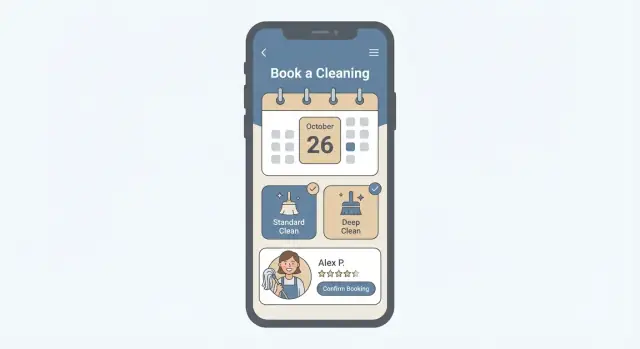
What an On-Demand Services App Really Is
An on-demand services app is a booking-and-fulfillment product for real-world tasks—home cleaning, appliance repairs, handyman work, and ongoing maintenance. The “on-demand” part doesn’t always mean “right now.” More often, it means customers can request a service quickly, see a clear price or estimate, and secure a confirmed time slot without back-and-forth calls.
A two-sided product, not just a customer app
Most successful on-demand services apps are two-sided:
- Customers browse services, choose a time, pay, and track the job.
- Service providers accept work, manage schedules, complete tasks, and get paid.
Even if you start with a small provider team, you’ll still need provider-facing tools (often a lightweight app or web portal) plus an admin panel to keep operations under control.
Set expectations: MVP first, then expand
It’s tempting to launch with every feature—subscriptions, coupons, route optimization, multiple service categories. For cleaning app development or a repair service app, you’ll move faster by shipping a mobile app MVP focused on the essentials, learning what users actually do, then adding complexity only where it earns its keep.
The main building blocks
Whether you’re creating a booking and scheduling app for cleaning or repairs, the core parts are usually:
- Booking: service selection, address, time slots, job details
- Payments: card payments, refunds, tips, invoices
- Dispatch/matching: assign providers manually or automatically
- Reviews: ratings and feedback after completion
- Admin panel: manage orders, providers, pricing, customer support
These blocks create the basic “request → confirm → complete → pay → review” loop you can refine over time.
Choose Your Niche and Validate Demand
A successful on-demand services app starts with a small, clear promise—not “everything for everyone.” Pick a narrow niche where you can standardize the service and deliver consistent quality.
Start with a narrow, repeatable service
Good starting points include standard home cleaning (1–3 bedroom packages) or small appliance repair (washer, dishwasher, microwave). These work well because you can define what’s included, estimate time, and set clear pricing.
Ask yourself: can you describe the service in one sentence without exceptions? If not, narrow it.
Define your service area and availability
Before building features, decide where you’ll operate:
- City + zones (e.g., “Downtown, North, West”) with different travel fees
- Travel radius from a provider hub
- Operating hours and cutoffs (e.g., same-day bookings only before 11am)
This prevents early churn caused by “No providers available” after users try the app once.
Identify customer segments and pain points
Pick 1–2 primary segments and design around what they value most:
- Busy families: predictable scheduling, trusted providers, rebooking
- Renters/young professionals: fast booking, transparent prices, easy entry
- Landlords/property managers: multi-unit scheduling, invoices, repeat jobs
Interview 10–15 people in your target segment. Focus on the last time they hired help: what annoyed them, what they paid, and what they’d change.
Competitors: find complaints you can fix
List 3–5 direct competitors (apps and local services). Pull reviews from Google, the App Store, Yelp, and Reddit. Create a simple table: “Complaint” → “How we’ll address it.” Common themes include late arrivals, unclear pricing, weak support, and inconsistent quality.
Finally, validate demand with a lightweight test: a landing page + ads for your city, or a manual concierge service (WhatsApp bookings) to prove people will actually pay before you build the full app.
Business Model: Marketplace vs. Managed Service
Your business model determines what you promise customers—and what you must control behind the scenes. For cleaning and repairs, the two common approaches are a marketplace (independent providers) and a managed service (your own team or tightly controlled contractors).
Marketplace: independent providers
You connect customers with vetted pros who set availability and complete the job under their own business identity (even if your brand is front-and-center in the app).
You’ll usually earn through a take rate (e.g., 10–25% of each job) plus possible booking fees. This model can scale faster, but quality can vary if onboarding and enforcement are weak.
Managed service: your team (or tightly managed contractors)
You sell the service as your operation: you set standards, train workers, and often handle re-dos and customer support more directly. Revenue is the full job price; costs include labor, supplies, and operations.
This can deliver more consistent outcomes (especially for recurring cleaning), but it’s operationally heavier: scheduling, coverage, and last-minute replacements become your responsibility.
Pricing: fixed, hourly, or quote-based
- Fixed packages (e.g., “2-bedroom deep clean”) are great for fast checkout and predictable expectations.
- Hourly works for flexible tasks, but customers may worry about overruns—use clear minimums and time tracking.
- Quote-based fits repairs best (unknown parts/time). Keep it simple: collect photos + symptoms, then provide a range or confirm after inspection.
Provider onboarding and trust
Plan onboarding like a mini compliance workflow: identity and document collection, background checks where relevant, insurance verification, and short training on service standards, communication, and safety.
Fees, cancellations, and payouts (high level)
Define your take rate, any customer booking fee, and provider fees (optional). Set cancellation rules with a clear cutoff (e.g., free within X hours, then a fee). For payouts, decide timing (instant vs. weekly) and holdbacks for refunds/chargebacks so cash flow stays stable.
User Roles and Products You Need
An on-demand services app isn’t just “one app.” To make bookings reliable (and supportable), you typically need three products: a customer experience, a provider experience, and an admin workspace. Each role has different goals—and different screens.
1) Customer app (the buyer)
The customer app should make it easy to answer three questions: What can I book? When? For how much?
At minimum, customers should be able to browse services (e.g., deep cleaning, faucet repair), see upfront pricing or estimates, choose a time slot, and pay in-app. After booking, they need order tracking (status updates like “confirmed,” “on the way,” “in progress”), the ability to contact support, and a simple way to rate and review the provider.
2) Provider app (the worker)
Providers need speed and clarity. Their core flow is: receive a job → accept/decline → navigate to the address → update job status → complete the job → get paid.
A good provider experience also includes in-app chat or calling (with privacy protections), job details (scope, photos, notes), and a payouts view showing earnings, fees, and upcoming transfers.
3) Admin panel (the operator)
The admin panel is where the business stays under control. It should let your team manage:
- Service catalog and add-ons
- Provider onboarding, documents, and availability
- Pricing rules, service areas, and promotions
- Order oversight, disputes, refunds, and manual adjustments
- Customer support tooling (notes, timelines, message history)
Can the provider side start as a web portal?
Often, yes—and it can cut MVP cost. If you’re starting with a small provider pool, a responsive web portal can cover job acceptance, status updates, and payouts without building a full second app.
Later, you can upgrade to a provider app once volume (and time sensitivity) makes push notifications, navigation shortcuts, and offline-friendly UX worth it.
MVP Scope for Cleaning or Repairs
Your MVP has one job: enable real, paid bookings end-to-end with as little complexity as possible. If a customer can request a service, a provider can accept and complete it, and you can step in when something goes wrong—your MVP is doing its job.
Define the MVP goal (what “done” looks like)
A practical MVP goal is: complete 50–200 paid orders with predictable operations. That volume is enough to learn what customers actually buy, what providers can reliably deliver, and where your process breaks.
Must-have MVP features: Customer
Keep the customer side focused on booking confidence:
- Sign up / log in (email or phone)
- Service selection (e.g., “1-bedroom cleaning” or “sink repair”) with clear pricing rules
- Address and basic notes (entry instructions, parking, photos for repairs)
- Scheduling (choose date/time window)
- Payment (card or wallet) and receipt
- Order history with status and support contact
Must-have MVP features: Provider
Providers need simple tools to show up and get paid:
- Availability (toggle working hours; optional days off)
- Job acceptance/decline (with a reason)
- Status updates: en route → started → completed
- Basic job details: address, time, notes, customer contact (masked if possible)
Must-have MVP features: Admin
Your admin panel is your “safety net” during early operations:
- Job management: view, assign/reassign, cancel, reschedule
- Provider management: onboarding status, documents, performance notes
- Manual adjustments: refunds/discounts, payout corrections, notes for audit
Defer these nice-to-haves (for later)
Skip anything that doesn’t help you complete the next booking:
- Memberships, referrals, promo engines beyond a simple coupon
- Dynamic pricing and complex add-ons
- Advanced matching, ratings-based routing, multi-stop routing
- In-app chat (start with SMS/email updates if needed)
A good MVP can feel slightly manual behind the scenes, but effortless for the customer—and clear for the provider.
Core User Flows and Simple UX
A great on-demand services app doesn’t win because it has more features. It wins because booking feels obvious, fast, and safe—especially on a small screen. Before you design anything “pretty,” map the user flow end-to-end and decide what the app should do when things go wrong (because they will).
The booking flow, step by step
Keep the main path linear and predictable:
Service → details → time → payment → confirmation.
At each step, ask: What’s the minimum information we need to schedule the job correctly? For cleaning, it might be bedrooms/bathrooms and whether the customer has supplies. For repairs, it might be the appliance type, issue symptoms, and photos.
A practical flow looks like this:
- Choose a service (Cleaning, Plumbing, Electrical)
- Add details (address, notes, photos, access instructions)
- Pick a time (available slots, duration estimate, earliest arrival)
- Pay (card/wallet, promo code, tip options if you support them)
- Confirm (summary, provider ETA rules, reschedule/cancel policy)
Clear packages and add-ons (so pricing stays simple)
Users hesitate when they can’t predict the total cost. Instead of forcing them to “describe the job” with no structure, offer service packages and add-ons.
Examples:
- Cleaning: “Standard Clean” vs. “Deep Clean,” add-ons like “Inside oven,” “Inside fridge,” “Bring materials.”
- Repairs: “Diagnostic visit” plus add-ons like “After-hours visit,” “Second technician,” or “Common parts estimate” where applicable.
Make the price logic visible: show what’s included, what increases time, and what may require approval (like parts).
Design for trust on every screen
Trust is part of UX. Build it into the flow rather than hiding it in a profile tab:
- Provider profiles with photo, experience, languages, and service area
- Badges (background check, verified documents, top-rated)
- Reviews that feel real (with job type and date)
- Clear pricing and policies (cancellation windows, what “materials included” means)
Key screens and “unhappy paths” you must design
Most MVPs fail on edge cases, not the happy path. Plan screens and states for:
- Empty states (no availability, no providers in area) with next-best actions
- Errors (payment failed, slot no longer available) with clear recovery
- Reschedules (user-initiated and provider-initiated) with confirmation and reminders
- Cancellations and refunds with transparent outcomes and timelines
If you get these basics right, your app will feel dependable—even before you add advanced features.
Tech Choices: App, Backend, and Integrations
Tech decisions are easiest when you tie them to two constraints: budget and how quickly you need to launch. For cleaning or repairs, customers care more about reliable booking, updates, and payment than fancy animations—so pick the simplest stack that can scale.
Native vs. cross-platform for iOS/Android
If you need the best performance and platform-specific polish, native (Swift for iOS, Kotlin for Android) is the premium option—but you’re building and maintaining two apps.
For most MVPs, cross-platform (Flutter or React Native) is the practical choice: one codebase, faster iteration, and lower cost. The trade-off is occasional extra work for device quirks or complex features.
A useful rule: if your first release is “book, pay, track, review,” cross-platform is usually enough.
Backend essentials (what your server must handle)
Even a simple on-demand services app needs a solid backend. At minimum, plan for:
- Accounts & roles: customers, providers, and admins
- Jobs/bookings: request, accept/assign, start, complete, cancel
- Provider availability: working hours, time off, service area
- Pricing logic: base rates, add-ons, minimum fees, taxes
- Payments: authorization, capture, refunds, payouts, and fees
You can build this with Firebase/Supabase for speed, or a custom API (Node.js/Django/Rails) if you expect more complex workflows and reporting.
If you’re optimizing for speed-to-market without sacrificing control, platforms like Koder.ai can be a practical option for an MVP: you describe the customer app, provider portal, and admin panel in a chat-driven workflow, iterate in “planning mode,” and still export source code when you’re ready to move to a fully custom pipeline.
Proven integrations (don’t reinvent these)
Use established services for common building blocks:
- Maps & geocoding: Google Maps or Mapbox
- Push notifications: Firebase Cloud Messaging / Apple Push
- Email/SMS: SendGrid + Twilio (or local SMS providers)
- Payments: Stripe (often simplest), or regional gateways if needed
These tools reduce risk and help you ship faster.
Data model basics to design upfront
Before coding, sketch your core tables/collections:
- Users (profile, contact, role)
- Providers (skills, documents, rating, service radius)
- Services (categories, duration, pricing rules)
- Bookings (time slot, address, status, assigned provider)
- Payments (amounts, refunds, payout status)
- Reviews (stars, comments, linked to booking)
Getting this right early prevents painful migrations later, especially around booking status changes and payment reconciliation.
Scheduling, Dispatching, and Matching Providers
Scheduling is where on-demand apps either feel effortless or frustrating. For cleaning and repairs, the “hard part” isn’t the calendar—it’s translating real-life constraints (traffic, tools, skills, delays) into rules your app can reliably enforce.
Define scheduling rules that prevent bad bookings
Start by deciding what the system must protect:
- Lead time: the earliest a customer can book (e.g., “as soon as 2 hours from now” or “next day only”).
- Time slots vs. exact time: cleaners often fit well into fixed slots (9–12, 12–3), while repairs may need an arrival window (10–12) to handle uncertainty.
- Job duration: set defaults by service type, but allow add-ons (extra bathroom, deep clean, parts installation) to extend the time.
- Buffers between jobs: add padding for parking, handover notes, and inevitable overruns. Even a 15–30 minute buffer reduces late arrivals dramatically.
If you don’t encode these rules early, customers will book impossible schedules—and support will spend all day apologizing.
Dispatch: manual first, automatic when you have data
There are two practical dispatch modes:
Manual assignment (operator/admin picks a provider) is ideal for an MVP because it handles edge cases: VIP customers, tricky jobs, new providers, and special equipment.
Automatic matching becomes valuable once you have enough providers and repeatable patterns. A simple scoring approach works well: filter eligible providers first, then sort by distance, availability, rating, and acceptance rate.
Handle real-world constraints (without overengineering)
To avoid cancellations and rework, your matching should consider:
- Travel time: don’t just use radius—estimate arrival time from the previous job.
- Skills and certifications: e.g., “gas appliance,” “mold treatment,” “deep cleaning.”
- Equipment and parts: some providers can bring a vacuum/steam cleaner; repair jobs may require parts pickup.
Keep the first version rule-based and transparent. Customers care more about reliability than “smart” matching.
Reschedules and cancellations with clear confirmations
Support both sides with explicit flows:
- Reschedule: show the next available options and confirm what changes (time, provider, price).
- Cancellation: clearly show fees (if any), cutoffs (e.g., free up to 24 hours), and when refunds will appear.
Every schedule change should trigger a confirmation message and update the provider’s timeline immediately to prevent double-booking.
Payments, Refunds, and Provider Payouts
Payments are where service apps either earn trust fast—or create support tickets forever. Treat payments as part of your booking system: every booking should have a clear payment state, and every state should map to what the user and provider can do next.
Pick a payment flow that matches your risk
You typically have three workable options:
- Charge upfront: user pays at booking time. Best for fixed-price services and simple UX.
- Authorize and capture later: place a hold when booking, capture after completion. Useful when the final amount can change (extra hours, parts).
- Pay after service: collect after completion. Lowest friction for users, but higher no-show and collection risk.
Whatever you choose, store it per booking: payment_status (e.g., unpaid, authorized, paid, failed, refunded, partially_refunded) and timestamps for audit.
Refunds, partial refunds, and cancellations (logic, not promises)
Don’t hardcode “full refund” assumptions. Implement refund logic that can express common scenarios:
- Cancellation before provider is assigned → void/uncapture/auto-refund
- Cancellation after assignment → optional cancellation fee captured; remainder refunded
- Service dispute → partial refund while keeping a portion for completed work
Model refunds as records linked to a booking (refund_amount, reason_code, initiated_by, provider_impact) so support and finance can reconcile later.
Provider payouts: predictable, traceable, configurable
Providers care about two things: when they get paid and how you calculate it.
Support weekly payouts by default, plus instant payouts as an optional feature. Add:
- Payout thresholds (e.g., don’t pay out under $X)
- Payout history (per provider: payout date, included bookings, fees, net amount)
- Clear separation between booking payment and provider payout (a booking can be paid while payout is pending)
Receipts and invoices
Send a receipt after payment capture and after any refund event. Generate invoices that reflect line items (service, add-ons, fees, discounts), and store invoice_id and invoice_status per booking for clean reporting.
Communication, Updates, and Reviews
Clear, timely communication is what turns a one-off booking into a repeat customer. For cleaning and repairs, people mainly want two things: certainty (who’s coming and when) and proof (what was done). Your app can deliver both with a few focused features.
In-app chat and masked calling
Add in-app chat so customers and providers can coordinate access details, parking, materials, or last-minute questions without switching to personal numbers.
For anything urgent (“I’m outside,” “water shutoff is here”), offer masked calling: the app connects the call but hides real phone numbers on both sides. This protects privacy, reduces off-platform deals, and keeps a record of job-related communication.
Push notifications that reduce anxiety
Push notifications should answer the customer’s natural timeline questions:
- Booking confirmed (with date/time and provider name)
- Provider en route / arriving soon
- Job started and completed
- Time changes, cancellations, or reassignment (with a clear reason)
Keep the text short and consistent, and make sure every notification links to a specific screen (the booking details), not just the home page.
Photo uploads for repairs and proof of work
Photos are especially valuable for repair service app workflows:
- Before photos: customers upload issue images when booking, helping providers bring the right tools
- During/after photos: providers upload completed-work proof (and optional notes)
This reduces disputes, speeds up follow-up support, and makes repeat visits easier.
Reviews, ratings, and moderation
A simple review flow—prompted right after completion—builds trust quickly. Pair star ratings with one or two short prompts (e.g., punctuality, quality, cleanliness).
Plan admin moderation tools from day one: flagging, removing abusive content, responding publicly, and handling review disputes when a job was canceled or refunded. Reviews should reflect real completed bookings only to prevent spam and keep your marketplace credible.
Security, Privacy, and Trust Features
Security and trust aren’t “nice to have” for a cleaning or repairs app—they’re the reason people feel comfortable letting a stranger into their home. Build these foundations early so you don’t have to retrofit them after an incident.
Minimum security you should ship
Start with strong authentication for every role (customers, providers, admins). Use secure password rules, optional 2FA for admins, and protect logins with rate limiting.
Role-based access control (RBAC) is essential: customers should only see their own bookings, providers should only see jobs assigned to them, and admins should only access what they need.
Add admin audit logs from day one. Track who changed prices, edited provider profiles, refunded orders, or accessed user records. Logs should be searchable and tamper-resistant.
Protect user data (and limit provider visibility)
Encrypt data in transit (HTTPS/TLS everywhere) and avoid exposing sensitive details to providers until necessary. For example, show only a neighborhood or approximate area before a job is accepted, and reveal the exact address only when the booking is confirmed.
Use data minimization: collect only what you need to deliver the service. If you don’t need a date of birth, don’t ask for it.
Operational safety and incident handling
Create a provider verification workflow: identity checks, phone/email verification, and (if applicable) background checks and license/insurance uploads. Show a “Verified” status clearly so customers understand what it means.
Include in-app incident reporting for both customers and providers (safety issue, damage, no-show). Route serious reports to a priority admin queue with timestamps and evidence attachments.
Retention, backups, and “who can see what”
Define a simple access matrix (role → data allowed) and document it.
Set retention rules (e.g., delete old chat messages after X months), and implement encrypted backups with tested restore procedures. Limit backup access to a small set of admins and log every access.
Testing, Launch, Metrics, and Growth Plan
A great MVP can still fail if it breaks in real life—when users are on slow networks, providers miss pings, or a payment needs a refund. Treat testing and launch as part of the product, not a final checkbox.
A practical testing checklist (MVP)
Before you spend on marketing, make sure the basics are boringly reliable:
- Booking flow: create a booking, reschedule it, and confirm all parties see the same time and address.
- Payments: card authorization/capture works, failed payments recover cleanly, receipts are sent, and payment status updates correctly.
- Cancellations + refunds: user cancels before/after the cutoff, provider cancels, and partial/full refunds behave as expected.
- Edge cases: double-booking, provider no-show, user changes address last minute, time zone quirks, and last-slot availability.
- Slow/unstable networks: test on throttled connections; ensure the app doesn’t spin forever and retries are safe (no duplicate charges).
- Notifications: push/SMS/email arrive on time, deep links open the right screen, and missed notifications don’t block the job.
If you have an admin panel, also test: manual job creation, provider assignment override, refunds, and dispute notes.
Run a pilot before a full launch
Start with one area (a neighborhood or small city) and a small provider group. The goal isn’t scale—it’s learning:
- Validate real dispatch timing (how long it takes to assign)
- Catch operational gaps (who calls the customer when something changes?)
- Tune service durations, pricing rules, and cancellation policy
Keep the pilot simple: limited hours, a small list of services, and clear expectations. This gives you clean data and fewer support headaches.
Metrics that tell you what to fix
Track a small set of metrics weekly:
- Conversion rate: visits → quote/price view → booking → paid
- Repeat rate: customers who book again within 30/60 days
- Cancellation rate: by reason (price, timing, provider unavailable, changed mind)
- Time-to-assign: from booking to provider acceptance (and % that require manual intervention)
Add lightweight event tracking early; it’s hard to rebuild analytics later.
Post-launch growth roadmap (keep it iterative)
Once the core flows are stable, sequence improvements:
- Automation: smarter matching rules, auto-reassignment, fewer admin touches
- Subscriptions: recurring cleanings/maintenance plans for predictable revenue
- Referrals: credits for both sides, with fraud controls
- Multi-city expansion: only after unit economics and operations are repeatable
If you want build estimates or help planning a pilot, you can check /pricing or reach out via /contact.
FAQ
What is an on-demand services app (and does it mean “right now”)?
An on-demand services app lets customers request and schedule real-world services (cleaning, repairs, handyman work) with minimal back-and-forth. It usually includes:
- Clear service options (packages or quotes)
- Available time slots or arrival windows
- In-app payment and receipts
- Job status updates from confirmation to completion
“On-demand” often means fast to book and easy to confirm, not necessarily “immediate.”
Why do I need a provider app and an admin panel, not just a customer app?
Most successful products are three experiences working together:
- Customer app: browse services, pick a time, pay, track, review
- Provider app/portal: accept jobs, manage availability, update status, view payouts
- Admin panel: assign/reassign jobs, manage pricing and service areas, handle refunds and disputes
Without provider and admin tooling, bookings quickly become unreliable and support-heavy.
What should an MVP include for a cleaning or repair booking app?
A good MVP proves you can complete real bookings end-to-end. A practical MVP goal is 50–200 paid orders with predictable operations.
Minimum scope typically includes:
- Customer: service selection, address/notes, scheduling, card payment, order tracking
- Provider: accept/decline, availability, status updates (en route/started/completed)
- Admin: job oversight, manual assignment, cancellations/reschedules, refunds/adjustments
Keep it slightly manual behind the scenes, but smooth for users.
How do I validate demand before building the full app?
Start with a narrow, repeatable service you can explain in one sentence and price consistently.
Practical validation options:
- Run a landing page + local ads and track quote/booking intent
- Offer a concierge pilot (WhatsApp/SMS bookings) to prove people will pay
- Interview 10–15 target customers about their last hire (price, frustrations, what they’d change)
Validating demand early prevents building features for a market that won’t convert.
Should I build a marketplace app or a managed service app?
Marketplace means you connect customers with independent providers and earn a take rate (often 10–25%). It can scale faster but requires strong onboarding and quality controls.
Managed service means you sell the service as your operation (team or tightly managed contractors). You keep the full job price but take on heavier operations: training, coverage, replacements, re-dos, and support.
Choose based on what you want to guarantee—and what you can operationally control.
Can the provider side start as a web portal instead of a mobile app?
For MVPs, yes. A responsive web portal can cover:
- Job acceptance/decline
- Status updates
- Viewing job details and payout summaries
Build a full provider mobile app later when you need push notifications, faster “on the go” workflows, navigation shortcuts, and more reliable real-time updates.
How should scheduling and provider matching work at the beginning?
Start with rules that prevent impossible bookings:
- Lead time: earliest bookable time (e.g., 2 hours, next-day only)
- Slots vs. windows: fixed slots for cleaning; arrival windows for repairs
- Duration + buffers: default duration per service and 15–30 min padding
- Service area logic: zones/radius and travel fees
Dispatch can be manual first (admin assigns) and move toward simple rule-based matching once you have enough data.
What payment approach works best for cleaning vs. repairs?
Pick a payment flow that matches the service risk:
- Charge upfront: best for fixed-price packages
- Authorize, capture later: better when totals can change (extra time, parts)
- Pay after service: lowest friction but higher no-show/collection risk
Model payment states per booking (e.g., authorized, paid, refunded) and support partial refunds and cancellation fees. Keep provider payouts traceable (weekly by default; instant as an option).
What trust, privacy, and security features are essential early on?
Focus on safety and accountability from day one:
- Strong authentication and role-based access (customers/providers/admins)
- Masked calling or privacy-protected contact options
- Provider verification (documents, insurance, background checks where relevant)
- Admin audit logs for refunds, pricing changes, and sensitive access
- Incident reporting flows (damage, no-show, safety issues)
Trust features reduce churn and support load as much as they improve safety.
What should I measure during a pilot launch to know what to fix?
Run a small pilot first (one area, limited hours, small provider pool) and track a tight metric set weekly:
- Conversion rate: visit → price view → booking → paid
- Repeat rate: rebook within 30/60 days
- Cancellation rate: segmented by reason
- Time-to-assign: booking to provider acceptance (and % needing manual help)
Use the pilot to tune durations, pricing, and cancellation policy before scaling marketing or expanding cities.