

Build Once, Reuse Often: A Practical Idea Reuse System
Learn a practical system to capture, package, and reuse ideas across projects with templates, checklists, and a simple library you’ll actually maintain.
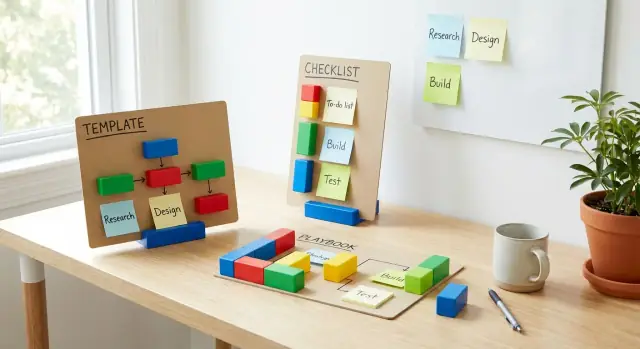
What “Build Once, Reuse Often” Actually Means
“Build once, reuse often” is a simple habit: when you create something useful for a project, you intentionally shape it so it can help you again—and then you make it easy to find next time.
This doesn’t mean copying and pasting the same work forever. It means building reusable building blocks (templates, checklists, phrasing, workflows, examples) that you can adapt quickly without starting from zero.
What it looks like in everyday work
Instead of writing a project plan from scratch, you start from a proven outline and adjust it for the new situation.
Instead of reinventing how you run meetings, you reuse a short agenda template and a decision log.
Instead of debating “how we do this” on every project, you reuse a lightweight playbook that captures your best current approach.
Why it’s worth doing
The benefits are practical and immediate:
- Speed: fewer blank-page moments, faster setup, faster delivery.
- Consistency: projects feel familiar, quality is steadier, fewer “oops” steps.
- Less rework: you reuse what already works and avoid repeating past mistakes.
- Easier collaboration: teammates can plug into shared formats and expectations.
You’ll also notice decision fatigue dropping—when the basics are pre-decided, your energy goes into the parts that truly need fresh thinking.
What you should reuse (and what you shouldn’t)
Great candidates for reuse are things that repeat with small variations: onboarding emails, proposal structures, discovery questions, handoff checklists, QA steps, naming conventions, design patterns, and “how we run this type of project” playbooks.
Avoid reusing anything that must be bespoke to be effective: sensitive client details, one-off creative concepts, context-heavy decisions without explanation, or outdated assets that no longer match your current standards.
The compounding effect
The goal isn’t perfection on day one. Each time you reuse an asset, you tighten it up—remove confusion, add a missing step, clarify wording. Those small improvements add up, and within a few projects you’ll have a system that quietly saves hours while raising quality.
Spot the Repetition Hidden in Your Projects
Most teams think their work is “all custom” because every project has a different client, topic, or deadline. But if you zoom in, a surprising amount of the work repeats—just with different labels.
Where repeatable work tends to hide
Scan your last 3–5 projects and list the recurring chunks. Common repeatable work includes proposals, onboarding, retrospectives, research, launches, and stakeholder updates. Even when the content changes, the skeleton often doesn’t.
Look for things like:
- The same meeting cadence (kickoff, weekly check-in, handoff)
- The same set of documents (brief, plan, status update, final report)
- The same “last mile” tasks (QA steps, approvals, packaging files)
The silent time sink: repeated decisions
Repetition isn’t only tasks—it’s decisions you re-make from scratch. Naming conventions, folder structures, slide deck order, what “done” means, how feedback is collected, which quality checks happen before sending work out. Each decision may take minutes, but across a project they add up—and they create inconsistency.
A quick way to spot this: notice what you argue about. If the team repeatedly debates structure (“Should we lead with context or results?”) or standards (“Do we need a peer review?”), that’s a candidate for reuse.
Hidden duplication you can turn into assets
Duplication often lives in plain sight:
- Similar emails rewritten repeatedly (intro, follow-up, reminder)
- Meeting notes that follow the same outline
- Docs that start from a copy of a copy
- Slide decks with the same sections, reordered
When you notice repeats, don’t just copy-paste again. Label them as future assets: a checklist, a template, a playbook page, or a reusable “standard section.” That’s the shift from doing the work to building the work once—and reusing it on purpose.
The 5-Step Reuse Loop: Capture, Package, Store, Reuse, Improve
“Build once, reuse often” works best as a loop, not a one-time clean-up project. You create assets that get easier to find and better to use every time they show up in real work.
1) Capture
Collect raw material as you go: a good email, a meeting agenda that worked, a checklist you scribbled during a hectic launch. Keep it lightweight—one inbox folder, one notes page, one “to-template” tag. The goal is to save promising bits before they disappear.
2) Package
Turn the raw note into something someone else (including future-you) can pick up quickly. Add a clear title, a short “when to use this,” and a simple structure (steps, headings, placeholders). Packaging is where reuse becomes realistic.
3) Store
Put packaged assets in one obvious home—a small knowledge library with consistent names. No special tools required: a shared drive, a doc workspace, or a folder structure is enough. What matters is that people know where to look.
4) Reuse
Make reuse the first move, not the last resort. Start new work by searching the library: “Do we already have a kickoff plan?” If yes, copy it, adjust the details, and keep going.
5) Improve
After using an asset, spend two minutes upgrading it: remove steps you skipped, add a missing prompt, clarify confusing wording. This is the feedback loop—every reuse produces data, and the asset steadily gets more useful.
Quick example (end-to-end)
You run a project and jot down a rough plan: timeline, roles, and recurring check-in questions. Later, you package it into a “Project Kickoff Plan” template with sections like Goals, Stakeholders, Milestones, Risks, and Weekly Update Format. You store it in your “Templates” folder, reuse it for the next project, and improve it by adding a decision log section after you notice decisions keep getting lost in chat.
Capture Ideas Without Creating a Mess
Capturing ideas is where reuse either starts smoothly—or turns into a junk drawer. The goal isn’t to build a perfect system upfront. It’s to make “saving the thought” faster than “trying to remember it later.”
Use one inbox, not five
Pick a single place as your idea inbox (a notes app, a doc, a voice-to-text note—anything you’ll actually open). Multiple capture locations create duplicates, lost context, and the dreaded “I know I wrote this somewhere.”
Keep the rule simple: every raw idea goes to the same inbox first.
Capture fast with a consistent mini-format
Don’t write essays. Use lightweight fields so future-you can understand the idea in 10 seconds:
- Context: Where did this come up? (client call, brainstorm, competitor, personal pain point)
- Goal: What is the idea trying to achieve?
- Constraints: Time, budget, brand rules, tools, audience limits
- Examples: A link, screenshot reference, or one concrete scenario
- Next step: The smallest action (draft outline, test variant, ask someone)
If you only have 20 seconds, capture just Goal + Next step.
Separate “idea” from “asset”
An idea is allowed to be messy. A reusable asset (template, checklist, playbook) needs structure. Mixing these too early leads to over-polishing and slows capture.
Make it explicit in your inbox: label entries as IDEA by default. Promotion to ASSET happens later.
Schedule a 15-minute weekly promotion
Once a week, spend 15 minutes:
- delete what’s clearly not useful, 2) merge duplicates, 3) promote 1–3 high-value ideas into a “to package” list.
This keeps capture friction low without letting the inbox pile up.
Turn Raw Notes into Reusable Building Blocks
Raw notes are great for thinking, but they’re hard to reuse. The goal of this step is to turn “messy but true” into something a future you (or a teammate) can find, trust, and drop into a project without re-reading five pages of context.
1) Name it so you can find it again
Naming is the cheapest upgrade you can make. A clear name makes an asset searchable, sortable, and easy to reuse across projects—especially when you’re scanning a list quickly.
A simple pattern that scales:
Verb + Deliverable + Audience + Stage
Examples:
- Draft + Kickoff Email + Client + Pre-Project
- Review + Landing Page Checklist + Marketing + Pre-Launch
- Plan + Content Calendar + Newsletter + Monthly
If you can’t name it in one line, it’s probably still a note—not a building block.
2) Add stable tags (not “whatever you feel today”)
Tags should stay consistent over time. Pick a small set you’ll actually use, and keep them predictable:
- Function: marketing, sales, design, ops, product
- Project type: website, campaign, onboarding, event
- Channel: email, social, web, video, in-person
- Risk level: low-risk, medium-risk, high-risk
Avoid overly specific tags like “Q3 launch 2024” unless you also have stable ones.
3) Write a one-sentence “when to use this” note
This prevents misuse and saves time.
Format:
Use when: (situation) Not for: (common wrong use)
Example:
Use when: you need a first-pass kickoff email after scope is agreed. Not for: cold outreach or contract follow-ups.
4) Package the block
Give the asset a clean start (title), a clean body (the reusable core), and remove personal details. You’re aiming for “plug-and-play,” not “perfect.”
Choose the Right Reusable Format
Reuse fails most often when the “asset” doesn’t match the job. If everything is saved as a long document, people won’t find what they need—or they’ll copy the wrong parts. A good knowledge library is a mix of formats, each designed for a specific kind of repeatable work.
Pick a format based on how you’ll use it
Ask one question: What do I want someone to do with this later—follow steps, fill in blanks, or copy an example? Then choose the simplest format that makes the next action obvious.
- Template: a fixed structure for repeatable documents (briefs, plans, reports). Use templates when you want consistency across projects and faster start-up time.
- Checklist: quality and completeness steps (before launch, before publish). Use checklists when mistakes are costly or easy to miss.
- Playbook: a step-by-step process with roles and decisions. Use playbooks when multiple people contribute and handoffs happen.
- Example bank: best-practice samples to copy and adapt. Use an example bank when quality is subjective (writing, design patterns, proposals). It’s also the fastest form of content repurposing: copy, tweak, ship.
- Decision log: reusable criteria for trade-offs (scope, priority, pricing, timing). Use a decision log to stop re-arguing the same debates.
A simple rule
If you’re repeating structure, create a template. If you’re repeating checks, create a checklist. If you’re repeating steps and coordination, create a playbook. If you’re repeating quality examples, create an example bank. If you’re repeating trade-offs, create a decision log.
Design Templates People Will Actually Use
Templates fail when they feel like homework. The goal isn’t to capture every possibility—it’s to make the next project faster and calmer. A good template is one that someone can open and start filling out in under a minute.
Start with “minimum viable templates”
Build the smallest version that still prevents common mistakes. If your team won’t adopt it at 80% complete, adding more fields won’t help.
A minimum viable template usually includes:
- A clear purpose (“Use this for client kickoffs”)
- 5–10 essential prompts
- A short example of a good answer (one line, not an essay)
Use prompts, not paragraphs
Instead of writing long instructions, write questions people can answer. Prompts reduce reading and increase consistency.
Examples:
- “What’s the success metric for this project?”
- “Who approves the final version?”
- “What constraints can’t we change (budget, deadline, tools)?”
Add optional sections (so beginners don’t bounce)
Keep the main flow lightweight, then add an “Optional / Advanced” area for edge cases. This avoids overwhelming first-time users while still supporting power users.
Optional sections might include risk planning, variations, QA checklists, or reusable snippets.
Make versioning boring and obvious
Versioning doesn’t need a system—just consistent fields at the top:
- Last updated: YYYY-MM-DD
- Owner: name or role
- Last reviewed: YYYY-MM-DD (schedule a simple review cadence)
- Changelog: 3–5 bullets (“Added new prompt for stakeholder mapping”)
When people trust a template is current, they reuse it. When they don’t, they create their own—and your “reuse library” turns into clutter.
Build a Simple Library for Reuse
A reuse system only works if people can find the “thing” they need in under a minute. The goal isn’t to build a perfect database—it’s to create a small, dependable library where your best assets live.
Start with a folder structure people naturally search
Most people don’t think “template type,” they think “what am I doing right now?” Organize your library by workflow stages, then by asset type.
For example:
- 01 Discover (research prompts, interview scripts)
- 02 Plan (project briefs, kickoff agendas)
- 03 Create (writing outlines, design patterns)
- 04 Review (QA checklists, feedback forms)
- 05 Launch (release checklists, announcement templates)
Keep naming consistent, and number the top-level folders so the order doesn’t drift.
Pick a single source of truth (and defend it)
Duplicates are where reuse systems go to die. Choose one home for “approved” assets—Notion, Google Drive, a shared folder, whatever your team already opens daily—and make everything else a pointer.
If someone wants to keep a personal copy, that’s fine, but the library version is the one that gets improved.
Make every asset skimmable
Each item should answer three questions fast: What is it? When do I use it? Who maintains it?
Add a short summary at the top, use consistent tags (e.g., #kickoff, #email, #checklist), and assign a clear owner. Owners don’t “control” usage—they keep it current.
Archive instead of deleting
Set a simple rule: if something is outdated, move it to an /Archive folder with a short note (“Replaced by X on 2025-10-02”). This prevents accidental loss while keeping the main library clean.
Make Reuse the Default in New Projects
If reuse is optional, it won’t happen—especially when deadlines hit. The easiest way to make “build once, reuse often” real is to change how projects start and how they close.
Start with a template-first kickoff
Before anyone opens a blank doc or design file, begin by selecting existing assets. Treat the kickoff as a quick “pick your starting kit” step:
- Choose the closest project template, checklist, or playbook from your library
- Pull any proven components (email sequences, onboarding steps, meeting agendas, design patterns)
- Create the project folder by duplicating the template structure, not by building one from scratch
This one habit reduces decision fatigue and gives the team a shared path from day one.
“Copy, then customize” (with fields that force clarity)
Make your reusable assets easy to adapt. Instead of generic guidance, include clear fields like:
- What must change: audience, offer, dates, metrics, channels
- What should stay the same: core steps, QA checks, tone rules, approvals
When people know exactly what to edit, they reuse faster and with fewer mistakes.
Add a reuse checklist at the start and end
Put a short “reuse checklist” at two moments:
- Project start: “Which existing assets are we using? What are we not reinventing?”
- Project end: “What did we improve? What should be saved back?”
Make improving the library part of the work
Encourage “share improvements back” as a normal closing step. When someone updates a template, tightens a checklist, or finds a better phrasing, they should publish the change (and a one-line note on why) to the library. Over time, reuse stops being a nice-to-have and becomes the default way projects run.
Where Koder.ai can help (when your “assets” become software)
As your reuse library matures, some templates and checklists eventually want to become tools: an intake form that routes requests, a status-update generator, a lightweight CRM, or a repeatable launch dashboard.
That’s a natural moment to use a vibe-coding platform like Koder.ai: you can describe the workflow in chat, build a small web app around it (often with React on the front end and Go + PostgreSQL behind it), and iterate using features like planning mode, snapshots, and rollback. If you outgrow the prototype, you can export the source code and keep moving without restarting from scratch.
Improve Assets with Every Reuse
Reuse isn’t just a way to move faster—it’s a way to make your assets better every time they’re used. Treat each reuse as a “test run” that reveals what works in real projects and what needs tightening.
Track a few practical signals
You don’t need complex analytics. Pick a small set of signals you can notice quickly:
- Time saved: Did this checklist/template cut the prep time or decision time?
- Fewer revisions: Did stakeholders ask for fewer changes because the structure was clearer?
- Fewer missed steps: Did the team avoid common omissions (handoffs, approvals, edge cases)?
If an asset isn’t improving any of these after a few uses, it may be too generic—or solving the wrong problem.
Collect feedback while it’s fresh
Add a tiny feedback step right after delivery or handoff. A two-minute prompt is enough:
- What was unclear?
- What was missing?
- What was unnecessary?
Capture answers in the asset itself (for example, a short “Notes from last use” section) so the next person benefits without searching.
Schedule lightweight maintenance
Improvements stick when you give them a regular slot:
- Monthly clean-up (15–30 minutes): remove duplicates, fix broken steps, rename confusing sections.
- Quarterly refresh (60–90 minutes): rethink structure, update examples, retire assets no one uses.
Keep the bar low: small edits, done consistently, beat big rewrites that never happen.
Set clear ownership
Every reusable asset should have:
- An owner who approves significant changes (to prevent drift)
- A simple rule for what people can edit freely (typos, small clarifications)
This balance keeps assets alive—stable enough to trust, but flexible enough to evolve with your work.
Common Pitfalls and How to Avoid Them
Even a simple reuse system can drift into habits that make it harder to work, not easier. Here are the most common traps—and the fixes that keep reuse helpful.
1) Over-templating (templates that think for you)
Templates should remove repetitive decisions, not replace judgment. When a template is too rigid, people either stop using it or follow it blindly and produce generic work.
Keep templates “minimum viable”: include only the steps you truly repeat, plus a small space for context (“What’s different this time?”). If a section isn’t used 3–5 times in a row, remove it.
2) Tool sprawl (notes in five places)
A reuse library fails when nobody knows where the “real” version lives. Multiple tools create duplicates, outdated copies, and extra searching.
Pick one primary home for reusable assets (your knowledge library) and one capture inbox. If you must use more tools, define clear roles (e.g., capture in one place, publish to the library in one place) and stick to them consistently.
3) Stale libraries (dead assets nobody trusts)
Once people hit outdated guidance, they stop checking the library.
Add a simple freshness rule: each asset gets a review date (e.g., quarterly for fast-changing work, yearly for stable processes). Also create retirement rules: archive anything unused for 6–12 months, and mark old versions clearly as “Deprecated” with a pointer to the current one.
4) Ignoring exceptions (or treating them as failures)
Sometimes the template is wrong for the job. That’s normal.
When you skip a template, document why in one sentence and what you did instead. This turns exceptions into improvements: either adjust the template, create a variant, or add an “When not to use this” note so the next person makes the call faster.
A One-Week Starter Plan to Build Your Reuse System
You don’t need a full knowledge library to get value from reuse. In one week, you can pick one workflow you repeat (client projects, content launches, internal initiatives) and create three reusable assets that immediately reduce effort next time.
Pick one workflow (15 minutes)
Choose a workflow you do at least monthly. Examples: shipping a blog post, running a client kickoff, launching a feature, planning a webinar.
Your goal this week: build (1) a project brief template, (2) a launch checklist, (3) a retro questions set for that workflow.
The 7-day plan
Day 1 — Choose scope + “where it lives.”
Create one folder/page where these assets will live (even a single doc is fine). Name it clearly: “Reuse Library — [Workflow].”
Day 2 — Draft the project brief template.
Start from the last project you ran. Copy the structure, remove specifics, and turn it into prompts.
Day 3 — Draft the launch checklist.
List steps in the order they actually happen. Keep items small and verifiable.
Day 4 — Write the retro questions.
Create 8–12 questions that help you improve the workflow after each run.
Day 5 — Test everything on a real project.
Use the brief/checklist on something you’re currently doing. Mark what’s missing or annoying.
Day 6 — Package for reuse.
Add short instructions at the top of each asset: “When to use,” “Who owns it,” and “How to customize.”
Day 7 — Share + lock the first version.
Send it to the people who would use it. Ask for one improvement each, then publish as v1.0.
Simple “definition of done” for each asset
Project brief template is done when: it fits on 1–2 pages and includes goal, audience, constraints, success metrics, timeline, owners, and links.
Launch checklist is done when: every item can be checked off, each has an owner (or role), and it covers prep → execution → follow-up.
Retro questions are done when: they can be answered in 15 minutes and produce at least 3 actionable improvements.
Make it stick: one weekly promotion
Set a recurring 15-minute calendar block: each week, promote one useful item into the library (a snippet, a doc, a checklist step). Small, steady additions beat big cleanups you never schedule.
FAQ
What does “build once, reuse often” mean?
It means turning useful work into templates, checklists, examples, or playbooks that you can adapt for the next project. You keep the useful structure while changing the details for the new situation.
What should I reuse across projects?
Start with work you repeat: project briefs, kickoff agendas, follow-up emails, QA steps, or handoff notes. If you have made the same decision or document several times, save a reusable version.
When should I use a template instead of a checklist?
Use a template when the document structure repeats, such as a proposal or project plan. Use a checklist when people need to verify steps before a launch, handoff, or review.
How do I find repeatable work in my projects?
Review your last three to five projects and note repeated meetings, documents, approvals, and quality checks. Repeated debates about folders, naming, feedback, or what “done” means also point to reusable assets.
How can I capture ideas without creating clutter?
Keep one capture inbox for rough notes, useful wording, and working processes. Save the idea quickly, then review it later and decide whether it deserves a cleaner reusable version.
How should I organize a reuse library?
Give each asset a clear name, a short note explaining when to use it, and a few stable tags. Store approved versions in one shared location that everyone treats as the source of truth.
What makes a template easy for people to use?
Keep the first version small enough to use in under a minute. Include the purpose, five to ten prompts or steps, and optional sections only when they help with less common cases.
How do I customize a reusable asset safely?
Copy the closest asset first, then update the audience, dates, goals, owners, and constraints. Leave the proven process and quality checks in place unless the project gives you a clear reason to change them.
How do I make reuse a normal team habit?
Make reuse part of the project kickoff by asking which existing assets the team will use. At project close, ask what changed and save useful improvements back to the library.
How often should I update reusable assets?
After each use, remove confusing or unused steps and add anything people needed but could not find. A short monthly cleanup and clear ownership keep the library current and trusted.