

Build a Product Website That Shows Clear, Honest Tradeoffs
A practical guide to building a product website that explains benefits and limits, helps buyers self-qualify, and reduces churn.
Start With Positioning and Non-Negotiable Constraints
If you want a product website that feels honest, start by getting brutally clear on what your product is—and what it is not. This is less about “better copy” and more about setting guardrails for every page you’ll write later.
1) Define the product in one sentence
Write a single sentence that includes who it’s for and the outcome:
“[Product] helps [specific buyer] [achieve outcome] by [primary approach].”
If you can’t keep it specific, your site will drift into vague claims.
2) Name the top 3 promises you can confidently deliver
Promises should be measurable or plainly observable—things a buyer will recognize as true after using the product.
Examples:
- “Set up in under 30 minutes without developer help.”
- “Generates weekly reports automatically.”
- “Supports role-based access for teams.”
These promises become your “headline material” across the home page, product page, and onboarding expectations.
3) List the top 3 constraints
Constraints are the limits that shape the buyer experience. Pick the ones most likely to affect purchase decisions, such as:
- Time: onboarding, implementation, time-to-value
- Cost: pricing model, minimum plan, overage fees
- Scope: what’s included vs. not included
- Platform: supported devices, browsers, environments
- Integrations: what’s native, what requires workarounds
4) Turn constraints into tradeoff statements
Convert each constraint into a clear sentence you can reuse on-site:
- “Best for teams that can standardize on X; not ideal if you need Y customization.”
- “Fast to launch, but advanced workflows require our Pro plan.”
- “Works with A and B today; C is not supported.”
5) Decide what you will not claim
Create a “do-not-say” list to avoid slippery superlatives. Ban phrases like “works for everyone,” “unlimited,” “fastest,” or “seamless” unless you can define the conditions. This keeps your honest marketing consistent—and prevents later pages from overpromising.
Know Your Audience and Where Tradeoffs Matter
If your website is honest about tradeoffs, the first step is being equally clear about who you’re building for. A “product for everyone” message forces you to hide limits. A specific audience lets you explain boundaries without sounding defensive.
Define the ideal customer in plain language
Write your ideal customer profile as if you’re describing a real person to a colleague:
- They have a specific job to do (not a vague interest).
- They measure success with a few outcomes (time saved, fewer errors, faster onboarding).
- They accept certain constraints (budget, setup effort, learning curve) because the payoff is worth it.
Example framing: “This is for small ops teams who need consistent processes across locations and don’t have time to maintain a complex system.”
Name where you’re a poor fit (2–3 common scenarios)
Pick the most frequent mismatch patterns and say them plainly. For example:
- If a buyer needs deep customization or a highly unique workflow, they may outgrow your fixed approach.
- If they require enterprise-only controls (advanced compliance, on-prem hosting), your product may not meet that bar.
- If they want the lowest price above all, your paid features or support model may not align.
These “not for you” moments reduce refunds and shorten evaluation cycles.
Map the buyer journey: awareness → evaluation → decision
Awareness: help them recognize the problem and what it costs.
Evaluation: show how your approach works, plus the limits that matter.
Decision: make pricing, requirements, and next steps feel predictable.
Anticipate trust questions and proof you can show
List the questions people ask before they believe you: “Will this work in my environment?”, “How long to see value?”, “What breaks first?”
Then choose proof that’s true and verifiable—customer quotes with context, simple metrics you can stand behind, screenshots of real workflows, and clear policies (support hours, SLAs, data handling) without promising outcomes you can’t guarantee.
Choose Goals, Core Pages, and What “Good” Looks Like
Before you write a single headline, decide what your website is supposed to do. “Educate” is not a goal; it’s a method. A clear goal forces clarity in copy, layout, and which tradeoffs you highlight.
Pick primary actions (and accept that you can’t have five)
Choose one primary action and one secondary action per visitor type. Common primary actions include: request a demo, start a trial, buy now, contact sales, or subscribe.
If every page tries to do everything, buyers won’t do anything. Your primary action should match your sales motion and product complexity (e.g., self-serve products can push “Start trial,” while higher-ticket products may push “Book a demo”).
Define what “good” means with success metrics
Pick metrics that reflect quality, not vanity.
- Qualified leads (not just form fills): leads that match your ideal customer profile and understand basic constraints
- Conversions: trial starts, purchases, or demo-to-close rates
- Support load: fewer “Can it do X?” tickets because the website answered it upfront
A useful north star is: the right buyers move faster, and the wrong buyers disqualify themselves earlier.
Plan the core pages (and assign a job to each)
At minimum, plan these pages and give each a single purpose:
- Home: positioning, who it’s for, the main tradeoff, next step
- Product: what it does, how it works, boundaries and exclusions
- Pricing: cost, plan differences, key limits, what drives price
- Use cases: real workflows, “works best when…”, “not a fit when…”
- FAQ: direct answers to common doubts, including limitations
- About: credibility, values, why you built it (no hype)
- Contact: frictionless path for edge cases and enterprise needs
Decide where limitations must be explicit
Don’t hide constraints in a terms page. Decide up front which pages must mention limitations directly (typically Home, Product, Pricing, and key Use Cases). This prevents “we’ll add it later” from turning into “we never say it.”
Put maintenance on the calendar
Tradeoffs drift as the product changes. Assign one owner responsible for keeping claims, limits, and screenshots accurate, with a simple cadence (monthly for fast-moving products, quarterly for stable ones).
This is also where tooling can help: if you build your marketing site inside a platform that supports snapshots and rollback, you can ship clarity updates faster and revert safely when a change confuses buyers. For example, Koder.ai includes snapshots/rollback and a planning mode, which can make iterative copy and layout updates less risky—especially when you’re testing clearer “Best for / Not for” language.
Home Page: Communicate Value Without Hiding the Downsides
Your home page should help the right buyers say “yes” quickly—and help the wrong buyers say “no” without wasting anyone’s time. The goal is clarity, not hype.
Put the promise above the fold (in plain language)
Lead with a main value proposition that a busy person can understand in five seconds. Skip internal jargon and vague claims like “all-in-one.” Use a concrete outcome and a clear subject.
Example: “Automate customer follow-ups for small support teams—without a complex CRM.”
Back it up with one short line that adds context: who it’s for, what it replaces, or the constraint that makes it different.
Add “Best for / Not for” early
Near the top, include a compact block that lets buyers self-qualify:
- Best for: the team size, workflow, or environment where you deliver your strongest value
- Not for: common situations you don’t serve well (budget, scale, required features, compliance needs)
This one element reduces churn later and increases trust now.
Make limitations easy to find, not buried
Don’t hide the downsides in a footer or legal page. Include a visible “Known limitations” link that jumps to a short section further down the home page.
In that section, list 3–6 constraints that matter in purchasing decisions (integrations you don’t have, performance limits, unsupported platforms, setup requirements). Keep it factual.
Use examples instead of generic claims
Replace “easy,” “fast,” or “powerful” with a real scenario: a specific task, a before/after workflow, or a measurable result. Even one concrete example beats a paragraph of adjectives.
Choose a CTA that matches intent
If your product has meaningful tradeoffs, a hard “Buy now” can feel pushy. Use intent-aligned CTAs like “See if it fits”, “Check compatibility”, or “Explore limitations”—and reserve purchase CTAs for buyers who are already convinced.
Product Page: Features With Clear Boundaries
A strong product page doesn’t try to win by listing everything. It helps a buyer quickly understand what they get, what they give up, and what needs extra effort. The goal is self-qualification: the right people lean in, and the wrong fit can move on without friction.
Organize features by outcomes
Group features by the result a customer wants, not by internal modules. For example: “Ship faster,” “Reduce errors,” “Stay compliant,” “Collaborate across teams.” Under each outcome, include 2–4 features that support it, written as plain benefits.
Instead of:
- “Rules engine, Webhooks, Audit log”
Use:
- “Automate approvals without manual follow-ups”
- “Notify other tools when something changes”
- “Track who did what, and when”
Add a visible “Tradeoff” note for major features
For each headline feature, add a short callout labeled “Tradeoff” to make boundaries easy to scan. Keep it specific and balanced:
- Tradeoff: speed vs control. “Quick setup uses standard templates; deep customization takes more time.”
- Tradeoff: simplicity vs flexibility. “Fewer settings reduces mistakes; advanced edge cases may need support.”
Make inclusions and requirements explicit
Buyers shouldn’t have to guess what’s included.
- Included: what works out of the box (defaults, standard reports, basic roles).
- Requires setup: what needs time from the customer (data import, workflow mapping, training).
- Add-ons or partners: what is possible but not part of the base product (integrations, migration help, custom security reviews).
Also state technical requirements in everyday terms: supported browsers/devices, single sign-on options, data residency, and any limits (file sizes, API quotas, team seats). If details vary by plan, point readers to the pricing page and FAQ for the exact breakdown.
Pricing Page: Make Cost and Limits Easy to Understand
A pricing page should help buyers decide quickly—and avoid surprises later. The simplest way to be “transparent” is to show what a plan is for, what it costs, and what it cannot do.
3 clear plans (with a recommendation)
- Starter — for individuals testing the product. Lower monthly cost, smaller limits.
- Team (Recommended) — for most day-to-day use. Recommended because it balances features and usage caps without requiring a contract.
- Business — for heavier usage, more controls, and support needs.
Add one sentence under each plan describing the best-fit scenario (not just a list of features).
What’s not included (say it plainly)
Create a “Not included” row for each plan so limits are impossible to miss:
- Usage caps (e.g., seats, projects, API calls, storage)
- Exclusions (e.g., no SSO, no audit logs, no custom roles)
- Support boundaries (e.g., community-only, no onboarding)
- Compliance or data options (e.g., no data residency, no HIPAA)
How pricing scales (and when it changes)
Explain the price levers in plain language:
- Per seat: cost rises when you add users.
- Per usage: cost rises when you exceed included volume.
- Add-ons: cost rises when you enable optional capabilities.
State the exact moment costs change (on upgrade, at renewal, when you cross a threshold) and whether overages are blocked, billed automatically, or require an upgrade.
How to choose a plan (self-qualification checklist)
Choose Starter if you have 1–2 users and light usage.
Choose Team if you need collaboration and predictable monthly spend.
Choose Business if you need admin controls, higher limits, or priority support.
When to talk to sales
Add an honest note: if you need procurement terms, custom security reviews, invoicing, multi-team rollouts, or very high volume, talk to sales—self-serve will likely be slower and less cost-effective.
Use Cases: Show Real Workflows and Where They Break
Use cases work best when they read like a real day at work: who’s doing what, in what order, and what they should expect at the end. Keep them specific enough that buyers can self-qualify—and include a clear “When this won’t work” callout so you don’t oversell.
Use case 1: Weekly KPI reporting for a small team
Who it’s for: Ops or marketing managers at 5–50 person teams.
Workflow (10–20 minutes once set up): Connect data source → choose the KPI template → set a weekly schedule → review and share.
Expected outcome: A repeatable report your team understands without manual spreadsheet work.
Dependencies & timeline: Requires access to your analytics tool and permission to connect it. Setup typically takes 30–60 minutes if the data is clean.
When this won’t work: If your KPIs depend on combining 6+ systems with inconsistent naming, you’ll hit mapping limits and need a data warehouse first.
CTA: Start a guided trial with the “Weekly KPI” template.
Use case 2: Approvals workflow for regulated content
Who it’s for: Teams that need auditability (legal, compliance, healthcare marketing).
Workflow (1–2 days to configure): Define roles → create an approval chain → add required fields → publish only after final sign-off.
Expected outcome: Clear accountability and a searchable record of who approved what, and when.
Dependencies & timeline: Needs agreed roles and an approval policy. Expect 2–5 business days if multiple stakeholders must confirm requirements.
When this won’t work: If you require qualified electronic signatures or region-specific compliance certifications the product doesn’t support.
CTA: Book a demo focused on approvals and audit history.
Use case 3: Customer onboarding with a checklist and handoffs
Who it’s for: Customer success teams onboarding 10–200 new accounts/month.
Workflow (same day): Choose an onboarding checklist → assign owners → trigger tasks at milestones → hand off to CS after activation.
Expected outcome: Fewer dropped handoffs and more consistent activation.
Dependencies & timeline: Requires your onboarding stages and owners. Integration with your CRM is optional but recommended; allow 1–3 hours for setup plus CRM approval time.
When this won’t work: If your onboarding requires heavy custom scripting at each step rather than standard task templates.
CTA: Download the onboarding checklist and compare it to your current process.
Use case 4: Multi-channel campaign planning (without chaos)
Who it’s for: Small marketing teams running coordinated launches.
Workflow (30–45 minutes per campaign): Create campaign brief → break into channel tasks → assign dates → track status.
Expected outcome: One place to see what’s shipping, what’s blocked, and what changed.
Dependencies & timeline: Needs asset owners and due dates. If you want calendar sync or Slack notifications, allow time for admin approvals.
When this won’t work: If you need pixel-perfect Gantt planning with advanced resource forecasting.
CTA: Try the campaign plan template and invite two teammates.
Make workflows easier to grasp
A simple text diagram can reduce ambiguity:
Source data → Template → Review → Share
Use this style to clarify handoffs, required inputs, and where delays typically happen.
Comparison Pages: Help Buyers Choose, Even If It’s Not You
Comparison pages are where honest tradeoffs pay off. They attract high-intent buyers who are already evaluating options—and they’re tired of vague claims. Your job isn’t to “win” every reader; it’s to help the right buyers self-qualify quickly.
Compare by category, not just by name
Don’t limit comparisons to direct competitors. Include common alternatives by category, because that’s how buyers actually think:
- “All-in-one platform” vs “best-of-breed tools”
- “DIY/self-hosted” vs “managed service”
- “Spreadsheet/manual process” vs “automation”
This also lets you be transparent about the cases where your product isn’t the best fit.
Use the same evaluation criteria across options
Pick a small set of criteria and keep them consistent across every comparison so readers can scan and trust what they’re seeing. Good, buyer-friendly criteria include:
- Price (including typical add-ons)
- Setup time (hours vs weeks)
- Control & flexibility (customization, data ownership)
- Support (response times, onboarding, SLAs if applicable)
Be specific, and when you can’t be exact (because competitors change), say what you’re basing it on (e.g., “based on publicly listed plans as of last update”).
Add “Choose us if…” and “Choose them if…”
This is the simplest way to make tradeoffs explicit.
- Choose us if… you value faster setup, fewer moving parts, and guided support—even if you have less customization.
- Choose them if… you need maximum control, deep configuration, or a self-hosted option—even if setup takes longer.
Keep it factual, not combative
Avoid attacks, sarcasm, or guesses about a competitor’s intent. Stick to verifiable differences and your own limitations (feature gaps, constraints, ideal customer profile). That tone signals confidence.
Offer a downloadable comparison checklist
Include a one-page checklist buyers can save or share internally (PDF or document). Focus it on questions to ask during evaluation—requirements, risks, hidden costs—not on pitching your product.
FAQ: Reduce Uncertainty With Direct Answers
A good FAQ helps buyers self-qualify. It doesn’t “handle objections” with vague reassurance—it removes uncertainty with specifics people can verify.
Start with real questions (not marketing)
Build your first draft by collecting the top 20 questions from sales calls, support tickets, and onboarding sessions. Look for repeats, especially questions that begin with:
- “Can it…?”
- “What happens if…?”
- “Do you support…?”
Those questions reveal the hidden deal-breakers your site should make obvious.
Answer like a spec sheet—without sounding technical
Use plain language, short paragraphs, and scannable formatting. Each answer should include clear boundaries:
- Supported: what works today (and any prerequisites)
- Not supported: the line you don’t cross
- Workarounds: realistic options, with tradeoffs (time, cost, risk)
- Timelines: what’s on the roadmap vs. “no plans”
If the honest answer is “it depends,” define what it depends on (team size, data volume, security requirements) and give an example.
Add a “Limitations and constraints” category
Make this a first-class section, not a footnote. Typical entries:
- Usage limits and throttling
- Data retention and export boundaries
- Required integrations or environments
- Compliance/security constraints (what you do and don’t certify)
This section prevents surprises and reduces churn by setting expectations early.
Only reference policies/docs you can keep current
It’s fine to mention supporting documentation or policies, but only if your team can reliably update them. An outdated “source of truth” damages trust faster than no documentation at all.
Trust Signals Without Overclaiming
Trust signals help buyers feel safe moving forward—but only if they’re specific, verifiable, and phrased in a way that doesn’t promise the impossible. The goal isn’t to “sound credible.” It’s to make your claims easy to believe.
Pick proof types you can actually support
Use a small set of proof types that match your sales cycle and that you can keep current:
- Testimonials for quick reassurance
- Case studies for deeper “how it worked” detail
- Metrics to quantify impact (with how you measured them)
- Screenshots to show the product’s real UX and settings
If you don’t have case studies yet, screenshots plus a few high-quality testimonials beat a vague “Trusted by hundreds” banner.
Make testimonials useful (context beats hype)
A good testimonial includes enough context for the reader to self-qualify. Include:
- Industry (or job role)
- Company size (or team size)
- Use case (“weekly reporting,” “customer onboarding,” “internal approvals”)
- Constraint that mattered (“limited engineering time,” “strict compliance,” “high volume”)
Avoid polishing testimonials into marketing slogans. A line like “We switched because setup took a day, not a month” is stronger than “Best tool ever.”
Use numbers carefully—and show the edges
If you cite metrics, add a short note on measurement and caveats. For example:
- “Typical teams save 3–5 hours/week on reporting based on time-tracking surveys from 18 customers after 30 days.”
- “May reduce churn for teams that use automated follow-ups; results vary by segment and volume.”
This kind of specificity lowers the risk of buyers feeling misled later.
Add trust pages you can maintain
Create only the “trust” pages you can keep accurate, such as /security and /privacy. Keep them plain and factual: what you do, what you don’t do, how data is handled, and how customers can request changes.
Write like a responsible partner, not a guarantor
Avoid implied guarantees (“will,” “always,” “best,” “no risk”). Prefer language like “may,” “often,” “typical,” and pair it with conditions. Honest nuance is a trust signal on its own.
Design Patterns That Make Tradeoffs Easy to Scan
Clear tradeoffs aren’t only about wording—they’re about making the “yes, but” visible at a glance. The goal is for a buyer to self-qualify quickly without hunting through footnotes.
Translate tradeoffs into UX (not paragraphs)
Use small, repeatable UI elements that carry meaning everywhere:
- Callouts next to a feature: one sentence on the upside, one on the boundary.
- Tooltips for short clarifications (e.g., what “seats” or “events” actually means).
- Comparison tables when buyers are choosing between plans, versions, or alternatives—keep rows scannable and avoid dense prose.
Standardize labels so readers don’t have to learn your site
Pick a handful of consistent tags and apply them across pages:
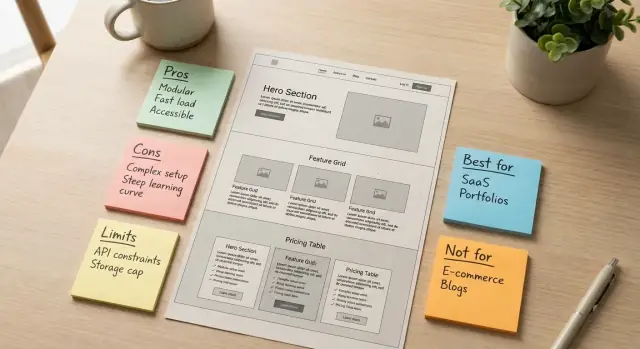
- Best for: who gets the most value.
- Not for: common mismatch scenarios.
- Requires: prerequisites (data, integrations, admin access, onboarding time).
- Limits: caps, excluded features, performance boundaries.
These labels work best as short blocks or chips with the same styling every time.
Put limitations where the decision happens
If you mention a feature, place its key limitation right there—not in a separate FAQ or a legal footer. Readers should never have to “collect” constraints across three pages to understand what they’re buying.
Add decision aids that guide self-qualification
Decision aids turn ambiguity into quick answers:
- A short checklist (“You’ll be successful if…”) and a mirrored “You may struggle if…”
- A simple calculator (usage, seats, storage) that shows the plan that fits—and what happens when you exceed it
- 3–5 eligibility questions (team size, workflow, compliance needs) that route people to the right option
Make it accessible by default
Tradeoffs only help if everyone can read them: use strong color contrast, real heading structure, keyboard-friendly tooltips, and clear focus states. If you use icons or illustrations to signal “Limits” or “Requires,” ensure they have meaningful alt text so the same message reaches screen reader users.
Launch, Measure, and Keep Tradeoffs Accurate Over Time
A “transparent tradeoffs” site isn’t something you publish once and forget. The moment your product, pricing, or roadmap changes, yesterday’s honest copy can become today’s misleading promise. Treat your website like a living reference: it should get more accurate with time, not more optimistic.
Measure self-qualification (not just conversions)
Set up analytics around actions that signal people are understanding the fit:
- Pricing page clicks from high-intent pages (Product, Comparison, Use Cases)
- Depth of engagement on key FAQ questions (limits, integrations, security, support)
- “Not for you” exits that happen after reading constraints (this can be healthy)
If you only track sign-ups, you’ll miss whether buyers are arriving informed.
Turn confusion into copy updates
Create a simple feedback loop from real conversations:
- Review support tickets for recurring misunderstandings (“I thought it did X…”)
- Pull themes from sales calls and demos (objections and repeated clarification)
When you see a pattern, update the page that should have answered it first—usually the Product, Pricing, Comparison, or FAQ page.
A/B test clarity, not hype
Run small A/B tests where the “B” version is more specific:
- Tighter definitions (“Up to 10 teammates” vs. “Team-friendly”)
- Clearer limits (“No on-prem deployments”)
- Plainer outcomes (“Exports CSV only”)
Judge results using fewer confused leads and fewer “surprise” cancellations—not only a higher click-through rate.
Keep tradeoffs current
Optionally add a short change log section for major product changes that affect fit (pricing shifts, removed features, new limits).
Schedule quarterly reviews of limitations, pricing, and comparison pages. Assign an owner and a checklist so accuracy doesn’t depend on memory.
If you’re shipping fast, consider treating your website like product code: version changes, review them in a planning step, and keep a clean rollback path. Teams building with Koder.ai often work this way—using planning mode to draft updates, deploying quickly when the messaging is crisp, and relying on snapshots to revert if an “improvement” accidentally makes tradeoffs less clear.
FAQ
How do I define my product in one sentence without sounding generic?
Use the template: “[Product] helps [specific buyer] achieve [outcome] by [primary approach].”
If you can’t keep it specific, your site will drift into vague claims. Rewrite until a stranger could tell who it’s for and what changes after using it.
What makes a “promise” credible enough to put on the home page?
Pick promises a buyer can quickly verify after using the product—measurable or plainly observable.
Examples:
- Setup time (“Set up in under 30 minutes without developer help”)
- Automation (“Generates weekly reports automatically”)
- Team capability (“Supports role-based access”)
These become reusable “headline material” across Home, Product, and onboarding.
Which constraints are worth calling out on my website?
List limits that change purchase decisions, then surface them early:
- Time to onboard / time-to-value
- Pricing model, minimum plan, overages
- Scope (what’s included vs not)
- Platform support (browsers/devices/environments)
- Integrations (native vs workaround)
Prioritize the constraints that most often cause refunds, churn, or long evaluation cycles.
How do I write “tradeoff statements” that feel honest (not negative)?
Turn each constraint into a balanced sentence that clarifies fit.
Examples:
- “Best for teams that can standardize on X; not ideal if you need Y customization.”
- “Fast to launch, but advanced workflows require the Pro plan.”
- “Works with A and B today; C is not supported.”
These statements prevent later pages from quietly overpromising.
What should go on a “do-not-claim” list for honest marketing copy?
Create a short “do-not-say” list and treat it like a style guide.
Avoid superlatives unless you define conditions (and can prove them), such as:
- “works for everyone”
- “unlimited”
- “fastest”
- “seamless”
Replace them with specifics: supported environments, exact limits, typical timelines, and clear prerequisites.
How do I add “Best for / Not for” without scaring away good buyers?
Add a compact self-qualification block near the top:
- Best for: team size, workflow, environment where you deliver strongest value
- Not for: the 2–3 most common mismatch scenarios (customization needs, enterprise-only controls, “lowest price above all”)
This reduces churn later and helps the right buyers move faster now.
Where should I mention limitations so buyers actually see them?
Put limitations where decisions happen—don’t bury them in legal pages.
Typically:
- Home: a visible “Known limitations” link/section
- Product: boundaries next to each major feature (a labeled “Tradeoff” note)
- Pricing: “Not included” rows per plan
- Key use cases: “When this won’t work” callouts
The goal is that buyers never have to hunt across pages to understand constraints.
What’s the simplest way to make a pricing page truly transparent?
Make price and limits legible in one scan:
- 2–3 clear plans with a one-sentence best-fit under each
- A “Not included” row per plan (caps, exclusions, support boundaries, compliance/data options)
- A plain explanation of how pricing scales (per seat, per usage, add-ons)
Also state when costs change (upgrade moment, renewal, threshold crossing) and how overages work (blocked, billed, or forced upgrade).
How do I write use cases that show value without overselling?
Write use cases like a real workday, with explicit dependencies and failure points.
Include:
- Who it’s for
- Step-by-step workflow
- Expected outcome
- Dependencies & typical timeline
- When this won’t work (the honest breaker)
This helps buyers self-qualify and prevents “template demos” that hide the hard parts.
How do I keep tradeoffs accurate as the product and pricing change?
Treat the website as a living reference and review it on a cadence (monthly for fast-moving products, quarterly for stable ones).
Track “self-qualification” signals, not just sign-ups:
- Engagement with FAQ items on limits/integrations/security
- Pricing page clicks from Product/Use Case/Comparison pages
- Healthy exits after reading constraints
Use support tickets and sales call themes to update the first page that should have answered the question (often Product, Pricing, Comparison, or /faq).