

How to Build a Subscription Newsletter Site With Archives
Learn how to build a subscription newsletter website with searchable archives, member-only access, payments, email delivery, and SEO—step by step.
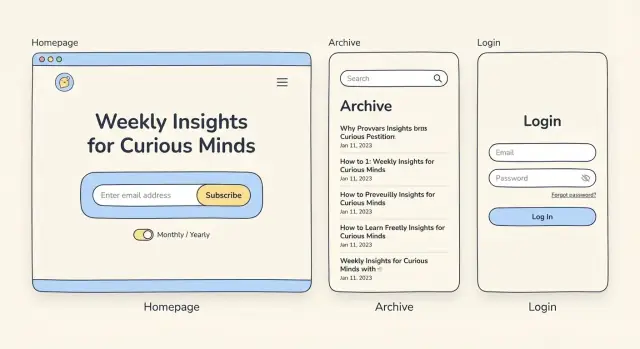
What You’re Building (and What to Decide First)
A subscription newsletter site with archives is really three products in one: a signup funnel, a publishing system, and a library people can browse (or unlock) later. If you get the basics clear before you touch design or tools, every later decision gets easier.
Define the goal (so the site has a job)
Be specific about what “success” means in the next 90 days:
- Grow subscribers: the homepage should push signup first.
- Publish consistently: you need a workflow that makes sending and posting frictionless.
- Offer a readable archive: members should find past issues quickly and enjoy reading them.
Trying to optimize for all three at once often creates a cluttered homepage and an archive nobody can navigate. Pick the primary goal, then let the other two support it.
Decide what’s free vs member-only
Your paywall rules determine your content structure.
Common approaches that work well:
- Free teasers, member-only full posts: each issue has a public intro plus a locked continuation.
- Free archive (older), paid for recent: e.g., last 30–90 days for members, older posts open for discovery.
- Bonus content for members: the main issue is free, but deep dives, templates, or Q&As are paid.
Write these rules down as plain sentences. You’ll use them later to configure access, previews, and SEO.
List the must-have pages
At minimum, plan these pages and what each must do:
- Home: explain the value fast and capture email.
- Pricing: plans, what’s included, and FAQs.
- Archive: browse, filter, and search past issues.
- Post page: readable typography, clear “subscribe/upgrade” prompts.
- About: why you, what readers get.
- Contact: support, press, partnerships.
If you already know your URL structure, keep it simple (for example: /archive, /pricing, /about).
Pick an MVP launch scope
Choose a small first version you can ship in weeks, not months. A good MVP is: signup, 10–20 archive posts, a pricing page, and basic member access.
Save upgrades—mobile app, community, courses, advanced segmentation—for after you’ve proven people will subscribe and read.
Choose Your Setup: All-in-One vs Modular
Your setup determines three things you’ll feel every week: how fast you can publish, how much you can customize, and how hard it is to move later. There’s no universal “best” option—only the best fit for your content, budget, and tolerance for tinkering.
Option A: All-in-one newsletter platform + custom site layer
This approach uses a newsletter platform for writing, sending, subscriptions, and basic hosting—then adds a lightweight custom site (or marketing pages) on top.
Choose this if you want the quickest path to paid subscriptions and you’re okay with design limits on the archive and member experience.
Watch for: platform branding, limited template control, and whether the archive URL structure and SEO settings are editable.
Option B: Website builder/CMS + email service + payments
Here you run the site on a CMS/website builder, connect an email service for delivery, and use Stripe (or similar) for payments. It’s the most flexible path for archives, navigation, and long-term SEO.
Choose this if your archive is a major product (searchable, well-structured, evergreen) and you want full control over the site experience.
Watch for: more moving parts, higher setup time, and ongoing maintenance (integrations, user accounts, access rules).
A practical alternative for teams that want control without months of build time: a vibe-coding platform like Koder.ai can help you prototype (and ship) a custom newsletter site by describing what you need in chat—homepage, archive, paywall rules, search, and an admin workflow. Under the hood it can generate a React web app with a Go + PostgreSQL backend, and you can export the source code, deploy/host, connect a custom domain, and use snapshots/rollback as you iterate.
Option C: Membership-first platform with built-in posts and paywall
Membership platforms often blend site + posts + paywall + email into one member-centric system. They typically offer stronger access control than newsletter-first tools.
Choose this if your business is “memberships with a newsletter,” not “newsletter with an optional paid tier.”
Watch for: export limits, restricted front-end customization, and whether email sending is as strong as dedicated ESPs.
How to compare before committing
Focus on four criteria:
- Total monthly cost (including transaction fees)
- Design control (homepage + archive + login)
- Data portability (export subscribers and content cleanly)
- Workflow fit (draft → approve → email → archive)
If you’re unsure, start with the simplest option that won’t block your archive plans later.
Homepage That Converts: Signup First, Details Second
Your homepage has one job: get the right people to subscribe. Everything else (feature lists, your origin story, deep navigation) is secondary. If visitors have to hunt for what you publish, who it’s for, or how to sign up, they’ll leave.
Lead with a clear promise
Start with a simple, specific promise that answers three questions in one glance:
- Who it’s for (e.g., “product leaders at B2B SaaS companies”)
- What they get (e.g., “one practical teardown + templates”)
- How often you publish (e.g., “every Tuesday”)
Keep it human and concrete. “Weekly insights” is vague; “a 5-minute brief on pricing experiments” sets expectations and attracts the right subscribers.
Put the signup first (and repeat it)
Place the signup form above the fold so visitors don’t need to scroll to take action. Keep it minimal: email address, and optionally a name field if you truly use it (personalization, onboarding).
Then repeat the signup form near the end of the page (or after a strong proof block). People who scroll are showing interest; make subscribing effortless when they’re ready.
If you offer both free and paid, make the default action clear (e.g., “Start free”) and explain the upgrade in one sentence, not a pricing table.
Build trust with previews, not paragraphs
Instead of long explanations, show what someone will actually receive:
- A short list of sample topics (3–6 bullets is enough)
- Recent issues (titles + one-line summaries)
- If most content is paid, include previews: the intro plus a “Continue reading” teaser
This is also where your newsletter archives help conversion: visitors can judge quality quickly, and you’re not asking for an email purely on faith.
Use social proof carefully
A single credible proof element can lift conversions, but only if it’s verifiable. Use:
- A short quote from a real reader (name + role/company if they approved it)
- A simple number you can defend (“Join 4,200 subscribers”)
Avoid generic testimonials and inflated metrics. If you can’t verify it, skip it.
Keep the page focused
Your homepage doesn’t need to explain every feature of your paid newsletter site. If you want to add detail, link out to a dedicated page (like /pricing or /archive) and keep the main page flowing toward signup.
Pricing, Plans, and Member Access Rules
Pricing is where clarity beats creativity. Visitors should understand (1) what they get, (2) what it costs, and (3) what happens if they stop paying—without hunting through FAQs.
Keep tiers simple (and comparable)
Most newsletter sites work best with two tiers: Free and Paid. Put the comparison high on your /pricing page and repeat it anywhere you ask people to subscribe.
| Feature | Free | Paid |
|---|---|---|
| Weekly email | ✓ | ✓ |
| Full archive access | Limited | Full |
| Member-only posts | — | ✓ |
| Comments / community | — | ✓ |
| Annual discount | — | ✓ |
If you have a third tier (e.g., “Founder”), make it clearly optional and limit it to a few concrete perks.
Billing cadence, what’s included, and cancellation
Spell out the billing cadence in plain language: “$10/month or $100/year (2 months free).” If you offer annual plans, explain the savings in one sentence.
Also state what the subscription includes: number of emails, access to the full archive, and any extras (events, templates, community). Avoid vague promises.
Make cancellation frictionless. A simple line like “Cancel anytime in your account; you’ll keep access until the end of your billing period” reduces anxiety and increases conversions. If you offer refunds, write the policy clearly.
Define access rules (so the archive stays coherent)
Decide, document, and consistently apply rules such as:
- What stays private: e.g., deep-dive issues, member resources, bonus interviews.
- What becomes public (and when): e.g., posts become public after 30 days to support SEO while keeping freshness behind the paywall.
- What free subscribers can see: e.g., excerpts plus the first paragraph, or 1 free archive post per month.
Treat /pricing as a primary navigation destination: link to /pricing in your header, and include it in your signup prompts (buttons, popups, and end-of-post CTAs) so readers never wonder where to compare plans.
Designing the Archive: Structure, Search, and Navigation
Your archive is where casual readers turn into regulars. A good archive makes it easy to answer two questions fast: “Is this newsletter for me?” and “What should I read next?”
Start with one strong Archive page
Create a dedicated /archive page that behaves like a lightweight library, not a chronological dump. Aim for three quick ways to browse:
- Filters by topic (e.g., Marketing, Product, Career)
- Filters by year (or month, if you publish frequently)
- Sorting by popularity (most read / most saved / most shared)
If you don’t have popularity data yet, start with “Newest” and add “Popular” once analytics or click data is reliable.
Make search feel obvious (and forgiving)
Add search near the top of the archive, above the list of posts, so people see it without scrolling. Good newsletter searches accept imperfect queries—partial words and common misspellings—because readers often remember “that issue about pricing” more than the exact title.
Also consider quick search helpers:
- Search suggestions (recent topics)
- Highlighting matched words in results
- “No results” guidance (e.g., show top topics and popular posts)
Keep post pages clean and consistent
Each post page should be easy to scan. Use clear headings, short sections, and a consistent layout so readers know what to expect every time.
A simple structure that works well:
- Title + date
- 1–2 line summary
- Body with H2/H3 headings
- A clear footer (subscribe, share, read next)
Navigation that encourages the next click
On every post, add Next/Previous links so a reader can keep going without returning to the archive. Pair that with a small “Related posts” block (3–5 items) based on shared topic tags.
This is one of the easiest ways to increase session depth without changing your writing.
Decide how member-only posts appear to non-members
For paid or member-only issues, don’t hide them completely. Show them in the archive with a clear label (e.g., “Member-only”), and use a preview approach:
- Display the intro + a few sections (or a truncated version)
- Add a strong CTA block: what they’ll get if they join, and where to subscribe (e.g., /pricing)
This turns the archive into a catalog of value, instead of a wall of locked doors.
Building the Paywall and Login Experience
Your paywall isn’t just a “no access” screen—it’s the moment readers decide whether subscribing feels easy and trustworthy.
Choose authentication (keep it simple)
Pick one primary login method and make it frictionless:
- Magic link (email login): Great for newsletter audiences; no passwords to remember. Add a clear “check your inbox” message and a resend option.
- Password login: Familiar, but expect password resets. Only choose this if your audience prefers it.
- Social login: Convenient, but can feel intrusive and adds dependency on third parties.
If you offer multiple methods, make one the default and tuck the others behind “More options.”
Define roles and what each can do
Set roles early so your site behavior stays consistent:
- Guest: Can read the homepage, teaser excerpts, and maybe a few free posts.
- Free subscriber: Can access free archives, account page, and preferences.
- Paid subscriber: Can read member-only posts, download extras, and access premium RSS (if you offer it).
- Admin: Can publish, manage members, and view billing/support tools.
Write these rules down like a contract. It prevents messy “special cases” later.
Enforce access everywhere (not just the page)
A paywall that only hides content visually is easy to bypass. Apply access checks in three places:
- Pages (server-side): Don’t render full content unless the user is allowed.
- API endpoints: Protect post JSON, search endpoints, and downloads.
- RSS feeds (if offered): Use unique, unguessable feed URLs and revoke them when access ends.
Plan the awkward edge cases
Billing and sharing issues affect real trust:
- Expired cards: Grace period + clear emails + one-click “update payment.”
- Refunds/chargebacks: Automatically downgrade access and log the event.
- Account sharing: Decide your policy (strict vs lenient), then implement lightweight protections like device/session limits and “sign out of other devices.”
Make the “locked” state helpful: show a short preview, what they’ll get, and a direct path to subscribe or log in (/pricing, /login).
Publishing Workflow: From Draft to Email to Web Archive
A subscription newsletter site lives or dies by consistency. If the email is great but the archive is messy, members won’t browse—and search engines won’t understand your content either. Set a workflow that makes “publish everywhere” the default.
Pick how content is created
Start by choosing your source of truth:
- Web editor (WYSIWYG): easiest for teams, but can produce inconsistent formatting if everyone writes differently.
- Markdown: fast, clean, and portable. Great if you want predictable styling and fewer layout surprises.
- Imported emails: useful if you already publish elsewhere, but imports can mangle spacing, images, and tracking links.
Whichever you choose, aim for one canonical version that can be reliably sent as an email and saved to the web archive.
Keep email and web versions aligned
Treat the email and archive page as two views of the same issue. Create a simple template and stick to it:
- Same headline and subheadings
- Same featured image (or no image, consistently)
- Same links (avoid different URLs in email vs web)
This reduces reader confusion (“Is this the same issue?”) and prevents broken references when someone shares an archived post.
Tagging and categories: do it early
Don’t wait until you have 50 issues to think about structure. Decide on a small, durable taxonomy now:
- 4–8 categories (broad themes)
- Flexible tags (topics, people, companies, locations)
The payoff is immediate: cleaner browsing, better related-post recommendations, and far less time spent untangling a chaotic archive later.
A workflow that scales past week one
Even solo creators benefit from clear stages:
- Draft (write + add links)
- Review (edit, fact-check, link-check)
- Schedule (set send time and publish time)
- Publish (email send + archive page goes live)
Add a quick pre-publish checklist: preview on mobile, confirm member-only settings, and verify that tags/categories are applied. If your tool supports it, automate “publish to archive when email sends” so you don’t forget on busy days.
Email Delivery, Consent, and Subscriber Management
Email is the product delivery channel for a subscription newsletter site—so treat consent and list hygiene as part of your user experience, not just compliance.
Set clear expectations at signup
On your signup form, say exactly what people will get and how often. A simple one- or two-sentence promise beats vague marketing copy.
Include:
- Typical cadence (e.g., “weekly on Tuesdays”)
- Content scope (what you cover, what you don’t)
- Whether paid members get extras (bonus issues, early access, member-only archive)
If you offer both free and paid, make it obvious what “free” includes so new subscribers don’t feel misled.
Consent and double opt-in
Collect explicit consent (a checkbox and a short consent line is often enough). If your audience spans regions with stricter rules or you expect a lot of spam signups, double opt-in can help.
Double opt-in is a tradeoff:
- Pros: cleaner list, fewer fake emails, stronger consent record
- Cons: fewer completed subscriptions (some people won’t confirm)
If you choose double opt-in, keep the confirmation email short, with one clear button.
Welcome email + onboarding to reduce churn
Don’t let the first email be a surprise. Send a welcome email immediately that:
- Repeats the promise (what’s next and when)
- Links to “start here” content in your archive (e.g., /archive and a best-of page)
- Asks one lightweight question (“What are you here for?”) to learn preferences
Then add a short onboarding sequence (2–4 emails over 1–2 weeks) that highlights your best work and teaches readers how to use the archive.
Unsubscribe and preferences should be easy
Make unsubscribe one click, clearly visible in the footer. Better yet, offer a preference center so people can switch frequency, topics, or pause for a month instead of leaving entirely.
Also monitor delivery basics: bounced emails, spam complaints, and inactive subscribers. Regularly pruning unreachable addresses improves deliverability for everyone.
SEO Basics for Newsletters With Archives
Your newsletter archive can become a steady source of search traffic—if search engines can understand what each issue is about and which pages they’re allowed to index. The goal is simple: make public pages discoverable, and keep member-only content private without confusing Google.
Use clean URLs and clear page signals
Give each issue a stable, readable URL (avoid long query strings or dates-only slugs). Pair that with a strong on-page title that matches what people would search for.
Write a unique meta description for every issue page. Treat it like ad copy: one sentence that summarizes the specific value of that edition, not a generic “Weekly newsletter about X.”
Add structured data (the lightweight way)
If your platform supports it, add structured data to issue pages using Article or BlogPosting. This helps search engines understand the content type, headline, publish date, author, and main image (if you use one).
Keep it accurate and consistent with the visible page content—don’t mark member-only text as if it’s fully available.
Avoid duplicate content between email and web
If the same issue exists in multiple places (web version, “view in browser,” campaign URLs), pick one preferred version and set a canonical URL to it.
Also make sure your archive page doesn’t generate many “near-duplicate” variations (filters, tracking parameters). Where possible, keep one indexable URL per issue.
Public index, protected premium
Create indexable public pages like:
- A main archive page (/archive)
- Topic or tag pages (/topics/growth)
- Teasers for premium issues
For member-only pages, require login and avoid indexing. A good pattern is to show a short excerpt publicly, then gate the rest—so search engines can still understand the page without exposing paid content.
Accessibility, Performance, and Mobile Readability
A newsletter archive is a reading product. If it’s hard to read, slow to load, or frustrating on a phone, people won’t stick around long enough to subscribe.
Make reading effortless
Start with typography. Most archive posts are long-form, so optimize for comfort:
- Font size: ~16–18px minimum for body text
- Line length: roughly 60–80 characters (avoid full-width paragraphs)
- Line height: ~1.5–1.7 for dense text
- Contrast: dark text on a light background (and verify links are clearly distinguishable)
Also consider small touches that reduce fatigue: clear headings, generous spacing between sections, and a “reading width” container that stays consistent across posts.
Keyboard and screen reader basics
Your signup, login, navigation, and search should work without a mouse.
Check these essentials:
- Visible focus states (users should see where they are on the page)
- Logical tab order through menus, forms, and dialogs
- Every form input has a real label (not just placeholder text)
- Error messages are specific and announced (e.g., “Email is required”)
If you use pop-ups (for signup prompts or paywall nudges), make sure focus moves into the modal and returns to the triggering element when it closes.
Keep archive pages fast
Archive listing pages can get heavy—dozens of excerpts, thumbnails, and filters. Prioritize speed:
- Compress and properly size images; avoid loading huge hero images in listings
- Lazy-load below-the-fold images and embeds
- Minimize third-party scripts (especially multiple analytics tags)
- Paginate or infinite-scroll carefully; don’t render hundreds of posts at once
Mobile-first testing that actually matters
Test the key flows on a phone, not just how the layout “looks”:
- Signup form: typing, autofill, and validation
- Checkout: payment fields, country/state selectors, error recovery
- Reading: font size, sticky headers, and tap targets
- Search and filters: easy to use one-handed, with clear results states
A fast, readable, accessible archive quietly signals quality—and makes subscribing feel like a safe bet.
Analytics, Feedback, and Launch Checklist
You don’t need enterprise dashboards to run a paid newsletter site well—but you do need a few reliable signals. Set up analytics early so you’re not guessing which pages sell, where people drop off, or whether members actually use the archive.
The events worth tracking (and why)
Start with a small set of events that map to your subscription funnel and archive habits:
- Signup (email captured): tells you if the homepage and signup forms work.
- Checkout start: identifies friction between “I’m interested” and “I’m paying.”
- Purchase (successful payment): your core conversion metric.
- Cancellation (and reason if possible): helps reduce churn and improve onboarding.
- Archive search usage (search opened + query submitted): shows whether members treat the archive as a product, not just a history page.
If you can, add a simple Paywall view event. It’s useful for measuring how often people hit the wall and whether the messaging prompts upgrades.
What to review weekly
Pick a short weekly scorecard you’ll actually check:
- Growth: new free subscribers, new paid members
- Engagement: open rate and click rate (use trends, not single sends)
- Revenue health: paid conversion rate, monthly recurring revenue (or equivalent), refunds
- Churn: cancellations and net member change
Tie these numbers to specific pages: homepage, pricing page, and top archive entries.
Build a simple feedback loop
Quantitative data tells you what happened; feedback tells you why:
- Use a real reply-to email and read replies (they’re product research).
- Add a 2–3 question survey after 2–4 weeks (“Why did you join?” “What are you hoping to find in the archive?”).
- Maintain a lightweight contact form for account and billing issues so they don’t turn into cancellations.
Launch checklist (pre + post)
Pre-launch: test signup, purchase, login/logout, password reset, paywall copy, receipt emails, and one end-to-end publishing run (draft → email → archive).
If you’re building a custom stack, use a staging environment and a rollback plan. Tools like Koder.ai can help here as well: its snapshots and rollback make it easier to iterate on paywall rules, archive navigation, and pricing copy without fearing a broken deploy.
Post-launch (first 2 weeks): review top drop-off points, refine pricing page messaging, improve the most-viewed archive pages, and turn the best “member question” into a new onboarding email or FAQ page.
If you end up sharing what you built, consider documenting your setup. Some platforms (including Koder.ai) run an earn-credits program for creators who publish content about their build process or refer other users—useful if you want your tooling to partially pay for itself.
FAQ
What should I decide first when building a subscription newsletter site with an archive?
Start by picking one primary goal for the next 90 days:
- Grow subscribers → homepage is mostly a signup pitch.
- Publish consistently → optimize your drafting/sending workflow.
- Build a browsable archive → invest in structure, search, and navigation.
Trying to maximize all three at once often creates a cluttered homepage and an unusable archive.
How do I choose what content is free vs member-only?
Write your rules as plain sentences and keep them consistent across the site. Common setups:
- Free intro + paid continuation for each issue.
- Recent posts paid, older posts free (e.g., last 30–90 days locked).
- Main newsletter free, bonuses paid (templates, deep dives, Q&A).
These decisions drive your page templates, previews, SEO approach, and paywall configuration.
What’s the minimum viable version (MVP) I should launch with?
A solid MVP you can ship in weeks usually includes:
- Homepage with an above-the-fold signup
- /pricing with clear tier comparison and cancellation language
- /archive with basic browsing (and search if possible)
- Post pages with readable typography + upgrade prompts
- Basic login + member access rules
Save advanced features (community, courses, segmentation, mobile app) until you’ve proven people will subscribe and read.
Should I use an all-in-one newsletter platform or a modular stack?
Use four criteria:
- Total monthly cost (including transaction fees)
- Design control (homepage, archive, login, post layout)
- Data portability (can you export subscribers + content cleanly?)
- Workflow fit (draft → approve → email → archive)
If your archive is a core product and you care about long-term SEO, a CMS + email + payments is often worth the extra setup.
What makes a newsletter homepage convert well?
Make the homepage do one thing well: convert visitors into subscribers.
Practical structure:
- A clear promise: who it’s for + what they get + frequency
- Signup form above the fold, and repeated near the bottom
- Proof via previews: recent issue titles + one-line summaries
- One credible social proof element (real quote or defensible subscriber count)
Push details to supporting pages like /pricing and /archive to keep focus.
How do I structure pricing so it’s clear and effective?
Keep tiers simple and comparable (often Free and Paid).
On /pricing, be explicit about:
- Monthly and annual price (and the annual savings)
- Exactly what’s included (archive access, bonuses, community, etc.)
- Cancellation terms (“Cancel anytime; access until end of billing period”)
Clarity reduces anxiety and increases conversions more than clever packaging.
How should I design the archive so people actually use it?
Treat the archive like a library, not a chronological dump:
- A dedicated /archive page
- Browsing by topic (and optionally year)
- Search placed near the top
- Post pages that include Next/Previous plus a small Related posts block
If you don’t have “popular” data yet, start with “Newest” and add “Popular” later when analytics are reliable.
How should member-only posts appear to non-members in the archive?
Don’t hide paid posts entirely. Show them in the archive with a clear label (e.g., “Member-only”) and a useful preview:
- Public intro + a couple sections (or a truncated version)
- A CTA that explains the value and links to /pricing
This turns the archive into a catalog of value instead of a wall of locked doors.
What’s the simplest, most trustworthy paywall and login setup?
Pick one primary method and make it frictionless:
- Magic link: great for newsletter audiences; add resend and clear instructions.
- Password: familiar, but expect resets.
- Social login: convenient, but adds dependency and can feel intrusive.
Also enforce access beyond the page UI:
- Server-side checks (don’t render full content)
- Protect APIs (post JSON, search, downloads)
- Secure premium RSS with unguessable URLs and revocation
How do I keep email, the web archive, and SEO working together?
Build a workflow where “publish everywhere” is the default:
- Choose a source of truth (Markdown, web editor, etc.)
- Keep email and web versions aligned (same headline, sections, and links)
- Add tags/categories early (small, durable taxonomy)
- Use stages: Draft → Review → Schedule → Publish (email + archive)
For SEO, ensure:
- Clean, stable issue URLs
- Unique meta descriptions
- Canonical URL if multiple versions exist
- Public indexable pages (/archive, topic pages) while keeping premium content protected