

How to Build a Technical Blog Website With Programmatic Pages
Step-by-step guide to building a technical blog with programmatic pages: content model, routing, SEO, templates, tooling, and a maintainable workflow.
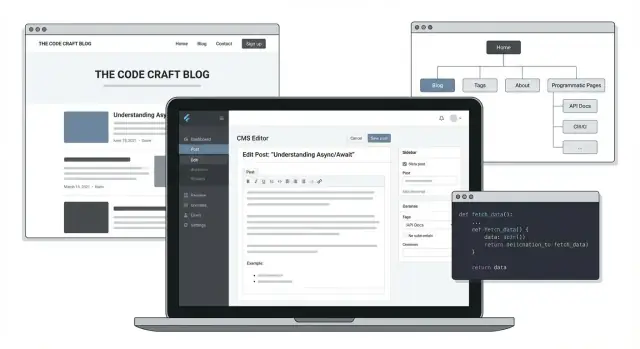
What a Technical Blog With Programmatic Pages Looks Like
A technical blog with programmatic pages is more than a stream of individual posts. It’s a site where your content is also organized and republished into helpful index pages—generated automatically from a consistent content model.
What “programmatic pages” mean (in a blog context)
Programmatic pages are pages created from structured data rather than written one-by-one. Common examples include:
- Tag and category pages (e.g.,
/tags/react/) that list related posts and surface key subtopics. - Author pages (e.g.,
/authors/sam-lee/) with bios, social links, and all articles by that writer. - Series pages (e.g.,
/series/building-an-api/) that present a curated learning path. - Docs-like indexes such as
/guides/, “Start here” hubs, or topic directories that aggregate content by intent.
Why teams build them
Done well, programmatic pages create consistency and scale:
- Your site structure stays predictable even as you publish more.
- Reusable templates reduce one-off work and make redesigns easier.
- Updates (like changing how cards look, adding reading time, or improving metadata) happen once and apply everywhere.
A key expectation: automation doesn’t replace quality
“Programmatic” doesn’t mean “auto-generated fluff.” These pages still need a job to do: a clear intro, sensible ordering, and enough context to help readers choose what to read next. Otherwise, they risk becoming thin lists that don’t earn trust (or search visibility).
What you’ll build by the end
By the end of this guide, you’ll have a practical blueprint: a site structure with programmatic routes, a content model that feeds them, reusable templates, and an editorial workflow for publishing and maintaining a content-heavy technical blog.
Goals, Audience, and Content Types
Before you design a content model or generate thousands of pages, decide what the blog is for and who it serves. Programmatic pages amplify whatever strategy you choose—good or bad—so this is the moment to be specific.
Define the audience by intent (not job titles)
Most technical blogs serve multiple groups. That’s fine, as long as you recognize that they search differently and need different levels of explanation:
- Beginners search for “what is…”, “getting started”, and simple step-by-step guides.
- Practitioners search for “how to…”, “best way to…”, integrations, edge cases, and performance tips.
- Enterprise buyers / evaluators search for “X vs Y”, security, compliance, pricing, and migration paths.
A useful exercise: pick 5–10 representative queries for each group and write down what a good answer looks like (length, examples, prerequisites, and whether a code snippet is needed).
Choose content types that match those needs
Programmatic pages work best when each page has a clear job. Common building blocks:
- Tutorials: guided outcomes (“build X”, “deploy Y”), often versioned.
- Reference docs: parameters, methods, error codes, compatibility tables.
- Release notes / changelogs: predictable structure, strong internal linking.
- Case studies: credibility for evaluators; focus on measurable outcomes.
- Comparisons: “A vs B” and “alternatives to…” for decision-stage readers.
Set publishing cadence and review standards
Pick a frequency you can sustain, then define the minimum review steps for each content type: quick editorial pass, code review for tutorials, and SME review for claims about security, compliance, or performance.
Define success metrics (realistically)
Tie the blog to measurable outcomes without promising miracles:
- Organic visits to high-intent pages
- Newsletter sign-ups or product sign-ups
- Demo requests (for enterprise-focused posts)
- Assisted conversions (blog visits that precede trials/purchases)
These choices will directly shape what pages you generate later—and how you prioritize updates.
Site Architecture and URL Strategy
A programmatic blog succeeds when readers (and crawlers) can predict where things live. Before you build templates, sketch the top-level navigation and the URL rules together—changing either later is how you end up with redirects, duplicate pages, and confusing internal links.
Map the top-level information architecture
Keep the primary structure simple and durable:
- Home: highlights, latest posts, and key entry points
- Blog: chronological feed with filters
- Topics: your main taxonomy hubs (what you want to be known for)
- Series: curated sequences (tutorials, deep dives)
- About: trust, authorship, contact
- Pricing (if relevant): productized services, newsletter sponsorships, or tools
This structure makes it easy to add programmatic pages under clearly named sections (e.g., a topic hub that lists all posts, related series, and FAQs).
Plan URL conventions that stay stable
Pick a small set of readable patterns and stick to them:
- Posts:
/blog/{slug} - Topic hubs:
/topics/{topic} - Series hubs:
/series/{series}
A few practical rules:
- Use lowercase, hyphenated slugs (
internal-linking, notInternalLinking). - Avoid dates in URLs unless your content is news-heavy.
- Never change slugs for minor title edits—treat URLs as permanent.
Choose a taxonomy strategy (and prevent tag sprawl)
Decide what each classification means:
- Topics/Categories: a limited set (e.g., 10–30) that you maintain intentionally.
- Tags: optional, but only if you can enforce rules (otherwise you’ll get near-duplicates like “seo”, “SEO”, and “search-engine-optimization”).
If you want long-term consistency, lead with topics and use tags sparingly (or not at all).
Set canonical rules for overlapping pages
Overlaps happen: a post might belong to a topic and also match a tag, or a series might look similar to a topic hub. Decide the “source of truth”:
- If topic pages are your primary hubs, make them indexable.
- If tag pages exist mainly for filtering, consider
noindexand/or canonicalize to the relevant topic page.
Document these decisions early so every generated page follows the same canonical pattern.
Design a Content Model That Enables Programmatic Pages
A programmatic blog succeeds or fails on its content model. If your data is consistent, you can generate topic hubs, series pages, author archives, “related posts,” and tool pages automatically—without hand-curating every route.
Start with the core content types
Define a small set of models that match how readers browse:
- Post: the primary unit (tutorial, reference, opinion, release notes).
- Author: bio, social links, expertise, and attribution.
- Topic: the theme (e.g., “Kubernetes,” “Observability”).
- Series: a multi-part sequence with an intentional order.
- Tool/Library: the technology a post references (e.g., “React,” “PostgreSQL”).
- Use case: reader intent (e.g., “Reduce build time,” “Set up CI”).
Required fields that keep pages predictable
For Post, decide what is mandatory so templates never guess:
title,description,slugpublishDate,updatedDatereadingTime(stored or computed)codeLanguage(single or list, used for filters and snippets)
Then add fields that unlock programmatic pages:
topics[]andtools[]relationships (many-to-many)seriesIdandseriesOrder(orseriesPosition) for correct sequencingrelatedPosts[](optional manual override) plusautoRelatedRules(tag/tool overlap)
Governance: prevent taxonomy chaos
Programmatic pages depend on stable naming. Set clear rules:
- Only editors (or a designated role) can create new Topics/Series.
- Topics use singular, title-case names and a stable
slug(no synonyms). - Keep a short definition for each Topic so the generated hub page isn’t thin.
If you want a concrete spec, write it down in your repo wiki or an internal page like /content-model so everyone publishes the same way.
Choose Your Stack: SSG, Hybrid, and Content Storage
Your stack choice affects two things more than anything else: how pages are rendered (speed, hosting, complexity) and how content is stored (authoring experience, preview, governance).
Rendering options (SSG, server-rendered, hybrid)
Static Site Generator (SSG) tools like Next.js (static export) or Astro build HTML ahead of time. This is usually the simplest and fastest approach for a technical blog with lots of evergreen content, because it’s cheap to host and easy to cache.
Server-rendered sites generate pages on request. This is helpful when content changes constantly, you need per-user personalization, or you can’t afford long build times. The tradeoff is higher hosting complexity and more things that can break at runtime.
Hybrid (a mix of static + server) is often the sweet spot: keep blog posts and most programmatic pages static, while rendering a few dynamic routes (search, dashboards, gated content). Next.js and many other frameworks support this pattern.
Where your content lives (Git, CMS, database)
Markdown/MDX in Git is great for developer-led teams: clean versioning, easy code review, and local editing. Preview is typically “run the site locally” or via preview deployments.
Headless CMS (e.g., Contentful, Sanity, Strapi) improves authoring UX, permissions, and editorial workflows (drafts, scheduled publishing). The cost is subscription fees and a more complex preview setup.
Database-backed content fits fully dynamic systems or when content is generated from product data. It adds engineering overhead and usually isn’t necessary for a blog-first site.
A simple decision shortcut
- 1–3 people, dev-led publishing: SSG + Markdown/MDX in Git.
- Editorial team or approvals required: Hybrid + headless CMS with previews.
- Product-driven content at scale: Hybrid/SSR + database (often alongside a CMS).
If you’re unsure, start with SSG + Git content, and leave room to swap in a CMS later by keeping your content model and templates clean (see /blog/content-model).
If your goal is to move fast without reinventing a full pipeline, consider prototyping the blog platform in a vibe-coding environment like Koder.ai. You can sketch your information architecture and templates via chat, generate a React frontend with a Go + PostgreSQL backend when needed, and export the source code once your model (posts, topics, authors, series) stabilizes.
How Programmatic Pages Are Generated
Programmatic pages are built from a simple idea: one template + many data entries. Instead of hand-writing every page, you define a layout once (headline, intro, cards, sidebar, metadata), then feed it a list of records—posts, topics, authors, or series—and the site produces a page for each.
Common programmatic page types
Most technical blogs end up with a small set of page “families” that multiply automatically:
- /topics — an index of all topics
- /topics/{topic} — a hub page for one topic (intro + curated posts)
- /authors/{author} — bio + posts by that author
- /series/{series} — ordered reading path for a multi-part series
You can extend this pattern to tags, tools, “guides,” or even API references—as long as you have structured data behind it.
Routing and build hooks (high level)
At build time (or on-demand in a hybrid setup), your site does two jobs:
- Fetch data from markdown files, a headless CMS, or a database.
- Create routes by mapping each record to a URL (a “slug”), then rendering the template with that record’s data.
Many stacks call this a “build hook” or “content collection” step: whenever content changes, the generator reruns the mapping and re-renders affected pages.
Pagination, sorting, and predictable rules
Programmatic lists need clear defaults so pages don’t feel random:
- Pagination: keep a consistent page size (e.g., 10–20 items) and stable URLs like
/topics/python/page/2. - Sorting: offer sensible views—latest, most popular, and optionally beginner-friendly (a flag you set per post).
- Tie-breakers: when dates match, fall back to title or ID so ordering doesn’t shuffle between builds.
These rules make your pages easier to browse, easier to cache, and easier for search engines to understand.
Build Reusable Templates and Components
Programmatic pages work best when you design a small set of templates that can serve hundreds (or thousands) of URLs without feeling repetitive. The goal is consistency for readers and speed for your team.
A reusable post layout
Start with a post template that’s flexible but predictable. A good baseline includes a clear title area, an optional table of contents for longer posts, and opinionated typography for both prose and code.
Make sure your template supports:
- Consistent heading styles (H2/H3/H4) so pages scan well and the TOC can be generated.
- Code blocks with copy buttons, line wrapping rules, and readable font sizes.
- Callouts (note/warning/tip) for “don’t miss this” moments.
Listing templates that you can multiply
Most programmatic value comes from index-like pages. Create templates for:
- Topic pages (e.g.,
/topics/static-site-generator) - Author pages (e.g.,
/authors/jordan-lee) - Series pages (e.g.,
/series/building-a-blog) - Search results (if you offer on-site search)
Each listing should show a short description, sorting (newest, most popular), and consistent snippets (title, date, reading time, tags).
Components that scale across the site
Reusable components keep pages useful without custom work:
- Related posts (based on tags/series/topic)
- “Next in series” navigation to encourage sequential reading
- Reusable CTA blocks (newsletter, product, consultation) that can be toggled per section
Accessibility basics (don’t treat as optional)
Bake accessibility into your UI primitives: sufficient contrast, visible focus states for keyboard navigation, and code blocks that remain readable on mobile. If a TOC is clickable, ensure it’s reachable and usable without a mouse.
SEO for Programmatic Pages (Without Thin Content)
Programmatic pages can rank extremely well—if each URL has a clear purpose and enough unique value. The goal is to make Google confident that every generated page is useful, not a near-duplicate created just because you had data.
Set the foundations (titles, canonicals, indexing)
Give every page type a predictable SEO contract:
- Title tags and meta descriptions: generate from real attributes (topic name, product name, year, difficulty level), but keep them readable. Avoid stuffing keywords.
- Canonical URLs: if multiple filters create similar pages, pick one canonical and point variants to it.
- Index/noindex rules: index pages that answer a distinct query; noindex pages created by combinations (e.g., tag + author + year) unless you can prove demand.
A simple rule: if you wouldn’t proudly link to the page from your homepage, it probably shouldn’t be indexed.
Use schema markup where it actually helps
Add structured data only when it matches the content:
- Article for individual posts (author, date, headline).
- BreadcrumbList for posts and hub pages to reinforce hierarchy.
- Organization or Person for your site/author identity (especially if author pages exist).
This is easiest when baked into templates shared across all programmatic routes.
Internal linking: hubs, series, and contextual links
Programmatic sites win when pages reinforce each other:
- Create topic hubs that summarize the topic and link to best posts (see
/blog/topics). - Add series navigation (“Part 2 of 5”) to reduce pogo-sticking.
- Encourage contextual links inside posts (not just “related posts” blocks).
Prevent thin tag/topic pages
Define minimum content rules for generated indexes:
- Require an intro paragraph, definitions, and “start here” links.
- Set thresholds (e.g., at least 3–5 quality posts) before a tag page can be indexed.
- Merge synonyms (e.g., “SSG” and “static site generator”) or redirect one to the other.
- Hide or noindex low-value tags instead of shipping hundreds of empty archives.
Sitemaps, Feeds, and Crawl Controls
Once you start generating pages (tag hubs, category listings, author pages, comparison tables), search engines need a clear “map” of what matters—and what doesn’t. Good crawl hygiene keeps bots focused on pages you actually want ranked.
Generate sitemaps that scale
Create sitemaps for both editorial posts and programmatic pages. If you have many URLs, split them by type so they stay manageable and easier to debug.
- /sitemap-posts.xml: individual articles
- /sitemap-topics.xml (or tags/categories): canonical topic hubs
- /sitemap-authors.xml: author profile pages (only if they add value)
- /sitemap-index.xml: points to the others
Include lastmod dates (based on real content updates) and avoid listing URLs you plan to block.
Robots.txt: block noise, not value
Use robots.txt to prevent crawlers from wasting time on pages that can explode into near-duplicates.
Block:
- Internal search results (e.g.,
/search?q=) - Filter/sort permutations (e.g.,
?sort=,?page=when those pages don’t add unique value) - Tracking parameters
If you still need these pages for users, keep them accessible but consider adding noindex at the page level (and keep internal linking pointed at the canonical version).
RSS/Atom feeds for humans and tools
Publish an RSS or Atom feed for the main blog (e.g., /feed.xml). If topics are a core navigation element, consider per-topic feeds too. Feeds help power email digests, Slack bots, and reader apps—and they’re a simple way to expose new content quickly.
Breadcrumbs and consistent labels
Add breadcrumbs that match your URL strategy (Home → Topic → Post). Keep navigation labels consistent across the site so crawlers—and readers—understand your hierarchy. If you want an extra SEO boost, add breadcrumb schema markup alongside the UI.
Performance and Reliability for a Content-Heavy Site
A technical blog with programmatic pages can grow from 50 to 50,000 URLs quickly—so performance has to be a product requirement, not an afterthought. The good news: most wins come from a handful of clear budgets and a build pipeline that enforces them.
Set explicit performance targets (and budgets)
Start with targets you can measure on every release:
- Core Web Vitals: aim for good LCP/INP/CLS on key templates (post, tag, category, comparison, etc.).
- Page weight budget: for example, keep initial load under ~200–300 KB gzip for HTML+critical CSS+JS on content pages.
- Script budget: avoid “just one more” analytics widget—small scripts add up across thousands of visits.
- Image budget: define max hero image dimensions and preferred formats so authors don’t accidentally ship 4 MB screenshots.
Budgets are useful because they turn debates into checks: “This change adds 60 KB of JS—does it earn its keep?”
Code highlighting without heavy client-side cost
Syntax highlighting is a common performance trap. Prefer server-side highlighting (at build time) so the browser receives plain HTML with precomputed styles. If you must highlight on the client, limit it to pages that actually contain code blocks and load the highlighter only when needed.
Also consider reducing theme complexity: fewer token styles usually means smaller CSS.
Images: responsive, lazy, and in the right formats
Treat images as part of your content system:
- Generate responsive
srcsetvariants and serve modern formats (AVIF/WebP) with fallbacks. - Lazy-load non-critical images (especially below the fold), but keep the first meaningful image eager to protect LCP.
- Use consistent screenshot widths and compression settings so programmatic pages don’t balloon unpredictably.
Caching, CDNs, and when incremental builds matter
A CDN caches your pages close to readers, making most requests fast without extra servers. Pair that with sensible cache headers and purge rules so updates propagate quickly.
If you publish often or have many programmatic pages, incremental builds become important: rebuild only the pages that changed (and the ones that depend on them) instead of regenerating the entire site every time. This keeps deploys reliable and prevents “site is stale because the build took two hours” problems.
Editorial Workflow: Writing, Reviewing, and Updating
Programmatic pages scale your site; your workflow is what keeps quality scaling with them. A lightweight, repeatable process also prevents “almost correct” content from quietly shipping.
Draft → Review → Preview → Publish
Define a small set of statuses and stick to them: Draft, In Review, Ready, Scheduled, Published. Even if you’re a one-person team, this structure helps you batch work and avoid context switching.
Use preview builds for every change—especially template or content-model updates—so editors can validate formatting, internal links, and generated lists before anything goes live. If your platform supports it, add publish scheduling so posts can be reviewed early and released at a predictable cadence.
If you’re iterating on templates quickly, features like snapshots and rollback (available in platforms such as Koder.ai) can reduce the fear of “one template change broke 2,000 pages,” because you can preview, compare, and revert safely.
Conventions for code samples
Code blocks are often the reason readers trust (or abandon) a technical blog. Set house rules such as:
- Prefer runnable snippets over pseudo-code.
- Include version notes (language/runtime/tool) when output depends on versions.
- Mark commands that are safe to run vs. destructive (for example, “this deletes data”).
- Test copy/paste paths in preview, including multi-step commands.
If you maintain a repo for examples, link to it with a relative path (e.g., /blog/example-repo) and pin tags or commits so examples don’t drift.
Track updates without rewriting history
Add a visible “Last updated” field and store it as structured data in your content model. For evergreen posts, maintain a short changelog (“Updated steps for Node 22”, “Replaced deprecated API”) so returning readers can see what changed.
A lightweight content QA checklist
Before publishing, run a quick checklist: broken links, headings in order, metadata present (title/description), code blocks formatted, and any generated page-specific fields populated (like tags or product names). This takes minutes and saves support emails later.
Launch, Measure, and Maintain Your Programmatic Blog
A programmatic blog isn’t “done” at launch. The main risk is quiet drift: templates change, data changes, and suddenly you have pages that don’t convert, don’t rank, or shouldn’t exist.
Launch checklist (the non-negotiables)
Before you announce anything, do a quick production sweep: key templates render correctly, canonical URLs are consistent, and every programmatic page has a clear purpose (answer, comparison, glossary, integration, etc.). Then submit your sitemap in Search Console and verify your analytics tags are firing.
Analytics basics: what to track and why
Focus on signals that guide content decisions:
- Top topics and entry pages: tells you what people actually want, not what you assumed.
- Internal search queries: reveals missing pages, confusing labels, and new keywords to target.
- CTA clicks (newsletter, demo, download): proves which templates and topics drive action.
If you can, segment by template type (e.g., /glossary/ vs /comparisons/) so you can improve a whole class of pages at once.
Search and discovery without index bloat
Add site search and filters, but be careful with filter-generated URLs. If a filtered view doesn’t deserve to rank, keep it usable for humans while preventing crawl waste (e.g., noindex for parameter-heavy combinations, and avoid generating infinite tag intersections).
Maintenance: redirects, tags, and link hygiene
Programmatic sites evolve. Plan for:
- Deprecating tags: merge near-duplicates, and redirect old tag URLs to the best replacement.
- Renamed slugs: keep a redirect map in version control.
- Broken link checks: run automated link testing on every deploy and weekly on production.
Next steps
Create obvious navigation paths so readers don’t hit dead ends: a curated /blog hub, a “start here” collection, and—if relevant—commercial paths like /pricing tied to high-intent pages.
If you want to accelerate implementation, build the first version of your programmatic routes and templates, then refine the content model in place. Tools like Koder.ai can be useful here: you can prototype the React UI, generate the backend pieces (Go + PostgreSQL) when you outgrow flat files, and still keep the option to export the source code once your architecture is set.
FAQ
What are “programmatic pages” in a technical blog?
Programmatic pages are pages generated from structured data and templates rather than written one-by-one. In a technical blog, common examples are topic hubs (e.g., /topics/{topic}), author archives (e.g., /authors/{author}), and series landing pages (e.g., /series/{series}).
Why should a technical blog team invest in programmatic pages?
They give you consistency and scale:
- Predictable site structure as content grows
- Reusable templates that are easier to redesign
- Global improvements (metadata, cards, reading time) applied in one place
They’re especially valuable when you publish many posts across repeatable topics, tools, or series.
How do I define the right audience for a programmatic technical blog?
Start with intent-based segments and map content to how people search:
- Beginners: “what is…”, “getting started”
- Practitioners: “how to…”, integrations, edge cases
- Evaluators: “X vs Y”, security, compliance, migration
Write down a handful of representative queries per segment and define what a “good answer” needs (examples, prerequisites, code).
What URL conventions work best for programmatic blog routes?
Use a small set of stable, readable patterns and treat them as permanent:
- Posts:
/blog/{slug} - Topic hubs:
/topics/{topic} - Series hubs:
/series/{series}
Keep slugs lowercase and hyphenated, avoid dates unless you’re news-heavy, and don’t change URLs for minor title edits.
How do I avoid tag sprawl while still organizing content?
Use topics/categories as your controlled, primary taxonomy (a limited set you maintain intentionally). Add tags only if you can enforce rules; otherwise, you’ll create duplicates like seo vs SEO.
A practical approach is “topics-first, tags-sparingly,” with clear ownership over creating new topics.
What should a content model include to support programmatic pages?
At minimum, model these entities so templates can generate pages reliably:
- Post (title, description, slug, publish/updated dates)
- Author (bio, links)
- Topic (name, slug, intro/definition)
- Series (name, slug, ordered list)
Then add relationships like topics[], tools[], and seriesOrder so hubs and “next in series” navigation can be built automatically.
Should I use an SSG, SSR, or hybrid stack for a programmatic blog?
Most blogs do best with a hybrid approach:
- Pre-render posts and hub pages statically for speed and caching
- Keep a few routes dynamic (search, dashboards, gated content)
For storage, Markdown/MDX in Git fits dev-led teams; a headless CMS is better when you need drafts, permissions, and scheduled publishing.
How should I handle pagination and sorting on topic/author/series pages?
Define stable defaults so lists don’t feel random:
- Pagination: consistent page size (e.g., 10–20)
- Sorting: “latest” plus optional “most popular” or “beginner-friendly” flags
- Tie-breakers: when dates match, fall back to title/ID to avoid reshuffling
Keep URLs predictable (e.g., /topics/python/page/2) and decide early which filtered views are indexable.
How do I prevent thin-content SEO problems on generated pages?
Give every generated page unique value and control what gets indexed:
- Add a real intro/definition and “start here” links on hubs
- Set thresholds (e.g., don’t index a tag page until it has 3–5 strong posts)
- Canonicalize or
noindexnear-duplicate filter combinations - Merge synonyms (and redirect one to the canonical page)
A good heuristic: if you wouldn’t link to the page from a main hub, it probably shouldn’t be indexed.
What operational checklist keeps a programmatic blog healthy long-term?
Use crawl controls and maintenance routines:
- Split sitemaps by type (posts, topics, authors) and include
lastmod - Block internal search and noisy parameter permutations via
robots.txt - Keep a redirect map in version control for renamed slugs/tags
- Run automated broken-link checks on deploys and periodically in production
Track performance by template type (posts vs topic hubs vs comparisons) so improvements apply across whole page families.