

Build a Tool Website with Clear Problem–Solution Messaging
Learn how to structure a tool website around the user’s problem, your solution, and proof—so visitors understand value fast and take action.
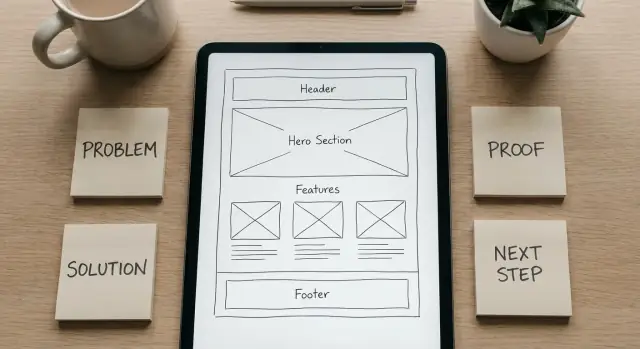
What Problem–Solution Framing Means for a Tool Website
Problem–solution framing is a way to write your tool’s website so the visitor immediately recognizes their situation ("Yes, that’s my issue") and sees a credible path to fixing it ("This tool is for me"). It’s not a slogan. It’s a story with a clear sequence:
problem → impact → promise → how it works → next step.
Why clarity beats completeness
First-time visitors don’t arrive wanting a full product tour. They arrive with a messy goal: save time, avoid mistakes, ship faster, feel in control, reduce cost, or prove something to a boss or client. If your page starts with every feature, every integration, and every edge case, people have to work to figure out whether you solve their problem—and many won’t.
Clarity wins because it reduces decision effort. When the problem is named precisely, the right users self-select quickly, and the wrong users move on without confusion.
The simple goal of your messaging
Your goal is not to convince everyone. It’s to help the right user:
- self-identify ("This is my pain point")
- understand the outcome ("Here’s what changes after using this")
- take one appropriate next step (try, demo, sign up, or learn more)
What you’ll build by the end
By the end of this guide, you’ll have two practical assets you can draft in one sitting:
- A page outline that follows the problem–solution story (hero, problem, solution flow, proof, objections, CTA)
- A tight set of messages: your problem statement, value proposition, and a few benefit-led lines that explain your tool without turning into a feature dump
Start With the Audience: Who Has the Problem?
Problem–solution messaging only works when the “problem” feels personal. That starts by being brutally specific about who the page is for—and who it is not for.
Pick 1–2 primary user types (and exclude the rest)
Choose the one or two groups most likely to succeed with your tool right now. For each, write a quick boundary statement:
- This page is for: a specific role in a specific context
- This page is not for: people with a different goal, maturity level, or workflow
Example: “For solo marketers shipping weekly campaigns” (not “enterprise teams with custom approval chains”). Excluding audiences makes your message clearer, not smaller.
Capture the “job to be done” in one sentence
Skip demographics and write the job as a simple outcome:
When [trigger], I want to [make progress], so I can [benefit].
Example: “When a client asks for results, I want to turn messy data into a clean report, so I can show progress without losing a day.”
Collect the words your users already use
Your best copy usually already exists—in:
- support tickets and chat logs
- app store or marketplace reviews
- sales calls and onboarding notes
- forums and community threads
Look for repeated phrases that describe frustration, time pressure, and what “good” looks like.
Turn vague personas into concrete situations
Replace “busy professional” with a scene: what happened right before they searched for a tool? What deadline, mistake, or request triggered the need?
Write a short before story (3–4 sentences) that feels familiar. If a reader thinks “That’s me,” you’ve found your audience.
Write a Clear Problem Statement Users Agree With
A good problem statement makes visitors nod and think, “Yes—that’s me.” If they can’t recognize themselves in the first few seconds, they won’t trust the solution (even if it’s genuinely helpful).
The top pains (and what they cost)
Focus on three pains your audience already feels, and describe the impact in plain terms:
- Wasted time: hours lost to manual steps, switching between tools, or chasing updates.
- Money leakage: missed billable work, late fees, duplicated spend, or avoidable refunds.
- Risk and stress: compliance mistakes, broken handoffs, unhappy customers, or constant fire drills.
Symptoms users recognize immediately
Don’t describe the tool yet—describe the day-to-day mess it creates:
Errors that keep slipping through, delays that compound, rework that never ends, confusion about “which version is correct,” or decisions made on outdated information.
What they’ve already tried (that didn’t work)
Show you understand their reality by naming the common workarounds:
Spreadsheets that turn into a patchwork, extra meetings to “get aligned,” hiring temporary help, adding yet another app that no one fully adopts, or writing a checklist that’s ignored under pressure.
Keep it accurate, not dramatic
Specific beats emotional. Use numbers only if you can stand behind them. Replace vague claims (“everything is chaotic”) with observable situations (“handoffs depend on memory, so tasks stall when someone is out”).
A two-line problem statement you can reuse
Here’s a simple structure you can apply across your homepage, landing pages, and product pages:
When [audience] tries to [important job], they get stuck with [recognizable symptoms], which leads to [time/money/risk impact].
They’ve tried [common workaround], but it still causes [core pain]—so progress feels harder than it should.
Build the Hero Section: One Message, One Next Step
Your hero section has one job: help the right person instantly recognize “this is for me” and know what to do next. If it tries to explain everything, it usually explains nothing.
Write a headline that names the outcome (and who it’s for)
Aim for problem outcome + audience, not a feature list. People don’t wake up wanting “AI-powered dashboards”—they want fewer mistakes, faster turnaround, clearer decisions.
Examples:
- “Create client-ready reports in minutes—for busy consultants.”
- “Stop losing track of renewals—simple reminders for small teams.”
- “Turn messy notes into a clear action list—for project leads.”
Add a subheadline that explains the approach in plain language
Your subheadline should answer: How do you get me to that outcome? Keep it concrete and jargon-free.
Example patterns:
- “Upload your file, choose a template, and export a polished result.”
- “Connect your calendar once. We track due dates and nudge you before anything slips.”
Choose one primary CTA and one secondary CTA
Give visitors a single obvious next step. If you offer five buttons, you’ve made them do work.
- Primary CTA: “Start free,” “Generate my report,” “Try it now”
- Secondary CTA: “Watch demo,” “See example,” “How it works”
Keep the primary CTA visually dominant, and make sure both CTAs match what you actually want users to do on this page.
Use a hero visual that shows the result or workflow
Prefer a screenshot, short loop, or simple mock flow that shows:
- the input (what the user provides),
- the key step (what your tool does),
- the output (what the user gets).
Avoid abstract art that forces people to guess what the tool is.
Add one short qualifier line to reduce bad-fit signups
A qualifier sets expectations and saves support time. Keep it friendly and specific:
- “Best for teams of 1–20. Not designed for enterprise procurement workflows.”
- “Works with CSV and Google Sheets. PDFs supported on the Pro plan.”
When the hero is clear, the rest of the page can earn trust and detail—without having to rescue confusion.
Present the Solution as a Simple Flow, Not a Feature Dump
People don’t buy “features.” They buy a clearer next step. Your job is to make the tool feel easy to start and predictable to finish.
Explain it as input → process → output
Use a simple 3-step flow that mirrors what users will actually do:
- Input: what they provide (a file, a URL, a few fields).
- Process: what your tool does to that input (clean, calculate, generate, compare).
- Output: what they get (a report, a ready-to-use file, a decision, a shareable result).
Keep this section near the top so users don’t have to “read the whole page” to understand the point.
Turn features into the “after” story
For each key feature, finish the sentence: “So you can…” and tie it back to the pain you introduced earlier.
- Auto-detection → So you don’t spend 20 minutes fixing formatting before you can start.
- One-click export → So you can send the result immediately, without rebuilding it in another tool.
- Saved presets → So repeated tasks take seconds, not a full setup every time.
Then make the outcome concrete: “After using the tool, you go from guessing and rework to a clean result you can use right away.”
Add boundaries (this builds trust)
State what it does and does not do in plain language. Example: “It generates the output and checks for common errors. It does not replace a human review for edge cases.”
Reduce scrolling friction with a ‘How it works’ jump
Include a small UI element near your primary message (for example, “How it works ↓”) that jumps to the 3-step explanation, so hesitant users can self-educate without hunting.
Turn Features Into Benefits Using a Pain-to-Benefit Map
Most tool websites list features because they feel “objective.” But people buy outcomes: less risk, fewer mistakes, less time spent, more confidence. A Pain → Benefit → Feature map helps you translate what the tool does into what the user gets.
Build the mapping table (then write your copy from it)
Start with the user’s pain in their own words. Next, describe the benefit as an observable outcome. Finally, attach the feature(s) that make that outcome possible.
| User pain (what they hate) | Benefit (what improves) | Feature (how it works) |
|---|---|---|
| “I keep re-checking my work because I don’t trust the result.” | Confidence you can act on without double-checking. | Validation rules + clear error messages. |
| “This takes me an hour every time.” | Finish in 10 minutes with fewer steps. | Templates + bulk actions + saved defaults. |
| “I’m worried I’ll share the wrong version.” | Fewer mix-ups and clearer handoffs. | Version history + naming conventions + exports. |
Replace vague adjectives with outcomes
Swap generic words like “easy” and “fast” for measurable or observable results: “set up in 3 steps,” “catch missing fields before you submit,” “share a clean report your team can read.” If you can’t measure it, show it.
Write benefits as mini before/after examples
Use short, concrete lines: “Before you tracked changes in a spreadsheet; now you see them automatically in one place.” Keep each benefit scannable—one sentence, one idea.
Keep technical depth in the right place
Benefits belong on the main landing page. Deep technical details (integrations, encryption specifics, API behavior) should live on dedicated pages like /docs or /security, so the main story stays clear and readable.
Add Proof and Trust Without Overclaiming
Problem–solution messaging lands better when you back it up with evidence people can quickly judge. The goal isn’t to “prove everything.” It’s to reduce uncertainty so visitors feel safe taking the next step.
Use proof that matches the promise
Pick proof types that directly support the core claim on the page:
- Testimonials that mention the before (pain) and after (result), not just “Love this tool.”
- Short case snapshots (3–5 lines): who it was for, what they tried before, what changed, and a specific outcome.
- Metrics with context: add the conditions so it’s believable (team size, timeframe, starting point). For example: “Typical setup time dropped from ~2 hours to ~20 minutes for a 5-person team.”
When you use numbers, keep the language honest: “typical,” “example,” and “varies by use case” signal you’re not promising the same results for everyone.
Show credible cues (carefully)
Logos can help, but only if you have permission. If you don’t, skip them—forced logo strips can feel manipulative. Instead, lean on concrete specifics: job titles, industries, and real scenarios.
Demonstrate the promise with visuals
A screenshot or short clip can do what paragraphs can’t: show the workflow and the outcome. Aim for “here’s what you’ll see after step 1” rather than a glossy montage. The best demos map to the main user pain point (speed, clarity, fewer mistakes).
Answer doubts right where people hesitate
Add a compact FAQ near the primary CTA. Focus on the questions that block action:
- “Will this work for my situation?”
- “How long does setup take?”
- “What do I need to get started?”
- “What happens if it’s not a fit?”
Keep it short, specific, and consistent with your proof—trust grows when everything lines up.
Handle Objections Where They Appear
Objections aren’t a separate “FAQ section” you tack on at the end. Place the reassurance right next to the moment the doubt appears: near pricing, next to the first CTA, under the data upload step, or beside claims about results.
The top 5 objections to address (and where to answer them)
- Price (near pricing teaser and primary CTA)
If the first reaction is “Is this worth it?”, make the trade-off concrete. Explain what the user saves (time, errors, back-and-forth) and give a simple way to start small—like a limited free plan or a low-commitment trial—so they can validate value before paying.
If you’re doing X today (manual spreadsheets and copy/paste), here’s how we help: we automate the repetitive steps and deliver a ready-to-use output in minutes.
- Effort / setup time (near onboarding and signup)
Spell out setup time and prerequisites so it feels predictable. Example: “Most people get their first result in 10–15 minutes.” List what’s required: a browser, an email, and the data source (CSV, URL, or connected account). If there’s any admin approval or permissions needed, say so upfront.
- Switching costs (near integrations or “how it works”)
Users worry about breaking a workflow that already works “well enough.” Reduce risk with parallel-run positioning: they can try your tool on one project first, export results, and only then decide to migrate.
If you’re doing X today (using three tools and stitching results), here’s how we help: we replace the handoffs with one simple flow and keep exports compatible with what you already use.
- Accuracy / reliability (near claims and examples)
Avoid vague promises. Define what “accurate” means in your context (validation checks, error flags, confidence indicators, revision history) and describe how users can review and correct outcomes before they act on them.
- Security (near any data entry fields)
Say what you do with their data in plain language: what’s stored, what’s not, and how long. Mention access controls (role-based permissions), encryption, and whether users can delete data on demand—without exaggerating.
Design Calls to Action That Match User Readiness
A call to action isn’t just a button—it’s a commitment you’re asking someone to make. If the ask is bigger than the visitor’s confidence, they’ll hesitate, bounce, or “save it for later.” The fix is to match the CTA to how ready they are right now.
Pick one primary conversion per page
Choose a single “main ask” and make everything else support it. Examples: start a trial, book a demo, request a quote, download the tool, or contact sales. When a page has multiple competing primary buttons, the message blurs and decision-making slows.
Use supporting CTAs for lighter intent
Not everyone is ready to try or buy. Add smaller steps that still move the story forward, such as:
- View an example output
- Download a template or checklist
- Run a quick sample with limited inputs
These are especially useful for visitors who agree with the problem but need proof before committing.
Keep CTA copy and placement consistent
Use the same CTA wording and style in the hero, mid-page, and at the bottom so it feels like one clear path. “Start free trial” and “Get started” can mean different things—pick one phrase and stick with it.
Design friction intentionally
Reduce unnecessary effort (fewer fields, no surprises), but keep enough structure to set expectations. If a demo request needs a work email, say so. If a trial requires a credit card, state it near the button.
Confirm what happens next
After a click or form submit, show confirmation messaging that answers: Did it work? What will happen next? When will they hear back? This tiny moment is where trust either grows—or evaporates.
Plan the Page and Site Structure Around the Story
Your site structure should follow the same problem–solution narrative as your copy. If visitors have to hunt for “what this is” or “how much it costs,” they’ll create their own story—and it won’t be kind.
A simple sitemap that works for most tools
Start with a small set of pages you can keep consistent and up to date:
- Home: the main problem–solution message and one primary next step.
- Use case page(s): one page per audience/problem.
- Pricing: clear tiers, what’s included, and who each tier is for.
- Docs: setup, integration, FAQ, and troubleshooting.
- About: credibility, team, and why you exist.
- Blog: education and examples that reinforce the problem framing.
Keep top navigation limited (think 4–6 items). If everything is “important,” nothing is.
One homepage vs dedicated landing pages
Use a single general homepage when:
- You serve one core audience with one dominant problem.
- Your tool has a straightforward “try it now” workflow.
Use dedicated landing pages when:
- You have multiple audiences (e.g., marketers vs developers).
- Different use cases need different proof, objections, and vocabulary.
Problem-first use case pages
Each use case page should mirror your main framework:
- a specific problem statement, 2) the simplest path to a result, 3) benefits tied to pain, 4) proof, 5) a CTA that matches readiness.
Guide the journey with intentional paths
Treat your pages like signposts. After proof sections, nudge visitors toward “Pricing.” After “How it works,” nudge toward “Docs” or “Get started.” You can do this with buttons and short cues (e.g., “Next: see pricing”) without cluttering navigation.
Validate the Message: Quick Tests Before You Scale
Before you redesign pages or buy traffic, make sure your message is doing its job: helping a stranger understand the problem, the solution, and why they should trust you—fast.
The “repeat-back” sentence
Define the one sentence you want visitors to repeat back to you after a quick glance. Keep it plain and specific:
- Who it’s for
- What pain it removes
- What outcome it delivers
If you can’t write that sentence without using buzzwords, the page won’t feel clear to first-time visitors.
Run a 5-second test
Show someone your hero section for five seconds (headline, subhead, primary CTA). Then ask:
- What do you think this tool does?
- Who is it for?
- What would you click next?
If they answer with a feature (“it has dashboards”) instead of an outcome (“it helps me finish X faster”), your framing needs work.
Check alignment across the page
Do a quick “problem → solution → proof” scan. Every major block should support the story arc.
A practical check: read only your headings and CTA labels from top to bottom. If the narrative breaks, visitors will break with it.
A/B test only what moves the needle
Start with the highest-impact elements:
- Headline (problem + outcome)
- Hero CTA (what happens after the click)
- Proof block (what kind of evidence you show)
Change one thing at a time, or you won’t know what caused the lift.
Track a few simple metrics
You don’t need a complex dashboard to learn:
- Scroll depth (where attention drops)
- CTA clicks (interest)
- Signup completion rate (friction)
When clicks are high but completion is low, your message may be fine—your next step is too hard.
A Practical Template You Can Copy for Your Tool Website
Use this as a starting point, then adjust the order based on what your buyers ask most often.
Fill‑in page outline (headlines + section order)
Hero
- Headline: “Get [desired outcome] without [main pain].”
- Subhead: “For [audience], [tool name] helps you [job to be done] in [time/effort], so you can [bigger benefit].”
- Primary CTA: “Start [trial/demo/checklist]”
- Secondary CTA: “See how it works”
Problem (recognition)
- “If you’re dealing with [symptom 1], [symptom 2], and [symptom 3], you’re not alone.”
Why current options fail
- “Spreadsheets/agency/DIY scripts break because [reason 1], [reason 2].”
How it works (3 steps)
- “Connect [input]” 2) “Set [rule/goal]” 3) “Get [result/report/output]”
Key benefits (not features)
- “So you can [benefit]” / “So you avoid [pain]” / “So you can prove [metric]”
Proof
- “Used by [type of customers].” “Average result: [measurable outcome].” (Only if true.)
Pricing preview
- “Plans start at [price]. Best for [who].”
FAQ (objections)
- “Will this work with [tool]?” “How long to set up?” “What about security?”
Final CTA
- “Start [trial]” + “Talk to us”
Clarity checklist
- Can a first‑time visitor repeat what you do in one sentence?
- Is the main problem stated before the main solution?
- Do headings describe outcomes, not interface details?
- Does every feature line end in a user benefit?
- Is there one obvious “next step” above the fold?
Next steps after you publish
- Write 3–5 use‑case pages (one audience + one job each).
- Refine onboarding emails to mirror your site’s promise and first win.
- Update /pricing to match how buyers compare alternatives.
Keep iterating using real questions from support tickets and sales calls. If people ask the same thing twice, your page should answer it once, clearly.
If your tool is itself a “build software faster” platform, the same framing applies. For example, Koder.ai positions well when the problem is explicit (slow, expensive development cycles) and the solution is explained as a predictable flow (chat → plan → generate an app you can deploy or export), with pricing clarity across free, pro, business, and enterprise tiers.
FAQ
What does “problem–solution framing” mean on a tool website?
Problem–solution framing is a message structure that starts with the visitor’s situation and ends with a clear next step: problem → impact → promise → how it works → CTA. It helps the right users recognize themselves fast and understand what changes after using your tool—without reading a full feature tour.
Why does clarity usually beat completeness on a homepage?
Because first-time visitors are trying to answer one question quickly: “Is this for me?” Leading with a precise problem and outcome reduces decision effort. Feature-first pages force people to translate features into value, and many will leave before they connect the dots.
How do I choose the right audience for my main page?
Pick 1–2 primary user types most likely to succeed right now, then write a boundary:
- This page is for: a specific role + context
- This page is not for: a different workflow or maturity level
Excluding audiences doesn’t shrink your market as much as it sharpens your message (and reduces bad-fit signups).
What’s the fastest way to define my user’s job to be done?
Use a simple “job to be done” sentence:
When [trigger], I want to [make progress], so I can [benefit].
Example: “When a client asks for results, I want to turn messy data into a clean report, so I can show progress without losing a day.” This gives you a concrete outcome to anchor the headline, proof, and CTA.
Where do I get the words to write a problem statement that feels real?
Steal (ethically) from real language:
- support tickets and chat logs
- onboarding notes and sales calls
- reviews (app stores, marketplaces)
- forums and community threads
Collect repeated phrases about frustration, time pressure, and what “good” looks like. Then mirror those words in your problem statement and benefits.
How do I write a problem statement users agree with?
A reusable two-line structure is:
When [audience] tries to [important job], they get stuck with [recognizable symptoms], which leads to [time/money/risk impact].
They’ve tried [common workaround], but it still causes [core pain]—so progress feels harder than it should.
Keep it specific and observable (avoid drama and unsupported numbers).
What makes a strong hero section for a tool website?
Your hero should do three things immediately:
- Name the outcome (and ideally the audience)
- Explain the approach in plain language (subheadline)
- Offer one primary CTA + one secondary CTA
A helpful pattern is “Outcome—for audience” + a subheadline like “Upload X, choose Y, export Z.”
How do I explain the solution without dumping features?
Use a simple input → process → output flow:
- Input: what the user provides (file, URL, fields)
- Process: what your tool does (clean, calculate, generate)
- Output: what they get (report, export, decision)
Then translate features into benefits by ending each line with “So you can…” (e.g., “Saved presets—so repeated tasks take seconds, not a full setup”).
How do I add proof and trust without overclaiming?
Add boundaries and proof that match your promise:
- State what it does and does not do (plain language)
- Use testimonials that include before → after, not generic praise
- Share short case snapshots (who, what changed, outcome)
- If you use metrics, add context and honest qualifiers like “typical” and “varies by use case”
Trust grows when claims, examples, and limits align.
How do I choose CTAs that people will actually click?
Match the ask to the visitor’s confidence level:
- Primary CTA: one main conversion (trial, demo, signup)
- Secondary/supporting CTA: lighter intent (see example output, watch demo, run a sample)
Be explicit about friction before the click (credit card, work email, permissions), and confirm what happens next after submission so the moment feels reliable.