

How to Build a Tools Comparison and Decision Guide Website
Learn how to plan, build, and grow a tools comparison and decision guide website—from content structure and data models to SEO, UX, and monetization.
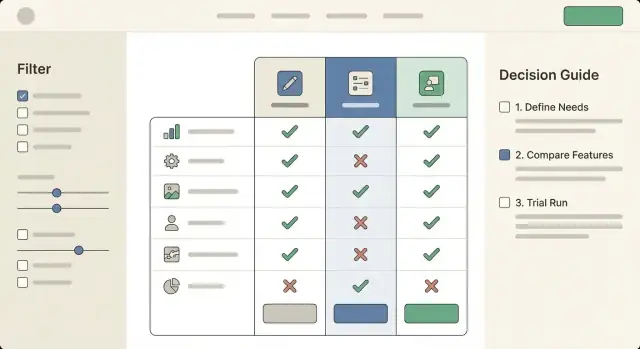
Clarify the Audience and Goals
Before you build a tools comparison website, decide exactly who you’re helping and what “success” looks like. A decision guide that tries to serve everyone usually ends up serving no one.
Define your audience (role, budget, use case)
Start with one clear primary reader. Give them a job title, constraints, and a real situation:
- Role: founder, marketer, ops manager, IT admin, freelancer
- Budget reality: free-only, under $50/month, team plan, enterprise
- Use case: “replace spreadsheets,” “track client projects,” “run email campaigns,” “record meetings,” etc.
This clarity determines what your product comparison table should emphasize. A freelancer may care about price and simplicity; an IT admin may prioritize security, SSO, and admin controls. Your feature matrix should reflect the reader’s decision criteria—not every feature a tool has.
Choose scope and outcomes
Pick a narrow tool category first (e.g., “meeting transcription tools” rather than “productivity software”). A tighter niche makes tool reviews easier to write with authority and makes SEO for comparison pages more focused.
Next, define your desired outcomes:
- Affiliate clicks to vendor sites
- Email signups for updates or templates
- Demo requests or lead gen for your own service
Be honest here, because it affects your content style, CTAs, and affiliate disclosure placement.
Set simple success metrics
Track a small set of metrics that map to your goals:
- Organic traffic to “best” and comparison pages
- CTR from comparison pages to individual tool pages
- Conversion rate: affiliate clicks, signups, or demo requests
With a clear audience and measurable goals, every later decision—site structure, UX, and data collection for software tools—gets easier and more consistent.
Pick the Niche and Map the Content Structure
A tools comparison website succeeds when it’s narrowly helpful. “All business software” is too broad to maintain and too vague to rank. Instead, pick a niche where people actively compare options and feel real switching pain—then build a structure that matches how they decide.
Choose a niche with clear buying intent
Start with a defined audience and a moment of decision. Good niches usually have:
- A recurring need (teams re-evaluate tools yearly)
- Many similar products (buyers need a feature matrix)
- High “best for” intent (people search for a decision guide)
Examples: “email marketing tools for Shopify stores,” “project management tools for agencies,” or “accounting tools for freelancers.” The more specific the niche, the easier it is to create meaningful comparisons and high-trust tool reviews.
List decision criteria people actually use
Before you plan pages, write down the criteria your readers care about—not what vendors advertise. Typical criteria include price, ease of use, integrations, support, and setup time. Add niche-specific criteria too (e.g., “HIPAA compliance” for healthcare, “multi-store support” for ecommerce).
This list becomes your consistent product comparison table and feature matrix across the site, so users can quickly scan and feel confident.
Group tools into subcategories and use cases
Most niches still need structure. Create clear subcategories and “best for” use cases, such as:
- By workflow: “invoicing” vs “expense tracking”
- By team type: “solo” vs “small team”
- By requirement: “with X integration”
These become your category hubs and future SEO for comparison pages.
Create a consistent naming system for pages
Consistency helps users and search engines. Pick patterns and stick to them:
- Category: “Best <Category> Tools”
- Use case: “Best <Tools> for <Audience/Need>”
- Versus: “<Tool A> vs <Tool B>”
Plan navigation: hubs, tool pages, and comparisons
A simple, scalable structure looks like:
- Category hub pages (overview + filters)
- Individual tool pages (who it’s for, pros/cons, pricing, integrations)
- Comparison pages (side-by-side tables + recommendation)
This architecture keeps the decision flow obvious: discover options → shortlist → compare → choose.
Design Your Comparison Framework
A comparison site lives or dies by consistency. Before you write reviews or build tables, decide what “a tool” means on your site and how you’ll compare one tool to another in a way readers can trust.
Create a standard tool profile template
Start with a single tool profile structure you’ll use everywhere. Keep it detailed enough to power filters and tables, but not so bloated that updates become painful. A practical baseline includes:
- Basics: name, category, short summary, official URL
- Platforms: web, iOS/Android, Windows/macOS, browser extension, API
- Target user: solo, SMB, enterprise; primary use case
- Pricing snapshot: free plan (Y/N), starting price, trial (Y/N)
- Support & trust: support channels, SLA (if applicable), security/compliance notes
- Evidence: sources/last verified date, changelog notes
Define comparison fields (your “feature matrix”)
Pick fields that match how people decide. Aim for a mix of:
- Features: must-haves (core), nice-to-haves (advanced), integrations
- Limits: seats, projects, storage, usage caps, rate limits
- Pricing tiers: plan names, key differences, add-ons, discounts
- Support: email/chat/phone, community, onboarding, response time claims
- Platforms: where it works and what’s missing on each platform
Tip: keep a small set of “universal” fields across all tools, then add category-specific fields (e.g., “team inbox” for help desks, “version history” for writing tools).
Decide how you’ll handle unknown data
Unknowns happen—vendors don’t publish details, features ship quietly, pricing changes mid-month. Define a rule like:
- Use “Unknown” (not blank) with a note in your editorial workflow: “Not publicly stated; last checked YYYY-MM-DD.”
- Don’t guess. If it’s important, label it “Contacted vendor” or “User-reported” based on your source.
Set review guidelines so labels stay consistent
If you use scores or badges (“Best for teams”, “Budget pick”), document the criteria. Keep it simple: what qualifies, what disqualifies, and what evidence is required. Consistent rules prevent “score drift” as you add more tools—and they make your recommendations feel fair, not arbitrary.
Build the Data Model (So Updates Don’t Hurt)
If your site is successful, the hardest part won’t be writing pages—it’ll be keeping everything accurate as tools change pricing, rename plans, or add features. A simple data model turns updates from “edit 20 pages” into “change one record and everything refreshes.”
Start simple: spreadsheet-first
Begin with a spreadsheet (or Airtable/Notion) if you’re validating the idea. It’s fast, easy to collaborate on, and forces you to decide what fields you truly need.
When you outgrow it (more tools, more categories, more editors), migrate the same structure into a CMS or database so you can power comparison pages automatically.
Plan the core relationships
Comparison sites break when everything is stored as free text. Instead, define a few reusable entities and how they connect:
- Tool: the product itself (name, website, short summary).
- Category: where it fits (e.g., “Email marketing,” “Project management”).
- Pricing plan: plans under a tool (Free/Starter/Pro), with price, billing period, and key limits.
- Feature: a standardized list (“SSO,” “API access,” “Exporting”).
- Feature value (the “feature matrix”): the join between tool (or plan) and feature (Yes/No/Partial + notes).
This tool ↔ category ↔ feature ↔ pricing plan setup lets you reuse the same feature definitions across many tools and avoids mismatched wording.
Add SEO and trust metadata (now, not later)
Even before you think about “SEO for comparison pages,” capture the fields you’ll want on every page:
- Short summary (1–2 sentences) for intros and meta descriptions
- Pros/cons (structured, not buried in paragraphs)
- Use-case tags (good for “Best for X” pages)
- Last updated date and data source (vendor site, docs, hands-on test)
These fields make your pages easier to scan and help readers trust the content.
Versioning and changelog rules
Decide what counts as a “material change” (pricing, key feature, limitations) and how you’ll show it.
At minimum, store:
- Updated_at timestamp per tool and per plan
- A short changelog note (e.g., “Updated pricing tiers on Oct 12”)
Transparency reduces support emails and helps your site feel dependable as it grows.
Create Page Types and Templates
Once your data model is taking shape, lock in the page types you’ll publish. Clear templates keep the site consistent, make updates faster, and help readers move from “just browsing” to a confident decision.
Core page types to build first
1) Category hub pages
These are your “browse and narrow down” entry points (e.g., Email Marketing Tools, Accounting Software). A good hub includes a short overview, a handful of recommended picks, and a simple filterable product comparison table. Add obvious paths into deeper research: “Compare top tools” and “Take the quiz.”
2) Tool detail pages
A tool page should answer: what it is, who it’s for, what it costs, and where it shines (and doesn’t). Keep the structure repeatable: summary, key features, pricing, integrations, pros/cons, screenshots (optional), and FAQs. This is also where readers expect a clear CTA like “Visit site” or “Get pricing.”
3) Comparison pages
Your head-to-head pages (Tool A vs Tool B vs Tool C) should lead with a concise verdict, then a standardized feature matrix so readers can scan quickly. Include common decision factors (price tiers, key features, support, onboarding, limitations) and end with next steps: “Compare,” “Shortlist,” or “Request a demo.”
4) Decision guide pages
These are “choose the right tool for your situation” guides. Think: “Best CRM for freelancers” or “How to pick a password manager for a small team.” They’re less about exhaustive specs and more about matching needs to options.
Trust elements that belong in templates
Build credibility into every page type with reusable blocks: a short “How we evaluate” snippet, visible last-updated dates, and links to your methodology, sources, and editorial policy (e.g., /methodology, /editorial-policy). If you use affiliate links, include a clear disclosure (and link to /affiliate-disclosure).
Reusable components to standardize
Create components you can drop anywhere: a comparison table module, feature list cards, FAQ blocks, and a consistent CTA bar (e.g., “Add to shortlist,” “See alternatives,” “Visit site”). Reuse is what keeps your tools comparison website scalable without feeling repetitive.
Choose the Tech Stack and Set Up the Foundation
Your tech stack should fit how your team actually works. The goal isn’t to pick the fanciest option—it’s to publish trustworthy comparisons quickly, keep them updated, and avoid breaking pages every time you add a new tool.
Pick a build approach that matches your team
If you’re a small team (or solo), a CMS or no-code setup can get you live fast:
- No-code site builders are great for launching a directory-style site, but can struggle with complex filtering and lots of data.
- CMS (like WordPress or a headless CMS) gives you a familiar editing workflow, roles, and revision history—useful when content is your main differentiator.
- Custom build makes sense when you need advanced filters, logged-in features, or you expect thousands of tools and categories.
A simple rule: if your comparisons are mostly editorial with a few tables, use a CMS; if your site is primarily a searchable database, consider a custom build (or a CMS + custom frontend).
If you want the flexibility of a custom build without a long build cycle, a vibe-coding platform like Koder.ai can help you prototype and ship a comparison site from a chat-based workflow—typically with a React frontend and a Go + PostgreSQL backend—then export the source code when you’re ready to own the stack.
Performance and mobile from day one
Comparison sites often fail on speed because tables, icons, and scripts pile up. Keep the foundation light:
- Limit heavy table widgets; prefer server-rendered tables where possible.
- Compress images and load them lazily (especially logos).
- Test on mobile early: filters should be usable with one hand, and tables should scroll without breaking layout.
Fast load times aren’t just nice—they directly affect SEO and conversions.
Navigation that supports decision-making
Help visitors understand where they are and where to go next:
- Add breadcrumbs (e.g., Category → Subcategory → Tool).
- Include “Related tools” and “Compare alternatives” blocks to encourage deeper browsing.
- Keep URLs clean and consistent so pages are easy to share and revisit.
Plan analytics and event tracking upfront
Don’t wait until after launch to measure what matters. Define events like:
- Filter usage, sort changes, and “View details” clicks
- Outbound clicks to vendor sites and affiliate links
- CTA interactions (newsletter signup, “Request a recommendation”)
Set this up early so you can improve pages based on real behavior instead of guesses. For next steps, see /blog/analytics-and-conversion-improvements.
UX for Tables, Filters, and Decision Flows
A comparison site wins or loses on clarity. People arrive with a goal (“pick something that works for my budget and team”), not a desire to study a spreadsheet. Your UX should help them narrow quickly, then confirm their choice with just enough detail.
Make comparison tables genuinely readable
Tables should scan well on both desktop and mobile.
Use sticky headers so the tool names and key columns stay visible while scrolling. Add a subtle column highlight on hover/tap (and when a column is focused via keyboard) to reduce “lost in the grid” moments.
Group rows into meaningful sections—e.g., Basics, Integrations, Security, Support—instead of one long list. Within each group, keep labels short and consistent (“SSO” vs “Single sign-on” vs “SAML” everywhere).
Filters that match real decisions
Avoid filters that mirror your database; match how people think. Common high-intent filters include budget, platform, team size, and a small set of “must-haves” (e.g., “works with Google Workspace”).
Keep filters forgiving: show how many tools remain, offer a one-click Reset, and don’t hide results behind an “Apply” button unless performance requires it.
Build a simple decision flow
Many visitors don’t want to compare 20 options. Offer a short “picker” path: 3–5 questions max, then show a ranked shortlist.
On every tool card or tool page, include a clear “Recommended for” summary (2–4 bullets) plus “Not ideal for” to set expectations. This reduces regret and improves trust.
Accessibility is part of UX, not a checkbox
Support keyboard navigation across filters and tables, maintain strong contrast, and use clear labels (avoid icon-only meaning). If you use color for “good/better/best,” provide text equivalents and ARIA labels so the comparison works for everyone.
Write High-Trust Comparison Content
Your content is the product. If readers sense you’re summarizing vendor marketing or forcing a “winner,” they’ll bounce—and they won’t return. High-trust comparison writing helps people make a decision, even when the answer is “it depends.”
Start with a category intro that teaches the decision
Before listing tools, write a short intro that helps readers choose their criteria. Explain what typically matters in this category (budget, team size, integrations, learning curve, security, support, time-to-setup) and which trade-offs are common.
A good pattern is: “If you care most about X, prioritize Y. If you need Z, expect higher cost or setup effort.” This turns your page into a decision guide, not a catalog.
Use a consistent review voice (and repeat the same questions)
For every tool, keep the same structure so readers can compare quickly:
- Who it’s for (and who should skip it)
- Strengths (what it does unusually well)
- Trade-offs (limits, missing features, cost surprises)
- Setup effort (time, skills, migration pain)
Consistency makes your comparisons feel fair—even when you have preferences.
Avoid absolute claims; show context and sources
Replace “best” and “fastest” with specifics: “best for teams that need…,” “fast for simple workflows, slower when…”. When you reference performance, pricing, or feature availability, explain where you got it: vendor docs, public pricing pages, your own test account, or user feedback.
Show freshness: cadence + timestamps
Add “Last reviewed” timestamps on every comparison and review. Publish your editorial update cadence (monthly for pricing, quarterly for features, immediate updates for major product changes). If a tool changes materially, note what changed and when.
SEO Strategy for Comparison and “Best” Pages
SEO for a tools comparison website is mostly about matching purchase-intent searches and making it easy for both readers and search engines to understand your structure.
Target the right intent keywords (and match page type)
Build your keyword list around queries that signal evaluation:
- “best X for Y” → a curated “best” page (e.g., “Best email marketing tools for eCommerce”)
- “X vs Y” → a head-to-head comparison page with a clear verdict
- “X alternatives” → an alternatives page that explains when to switch
Each page should answer the intent quickly: who it’s for, what’s being compared, and what the recommended pick is (with a brief why).
Create an internal linking system that supports decisions
Use internal links to guide readers through evaluation steps:
Hub → tool pages → comparisons → decision guides
For example, a category hub like /email-marketing links to individual tool pages like /tools/mailchimp, which link to /compare/mailchimp-vs-klaviyo and /alternatives/mailchimp, and finally into decision flows like /guides/choose-email-tool.
This structure helps search engines understand topical relationships and helps users keep moving toward a choice.
Use schema selectively (only where it’s valid)
Add FAQ schema on pages that genuinely include Q&A sections. Consider Product schema only if you can provide accurate, specific product data and you’re eligible for it (don’t force it). Keep the content readable first; schema should reflect what’s already on the page.
Support money pages with a /blog plan
Plan supporting articles in /blog that target informational queries and funnel readers to comparison pages. Examples: “How to choose a CRM for freelancers,” “What is a feature matrix?,” or “Common mistakes when switching tools.” Each post should link to the relevant hub (/crm), comparisons, and decision guides—without overstuffing anchors or repeating the same phrasing.
Monetization and Disclosures
Monetization is part of the job—users understand that comparison sites need to pay the bills. What they won’t forgive is feeling tricked. The goal is to earn revenue while making it obvious when money is involved, and keeping your recommendations independent.
Choose your monetization model (and say it plainly)
Be explicit about how you make money. Common models for a tools comparison website include affiliate links (commissions on purchases), sponsorships (paid placements or ads), and lead generation (paid qualified referrals or demo requests).
A simple note in your header/footer and a short line near key CTAs is often enough: “Some links are affiliate links. If you buy, we may earn a commission—at no extra cost to you.” Avoid vague wording that hides the relationship.
Put disclosures where decisions happen
A disclosure page is necessary, but not sufficient.
- Create a dedicated /disclosure (and optionally /advertising-policy) page that explains affiliate relationships, sponsorship rules, and how you keep rankings fair.
- Link to it near outbound CTAs like “Visit site,” “Get pricing,” or “Start trial,” especially on “Best” pages and product comparison table pages.
- If a specific vendor is sponsored, label it clearly (“Sponsored”) right on the card/row—not only in fine print.
Keep recommendations independent
Your credibility is your moat. To protect it:
- Separate ads from rankings visually and structurally (different blocks, different labels).
- Define ranking criteria in your comparison framework section of the page (what matters, how weights work, and what data sources you use).
- Don’t let sponsorship change scoring. If you offer paid placements, keep them outside the ranking (e.g., “Featured partner” module) and explain what that means.
Track revenue without misleading users
You can measure performance accurately while staying honest.
Track revenue per page and per click using labeled outbound events (e.g., “affiliate_outbound_click”) and map them to page templates (best pages vs. individual reviews). Use this data to improve clarity and relevance—stronger intent matching typically raises conversion optimization without gimmicks.
If you’re testing CTA text or button placement, avoid anything that implies endorsement you can’t back up (e.g., “#1 guaranteed”). Trust compounds faster than short-term clicks.
Analytics and Conversion Improvements
Analytics isn’t just “traffic reporting” for a tools comparison website—it’s how you learn which parts of your tables and decision flows actually help people choose.
Track the actions that signal intent
Set up event tracking for the interactions that matter most:
- Filter usage (which filters get used, in what order, and how often users clear them)
- Table interactions (column sort, horizontal scroll, expanding rows, “show differences,” opening tool details)
- Outbound clicks (pricing pages, trials, demos, affiliate links) and whether they happen from the table, a shortlist, or a review page
These events let you answer practical questions like: “Do people use the feature matrix, or do they skip straight to pricing?” and “Which filter combinations lead to outbound clicks?”
Find drop-off points (especially on mobile)
Build simple funnels such as:
- Land on a “best tools” page → 2) Apply a filter → 3) Open tool details → 4) Click out
Then segment by device. Mobile users often drop during table scrolling, sticky headers, or long filter panels. If you see a big fall-off after “table view,” test clearer tap targets, fewer default columns, and a more obvious “shortlist” action.
A/B test the parts that change decisions
Prioritize tests that affect comprehension and confidence:
- Table layout (compact vs. spacious, default columns, sticky first column)
- CTA labels (“See pricing” vs. “Start free trial” vs. “Compare on shortlist”)
- Shortlist flow (single-step vs. guided questions)
Keep one primary metric (qualified outbound clicks) and one guardrail metric (bounce rate or time-to-first-interaction).
Dashboards + weekly review routine
Create a lightweight dashboard for: top pages, outbound clicks by source, filter usage, device split, and funnel conversion. Review weekly, pick one improvement, ship it, and re-check the trend the following week.
Maintenance, Updates, and Scaling
A comparison site is only as useful as its freshness. If your tables and “best” pages drift out of date, trust drops fast—especially when pricing, features, and plans change every quarter.
Set a simple update workflow
Treat updates like a recurring editorial job, not an emergency.
- Monthly checks (lightweight): verify pricing, plan names, key limits (seats, storage, automations), and anything you highlight in your feature matrix.
- Quarterly deep reviews: re-test core workflows, onboarding, and any “deal-breaker” features (SSO, API access, export options, compliance).
- Event-based updates: vendor releases, acquisitions, major pricing changes, or user reports.
Keep a short internal checklist for each tool page so updates stay consistent: “pricing verified,” “screenshots reviewed,” “features re-confirmed,” “pros/cons adjusted,” and “last updated” date.
Add a “Suggest an update” path
Put a small link near your comparison table and tool pages: “Suggest an update.” Route it to a form that captures:
- What’s wrong (price, feature, limit, broken link)
- Source (URL or screenshot)
- Optional email for follow-up
Publish a clear correction policy (“We verify and update within X business days”). When you fix something, note it in a lightweight changelog on the page. This creates accountability without turning the site into a forum.
Scale categories only if you can maintain them
It’s tempting to add new categories quickly, but every new category multiplies maintenance.
A good rule: don’t launch a category until you can commit to updating its top tools on schedule (and you have a repeatable data collection process). If you can’t keep 15–30 tools current, start smaller with fewer, better-maintained entries.
Build authority with linkable assets
Original research and small utilities give you defensible value beyond affiliate links.
Examples:
- A pricing calculator (e.g., “cost per seat at 10/25/50 users”)
- A requirements checklist for buyers to download
- A feature matrix template users can copy
These assets attract references from other sites and keep your pages useful even when vendors change their marketing claims.
FAQ
What should I decide before I start building a tools comparison website?
Start by defining one primary reader (role, budget, use case). Then pick a narrow category with clear buying intent (e.g., “meeting transcription tools” instead of “productivity software”) and define what success means for the site (affiliate clicks, email signups, demo requests).
How do I choose the right comparison criteria for my feature matrix?
Choose criteria your audience actually uses to decide: price, ease of use, integrations, support, setup time, and a few niche-specific requirements (like HIPAA, SSO/SAML, multi-store support). Keep a small universal set across all tools, then add category-specific fields where needed.
What page types should a comparison and decision guide site include?
Use a consistent architecture:
- Category hub pages (overview + filters + recommended picks)
- Tool detail pages (who it’s for, pros/cons, pricing, integrations)
- Comparison pages (side-by-side tables + verdict)
- Decision guides (“best for X” and “how to choose”)
This matches the natural flow: discover → shortlist → compare → choose.
What should be included in a standard tool profile template?
Create a standard tool profile template with fields you can reuse everywhere:
- Basics (name, category, summary, official URL)
- Platforms (web/mobile/desktop/API)
- Target user and primary use case
- Pricing snapshot (free plan, starting price, trial)
- Support and trust (channels, SLA, security/compliance notes)
- Evidence (sources + “last verified” date)
This makes tables, filters, and updates much easier.
How should I handle missing or unclear product data?
Make unknowns explicit and consistent:
- Use “Unknown” (not blank) and record last checked.
- Don’t guess.
- If you reached out or it’s user-reported, label it as “Contacted vendor” or “User-reported.”
This protects trust and reduces contradictions across pages.
What data model works best for a scalable comparison site?
Model the site like a database so updates don’t require editing many pages:
- Tool (core info)
- Category (grouping)
- Pricing plan (tiers, billing period, limits)
- Feature (standardized list)
- Feature value (tool/plan ↔ feature: Yes/No/Partial + notes)
This structure powers consistent comparisons and filtering.
How do I make comparison tables usable on mobile and desktop?
Design tables for scanning and mobile:
- Sticky headers (and ideally a sticky first column)
- Group rows into sections (Basics, Integrations, Security, Support)
- Short, consistent labels (avoid multiple names for the same thing)
- Subtle highlighting for the active column/row
Readable tables reduce bounce and improve conversion.
Which filters should I prioritize for a tools comparison website?
Use high-intent filters that reflect how people decide:
- Budget and pricing model
- Platform (web, iOS/Android, desktop)
- Team size
- A small set of must-haves (key integrations, SSO, API)
Make filters forgiving: show remaining results, include a one-click reset, and avoid forcing an “Apply” button unless performance requires it.
How do I write high-trust comparison content that readers believe?
Build trust through consistency and evidence:
- Use the same questions/structure for every tool (who it’s for, strengths, trade-offs, setup effort).
- Avoid absolute claims; give context (“best for teams that need…”).
- Cite sources (vendor docs, pricing pages, hands-on tests, user feedback).
- Show freshness with “Last reviewed” timestamps and a clear update cadence.
What analytics should I set up to improve conversions on comparison pages?
Track behavior that maps to your goals:
- Filter usage, sort changes, and tool detail clicks
- Table interactions (scroll, expand rows, “show differences”)
- Outbound clicks to vendor/affiliate links and which page element generated them
Then run simple funnels (land → filter → view tool → click out) and segment by device to find mobile drop-offs. Use A/B tests on table layout and CTA labels, with one primary metric (qualified outbound clicks) and one guardrail metric (bounce rate or time-to-first-interaction).