

How to Build a Web App to Track Vendor Invoices & Payments
Step-by-step plan to build a vendor invoice web app: capture invoices, route approvals, track payment status, send reminders, and report spend securely.
Define the Goal and MVP Scope
Before you choose tools or draw screens, get precise about what problem you’re solving and for whom. A vendor invoice app can serve very different needs depending on who touches it day to day.
Identify the primary users
Start by naming the core user groups:
- Accounts Payable (AP) staff who receive invoices, fix details, and push items forward
- Approvers (department heads, project owners) who confirm an invoice is valid
- Finance leads who care about controls, reporting, and cash planning
- Vendors (optional) if you later add a portal for submissions and visibility
Design your MVP around the smallest set of users that unlocks value—usually AP + approvers.
Define the top outcomes
Pick the three outcomes that matter most. Common choices are:
- Fewer late payments (clear due dates, reminders, and fewer stuck invoices)
- Faster approvals (less chasing, fewer “where is this?” messages)
- Cleaner records (one source of truth for invoice data and decisions)
Write these outcomes down; they become your acceptance criteria.
Agree on “payment status” vocabulary
Teams often mean different things by “paid.” Decide your official statuses early, for example:
- Draft → Submitted → Approved → Scheduled → Paid
Also define what triggers a status change (approval, export to accounting, bank confirmation, etc.).
Lock an MVP to prevent scope creep
For an MVP, aim for: invoice intake, basic validation, approval routing, status tracking, and simple reporting. Push advanced items (OCR, vendor portal, deep ERP sync, complex exceptions) to a “later” list with a clear rationale.
Map the Invoice-to-Payment Workflow
Before you build screens or tables, write down the real path an invoice takes in your company—from the moment it arrives to the moment payment is confirmed. This becomes the source of truth for your app’s statuses, notifications, and reports.
Start with the current reality
Capture where invoices enter (email inbox, vendor portal, mail scan, employee upload) and who touches them next. Interview accounts payable and at least one approver; you’ll often find unofficial steps (side emails, spreadsheet checks) that must be supported—or intentionally removed.
Define required checkpoints
Most invoice-to-payment flows have a few mandatory gates:
- Coding (GL/account, cost center, project, tax treatment)
- Approvals (single approver, multi-step, or parallel)
- Payment execution (scheduled, released, sent)
- Reconciliation (bank/ERP confirmation, remittance matched)
Write each checkpoint as a state change with a clear owner and input/output. Example: “AP codes invoice → invoice becomes ‘Ready for approval’ → approver either approves or requests changes.”
Call out exceptions early
List the edge cases that will break a simple happy path:
- Partial payments and split payments across invoices
- Disputes (price/quantity mismatch), holds, and vendor credits/credit notes
- Duplicate invoices (same number/vendor/amount) and re-submissions
Set SLAs and escalation rules
Decide time expectations per step (e.g., approval within 3 business days, payment within net terms) and what happens when they’re missed: reminders, escalation to a manager, or automatic re-routing. These rules will later drive your notification and reporting design.
Design the Data Model and Statuses
A clear data model keeps your app consistent as invoices move from upload to payment. Start with a small set of entities you can grow later.
Core entities (what you store)
At minimum, model these as separate tables/collections:
- Vendor: name, tax/VAT ID, default currency, payment terms, contact email
- Invoice: vendor_id, invoice_number, issue_date, due_date, currency, subtotal, tax_total, total, PO_number (optional), notes
- Line Item (optional for MVP, but useful): invoice_id, description, quantity, unit_price, tax_rate, line_total
- Approval: invoice_id, approver_id, decision (Approved/Rejected), decision_at, comment
- Payment: invoice_id, method, amount, scheduled_date, paid_date, reference (bank/transaction ID)
- Attachment: invoice_id, file_name, storage_key/url, uploaded_by, uploaded_at
Keep money fields as integers (e.g., cents) to avoid rounding errors.
Required fields (what makes an invoice “real”)
Make these mandatory for submission: vendor, invoice number, issue date, currency, and total. Add due date, tax, and PO number if your process depends on them.
Status enums (how you describe progress)
Define a single status on the invoice so everyone sees the same truth:
- Draft → being entered
- Submitted → ready for review
- Approved / Rejected → decision made
- Scheduled → payment planned
- Paid → settled
Duplicate prevention
Add a unique constraint on (vendor_id, invoice_number). It’s the simplest, highest-impact protection against double entry—especially when you later add invoice upload and OCR.
Plan Roles, Permissions, and Access Control
Access control is where invoice apps either stay tidy or become a free-for-all. Start by defining a small set of roles and being explicit about what each role can do.
Core roles to include
- AP Admin: manages settings (vendors, approval rules), can correct data, and oversees exceptions.
- AP Clerk: uploads invoices, fixes validation errors, and prepares items for approval.
- Approver: reviews and approves/rejects invoices assigned to them.
- Finance Admin: marks payments (or confirms sync from accounting), handles reconciliations and exports.
- Read-only: can view invoices and statuses but cannot change anything.
Permission “verbs” that matter
Keep permissions action-based (not screen-based): view, create/upload, edit, approve, override, export, manage settings. For example, many teams allow AP Clerks to edit header fields (vendor, amount, due date) but not bank details or tax IDs.
Vendor-specific visibility
If multiple business units share the same system, restrict access by vendor or vendor group. Typical rules:
- Users can only view invoices for vendors assigned to their department.
- Approvers only see invoices routed to them, even if they can view the vendor.
This prevents accidental data exposure and keeps inboxes focused.
Delegated approvals and out-of-office coverage
Support delegation with start/end dates and an audit note (“Approved by Delegate on behalf of X”). Add a simple “who is covering whom” page and require that delegations are created by AP Admins (or the manager) to avoid misuse.
Sketch the Core Screens and Navigation
A good accounts payable app feels obvious the first time someone opens it. Aim for a small set of screens that match how people actually work: find invoices, understand what’s happening, approve what’s waiting, and review what’s due.
1) Invoice list (your home base)
Make the default view a table that supports quick scanning and fast decisions.
Include filters for status, vendor, and due date, plus search by invoice number and amount. Add bulk actions like “Assign owner,” “Request info,” or “Mark as paid” (with permission checks). Keep a saved filter like “Due in 7 days” for weekly reviews.
2) Invoice detail page (one place for the full story)
The detail screen should answer: What is this invoice, where is it stuck, and what do we do next?
Add a clear timeline (received → validated → approved → scheduled → paid), a notes thread for context, and attachments (original PDF, emails, supporting docs). Place primary actions (approve, reject, request changes) at the top so they’re not buried.
3) Approval queue (manager-friendly)
Create a dedicated queue showing only what needs action. Support approve/reject with comments, plus a quick “view key fields” panel to avoid extra clicks. Keep navigation back to the list so managers can work in short bursts.
4) Payment status view (weekly review mode)
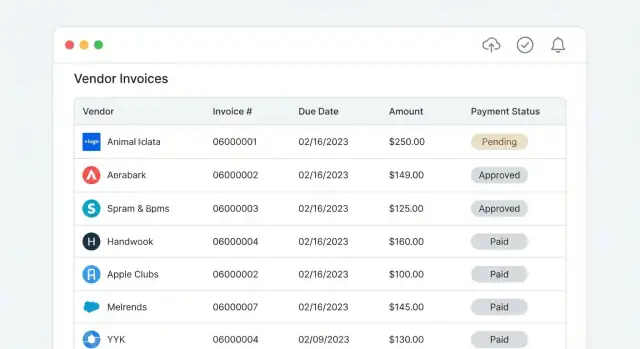
Offer a simplified view optimized for “What’s due and what’s late?” Group by due date (overdue, this week, next week) and make statuses visually distinct. Link each row to the invoice detail page for follow-up.
Keep navigation consistent: a left menu with Invoices, Approvals, Payments, and Reports (/reports), with breadcrumbs on detail pages.
Build Invoice Capture and Validation
Invoice capture is where messy real-world input enters your system, so make it forgiving for humans but strict on data quality. Start with a few reliable intake paths, then layer automation.
Choose intake methods
Support multiple ways to get an invoice into the app:
- Manual entry for edge cases and quick fixes.
- File upload from a desktop or shared drive.
- Email forwarding to a dedicated address (e.g., invoices@…) that creates a draft invoice automatically.
Keep the first version simple: every intake method should produce the same outcome—a draft invoice record with an attached source file.
Decide supported formats
At minimum, accept PDF and common image types (JPG/PNG). If vendors send structured files, add CSV import as a separate flow with a template and clear error messages.
Store the original file unchanged so finance can always reference the source.
Add validation that prevents downstream problems
Validate on save and on submission for approval:
- Required fields: vendor, invoice number, invoice date, total, currency, due date.
- Date logic: due date not before invoice date; warn on future invoice dates.
- Currency and amounts: consistent formatting, two-decimal rounding rules, and non-negative totals.
- Duplicate checks: same vendor + invoice number (and optionally amount/date) should trigger a warning or block.
Optional: OCR with human review
OCR can suggest fields from PDFs/images, but treat it as a proposal. Show confidence indicators and require a human to confirm or correct extracted values before the invoice can move forward.
Implement Approvals, Exceptions, and Change Control
Approvals are where invoice tracking stops being “a list” and becomes a real accounts payable process. The goal is simple: the right people review the right invoices, decisions are recorded, and any change after approval is controlled.
Configure approval rules
Start with a rules engine that’s easy to explain to non-technical users. Common routing rules include:
- By amount (e.g., under $1,000 → manager; over $10,000 → finance director)
- By cost center (route to the cost center owner)
- By vendor (certain vendors require procurement review)
- By department (marketing vs. IT may have different approvers)
Keep the first version predictable: one primary approver per step, and a clear next action.
Build an approval log (audit-friendly)
Every decision should create an immutable log entry: invoice ID, step name, actor, action (approved/rejected/sent back), timestamp, and comment. Keep this log separate from editable invoice fields, so you can always answer “who approved what and when.”
Handle exceptions: rework loops and rejection reasons
Invoices often need correction (missing PO, wrong coding, duplicate). Support “send back to AP” with required rework reasons and optional attachments. For rejections, capture standardized reasons (duplicate, incorrect amount, non-compliant) plus a free-text note.
Control changes after approval
After an invoice is approved, edits should be restricted. Two practical options:
- Lock sensitive fields (amount, vendor, bank details, line items)
- Require re-approval if key fields change, automatically resetting the invoice to a prior step and logging the change request
This prevents silent edits and keeps approvals meaningful.
Track Payments and Reconcile Status
Once invoices are approved, the app should shift from “who needs to sign off?” to “what’s the payment reality?” Treat payments as first-class records, not a single checkbox.
Define payment records
For each invoice, store one or more payment entries with:
- Method (ACH, wire, check, card, processor)
- Date/time (when sent, not just when recorded)
- Amount
- Reference ID (bank trace number, check number, processor transaction ID)
- Optional notes (fees, currency conversion, payment batch, who initiated)
This gives you an audit-friendly story without forcing users into free-text fields.
Support partial and multiple payments
Model payments as a one-to-many relationship: Invoice → Payments. Compute invoice totals like:
- Amount paid = sum(payments)
- Balance due = invoice total − amount paid
Status should reflect reality: Unpaid, Partially paid, Paid, and Overpaid (rare, but it happens with credits or duplicate payments).
Scheduled vs paid
Add a Scheduled state for payments with a planned timestamp (and optional expected settlement date). When money actually leaves, flip to Paid and capture the final timestamp and reference ID.
Reconciliation hooks
Build matching workflows that can connect payments to external evidence:
- Match to accounting/ERP entries by reference ID, amount, vendor, and date window
- Import bank exports (CSV/OFX) and suggest matches, then let users confirm
Set Up Notifications, Reminders, and Escalations
Notifications are the difference between a tidy queue and invoices that quietly go overdue. Treat them as a workflow feature—not a bolt-on.
Reminder rules for due dates
Start with two types of reminders: upcoming due dates and overdue invoices. A simple default works well (for example, 7 days before due, 1 day before due, then every 3 days overdue), but keep it configurable per company.
Make reminders smart enough to skip invoices that are Paid, Canceled, or On Hold, and to pause when an invoice is in a dispute.
Queue notifications for approvers
Approvers should get a nudge when an invoice enters their queue, and again if it’s still waiting after a defined SLA.
Escalations should be explicit: if no action happens within (say) 48 hours, notify the next approver or a finance admin, and mark the invoice as Escalated so it’s visible in the UI.
Let users tune what they receive
Give users control over:
- Channel: email vs. in-app
- Frequency: immediate vs. batched
- Quiet hours / weekends
For in-app alerts, a notification center plus a badge count is usually enough.
Add daily/weekly digest emails
Digests reduce noise while keeping people accountable. Include a short summary: invoices waiting for the user, items nearing due date, and anything escalated. Link directly to filtered views like /invoices?status=pending_approval or /invoices?due=overdue.
Finally, log every notification sent (and any user snooze/unsubscribe actions) to support troubleshooting and audits.
Add Integrations and Data Exchange
Integrations can save time, but they also add complexity (auth, rate limits, messy data). Treat them as optional until your core workflow is solid. A good MVP can still deliver value with clean exports your accounting team can import.
Start with a reliable export (MVP-friendly)
Ship a dependable CSV export first—filtered by date, vendor, status, or payment batch. Include stable IDs so re-exports don’t create duplicates in another system.
For example, export fields like: invoice_number, vendor_name, invoice_date, due_date, total_amount, currency, approval_status, payment_status, internal_invoice_id.
If you already expose an API, a JSON export endpoint can support lightweight automation later.
Plan formats, mappings, and “source of truth”
Before building QuickBooks/Xero/NetSuite/SAP connectors, write down:
- Which system owns vendor records, GL codes, and payment confirmation
- How you map fields (e.g., your Vendor → External Vendor ID)
- What happens when required fields are missing (block export vs. export with warnings)
A small “Integration Settings” screen helps: store external IDs, default accounts, tax handling, and export rules. Link it from /settings/integrations.
Handle sync conflicts and retries clearly
When you add two-way sync, expect partial failures. Use a queue with retries, and show people what happened:
- “Export failed: vendor missing External ID. Fix vendor and retry.”
- “Invoice already exists in Xero (ID …). Review mapping.”
Log every sync attempt with timestamps and payload summaries so finance can audit changes without guessing.
Security, Audit Trail, and Data Protection
Security is not a “nice to have” in accounts payable. Invoices contain vendor bank details, tax IDs, pricing, and internal approver notes—exactly the kind of data that can cause real damage if leaked or altered.
Audit trail: make every key change traceable
Treat the audit log as a first-class feature, not a debug tool. Record immutable events for the moments that matter: invoice submission, OCR/import results, field edits, approval decisions, reassignments, exceptions raised/resolved, and payment updates.
A useful audit entry typically includes: who did it, what changed (old → new), when it happened, and where it originated (UI, API, integration). Store it append-only so it can’t be rewritten after the fact.
Protect data in transit and at rest
Use TLS for all traffic (including internal service calls). Encrypt sensitive data at rest in your database and object storage (invoice PDFs/images). If you store bank details or tax identifiers, consider field-level encryption so the most sensitive values are protected even if a database snapshot is exposed.
Also limit who can download original invoice files; often fewer people need file access than need invoice status visibility.
Authentication, sessions, and access controls
Start with secure authentication (email/password with strong hashing, or SSO if your customers expect it). Add session controls: short-lived sessions, secure cookies, CSRF protection, and optional MFA for admins.
Enforce least privilege everywhere—especially for actions like editing approved invoices, changing payment status, or exporting data.
Retention and backups (keep it practical)
Define how long you keep invoices, logs, and attachments, and how you handle deletion requests. Set up regular backups and test restores so recovery is predictable after mistakes or outages.
Reporting and Dashboards
Reporting is where your app turns day-to-day invoice updates into clarity for finance and budget owners. Start with a few high-signal views that answer the questions people ask during month-end close.
The “must-have” reports
Build three to four core reports first, then expand based on real usage:
- Aging (0–30, 31–60, 61–90, 90+ days) to show stalled invoices and where time is being spent.
- Overdue invoices with vendor, due date, amount, current status, and the next action (who needs to approve, what’s missing).
- Spend by vendor (and optionally by department or cost center) to support budgeting and vendor negotiations.
- Approval cycle time (average and percentiles) to spot bottlenecks—e.g., “Legal review adds 6 days.”
Saved filters and exports for close
Add saved filters like “Due this week,” “Unapproved over $10k,” and “Invoices missing PO.” Make every table exportable (CSV/XLSX) with consistent columns so accountants can reuse the same templates each month.
Dashboards that fit on one screen
Keep charts simple: status counts, upcoming due totals, and a small “at risk” panel (overdue + high value). The goal is quick triage, not analytics.
Permission-aware reporting
Ensure reports respect role-based access control: users should only see invoices for their department or entities, and exports must enforce the same rules to prevent accidental data leakage.
Pick a Tech Stack and Simple Architecture
A vendor invoice app doesn’t need an exotic setup to be reliable. Optimize for speed of delivery, maintainability, and hiring—then add complexity only when you’ve proven you need it.
Choose a straightforward stack
Pick a mainstream, batteries-included option your team can support:
- React + Node (Express/NestJS) if you want a modern SPA and flexible APIs.
- Rails if you value conventions and fast CRUD development.
- Django if you want a strong admin, clear structure, and mature ecosystem.
Any of these can handle invoice capture, approvals, and payment status tracking well.
If you want to accelerate the first version even further, a vibe-coding platform like Koder.ai can help you stand up a working React-based UI and backend workflow quickly from a chat-driven spec—then iterate on approval rules, roles, and reports without waiting for a full traditional sprint cycle. When you’re ready, you can export the source code and continue development with your team.
Keep architecture simple (at first)
Start with one web app + one database (e.g., Postgres). Make a clean separation between UI, API, and database layers, but keep them in a single deployable service. You can split into microservices later if real scaling pressures appear.
Use background jobs for slow work
OCR, importing bank/ERP files, sending reminders, and generating PDFs can be slow or unpredictable. Run them via a job queue (Sidekiq/Celery/BullMQ) so your app stays responsive and failures can retry safely.
Plan attachment storage early
Invoices and receipts are central. Store files in cloud object storage (like S3-compatible storage) rather than your web server disk. Add:
- Virus scanning on upload
- Immutable originals (don’t overwrite; version instead)
- Signed URLs for secure downloads
This approach keeps the system dependable without overengineering.
Testing, Deployment, and Iteration Plan
A vendor invoice app only feels “simple” when it’s predictable. The fastest way to keep it predictable is to treat testing and deployment as product features, not afterthoughts.
Test what can break your money flow
Focus on the rules that change invoice outcomes.
- Write tests for status transitions (e.g., Draft → Submitted → Approved → Paid), including invalid jumps.
- Write tests for permissions and role-based access control (who can edit, approve, void, or mark paid).
- Test approval rules (amount thresholds, required approvers, exception paths, and re-approval after edits).
Add a small set of end-to-end tests that mimic real work: upload an invoice, route for approval, update payment status, and verify the audit trail.
Make demos and QA repeatable
Add sample data and scripts for demos and QA: a handful of vendors, invoices in different statuses, and a couple of “problem” invoices (missing PO, duplicate number, mismatched totals). This lets support, sales, and QA reproduce issues without touching production.
Deploy with a staging gate
Plan deployment with staging + production, environment variables, and logging from day one. Staging should mirror production settings so your invoice approval workflow behaves the same before release.
If you’re building on a platform like Koder.ai, features like snapshots and rollback can also help you test workflow changes (like approval routing updates) safely and revert quickly if a release introduces unexpected behavior.
Release in small, safe steps
Release iteratively: ship an MVP first (capture, approvals, payment status tracking), then add ERP/accounting integrations, then advanced automation like reminders and escalations. Keep each release tied to one measurable improvement (fewer late payments, fewer exceptions, faster approvals).
FAQ
Who should be the primary users for an MVP vendor invoice app?
Start with AP staff + approvers. That pair unlocks the core loop: invoices get captured, validated, approved, and tracked to payment.
Add finance admins, reporting audiences, and a vendor portal only after the workflow is stable and you’ve proven adoption.
What are the best MVP goals to define before building anything?
Pick 3 measurable outcomes and use them as acceptance criteria, for example:
- Fewer late payments (better due-date visibility and reminders)
- Faster approvals (clear queues and escalation)
- Cleaner records (one source of truth + audit log)
If a feature doesn’t improve one of these, push it to “later.”
How do we choose invoice and payment statuses without confusing the team?
Write down one official status chain and the trigger for each change, e.g.:
- Draft → Submitted (AP finishes required fields)
- Submitted → Approved/Rejected (approver decision logged)
- Approved → Scheduled (payment planned)
- Scheduled → Paid (bank/accounting confirmation + reference ID)
Avoid ambiguous states like “processed” unless you define exactly what it means.
What data model should we start with for invoices, approvals, and payments?
Minimum practical tables/collections:
- Vendor
- Invoice
- Approval (immutable decisions)
- Payment (one-to-many for partial/multiple payments)
- Attachment
Keep money amounts as integers (cents) to avoid rounding errors, and keep the original invoice file unchanged.
How do we prevent duplicate invoices from being entered or paid twice?
Enforce a unique constraint on (vendor_id, invoice_number). If needed, add a secondary check (amount/date window) for vendors that reuse numbering.
In the UI, show a clear “possible duplicate” warning with links to the matching invoices so AP can resolve it quickly.
Which roles and permissions are essential in an accounts payable workflow?
Use a small role set and action-based permissions:
- AP Admin: settings, overrides
- AP Clerk: create/upload, edit pre-approval
- Approver: approve/reject assigned items
- Finance Admin: confirm payments, reconcile, export
- Read-only: view only
Keep permissions tied to verbs like view, edit, approve, export rather than specific screens.
How should delegated approvals (out-of-office coverage) work?
Support delegation with:
- Start/end dates
- An audit note like “Approved by Delegate on behalf of X”
- Restricted creation (AP Admin or manager)
Also provide a simple page showing active delegations so coverage is visible and reviewable.
What invoice capture and validation rules prevent downstream issues?
Treat validation as a gate on save and on submit:
- Required fields: vendor, invoice number, invoice date, total, currency, due date
- Date rules: due date not before invoice date; warn on future invoice dates
- Amount rules: non-negative totals; consistent rounding
- Duplicate checks: block or warn based on policy
All intake methods (manual, upload, email) should create the same outcome: a draft invoice + original attachment.
How do we model partial payments and track “scheduled” vs “paid” accurately?
Store payments as first-class records with:
- Method, amount, sent/paid date
- Reference ID (trace/check/transaction number)
Compute:
- Amount paid = sum(payments)
- Balance due = invoice total − amount paid
This makes partial payments and reconciliation straightforward, and prevents “checkbox accounting.”
What’s the safest way to add accounting/ERP integrations without breaking the workflow?
Keep the first integration MVP-friendly:
- Ship a stable CSV export with internal IDs to prevent re-import duplicates
- Decide which system is the source of truth for vendors, GL codes, and payment confirmation
- Log every export/sync attempt with clear failure reasons and retries
Add two-way sync only after the internal workflow is reliable and audited.