

Build a Web App to Manage API Keys, Quotas & Usage Analytics
Learn how to design and build a web app that issues API keys, enforces quotas, tracks usage, and presents clear analytics dashboards with secure workflows.
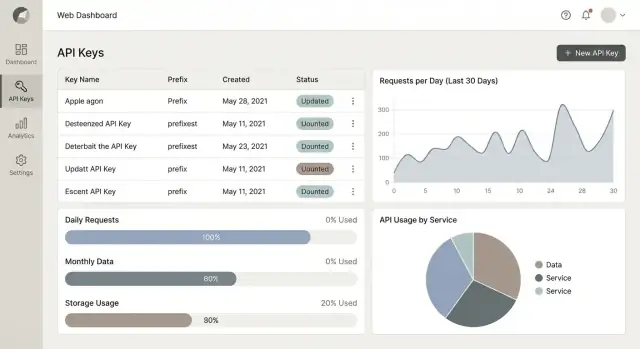
What You’re Building and Who It’s For
You’re building a web app that sits between your API and the people who consume it. Its job is to issue API keys, control how those keys can be used, and explain what happened—in a way that’s clear enough for both developers and non-developers.
At a minimum, it answers three practical questions:
- Who is calling the API? (Which customer, which app, which key)
- How much are they allowed to use? (Quotas, rate limits, plan rules)
- How much did they actually use? (Metering and analytics you can trust)
If you want to move fast on the portal and admin UI, tools like Koder.ai can help you prototype and ship a production-grade baseline quickly (React frontend + Go backend + PostgreSQL), while still keeping full control via source-code export, snapshots/rollback, and deployment/hosting.
Who uses it
A key-management app isn’t only for engineers. Different roles show up with different goals:
- Admins / platform owners want to create policies (limits, access levels), resolve incidents fast, and maintain control across many customers.
- Developers (your customers or internal teams) want self-serve key creation, simple docs, and quick answers when something breaks (“Why am I getting 429s?”).
- Finance and support teams want usage history, customer-level summaries, and data that can back up invoices, credits, or plan upgrades—without reading raw logs.
Core modules you’ll likely need
Most successful implementations converge on a few core modules:
- Keys: create keys, name/tag them, scope permissions, rotate, revoke, and view last-used.
- Quotas & rate limiting: define limits per key, per customer, per endpoint, and enforce them consistently.
- Usage metering: capture request events (or summaries), then aggregate them into daily/monthly usage.
- Analytics: dashboards that explain usage trends, top endpoints, errors, and throttling.
- Alerts: notify when usage spikes, quotas are near max, keys are misused, or errors surge.
Scope: start simple, then expand
A strong MVP focuses on key issuance + basic limits + clear usage reporting. Advanced features—like automated plan upgrades, invoicing workflows, proration, and complex contract terms—can come later once you trust your metering and enforcement.
A practical “north star” for the first release: make it easy for someone to create a key, understand their limits, and see their usage without filing a support ticket.
Requirements Checklist (MVP vs Later)
Before you write code, decide what “done” means for the first release. This kind of system grows quickly: billing, audits, and enterprise security show up sooner than you expect. A clear MVP keeps you shipping.
MVP: the minimum that creates real value
At a minimum, users should be able to:
- Create and revoke API keys (with a name/label and optional expiration)
- Set quotas (e.g., requests/day or requests/month) per key or per project
- Enforce rate limiting (e.g., requests/minute) to protect your API
- See usage charts (simple daily totals, top keys, and error rates)
- Track basic audit events (key created/revoked, quota changed) for support and accountability
If you can’t safely issue a key, limit it, and prove what it did, it’s not ready.
Non-functional needs you should decide upfront
- Performance: what’s the peak requests/sec you must meter without dropping events?
- Reliability: do you need “never lose usage events,” or is “eventual accuracy” acceptable?
- Data retention: how long do you keep raw events vs aggregated totals (e.g., 7 days raw, 13 months aggregated)?
Tenant model: single org vs multi-tenant
Pick one early:
- Single org: faster to build, fewer role/permission edges.
- Multi-tenant SaaS: requires tenant isolation, per-tenant quotas, and admin roles from day one.
“Later” features worth planning for
Rotation flows, webhook notifications, billing exports, SSO/SAML, per-endpoint quotas, anomaly detection, and richer audit logs.
Success metrics (make them measurable)
- Time to issue keys: e.g., under 2 minutes from signup to first key
- Metering accuracy: e.g., <0.5% discrepancy between gateway counts and aggregates
- Support load: fewer “why was I blocked?” tickets; clear quota/rate-limit explanations
High-Level Architecture Options
Your architecture choice should start with one question: where do you enforce access and limits? That decision affects latency, reliability, and how quickly you can ship.
Option 1: Enforce at an API gateway
An API gateway (managed or self-hosted) can validate API keys, apply rate limits, and emit usage events before requests reach your services.
This is a strong fit when you have multiple backend services, need consistent policies, or want to keep enforcement out of application code. The trade-off: gateway configuration can become its own “product,” and debugging often requires good tracing.
Option 2: Enforce at a reverse proxy
A reverse proxy (e.g., NGINX/Envoy) can handle key checks and rate limiting with plugins or external auth hooks.
This works well when you want a lightweight edge layer, but it can be harder to model business rules (plans, per-tenant quotas, special cases) without building supporting services.
Option 3: Enforce in app middleware
Putting checks in your API application (middleware) is usually fastest for an MVP: one codebase, one deploy, simpler local testing.
It can get tricky as you add more services—policy drift and duplicated logic are common—so plan an eventual extraction into a shared component or edge layer.
Separate concerns early
Even if you start small, keep boundaries clear:
- Auth (is the key valid?), quota/rate limit (is it allowed now?), metering (record what happened), analytics UI (show it).
Sync vs async tracking
For metering, decide what must happen on the request path:
- Synchronous: increment counters before responding (accurate enforcement, higher latency).
- Asynchronous: emit events to a queue/log for aggregation (faster requests, eventual consistency for reports).
Plan for scale: hot vs cold paths
Rate limit checks are the hot path (optimize for low-latency, in-memory/Redis). Reports and dashboards are the cold path (optimize for flexible queries and batch aggregation).
Data Model for Keys, Quotas, and Usage
A good data model keeps three concerns separate: who owns access, what limits apply, and what actually happened. If you get that right, everything else—rotation, dashboards, billing—gets simpler.
Core entities (what you need on day one)
At minimum, model these tables (or collections):
- Organization: the tenant boundary (billing owner, members).
- Project/App: a container for keys and settings (often maps to one API client).
- API Key: metadata about a credential (name, status, created_at, last_used_at).
- Plan: a bundle of limits and features (e.g., Free, Pro).
- Quota: the specific limit rules (e.g., 10k requests/day, 60 req/min).
- Usage Event: the raw record of usage (timestamp, project_id, endpoint, status code, units).
Store metadata separately from secrets
Never store raw API tokens. Store only:
- A key prefix (first 6–8 chars) for display/search.
- A verifier for the token (typically SHA-256 or HMAC-SHA-256 with a server-side pepper over a random 32–64 byte secret) for verification.
- Optional: scopes, environment (prod/sandbox), and expires_at.
This lets you show “Key: ab12cd…”, while keeping the actual secret unrecoverable.
Auditability isn’t optional
Add audit tables early: KeyAudit and AdminAudit (or a single AuditLog) capturing:
- actor_id (user/service), action, target_type/id
- before/after (for quota edits)
- ip/user_agent, timestamp
When a customer asks “who revoked my key?”, you’ll have an answer.
Time windows and counters
Model quotas with explicit windows: per_minute, per_hour, per_day, per_month.
Store counters in a separate table like UsageCounter keyed by (project_id, window_start, window_type, metric). That makes resets predictable and keeps analytics queries fast.
For portal views, you can aggregate Usage Events into daily rollups and link to /blog/usage-metering for deeper detail.
Authentication, Authorization, and Roles
If your product manages API keys and usage, your app’s own access control needs to be stricter than a typical CRUD dashboard. A clear role model keeps teams productive while preventing “everyone is an admin” drift.
Role design that maps to real teams
Start with a small set of roles per organization (tenant):
- Owner: full control, billing ownership, can manage org settings and delete the org.
- Admin: manages users, projects, keys, quotas, and security settings.
- Developer: can create/rotate keys for assigned projects, view usage, but can’t change billing or org-wide security.
- Read-only: can view keys (masked), quotas, and analytics.
- Finance: can view invoices/usage cost reports, export data, but can’t manage keys.
Keep permissions explicit (e.g., keys:rotate, quotas:update) so you can add features without reinventing roles.
Secure login for humans
Use standard username/password only if you must; otherwise support OAuth/OIDC. SSO is optional, but MFA should be required for owners/admins and strongly encouraged for everyone.
Add session protections: short-lived access tokens, refresh token rotation, and device/session management.
Authentication for APIs you protect
Offer a default API key in a header (e.g., Authorization: Bearer <key> or X-API-Key). For advanced customers, add optional HMAC signing (prevents replay/tampering) or JWT (good for short-lived, scoped access). Document these clearly in your developer portal.
Tenant isolation: non-negotiable
Enforce isolation at every query: org_id everywhere. Avoid relying on UI filtering alone—apply org_id in database constraints, row-level policies (if available), and service-layer checks, and write tests that attempt cross-tenant access.
API Key Lifecycle: Create, Rotate, Revoke
A good key lifecycle keeps customers productive while giving you fast ways to reduce risk when something goes wrong. Design the UI and API so the “happy path” is obvious, and the safer options (rotation, expiry) are the default.
Create: capture intent, not just a string
In the key creation flow, ask for a name (e.g., “Prod server”, “Local dev”), plus scopes/permissions so the key can be least-privilege from day one.
If it fits your product, add optional restrictions like allowed origins (for browser-based usage) or allowed IPs/CIDRs (for server-to-server). Keep these optional, with clear warnings about lockouts.
After creation, show the raw key only once. Provide a big “Copy” button, plus lightweight guidance: “Store in a secret manager. We can’t show this again.” Link directly to setup instructions like /docs/auth.
Rotate: make it a routine, not an incident
Rotation should follow a predictable pattern:
- Create a new key with the same scopes and restrictions.
- Deploy/update the integration to use the new key.
- Verify traffic is flowing.
- Revoke the old key.
In the UI, provide a “Rotate” action that creates a replacement key and labels the previous one as “Pending revoke” to encourage cleanup.
Revoke and expire: immediate and scheduled
Revocation should disable the key immediately and log who did it and why.
Also support scheduled expiry (e.g., 30/60/90 days) and manual “expires on” dates for temporary contractors or trials. Expired keys should fail predictably with a clear auth error so developers know what to fix.
Quotas and Rate Limiting: How to Enforce Usage
Rate limits and quotas solve different problems, and mixing them up is a common source of confusing “why was I blocked?” support tickets.
Rate limits vs quotas
Rate limits control bursts (e.g., “no more than 50 requests per second”). They protect your infrastructure and keep one noisy customer from degrading everyone else.
Quotas cap total consumption over a period (e.g., “100,000 requests per month”). They’re about plan enforcement and billing boundaries.
Many products use both: a monthly quota for fairness and pricing, plus a per-second/per-minute rate limit for stability.
Pick an enforcement algorithm
For real-time rate limiting, choose an algorithm you can explain and implement reliably:
- Token bucket: tokens refill over time; each request spends a token. Great for allowing small bursts while keeping an average rate.
- Leaky bucket: requests “drip” out at a constant pace. Great for smoothing traffic but can feel stricter.
Token bucket is usually the better default for developer-facing APIs because it’s predictable and forgiving.
Choose where counters live
You typically need two stores:
- Redis (or similar) for fast, atomic, real-time checks at the gateway/edge.
- Your database for durable reporting and billing-grade history.
Redis answers “can this request run right now?” The DB answers “how much did they use this month?”
Define what counts as usage
Be explicit per product and per endpoint. Common meters include requests, tokens, bytes transferred, endpoint-specific weights, or compute time.
If you use weighted endpoints, publish the weights in your docs and portal.
Make error responses actionable
When blocking a request, return clear, consistent errors:
- 429 Too Many Requests for rate limiting. Include
Retry-Afterand optionally headers likeX-RateLimit-Limit,X-RateLimit-Remaining,X-RateLimit-Reset. - 402 Payment Required (or 403) for over-quota access on paid plans. Include the current period usage, quota limit, and a link to /billing or /pricing.
Good messages reduce churn: developers can back off, add retries, or upgrade without guessing.
Usage Metering: Collecting and Aggregating Events
Usage metering is the “source of truth” for quotas, invoices, and customer trust. The goal is simple: count what happened, consistently, without slowing down your API.
What to log per request (and what not to)
For each request, capture a small, predictable event payload:
- timestamp (server time)
- key_id (or token identifier)
- endpoint (route name, not full URL)
- status (e.g., 200, 401, 429)
- units (how much to count: 1 request, tokens, bytes, etc.)
Avoid logging request/response bodies. Redact sensitive headers by default (Authorization, cookies) and treat PII as “opt-in with strong need.” If you must log something for debugging, store it separately with a shorter retention window and strict access controls.
Keep the API fast with an event pipeline
Don’t aggregate metrics inline during the request. Instead:
- API writes an event to a queue/stream (or lightweight append-only table).
- A worker consumes events and updates daily/hourly aggregates.
This keeps latency stable even when traffic spikes.
Idempotency, retries, and double-counting
Queues can deliver messages more than once. Add a unique event_id and enforce deduplication (e.g., unique constraint or “seen” cache with TTL). Workers should be safe to retry so a crash doesn’t corrupt totals.
Retention: raw short-term, aggregates long-term
Store raw events briefly (days/weeks) for audits and investigations. Keep aggregated metrics much longer (months/years) for trends, quota enforcement, and billing readiness.
Analytics Dashboards That People Actually Use
A usage dashboard shouldn’t be a “nice chart” page. It should answer two questions quickly: what changed? and what should I do next? Design around decisions—debugging spikes, preventing overages, and proving value to a customer.
The core views to ship first
Start with four panels that map to everyday needs:
- Usage over time (requests/day or requests/min), with a clear comparison to the prior period.
- Top endpoints (by volume and by cost/weight if you have weighted quotas).
- Error rate (4xx vs 5xx) so teams can separate client mistakes from service issues.
- Latency (optional) p50/p95; include only if you can measure it reliably.
Make it actionable, not decorative
Every chart should connect to a next step. Show:
- Quota remaining for the current cycle (e.g., 18,200 of 50,000 left)
- Projected usage at the current pace, with a simple “will exceed / will stay under” callout
When projected overage is likely, link directly to the upgrade path: /plans (or /pricing).
Filtering that matches how people work
Add filters that narrow investigations without forcing users into complex query builders:
- Time range (last 24h, 7d, 30d, custom)
- API key, project, environment (prod/staging)
- Endpoint and status code family
Export and API access
Include CSV download for finance and support, and provide a lightweight metrics API (e.g., GET /api/metrics/usage?from=...&to=...&key_id=...) so customers can pull usage into their own BI tools.
Alerts, Notifications, and Billing-Readiness
Alerts are the difference between “we noticed a problem” and “customers noticed first.” Design them around the questions users ask under pressure: What happened? Who is affected? What should I do next?
What to Alert On (and When)
Start with predictable thresholds tied to quotas. A simple pattern that works well is 50% / 80% / 100% of quota usage within a billing period.
Add a few high-signal behavioral alerts:
- Unusual spikes: usage that deviates sharply from a tenant’s recent baseline (e.g., 3× hourly average)
- Authentication failures: sudden increase in invalid API key usage or signature errors
- Rate-limit pressure: sustained throttling events that indicate a misconfigured client
Keep alerts actionable: include tenant, API key/app, endpoint group (if available), time window, and a link to the relevant view in your portal (e.g., /dashboard/usage).
Notification channels
Email is the baseline because everyone has it. Add webhooks for teams that want to route alerts into their own systems. If you support Slack, treat it as optional and keep setup lightweight.
A practical rule: provide a per-tenant notification policy—who gets which alerts, and at what severity.
Simple usage reports people read
Offer a daily/weekly summary that highlights total requests, top endpoints, errors, throttles, and “change vs last period.” Stakeholders want trends, not raw logs.
Billing-readiness without committing to billing
Even if billing is “later,” store:
- Plan history (which plan a tenant was on, and when)
- Pricing effective dates (so recalculations are consistent)
This lets you backfill invoices or previews without rewriting your data model.
Clear messaging template
Every message should state: what happened, impact, and next step (rotate key, upgrade plan, investigate client, or contact support via /support).
Security and Compliance Basics
Security for an API-key management app is less about fancy features and more about careful defaults. Treat every key as a credential, and assume it will eventually be copied into the wrong place.
Protecting API keys
Never store keys in plaintext. Store a verifier derived from the secret (commonly SHA-256 or HMAC-SHA-256 with a server-side pepper) and only show the user the full secret once at creation time.
In the UI and logs, display only a non-sensitive prefix (for example, ak_live_9F3K…) so people can identify a key without exposing it.
Provide practical “secret scanning” guidance: remind users not to commit keys to Git, and link to their tooling docs (for example, GitHub secret scanning) in your portal docs at /docs.
Admin protections (often overlooked)
Attackers love admin endpoints because they can create keys, raise quotas, or disable limits. Apply rate limiting to admin APIs too, and consider an IP allowlist option for admin access (useful for internal teams).
Use least privilege: separate roles (viewer vs admin), and restrict who can change quotas or rotate keys.
Audit logs and retention
Record audit events for key creation, rotation, revocation, login attempts, and quota changes. Keep logs tamper-resistant (append-only storage, restricted write access, and regular backups).
Adopt compliance basics early: data minimization (store only what you need), clear retention controls (auto-delete old logs), and documented access rules.
Threat scenarios to design for
Key leakage, replay abuse, scraping of your portal, and “noisy neighbor” tenants consuming shared capacity. Design mitigations (hashing/verifiers, short-lived tokens where possible, rate limits, and per-tenant quotas) around these realities.
Admin and Developer Portal UX
A great portal makes the “safe path” the easiest path: admins can quickly reduce risk, and developers can get a working key and a successful test call without emailing anyone.
Admin UX: speed, control, and confidence
Admins usually arrive with an urgent task (“revoke this key now”, “who created this?”, “why did usage spike?”). Design for fast scanning and decisive action.
Use quick search that works across key ID prefixes, app names, users, and workspace/tenant names. Pair it with clear status indicators (Active, Expired, Revoked, Compromised, Rotating) and timestamps like “last used” and “created by”. Those two fields alone prevent a lot of accidental revokes.
For high-volume operations, add bulk actions with safety rails: bulk revoke, bulk rotate, bulk change quota tier. Always show a confirmation step with a count, and summarize impact (“38 keys will be revoked; 12 have been used in the last 24h”).
Provide an audit-friendly details panel for each key: scopes, associated app, allowed IPs (if any), quota tier, and recent errors.
Developer UX: make success immediate
Developers want to copy, paste, and move on. Put clear docs next to the key creation flow, not buried elsewhere. Offer copyable curl examples and a language toggle (curl, JS, Python) if you can.
Show the key once with a “copy” button, plus a short reminder about storage. Then guide them through a “Test call” step that runs a real request against a sandbox or a low-risk endpoint. If it fails, provide error explanations in plain English, including common fixes:
- “Invalid key” → check header name and whitespace
- “Forbidden” → missing scope/role
- “Rate limited” → how to view quotas and retry-after
Self-serve onboarding in minutes
A simple path works best: Create first key → make a test call → see usage. Even a tiny usage chart (“Last 15 minutes”) builds trust that metering works.
Link directly to relevant pages using relative routes like /docs, /keys, and /usage.
Accessibility and clarity
Use plain labels (“Requests per minute”, “Monthly requests”) and keep units consistent across pages. Add tooltips for terms like “scope” and “burst”. Ensure keyboard navigation, visible focus states, and sufficient contrast—especially on status badges and error banners.
Deployment, Monitoring, and Testing
Getting this kind of system into production is mostly about discipline: predictable deploys, clear visibility when something breaks, and tests focused on the “hot paths” (auth, rate checks, and metering).
Deployment setup (secrets, env vars, migrations)
Keep configuration explicit. Store non-sensitive settings in environment variables (e.g., rate-limit defaults, queue names, retention windows) and put secrets in a managed secrets store (AWS Secrets Manager, GCP Secret Manager, Vault). Avoid baking keys into images.
Run database migrations as a first-class step in your pipeline. Prefer a “migrate then deploy” strategy for backward-compatible changes, and plan for safe rollbacks (feature flags help). If you’re multi-tenant, add sanity checks to prevent migrations that accidentally scan every tenant table.
If you’re building the system on Koder.ai, snapshots and rollback can be a practical safety net for these early iterations (especially while you’re still refining enforcement logic and schema boundaries).
Observability that answers real questions
You need three signals: logs, metrics, and traces. Instrument rate limiting and quota enforcement with metrics such as:
- Allowed vs rejected requests (by API key, endpoint, and tenant)
- “Reason codes” for rejects (rate limit, quota exceeded, invalid key)
- Metering pipeline lag (event ingest → aggregation delay)
Create a dashboard specifically for rate-limit rejects so support can answer “why is my traffic failing?” without guessing. Tracing helps spot slow dependencies on the critical path (DB lookups for key status, cache misses, etc.).
Backups and recovery priorities
Treat config data (keys, quotas, roles) as high-priority and usage events as high-volume. Back up configuration frequently with point-in-time recovery.
For usage data, focus on durability and replay: a write-ahead log/queue plus re-aggregation is often more practical than frequent full backups.
Testing and rollout plan
Unit-test limit logic (edge cases: window boundaries, concurrent requests, key rotation). Load-test the hottest paths: key validation + counter updates.
Then roll out in phases: internal users → limited beta (select tenants) → GA, with a kill switch to disable enforcement if needed.
FAQ
What’s the minimum viable feature set for an API key management portal?
Focus on three outcomes:
- Issue and revoke keys safely (show the secret once, support expiry).
- Enforce basic limits (rate limits + a simple daily/monthly quota).
- Explain usage and blocks (a small dashboard + clear 429/over-quota messages).
If users can create a key, understand their limits, and verify usage without filing a ticket, your MVP is doing its job.
Should I enforce API keys and limits at a gateway, reverse proxy, or in application middleware?
Pick based on where you want consistent enforcement:
- API gateway: best for multiple services and centralized policy; can be harder to debug without strong tracing.
- Reverse proxy: lightweight edge enforcement, but complex plan rules may push you toward extra services.
- App middleware: fastest MVP (one codebase), but watch for duplicated logic as you add services.
A common path is middleware first, then extract to a shared edge layer when the system grows.
How should I store API keys securely in my database?
Store metadata separately from the secret:
- Save a prefix (first 6–8 chars) for display/search.
- Save a hash for verification (never the raw token).
- Track lifecycle fields like
created_at,last_used_at,expires_at, andstatus.
In the UI, show the full key only once at creation and make it clear it can’t be recovered later.
What’s the difference between rate limits and quotas, and do I need both?
They solve different problems:
- Rate limits cap bursts (e.g., 60 req/min) to protect reliability.
- Quotas cap total usage over a window (e.g., 100k/month) for plan enforcement and billing boundaries.
Many APIs use both: a monthly quota plus a per-second/per-minute rate limit to keep traffic stable.
How do I meter API usage without slowing down my API?
Use a pipeline that keeps the request path fast:
- On each request, emit a small usage event (timestamp, key id, endpoint, status, units).
- Write it to a queue/stream (or append-only log).
- A worker aggregates into hourly/daily/monthly totals.
This avoids slow “counting” in-line while still producing billing-grade rollups.
How do I prevent double-counting in a usage event pipeline?
Assume events can be delivered more than once and design for retries:
- Add a unique
event_idper request. - Deduplicate in the consumer (unique constraint, or a “seen IDs” cache with TTL).
- Make aggregation updates idempotent so a worker crash doesn’t corrupt totals.
This is essential if you’ll later use usage for quotas, invoices, or credits.
What should I include in audit logs for a key and quota management system?
Record who did what, when, and from where:
- Key lifecycle: create, rotate, revoke, expire.
- Policy changes: quota/rate limit edits (store before/after).
- Auth/admin activity: logins, role changes, suspicious spikes.
Include actor, target, timestamp, and IP/user-agent. When support asks “who revoked this key?”, you’ll have a definitive answer.
How should I design roles and permissions for a multi-tenant API portal?
Use a small, explicit role model and fine-grained permissions:
- Roles like Owner, Admin, Developer, Read-only, Finance.
- Permissions like
keys:rotateandquotas:updateso you can add features without redefining roles.
Enforce tenant isolation everywhere (e.g., org_id on every query), not just via UI filters.
How long should I retain raw usage events vs aggregated metrics?
A practical approach is raw short-term, aggregates long-term:
- Keep raw events for days/weeks for investigations.
- Keep rollups (daily/monthly totals) for months/years for trends and billing readiness.
Decide this up front so storage costs, privacy posture, and reporting expectations stay predictable.
What should my API return when a request is blocked, and how do I make it actionable?
Make blocks easy to debug without guesswork:
- For rate limiting, return 429 with
Retry-Afterand (optionally)X-RateLimit-*headers. - For over-quota, return 402 (or 403) and include the current period usage, limit, and a link to the next step (e.g.,
/plansor/billing).
Pair this with portal pages that answer “why was I blocked?” and let users verify usage in /usage (and deeper details in /blog/usage-metering if you have it).