

Building a Web App for Centralized Access Request Reviews
Learn how to design and build a web app that centralizes access requests, routes approvals, records decisions, and supports audits with clear roles and controls.
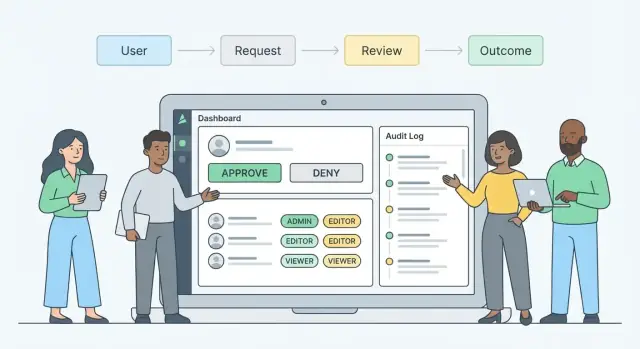
What a Centralized Access Review App Does
Access requests tend to show up everywhere: a quick Slack message to “add me to the project,” an email thread with three managers CC’d, a ticket in one of several queues, and sometimes a spreadsheet someone updates “for now.” The result is predictable: requests get missed, approvals are inconsistent, and nobody can confidently answer who approved what (or why).
A centralized access review app fixes this by giving access requests a single, structured home.
“Centralized review” in plain terms
Centralized review means every request flows into one inbox (or queue) with consistent rules for what information is required, who must approve, and how decisions are recorded.
Instead of asking reviewers to interpret free-form messages, the app guides requesters through a standard form, routes the request to the right approvers, and captures a traceable decision trail. Think: one system of record for access decisions, not a collection of screenshots and chat history.
Who benefits (and how)
- Requesters benefit because they know where to submit a request, what details are needed, and how to check status without pinging people.
- Approvers benefit because they receive complete requests in a consistent format, can make quick yes/no decisions with context, and can delegate or escalate when needed.
- IT and security benefit because they can enforce least privilege, reduce ad-hoc exceptions, and standardize the approval process across teams.
- Auditors benefit because the app can produce an audit trail: who requested, who approved, when it happened, what access was granted, and when it expired or was removed.
What this article will focus on
This guide isn’t about building a full identity platform from scratch. It focuses on the practical core: designing an access request workflow, the data model behind resources and entitlements, and safety basics like approvals, traceability, and sensible controls. By the end, you should have a clear picture of what the app needs to do before you choose frameworks or start coding.
Users, Roles, and Responsibilities
A centralized access review app lives or dies by clarity: who is involved, what they’re allowed to do, and what they’re explicitly prevented from doing. Start by defining a small set of roles, then map every screen and action to those roles.
Core actors in an access request
Requester (employee/contractor): Submits the request, provides business justification, and tracks status. They should be able to view their own requests, add comments, and cancel a pending request—but not see internal reviewer notes meant for approvers.
Manager: Confirms the request aligns with the person’s job and that the timing makes sense. Managers typically can approve/reject, comment, request changes, and view direct reports’ requests.
Resource owner (system/app/data owner): Validates whether the requested entitlement is appropriate for the resource and can approve/reject based on risk, licensing, and operational constraints.
IT admin / fulfillment team: Implements approved access (or triggers automation). They should be able to view approved requests, perform fulfillment steps, attach evidence (screenshots/log extracts), and mark fulfillment complete—without changing approvals.
Security/Compliance reviewer (optional step): Reviews higher-risk access (e.g., admin roles, sensitive datasets). They can approve/reject, add required controls (MFA, ticket references), or require time-bound access.
Auditor: Read-only access to search, filter, and export evidence. No ability to comment in-line on live requests.
Permissions: what each role can see and do
Define permissions at the action level: view, approve/reject, delegate, comment, and export. Keep it strict: reviewers should only see requests they’re assigned to, plus any policy-driven visibility (e.g., managers see their team).
Separation of duties (SoD)
Prevent self-approval and circular approval chains. Common rules:
- A requester cannot approve their own request.
- A manager cannot approve access that grants them control over their own approvals (e.g., admin of the approval system).
- For high-privilege roles, don’t allow a single reviewer to be the only gate: require a second reviewer (security or another owner).
Temporary coverage and delegations
Plan for out-of-office from day one. Support time-bound delegations (start/end dates), with an audit record of who delegated to whom. Show delegations clearly in the approval UI and allow emergency reassignment by an admin—with a reason required.
Access Request Types and Required Data
A centralized access review app works best when it treats requests as structured objects, not free-form messages. Standardized inputs make routing predictable, reduce back-and-forth, and improve your audit trail.
Core request types
Most teams can cover the majority of needs with four request types:
- New access: grant a user access to a resource for the first time.
- Change access: modify an existing entitlement (for example, Reader → Admin).
- Remove access: revoke access proactively (offboarding, role change, least privilege cleanup).
- Extension: keep time-bound access longer than originally approved.
Each type should map cleanly to your RBAC model (role, group, permission set) so fulfillment is unambiguous.
Required data (and why it matters)
At minimum, capture:
- User (requester vs. subject): who needs the access.
- Resource: system/app/project the entitlement applies to.
- Access level: role/group/permission requested.
- Business reason: short justification reviewers can evaluate.
- Duration: permanent vs. time-bound, with an end date for temporary access.
For higher-risk resources, require extra fields to support consistent access governance:
- Ticket link (e.g., incident/change request): ties access to documented work.
- Training confirmation: acknowledgement of required security/compliance training.
- Data sensitivity: whether production data, PII, or finance systems are involved.
Status model to keep everyone aligned
Define a clear lifecycle so reviewers, fulfillers, and requesters always know what’s next:
Draft → Submitted → In Review → Approved/Denied → Fulfillment In Progress → Fulfilled → Expired/Revoked
Keeping “Fulfilled” separate is critical: an approval isn’t complete until access is actually provisioned (manually or via SSO/provisioning integration). “Expired” (or “Revoked”) helps enforce least privilege for time-bound grants.
Workflow Design: Routing, Escalations, and Exceptions
A good workflow does two things at once: it moves routine requests quickly, and it slows down only when risk or ambiguity is high. The key is making “who approves what” explicit, predictable, and easy to audit.
Map clear approval paths
Start with a default approval chain that matches how decisions are typically made. A common pattern is:
- Manager approval (is this access needed for the role and current work?)
- Resource owner approval (does this align with how the system should be used?)
- Security approval (conditional) for sensitive resources or elevated entitlements
Keep the path visible in the request view so reviewers know what happens next and requesters know what to expect.
Rule-based routing (not one-size-fits-all)
Hard-coding approval routes leads to constant exceptions and admin work. Instead, define routing rules based on:
- Resource (e.g., “Finance ERP” always needs owner approval)
- Risk level (e.g., admin roles, production access, write privileges)
- Requester attributes (department, location, employment type)
Rules should be understandable by non-engineers. Use a “when/then” style editor (or a simple table) and include a safe fallback route when no rule matches.
SLAs, escalations, and auto-expiry
Approvals stall unless you design for human behavior. Define SLAs per step (e.g., manager: 2 business days; owner: 3 days) and implement:
- Reminders before the SLA expires
- Escalation to a delegate or next-level approver
- Reassignment when the reviewer is out of office
- Auto-expire pending requests after a set window, with a clear “resubmit” path
Exceptions that stay controlled
You’ll need exceptions, but they must be structured:
- Fast-track for low-risk access (still logged)
- Emergency access with time limits and mandatory post-approval review
- Manual overrides only for designated admins, requiring justification and an audit note
Treat exceptions as first-class workflow states, not side conversations in chat. That’s how you preserve speed without losing accountability.
UI and Reviewer Experience
A centralized review app succeeds or fails on how quickly reviewers can make a confident decision. The UI should minimize hunting for context, reduce back-and-forth, and make “the safe choice” obvious.
Core screens you’ll need
Request form should feel like a guided checkout: pick the resource, select the access level, add a clear business justification, choose duration (if applicable), and attach supporting links or files. Use progressive disclosure—only show advanced fields when needed (e.g., emergency access or temporary access).
Reviewer inbox is the daily workspace. Keep it scannable: requester, resource, entitlement, due date/SLA, and a simple risk badge. Useful filters include: “High risk,” “Due soon,” “My team,” and “Waiting for info.”
Request detail is where decisions happen. Put decision controls at the top, and the evidence directly underneath.
Admin settings should let admins manage forms, routing rules, templates, and UI labels without redeploying.
Make decisions easy with the right context
Reviewers should see:
- Current access for the requester (what they already have)
- Peer access hints (e.g., “8 people in Finance have this role”) with privacy-safe aggregation
- Risk tags (sensitive data, production access, external sharing, elevated privileges)
- Justification quality prompts (“What task? For how long? What ticket?”)
Present this in a consistent “Context” panel so reviewers learn where to look.
Reviewer actions (beyond approve/deny)
Support common real-world outcomes:
- Approve, Deny (with required reason)
- Ask for info (sends questions back to requester, pauses SLA)
- Delegate (with guardrails: only to allowed reviewers)
- Approve with changes (swap entitlement, shorten duration, add conditions)
Accessibility and usability basics
Use clear labels (avoid internal acronyms), large click targets, and keyboard navigation for inbox triage and decision buttons. Provide strong focus states, high-contrast status badges, and mobile-safe layouts for quick approvals. Keep confirmations explicit (“You are approving Admin access to X”) and prevent accidental double-submits with visible loading states.
Data Model for Resources, Entitlements, and Requests
A clean data model is what keeps an access review app understandable as it scales. If reviewers can’t tell what’s being requested, why, and what happened next, the UI and audit trail will both suffer.
Define “resources” vs. “entitlements”
Start by separating the thing being protected from the specific access you can grant:
- Resource: an application, database, folder, SaaS tenant, or even an environment (Prod/Dev).
- Entitlement: a group, role, permission set, database grant, or folder ACL entry tied to a resource.
This lets you model common patterns like “one app, many roles” or “one database, many schemas” without forcing everything into a single “role” concept.
Model the request and its journey
At minimum, you want these core relationships:
- User → creates a Request for one or more Request items
- Each request item generates one or more Approvals (manager, owner, security)
- Approved items create Fulfillment tasks (automated provisioning or a manual ticket)
Keep approvals as first-class records, not fields on the request. That makes routing, re-approvals, and evidence collection much easier.
Time-bound access: effective dates that mean something
Store access timing at the request-item level:
- Start date, end date, and reason
- Extension history as an append-only log (who extended, from/to, justification)
This structure supports least privilege and prevents “temporary” access from becoming permanent by accident.
Retention and export without clutter
Plan retention by record type: requests and approvals often need long-term retention; transient notifications usually don’t. Add export-friendly identifiers (request number, resource key, entitlement key) so auditors can filter and reconcile data without custom queries.
Identity and Directory Integrations
Your app can’t review access requests reliably if it doesn’t know who people are, where they sit in the org, and what they already have. Identity and directory integrations become the source of truth for that context—and they prevent approvals from being based on stale spreadsheets.
Choose your identity source of truth
Start by deciding which system owns which facts:
- Authentication (who can sign in): usually an SSO provider (Okta, Azure AD, Google Workspace) using SAML/OIDC.
- Workforce status (who should exist): often HR (Workday, BambooHR) for hire dates, termination, contractor end dates.
- Org structure and groups (who reports to whom, current memberships): typically a directory (Azure AD, AD, Google) or an HR + directory mix.
Many teams use a hybrid model: HR for employment status and department, directory for manager relationships and group memberships.
Import the org data you’ll depend on
At minimum, sync:
- User profile and identifiers (email, employee ID)
- Manager and reporting chain (for routing)
- Department / cost center (for policy-based approvals)
- Employment status (active, leave, terminated)
- Current group memberships / entitlements (to detect duplicates and enforce least privilege)
Design syncs as incremental (delta) pulls when possible, and store “last verified” timestamps so reviewers can see how fresh the data is.
Plan for lifecycle events
Your workflow should react to changes automatically: new hires may need baseline access packages; transfers can trigger re-review of existing entitlements; terminations and contractor expiry should queue immediate revocation tasks and block new requests.
Handle failures explicitly
Document what happens when data is messy: stale manager info (route to department approver), missing users (allow manual identity linking), duplicate identities (merge rules and safe blocking), and directory outages (graceful degradation plus retry queues). Clear failure paths keep approvals credible and auditable.
Provisioning, Fulfillment, and Revocation
Approvals are only half the job. Your app also needs a clear path from “Approved” to “Access is actually granted,” plus a reliable way to remove access later.
Picking a fulfillment approach
Most teams use one (or a mix) of these models:
- Create tickets in Jira/ServiceNow and let an admin team fulfill them.
- Call APIs to provision directly (e.g., add to a group, assign a role, create an entitlement).
- Send tasks to admins inside the app when automation isn’t possible (with due dates and ownership).
The best choice depends on your systems and risk tolerance. For high-impact access, ticket-based fulfillment with a second set of eyes can be a feature, not a limitation.
Separate approval from fulfillment status
Design your workflow so Approved ≠ Granted. Track fulfillment as its own state machine, for example:
- Requested → Approved/Rejected
- Approved → Fulfillment Queued → In Progress → Granted (or Failed)
This separation prevents false confidence and gives stakeholders an honest view of what’s pending.
Verification and evidence
After fulfillment, add a verification step: confirm the access was applied in the target system. Store lightweight evidence such as a reference ID (ticket number), timestamp, and “verified by” user or automation run. This turns access governance into something you can prove, not just claim.
Revocation and expiry
Treat removal as a first-class feature:
- Support end dates at request time.
- Run auto-removal when the end date passes (API-driven) or queue a revocation task if manual.
- Record revocation outcomes (Removed/Failed) the same way you record grants.
When revocation is easy and visible, least privilege stops being a slogan and becomes daily practice.
Audit Trail and Evidence for Reviews
A centralized access review app is only as credible as its evidence. Approvals and denials need to be explainable months later—without relying on someone’s memory or a screenshot in an email thread.
Design an immutable audit log
Treat every meaningful action as an event and write it to an append-only audit log. At minimum, record who acted, what they did, when they did it, from where they did it, and why.
That typically includes:
- Actor identity (user ID, display name, role at the time)
- Action type (submitted, approved, denied, reassigned, escalated, revoked)
- Timestamp (server-side) and request/resource identifiers
- Source details (IP address, user agent, SSO session ID)
- Reason fields (decision rationale and free-text comments)
Capture decision context (not just the decision)
Auditors often ask, “What information did the reviewer have when they approved this?” Store the decision context alongside the event:
- Comments and structured reasons (e.g., “project onboarding”, “break-glass emergency”)
- Attachments (tickets, policy exceptions)
- The policy or rule applied (RBAC mapping, eligibility rule, SoD check result)
- Overrides: who overrode, what was bypassed, and the justification
Keep attachments versioned and linked to the specific request step so they don’t get separated later.
Prevent tampering and clarify admin changes
Make the audit log append-only in storage (for example, write-once tables, immutable object storage, or a separate logging service). Limit admin abilities to adding corrective events rather than editing history.
If configuration changes affect reviews (routing rules, approver groups, escalation timers), log those as well with clear before/after values. That change history often matters as much as the access decision.
Audit views and exports that answer real questions
Provide audit-friendly screens and exports with practical filters: by user, resource, entitlement, date range, request status, and approver. Exports should be consistent and complete (CSV/PDF), include time zone handling, and preserve identifiers so records can be matched to directory or ticketing systems.
The goal is simple: every approval should tell a complete story, quickly, with evidence you can trust.
Security and Privacy Controls
A centralized access review app quickly becomes a high-value target: it contains who has access to what, why they requested it, and who approved it. Security and privacy can’t be “added later”—they shape how you design roles, screens, and data storage.
Least privilege inside the app
Start by locking down visibility, not just actions. Many requests include sensitive context (customer names, incident IDs, HR notes).
Define clear application roles (e.g., requester, reviewer, resource owner, auditor, admin) and scope what each role can see:
- Reviewers should only see requests routed to them, not the full queue.
- Resource owners can see requests for their resources, not everyone’s.
- Auditors may need read-only access to decisions and evidence, but not all free-text fields if they contain personal data.
Treat admin access as exceptional: require MFA, limit it to a small group, and log every privileged action.
Protecting data end-to-end
Encrypt in transit (TLS everywhere) and at rest (database and backups). Store secrets (DB passwords, signing keys, webhook tokens) in a secrets manager, not environment files committed to repos.
Be deliberate about what you store:
- Avoid storing raw access tokens.
- Redact or template request justification fields where possible.
- Separate identity data from request notes to reduce accidental disclosure.
Safeguards against common attacks
Add baseline controls early:
- Rate limits on login, search, and API endpoints to reduce scraping and brute force.
- CSRF protection for browser sessions; use SameSite cookies and anti-CSRF tokens.
- Strict input validation (server-side) for IDs, comments, and filters.
- File upload controls if you accept evidence: allowlist MIME types, scan uploads, set size limits, and store files outside the web root.
Compliance basics: minimize, retain, and control logs
Set retention periods for requests, comments, and attachments based on policy (e.g., 1–7 years for audit evidence, shorter for personal notes). Keep an access-controlled audit log with immutable events (who/what/when), and restrict log access to auditors and security staff only. When in doubt, store less—and document why you keep what you keep.
Notifications and Communication
Notifications are the nervous system of an access request workflow. When they’re clear and timely, requests move quickly and reviewers stay confident. When they’re noisy or vague, people ignore them—and approvals stall.
What to notify (and when)
At minimum, cover three moments:
- Submission confirmation to the requester, including what happens next and expected timelines.
- Approval needed to each reviewer, with enough context to decide quickly.
- Decision made to the requester and any downstream fulfillers (IT/help desk), including next steps and effective dates.
Keep the message content consistent across channels so people don’t have to hunt for details.
Channel strategy: email, chat, and in-app
Use a tiered approach:
- In-app notifications for users already in the app daily (reviewers, admins). Low-noise and easy to track.
- Email for dependable delivery and auditability, especially for occasional approvers.
- Chat (Slack/Teams) for fast response, but only if users opt in and you can control frequency.
Avoid spam by batching non-urgent updates (e.g., a daily digest) and reserving real-time pings for approvals and escalations.
Reminders and escalations that respect time zones
Reminders should be predictable and fair: send the first reminder after a defined SLA window, then escalate only if there’s no action. Apply working hours and local time zones so a reviewer in Sydney doesn’t get “overdue” alerts at 2 a.m. Let teams configure quiet hours and holiday calendars.
Templates with required context (and deep links)
Create notification templates that always include:
- Requester, resource, entitlement, and justification
- Risk signals (e.g., elevated privileges, production access)
- Due date/SLA and the next approver
- A deep link to act immediately: /requests/{id}
Well-designed notifications reduce back-and-forth, speed up the approval process, and improve audit readiness without overwhelming people.
Testing, Launch, and Ongoing Improvements
A centralized access review app only earns trust when it behaves predictably under real pressure: urgent requests, complex routing, and strict separation of duties. Before you invite the whole company, define what “done” means so everyone is testing toward the same finish line.
Define “done” (so testing has a target)
Start with the core flows you must support on day one: create request → route to the right reviewer(s) → approve/deny → fulfill/revoke → record evidence.
Then list the admin settings you consider non-negotiable (routing rules, approver groups, delegation, escalation timing, expiry defaults) and the reporting views you need (open backlog, aging requests, cycle time by team, and basic export for audit).
Test the critical paths that break approvals
Focus testing on scenarios that can silently produce the wrong outcome:
- Routing rules: correct approver for each resource/entitlement, including edge cases (contractors, cross-team resources).
- Delegation and out-of-office coverage: verify the delegate sees exactly what they should, and that responsibility remains visible.
- Expiry and time-bound access: confirm reminders, automatic expiration behavior, and what happens when fulfillment is delayed.
- Permission checks: reviewers can’t approve their own access; requesters can’t see others’ requests unless intended; admins can’t rewrite history.
Add a small set of “evil tests” (duplicate clicks, partial failures, retries) to ensure you don’t create double approvals or contradictory states.
Roll out in controlled steps
Launch with a pilot group that represents reality: one business team, one IT/provisioning team, and at least one high-risk resource owner. Keep a short feedback loop (weekly review of pain points) and publish simple guidance on where requests should go during the transition.
If you’re migrating from email or ticketing, plan a cutoff rule: new requests must be created in the app after date X; older items can be imported as read-only references or closed with a documented decision.
Measure outcomes and improve
Track a few metrics consistently: median cycle time, number of pending requests, approval/denial rates, and common denial reasons. Denial reasons are especially valuable—they point to missing prerequisites, unclear resource descriptions, or overly broad request types.
Use these signals to refine routing, tighten least privilege defaults, and improve forms and notifications without changing the underlying policy every week.
Implementing Faster (Without Sacrificing the Controls)
Once the workflow, roles, and data model are clear, the main risk becomes execution drift: inconsistent screens, missing audit events, or “temporary” shortcuts that turn into permanent gaps.
If you want to accelerate delivery while keeping the architecture disciplined, a vibe-coding workflow can help. With Koder.ai, teams can build the core of an access review app from a structured spec (roles, request states, routing rules, and audit events) through a chat-driven interface—then iterate safely with Planning Mode, snapshots and rollback, and source code export when you’re ready to bring it into your standard SDLC. Koder.ai’s default stack (React for web, Go + PostgreSQL for backend) maps well to the typical needs here: inbox-style UIs, strongly-typed approval workflows, and append-only audit logging.
Whether you use Koder.ai or a traditional build, the sequencing stays the same: lock down the roles and SoD rules, make approvals and fulfillment separate, and treat auditability as a product feature—not an afterthought.
FAQ
What is a centralized access review app?
A centralized access review app is a single system where all access requests are submitted, routed for approval, and recorded.
It replaces ad-hoc Slack/email/tickets with a structured workflow so you can answer: who requested what, who approved/denied, when, and why.
Why should we centralize access requests instead of using Slack, email, or tickets?
Because access requests scattered across chat, email, and multiple ticket queues lead to missed requests, inconsistent approvals, and weak evidence.
Centralization improves:
- Consistency (same required fields and approval steps)
- Accountability (traceable decisions)
- Speed (less back-and-forth)
- Audit readiness (exportable history)
Who are the typical users and roles in an access review workflow?
Common roles include:
- Requester: submits and tracks their requests
- Manager: confirms job-need and timing
- Resource owner: validates entitlement appropriateness for the system/data
- IT admin/fulfillment: provisions access after approval (without changing approvals)
- Security/Compliance (optional): reviews high-risk access
- Auditor: read-only search/export for evidence
What information should every access request include?
At minimum, capture:
- Subject user (who needs access)
- Resource (system/app/project/environment)
- Entitlement/access level (role/group/permission set)
- Business reason (why it’s needed)
- Duration (permanent vs. end date)
For higher-risk access, add fields like ticket links, training confirmation, and data sensitivity indicators.
What are the main access request types we should support?
Most teams can cover nearly all cases with:
- New access: first-time grant
- Change access: modify existing access (e.g., Reader → Admin)
- Remove access: revoke access (offboarding/cleanup)
- Extension: prolong time-bound access
Keeping types limited makes routing and fulfillment predictable and auditable.
How should we design request statuses so everyone stays aligned?
A clear lifecycle avoids confusion about what happens next. A practical model is:
- Draft → Submitted → In Review → Approved/Denied → Fulfilled → Expired
Key idea: Approved ≠ Granted. Track fulfillment separately so stakeholders know whether access has actually been provisioned.
How do approval routing rules typically work in a centralized review app?
Use rule-based routing so approval chains adapt to context (resource, risk, requester attributes) without constant manual exceptions.
A common baseline is:
- Manager approval
- Resource owner approval
- Conditional security approval for elevated/sensitive access
Always include a safe fallback route when no rule matches.
How do we prevent approvals from getting stuck (SLAs, reminders, escalations)?
Plan SLAs and escalation mechanisms so requests don’t stall:
- Step-level SLAs (e.g., manager 2 business days)
- Reminders before due dates
- Escalation to delegate/next-level approver
- Reassignment for out-of-office coverage
- Auto-expire pending requests with a clear resubmit path
Make escalations auditable (who was escalated, when, and why).
What separation-of-duties rules should we enforce?
Enforce SoD to prevent self-approval and risky circular chains. Common guardrails:
- Requesters cannot approve their own requests
- Prevent approvals that grant control over the approval system itself
- Require a second reviewer for high-privilege roles (e.g., security)
Also support time-bound delegations with start/end dates and clear audit records.
What should the audit trail include to satisfy audits and investigations?
A strong audit trail should be append-only and capture both decisions and context:
- Who did what, when, and from where (identity, timestamp, IP/session)
- Decision outcomes and required reasons
- Comments, attachments, and referenced tickets
- Which routing/policy rule applied and any overrides
Provide exportable views (CSV/PDF) with stable identifiers so auditors can reconcile records.