

How to Build a Web App for Cloud Cost and Usage Allocation
Learn how to design and build a web app that ingests cloud billing data, allocates usage to teams, and delivers dashboards, budgets, and actionable reports.
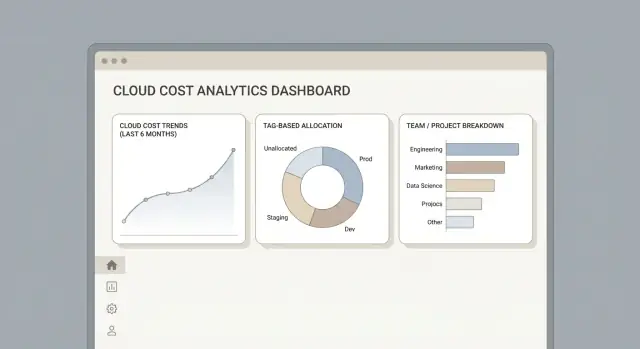
Define the problem: costs, usage, and who needs answers
Before you build screens or pipelines, get specific about the questions your app must answer. “Cloud costs” can mean an invoice total, a team’s monthly spend, a single service’s unit economics, or the cost of a customer-facing feature. If you don’t define the problem up front, you’ll end up with dashboards that look impressive but don’t resolve disputes.
A helpful framing: your first deliverable isn’t “a dashboard,” it’s a shared definition of truth (what numbers mean, how they’re computed, and who is accountable for acting on them).
Who will use the app?
Start by naming the primary users and what they need to decide:
- Finance / FinOps: close the month, explain variance, set policies, and enforce budget accountability.
- Engineering: identify waste, compare environments (prod vs dev), and link spend to deployments or services.
- Team leads / product owners: understand their “bill,” justify investments, and plan capacity.
- Executives (often read-only): trend visibility and risk signals.
Different users require different levels of detail. Finance may want stable, auditable monthly numbers; engineers may want daily granularity and drill-down.
Define outcomes (not features)
Be explicit about which of these you’re delivering first:
- Showback: visibility by team/service without internal billing.
- Chargeback: actual internal invoices and allocations that hit budgets.
- Forecasting: expected month-end spend and scenario planning.
- Budget control: budgets, alert thresholds, and approval workflows.
A practical way to keep scope tight is to choose one “primary outcome” and treat the others as follow-ons. Most teams start with showback plus basic anomaly detection, then graduate to chargeback.
Scope the cloud footprint
List the clouds and billing entities you must support on day one: AWS payer accounts, Azure subscriptions and management groups, GCP billing accounts/projects, plus shared services (logging, networking, security). Decide whether you’ll include marketplace charges and third-party SaaS.
Freshness and retention
Pick a target update cadence: daily is enough for finance and most teams; near-real-time helps incident response and fast-moving orgs but raises complexity and cost. Also set retention (e.g., 13–24 months) and whether you need immutable “month close” snapshots for audits.
Decide what to measure: data model and key dimensions
Before you ingest a single CSV or call a billing API, decide what “the truth” looks like in your app. A clear measurement model prevents endless debates later (“Why doesn’t this match the invoice?”) and makes multi-cloud reporting predictable.
Start with the required metrics
At minimum, treat each billing line as a record with a consistent set of measures:
- Cost: pre-tax cost, effective cost (after discounts), and billed cost (invoice total).
- Usage: quantity + unit (hours, GB-month, requests). Keep the unit as data, not as UI text.
- Credits and discounts: commitments, promotional credits, enterprise discounts.
- Refunds and adjustments: negative lines should be first-class citizens.
- Taxes and fees: often reported separately; model them explicitly so finance can reconcile.
A practical rule: if a value can change what finance pays or what a team gets charged, it deserves its own metric.
Define core dimensions (the “group by” fields)
Dimensions make costs explorable and allocatable. Common ones:
- Account / subscription / billing entity
- Project / application
- Team / cost center / owner
- Environment (prod, staging, dev)
- Service / SKU / meter
- Region / zone
Keep dimensions flexible: you’ll add more later (e.g., “cluster”, “namespace”, “vendor”).
Choose time keys for reporting
You usually need multiple time concepts:
- Invoice period (for finance reconciliation)
- Day (for trends and anomaly detection)
- Month (for executive reporting and budgets)
“Allocated” vs “unallocated” must be unambiguous
Write down a strict definition:
- Allocated cost: cost assigned to an owner/team via tags or allocation rules.
- Unallocated cost: cost with missing/invalid ownership that must stay visible (not silently dropped).
This single definition will shape your dashboards, alerts, and trust in the numbers.
Collect billing data: exports, APIs, and ingestion flow
Billing ingestion is the foundation of a cloud cost management app: if the raw inputs are incomplete or hard to reproduce, every dashboard and allocation rule becomes an argument.
Plan your connectors (and accept that they differ)
Start by supporting the “native truth” for each cloud:
- AWS: Cost and Usage Report (CUR) delivered to S3 (often hourly or daily), plus optional APIs for metadata.
- Azure: Cost Management exports to a Storage Account (typically daily), with separate endpoints for different scopes (subscription, management group).
- GCP: Billing export to BigQuery (most convenient), or export files if you prefer a file-based pipeline.
Design each connector to produce the same core outputs: a set of raw files/rows, plus an ingestion log (what you fetched, when, and how many records).
Pull vs. push ingestion
You’ll usually pick one of two patterns:
- Pull (scheduled import): your app polls S3/Blob/BigQuery on a schedule. Easier to reason about and retry, but can be slower to reflect changes.
- Push (event-driven): storage events (e.g., “new object created”) trigger ingestion. Faster and cheaper at scale, but needs careful deduplication because events can arrive twice.
Many teams run a hybrid: push for freshness, plus a daily pull “sweeper” for missed files.
Time, currency, and billing boundaries
Ingestion should preserve the original currency, time zone, and billing period semantics. Don’t “fix” anything yet—just capture what the provider says, and store the provider’s period start/end so late adjustments land in the right month.
Keep an immutable staging area
Store the raw exports in an immutable, versioned staging bucket/container/dataset. This gives you auditability, supports reprocessing when you change parsing logic, and makes disputes solvable: you can point to the exact source file that generated a number.
Normalize and validate: make different clouds comparable
If you ingest AWS CUR, Azure Cost Management exports, and GCP Billing data as-is, your app will feel inconsistent: the same thing is called a “service” in one file, a “meter” in another, and a “SKU” somewhere else. Normalization is where you turn those provider-specific terms into one predictable schema so every chart, filter, and allocation rule behaves the same.
Design a unified schema
Start by mapping provider fields into a common set of dimensions you can rely on everywhere:
- Service (e.g., “Compute”, “Object Storage”)
- SKU (the billable item, often the most granular identifier)
- Usage type (hours, GB-months, requests, etc.)
Keep provider-native IDs too (like AWS ProductCode or GCP SKU ID) so you can trace back to the original record when a user disputes a number.
Clean the common data issues
Normalization isn’t just renaming columns—it’s data hygiene.
Handle missing or malformed tags by separating “unknown” from “unallocated” so you don’t hide problems. Deduplicate rows using a stable key (source line item ID + date + cost) to avoid double-counting from retries. Watch for partial days (especially near “today” or during export delays) and mark them as provisional so dashboards don’t swing unexpectedly.
Track lineage and versions
Every normalized row should carry lineage metadata: source file/export, import time, and a transformation version (e.g., norm_v3). When mapping rules change, you can reprocess confidently and explain differences.
Validate and summarize for users
Build automated checks: totals by day, negative-cost rules, currency consistency, and “cost by account/subscription/project.” Then publish an import summary in the UI: rows ingested, rows rejected, time coverage, and the delta vs. provider totals. Trust grows when users can see what happened, not just the final number.
Tagging and ownership: turn raw costs into accountable costs
Cost data is only useful when someone can answer “who owns this?” consistently. Tagging (AWS), labels (GCP), and resource tags (Azure) are the simplest way to connect spend to teams, apps, and environments—but only if you treat them like product data, not a best-effort habit.
Define rules: required keys and allowed values
Start by publishing a small set of required keys that your allocation engine and dashboards will rely on:
teamappcost-centerenv(prod/stage/dev)
Make the rules explicit: which resources must be tagged, which tag formats are accepted (e.g., lowercase kebab-case), and what happens when a tag is missing (e.g., “Unassigned” bucket plus an alert). Keep this policy visible inside the app and link to deeper guidance like /blog/tagging-best-practices.
Build a mapping UI for messy reality
Even with policies, you’ll see drift: TeamA, team-a, team_a, or a renamed team. Add a lightweight “mapping” layer so finance and platform owners can normalize values without rewriting history:
- Map many raw values to one canonical value (e.g.,
TeamA,team-a→team-a) - Support time-bound mappings (old name valid until a cutover date)
- Record who made the change and why (audit notes)
This mapping UI is also where you can enrich tags: if app=checkout is present but cost-center is missing, you can infer it from an app registry.
Handle exceptions without breaking accountability
Some costs won’t tag cleanly:
- Shared resources (Kubernetes clusters, shared VPCs, NAT gateways)
- Platform costs (CI, observability, internal tooling)
- Security tooling (centralized scanners, SIEM)
Model these as owned “shared services” with clear allocation rules (e.g., split by headcount, usage metrics, or proportional spend). The goal is not perfect attribution—it’s consistent ownership so every dollar has a home and a person who can explain it.
Allocation engine: rules, splits, and shared cost strategies
An allocation engine turns normalized billing lines into “who owns this cost, and why.” The goal isn’t just math—it’s producing results that stakeholders can understand, challenge, and improve.
Core allocation methods
Most teams need a mix of approaches because not all costs arrive with clean ownership:
- Direct tags/labels: If a line item already has an owner tag (team, product, cost center), assign it directly.
- Split by usage drivers: Allocate shared services based on measurable consumption (CPU hours, GB stored, requests, log ingest, node-hours).
- Fixed percentages: Useful for stable agreements (e.g., platform team covers 30% of shared networking), but should be reviewed regularly.
Rules that behave like policy
Model allocation as ordered rules with priority and effective dates. This lets you answer: “What rule was applied on March 10th?” and safely update policy without rewriting history.
A practical rule schema often includes:
- Match conditions (cloud, account/subscription, service, SKU, tag presence, project, region)
- Allocation target (team/product/environment)
- Allocation method (direct, usage-based, percent)
- Validity window (start/end date) and priority
Handling shared costs (the tricky part)
Shared costs—Kubernetes clusters, networking, data platforms—rarely map 1:1 to a single team. Treat them as “pools” first, then distribute.
Examples:
- Kubernetes: pool cluster costs, then split by namespace usage (pod CPU/memory requests or actual usage).
- Networking: allocate NAT gateways and egress by bytes transferred per VPC/project.
- Data platforms: allocate warehouses/streams by query time, credits, or processed GB.
Make results explainable
Provide before/after views: original vendor line items vs. allocated results by owner. For each allocated row, store an “explanation” (rule ID, match fields, driver values, split percentages). This audit trail reduces disputes and builds trust—especially during chargeback and showback.
Storage and performance: warehouse tables that stay fast
Cloud billing exports get big quickly: line items per resource, per hour, across multiple accounts and providers. If your app feels slow, users will stop trusting it—so storage design is product design.
Pick a warehouse + OLAP-friendly views
A common setup is a relational warehouse for truth and simple joins (Postgres for smaller deployments; BigQuery or Snowflake when volumes climb), plus OLAP-style views/materializations for analytics.
Store raw billing line items exactly as received (plus a few ingestion fields like import time and source file). Then build curated tables for your app to query. This keeps “what we got” separate from “how we report it,” which makes audits and reprocessing safer.
If you’re building this from scratch, consider accelerating the first iteration with a platform that can scaffold the architecture quickly. For example, Koder.ai (a vibe-coding platform) can help teams generate a working web app via chat—commonly with a React frontend, a Go backend, and PostgreSQL—so you can spend more time validating the data model and allocation logic (the parts that determine trust) instead of re-laying boilerplate.
Partition for the questions people ask
Most queries filter by time and by boundary (cloud account/subscription/project). Partition and cluster/index accordingly:
- Partition by usage date (daily partitions work well for billing)
- Cluster/index by cloud account and provider
- Keep high-cardinality fields (resource IDs) out of your primary dashboard paths
This lets “last 30 days for Team A” stay fast even when total history is huge.
Pre-aggregate for dashboards
Dashboards shouldn’t scan raw line items. Create aggregated tables at the grains users explore:
- Daily cost by team, service, and environment
- Daily usage by service/SKU where it matters
- Monthly summaries for finance-friendly rollups
Materialize these tables on a schedule (or incrementally) so charts load in seconds.
Plan for backfills and recomputation
Allocation rules, tagging mappings, and ownership definitions will change. Design for recomputing history:
- Version your allocation outputs (rule set ID + run timestamp)
- Support targeted backfills (specific date ranges/accounts)
- Keep raw + curated data immutable so you can rerun without losing provenance
That flexibility is what turns a cost dashboard into a system people can rely on.
UX and dashboards: make costs easy to explore and explain
A cost allocation app succeeds when people can answer common questions in seconds: “Why did spend jump?”, “Who owns this cost?”, and “What can we do about it?” Your UI should tell a clear story from totals to details, without forcing users to understand billing jargon.
Core pages users actually need
Start with a small set of predictable views:
- Overview: total spend, trend vs. last period, top cost drivers, and a quick “what changed” panel.
- Team view: costs by owner (team/cost center), including shared allocations and unallocated items.
- Service breakdown: spend by cloud product (e.g., compute, storage), with the ability to pivot by region or account/subscription.
- Anomalies: a prioritized list of unusual spikes with plain-language explanations and links to the underlying line items.
Consistent filters and a stable mental model
Use the same filter bar everywhere: date range, cloud, team, project, and environment (prod/stage/dev). Keep filter behavior consistent (same defaults, same “applies to all charts”), and make active filters visible so screenshots and shared links are self-explanatory.
Drill-down without dead ends
Design an intentional path:
Invoice total → allocated total → service/category → account/project → SKU/line items.
At each step, show the “why” next to the number: applied allocation rules, tags used, and any assumptions. When users land on a line item, provide quick actions like “view owner mapping” (link to /settings/ownership) or “report missing tags” (link to /governance/tagging).
Exports and sharing that respect permissions
Add CSV exports from every table, but also support shareable links that preserve filters. Treat links like reports: they should honor role-based access, include an audit trail, and optionally expire. This makes collaboration easy while keeping sensitive spend data controlled.
Budgets, alerts, and anomalies: drive action, not just reports
Dashboards explain what happened. Budgets and alerts change what happens next.
If your app can’t tell a team “you’re about to blow your monthly budget” (and notify the right person), it stays a reporting tool—not an operational one.
Budgets people can own
Start with budgets at the same level you allocate costs: team, project, environment, or product. Each budget should have:
- A clear owner (person or on-call rotation) and optional watchers
- A period (monthly is simplest; add weekly for fast-moving teams)
- Thresholds (e.g., 50/80/100% of budget) with different notification urgency
- Scope rules aligned with your allocation model (tags, accounts/subscriptions, cost centers)
Keep the UI simple: one screen to set amount + scope + owner, and a preview of “last month spend in this scope” to sanity-check.
Alerts that are more than “spend is high”
Budgets catch slow drift, but teams also need immediate signals:
- Spend spikes (today vs recent average)
- Missing tags (new resources created without required ownership labels)
- Unusual usage changes (e.g., data egress doubled, CPU hours jumped)
Make alerts actionable: include top drivers (service, region, project), a short explanation, and a link into your explorer view (e.g., /costs?scope=team-a&window=7d).
Simple anomaly logic before ML
Before machine learning, implement baseline comparisons that are easy to debug:
- Choose a baseline window (e.g., trailing 14 days excluding the last 1 day)
- Compare current window (e.g., last 24h) against baseline mean/median
- Trigger when both relative change (e.g., +60%) and absolute delta (e.g., +$200) exceed thresholds
This avoids noisy alerts on tiny spend categories.
Close the loop: log outcomes
Store every alert event with status: acknowledged, muted, false positive, fixed, or expected. Track who acted and how long it took.
Over time, use that history to reduce noise: auto-suppress repeat alerts, improve thresholds per scope, and identify “always untagged” teams that need workflow fixes rather than more notifications.
Security, access control, and auditability
Cost data is sensitive: it can reveal vendor pricing, internal projects, and even customer commitments. Treat your cost app like a financial system—because for many teams, it effectively is.
Roles and permissions that match real workflows
Start with a small set of roles and make them easy to understand:
- Admin: manages cloud connectors, global settings, and access.
- Finance: can edit allocation rules and approve chargeback/showback exports.
- Team lead: can view their teams’ costs, manage team-level tags/ownership, and propose rule changes.
- Viewer: read-only dashboards and drill-down.
Enforce these in the API (not just the UI), and add resource-level scoping (e.g., a team lead can’t see other teams’ projects).
Secure connectors and secret rotation
Cloud billing exports and usage APIs require credentials. Store secrets in a dedicated secret manager (or encrypted at rest with KMS), never in plain database fields. Support safe rotation by allowing multiple active credentials per connector with an “effective date,” so ingestion doesn’t break during key swaps.
Practical UI details help: show the last successful sync time, permission scope warnings, and a clear “re-authenticate” flow.
Audit logs you can trust
Add append-only audit logs for:
- allocation rule changes (before/after, who, when)
- imports/exports and downloaded reports
- connector changes and credential updates
Make logs searchable and exportable (CSV/JSON) and link each log entry to the affected object.
Data handling and retention in the product
Document retention and privacy settings in the UI: how long raw billing files are kept, when aggregated tables replace raw data, and who can delete data. A simple “Data Handling” page (e.g., /settings/data-handling) reduces support tickets and builds confidence with finance and security teams.
Integrations and APIs: connect to the tools people already use
A cost allocation app only changes behavior when it shows up where people already work. Integrations reduce “reporting overhead” and turn cost data into shared, operational context—finance, engineering, and leadership all see the same numbers in their daily tools.
Chat alerts (Slack / Microsoft Teams)
Start with notifications because they drive immediate action. Send concise messages with the owner, the service, the delta, and a link back to the exact view in your app (filtered to the team/project and time window).
Typical alerts:
- Budget threshold reached (80%, 100%)
- Unusual spend spike vs. last week
- Missing tags on high-cost resources
SSO and identity (Okta, Azure AD, Google Workspace)
If access is hard, people won’t adopt. Support SAML/OIDC SSO and map identity groups to cost “owners” (teams, cost centers). This also simplifies offboarding and keeps permissions aligned with org changes.
An internal Cost API (for portals and automation)
Provide a stable API so internal systems can fetch “cost by team/project” without screen-scraping dashboards.
A practical shape:
GET /api/v1/costs?team=payments&start=2025-12-01&end=2025-12-31&granularity=day- Include: allocated cost, unallocated cost, usage units, and the rule set/version used
Document rate limits, caching headers, and idempotent query semantics so consumers can build reliable pipelines.
Webhooks for events
Webhooks make your app reactive. Fire events like budget.exceeded, import.failed, anomaly.detected, and tags.missing to trigger workflows in other systems.
Common destinations include Jira/ServiceNow ticket creation, incident tools, or custom runbooks.
BI exports (Looker, Power BI, Tableau)
Some teams insist on their own dashboards. Offer a governed export (or a read-only warehouse schema) so BI reports use the same allocation logic—not reimplemented formulas.
If you package integrations as add-ons, link users to /pricing for plan details.
Testing, monitoring, and rollout: keep trust in the numbers
A cost allocation app only works if people believe it. That trust is earned through repeatable testing, visible data quality checks, and a rollout that lets teams compare your numbers to what they already know.
Test with real billing samples (including the ugly parts)
Start by building a small library of provider exports and invoices that represent common edge cases: credits, refunds, taxes/VAT, reseller fees, free tiers, committed-use discounts, and support charges. Keep versions of these samples so you can re-run tests whenever you change parsing or allocation logic.
Focus tests on outcomes, not just parsing:
- A “known month” where you can predict totals by service/account.
- Allocation rule changes (e.g., 60/40 split) that should update only specific outputs.
- Rounding behavior at daily vs monthly levels.
Data quality tests that match provider totals
Add automated checks that reconcile your computed totals to provider-reported totals within a tolerance (for example, due to rounding or timing differences). Track these checks over time and store the results so you can answer, “When did this drift start?”
Helpful assertions:
- Total cost by billing period matches the invoice/export.
- No negative costs unless explicitly expected (refunds/credits).
- Currency and exchange rate handling is consistent.
Monitoring: ingestion, freshness, and query health
Set up alerts for ingestion failures, stalled pipelines, and “data not updated since” thresholds. Monitor slow queries and dashboard load times, and log which reports drive heavy scans so you can optimize the right tables.
Rollout plan: pilot, training, and feedback loops
Run a pilot with a few teams first. Give them a comparison view against their existing spreadsheets, agree on definitions, then roll out broadly with short training and a clear feedback channel. Publish a change log (even a simple /blog/changelog) so stakeholders see what changed and why.
If you’re iterating quickly on product requirements during the pilot, tools like Koder.ai can be useful to prototype UI flows (filters, drill-down paths, allocation rule editors) and regenerate working versions as definitions evolve—while still keeping you in control of source code export, deployment, and rollback as the app matures.
FAQ
What should I define before building a cloud cost allocation web app?
Start by defining the exact decisions the app must support (variance explanation, waste reduction, budget accountability, forecasting). Then align on primary users (Finance/FinOps, Engineering, team leads, executives) and the minimum outcomes you’ll deliver first: showback, chargeback, forecasting, or budget control.
Avoid building dashboards before you’ve written down what “good” looks like and how you’ll reconcile to provider invoices.
What’s the difference between showback and chargeback in a cost allocation app?
Showback provides visibility (who is spending what) without issuing internal invoices. Chargeback creates enforceable internal billing where allocations “hit” budgets and often require approvals and audit trails.
If you need strong accountability, start designing for chargeback early (immutable month-close snapshots, explainable rules, and formal exports), even if you launch with showback UI first.
What metrics should the data model include to avoid reconciliation issues?
Model each provider line item as a record with consistent measures:
- Cost: pre-tax, effective (after discounts), billed/invoice
- Usage: quantity plus unit stored as data
- Credits/discounts, refunds/adjustments, taxes/fees
A practical rule is: if it can change what finance pays or what a team gets charged, make it a first-class metric.
Which dimensions matter most for grouping and allocating cloud spend?
Start with dimensions that users actually “group by”:
- Billing entity (account/subscription/billing account)
- Project/application
- Team/cost center/owner
- Environment (prod/stage/dev)
- Service and SKU/meter
- Region/zone
Keep dimensions flexible so you can add cluster/namespace/vendor later without breaking reports.
How should I handle time periods (daily vs invoice period) in billing reports?
Capture multiple time keys because different workflows depend on different clocks:
- Invoice period for finance reconciliation and month close
- Day for trends and anomaly detection
- Month for exec reporting and budgets
Also store the provider’s original time zone and billing boundaries so late adjustments land where the provider intends.
Should billing ingestion be daily or near-real-time?
Near-real-time helps incident response and fast-moving organizations, but increases complexity (deduplication, partial-day handling) and cost.
Daily updates are usually enough for finance and most teams. A common hybrid is event-driven ingestion for freshness plus a daily scheduled “sweeper” job to catch missed files.
Why store raw billing exports in an immutable staging area?
Keep an immutable, versioned staging area for raw provider exports (S3/Blob/BigQuery tables) and store an ingestion log (what was fetched, when, record counts).
This enables audits, reproducible reprocessing after parser changes, and faster dispute resolution because you can point to the exact source file that produced a number.
How do you normalize AWS, Azure, and GCP billing data into one schema?
Normalize provider-specific concepts into a unified schema (for example: Service, SKU, Usage Type), while preserving provider-native IDs for traceability.
Then apply hygiene steps:
- Deduplicate using stable keys (source line item ID + date)
- Mark partial days as provisional
- Separate missing tag values from true unallocated ownership
- Add lineage fields (source file, import time, transformation version)
This makes multi-cloud charts and allocation rules behave predictably.
How do you enforce tagging/labels and handle messy tag values?
Define a small set of required keys (for example team, app, cost-center, env) with allowed formats and clear consequences for missing tags.
Add a mapping layer in the product to handle real-world drift (e.g., TeamA → team-a), support time-bound mappings, and keep an audit trail of who changed what and why.
What should an allocation engine support to handle shared costs and disputes?
Treat allocation as ordered rules with priority and effective dates. Support multiple methods:
- Direct assignment from tags/labels
- Usage-driven splits for shared services (CPU hours, GB stored, bytes egress)
- Fixed percentages for stable agreements
Make results explainable by storing the “why” per allocated row (rule ID, match fields, driver values, split percent) and providing before/after views from vendor line items to allocated outputs.